Author's Note: A deep dive into all 60+ Claude Code environment variables, focusing on how CLAUDE_CODE_DISABLE_EXPERIMENTAL_BETAS fixes the anthropic-beta header error on third-party platforms.
When using Claude Code to connect to AWS Bedrock, Google Vertex AI, or other third-party LLM gateways, you've likely run into this error: "Unexpected value(s) for the anthropic-beta header". This happens because Claude Code sends Anthropic-specific experimental Beta headers by default, which third-party platforms like AWS Bedrock don't recognize.
The solution is just a one-line setting: CLAUDE_CODE_DISABLE_EXPERIMENTAL_BETAS=1.
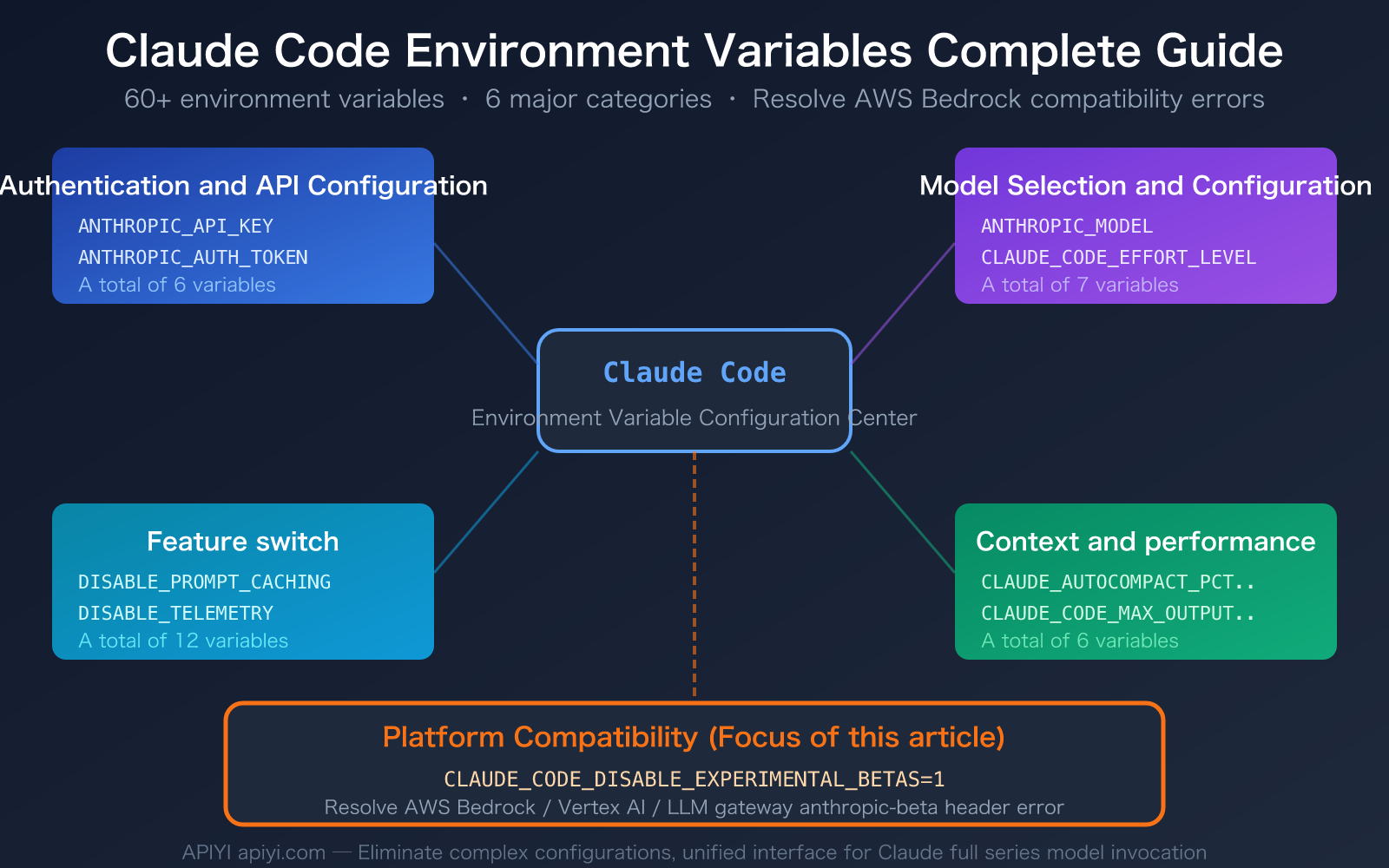
But Claude Code's environment variables go far beyond just this one—the official documentation lists over 60 environment variables, covering authentication, model selection, performance tuning, feature toggles, and more. This article will systematically break down these variables to help you quickly locate and resolve any Claude Code configuration issues.
Core Value: By the end of this post, you'll master the full Claude Code environment variable system, be able to quickly fix AWS Bedrock/Vertex AI compatibility issues, and learn how to optimize your Claude Code experience and costs through environment variables.
Key Claude Code Environment Variables
Claude Code's 60+ environment variables can be grouped into 6 main categories. Here are the core variables you should care about:
| Category | Key Variable | Purpose | Common Use Case |
|---|---|---|---|
| Platform Compatibility | CLAUDE_CODE_DISABLE_EXPERIMENTAL_BETAS |
Disables experimental anthropic-beta headers | Fixes AWS Bedrock/Vertex AI errors |
| Auth Config | ANTHROPIC_API_KEY |
Sets the API key | Using third-party API platforms for model invocation |
| Model Selection | ANTHROPIC_MODEL |
Specifies the model to use | Switching to a specific model version |
| Performance Tuning | CLAUDE_CODE_MAX_OUTPUT_TOKENS |
Controls max output tokens | Limiting long responses to save costs |
| Feature Toggles | DISABLE_PROMPT_CACHING |
Disables prompt caching | Debugging or compatibility needs |
| Context Management | CLAUDE_AUTOCOMPACT_PCT_OVERRIDE |
Controls auto-compaction threshold | Optimizing long conversation experience |
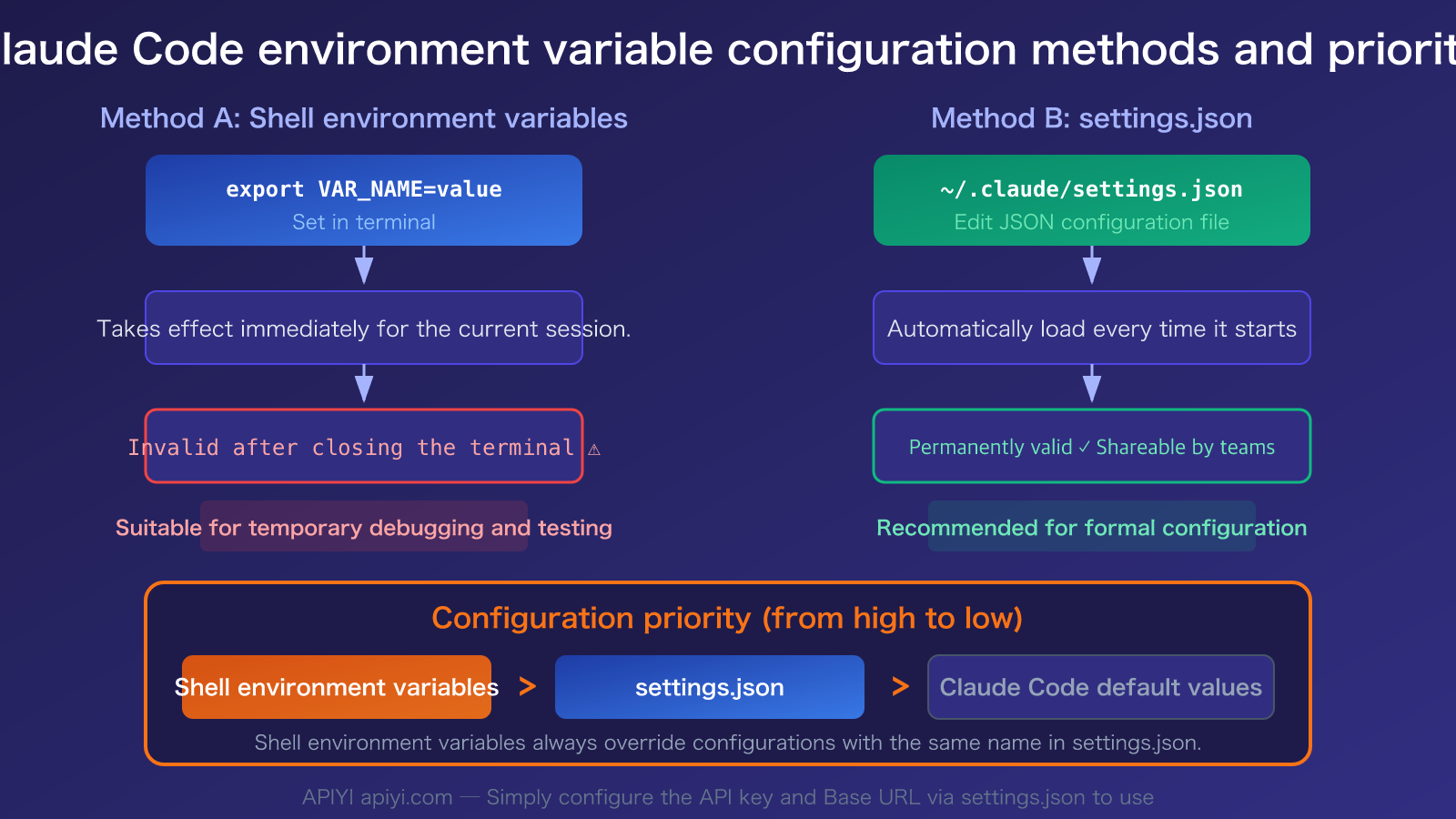
Two Ways to Set Claude Code Environment Variables
Method 1: Shell Environment Variables (Temporary)
Set these in your terminal before starting Claude Code. This only applies to the current session:
export CLAUDE_CODE_DISABLE_EXPERIMENTAL_BETAS=1
export ANTHROPIC_API_KEY="your-api-key"
claude
Method 2: settings.json Configuration (Permanent)
Configure the env field in ~/.claude/settings.json. These are automatically loaded every time you start:
{
  "env": {
    "CLAUDE_CODE_DISABLE_EXPERIMENTAL_BETAS": "1",
    "ANTHROPIC_API_KEY": "your-api-key"
  }
}
🎯 Pro Tip: For settings you want to keep long-term (like API keys or platform compatibility fixes), use the
settings.jsonmethod so you don't have to manually export them every time. If you're using an API key from a third-party platform like APIYI (apiyi.com), just configure it here.
Claude Code Environment Variables: Solving AWS Bedrock Compatibility Issues
Deep Dive into CLAUDE_CODE_DISABLE_EXPERIMENTAL_BETAS
This is the star of the show. When you use Claude Code through third-party gateways like AWS Bedrock, Google Vertex AI, or LiteLLM, Claude Code automatically adds Anthropic's experimental beta flags to the request headers. For example:
anthropic-beta: prompt-caching-scope-2026-01-05,advanced-tool-use-2025-11-20
These beta flags are features specific to the direct Anthropic API. Third-party platforms like AWS Bedrock don't recognize them, which leads to this error:
Error: Unexpected value(s) for the anthropic-beta header
The Solution:
# Option 1: Via Shell command
export CLAUDE_CODE_DISABLE_EXPERIMENTAL_BETAS=1

# Option 2: In settings.json
{
  "env": {
    "CLAUDE_CODE_DISABLE_EXPERIMENTAL_BETAS": "1"
  }
}
By setting this to 1, Claude Code stops sending these experimental beta headers, making it compatible with all third-party platforms.
Known Issues & Temporary Workarounds
According to GitHub Issues, some versions of Claude Code (post-2.1.18) have an issue where this environment variable isn't fully effective—certain new beta headers (like advanced-tool-use-2025-11-20) might still be sent even if CLAUDE_CODE_DISABLE_EXPERIMENTAL_BETAS=1 is set.
If you're still running into trouble, try these additional steps:
- Downgrade Claude Code: Roll back to a known stable version like 2.1.68.
- Use LiteLLM Gateway: LiteLLM offers an
anthropic_beta_headers_config.jsonconfiguration file, allowing you to fine-tune which beta headers are forwarded. - Set DISABLE_PROMPT_CACHING: Disabling prompt caching can help avoid beta headers related to
prompt-caching-scope.
# Full compatibility settings
export CLAUDE_CODE_DISABLE_EXPERIMENTAL_BETAS=1
export DISABLE_PROMPT_CACHING=1
Claude Code Environment Variables: Complete Reference
Category 1: Authentication & API Configuration
This is the most fundamental category, controlling how Claude Code connects to the API service:
| Variable Name | Function | Usage Scenario |
|---|---|---|
ANTHROPIC_API_KEY |
API key, sent as the X-Api-Key header | Using third-party API platforms (like APIYI apiyi.com) |
ANTHROPIC_AUTH_TOKEN |
Custom Authorization header value (automatically adds Bearer prefix) | Custom authentication schemes |
ANTHROPIC_CUSTOM_HEADERS |
Adds custom request headers (Name: Value format) | Gateways requiring extra headers |
ANTHROPIC_BASE_URL |
Custom API endpoint address | Connecting to a third-party API proxy service |
CLAUDE_CODE_CLIENT_CERT |
Path to mTLS client certificate | Enterprise-grade security authentication |
CLAUDE_CODE_CLIENT_KEY |
Path to mTLS private key | Enterprise-grade security authentication |
🎯 Note for Third-Party Platform Users: When using third-party API platforms like APIYI (apiyi.com), you need to set both
ANTHROPIC_API_KEYandANTHROPIC_BASE_URL. Claude Code will prioritize the API key in your environment variables, even if you're logged into an Anthropic subscription account.
Category 2: Model Selection & Configuration
Controls which model Claude Code uses and its behavioral parameters:
| Variable Name | Function | Default Value |
|---|---|---|
ANTHROPIC_MODEL |
Specifies the primary model name | Claude Sonnet 4.6 |
ANTHROPIC_DEFAULT_OPUS_MODEL |
Specifies the Opus-level model | Claude Opus 4.6 |
ANTHROPIC_DEFAULT_SONNET_MODEL |
Specifies the Sonnet-level model | Claude Sonnet 4.6 |
ANTHROPIC_DEFAULT_HAIKU_MODEL |
Specifies the Haiku-level model (for background tasks) | Claude Haiku 4.5 |
CLAUDE_CODE_SUBAGENT_MODEL |
Model used by sub-agents | Inherits from primary model |
CLAUDE_CODE_MAX_OUTPUT_TOKENS |
Maximum output tokens | 32,000 (Max 64,000) |
CLAUDE_CODE_EFFORT_LEVEL |
Reasoning depth (low/medium/high/max/auto) | auto |
Category 3: Platform Compatibility & Gateway Configuration
These variables are specifically designed to resolve compatibility issues between Claude Code and various cloud platforms or LLM gateways:
| Variable Name | Function | Applicable Platform |
|---|---|---|
CLAUDE_CODE_DISABLE_EXPERIMENTAL_BETAS |
Disables experimental beta headers | AWS Bedrock / Vertex AI / Third-party gateways |
CLAUDE_CODE_USE_BEDROCK |
Enables AWS Bedrock mode | AWS Bedrock |
CLAUDE_CODE_SKIP_BEDROCK_AUTH |
Skips AWS auth (when using a gateway) | LLM Gateway + Bedrock |
CLAUDE_CODE_USE_FOUNDRY |
Enables Microsoft Foundry mode | Azure AI |
CLAUDE_CODE_SKIP_FOUNDRY_AUTH |
Skips Azure auth | LLM Gateway + Azure |
CLAUDE_CODE_SKIP_VERTEX_AUTH |
Skips Google Vertex auth | LLM Gateway + Vertex |
ANTHROPIC_FOUNDRY_BASE_URL |
Base URL for Foundry resources | Microsoft Foundry |
ANTHROPIC_FOUNDRY_API_KEY |
Foundry API key | Microsoft Foundry |
ANTHROPIC_SMALL_FAST_MODEL_AWS_REGION |
AWS region for the Haiku model | Bedrock Multi-region |
Category 4: Feature Toggles
Disable specific features using the DISABLE_ or CLAUDE_CODE_DISABLE_ prefix:
| Variable Name | Effect when set to 1 |
|---|---|
DISABLE_PROMPT_CACHING |
Disables prompt caching |
DISABLE_AUTOUPDATER |
Disables automatic updates |
DISABLE_TELEMETRY |
Disables telemetry data collection |
DISABLE_ERROR_REPORTING |
Disables error reporting |
CLAUDE_CODE_DISABLE_NONESSENTIAL_TRAFFIC |
Disables all non-essential traffic listed above |
CLAUDE_CODE_DISABLE_AUTO_MEMORY |
Disables the automatic memory feature |
CLAUDE_CODE_DISABLE_1M_CONTEXT |
Disables the 1-million token context window |
CLAUDE_CODE_DISABLE_ADAPTIVE_THINKING |
Disables adaptive reasoning |
CLAUDE_CODE_DISABLE_FAST_MODE |
Disables Fast Mode |
CLAUDE_CODE_DISABLE_BACKGROUND_TASKS |
Disables background task functionality |
CLAUDE_CODE_DISABLE_CRON |
Disables scheduled tasks |
CLAUDE_CODE_DISABLE_GIT_INSTRUCTIONS |
Removes built-in Git instructions |
Category 5: Context & Performance Management
Controls how Claude Code manages the context window and resource usage:
| Variable Name | Function | Default Value |
|---|---|---|
CLAUDE_AUTOCOMPACT_PCT_OVERRIDE |
Trigger percentage for auto-compaction | 95% |
CLAUDE_CODE_AUTO_COMPACT_WINDOW |
Token window size used for compaction calculations | Model context window |
CLAUDE_CODE_FILE_READ_MAX_OUTPUT_TOKENS |
Max tokens for file reading | Default |
CLAUDE_CODE_API_KEY_HELPER_TTL_MS |
Credential refresh interval (ms) | — |
CLAUDE_CODE_TMPDIR |
Temporary file directory | /tmp (Unix) |
CLAUDE_CODE_SHELL |
Specifies the shell to use | Auto-detected |
🎯 Performance Tip: If you notice Claude Code frequently compressing context during long conversations, you can set
CLAUDE_AUTOCOMPACT_PCT_OVERRIDEto a lower value (like50). This triggers compaction earlier, which can help reduce information loss. These environment variable configurations are also fully supported when invoking models via APIYI (apiyi.com).
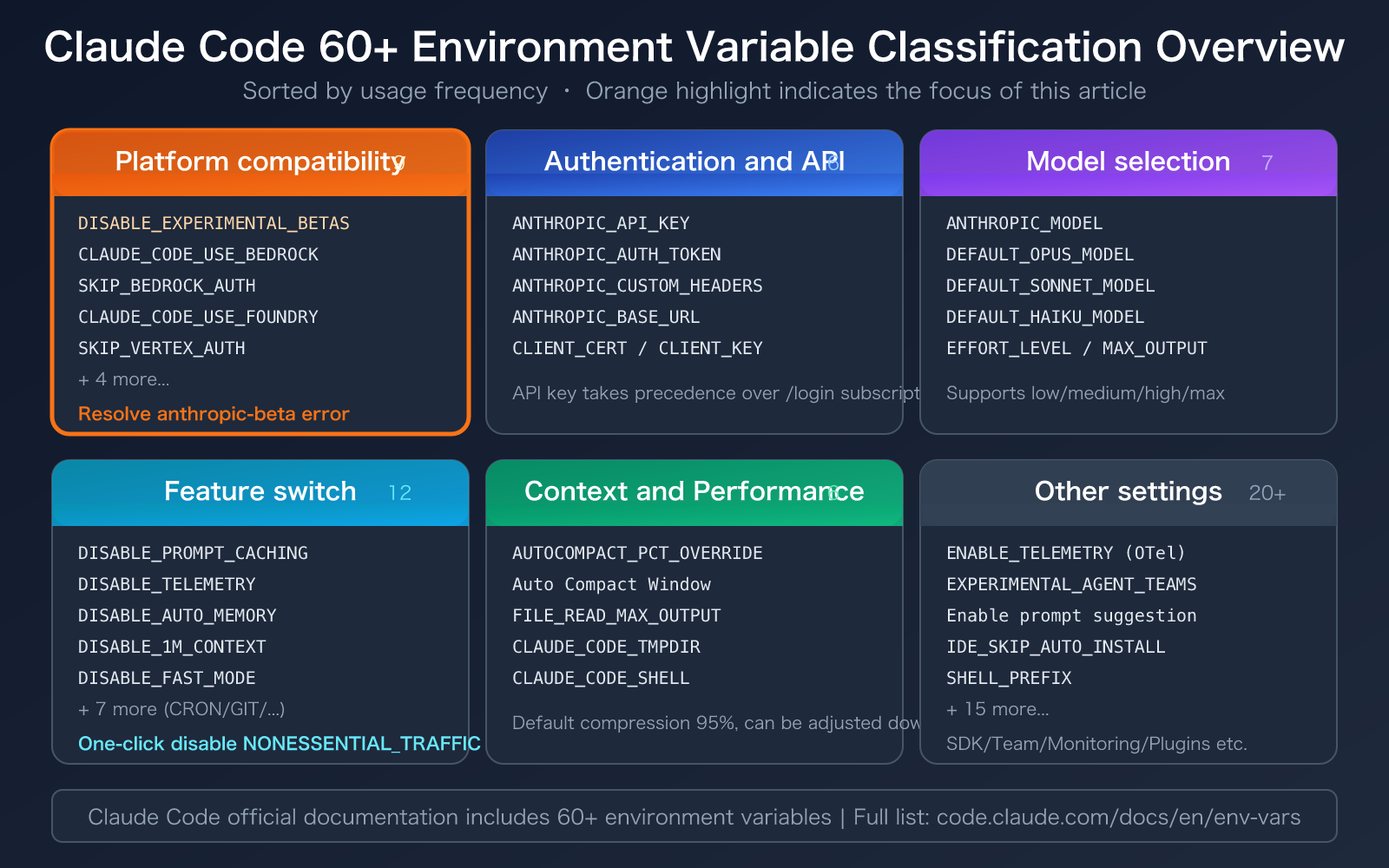
Claude Code Environment Variables Quick Start
Minimalist Example: Configuring Claude Code to Connect to Third-Party API Platforms
# Start Claude Code after setting environment variables in the terminal
export ANTHROPIC_API_KEY="sk-your-api-key"
export ANTHROPIC_BASE_URL="https://vip.apiyi.com/v1"
export CLAUDE_CODE_DISABLE_EXPERIMENTAL_BETAS=1
claude
View full settings.json configuration template (including AWS Bedrock compatibility settings)
{
  "env": {
    "ANTHROPIC_API_KEY": "sk-your-api-key",
    "ANTHROPIC_BASE_URL": "https://vip.apiyi.com/v1",
    "CLAUDE_CODE_DISABLE_EXPERIMENTAL_BETAS": "1",
    "CLAUDE_CODE_MAX_OUTPUT_TOKENS": "32000",
    "CLAUDE_AUTOCOMPACT_PCT_OVERRIDE": "80",
    "DISABLE_TELEMETRY": "1"
  },
  "permissions": {
    "allow": ["Read", "Glob", "Grep"],
    "deny": []
  }
}
AWS Bedrock Specific Configuration:
{
  "env": {
    "CLAUDE_CODE_USE_BEDROCK": "1",
    "CLAUDE_CODE_DISABLE_EXPERIMENTAL_BETAS": "1",
    "DISABLE_PROMPT_CACHING": "1",
    "ANTHROPIC_SMALL_FAST_MODEL_AWS_REGION": "us-east-1"
  }
}
Microsoft Foundry Specific Configuration:
{
  "env": {
    "CLAUDE_CODE_USE_FOUNDRY": "1",
    "ANTHROPIC_FOUNDRY_BASE_URL": "https://my-resource.services.ai.azure.com/anthropic",
    "ANTHROPIC_FOUNDRY_API_KEY": "your-foundry-key",
    "CLAUDE_CODE_DISABLE_EXPERIMENTAL_BETAS": "1"
  }
}
Tip: If you don't want to mess with complex AWS Bedrock or Azure configurations, you can use the full range of Claude models directly via APIYI (apiyi.com). Just set the API key and Base URL—no need to deal with cloud platform authentication or compatibility issues.
FAQ
Q1: I set CLAUDE_CODE_DISABLE_EXPERIMENTAL_BETAS=1 but still get anthropic-beta header errors. What should I do?
This is a known Claude Code bug (GitHub Issues #22893, #20031). Some newer versions introduce new beta headers that the environment variable doesn't fully block. Solutions:
- Downgrade to a known stable version like 2.1.68.
- Set
DISABLE_PROMPT_CACHING=1to disable cache-related headers. - If using a LiteLLM gateway, configure
anthropic_beta_headers_config.jsonfor fine-grained filtering. - Switch to a more compatible third-party platform like APIYI (apiyi.com) to avoid header issues when connecting directly to Bedrock.
Q2: What’s the priority between the ANTHROPIC_API_KEY environment variable and /login?
The environment variable API key takes precedence over the subscription authentication from /login. Once you've set the ANTHROPIC_API_KEY environment variable, Claude Code will use that key and charge based on API usage, even if you're logged into a Claude Pro/Team subscription via /login. If you're using a key from APIYI (apiyi.com), the costs will be settled through that platform.
Q3: How can I check the current active environment variable configuration for Claude Code?
Run the /config command within Claude Code's interactive mode to see the status of all current configuration items, including environment variables, settings.json settings, and default values. You can also run env | grep -E "CLAUDE|ANTHROPIC|DISABLE" in your terminal to see the relevant environment variables you've set.
Summary
Key takeaways for Claude Code environment variables:
- Fixing AWS Bedrock Errors: Set
CLAUDE_CODE_DISABLE_EXPERIMENTAL_BETAS=1to disable experimental beta headers. This one-line fix resolves the "Unexpected value(s) for the anthropic-beta header" error. - 60+ Environment Variables across 6 Categories: Authentication, model selection, platform compatibility, feature toggles, context management, and other settings.
- Two Configuration Methods: Shell export (temporary) and
settings.json(permanent). We recommend usingsettings.jsonfor persistent configurations. - Simplified Setup via Third-Party Platforms: By using a unified API platform like APIYI (apiyi.com), you only need to set two variables:
ANTHROPIC_API_KEYandANTHROPIC_BASE_URL. This bypasses complex cloud platform authentication and beta header compatibility issues.
We recommend using APIYI (apiyi.com) for a quick Claude Code setup. The platform provides free credits and a unified interface, helping you avoid the various compatibility pitfalls often found in AWS Bedrock or Vertex AI configurations.
📚 References
-
Claude Code Official Docs – Environment Variables: Full list of environment variables and descriptions.
- Link:
code.claude.com/docs/en/env-vars - Description: The authoritative reference for all 60+ environment variables.
- Link:
-
Claude Code Official Docs – Settings: Configuration scopes and
settings.jsonspecifications.- Link:
code.claude.com/docs/en/settings - Description: Understanding the four-tier configuration system: Managed, User, Project, and Local.
- Link:
-
Claude Code Official Docs – Amazon Bedrock: AWS Bedrock integration guide.
- Link:
code.claude.com/docs/en/amazon-bedrock - Description: Bedrock-specific configurations and troubleshooting common issues.
- Link:
-
GitHub Issue #22893 – DISABLE_EXPERIMENTAL_BETAS not fully effective: Community bug report.
- Link:
github.com/anthropics/claude-code/issues/22893 - Description: Learn about known limitations and temporary workarounds for this environment variable.
- Link:
-
LiteLLM – Claude Code Beta Headers Management: Beta header filtering at the gateway level.
- Link:
docs.litellm.ai/docs/tutorials/claude_code_beta_headers - Description: Fine-grained beta header control when using the LiteLLM gateway.
- Link:
Author: APIYI Tech Team
Technical Discussion: Feel free to discuss your Claude Code configuration experiences in the comments. For more tutorials, visit the APIYI Documentation Center at docs.apiyi.com.