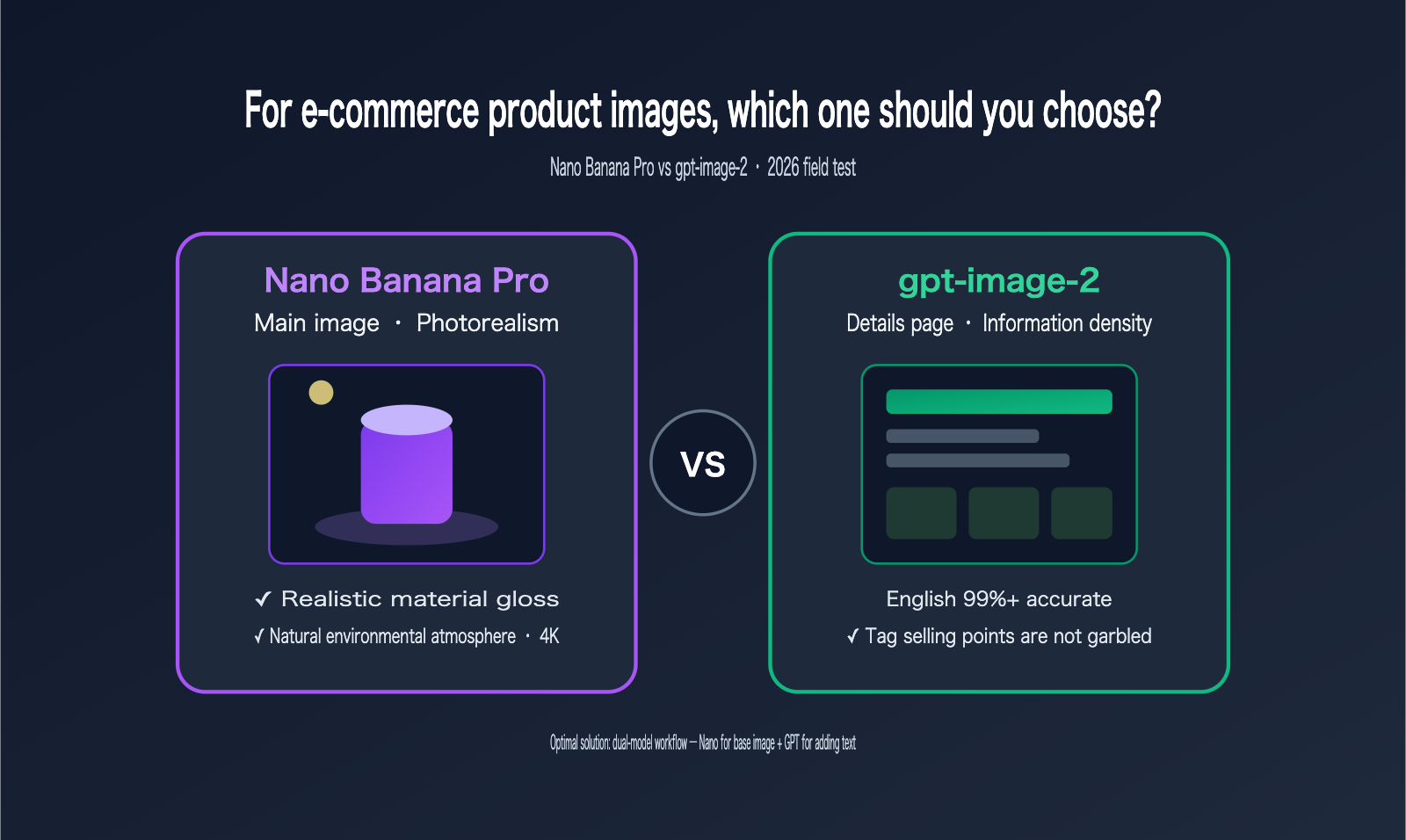
When it comes to creating e-commerce product images, should you use Nano Banana Pro or gpt-image-2? This is the most common dilemma for cross-border sellers and e-commerce design teams. A simple but accurate rule of thumb is: main images are all about realism and material texture, while detail pages are about information density and text rendering—which happen to be the respective strengths of these two models. This article compares the core differences between Nano Banana Pro and gpt-image-2 in e-commerce scenarios, providing clear selection advice for everything from main images and detail pages to localization for Western, Japanese, and local markets.
Core Value: After reading this, you'll know exactly which model to choose for different types of e-commerce images, such as main images, detail pages, and infographics, and how to use a dual-model workflow to combine their strengths.
Core Differences: Nano Banana Pro vs. gpt-image-2
Both are top-tier image generation models as of 2026, but their training focuses differ, leading to distinct pros and cons in e-commerce scenarios. Nano Banana Pro (Gemini 3 Pro Image) acts more like a "photographer," excelling in realistic lighting and textures, while gpt-image-2 acts like a "layout designer," excelling in text rendering and precise formatting.
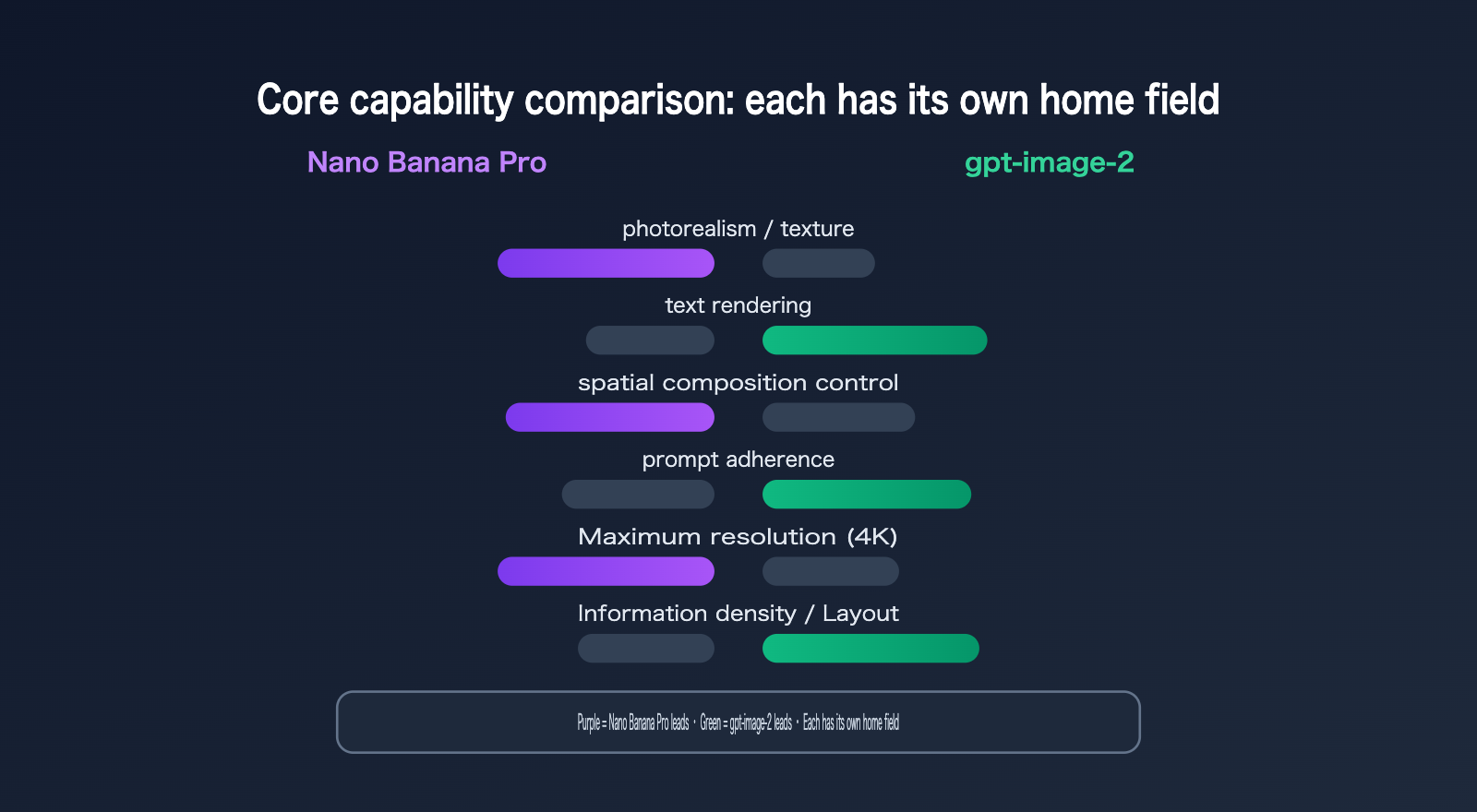
| Comparison Dimension | Nano Banana Pro | gpt-image-2 | E-commerce Winner |
|---|---|---|---|
| Text Rendering | Long text/non-Latin can blur | 99%+ accurate for English | gpt-image-2 |
| Realism/Texture | Natural skin and surfaces | Slightly digital feel | Nano Banana Pro |
| Prompt Adherence | Strong, good spatial layout | More precise, stable with multi-elements | gpt-image-2 |
| Max Resolution | Native 4K (4096px) | HD but slightly compressed | Nano Banana Pro |
| Generation Speed | ~2-5 seconds | ~3-5 seconds | Nano Banana Pro |
| Editing/Multi-image | Multi-round editing, up to 14 images | Supports multi-image composition | Tie |
In short, Nano Banana Pro's strength is "photographic realism"—it renders believable skin textures, product surface gloss, and environmental atmosphere, making the images look closer to professional studio shots. gpt-image-2's strength is "layout precision"—it can embed selling points, price tags, and specifications clearly without typos or garbled text. Once you grasp this, all subsequent scenario selections will follow logically.
The root of this difference lies in the design philosophy of each model. Nano Banana Pro is backed by Gemini's multimodal reasoning capabilities; it has a deeper understanding of spatial relationships, lighting directions, and physical material properties, making it more like a visual engine that understands photography. gpt-image-2, on the other hand, is more strongly aligned with layout structures and text encoding; it acts more like a layout engine that understands "design drafts"—it knows how large a title should be, where labels should go, and how to align prices. It's worth noting that Nano Banana Pro also produces larger file sizes (averaging about 3.3MB, compared to 2.5MB for gpt-image-2) and natively supports 4K resolution, giving it more headroom for scenarios requiring zooming, printing, or high-fidelity main images. Neither is strictly "better"; they are simply optimized for different tasks.
💡 Selection Tip: You don't have to choose just one. You can switch between these models using the same API key on the APIYI (apiyi.com) platform. We recommend running a comparison on your own product images and assigning the primary model based on the image type—real-world testing is always more accurate than any review.
E-commerce Costs and Pricing Comparison
Cost is an unavoidable factor when scaling up image generation. The billing logic for these two models differs: gpt-image-2 charges based on quality tiers—the low tier is extremely cheap, while the high tier is on the pricier side. Nano Banana Pro, on the other hand, offers more balanced pricing and supports volume discounts.
| Image Quality Tier (1024px) | gpt-image-2 | Nano Banana Pro |
|---|---|---|
| Low/Draft | ~$0.006 | —— |
| Standard | ~$0.053 | ~$0.067 (Bulk: ~$0.034) |
| High | ~$0.211 | Increases with resolution |
Looking at the costs, for detail page infographics that require high volume and don't demand extreme realism, the low tier of gpt-image-2 is very cost-effective. For hero images that need to drive conversions and justify high-quality output, the balanced pricing of Nano Banana Pro is a better fit. When generating images in bulk, Nano Banana Pro’s volume discounts can further lower your costs.
🎯 Cost Optimization Tip: With significant price gaps between models and tiers, it's easy to make calculation errors manually. We recommend using the unified API from APIYI (apiyi.com) to automatically route requests to the most cost-effective model and tier based on the image type. The platform uses usage-based billing, making it much easier to track the cost per image.
Choose Nano Banana Pro for Hero Images, gpt-image-2 for Detail Pages
This is the core takeaway of this article, echoing a consensus from extensive testing: Use Nano Banana Pro for e-commerce hero images, and gpt-image-2 for detail pages and infographics. Below, we’ve mapped common e-commerce image types to their most suitable models.
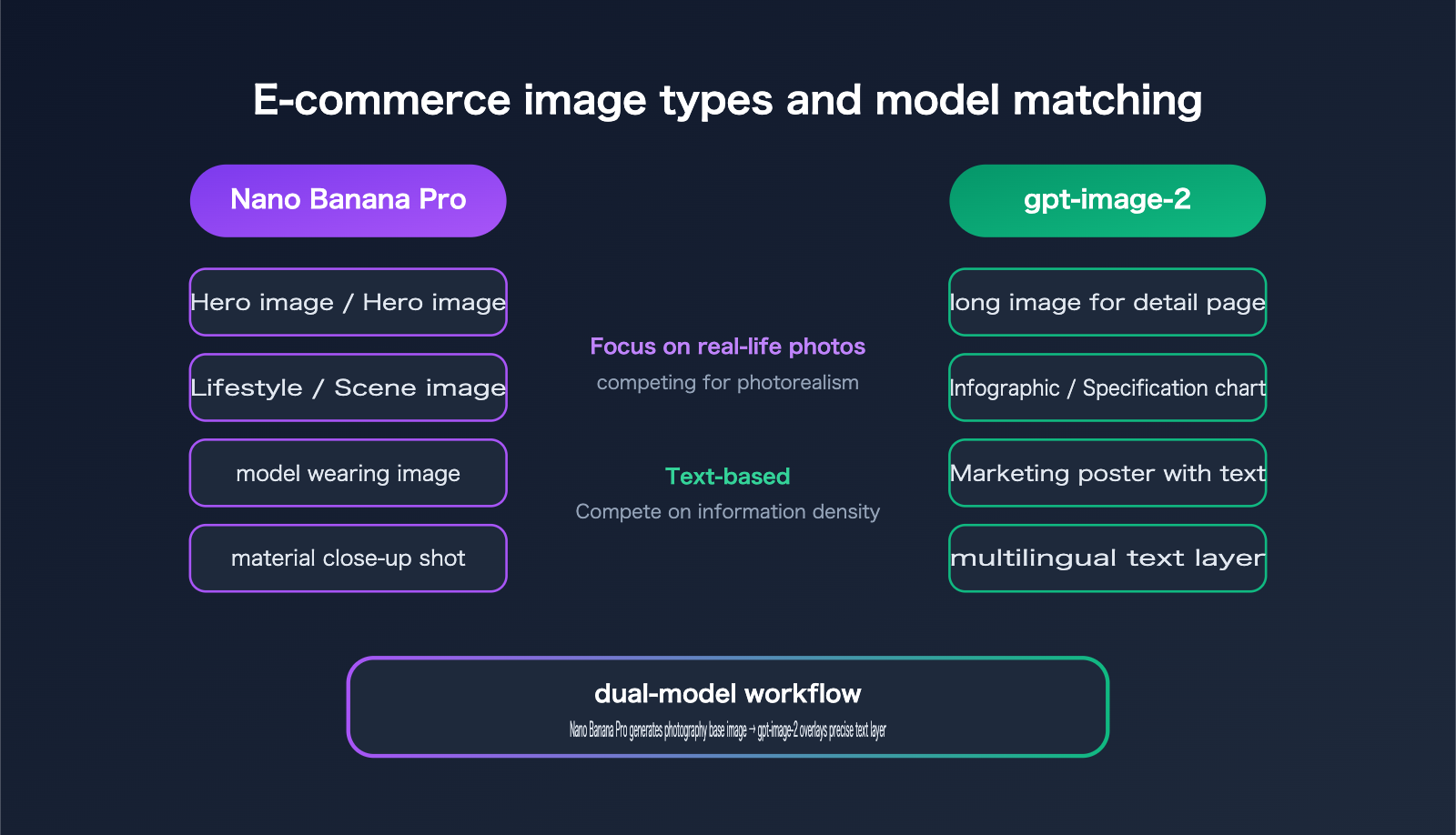
| E-commerce Image Type | Recommended Model | Reason |
|---|---|---|
| Hero Image | Nano Banana Pro | Realistic textures and lighting directly impact conversion |
| Lifestyle / Scene | Nano Banana Pro | More natural environmental atmosphere and composition |
| Model / Apparel | Nano Banana Pro | High fidelity for skin and fabric details |
| Detail Page Long Image | gpt-image-2 | Precise rendering for large amounts of selling-point text |
| Infographic / Specs | gpt-image-2 | Accurate labels, values, and comparison tables |
| Marketing Poster with Text | gpt-image-2 | Clear and readable pricing and promotional copy |
The hero image is the first thing a buyer sees in search results; its realism and texture directly determine your click-through rate. This is where Nano Banana Pro shines—its rendering of product surface gloss and ambient light is closest to professional studio photography, and it's quite forgiving. The detail page, however, is for persuasion; it needs to densely present selling points, specifications, and usage steps. If the text is garbled, the entire image is ruined. The 99%+ rendering accuracy of gpt-image-2 for English text is virtually irreplaceable here.
The real pro move is a dual-model workflow: use Nano Banana Pro to generate a high-quality product photography base, then use gpt-image-2 to overlay text layers and feature annotations. This way, your detail page gets both studio-grade realism and clear, accurate typography, combining the strengths of both models. Professional e-commerce teams commonly use this "Nano for the base, gpt for the text" combo.
Below is a demonstration of how to switch models based on image type using the same aggregated API. You only need to change the model field for hero images versus detail pages:
import requests, base64

API_KEY = "YOUR_API_KEY"

# Hero Image: Use Nano Banana Pro for realistic product shots
nb_url = "https://api.apiyi.com/v1beta/models/gemini-3-pro-image-preview:generateContent"
# Detail Page: Use gpt-image-2 for text-heavy infographics (via OpenAI-compatible API)
gpt_url = "https://api.apiyi.com/v1/images/edits"

with open("product.png", "rb") as f:
    img_b64 = base64.b64encode(f.read()).decode()

# Hero image request: Emphasize material and lighting
nb_payload = {
    "contents": [{"parts": [
        {"text": "Generate an image: studio hero shot of this product, soft natural light, realistic material and surface, pure white background."},
        {"inline_data": {"mime_type": "image/png", "data": img_b64}}
    ]}],
    "generationConfig": {"imageConfig": {"aspectRatio": "1:1", "imageSize": "2K"}}
}
resp = requests.post(nb_url, headers={"x-goog-api-key": API_KEY}, json=nb_payload, timeout=300)
print(resp.status_code)
📘 Workflow Tip: The dual-model workflow relies on being able to switch models seamlessly within the same codebase. By connecting through APIYI (apiyi.com), a single API key covers both Nano Banana Pro and gpt-image-2, saving you the hassle of managing multiple vendor accounts and payment methods, while also simplifying concurrency and retry logic.
How to Choose Between Western, Japanese, and Localized Styles
For cross-border e-commerce, there's an extra layer of complexity: style localization. The same product needs to appeal to Western aesthetics, Japanese sensibilities, or local market preferences. The division of labor between the two models generally follows the logic used for main product images versus detail pages.
| Localization Need | Recommended Model | Description |
|---|---|---|
| Western-style scene images | Nano Banana Pro | Better at dramatic lighting and environmental depth |
| Japanese-style ambient images | Nano Banana Pro | More accurate with soft light, negative space, and natural textures |
| Local promotional visuals | Nano Banana Pro | Excellent for realistic scene backgrounds |
| Multilingual infographics | gpt-image-2 | Accurate text translation and multilingual labels |
| Multi-market spec sheets | gpt-image-2 | Precise rendering of market-specific units and specifications |
Leave the style-based localization (lighting, composition, and aesthetic tone) to Nano Banana Pro; it’s much more nuanced at capturing environmental atmosphere and cultural context. Meanwhile, handle text-based localization (translating English infographics into Japanese or swapping out market-specific specs) with gpt-image-2. It can accurately replace multilingual text while maintaining the original layout. By combining both, you can efficiently produce localized assets for multiple markets using a single set of base images.
For example, imagine a home lighting product launching on both Western and Japanese sites. For the Western main image, you can use Nano Banana Pro to generate a dramatic, warm-lit living room scene to highlight the atmosphere and texture. For the Japanese site, you'd switch to a soft-lit, minimalist scene with more negative space—again using Nano Banana Pro, as it’s better at nailing that specific aesthetic. For the detail page spec sheets, use gpt-image-2 to render the dimensions, power, and material descriptions in English and Japanese respectively, ensuring the text is crisp and error-free. One set of base images, split between two models, allows you to scale assets for multiple markets—this is the efficiency that cross-border multi-site operations strive for. Just keep in mind that for non-Latin scripts like Japanese or Arabic, you should always use gpt-image-2; Nano Banana Pro has a higher error rate with these characters and isn't ideal for finished images containing text.
🎯 Localization Tip: When handling multi-market localization, you'll be switching models frequently. We recommend hardcoding your model routing rules into your workflow. Use APIYI (apiyi.com) to manage the scheduling—route ambient images to Nano Banana Pro and text-heavy images to gpt-image-2—to avoid having to make manual decisions for every single image.
Decision-Making Advice
If you only remember one thing: Choose Nano Banana Pro for realism, gpt-image-2 for text density, and use both when you need the best of both worlds. When it comes to implementation, you can prioritize based on these rules:
- Images with lots of text (detail pages, infographics, posters) → Prioritize gpt-image-2.
- Images focused on product/model photography with minimal text (main images, lifestyle shots, model photos) → Prioritize Nano Banana Pro.
- Need both realistic backgrounds and clear text → Use a dual-model workflow: Nano for the base image + gpt for the text overlay.
- High-volume needs where extreme realism isn't the top priority → Use gpt-image-2 at a lower setting to control costs.
Also, avoid two common pitfalls. First, blindly using two models for everything: If an image has very little text (like a product on a plain white background), forcing it through gpt-image-2 just adds cost and slows down the process. The dual-model approach is only worth it when you need both a realistic base and dense text. Second, trying to force one model to do everything: Many teams try to save time by sticking to one model, but end up with unrealistic main images or garbled text on detail pages, failing on both fronts. The right approach is to audit your image types, categorize them by text ratio and realism requirements, and then assign the appropriate model. Once you've mapped this out, you can automate the routing so the system picks the model based on the image type, rather than relying on human judgment for every single file.
💡 Decision Advice: Choosing the right model depends on your image structure and text ratio. We recommend running an A/B test with real product images on the APIYI (apiyi.com) platform. Since the platform supports a unified interface for multiple models, it’s easy to switch and track costs. You can find the optimal combination for your product category with just a few dozen test images.
FAQ
Q1: Do I have to use Nano Banana Pro for the main image? Can’t I use gpt-image-2?
It's not a hard rule. gpt-image-2 can produce decent product images, but when it comes to "photorealistic" quality—like skin texture, product surface gloss, and environmental atmosphere—Nano Banana Pro usually has the edge. Since the main image is all about that crucial first impression, we recommend it. You can test a few images of your own products on APIYI (apiyi.com) to see how it performs across different categories.
Q2: Product detail pages have a lot of text. Is Nano Banana Pro really that bad at rendering text?
It's not that it can't do it, but it's not consistent enough. Nano Banana Pro handles short labels fine, but the error rate climbs significantly with long sentences, multiple text blocks, and non-Latin characters (like Japanese). gpt-image-2 boasts 99%+ accuracy for English, making it much more reliable for the dense text scenarios found on detail pages. Text is the lifeblood of a detail page, so stability should be your priority.
Q3: Is a dual-model workflow too complex for small teams?
Not at all. The core process is just two steps: "Nano Banana Pro for the base image → gpt-image-2 for the text layer." The tricky part is usually integrating two different models, but with APIYI (apiyi.com), you can access both using a single API key. You just need to switch the model field in your code, making it easy for small teams to implement quickly.
Q4: There’s a big price difference between the two models. How can I control total costs?
The key is to allocate tiers based on the image type: use the cost-effective gpt-image-2 for high-volume detail pages, and reserve the high-quality Nano Banana Pro for conversion-driving main images. You can also take advantage of bulk discounts for Nano Banana Pro in high-volume scenarios. By using the pay-as-you-go model on APIYI (apiyi.com), you can clearly track the cost per image for each category and optimize as you go.
Summary
Nano Banana Pro and gpt-image-2 aren't substitutes for each other in e-commerce product imagery; they’re complementary. Nano Banana Pro wins on realism, material rendering, composition, and 4K resolution, making it the top choice for main images, lifestyle shots, and model photography. gpt-image-2 wins on text rendering, prompt adherence, and information density, making it the go-to for detail pages, infographics, and text-heavy posters. Your initial assessment was spot on—leave the information density to gpt-image-2 and the stunning, photorealistic quality to Nano Banana Pro.
The optimal solution is often a dual-model workflow: use Nano Banana Pro to create a professional-grade base image, then use gpt-image-2 to overlay precise text, adjusting for regional styles (Western, Japanese, or local) as needed. If you're ready to start testing, you can register on APIYI (apiyi.com) to claim your testing credits. Use the same API key to run both models on your own product images; a few dozen images should be enough to determine the best combination for your specific product category.
Author: APIYI Team
Technical Support: The models mentioned in this article, such as Nano Banana Pro and gpt-image-2, can all be accessed via the unified APIYI (apiyi.com) interface. New users can register to claim free testing credits.