Author’s note: This article breaks down the four components of a scheduled monitoring and summarization agent, explains how an OpenAI-compatible interface decouples model invocation from a specific SDK, and provides a runnable Python example.
OpenRouter recently published a tutorial on building a persistent AI agent in TypeScript with @openrouter/agent 0.11.0. The agent runs on a schedule, automatically monitoring Hacker News and generating summaries. It’s a representative use case: many teams want something similar, whether that’s a daily morning digest of industry news, competitor activity, or trending posts in tech communities. Using that tutorial as a starting point, we’ll break down a general architecture for a monitoring and summarization agent that isn’t tied to a specific SDK.
This isn’t a retelling of that tutorial. Only summary information about the original tutorial has been made public, so we won’t speculate about its implementation. Instead, we’ll focus on a broader question: what components make up a monitoring and summarization agent, and how can you design the model invocation layer so you can switch models and providers whenever you need to?
What you’ll get: By the end of this article, you’ll understand the four-stage structure—scheduled triggering, data retrieval, model summarization, and output delivery—and have a Python implementation based on an OpenAI-compatible interface that you can adapt to your own needs.
Key Takeaways for a Monitoring and Summarization Agent
Here’s a summary of the article’s main points. The sections that follow explore each one in more detail.
| Key point | Description | Value |
|---|---|---|
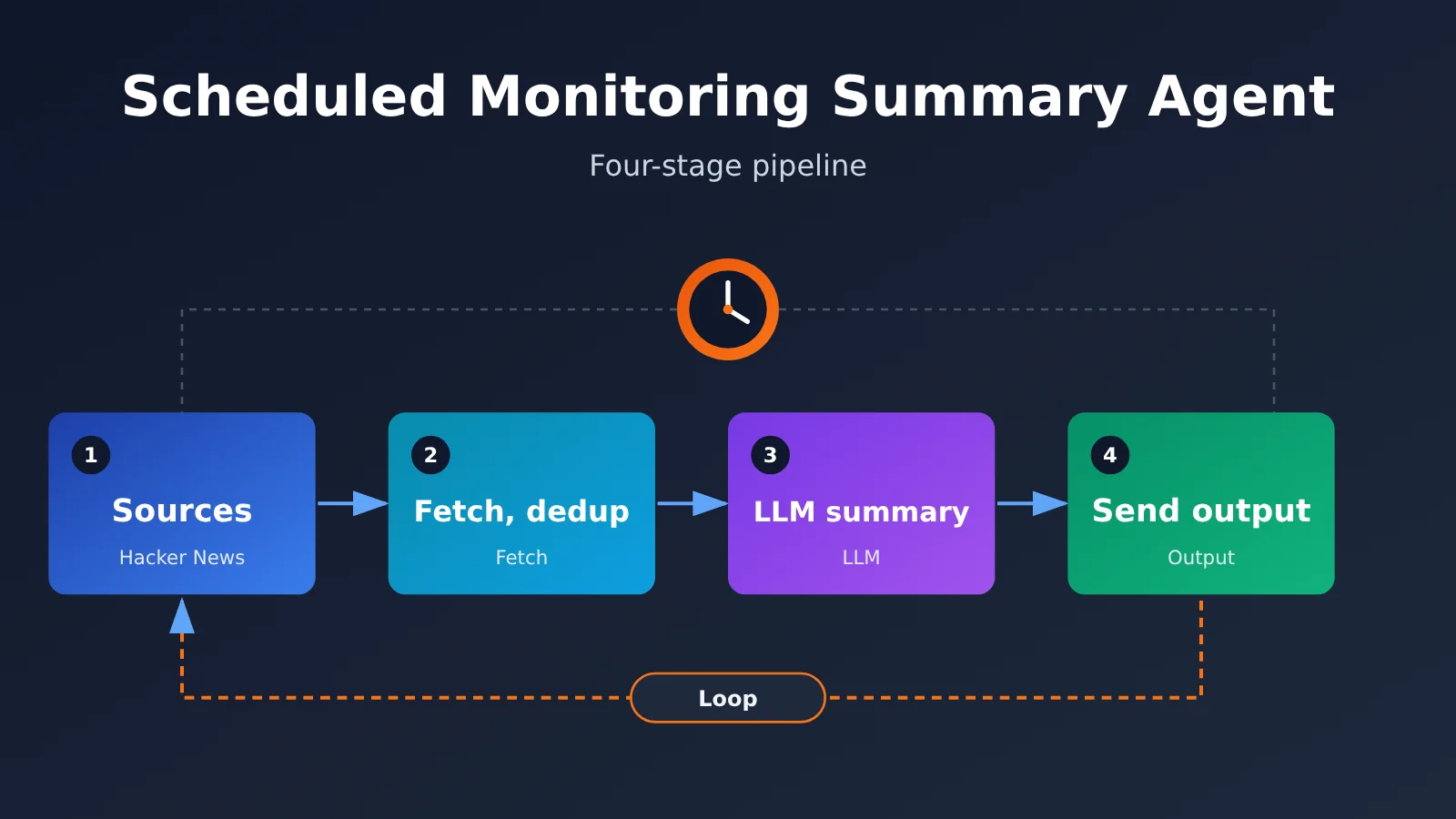
| Four-part structure | Scheduled trigger → data fetching → model summarization → output | Each part can be replaced and tested independently |
| State management | Track processed items to avoid summarizing them twice | Reduces model calls and keeps output clean |
| Decoupled model invocation layer | Business logic depends on a summarization interface, not a specific SDK | Switch models or providers by changing the configuration |
| OpenAI-compatible protocol | Use the standard Chat Completions format as the foundation for model calls | A mature ecosystem that supports models from multiple providers |
| Choose models for the task | For summarization, consider context window length, instruction following, stability, and cost | Avoid overpaying for simple tasks |
The Four Components of a Monitoring and Summarization Agent
A “persistent Agent” is essentially a pipeline that a timer wakes up repeatedly. It doesn’t need complex, multi-step reasoning, but it does need to be reliable because no one is watching it run. Splitting it into four components with clear responsibilities is the foundation for keeping it running smoothly over time.
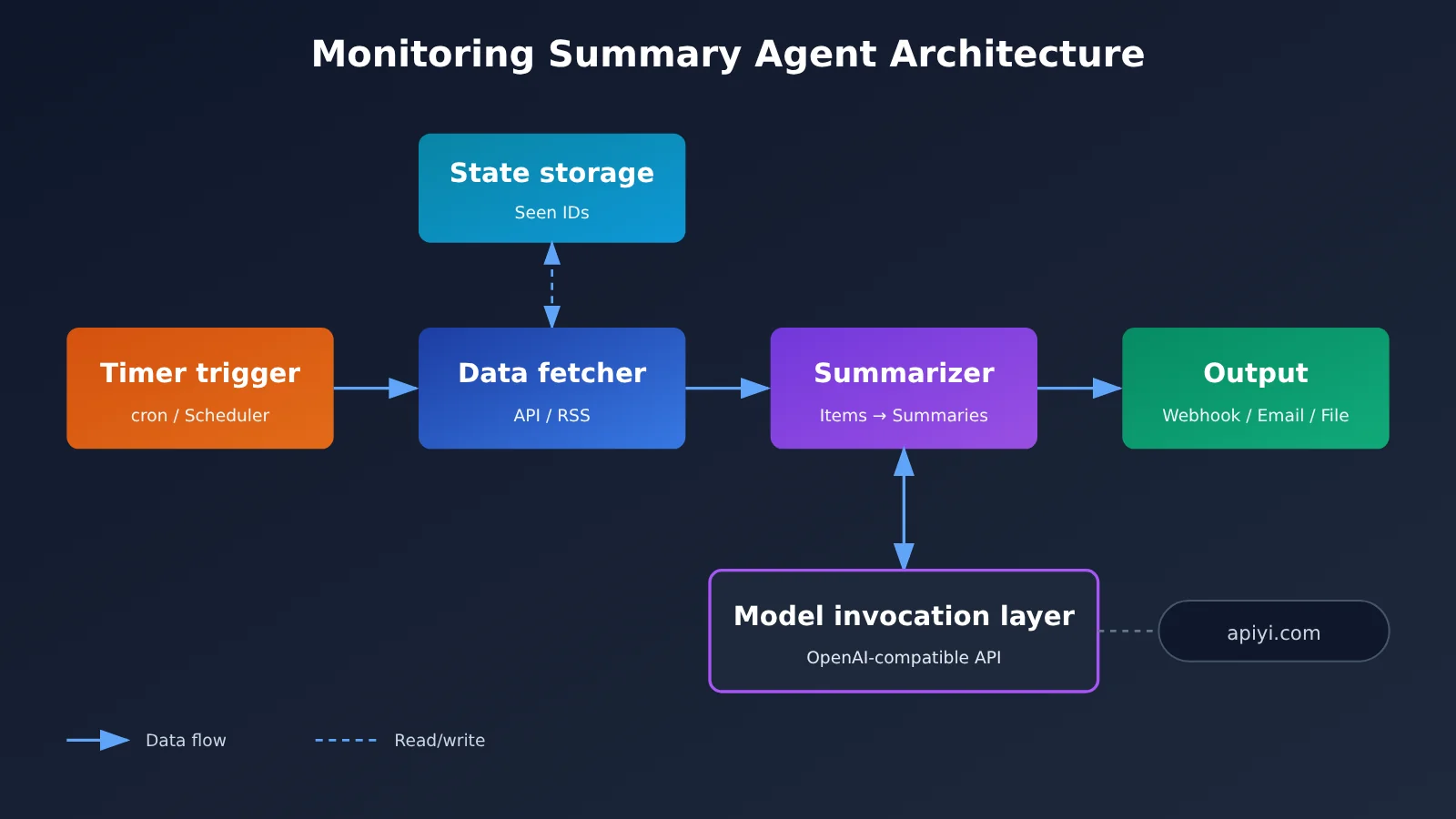
| Component | Responsibility | Common implementations | Design considerations |
|---|---|---|---|
| Scheduled trigger | Start the task at regular intervals | cron, systemd timer, cloud function timers, scheduled CI workflows, in-process scheduling libraries | Separate triggering from business logic and allow failed runs to be retried |
| Data fetcher | Pull new content from information sources | Public APIs, RSS, web scraping | Set timeouts, limit the number of items, and record seen IDs |
| Summarizer | Call a Large Language Model to generate summaries | Chat Completions API | Trim input, use a consistent prompt, and constrain the output format |
| Output handler | Deliver results somewhere people can see them | Email, IM bot webhooks, Markdown files, databases | Provide a fallback for failed delivery, such as saving results to disk |
These four components communicate through simple data structures: the fetcher outputs a list of items, the summarizer outputs summary text, and the output handler delivers that text. This makes problems easier to isolate. If summary quality is poor, you can adjust the summarizer; if delivery fails, you can investigate the output handler.
Many people put all the logic into one script for their first version. It works, but it’s hard to maintain. Once you want to switch from Hacker News to GitHub Trending, or use a model from another provider, you have to change code throughout the script. With separate components, adding an information source only requires a new fetcher, and switching models only requires a configuration change.
Choosing a Scheduled Trigger for Your Monitoring Summary Agent
Scheduled triggers are what make the agent “always on.” OpenRouter’s tutorial uses a long-running process, but you have several deployment options. The right choice depends on the infrastructure you already have.
| Trigger | How it runs | Advantages | Things to consider |
|---|---|---|---|
| System cron | Starts a new process each time and exits when done | Simple and reliable; no long-running process or memory leaks | State must be saved to disk, and environment variables need separate configuration |
| In-process scheduler | Runs on a schedule inside a long-running process | Easy to share connections and caches | Needs a supervisor in case the process crashes (such as systemd or a container restart policy) |
| Cloud function timer | Triggers a serverless function on schedule | No server maintenance; pay per invocation | Execution time is limited, and state must be stored externally |
| Scheduled CI workflow | Runs on a schedule in a CI platform | No server costs; logs are easy to trace | Scheduling may be delayed, making it unsuitable for high-frequency tasks |
For summary jobs that run hourly or daily, system cron plus a script that exits when finished is usually the most cost-effective option. It avoids the memory growth that can come with a long-running process, and if a run fails, the next scheduled run will try again. A long-running process is generally worth considering only when you need monitoring at minute-level intervals or need to share resource-intensive assets between runs.
How to Decouple the Model Invocation Layer in a Monitoring Summary Agent
This is the focus of the article. OpenRouter’s tutorial uses its own @openrouter/agent SDK, which makes it easy to get started. But the publicly available summary doesn’t say whether the SDK supports custom OpenAI-compatible endpoints, and we haven’t verified it ourselves. So we won’t cover connecting that SDK to other platforms here.
Instead, let’s take a different approach: rather than making business logic depend directly on any provider’s Agent SDK, we’ll add a thin “summary interface” in between. The business code calls only summarize(items), while the interface uses configuration to determine which model and endpoint to use.
Designing the Monitoring Summary Agent’s Invocation Interface
The invocation layer follows three simple principles that can save a lot of rework later:
- Expose only business-level operations: Provide
summarize(items) -> strwithout leaking low-level parameters likemessagesandtemperatureinto the business code. - Use a consistent underlying protocol: Use the OpenAI-compatible Chat Completions format internally, with
base_url,api_key, andmodelall read from environment variables. - Provide a fallback on failure: Retry a limited number of times if a call fails. If it still fails, output the original list of titles so there’s at least a readable result for the day.
We use the OpenAI-compatible protocol as the foundation because it’s become a de facto standard, and the official SDK and many third-party tools support changing base_url. As long as the server supports the format, switching models comes down to changing a line of configuration.
| Interface choice | Cost of switching models | Ecosystem and tools | Best suited for |
|---|---|---|---|
| Use a provider-specific Agent SDK | Switching providers usually requires code changes | The SDK’s built-in capabilities work out of the box | Long-term use of a chosen platform when built-in features matter |
| Use the official OpenAI SDK + a compatible endpoint | Just change base_url and model |
The most mature ecosystem, with the most examples | Most monitoring summary tasks |
| Build your own HTTP wrapper | Change the configuration, but handle maintenance yourself | Fewest dependencies | Environments where dependency size is a critical concern |
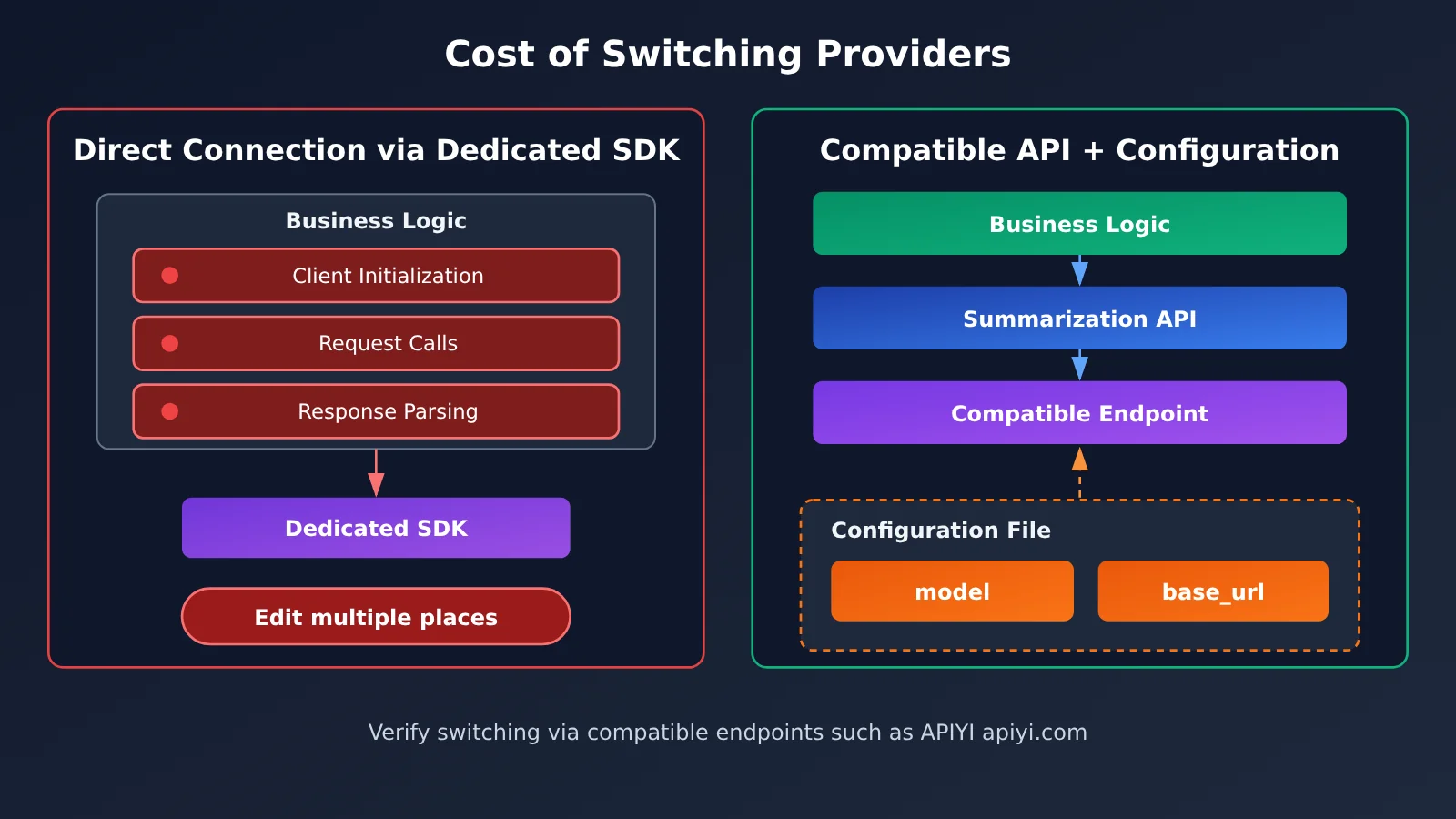
With this design, an aggregation platform like APIYI can be one option for the model invocation layer. APIYI supports the OpenAI API format and works with the official OpenAI SDK, so switching models only requires changing the model name. For a monitoring summary Agent, this means you can compare summaries from different models using the same API key, without writing a separate integration for each provider.
What to Consider When Choosing a Model for Monitoring Summaries
Summarization looks simple, but different information sources place very different demands on a model. We don’t currently have systematic test data for this type of task, so we won’t claim that any one model is best. Instead, here are the factors to weigh when making your decision.
| Factor | Why It Matters | Practical Advice |
|---|---|---|
| Context length | You may need to feed in dozens of headlines or even full articles at once | Trim the input first, then choose a model based on the trimmed length |
| Instruction following | Summaries need a consistent format for delivery and parsing | Run several tests with the same prompt and check whether the format stays consistent |
| Language capabilities | English-language sources need to be summarized in Chinese | Pay particular attention to the accuracy of technical terminology |
| Invocation cost | Costs accumulate when scheduled tasks run over the long term | Make one call per run, and limit the number of input items and output length |
| Service reliability | Unattended failures may not be noticed until the next day | Configure retries and fallbacks, and keep a backup model available |
💡 Recommendation: There’s no one-size-fits-all answer for choosing a summarization model. The most reliable approach is to compare models using your actual information sources over several days. With APIYI at apiyi.com, you can use the same code to switch between candidate models, compare format consistency and Chinese-language output, and then choose one for long-term use.
Monitoring Summary Agent: Quick Start
Let’s build a minimal working version in Python. We’ll use the public Hacker News API (hacker-news.firebaseio.com/v0) as the information source, matching the OpenRouter tutorial so it’s easy to compare the two.
Minimal Example: Fetch and Summarize
The following code fetches the top 10 Hacker News headlines and sends them to a model for a Chinese-language summary. It lets you check that the entire pipeline works:
import requests
import openai

client = openai.OpenAI(
    api_key="YOUR_API_KEY",
    base_url="https://api.apiyi.com/v1"  # OpenAI 兼容端点
)

HN = "https://hacker-news.firebaseio.com/v0"
ids = requests.get(f"{HN}/topstories.json", timeout=10).json()[:10]
titles = [requests.get(f"{HN}/item/{i}.json", timeout=10).json().get("title", "") for i in ids]

resp = client.chat.completions.create(
    model="gpt-4o-mini",  # 示例模型名,以平台模型列表为准
    messages=[{"role": "user", "content": "用中文分 3 点总结这些热帖的主题:\n" + "\n".join(titles)}]
)
print(resp.choices[0].message.content)
This code works, but it isn’t ready to run continuously: it doesn’t deduplicate entries or handle failures, and the model and endpoint are hardcoded. The full version below separates the four components and adds state management.
View the full implementation (four components + deduplication + fallback)
import json
import os
import time
from pathlib import Path

import openai
import requests

HN = "https://hacker-news.firebaseio.com/v0"
STATE_FILE = Path(os.getenv("STATE_FILE", "seen_ids.json"))
TOP_N = int(os.getenv("TOP_N", "30"))


# ---------- 数据获取器 ----------
def fetch_new_stories(seen: set) -> list:
    ids = requests.get(f"{HN}/topstories.json", timeout=10).json()[:TOP_N]
    items = []
    for i in ids:
        if i in seen:
            continue
        item = requests.get(f"{HN}/item/{i}.json", timeout=10).json() or {}
        if item.get("title"):
            items.append({"id": i, "title": item["title"],
                          "url": item.get("url", ""), "score": item.get("score", 0)})
    return items


# ---------- 状态管理 ----------
def load_seen() -> set:
    return set(json.loads(STATE_FILE.read_text())) if STATE_FILE.exists() else set()

def save_seen(seen: set) -> None:
    STATE_FILE.write_text(json.dumps(sorted(seen)[-2000:]))  # 只保留最近的 ID


# ---------- 摘要器(模型调用层) ----------
class Summarizer:
    def __init__(self):
        self.client = openai.OpenAI(
            api_key=os.environ["LLM_API_KEY"],
            base_url=os.getenv("LLM_BASE_URL", "https://api.apiyi.com/v1"),
        )
        self.model = os.getenv("SUMMARY_MODEL", "gpt-4o-mini")

    def summarize(self, items: list, retries: int = 2) -> str:
        lines = "\n".join(f"- [{x['score']}] {x['title']}" for x in items)
        prompt = ("你是技术资讯编辑。请用中文把下面的 Hacker News 新热帖归纳为 3-5 个主题,"
                  "每个主题一句话,并列出最值得关注的 3 条标题。\n" + lines)
        for attempt in range(retries + 1):
            try:
                resp = self.client.chat.completions.create(
                    model=self.model,
                    messages=[{"role": "user", "content": prompt}],
                    max_tokens=800,
                )
                return resp.choices[0].message.content
            except Exception as e:
                print(f"摘要失败(第 {attempt + 1} 次):{e}")
                time.sleep(2 ** attempt)
        return "【模型暂不可用,以下为原始标题】\n" + lines  # 降级输出


# ---------- 输出器 ----------
def deliver(text: str) -> None:
    webhook = os.getenv("WEBHOOK_URL")
    if webhook:
        try:
            requests.post(webhook, json={"text": text}, timeout=10).raise_for_status()
            return
        except Exception as e:
            print(f"推送失败,改为落盘:{e}")
    Path(f"digest-{time.strftime('%Y%m%d-%H%M')}.md").write_text(text, encoding="utf-8")


# ---------- 一次运行(由定时器触发) ----------
def run_once() -> None:
    seen = load_seen()
    items = fetch_new_stories(seen)
    if not items:
        print("没有新条目,本轮跳过")
        return
    deliver(Summarizer().summarize(items))
    save_seen(seen | {x["id"] for x in items})


if __name__ == "__main__":
    run_once()
The full version has a few key design choices worth highlighting. First, Summarizer exposes only summarize; the model name, endpoint, and key all come from environment variables. That’s the decoupling of the invocation layer discussed earlier. Second, the state file keeps only the most recent batch of IDs, so it won’t grow indefinitely over time. Finally, if the model fails, the agent outputs the original titles; if delivery fails, it saves the output to disk. That way, every run produces a traceable result.
Scheduling the Monitoring and Summary Agent
The script is designed to run once and exit, so you can hand it directly to system cron. The configuration below runs it twice a day, at 8:00 a.m. and 8:00 p.m.:
# crontab -e
0 8,20 * * * cd /opt/hn-digest && LLM_API_KEY=xxx SUMMARY_MODEL=gpt-4o-mini /usr/bin/python3 agent.py >> run.log 2>&1
To compare another model, just change SUMMARY_MODEL to a different model name—no code changes needed. In production, store your key in a .env file or a secrets management service rather than putting it directly in crontab.
🚀 Quick-start tip: Use the minimal example first to confirm the end-to-end workflow works, then switch to the full version and set up cron. APIYI apiyi.com offers free test credits for new users. With one key, you can switch between models such as OpenAI, Claude, and Gemini, making it easy to compare summary quality during prototyping.
Frequently Asked Questions
Q1: What is a scheduled monitoring and summarization agent?
It’s an automated program that runs on a schedule: it fetches new content from information sources, asks a Large Language Model to summarize it, and sends the results to email, an instant messaging app, or a file. Unlike a conversational agent, it runs unattended over the long term, so reliability and deduplication matter more than complex reasoning.
Q2: What’s the difference between using a dedicated Agent SDK and an OpenAI-compatible API?
A dedicated SDK often provides built-in features such as tool calling and scheduling, making it faster to get started. But it also ties your application code to that platform. An OpenAI-compatible API is lower-level, so you’ll need to handle scheduling and deduplication yourself. In return, you can switch models and providers by changing the configuration. For straightforward summarization tasks, that flexibility is often more valuable.
Q3: Can the OpenRouter @openrouter/agent tutorial be adapted directly to another platform?
The publicly available summary only says that the tutorial uses `@openrouter/agent` 0.11.0 in TypeScript. It doesn’t say whether the SDK supports custom endpoints, and we haven’t verified that ourselves. If you want to keep your options open, a safer approach is to use the tutorial’s scenario as inspiration and build your own implementation using an OpenAI-compatible API layer like the one in this article.
Q4: What are some practical use cases for a monitoring and summarization agent?
– **Daily tech community digest**: Summarize daily topics from Hacker News and tech forums
– **Competitor update tracking**: Monitor competitor blogs or changelogs and summarize changes
– **Open-source project updates**: Collect new releases and important issues from repositories you follow
– **Industry news briefing**: Aggregate multiple RSS feeds and send a Chinese-language briefing each morning
Q5: How can I quickly call a model through an API to generate summaries?
We recommend using an aggregation platform that supports the OpenAI-compatible format:
1. Visit APIYI at apiyi.com, register an account, and get an API key and free test credits
2. Set `base_url` in the code from this article to `https://api.apiyi.com/v1`
3. Use the `SUMMARY_MODEL` environment variable to switch between models and compare their summaries
Q6: How can I control API costs over the long term?
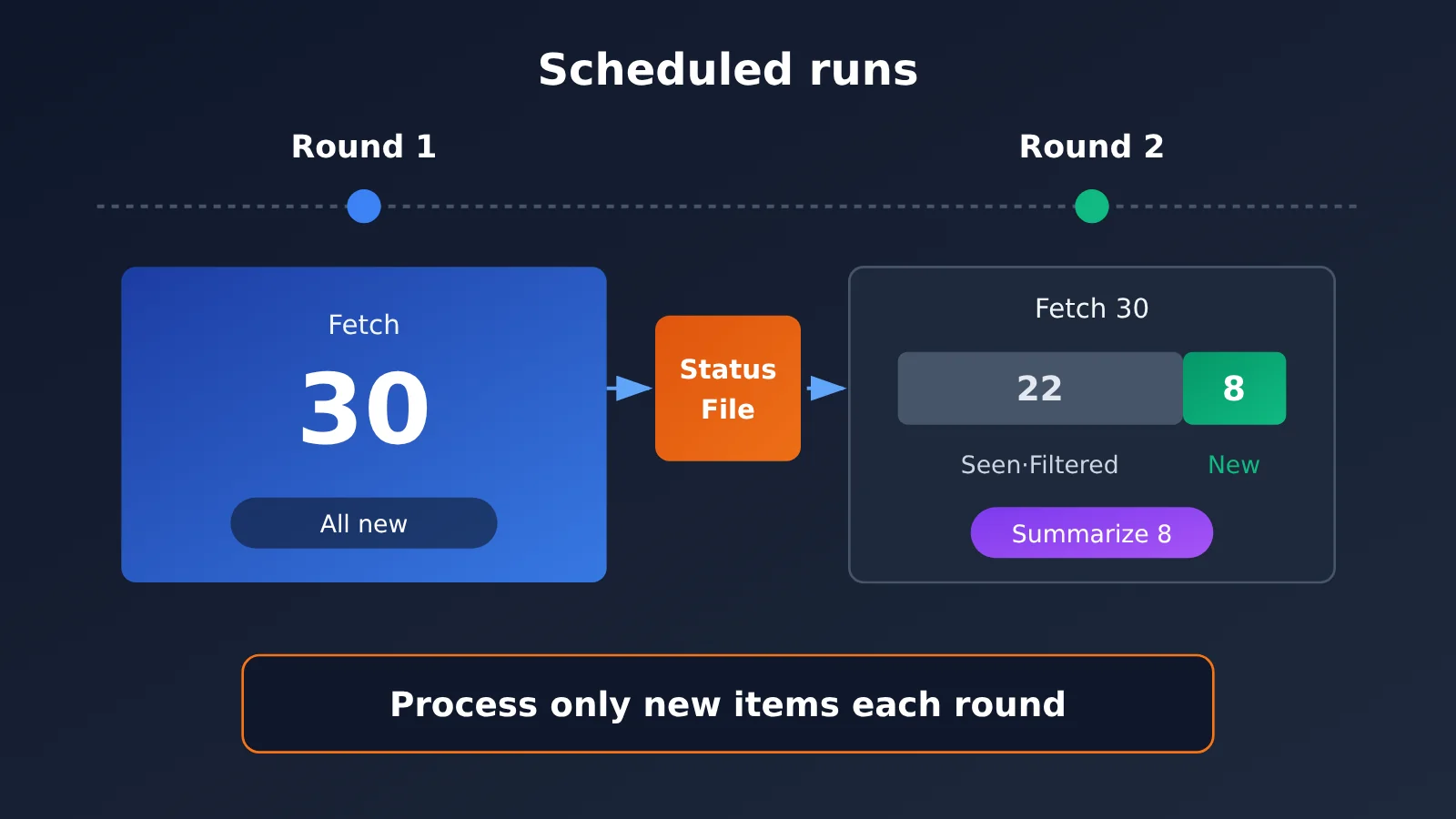
The key is to process only new items and make just one model invocation per run. Use a state file to filter out items you’ve already seen, limit the number of items and `max_tokens` per run, and set the schedule based on your actual needs. Model prices vary widely, so compare them on the model pricing page at APIYI apiyi.com and choose a more economical model for lightweight tasks like summarization.
Q7: What are the known limitations of a monitoring and summarization agent?
– **Titles provide limited information**: Summarizing from titles alone can lead to misinterpretations. You can fetch the full text when needed, but keep input length and scraping compliance in mind
– **Models may make up details**: Your prompt should require the model to summarize only the supplied content, and key conclusions should retain links to the original sources
– **Information sources change**: Changes to API formats or rate-limiting policies can cause fetching to fail, so you’ll need to monitor the logs
Monitoring Summary Agent: Key Takeaways
- Four-part structure: Scheduling, data fetching, model summarization, and output are independent, making each easy to replace and debug
- Run and exit for reliability: For low-frequency summaries, cron and a one-shot script are simpler to manage than a long-running process
- State determines quality: Track IDs you’ve already seen and summarize only new items each run to avoid repetition and waste
- Decouple the invocation layer: Your application depends only on a
summarizeinterface; the model, endpoint, and key all come from configuration - Build on a compatible protocol: The OpenAI-compatible format lets you switch models by changing one environment variable
- Choose models through testing: Compare context window, instruction following, language support, cost, and reliability. You can switch between models using the same code at APIYI apiyi.com
- Plan for failures: Output the original titles if summarization fails, and save results to disk if delivery fails
Summary
Building a scheduled monitoring summary Agent isn’t about using the most complex framework. It’s about separating the pieces clearly:
- Separate components: Scheduling, fetching, summarization, and output connect through simple data structures, and each can be tested independently
- Decouple interfaces: Use a thin summarization interface to isolate the application from a specific SDK, with an OpenAI-compatible protocol underneath
- Prioritize reliability: Deduplication, retries, and fallbacks are essential for unattended tasks
OpenRouter’s Hacker News tutorial provides a useful example, while the general architecture in this article lets you apply the same approach to any information source and model. As a next step, start with a minimal example to get the whole pipeline working. Then run it with cron for a few days and review the summary quality before choosing a model for the long term.
For quick testing, try APIYI apiyi.com. You can switch between several leading models with a single API key, and new users get free credits for comparing models during prototyping.
📚 References
- OpenRouter tutorial summary: Build an always-on AI Agent with the Agent SDK to monitor Hacker News
- Link:
aihot.news/items/upl3hjjdokqe13w3ieo9opr0v -
Description: The inspiration for this article, covering how to build a scheduled Agent in TypeScript using
@openrouter/agent0.11.0 -
Official Hacker News API: A public, read-only data API
- Link:
github.com/HackerNews/API -
Description: Documents fields for endpoints such as topstories and item, which provide the example data used in this article
-
OpenAI Python SDK: The official client library
- Link:
github.com/openai/openai-python - Description: Explains how to connect to compatible endpoints using the
base_urlparameter
Author: APIYI Technical Team
Technical discussions: Contact us through the APIYI website homepage. For more integration resources, visit the documentation center at docs.apiyi.com.