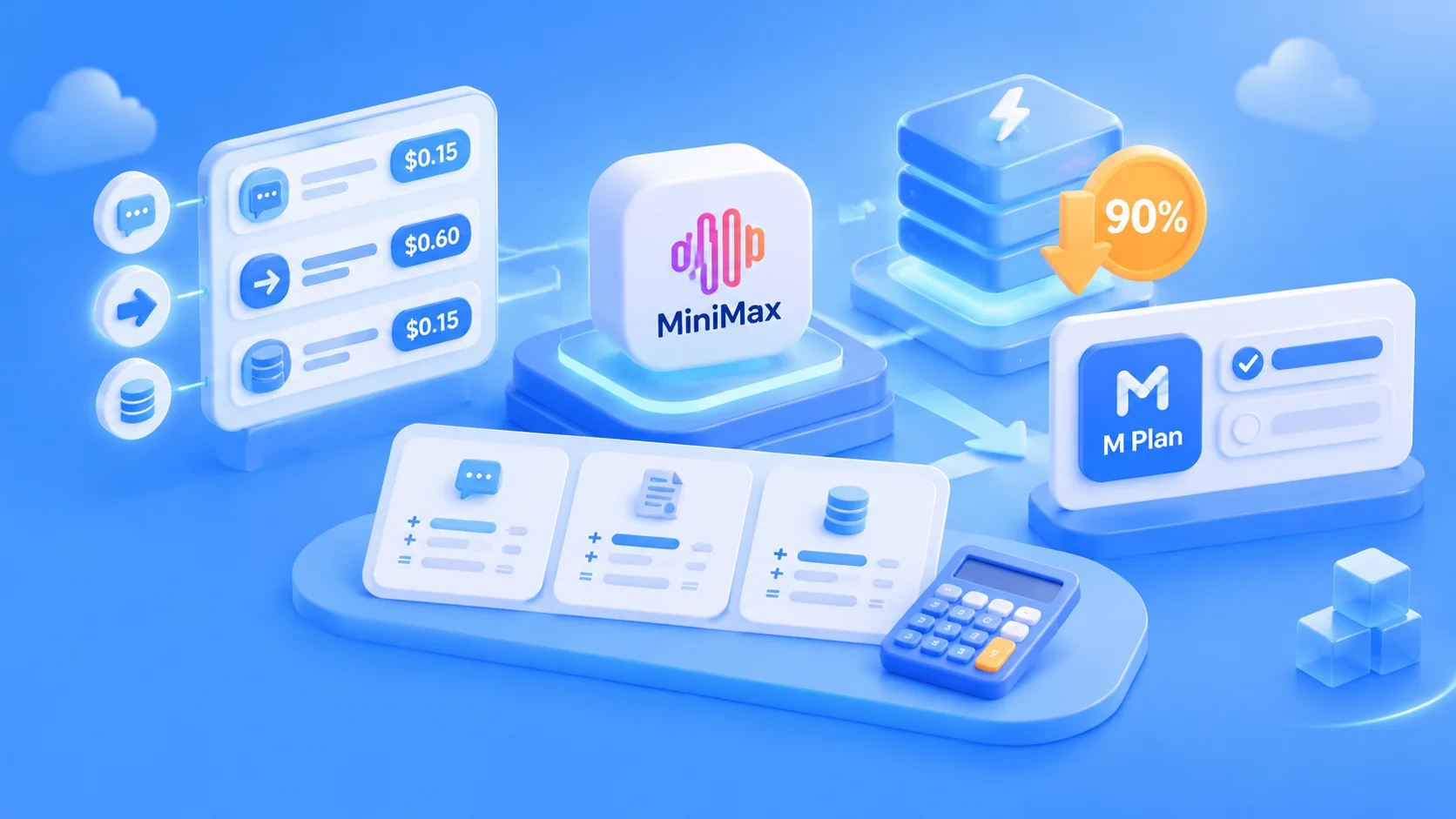
Author’s note: A practical guide to how MiniMax M3.1 Flash is priced, how to save money, and whether to choose pay-as-you-go API access or an M Plan subscription.
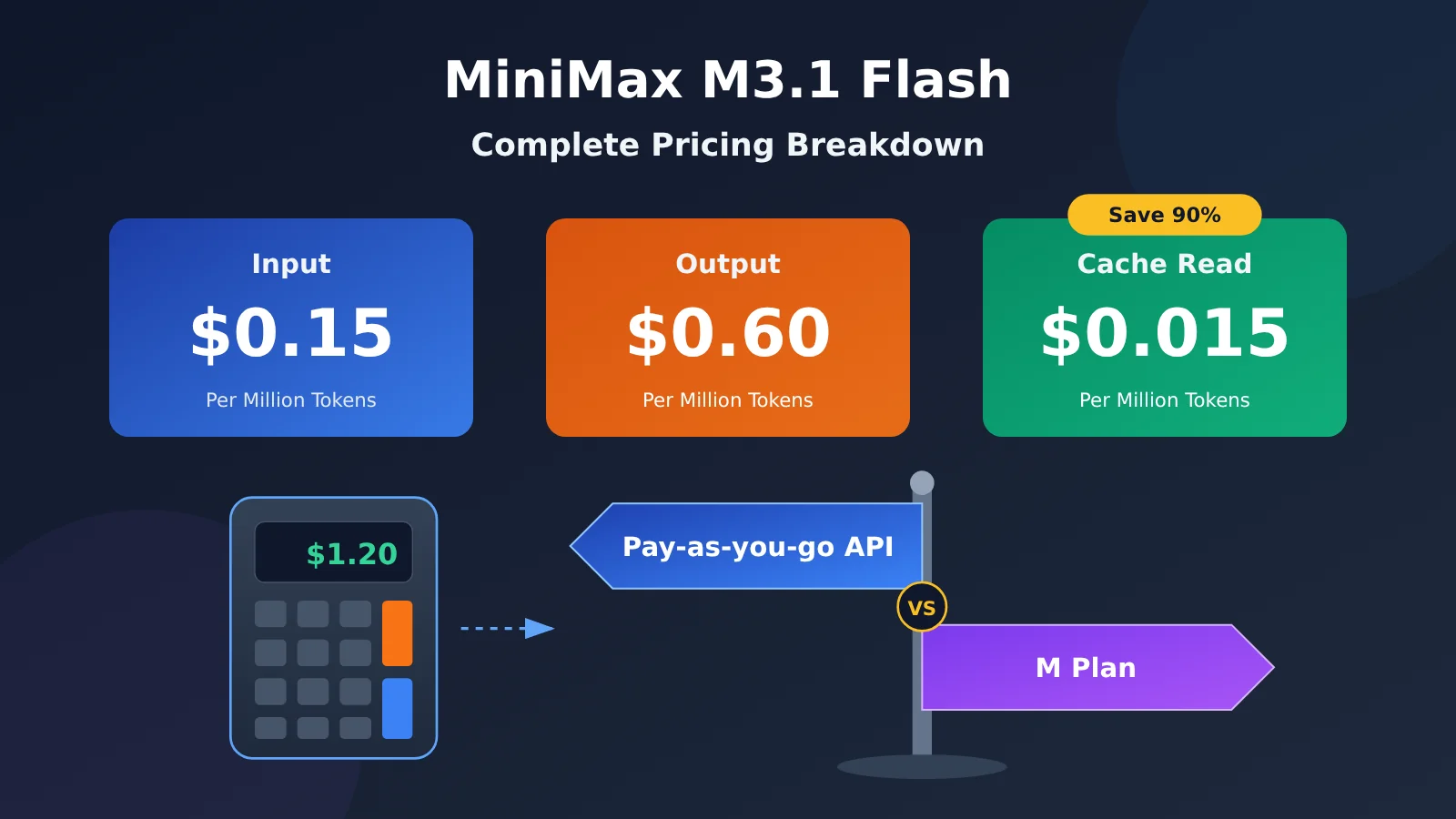
The takeaway in one sentence: MiniMax M3.1 Flash costs $0.15 per million input tokens, $0.60 per million output tokens, and $0.015 per million cached-read tokens. The biggest part of your bill is usually output, including the model’s reasoning process. You can save money in two ways: lower the effort level, and put fixed content at the beginning of your requests so it can be cached.
This isn’t another launch announcement. We’ve already covered the release on this site. This article is all about the costs: what each of the three rates means, how much a typical conversation or Agent task might cost, where M3.1 is cheaper than M3, and how to choose between pay-as-you-go and a monthly subscription.
What you’ll get from this guide: By the end, you’ll be able to estimate your monthly MiniMax M3.1 Flash costs, avoid the two most common billing pitfalls, and choose the payment option that works best for you.
MiniMax M3.1 Flash: Key Pricing Points
First, a quick definition: a token is the smallest unit used for model billing. You can think of it as a “piece of text.” MiniMax’s official estimate is that about 750 English words equal 1,000 tokens. The pricing page doesn’t provide a conversion rate for Chinese, so check your actual usage on your billing dashboard.
The table below lists all of MiniMax M3.1 Flash’s rates, as published on MiniMax’s official pricing page:
| Billing item | Price (per million tokens) | In plain English | Typical content |
|---|---|---|---|
| Input | $0.15 | Everything you send to the model | System prompts, chat history, uploaded documents, images, and videos |
| Output | $0.60 | Everything the model sends back, including reasoning | Final answers, reasoning |
| Cache read | $0.015 | Input content that’s repeated from previous requests and served from cache | System prompts that stay the same across requests, long documents you reference repeatedly |
| Add-on: web_search | $0.01/call | A server-side web search tool, billed per call | Search requests made by an agent |
There are two things to keep in mind. First, output costs four times as much as input, so “how much the model says” affects your bill more than “how much you send.” Second, cache reads cost just one-tenth of the input rate, which means cached input saves you 90%.
How to Understand MiniMax M3.1 Flash’s Pricing Formula
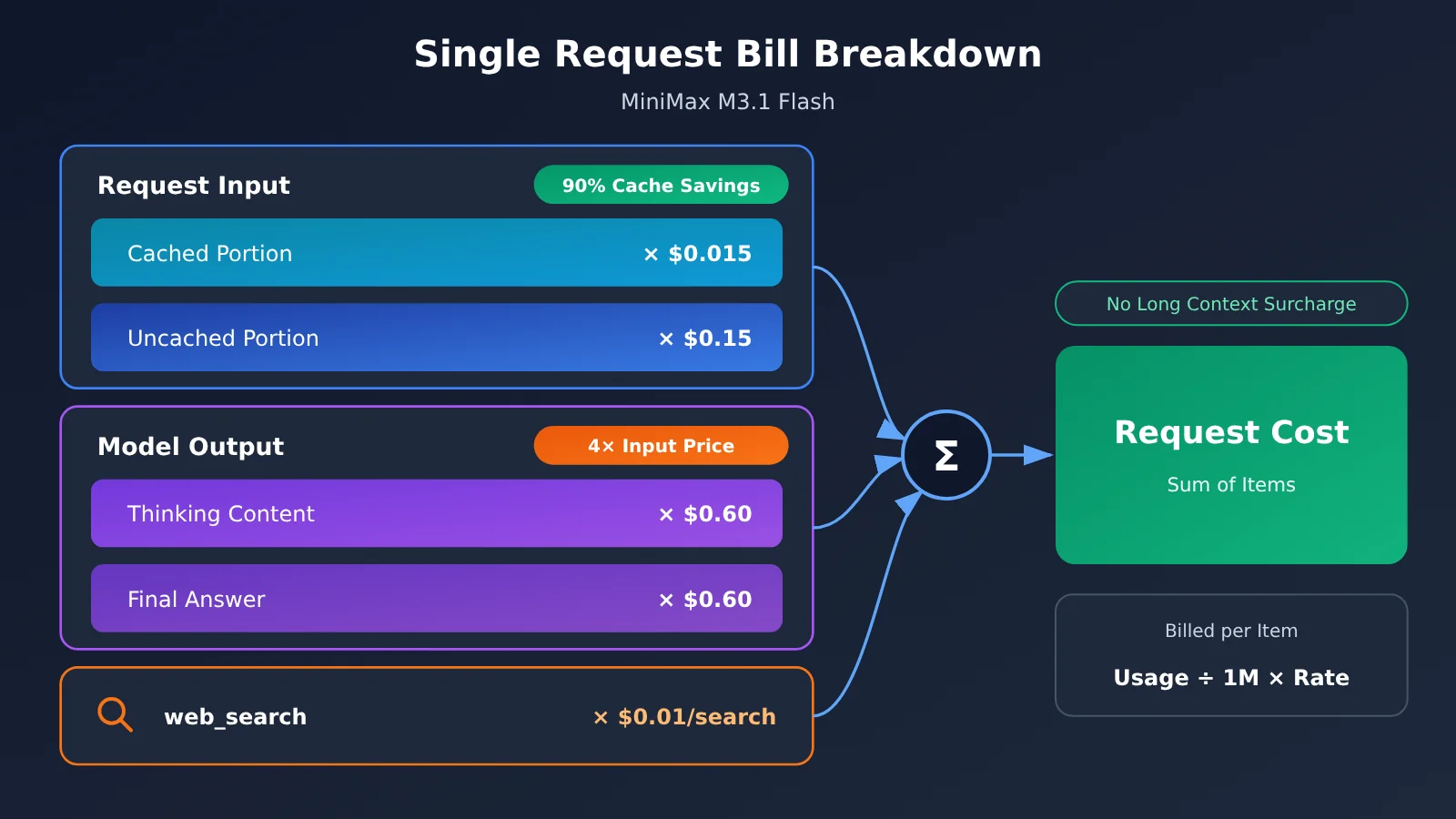
The official formula is simple: Cost = usage ÷ 1,000,000 × rate. Calculate each billing item separately, then add them together. The total is deducted from your account balance.
You can break down the bill for a single request into three parts: cached input × $0.015, uncached input × $0.15, and output (answer + reasoning) × $0.60. Then add the number of searches × $0.01.
MiniMax M3.1 Flash also has a context window of 1,000,000 tokens. The context window is the maximum amount of content the model can “see” at once. The official pricing page states that there’s no surcharge for long context: the rate is the same whether you send 100,000 or 800,000 tokens.
MiniMax M3.1 Flash Pricing: 3 Examples
The token counts in these examples are hypothetical and provided only to demonstrate the calculation. They aren’t based on measured data, so feel free to plug in your own numbers.
Example 1: A Typical Conversation
Assume: 2,000 input tokens (no cache hit) and 1,500 output tokens (including reasoning).
- Input: 2,000 ÷ 1,000,000 × $0.15 = $0.0003
- Output: 1,500 ÷ 1,000,000 × $0.60 = $0.0009
- Total: $0.0003 + $0.0009 = $0.0012
Check: For 1,000 conversations like this, you’d use 2 million input tokens and 1.5 million output tokens. That comes to 2 × $0.15 + 1.5 × $0.60 = $0.30 + $0.90 = $1.20, which matches $0.0012 × 1,000.
Example 2: A Multi-Turn Agent Task
An agent is a model that breaks a task into steps, calls tools, and works through multiple rounds on its own. Each round resends the previous context, so input usage can be high—and caching can make the biggest difference.
Assume: 20 rounds in total, with 30,000 input tokens per round: 25,000 cached tokens and 5,000 new tokens. Each round generates 2,000 output tokens.
- Cache reads: 25,000 × 20 = 500,000 tokens; 0.5 × $0.015 = $0.0075
- New input: 5,000 × 20 = 100,000 tokens; 0.1 × $0.15 = $0.015
- Output: 2,000 × 20 = 40,000 tokens; 0.04 × $0.60 = $0.024
- Total: $0.0075 + $0.015 + $0.024 = $0.0465
For comparison: with no cache hits, 600,000 input tokens would cost 0.6 × $0.15 = $0.09. Add $0.024 for output, and the total comes to $0.114. Caching saves $0.114 − $0.0465 = $0.0675 on this task, or about 59%.
Example 3: 1,000 Batch Calls a Day
Assume: Each call includes a fixed 1,000-token system prompt (with a cache hit), 500 tokens of new content, and 1,000 output tokens.
- Cache reads: 1,000 × 1,000 = 1 million tokens; 1 × $0.015 = $0.015
- New input: 500 × 1,000 = 500,000 tokens; 0.5 × $0.15 = $0.075
- Output: 1,000 × 1,000 = 1 million tokens; 1 × $0.60 = $0.60
- Daily total: $0.015 + $0.075 + $0.60 = $0.69, or about $20.70/month over 30 days
If you set the effort level higher and each call generates 3,000 output tokens (also hypothetical), output costs rise to 3 × $0.60 = $1.80, bringing the daily total to $1.89. Input and cache costs stay the same, but the bill is nearly 2.7 times higher ($1.89 ÷ $0.69 ≈ 2.74). This shows that output is the biggest cost in batch tasks.
🚀 Quick tip: Start with a small batch of real data. Record the average input, cache-hit, and output token counts, then plug them into the formula above to estimate your monthly costs. It’ll be much more accurate than guessing. If you’d also like to compare the costs of MiniMax-M3, Claude, and other models, you can switch between models and test them with the same API key on APIYI at apiyi.com.
The Two Biggest Billing Traps with MiniMax M3.1 Flash
Trap 1: You can’t turn off thinking, and the effort level determines your bill
Effort controls how deeply the model thinks. The higher the level, the more it thinks. MiniMax M3.1 Flash works differently from many other models: you can’t turn off thinking. The official docs state that setting thinking to disabled or effort to none returns a 400 error: model “MiniMax-M3.1-Flash” requires adaptive thinking.
Thinking tokens are billed as output, and effort defaults to max if you don’t specify it—the most expensive level. To save money, you’ll need to lower the effort level yourself. The field name varies by protocol: the Anthropic protocol uses output_config.effort, the OpenAI protocol uses reasoning_effort, and the Responses protocol uses reasoning.effort.
| Effort level | Amount of thinking | Impact on your bill | Recommended use cases |
|---|---|---|---|
| low | Least | Fewest output tokens, lowest cost and latency | Classification, extraction, rewriting, format conversion |
| medium | Less | Relatively inexpensive | Everyday questions, simple summaries |
| high | More | Relatively expensive | General coding, multi-step reasoning |
| xhigh | A lot | Expensive | Complex analysis, difficult debugging |
| max (default) | Most | Highest cost and latency | Truly difficult tasks, long-chain agents |
The official docs don’t say how many extra tokens each level uses on average. The table shows only the relative differences. Also, official benchmarks and third-party Vals evaluations both used higher effort levels (Vals explicitly says it used effort max). There’s no public data yet on how much performance drops when you lower the level. We recommend testing a batch of samples with low or medium first, then increasing the level if the results aren’t good enough.
There’s another change: thinking content is now returned separately. In the OpenAI-compatible protocol, it’s in the reasoning_content field, while content contains only the final answer. If you previously parsed thinking content from M3 output tags, you’ll need to update that parsing logic.
Trap 2: Cache reads cost just one-tenth of the input price, so content order matters
Caching means that when the system recognizes content in your request that’s identical to content from a previous request, it charges the cache-read price: $0.015, which is 90% less than $0.15.
To get more cache hits, keep the beginning of each request unchanged:
- Put your fixed system prompt first. Don’t insert timestamps, random numbers, or usernames into it.
- Place frequently reused content—such as long documents, knowledge bases, and tool descriptions—right after the system prompt.
- Put content that changes each time, such as the user’s question and data for the current turn, at the end.
- Don’t casually delete or edit earlier messages in a multi-turn conversation. If you change a section in the middle, later content is much less likely to hit the cache.
The official materials only publish the cache-read price. For details on caching rules and other related charges, check MiniMax’s official pricing page.
MiniMax M3.1 Flash vs. M3 Pricing
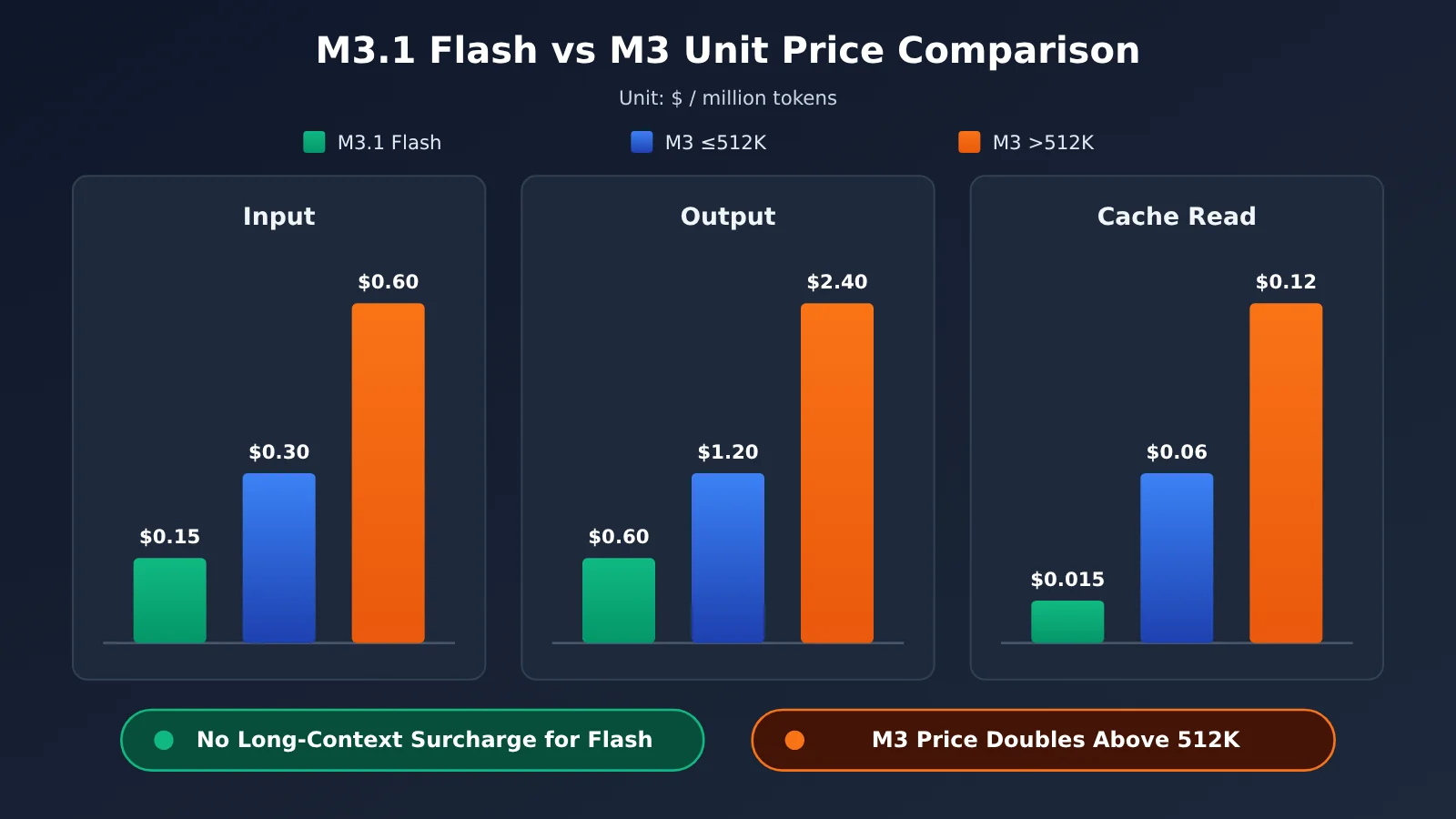
People often ask how much cheaper MiniMax M3.1 Flash is than the previous-generation M3. The table below uses prices from the official pricing page. M3 prices are the standard rates after a permanent 50% discount, per million tokens:
| Model | Input | Output | Cache read | Long-context surcharge |
|---|---|---|---|---|
| MiniMax-M3.1-Flash | $0.15 | $0.60 | $0.015 | None |
| MiniMax-M3 (input ≤512K) | $0.30 | $1.20 | $0.06 | — |
| MiniMax-M3 (input >512K) | $0.60 | $2.40 | $0.12 | 2× rate |
| MiniMax-M3 Priority tier | 1.5× standard rate | 1.5× standard rate | — | — |
Note: Pricing data comes from MiniMax’s official pricing page. Actual charges on third-party platforms depend on their own pricing. For example, when using the MiniMax series through APIYI at apiyi.com, refer to the prices listed on its pricing page.
The table shows three things:
- For regular-length inputs: Flash’s input and output rates are both half of M3’s, while its cache read rate is just one-quarter ($0.015 vs. $0.06). Let’s check Example 3: with the same usage, M3 costs 1 × $0.06 + 0.5 × $0.30 + 1 × $1.20 = $1.41 per day, while Flash costs $0.69 per day, or about 49% as much.
- For very long contexts: When input exceeds 512K, M3’s rates double, while Flash has no surcharge. Flash’s input and output rates are then just one-quarter of M3’s.
- Better cache savings: Flash’s cache read rate is one-tenth of its input rate, compared with one-fifth for M3. So the more you rely on caching, the greater Flash’s advantage.
The official claim says “one-third the cost.” Why are the rates only half as much?
These claims aren’t contradictory. Half the rate refers to the price per token. One-third the cost (in an official post on X) and “70% lower overall cost for Agent tasks” (in the official blog) refer to the total cost of completing a task. Both are claims made by MiniMax.
Total cost per task = rate × tokens used. If the new model needs fewer rounds or tokens to complete the same task, the task cost can drop by more than the per-token rate. But MiniMax hasn’t published the specific calculation behind the one-third figure. The Automation-Bench figure in its cost chart (62.8) also doesn’t match the figure in the table (62.2). For budgeting, it’s best to calculate costs using the listed rates and treat the “one-third” claim as a reference.
How to Choose Between MiniMax M3.1 Flash Pay-As-You-Go API and an M Plan Subscription
MiniMax M3.1 Flash offers two payment options. With the pay-as-you-go API, you pay for what you use, with charges deducted from your account balance. M Plan is a monthly subscription with three tiers: Go, Explore, and Build. All tiers use the M3.1 Flash text model. According to the official documentation, Explore includes 3 times the usage of Go, while Build includes 7.5 times the usage of Go. Explore and Build also include the H3 video model. Check the official website for current monthly prices. The company has also announced a first-month discount for monthly subscriptions; check the official website for the offer details.
| Decision factor | Choose pay-as-you-go API | Choose an M Plan subscription |
|---|---|---|
| How much you use | Your usage is unpredictable or generally low | You use it heavily every day and want a fixed monthly cost |
| Where you use it | Your product backend, batch scripts, or data processing | Writing code and getting everyday AI coding assistance |
| What tools you use | Custom programs that call the API endpoint directly | MiniMax Code, Claude Code, Codex, Cursor, OpenCode |
| Whether you need video | Pay separately as needed | Explore / Build include the H3 video model |
| Cost control | Optimize costs precisely per request using effort settings and caching | No need to calculate tokens; check the official website for rules on usage beyond your plan’s limits |
In short: choose pay-as-you-go for programs and a subscription for people. If you mainly write code in tools like Claude Code or Cursor, you can connect an M Plan subscription key directly. If you’re building a product or running batch jobs, the pay-as-you-go API makes costs more transparent, especially when paired with the cost-calculation method in this article.
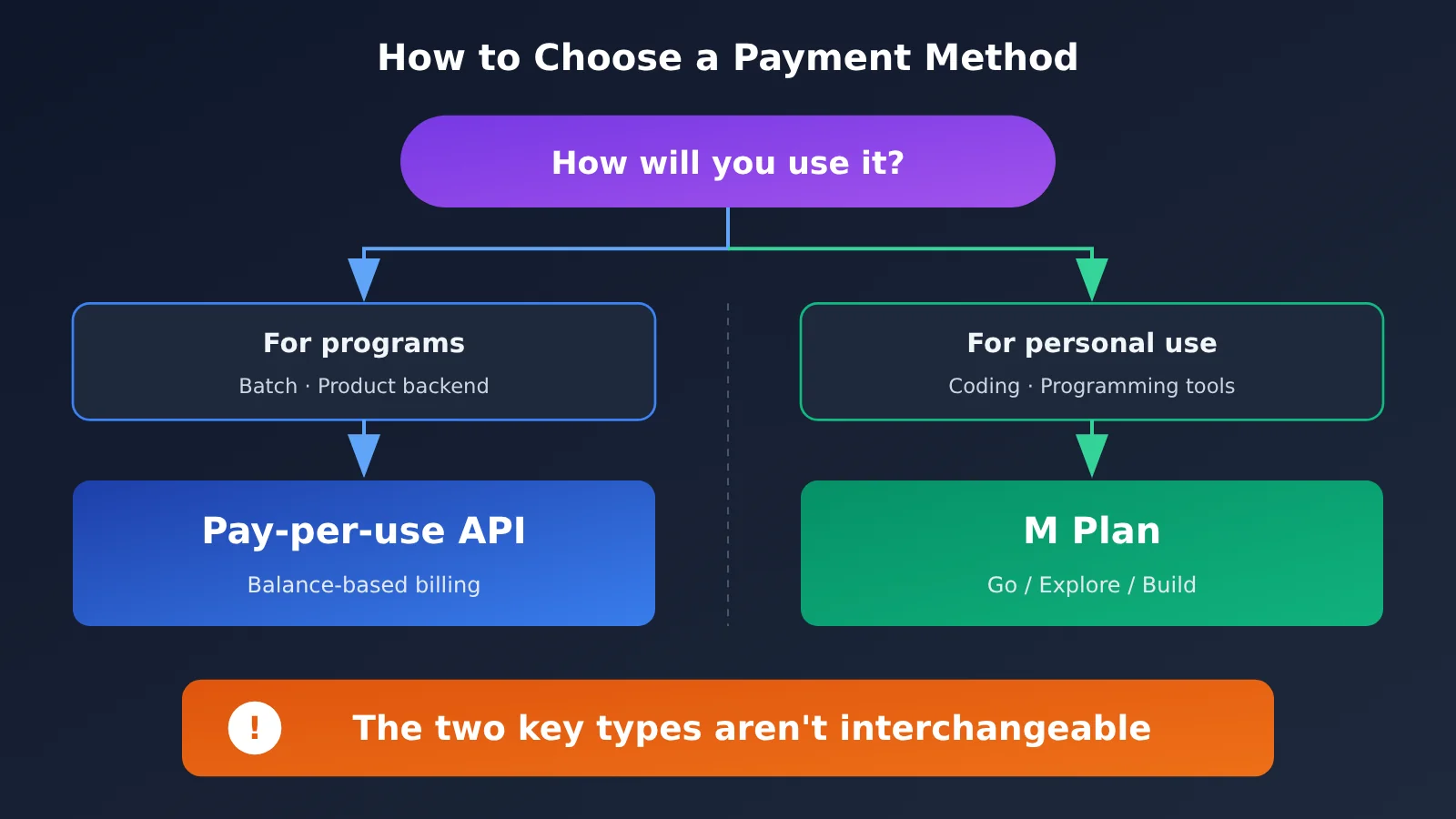
⚠️ Important: The two types of keys aren’t interchangeable. The official FAQ explicitly states that the pay-as-you-go API key and the M Plan subscription key are different keys, and you get them from different places in the dashboard. Using a subscription key to call a pay-as-you-go endpoint, or vice versa, will cause problems. Before configuring anything, make sure you’ve copied the right key. Also, the old model name MiniMax-M3.1-Flash-Preview has been retired. Requests using the old name are now handled by MiniMax-M3.1-Flash.
When You Shouldn’t Use MiniMax M3.1 Flash
Low cost doesn’t mean it’s the right choice for every task. In these situations, it’s best to hold off on switching—or switch only part of your workload.
1. Long-running agent workflows and terminal tasks. Third-party evaluations from Vals AI show that M3.1 Flash scores 25.25% on Terminal-Bench 4.0, ranking 22nd out of 51 models. On HLAB-Vals-1.1, it scores 7.50%, ranking 17th out of 23 models. MiniMax’s own reported Terminal Bench 4.0 score is 38.1, which is 13.7 points below Claude Opus 5’s 51.8.
2. Large-scale code refactoring. MiniMax reports a score of 23.0 on SWE Refactor Bench, compared with 31.0 for Claude Opus 5.
3. Tasks that require thinking to be disabled for ultra-low latency. Thinking can’t be turned off; the lowest setting available is low.
4. Existing integrations that rely on parsing thinking tags. If you’re migrating from M3, you’ll need to update your parsing logic first, or you won’t get the thinking content.
5. You want to use it on APIYI right now. As of publication, MiniMax-M3.1-Flash isn’t listed on the APIYI pricing page. Check the pricing page to confirm availability.
A quick note on how it compares with Claude: MiniMax’s official comparison table uses Claude Opus 5, not Opus 5.5. Claude Opus 5.5 remains Anthropic’s most powerful flagship model, and MiniMax hasn’t compared it point by point. So it wouldn’t be accurate to say that Flash matches or surpasses Opus 5.5. In the overall rankings, Vals Index places M3.1 Flash 15th out of 22 models, with a score of 53.78%, and 5th among open-weight models.
| Model | Input / output (per million tokens) | Benchmark comparison | Best for | Access |
|---|---|---|---|---|
| MiniMax-M3.1-Flash | $0.15 / $0.60 | MiniMax-reported results + Vals evaluations | Batch processing, everyday coding, tool use | Official MiniMax; check the APIYI pricing page for availability |
| claude-opus-5 | $5 / $25 (official pricing) | Model used in MiniMax’s official comparison table | Complex tasks | APIYI, apiyi.com, and others |
| claude-opus-5-5 | $4 / $20 (official pricing) | Not compared by MiniMax | Difficult planning, architecture design, large-scale refactoring | APIYI, apiyi.com, and others |
Based on the listed prices, Opus 5.5’s output tokens cost about 33 times as much as Flash’s ($20 ÷ $0.60 ≈ 33.3), while its input tokens cost about 27 times as much ($4 ÷ $0.15 ≈ 26.7). With that big a price gap, the most practical approach is to split the work between them rather than choose just one.
How to Pair MiniMax and Claude Opus 5.5 on APIYI
As of 2026-10-22, the MiniMax models available directly on APIYI’s pricing page are MiniMax-M3 (which supports both OpenAI and Anthropic API formats and is available in the ClaudeCode group), MiniMax-M2.7, MiniMax-M2.7-highspeed, MiniMax-M2.5, MiniMax-M2.5-lightning, and the video model MiniMax-H3. MiniMax-M3.1-Flash isn’t on the pricing page yet. Check APIYI’s pricing page to confirm whether it’s available.
For Claude, both claude-opus-5-5 and claude-opus-5 are available to call directly. The advantage of APIYI is that one API key lets you call both the MiniMax series and Claude Opus 5.5—no need to register or top up separately. Here’s a recommended way to divide the work:
- Use MiniMax for inexpensive, high-volume tasks: Data cleaning, content classification, batch rewriting, and simple code generation are a good fit for cost-effective models like MiniMax-M3, especially with caching and lower reasoning effort.
- Use Opus 5.5 for complex planning and refactoring: System architecture design, major cross-module refactors, and high-level planning for long-running tasks are well suited to
claude-opus-5-5. - Plan first, then execute: Ask Opus 5.5 to develop a plan and break it into tasks, then send those smaller tasks to MiniMax for batch execution. This balances quality and cost.
💡 How to choose: If you’re not sure which tasks you can hand off to a cheaper model, run the same sample tasks through MiniMax-M3 and
claude-opus-5-5on APIYI at apiyi.com. Compare the results and costs, then decide how to divide the work.
Frequently Asked Questions
Q1: How much does MiniMax M3.1 Flash actually cost?
According to the official pricing page, it costs $0.15 per million input tokens, $0.60 per million output tokens, and $0.015 per million cached input tokens. These rates are fixed, with no surcharge for long contexts. Server-side web search via `web_search` costs an additional $0.01 per search.
Q2: Why does a one-sentence question generate so many output tokens?
Because the model’s reasoning process counts as output, and if you don’t specify an effort level, it defaults to `max`. You can’t turn off reasoning, so the only way to reduce output is to set effort to `low` or `medium`.
Q3: How much cheaper is MiniMax M3.1 Flash than M3?
For input and output, its per-token rates are half of M3’s standard rates; cached input costs one-quarter as much. When input exceeds 512K tokens, M3’s rates double, while Flash’s don’t increase. The official claim that it costs “one-third as much” is based on the company’s own task-level figures; the calculation method hasn’t been published.
Q4: Can I use a pay-as-you-go API key with M Plan in Claude Code?
No. Pay-as-you-go API keys and M Plan subscription keys are different types of keys, obtained from different places in the dashboard, and they aren’t interchangeable. To connect a subscription to a tool, copy your subscription key.
Q5: Can I call MiniMax M3.1 Flash through APIYI?
As of publication, MiniMax-M3.1-Flash isn’t listed on APIYI’s pricing page. Check the pricing page for availability; we’ll add it as soon as possible. For now, you can use MiniMax-M3, claude-opus-5-5, and other models directly through APIYI at apiyi.com, and switch between them with a single key.
Q6: Is there a way to try it for free?
The third-party platform OpenRouter offers a rate-limited free endpoint, `minimax/minimax-m3.1-flash:free`, which is a good way to try it out. For production use, follow the method in this article and estimate costs with a small batch of data first.
Q7: What are MiniMax M3.1 Flash’s limitations?
Third-party reviews suggest it’s weaker on long-horizon Agent tasks and terminal tasks (ranking 22nd out of 51 models on Vals Terminal-Bench 4.0). Its self-reported scores on refactoring tasks are also lower than Claude Opus 5. In addition, MiniMax hasn’t published a technical report explaining what changed in Flash.
Q8: What should I do first to minimize costs?
First, lower effort from the default `max` setting. Then, place fixed system prompts and long documents at the beginning of requests to take advantage of caching. These two steps usually make a more immediate difference than switching models. To compare costs across multiple models, you can run tests through APIYI at apiyi.com.
MiniMax M3.1 Flash Pricing: Key Takeaways
- Three pricing rates: $0.15 for input, $0.60 for output, and $0.015 for cached reads, per million tokens. There’s no surcharge for long contexts.
- Output drives most of the bill: Reasoning is billed as output. The default max setting is the most expensive, so lower the effort level first if you want to save.
- You can’t turn reasoning off: Setting it to
disabledornonereturns a 400 error. The lowest available setting islow. - Caching saves 90%: Put fixed content at the beginning and variable content at the end.
- Half the per-token price of M3: The claim that it costs “one-third as much” is the official figure based on task-level costs. Both claims can be true.
- Use pay-as-you-go for code and subscriptions for people: The two types of keys aren’t interchangeable. Check the official website for current M Plan pricing.
- Mixing models can be more cost-effective: Use one APIYI key to run batch jobs with MiniMax and handle planning with Opus 5.5.
Summary
The key points about MiniMax M3.1 Flash pricing:
- Know how to calculate the cost: Cost = usage ÷ 1 million × price. Calculate input, cached reads, and output separately, then add them together.
- Know how to save: Lower the effort level to control reasoning output, and put fixed content first to get more cache hits.
- Know which option to choose: Use the pay-as-you-go API for code and the M Plan for people. For long-running agent workflows and major refactors, a more capable model is still recommended.
Try a small batch of real data first to calculate your own cost per run, then decide on your payment method and how to divide the work. If you need to compare performance and costs across multiple models, you can use one APIYI key at apiyi.com to run unified tests. Check the pricing page to confirm whether MiniMax-M3.1-Flash is available.
📚 References
- MiniMax official announcement blog: M3.1 Flash speed, cost, and officially reported benchmark scores
- Link:
minimax.io/blog/minimax-m31f -
Notes: Source for official pricing and the claim that “agent task costs are reduced by 70%”
-
MiniMax official pricing page: Full per-unit pricing for Flash and M3
- Link:
platform.minimax.io/docs/guides/pricing -
Notes: Billing formula, long-context pricing tiers, and
web_searchpricing -
MiniMax official documentation: Model invocation: Effort levels and reasoning rules
- Link:
platform.minimax.io/docs/guides/text-generation -
Notes: Reasoning can’t be disabled, and the
effortfield name for each protocol -
MiniMax M Plan subscription guide: Go / Explore / Build tiers
- Link:
platform.minimax.io/docs/m-plan/intro -
Notes: Usage multipliers, supported tools, and model details
-
MiniMax official FAQ: Differences between API keys and subscription keys
- Link:
platform.minimax.io/docs/faq/about-apis -
Notes: Official explanation that the two types of keys aren’t interchangeable
-
Vals AI evaluation page: Third-party evaluation results
- Link:
vals.ai/models/minimax_MiniMax-M3.1-flash - Notes: Vals Index ranking, strengths, and weaknesses
Author: APIYI Technical Team
Technical discussions: Get in touch via the APIYI (apiyi.com) homepage. For more integration resources, visit the documentation center at docs.apiyi.com.