Author’s note: This article compares ChatGPT Scheduled Tasks, the Codex agent, and ChatGPT Dot across three layers—triggering, execution, and ongoing coordination—covering their automation capabilities, costs, reliability, and how to choose between them.
As of October 2026, three OpenAI products can make AI “work on its own”: ChatGPT Scheduled Tasks, the Codex agent and Codex Automations, and ChatGPT Dot, an always-on personal agent released on September 29. All three can run on a schedule and continue work across conversations, so many users aren’t sure how they differ or which plan is worth paying for.
This article won’t rank the three from strongest to weakest. They’re designed for different purposes, and they’ve already started calling on one another. We’ll use OpenAI’s official documentation to explain their capabilities and costs, then check their reliability against hands-on testing from The Verge, Axios, and Business Insider, along with community reports of failures.
What you’ll get: By the end, you’ll know which option to use for daily news searches, software automation, and long-term project follow-up—and how far each still has to go before it can act as an unsupervised digital employee.
The Key Differences Between ChatGPT Scheduled Tasks, Codex, and Dot
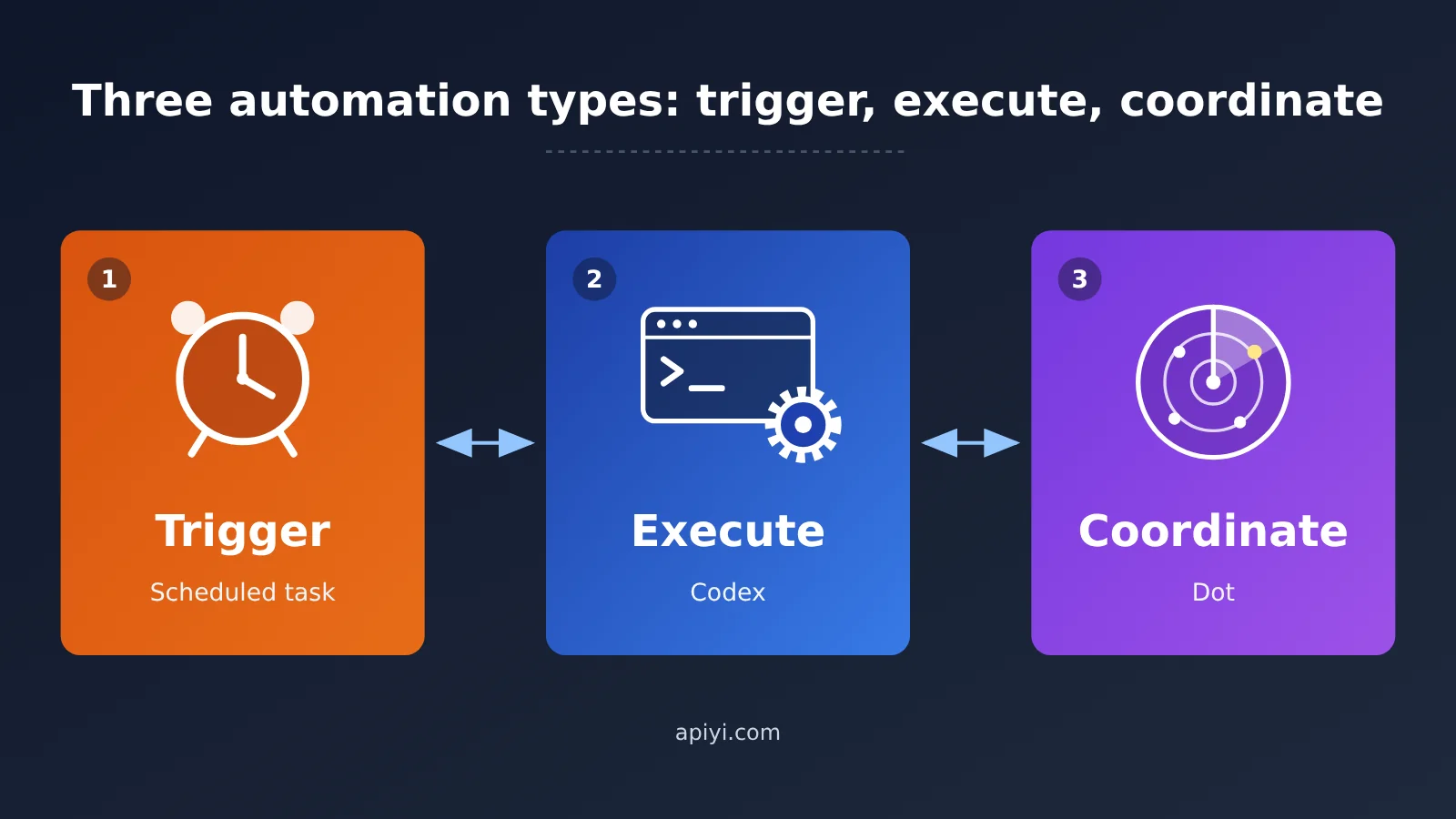
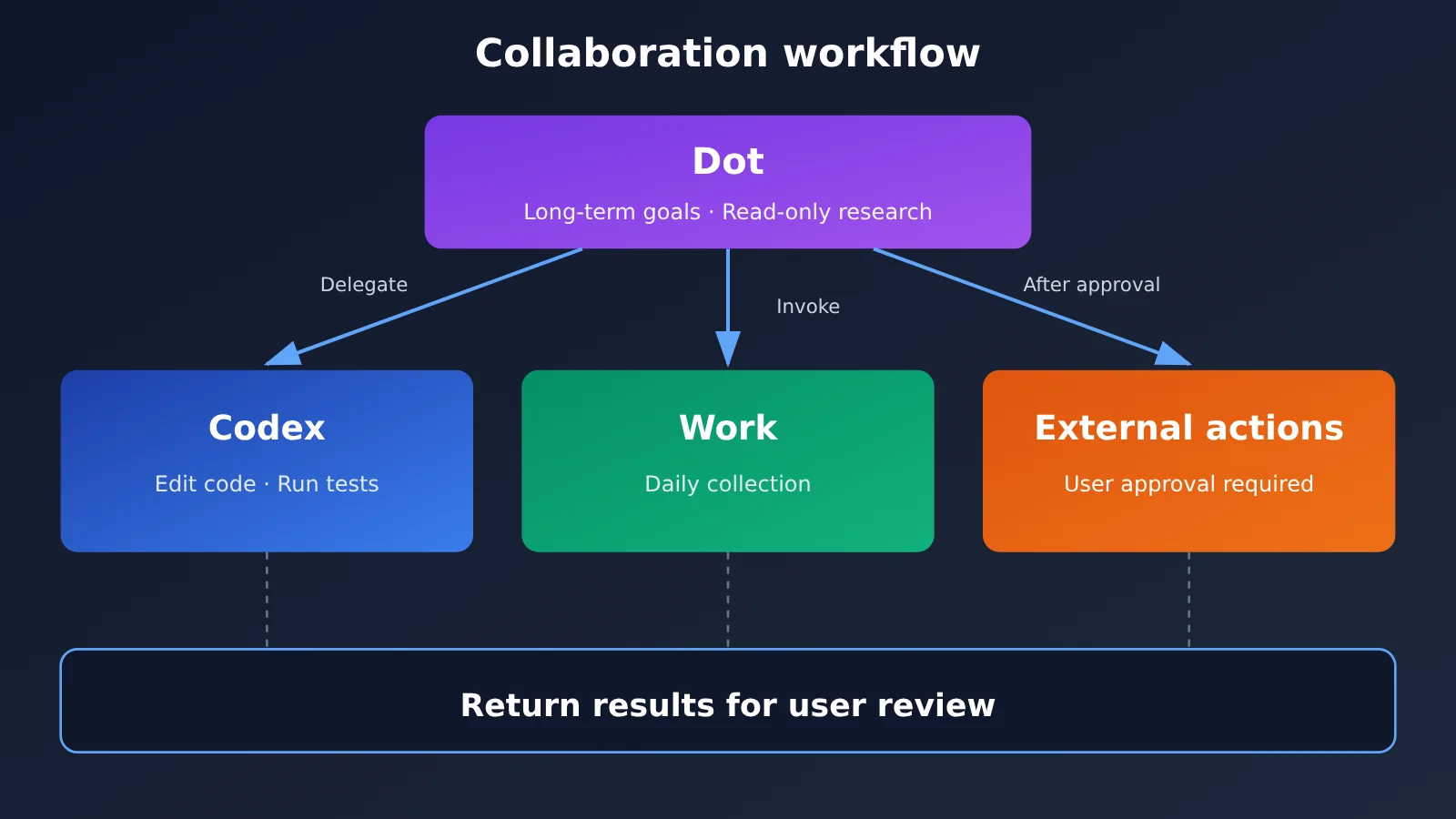
The simplest way to think about the three is: scheduled tasks trigger the work, Codex carries it out, and Dot coordinates it over time. This is just an analogy to help explain the differences, not an official OpenAI classification. Their capabilities overlap considerably, so it would be wrong to assume that scheduled tasks can’t execute work or that Codex can’t work proactively.
| Comparison | ChatGPT Scheduled Tasks | Codex Agents and Automation | ChatGPT Dot |
|---|---|---|---|
| Core role | Automatically triggered tasks | Engineering and desktop execution agent | Persistent, long-term work agent |
| Runs at a specified time | Supported | Supported | Supported |
| Responds to external events | Selected Gmail, Slack, and GitHub events | Available automations and integrations | Specified events and proactive follow-ups |
| Operates websites / local software | Depends on the Work execution environment | Supports browsers and Computer Use | Has its own cloud browser; can delegate to a connected computer |
| Modifies code and files | Work can do this in a suitable environment | Core strength | Executes directly or delegates to Codex |
| Proactively looks for issues without new messages | Depends on predefined monitoring conditions | Contextual suggestions and follow-up checks | Proactive research is a core feature |
| Continues after the computer is shut down | Cloud tasks can | Cloud tasks can; local tasks can’t | Its own cloud-based work can |
| Human approval | Depends on the app and operation permissions | Depends on sandbox and approval policies | Built-in approvals and custom rules |
| Best suited for | General users | Users comfortable with some setup and supervision | People with ongoing work needs |
Note that the table compares capabilities supported by the products. Not every feature is necessarily available on every account, version, or in every region.
ChatGPT Scheduled Tasks: More Than Just Reminder Triggers
Scheduled tasks launched in beta on January 14, 2025, primarily as a way to set reminders. After an update on June 17, 2026, they gained a unified Scheduled management hub. Monitoring tasks can now search the web and check connected apps, notifying you only when a change is worth reporting. The former ChatGPT Pulse proactive updates feature was also folded into scheduled tasks, and Pulse was retired.
Event triggers are another important capability. Officially supported event sources include new Gmail messages (filterable by sender or subject), new messages in specific Slack channels, and specified GitHub pull request activity. These tasks run through ChatGPT Work and aren’t available on Free or Go plans. A task can combine multiple event triggers, but it can’t combine time-based and event-based triggers in the same task definition.
| Plan | Active scheduled task limit | Frequency details |
|---|---|---|
| Free / Go | 3 | Free recurring tasks can run at most once a day and only use broad time windows such as morning, afternoon, or evening |
| Plus | 5 | Paid plans support hourly recurrence and specified delivery times |
| Business / Edu | 10 | Same as above |
| Pro / Enterprise | 15 | Same as above |
| Event triggers (all accounts) | Separate limit | Up to 30 per hour and 720 per day; events occurring close together may be combined |
Codex Agents: Getting the Work Done
The Codex desktop app launched on macOS on February 2, 2026, and expanded to Windows on March 4. It offers parallel agents, Git Worktree isolation, a skills system, and Automations. The April 16 release of “Codex for (almost) everything” brought a major change: Codex can operate other apps on your computer, use Computer Use in the background, remember information, schedule future tasks for itself, resume existing threads, and proactively suggest next steps. OpenAI reported at the time that more than 3 million developers used Codex each week, but that figure reflects adoption—not how many of them use its automation features.
The essential difference between Codex and a scheduled task is that Codex restores its working environment, then reads files, changes code, runs tests, examines results, and fixes failures. It doesn’t just generate a piece of text at a scheduled time. In February 2026, OpenAI published an internal long-running task experiment in which Codex used GPT-5.3-Codex to build a design tool from an empty codebase. It ran for about 25 hours, consumed roughly 13 million tokens, and generated around 30,000 lines of code. The experiment showed that Codex could keep working toward a complex goal over an extended period, but it wasn’t a guarantee of reliability for every user.
ChatGPT Dot: A Personal Agent That Stays on Top of Things
Dot is powered by GPT-6 Astra and has its own cloud computer and browser. Its plugin ecosystem can connect to more than 4,000 apps, and Dot can collaborate with users through channels such as ChatGPT, Slack, and Teams. “4,000+” refers to the scope of the ecosystem; which apps an individual can actually use depends on plugins, connections, permissions, region, and workspace configuration. The key difference between Dot and Codex is Proactive Research: even when the user hasn’t sent a new message, Dot can read authorized information sources, connect new information to existing tasks, and decide whether to alert the user.
Proactive Research has an important security boundary: it can only use read-only tools. It can’t directly send messages to third parties, change content in connected apps, or control a browser. Research findings are first reported to Dot, which then arranges any follow-up actions according to authorization and approval rules. By October, Dot could start or continue Codex work and read and edit existing ChatGPT Work automation tasks. The three therefore work together rather than replace one another.
ChatGPT Scheduled Tasks vs. Codex and Dot: Cost Comparison
These three capabilities aren’t three separate subscriptions. Scheduled tasks are generally included in eligible ChatGPT plans. Codex is available through a ChatGPT subscription or via an API key with usage-based billing. The first Dot instance is included in eligible Pro or Business Premium plans, with no additional base subscription fee.
| Plan | Monthly price (official US pricing as of October 2026) | Main automation capabilities |
|---|---|---|
| Free | $0 | Limited scheduled tasks and Codex access |
| Go | $8 (varies by region) | Basic tasks and limited Codex access |
| Plus | $20 | More scheduled tasks, Work, and Codex |
| Pro 100 / 200 / 500 | $100 / $200 / $500 | Adds Dot, with increasing usage allowances |
| Business Standard | $20 billed annually, $25 billed monthly / user | Team scheduled tasks and Codex |
| Business Premium | $100 billed annually, $125 billed monthly / user | Dot available to eligible users |
| Self-built API solution | Usage-based billing | Access multiple models through APIYI apiyi.com and orchestrate scheduled scripts yourself |
A few points are easy to misunderstand. Dot has the same core intelligence on Pro 200 and Pro 100; the main differences are usage allowances and plan benefits. Plus users currently can’t access Dot directly. During the first month after Dot’s launch, eligible Dot usage itself doesn’t count against existing allowances, but Work and Codex tasks created or managed by Dot still consume allowances according to their respective rules. Work and Codex share work allowances on eligible plans. The standard Codex cloud environment doesn’t incur separate virtual machine charges, but model tasks are billed as usual.
One more important distinction: Access through an API key doesn’t give you the native Dot, Work, or Codex Cloud features included in ChatGPT subscriptions. The API route is best suited to developers who want to build their own “trigger + model invocation” setup. Here’s a minimal implementation.
Build a Lightweight Scheduled Task With an API
If all you need is a roundup of news each morning and you don’t want to upgrade your subscription, you can use cron and a single model invocation. Note that the API won’t browse the web for you: your script needs to fetch the news sources and pass them in.
import openai

client = openai.OpenAI(
    api_key="YOUR_API_KEY",
    base_url="https://api.apiyi.com/v1"  # APIYI OpenAI-compatible endpoint
)

news = open("today_feed.txt", encoding="utf-8").read()  # Generated beforehand by a fetch script
resp = client.chat.completions.create(
    model="gpt-4o-mini",
    messages=[{"role": "user", "content": f"筛选高价值 AI 新闻并写中文摘要,保留原始网址:\n{news}"}]
)
print(resp.choices[0].message.content)
View the full implementation (with deduplication and retries)
import json
import time
import hashlib
from pathlib import Path
import openai

client = openai.OpenAI(
    api_key="YOUR_API_KEY",
    base_url="https://api.apiyi.com/v1"
)

SEEN_FILE = Path("seen.json")

def load_seen() -> set:
    return set(json.loads(SEEN_FILE.read_text())) if SEEN_FILE.exists() else set()

def dedupe(items: list[dict], seen: set) -> list[dict]:
    fresh = []
    for it in items:
        key = hashlib.md5(it["url"].encode()).hexdigest()
        if key not in seen:
            seen.add(key)
            fresh.append(it)
    return fresh

def summarize(items: list[dict], model: str = "gpt-4o-mini", retries: int = 3) -> str:
    text = "\n".join(f"- {i['title']} | {i['date']} | {i['url']}" for i in items)
    for attempt in range(retries):
        try:
            resp = client.chat.completions.create(
                model=model,
                messages=[
                    {"role": "system", "content": "你是 AI 行业编辑,只基于给定条目写摘要,不补充未提供的事实。"},
                    {"role": "user", "content": f"按重要性排序并写中文摘要,保留网址和日期:\n{text}"}
                ],
                max_tokens=1500
            )
            return resp.choices[0].message.content
        except Exception as e:
            time.sleep(2 ** attempt)
    return "ERROR: 模型调用失败,需人工检查"

if __name__ == "__main__":
    items = json.loads(Path("today_feed.json").read_text(encoding="utf-8"))
    seen = load_seen()
    fresh = dedupe(items, seen)
    SEEN_FILE.write_text(json.dumps(list(seen)))
    report = summarize(fresh) if fresh else "今日无新增条目"
    Path("daily_report.md").write_text(report, encoding="utf-8")

# Crontab example: run daily at 8 a.m.
# 0 8 * * * /usr/bin/python3 /path/to/daily_news.py
🚀 Quick-start tip: The key to a self-built solution is to get all three stages working first: triggering, execution, and delivery. Then consider switching to a more powerful model. Get free testing credits from APIYI at apiyi.com and use the same API key to compare summary quality across GPT, Claude, and Gemini before deciding which one to use day to day.
When to Use ChatGPT Scheduled Tasks, Codex, or Dot
It’s easier to compare them using the same goal: “Research AI news every morning at 8 a.m., filter for high-value stories, assess trends against past coverage, and organize the findings into material editors can use.”
When to Choose ChatGPT Scheduled Tasks
- Daily briefings and monitoring: Create a daily or monitoring task that searches the web automatically at the scheduled time, avoids duplicate stories, and notifies you only when something changes.
- Lightweight event response: Automatically compile information when you receive a Gmail message from a specific sender or when there’s new activity on a GitHub PR. This requires a Plus plan or higher.
- Limitations: Collection quality depends on search tools and website accessibility. Complex trend research is also constrained by model capabilities and usage limits.
When to Choose Codex
- Maintainable collection pipelines: Read from preset sources, use scripts to collect and deduplicate content, store structured data, compare it with historical records, generate reports for review, and fix the workflow when it fails.
- Scheduled engineering work: Categorize bugs daily, summarize CI failures, prepare release briefings, or “detect a regression, modify the code, test it, and submit the changes for review only after the tests pass.”
- Limitations: Scheduled tasks that depend on a local project require your computer to be on, the desktop app to be running, and the files to be accessible. Codex Cloud can keep working while your computer sleeps, but it can’t access all your local files, browser login sessions, or system permissions.
When to Choose Dot
- Long-term intelligence assistant: Give it a high-level goal, such as “Keep tracking important changes and notify me when something’s worth writing about.” Dot delegates daily collection to scheduled tasks and tool fixes to Codex.
- Cross-project coordination: Manage multiple projects and spot issues no one explicitly assigned it to find, such as a client’s new requirements conflicting with the original plan or an email exchange that hasn’t reached a clear agreement.
- Limitations: It’s still constrained by platform access, connection permissions, model errors, usage limits, and approval mechanisms.
One more thing to keep in mind: if your sources include platforms like X, Xiaohongshu, Douyin, or Weibo that require login or restrict bot access, none of the three approaches can guarantee complete access. Cloud browsers and Computer Use can’t bypass every verification check either.
ChatGPT Dot and Codex Tested: How Far Are We From Full Automation?
Three independent publications tested Dot in October, and their conclusions were broadly similar: it’s good at pulling information together and producing content, but it still gets stuck on the final steps of real-world tasks.
- The Verge (October 2): Dot found a $100 discount in an old email, but stopped when it encountered a verification step that required someone to hold down a button. Checkout involved banking information, so the author completed it personally. When looking for a coworking space, Dot missed the option to book a free tour. It did better on tasks in controlled environments, such as redesigning a personal website and working with video footage. The author described Dot as “Codex for normal people,” but didn’t find it compelling enough to justify $100 a month.
- Axios (October 20): Dot generated a 38-page, retro-style event keepsake book. It created a separate 12-page photo keepsake book in 47 seconds, though that was a single test result, not an average. It also spotted a scheduling conflict on the calendar. Shopping ran into obstacles here too, and its creations needed human editing.
- Business Insider (October 22): Dot proactively noticed that an email exchange between the author and their accountant hadn’t been confirmed, prompting the author to follow up on a tax filing. But when ordering lunch, it was repeatedly interrupted by SMS verification codes and input problems. The copy it wrote for a website design also felt generic.
Community feedback has exposed reliability gaps. Early users on Reddit reported that Dot missed things when monitoring email and didn’t provide clear progress updates. One Pro 200 user also triggered an anti-abuse suspension after heavy use. In the OpenAI developer community, users reported that Dot interrupted multistep tasks and repeatedly asked for approval for actions that had already been authorized. For scheduled tasks, users reported jobs not running on time, being automatically paused after failures, or showing execution records without visible results. Security checks also blocked write operations involving GitHub, Gmail, and other services. Codex GitHub Issue #56550 documents one case in which a scheduled task marked Active on Windows 11 hadn’t triggered by noon, even though running it manually worked. The root cause hasn’t been confirmed.
These reports show that automation failures fall into at least four categories: a task doesn’t trigger; it triggers but lacks data or permissions; it runs but the quality falls short; or it completes but the result isn’t delivered. These failures happen at different stages, so they can’t all be blamed on “the model not being smart enough.” A handful of posts also can’t establish an overall failure rate. OpenAI hasn’t published data comparing the long-term unattended success rates of all three against a common set of tasks, either.
ChatGPT Scheduled Tasks, Codex, and Dot: Which Should You Choose?
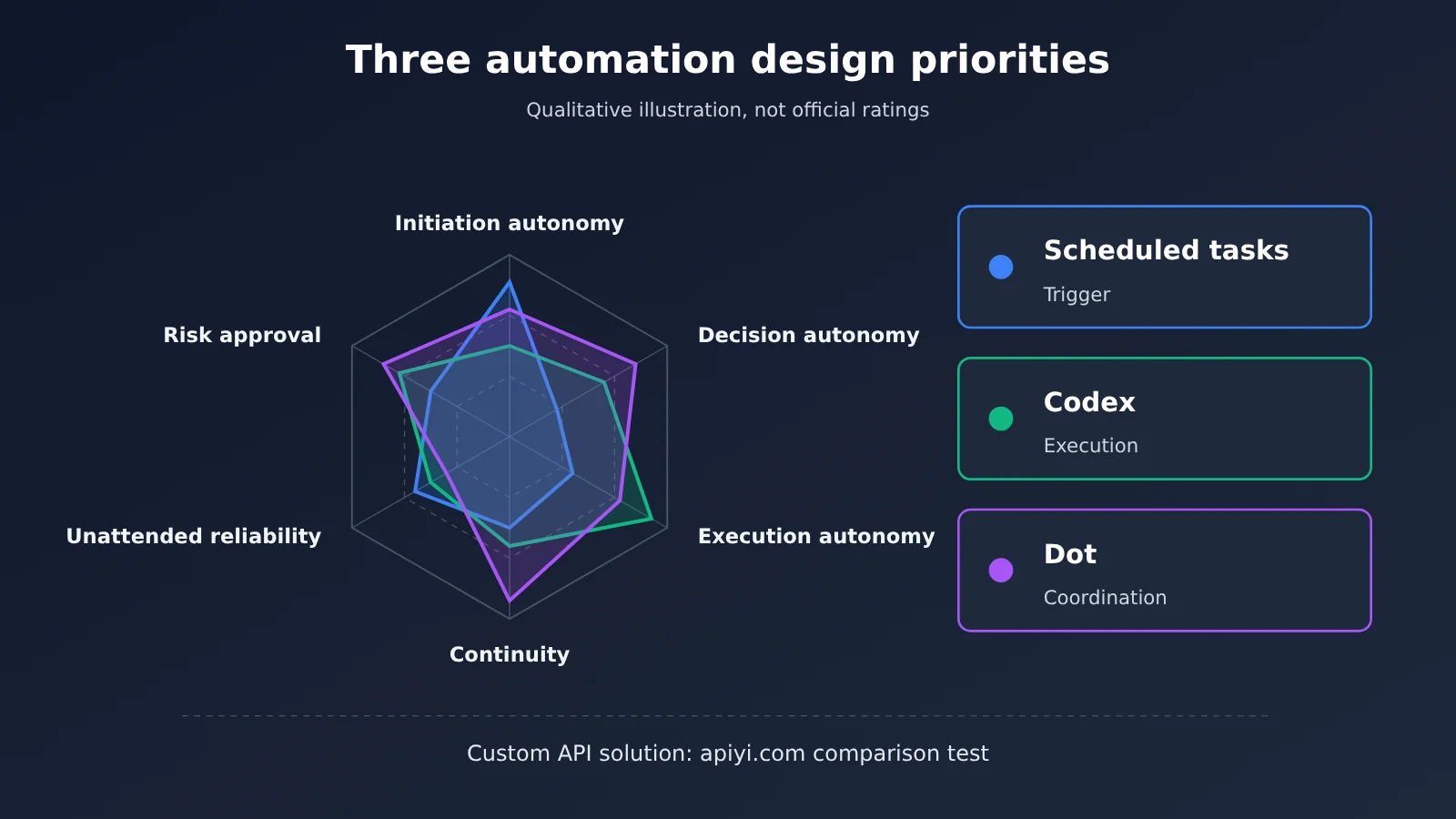
To judge how fully automated a tool really is, these six dimensions are more useful than simply asking whether it can run on a schedule or click buttons. The table is a qualitative comparison of design priorities, not an official rating.
| Dimension | Key question | Scheduled Tasks | Codex | Dot |
|---|---|---|---|---|
| Startup autonomy | Can it start without a new prompt? | Starts on a schedule or event | Triggered by a schedule or authorized event | Also offers proactive read-only research |
| Decision autonomy | Can it decide what’s worth doing? | Within a clearly defined scope | Can make context-aware suggestions | A central design focus |
| Execution autonomy | Can it operate files, software, and websites? | Depends on the Work environment | A core strength | Executes directly or delegates |
| Continuity | Can it carry work across days? | Can continue in a linked chat | Threads, memory, and scheduled follow-ups | A core design feature |
| Unattended reliability | Can it run on time, produce correct results, and deliver them? | No standardized public data | No standardized public data | No standardized public data |
| Risk and approvals | Can high-risk actions be controlled? | Depends on app permissions | Sandbox and approval policies | Built-in approvals and custom rules |
Based on that, here are some straightforward recommendations:
- For daily briefings, reminders, or website monitoring: Plus scheduled tasks are enough. There’s no need to upgrade to Dot from $20 to $100.
- For maintaining scripts, data, and code: Choose Codex. If you need it to keep running after you step away from your computer, prioritize a cloud environment. Use narrowly scoped sandbox permissions for background tasks where possible, since open network access, local write access, and full system access all increase risk.
- For tracking dozens of tasks and coordinating across platforms: Dot becomes more valuable, but allow time for a person to take over logins, payments, and external submissions.
- For developers embedding automation in their own products: Build your own triggers and orchestration with the API. This gives you the most control, but requires more engineering work.
💡 How to choose: To assess the return on investment, look at how much manual work you actually save each month, along with the extra time spent on errors, approvals, and rework. For enterprise evaluations, track trigger success rate, completion rate, factual accuracy, the number of human takeovers, and cost per successful task. For custom workflows, you can compare models through a unified interface on APIYI apiyi.com. Switching models only requires changing the model parameter.
Frequently Asked Questions
Q1: What are ChatGPT scheduled tasks, Codex, and Dot?
Scheduled tasks automatically start work based on a time or event. Codex is an execution agent that can read and write files, run code, and operate a computer. Dot is an always-on personal agent released in September 2026 and powered by GPT-6 Astra. It tracks goals over time and coordinates their execution.
Q2: If Codex can already execute complex tasks automatically, why do we need Dot?
“Completing a specified task” and “continually identifying what needs to be done” are two different things. Codex is great at execution once it has a goal. Dot focuses on keeping track of goals, monitoring changes, starting new tasks, and coordinating execution agents. That said, Codex also has memory and proactive suggestion features in 2026, so the distinction isn’t absolute.
Q3: Does Dot make scheduled tasks and Codex unnecessary?
No. Dot can start or continue Codex work and edit existing Work automation tasks. Dot and Codex are more like a project lead and an execution agent.
Q4: Does my computer have to be on for Codex scheduled tasks to run?
Tasks that depend on a local project need your computer to be on, the app to be running, and the files to be accessible. Codex Cloud runs in an OpenAI-managed cloud environment and can continue after your computer goes to sleep, but it doesn’t automatically have access to your local files or logged-in sessions.
Q5: Can I use an API for similar automation without a ChatGPT subscription?
Yes, you can set up the “scheduled trigger + model processing” layer using the cron script above. Register with APIYI at apiyi.com to get an API key and free credits, then set `base_url` to `https://api.apiyi.com/v1`. Keep in mind that API access doesn’t include ChatGPT’s native Dot, Work, or Codex Cloud features. You’ll need to implement web scraping and notification delivery yourself.
Q6: Could Dot’s proactive research send emails or change content without permission?
No. According to the official rules, proactive research can only use read-only tools. When it finds an issue, it passes it to Dot, which handles it according to authorization and approval rules. In one official example, Dot found that a user had missed an invoice, prepared it, and sent it only after receiving approval.
Q7: How do I troubleshoot a ChatGPT scheduled task that didn’t run?
First, open the Scheduled page and check the task’s status. Don’t rely solely on what the model says in the conversation. Then check the web access tools and app connections, whether the task was paused due to failures or prolonged inactivity, and whether the associated chat was deleted or archived. Also, some tasks created in a Project can’t access files uploaded to that Project.
Q8: What’s a low-cost way to compare models for automated summaries?
Use the same input data and prompt with multiple models, then record their accuracy and cost. With APIYI at apiyi.com, you can call models from multiple providers using one API key, saving you the trouble of creating separate accounts. It’s a good option for small-scale testing.
ChatGPT Scheduled Tasks, Codex, and Dot: Key Takeaways
- Different roles: Scheduled tasks handle triggers, Codex handles execution, and Dot coordinates ongoing work (a framework for understanding them, not an official ranking).
- Scheduled tasks are more than alarms: In 2026, they support web monitoring and triggers from Gmail, Slack, and GitHub events.
- Codex does more than write code: It has expanded to include browser access, Computer Use, memory, and the ability to resume work across days.
- Dot has a higher barrier to entry: It primarily targets Pro, Business Premium, and select Enterprise users. Its proactive research is read-only.
- Reliability is still a weak spot: CAPTCHAs, logins, payments, and missed runs come up repeatedly in media tests and community reports.
- Choose based on your needs: Use scheduled tasks for daily briefings, Codex for engineering workflows, and Dot for long-term coordination across multiple projects.
Summary
The differences between ChatGPT scheduled tasks, the Codex agent, and Dot when it comes to full automation boil down to three layers:
- Trigger layer: Scheduled tasks are the easiest to access—even Free users can use them—and suit most everyday monitoring needs.
- Execution layer: Codex can actually modify files, run tests, and operate a computer, but it’s important to understand the boundaries between local and cloud environments.
- Coordination layer: Dot organizes multiple tasks around a long-term goal. The trade-off is a higher subscription cost, and humans still need to step in for logins, verification, and approvals.
A truly reliable “AI digital employee” hasn’t arrived yet. Automation that’s auditable, recoverable, and governed by clear authorization boundaries is a better fit for real-world business today than “full automation” that eliminates approvals altogether. If you’re a developer looking to embed automation in your own system, try using the free credits at APIYI apiyi.com to get a minimal workflow running before deciding whether to upgrade to OpenAI’s native agent products.
📚 References
- ChatGPT Scheduled Tasks Official Help Documentation: Task frequency, plan limits, and event triggers
- Link:
help.openai.com/en/articles/10291617-scheduled-tasks-in-chatgpt -
Details: The authoritative source for scheduled task capabilities and limitations
-
OpenAI: Codex for (almost) everything: Codex capability updates in April 2026
- Link:
openai.com/index/codex-for-almost-everything -
Details: Updates covering Computer Use, memory, and resuming work across days
-
OpenAI: Introducing dots: The official Dot launch announcement
- Link:
openai.com/index/introducing-dots -
Details: GPT-6 Astra, cloud computers, proactive research, and use cases
-
Dots privacy, security, and safety FAQs: Dot’s permissions and safety boundaries
- Link:
help.openai.com/en/articles/20001529-dots-privacy-security-and-safety-faqs -
Details: How read-only proactive research and the approval process work
-
Run long horizon tasks with Codex: An experiment in long-running Codex tasks
- Link:
developers.openai.com/blog/run-long-horizon-tasks-with-codex -
Details: A 25-hour experiment using approximately 13 million tokens
-
The Verge’s hands-on review of Dot: An independent media review
- Link:
theverge.com/ai-artificial-intelligence/1004096/openai-chatgpt-dots-hands-on-agent - Details: Real-world performance on tasks including website redesign, video processing, and shopping
Author: APIYI Technical Team
Technical discussions: Contact us through the APIYI homepage. For more integration resources, visit the documentation center at docs.apiyi.com.