Author’s note: This article compares MiniMax’s officially published figures with third-party evaluations from Vals, helping you decide whether MiniMax M3.1 Flash is right for you—and when you shouldn’t switch.
The short version: MiniMax M3.1 Flash is affordable and fast, and it excels at office automation, vision, and finance and tax-related Agent tasks. But it falls noticeably behind Claude’s flagship models on long-horizon terminal tasks and large-scale code refactoring. It’s a good fit for handling high-volume, clearly defined work, but it shouldn’t replace your primary model for your toughest tasks.
A note on this article’s scope: “Testing” in the title refers to a roundup of publicly available third-party evaluations, mainly from Vals AI. We didn’t run our own benchmarks, and this article contains no results from in-house testing. We’ll identify the source of every figure and group them into three categories: “official claims” (published by MiniMax), “third-party evaluations” (from Vals and others), and “unknown/not disclosed.”
What you’ll get out of this: By the end, you’ll know where the official and third-party figures diverge, where MiniMax M3.1 Flash shines and where it falls short, and how to use a 30-minute self-test checklist to decide whether to switch models for your own tasks.
MiniMax M3.1 Flash: Key Features at a Glance
First, a few basics. A token is the unit used to measure model usage and input length. The official estimate is that about 750 English words equal 1,000 tokens. An agent is a way of using a model that lets it call tools and complete tasks in multiple steps, such as filling out forms, running command-line instructions, or researching a topic before writing a report. The context window is the maximum amount of content a model can “see” at once.
All the information in the table below comes from MiniMax’s official documentation and pricing page, so it reflects the company’s own claims.
| Item | MiniMax M3.1 Flash: Official Information | Notes |
|---|---|---|
| Model name | MiniMax-M3.1-Flash | The older name, MiniMax-M3.1-Flash-Preview, has been retired. Requests using the old name are automatically routed to the new model. |
| Architecture | MoE, 428B total parameters, about 23B active | Same as M3; MiniMax hasn’t published a technical report explaining what changed in Flash. |
| Context window | 1,000,000 tokens | The Vals page lists a maximum output of 524,288 tokens. |
| Input / output | Text, image, and video input; text output | Supports multimodal understanding. |
| Thinking effort | low / medium / high / xhigh / max | Defaults to max if the parameter isn’t provided. |
| Price (per million tokens) | $0.15 input, $0.60 output, $0.015 cached input | No surcharge for long context. |
| Open-source weights | An official post on X says they’ll be released on October 23 | Not yet released as of publication (October 22). |
MoE (Mixture of Experts) is a model architecture with a large number of total parameters, while only a small subset of “experts” is used for each computation. This lets the model maintain a large capacity while keeping inference costs in check. Cached input refers to repeated input content—such as a fixed system prompt—that’s served from cache and billed at a lower rate.
How MiniMax M3.1 Flash Thinks: You Can Turn It Down, but Not Off
This is the easiest migration pitfall to run into when moving from M3. M3.1 Flash’s thinking feature can’t be turned off: if you pass thinking disabled or effort none in a request, the API returns a 400 error. The exact error is model "MiniMax-M3.1-Flash" requires adaptive thinking. To save time and tokens, your only option is to lower the effort setting.
The higher the effort level, the more the model thinks—and the more output tokens it uses, with higher latency as a result. The parameter name differs across the three protocols: output_config.effort for the Anthropic protocol, reasoning_effort for the OpenAI protocol, and reasoning.effort for the Responses protocol. Also, thinking content is now returned separately. With the OpenAI-compatible protocol, it appears in the reasoning_content field, while content contains only the final answer. If you previously extracted thinking content from M3’s <think> tags, you’ll need to update that code.
🚀 Quick-start recommendation: As of publication, APIYI’s pricing page doesn’t yet list MiniMax-M3.1-Flash. We’ll add the model as soon as possible. Check the APIYI pricing page to confirm availability. If you want to get familiar with the MiniMax API format first, you can call MiniMax M3 directly on APIYI at apiyi.com. It supports both OpenAI and Anthropic API formats and is available in the ClaudeCode group.
MiniMax M3.1 Flash: Officially Reported Scores vs. Third-Party Evaluations
A benchmark scores a model using a fixed set of questions. Even with the same test name, scores can vary significantly across organizations and testing environments. Before looking at the numbers, check who ran the test and under what conditions.
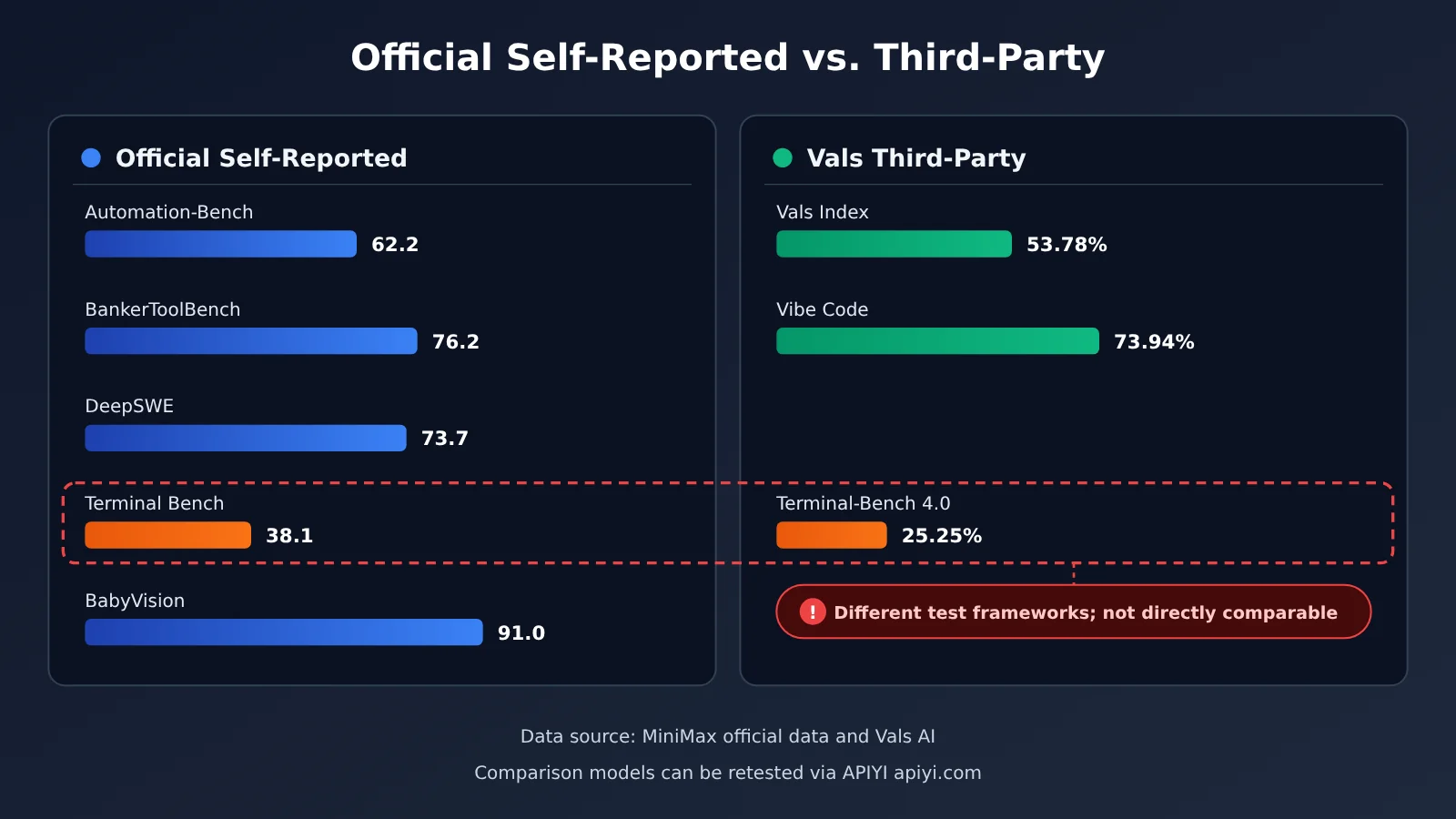
| Test | Score | Source | Testing conditions / notes |
|---|---|---|---|
| Automation-Bench v1.0.6 | 62.2 (Opus 5 scored 50.3) | Officially reported | Official table; the official cost chart shows 62.8 for the max tier |
| BankerToolBench | 76.2 (tied with Opus 5) | Officially reported | Banking tool-use tasks |
| DeepSWE v1.1 | 73.7% (DeepSeek V4.1 Flash-1017 scored 77.0) | Officially reported | A competitor scored higher in the official table |
| OSWorld V2 | 61.7 | Officially reported | MiniMax says it ranks first among Chinese models |
| Agents’ Last Exam (ALE) | 29.6 | Officially reported | MiniMax says it ranks first among Chinese models |
| CyberGym | 82% | Officially reported | Security tasks |
| Terminal Bench 4.0 | 38.1 (Opus 5 scored 51.8) | Officially reported | 13.7 points behind Opus 5 |
| SWE Refactor Bench | 23.0 (Opus 5 scored 31.0) | Officially reported | Code refactoring tasks |
| BabyVision (with tools) | 91.0 | Officially reported | Visual understanding |
| HLE (without tools) | 43.4 | Officially reported | High-difficulty, general-knowledge questions |
| Vals Index | 53.78%, ranked 15th out of 22 models | Third-party Vals | Ranked 5th among 11 open-weight models, slightly below Xiaomi MiMo V2.6 Flash (54.83%) |
| Terminal-Bench 4.0 | 25.25%, ranked 22nd out of 51 models | Third-party Vals | Official API, temperature 1, top_p 0.95, effort max, maximum output of 262k |
| HLAB-Vals-1.1 | 7.50%, ranked 17th out of 23 models | Third-party Vals | Same conditions as above |
One important clarification: the Anthropic comparison in the official table is with Claude Opus 5, not Opus 5.5. Claude Opus 5.5 is still Anthropic’s flagship model, and MiniMax hasn’t published a side-by-side comparison with it across these tests. So claims like “M3.1 Flash catches up to Opus 5.5” aren’t supported by the data.
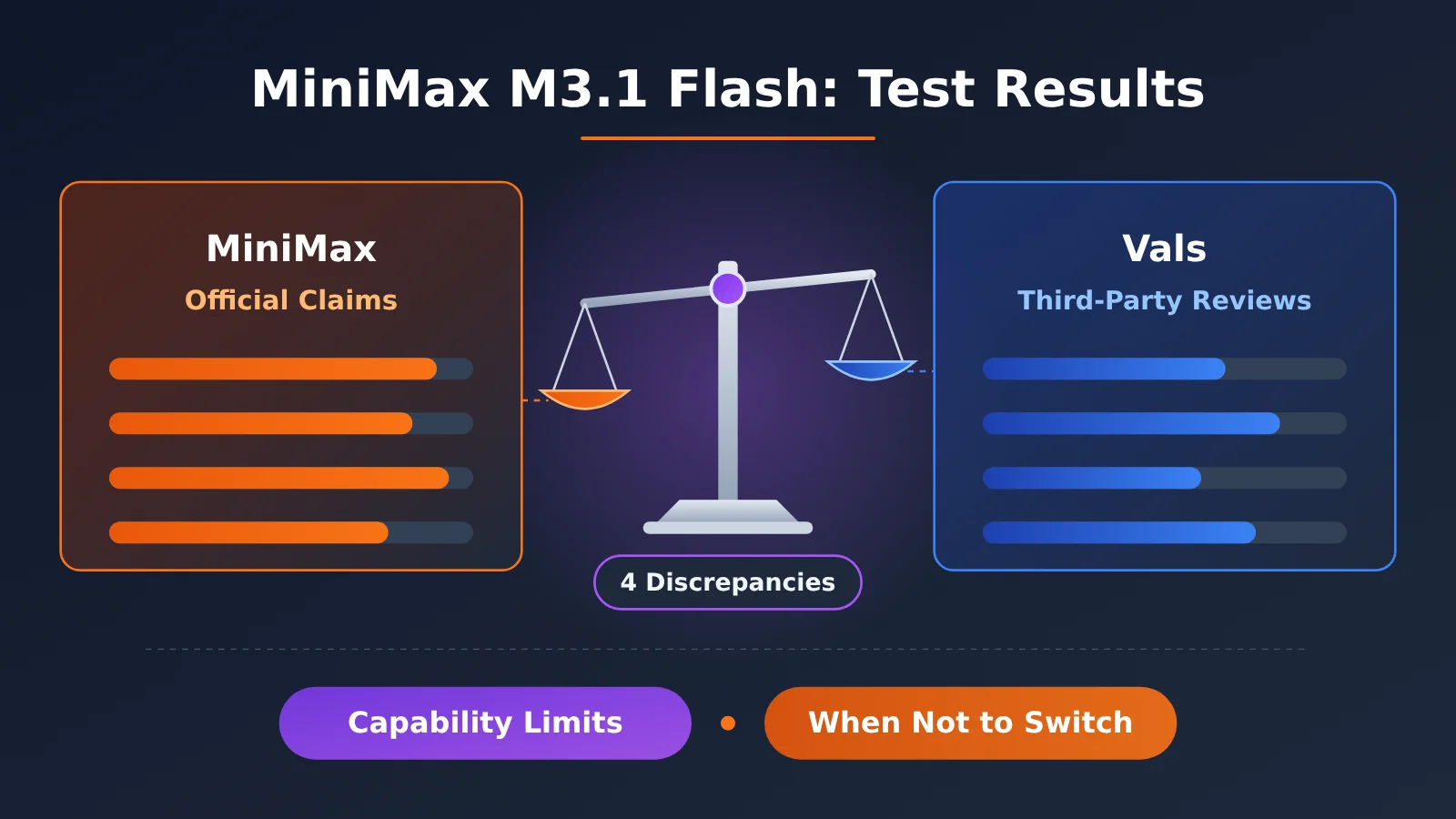
4 Discrepancies in the MiniMax M3.1 Flash Numbers
- Terminal-Bench: 38.1 officially vs. 25.25% on Vals. Both results are labeled Terminal-Bench 4.0, but they use different testing harnesses. A testing harness is the execution environment and scheduler set up for a model, and it can directly affect whether the model can complete multi-step commands successfully. So these two numbers aren’t directly comparable, and it wouldn’t be accurate to say “the official score was inflated by 13 points.” The takeaway both results support is that long-running terminal tasks are a weak spot for M3.1 Flash. In the official table, it trails Opus 5; in Vals’s rankings, it sits in the middle-to-lower tier among 51 models.
- Automation-Bench: 62.8 in the cost chart vs. 62.2 in the table. The same official materials report two different numbers, a difference of 0.6 points that doesn’t materially affect the conclusion. Still, it shows that the official materials themselves contain inconsistencies. When citing the result, it’s best to use the table and specify the source.
- Cost: three different claims—“70% lower,” “one-third,” and “half”. The official blog says the overall cost for agent tasks is 70% lower than the previous generation. An official post on X says it’s one-third the cost of M3. Based on token prices alone, Flash is half the price of M3 at standard rates ($0.15 vs. $0.30). The official claims are based on task costs, but the exact calculation hasn’t been disclosed.
- Speed: 170+, 200+, and around 150. The next section explains this in detail.
How Fast Is MiniMax M3.1 Flash? The TPS Figures Are All Official
TPS (tokens per second) measures how many tokens a model outputs each second. The higher the number, the faster it generates text. P50 is the median: sort all request speeds from slowest to fastest, and the value right in the middle is the P50. It’s often a better indicator of what to expect than the average.
So far, all publicly available speed figures come from MiniMax. I couldn’t find any independent third-party benchmarks:
- Official blog: typical output can reach 200+ TPS, with P50 consistently above 170 TPS;
- Official product page: around 150 tokens per second;
- Official blog and X posts: online inference is about 3× faster than M3.
These figures use different measurement criteria, and the product page gives the more conservative estimate. More importantly, a high TPS doesn’t necessarily mean you’ll get an answer quickly. M3.1 Flash uses max effort by default, and thinking tokens count toward the output too. If a task requires the model to “think” through several thousand tokens first, even at 170 tokens per second, it can still take a while to get the final answer. The speed you experience depends on “total output tokens ÷ TPS + time to first token,” so the self-test checklist below asks you to record both token count and elapsed time.
MiniMax M3.1 Flash: Strengths and Weaknesses
First, let’s look at the improvements over the previous-generation M3, as recorded by Vals. All results in the table below come from third-party evaluations.
| Vals benchmark | M3.1 Flash | M3 | Change |
|---|---|---|---|
| Vibe Code Bench | 73.94% | 47.57% | Major improvement |
| Tax Agent Bench | 32.14% | 20.59% | Clear improvement |
| EMB v1.1 | 67.84% | 59.75% | Improvement |
| Finance Agent v2.1 | 58.83% | 54.34% | Modest improvement |
| Legal Research Bench | 34.13% | 29.81% | Modest improvement |
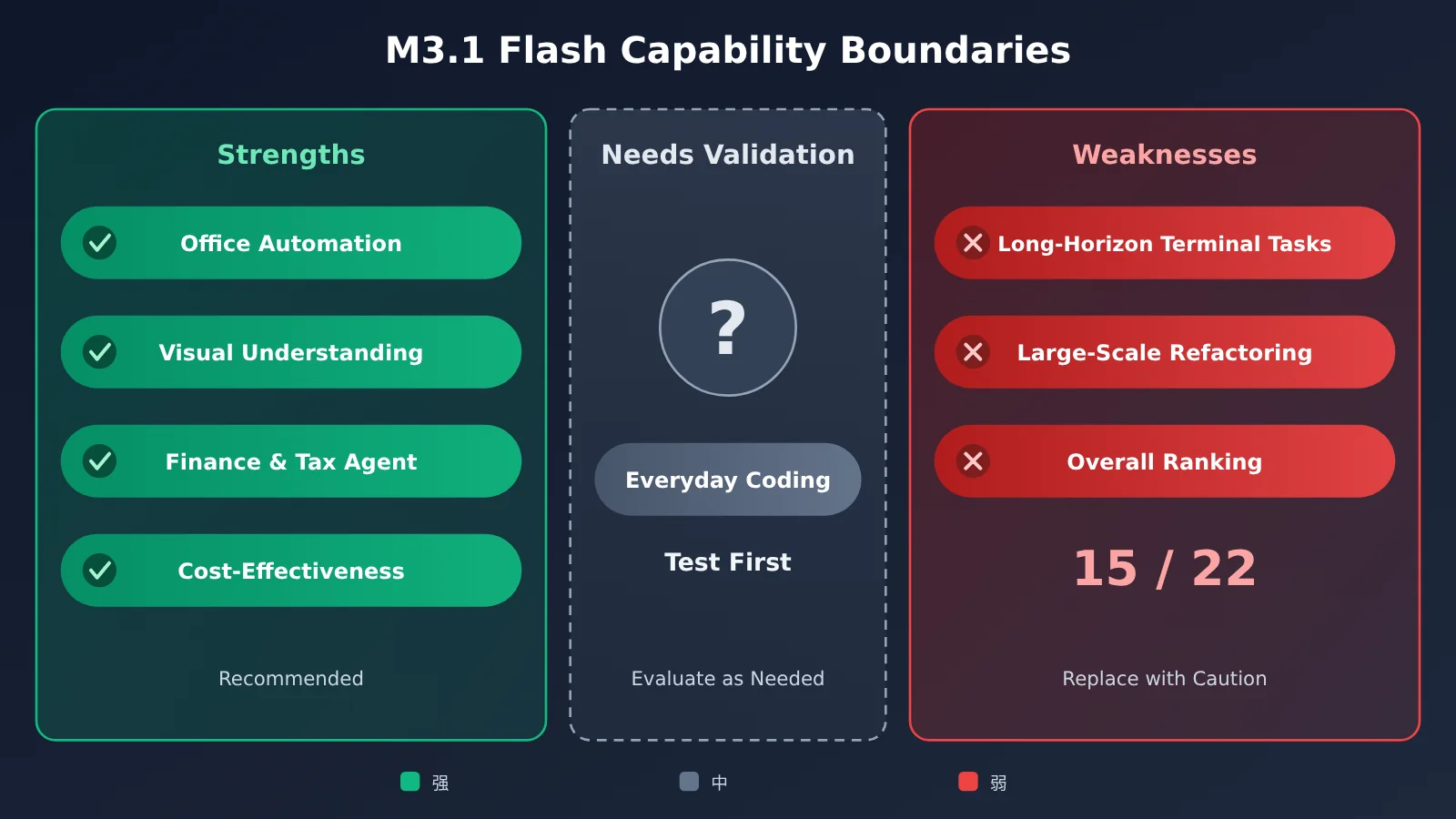
| Dimension | Assessment | Evidence |
|---|---|---|
| Agent-driven office automation | Strong | Official Automation-Bench score: 62.2 (compared with 50.3 for Opus 5); OSWorld V2 score: 61.7 |
| Visual understanding | Strong | Official BabyVision score (with tools): 91.0; supports image and video input |
| Finance and tax agents | Relatively strong | Official BankerToolBench score: 76.2; Vals tax and finance scores are both higher than M3’s |
| Value for money | Strong | Official pricing is half the standard price of M3, with no extra charge for long contexts |
| Long-horizon terminal tasks | Weak | On the official Terminal Bench, it trails Opus 5 by 13.7 points; it ranks 22nd out of 51 models on Vals Terminal-Bench 4.0 |
| Large-scale code refactoring | Weak | Official SWE Refactor Bench score: 23.0, compared with 31.0 for Opus 5 |
| Overall performance | Mid-tier | Ranks 15th out of 22 models on the Vals Index |
Summary of strengths
- Low price and simple billing: $0.15 for input and $0.60 for output, with flat pricing for contexts up to 1M tokens. That makes it suitable for high-volume use.
- Strong performance on office and visual agent tasks: Official and third-party evaluations point in the same direction for tasks like organizing spreadsheets, interacting with websites, and recognizing image content.
- Clear improvement over M3: Vals’ Vibe Code Bench score rose from 47.57% to 73.94%, marking a significant step up in its ability to build small applications for everyday use.
Summary of limitations
- Still falls short on complex engineering tasks: On multi-step command-line tasks and large changes across multiple files, even the official results show it trailing Opus 5.
- Thinking can’t be turned off: Even short question-and-answer exchanges go through a thinking process, making it a poor fit for scenarios where first-token latency matters.
- Limited transparency: The official cost calculation and technical report haven’t been published, so the claim of “one-third the cost” can’t yet be independently verified.
When Not to Switch to MiniMax M3.1 Flash
In these six situations, it’s best to keep your current primary model—or at least run your own tests before deciding:
- Your main workload is a long-running terminal agent: For example, automatically running CI, troubleshooting issues on a server, or executing dozens of commands in one go. Both the official benchmarks and Vals’ data flag this as a weak spot. If Claude Opus 5.5 is already working reliably for you, the rework caused by switching could easily cost more than you save on tokens.
- You regularly handle large-scale refactors: Tasks like changing interfaces across a dozen files or splitting up modules are a good fit for a flagship model. On the official SWE Refactor Bench, M3.1 Flash scores 23.0, compared with 31.0 for Opus 5—a significant gap.
- You need to disable reasoning for the lowest possible latency: In scenarios like real-time customer support, intent classification, and autocomplete, M3.1 Flash’s reasoning can’t be turned off. Even on the low setting, it adds a bit of wait time compared with a model that doesn’t reason.
- Your existing integration parses
<think>tags, and there’s no time to update it soon: M3.1 Flash returns reasoning in a separate field. Simply changing the model name could leave your parsing logic unable to retrieve the data—or even cause errors. - You need to deploy it privately on-premises right away: The official announcement says the weights will be released on October 23, but they weren’t available as of publication. The hardware requirements, including VRAM, haven’t been announced either, so you can’t plan your infrastructure reliably yet.
- It’s cheaper per token, but not necessarily per task: The default max setting can generate a lot of reasoning tokens. If your tasks need short answers and your current model is already inexpensive, switching may not lower your actual bill. Be sure to compare the cost per task.
A 30-Minute Checklist for Testing MiniMax M3.1 Flash Yourself
Benchmarks only show average performance. Your own tasks are the real test. Follow these steps to run a comparison in 30 minutes. You can use the official MiniMax API or OpenRouter’s rate-limited free endpoint, minimax/minimax-m3.1-flash:free.
- Choose tasks (about 5 minutes): Pick three types of tasks from your recent real-world work, with three to five examples of each. The first type should be repetitive, well-defined work, like organizing a spreadsheet or writing summaries. The second should be your main day-to-day tasks. The third should be the challenging tasks you’re most concerned about, like multi-step terminal operations or editing multiple files.
- Keep the settings fixed: Run M3.1 Flash once at
medium, then again at its defaultmaxsetting. Record which setting you used. Keep the same settings for the model you’re comparing it against, too—don’t change them midway through. - Compare the same tasks (about 15 minutes): Run each task with both models using exactly the same prompts and context.
- Record the results: For each task, note the input tokens, output tokens (including reasoning), total time, whether it succeeded on the first try, and how much you had to edit manually.
- Calculate the cost per task (about 10 minutes): Use the official formula—“usage ÷ 1,000,000 × unit price”—and add up the costs for input, output, and cached reads to find the actual cost of each task.
- Draw conclusions by task type: If a category’s quality is acceptable and its cost per task is lower, switch just that category over. If the model clearly struggles with challenging tasks in the third category, keep those with your original model.
💡 Tip for choosing a comparison model: You can use APIYI (apiyi.com) to call claude-opus-5-5 or MiniMax-M3 with the same API key, so you won’t need to sign up for multiple platforms just to run a comparison.
Combining the MiniMax Series and Claude Opus 5.5 on APIYI
M3.1 Flash is best suited to handling high-volume work for a team, rather than serving as its only model. A practical approach is to assign tasks based on difficulty: use the MiniMax series for inexpensive, high-volume tasks, and Claude Opus 5.5 for complex planning and refactoring.
| Model | Role | Best for | Available platforms |
|---|---|---|---|
| MiniMax-M3.1-Flash | Low-cost, fast Agent model | Office automation, vision, and batch financial and tax tasks | Official MiniMax API / M Plan; check the APIYI pricing page for availability |
| MiniMax-M3 | Previous-generation workhorse | Everyday Chinese-language tasks and batch processing | APIYI apiyi.com (OpenAI / Anthropic-compatible formats) |
| claude-opus-5-5 | Anthropic’s most capable current flagship | Complex planning, large-scale refactoring, and long-running Agent workflows | APIYI apiyi.com |
| claude-opus-5 | Previous-generation flagship | Comparison model in the official benchmark table | APIYI apiyi.com |
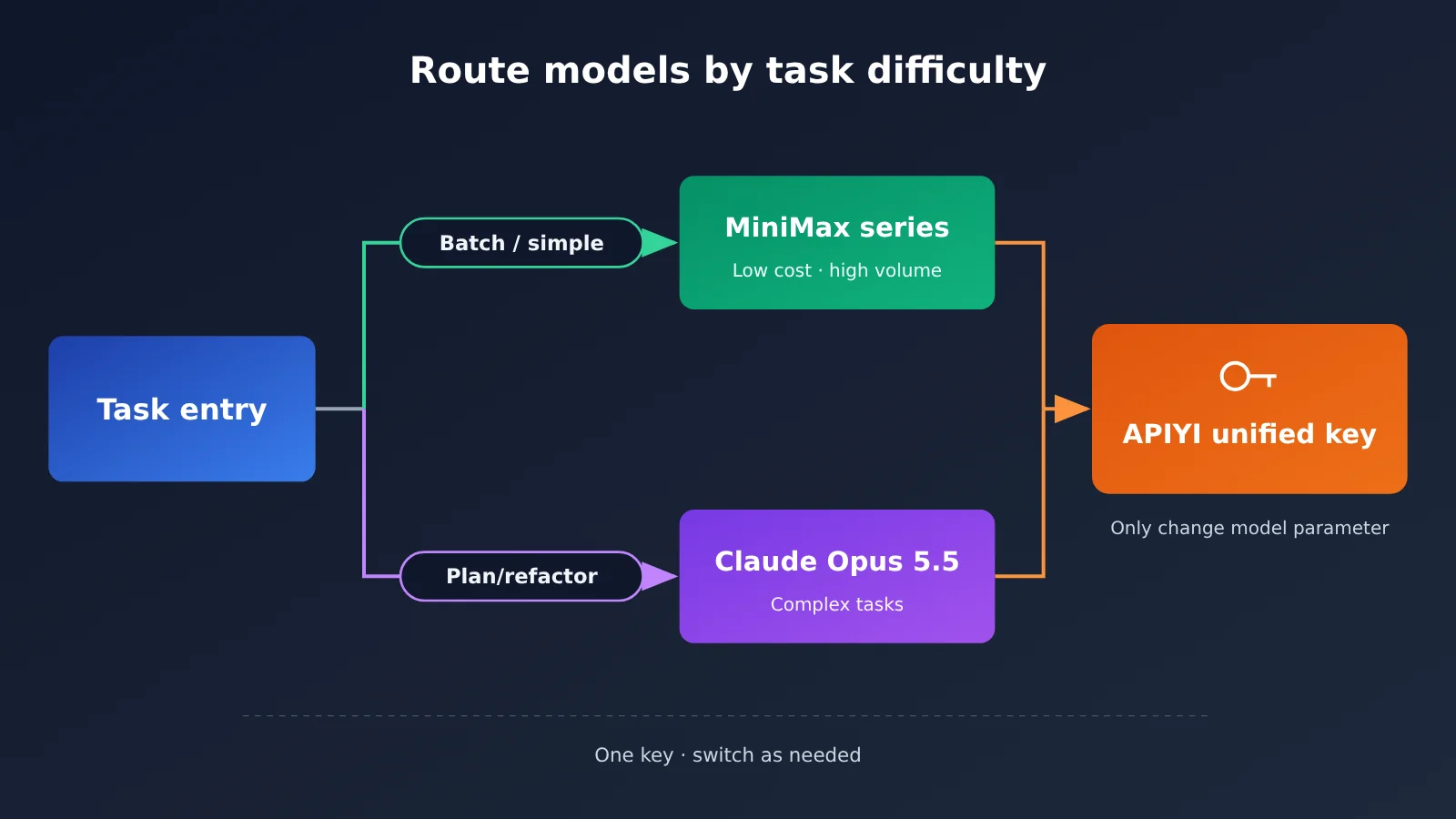
On APIYI, one API key lets you call overseas models like Claude, GPT, and Gemini, as well as domestic models like DeepSeek and MiniMax. To switch models, you only need to change the model parameter:
from openai import OpenAI

client = OpenAI(
    api_key="YOUR_APIYI_KEY",
    base_url="https://api.apiyi.com/v1"  # APIYI 统一接口
)

def ask(model, prompt):
    resp = client.chat.completions.create(
        model=model,
        messages=[{"role": "user", "content": prompt}],
    )
    return resp.choices[0].message.content

# 便宜、量大的活交给 MiniMax 系列
print(ask("MiniMax-M3", "把这段会议纪要整理成 5 条待办"))

# 难的规划和重构交给 Claude Opus 5.5
print(ask("claude-opus-5-5", "为这个单体服务设计分阶段拆分方案"))
For pricing, according to APIYI’s published rates, claude-opus-5-5 costs $4 per million input tokens and $20 per million output tokens. claude-opus-5 costs $5 / $25. If MiniMax-M3.1-Flash appears on the APIYI pricing page later, use the model name and price listed there.
Frequently Asked Questions
Q1: What are MiniMax M3.1 Flash’s main strengths?
Based on the company’s own reported results and Vals benchmarks, its strengths are agentic office automation, visual understanding, tool use for finance and tax tasks, and low cost. It ranks 15th out of 22 models on Vals, putting it in the middle of the pack—not an all-around model.
Q2: Which is stronger, MiniMax M3.1 Flash or Claude Opus 5.5?
The company hasn’t published a direct, task-by-task comparison with Opus 5.5; its comparison table uses Opus 5. Even against Opus 5, M3.1 Flash trails on Terminal Bench and SWE Refactor Bench. Opus 5.5 remains Anthropic’s most powerful flagship model.
Q3: Which Terminal Bench score is correct: the official 38.1 or Vals’ 25.25%?
Both are valid results, but they come from different testing frameworks, so you can’t compare them by simply subtracting one from the other. Both point to the same conclusion: long, multi-step terminal tasks are a weak spot for M3.1 Flash.
Q4: Can I use M3.1 Flash through APIYI right now?
As of 2026-10-22, MiniMax-M3.1-Flash isn’t listed on APIYI’s pricing page. Check the APIYI pricing page for current availability. You can currently call models such as MiniMax-M3 and claude-opus-5-5 directly through APIYI at apiyi.com.
Q5: Which effort level should I choose?
If you don’t specify one, the default is `max`. That gives you the most thorough results, but it’s also the slowest and uses the most output tokens. For simple tasks in bulk, start with `low` or `medium` and increase the level if the results aren’t good enough. You can’t turn off the model’s reasoning.
Q6: Can I use an M Plan subscription key as an API key?
No. The official FAQ says that pay-as-you-go API keys and M Plan subscription keys are different, and you need to get them from different sections of the dashboard. Check the official website for the monthly price of each M Plan tier.
Q7: How can I test its performance on a budget?
Start by running a few tasks on OpenRouter’s rate-limited free endpoint. For comparison, you can use the same API key to call flagship models through APIYI at apiyi.com. Then use the 30-minute checklist in this article to track token usage and completion time.
MiniMax M3.1 Flash Key Takeaways
- No independent testing was conducted for this article: All figures come from MiniMax’s official reports or third-party Vals evaluations.
- Ranks in the middle overall: It scored 53.78% on the Vals Index, placing 15th out of 22 models.
- Clear strengths: Office automation, visual understanding, financial and tax Agent tasks, and low cost.
- Clear weaknesses: Long-running terminal tasks and large-scale refactoring. It also trails Opus 5 in the official comparison table.
- Check how the numbers were measured: The two Terminal Bench scores aren’t directly comparable, and the cost and speed figures come from MiniMax.
- Thinking can’t be turned off: You can only lower the effort level. When migrating from M3, you’ll need to update your
<think>tag parsing logic. - A combination works better: Use one API key on APIYI to pair MiniMax models with Opus 5.5, and assign each model tasks based on difficulty.
Summary
The key takeaways for MiniMax M3.1 Flash:
- Where it performs well: It’s good at office automation, visual tasks, and financial and tax-related Agent workflows, but struggles with long-running terminal tasks and large-scale refactoring.
- How to interpret the numbers: Official and third-party figures come from different testing frameworks. Even MiniMax’s own materials have minor discrepancies, such as 62.8 versus 62.2. Cite the source when quoting a figure.
- Whether to switch: It’s worth trying for high-volume tasks with clear rules. Keep your most difficult tasks on the existing model for now, and let a 30-minute test with your own workloads guide your decision.
Start by comparing the models on your actual tasks, then switch gradually by task category rather than replacing everything at once. You can use APIYI at apiyi.com to call the comparison models—including your current MiniMax-M3 and Claude Opus 5.5—from one place, and run the tests with a single API key.
📚 References
- MiniMax Official Release Blog: Official benchmarks, speed, and pricing for M3.1 Flash
- Link:
minimax.io/blog/minimax-m31f -
Note: The primary source for MiniMax’s self-reported data
-
MiniMax Official Documentation: Model Invocation: The
effortparameter, reasoning mechanism, and API endpoint - Link:
platform.minimax.io/docs/guides/text-generation -
Note: Essential reading for migration and integration
-
MiniMax Official Pricing Page: Pricing details for M3.1 Flash and M3
- Link:
platform.minimax.io/docs/guides/pricing -
Note: Use this to calculate the cost of individual tasks
-
Vals AI Model Page: Third-party evaluation results for M3.1 Flash
- Link:
vals.ai/models/minimax_MiniMax-M3.1-flash -
Note: Includes rankings and test conditions
-
MarkTechPost Report: A roundup of the official comparison table
- Link:
marktechpost.com/2026/10/19/minimax-m3-1-flash-release - Note: Includes comparison data against Opus 5 and differences in the cost chart
Author: APIYI Technical Team
Technical inquiries: Contact us on the APIYI homepage at apiyi.com. For more integration resources, visit the documentation center at docs.apiyi.com.