Author’s note: Based on real-world benchmarks of the already open-sourced Kimi K3, this article estimates the hardware requirements, monthly costs, cost per token, and break-even point for running K3.1 Pro locally. It’ll help you decide when to rent, when to buy, and when to use the API instead.
Here’s the short version: Kimi K3.1 Pro is about to be open-sourced, but running it locally isn’t for individual users. The official announcement says the full weights will be released by November 4, as a 3T-scale open-weight model. As of October 26, 2026, K3.1 Pro’s weights haven’t been released yet. All hardware and VRAM figures in this article are extrapolated from real-world benchmarks of the already open-sourced Kimi K3, and will need to be verified once the weights are available.
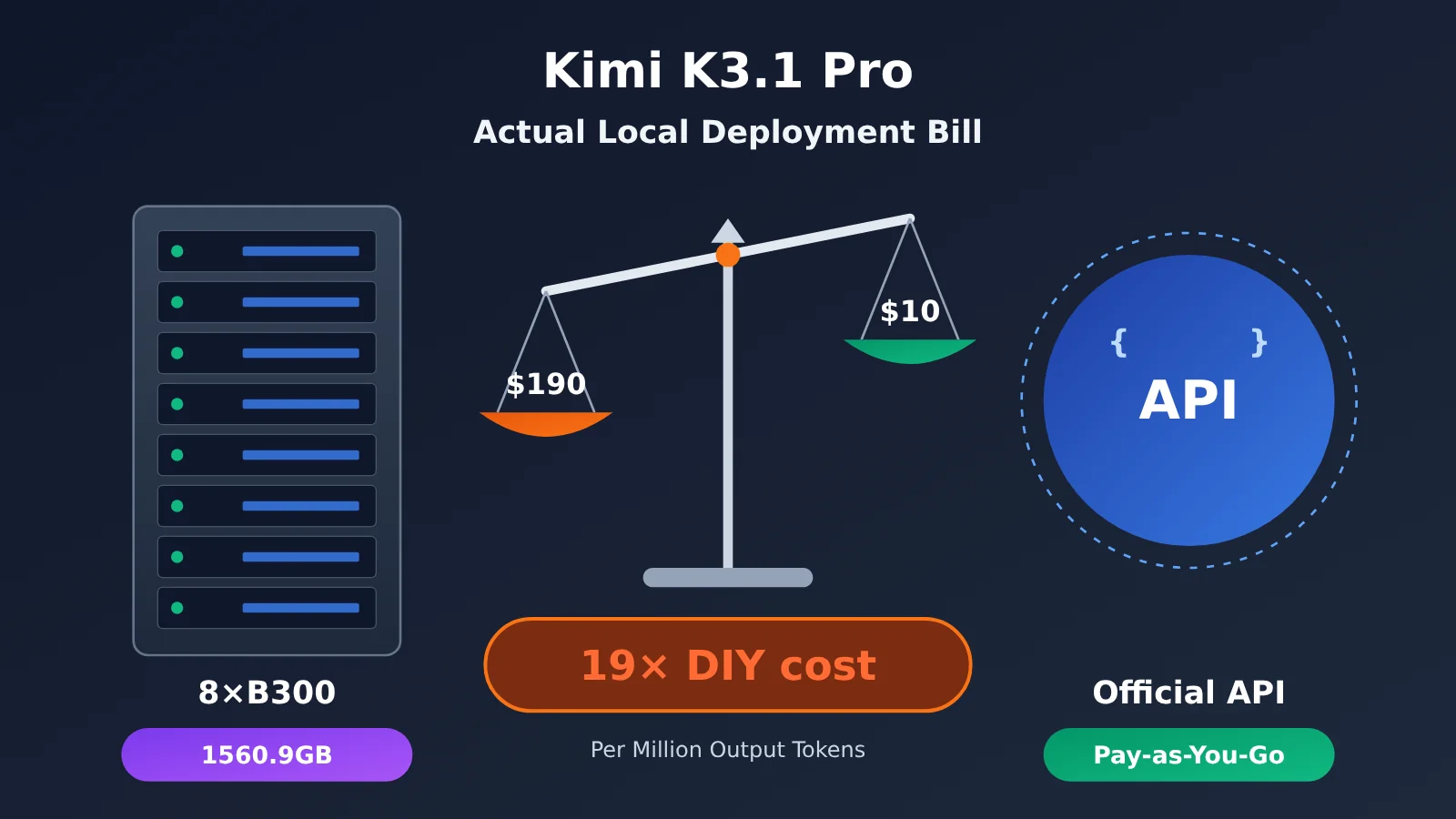
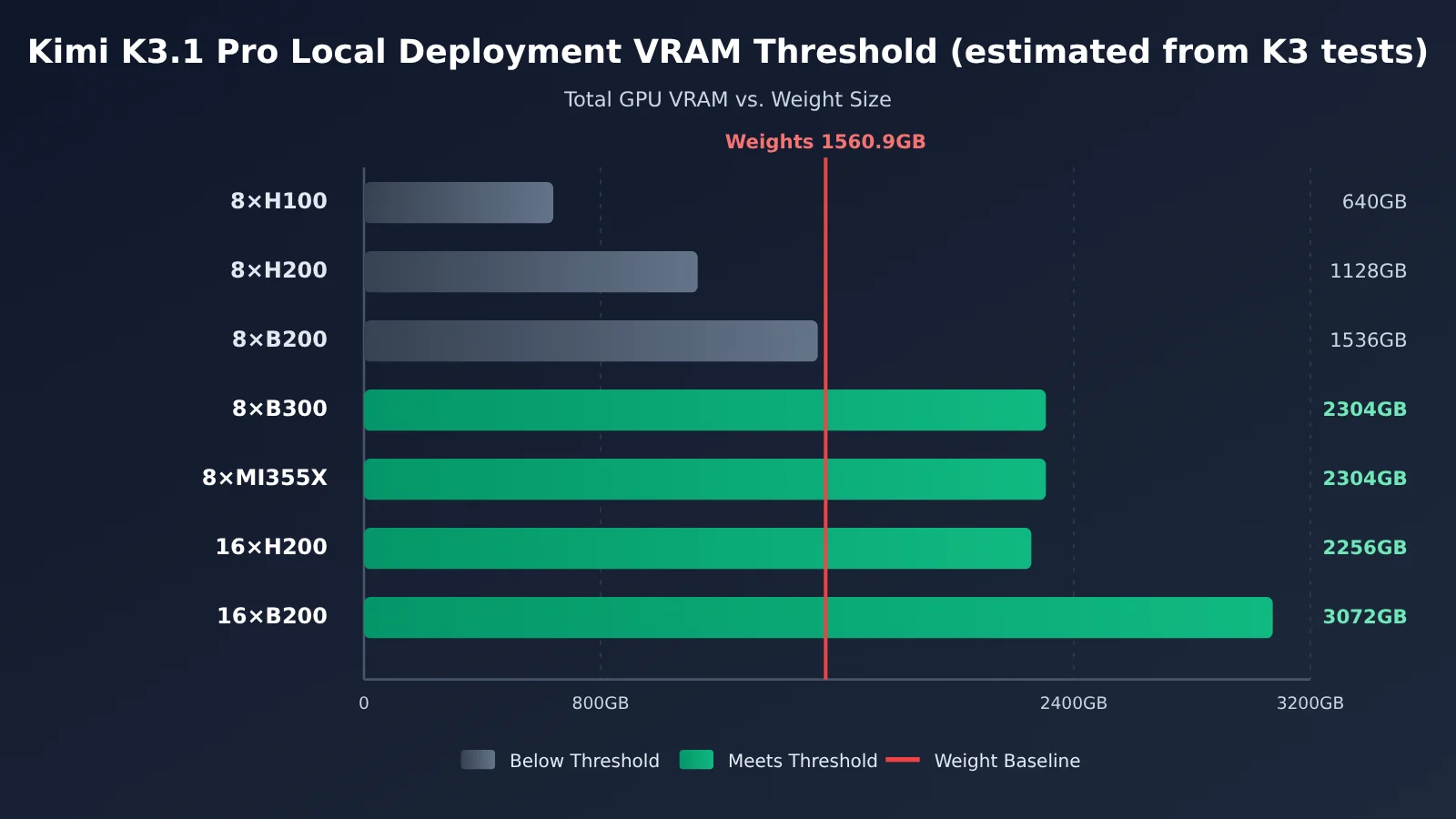
Based on K3 benchmarks, the weights alone take up 1,560.9 GB. Eight B300 GPUs are just enough, while eight H200 GPUs fall short by about 400 GB. If you run an 8×B300 machine just for yourself, each million output tokens will cost about $190.00—19 times the official API price of $10.00.
This isn’t an article meant to discourage you—it’s a decision guide for figuring out whether to self-host. Every figure is labeled as coming from an official source, a third-party benchmark, or an estimate in this article, so you can plug in your own usage and run the numbers.
What you’ll get: By the end, you’ll be able to work out the true cost of self-hosting Kimi K3.1 Pro and use the checklist to decide whether to rent a machine, buy one, or call the API directly.
Key Considerations for Deploying Kimi K3.1 Pro Locally
| Key point | Conclusion | Evidence level |
|---|---|---|
| Weight availability | Not yet released; the official announcement says it will be released before November 4 | Official source |
| Weight size | K3 weights are 1,560.9 GB; K3.1 Pro uses the same architecture | Third-party measurements (K3) |
| Minimum single-machine setup | 8×B300 / 8×GB300 / 8×MI355X | Inference framework configurations + measurements |
| Self-hosting cost per unit | About $190.00 per million output tokens | Third-party billing data |
| Conditions for matching API pricing | Sustained output above 1,500 tok/s over the long term | Estimate in this article |
How to Interpret the Evidence on Local Deployment of Kimi K3.1 Pro
This article separates information into three evidence levels. Official source refers to statements from Moonshot in the kimi.ai blog, platform.kimi.ai documentation, and Hugging Face model cards. Third-party measurements refers to publicly available test data from AWS, GPUStack, OpenZeka, Modal users, and others. We’ll cite the source and date in each case. Estimates in this article are calculations based on public pricing and throughput data. We’ll provide the formulas and assumptions; these figures aren’t official data.
The projection is also based on official information: K3.1 Pro is a post-trained version of Kimi K3, retaining the same architecture while using more compute for RL post-training. That makes K3’s parameter count, quantization format, and weight size reasonable reference points for estimating the minimum deployment requirements for K3.1 Pro.
Kimi K3.1 Pro Local Deployment Hardware Requirements: Why 8 B300s Are the Starting Point
【Official specs】The K3 model card lists 2.8T total parameters, 104B active parameters, and 93 layers. It has 896 routed experts, selecting 16 per token, plus 2 shared experts. The context window is 1,048,576 tokens. Weights use MXFP4, activations use MXFP8, and quantization-aware training was applied starting at the SFT stage.
【Third-party measurements】Someone tallied the files in the Hugging Face repository: 96 safetensors shards total 1,560,936,091,448 bytes, or about 1,560.9 GB. The measured size is larger than the theoretical estimate of “2.8T × 0.5 bytes = 1,400 GB” because some components in the config—attention layers, shared experts, lm_head, the vision tower, and others—are whitelisted and kept at higher precision. The vLLM recipe lists 1,680 GB as the minimum VRAM requirement and says at least 8×GB300 are needed. Real production traffic requires multiple nodes.
| Configuration | Total VRAM | Can it run? | Notes |
|---|---|---|---|
| 8×H100 80GB | 640GB | No | Weights are 2.4× the available VRAM |
| 32×H100 | 2.56TB | Barely | SGLang has a recipe, but Hopper doesn’t natively support MXFP4, so runtime dequantization is required |
| 8×H200 141GB | 1.13TB | No | Short by about 400GB—the most frustrating tier |
| 16×H200 (two servers) | 2.26TB | Yes | Dequantization is still required |
| 8×B200 180GB | 1.44TB | No | Short by about 120GB |
| 16×B200 / GB200 | 2.88TB | Yes | Blackwell reference configuration |
| 8×B300 / GB300 | 2.30TB | Yes | Official default path; fits just barely on one server |
| 8×MI355X | 2.30TB | Yes | AMD day-zero validation |
| Single GPU / RTX 4090 / 512GB Mac | — | No | It would take 75 RTX 4090s just to fit the weights |
The KV cache isn’t the bottleneck. Only 24 of K3’s layers use Gated MLA, at about 27 KiB per token. The remaining 69 KDA layers need only a fixed state per sequence. Third-party calculations put the KV cache at about 29.5GB for a single user with a 1M-token context, and about 0.7GB at 8K tokens. The real constraint is the 1.56TB of weights.
If you still want to deploy it, these are the framework-level hard requirements (from the vLLM recipe and SGLang cookbook, for K3):
- vLLM image:
vllm/vllm-openai:kimi-k3. Only the CUDA 13 version is available; requires r580+ drivers and vLLM ≥ 0.27.0. - Parallelism strategy: TP / TEP requires at least 8 GPUs; DEP requires at least 16. Distributed KV cache is listed as unsupported on all hardware configurations.
- SGLang node planning: B300 uses 1 node with 8 GPUs; B200 and H200 both require 2 nodes with 8 GPUs.
- Moonshot’s August 2026 guidance (as relayed by a third party): production deployments should use a supernode with more than 64 accelerators.
Kimi K3.1 Pro Local Deployment: Real-World Monthly Costs for Four Options
The estimates below assume a single 8×B300 server running 24/7. All prices are converted at a rate of $1 = ¥7.25. The figures come from three sources: pay-as-you-go rates collected by ComputeUnion on October 24–25, 2026; real-world bills reported by Modal users; and notes from the Computing Power Rental Industry Survey (reprinted by Sina Finance on May 20, 2026).
⚠️ Domestic whole-server rental and purchase prices—such as around ¥80,000/month per H200, ¥160,000–190,000/month per B300 under a five-year contract, and ¥6.8–7 million per B300 at spot prices—are based on industry survey figures, not publicly listed vendor prices, and should be treated as rough estimates only. The standard offering is an eight-GPU server, with a minimum contract term of one year.
| Option | Calculation basis | Monthly cost | Notes |
|---|---|---|---|
| Overseas pay-as-you-go rental (24/7) | B300 server at ¥342–464/hour × 730 hours | About ¥249,800–338,700 ($34,500–46,700) | Third-party quotes + estimates in this article |
| Modal real-world bill (24/7) | $56.79/hour × 730 hours | $41,457.00, about ¥300,600 | Third-party bill based on actual usage |
| Domestic five-year whole-server rental | Industry survey figures | ¥160,000–190,000 | Not publicly listed; minimum one-year contract |
| Outright purchase + electricity | ¥6.8–7 million, depreciated straight-line over 3 years, plus about ¥8,800 for electricity | About ¥198,000–203,000 | Excludes operations staff, spare parts, rack space, and bandwidth |
| Run for only 4 hours a day, then shut down | Overseas pay-as-you-go | About ¥26,000–30,000 | Each restart takes about 27 minutes to cold-start |
The electricity cost is estimated using the following assumptions: 13.2 kW load, PUE of 1.3, and electricity at ¥0.7/kWh, which works out to about ¥12 per hour. Outright purchase looks like the cheapest option, but the table doesn’t include the cost of operations engineers—and that’s often a small team’s biggest hidden expense.
“Run for just four hours a day, then shut down” sounds like a money-saver, but it’s hard to make work in practice. Modal’s real-world cold start takes about 27 minutes to load 1.56 TB of weights, run JIT compilation, and capture 51 CUDA graphs. For short jobs, the wait can end up longer than the inference itself.
Kimi K3.1 Pro Unit Cost: Throughput Determines How Much More You’ll Pay Than for the API
The monthly subscription is just the headline cost. What really determines whether it’s worth it is the cost per million tokens. This article uses the following estimate: cost per million output tokens = hourly machine cost ÷ output tokens per hour (in millions). The hourly cost is fixed at $56.79, based on Modal’s measurements.
Third-party benchmarks for several 8×B300 setups:
- Modal, single machine (TP8, native MXFP4): sustained 92 tok/s, TTFT of 0.92–1.02 seconds
- OpenZeka (DGX B300, TP8, vLLM): 105.7 tok/s at concurrency 1; 32.45 tok/s per user at concurrency 64. Estimated capacity: 150 chat users or 50 Agent users
- AWS official example (July 29, 2026, p6-b300.48xlarge): 516 tok/s at concurrency 8; aggregate throughput of 4,634 tok/s at high concurrency
- GPUStack (July 30, 2026): with 64K inputs and concurrency 10, vLLM took 100.5 seconds end to end; aggregate prefill throughput was about 19K–23K tok/s
| Sustained output throughput | Output per hour | Cost per million output tokens | Compared with official API at $10.00 |
|---|---|---|---|
| 92 tok/s (single request at full utilization) | 0.33M | $171.50 (the original author’s figure: $190.00) | About 17–19× |
| 500 tok/s | 1.80M | $31.50 | About 3× |
| 1,000 tok/s | 3.60M | $15.80 | About 1.6× |
| 1,500 tok/s | 5.40M | $10.50 | Roughly break-even |
| 3,000 tok/s | 10.80M | $5.30 | About half the cost |
| 4,634 tok/s (AWS measured peak) | 16.68M | $3.40 | About one-third the cost |
With just one or a few users, you’ll likely land in the first row. If you can’t reach high concurrency, most of the machine sits idle, bringing the cost to about $190.00 per million output tokens. That’s where the “19× more expensive” in the title comes from. Only if your workload can sustain throughput above 1,500 tok/s will the unit cost of self-hosting approach the API price.
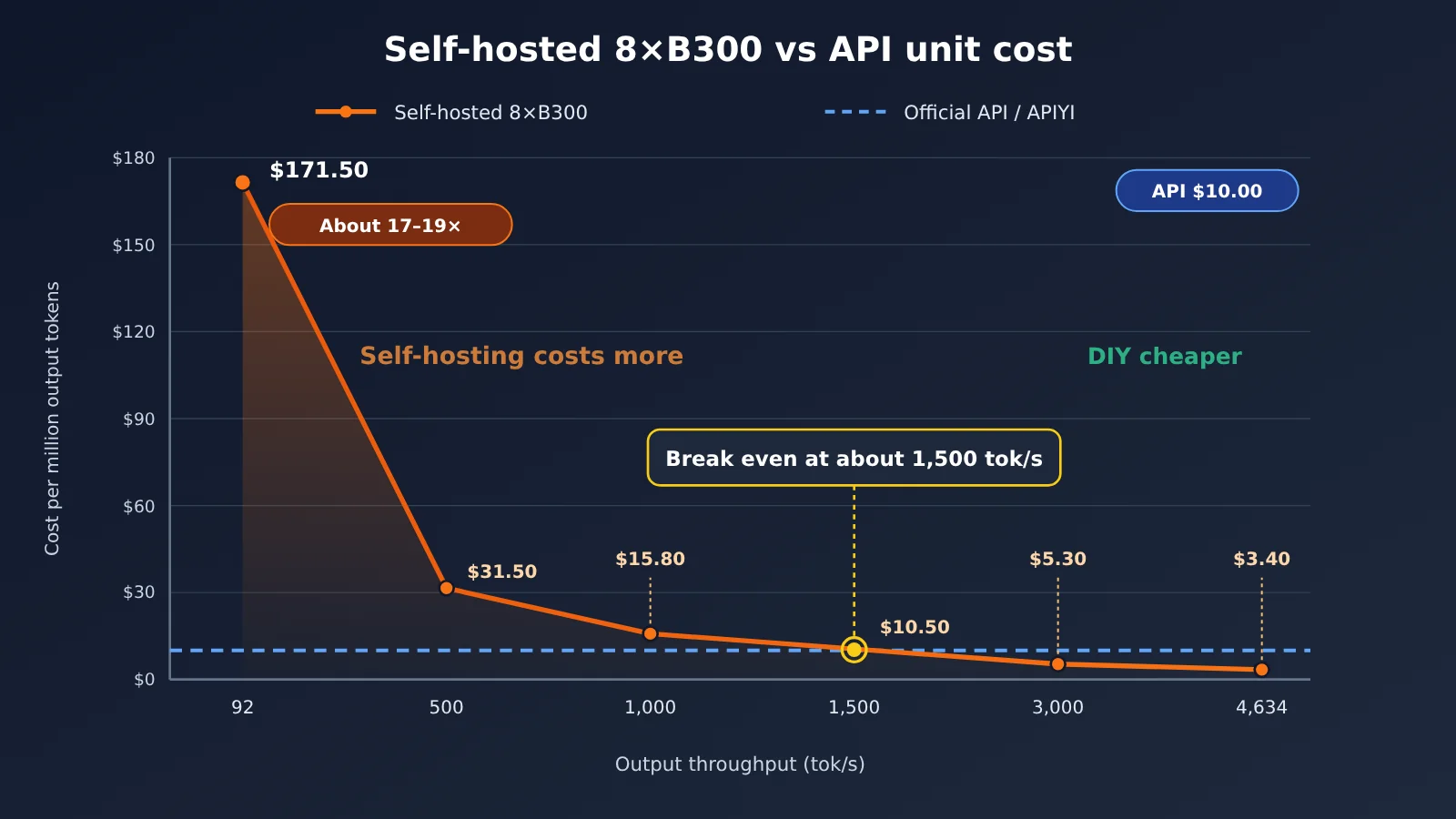
💡 Comparison note: The chart uses the official price of $10.00 per million output tokens as its API benchmark. APIYI apiyi.com charges the same output price for kimi-k3.1-pro, so it’s a direct comparison.
Kimi K3.1 Pro Local Deployment Break-Even: How Many Tokens Do You Need Each Month?
Let’s look at it another way: how many tokens do you need to use each month for self-hosting to break even with the API? This estimate uses the following assumptions: the official API costs $2.00 for input and $10.00 for output, the input-to-output ratio is 5:1 (common in Agent scenarios), and cache hits aren’t included.
| Self-hosting option | Monthly cost | Monthly input tokens needed | Monthly output tokens needed |
|---|---|---|---|
| Overseas pay-as-you-go, 24/7 | $41,457.00 | About 10.4 billion | About 2.07 billion |
| Domestic 5-year whole-system plan | ¥190,000 | About 6.55 billion | About 1.31 billion |
| Upfront purchase (depreciation + electricity) | ¥203,000 | About 6.98 billion | About 1.4 billion |
What does more than a billion output tokens a month look like? OpenZeka estimates that one 8×B300 server can support 50 concurrent Agent users. A small team of fewer than ten people won’t come anywhere close to that scale.
There’s another factor that’s easy to overlook: caching. The official cache-hit price is just $0.20 per million tokens, and cache hit rates are often high in Agent and long-document scenarios. The higher the cache hit rate, the cheaper the API becomes—and the higher the break-even point for self-hosting.
When Does It Make Sense to Self-Host Kimi K3.1 Pro?
Self-hosting is an option, but you need a clear reason to do it. It makes sense in a few scenarios:
- Compliance or offline deployment is a hard requirement: Your data can’t leave your internal network, or the system must be physically isolated. Even the cheapest API won’t work in that case. However, the official API already supports zero data retention (ZDR), so first check whether that meets your compliance requirements.
- You need to fine-tune or distill the model: You want to continue training K3.1 Pro for a specific domain, or distill it into a smaller model in the 30B–120B range. In either case, you’ll need access to the full weights.
- You have idle GPUs and dedicated operations staff: You already have idle capacity such as 8×B300s, 8×MI355Xs, or two H200s, and you have engineers who can operate vLLM or SGLang. Only then is the marginal cost likely to be low.
- Your workload is large enough to justify it: You can sustain more than 1,500 tok/s over the long term, with monthly output reaching the billion-token range.
Be sure to review the license terms in advance, too. K3 uses the Kimi K3 License. Third-party summaries indicate that providing model services to others with annual revenue exceeding $20 million requires separate authorization. The terms for K3.1 Pro will depend on the LICENSE file in its Hugging Face repository once the weights are released. For now, it’s too early to draw conclusions on the official terms.
When You Definitely Shouldn’t Self-Host Kimi K3.1 Pro
Self-hosting will probably cost you money if your motivation is any of the following:
- You want to save money: Unless your throughput stays above 1,500 tok/s, your cost per unit will be higher than the API’s. For personal use, it’s about 19 times higher.
- You want to run long tasks but also turn the service on and off as needed: Cold starts take about 27 minutes, making an on-demand setup impractical.
- You’re using it alone or with a small team: You won’t come close to saturating concurrency. You’ll effectively be paying $56.79 per hour for 92 tok/s.
- You’re counting on quantization to fit it on a single machine: None of the community options are production-ready. Unsloth 1-bit (UD-IQ1_S, 594GB) runs at about 9 tok/s on 8×A100 GPUs. That works out to $620.00 per million output tokens—3.3 times more than the full model. The top-1 agreement rate between the 1-bit and full models is about 79%.
kimi-k3-in-cruns the full weights using 8.24GB of memory, but at just 10–32 seconds per token, so it’s only a technical demo.
The form that’s genuinely suited to local use is a distilled version, if and when the community releases one. Until then, using an API is the simplest option for individuals and small teams.
Get Started with Kimi K3.1 Pro: Run Your Workload Through the API First
Before deciding to self-host, we strongly recommend running your real workload through the API for a month. That’ll give you actual data on input, output, and cache-hit ratios, so you can revisit the cost comparison above with real numbers. APIYI apiyi.com now offers kimi-k3.1-pro at the same price as the official API: $2.00 input / $10.00 output / $0.20 cache reads (USD per million tokens). Check the platform’s model list for the latest model names and prices.
Integration tips (OpenAI-compatible API):
- Register at APIYI apiyi.com and create an API key. New users get free credits for testing.
- Set your SDK’s
base_urltohttps://api.apiyi.com/v1. - Set the model ID to
kimi-k3.1-pro. For higher speed, usekimi-k3.1-pro-highspeedinstead ($4.00 input / $20.00 output). - For reasoning intensity,
reasoning_effortacceptslow,high, ormax. The official default ismax; the official evaluation settings aretemperature = 1.0andtop_p = 0.95. - For multi-turn conversations and tool calls, you must pass back assistant messages containing
reasoning_contentexactly as received. Otherwise, the context may become corrupted. - Write a logging script to track
prompt_tokens,completion_tokens, and cache hits daily. Use these figures to inform any future decision to self-host.
| Model | Input | Output | Cache reads | Available platforms |
|---|---|---|---|---|
| kimi-k3.1-pro | $2.00 | $10.00 | $0.20 | APIYI apiyi.com, official Kimi API |
| kimi-k3.1-pro-highspeed | $4.00 | $20.00 | $0.20 | APIYI, official Kimi API |
| kimi-k3 | $3.00 | $15.00 | $0.30 | APIYI |
🚀 Get started quickly: If your project is still in the validation stage, we recommend using APIYI apiyi.com to test kimi-k3.1-pro alongside other leading models with the same API key. First confirm that K3.1 Pro is the best fit for your tasks, then consider whether self-hosting makes sense.
Frequently Asked Questions About Running Kimi K3.1 Pro Locally
Q1: Can I download the Kimi K3.1 Pro weights yet?
Not yet. The official statement is “The full model weights will be released by Nov 4,” meaning they’re expected before November 4, 2026. All hardware figures in this article are estimates based on the open-source K3 model. Once the weights are released, check the actual file size and update the estimates accordingly.
Q2: Why can’t eight H200 GPUs run Kimi K3.1 Pro?
Eight H200 GPUs provide 1.13 TB of total VRAM, while the K3 weights measure 1,560.9 GB—a gap of about 400 GB. Hopper also doesn’t natively support MXFP4, so even with two servers equipped with 16 H200s each, runtime dequantization is required, which limits performance.
Q3: How was the “19 times more expensive” figure calculated?
The figure is based on third-party benchmarks: Modal charges $56.79 per hour for eight B300 GPUs, with a steady-state rate of about 92 tokens per second per request. That works out to roughly $190.00 per million output tokens—19 times the official API output price of $10.00. Using 92 tokens per second for a strict calculation gives $171.50; the original estimate also accounts for overhead in real-world operation.
Q4: Is there a way for a small team to save money by running Kimi K3.1 Pro themselves?
Not really. Buying the hardware outright costs around RMB 200,000 per month, not including labor. Quantizing the model to fit on a single server actually costs more and delivers worse results. For a small team, a pay-as-you-go API is the more practical option. For example, you can access kimi-k3.1-pro through the APIYI API proxy service at apiyi.com and pay only for what you use. Cached input tokens cost just $0.20 per million.
Q5: How can I quickly call Kimi K3.1 Pro through an API?
Sign up at APIYI (apiyi.com) to get an API key, set `base_url` to `https://api.apiyi.com/v1`, and use `kimi-k3.1-pro` as the model name. You generally won’t need to change your existing OpenAI SDK code. Just remember to pass back `reasoning_content` in multi-turn conversations.
Q6: What are the known limitations of running Kimi K3.1 Pro locally?
There are three main limitations. First, cold starts take about 27 minutes, making the model a poor fit for elastic scaling. Second, the vLLM image is only available for CUDA 13, so you’ll need an r580-or-later driver. Older clusters must be upgraded first. Third, distributed KV cache isn’t supported on any of the hardware configurations listed, which limits scaling across multiple machines.
Q7: When might local deployment become practical?
Local deployment will become a realistic option for individuals and small teams once the community releases distilled models in the 30B–120B range. For the foreseeable future, running the full 3T-scale model will remain a data-center-level workload.
Kimi K3.1 Pro Local Deployment: Key Takeaways
- Weights not yet released: The official release is promised before November 4; all current figures are estimates based on K3.
- Minimum hardware: The weights require 1,560.9 GB, so a single server needs at least 8× B300, GB300, or MI355X GPUs.
- Monthly cost: Running a single server 24/7 costs around RMB 160,000–340,000 per month, depending on the deployment option.
- Cost per token: Self-hosting costs about $190.00 per million output tokens, 19 times the price of the official API.
- Break-even conditions: Sustained throughput above 1,500 tok/s and monthly output in the billions of tokens.
- Getting started: First, use APIYI at apiyi.com to run real workloads with kimi-k3.1-pro, then use the data to decide whether to self-host.
Kimi K3.1 Pro Deployment Self-Assessment Checklist
Answer these five questions to figure out whether you should rent, buy, or use an API:
- Do compliance requirements prohibit data from leaving your internal network, and is the official ZDR option still insufficient? — No: use the API.
- Do you need the weights for fine-tuning or distillation? — Yes: consider renting a server on a short-term, pay-as-you-go basis, and shut it down when you’re done.
- Do your monthly output tokens consistently exceed 1.3 billion? — No: self-hosting will definitely cost more than using the API.
- Do you already have an idle server with 8× B300- or MI355X-class GPUs and dedicated operations staff? — Yes: self-hosting may be worth considering. Otherwise, don’t buy machines specifically for this.
- Does your workload need to start and stop at any time, or scale flexibly? — Yes: self-hosting’s 27-minute cold start won’t work; choose the API.
Summary
Key takeaways on deploying Kimi K3.1 Pro locally:
- High barrier to entry: Based on K3 estimates, the weights require around 1.56 TB of memory. Even 8×B300 GPUs would only just be enough.
- Expensive for personal use: Running it on a single machine costs about $190.00 per million output tokens—19 times the API price.
- Only economical at scale: Self-hosting starts to make sense when throughput consistently exceeds 1,500 tok/s and monthly output reaches the billion-token range.
For most developers and small teams in China, the right approach is to start with the API, get your application running, and gather usage data before deciding whether self-hosting is worthwhile. We recommend using APIYI at apiyi.com to access kimi-k3.1-pro. Pricing matches the official rate, new users get free credits, and you can use a single API key to compare other leading models as well.
📚 References
- Official Kimi K3.1 Pro announcement: Weight release timeline and model positioning
- Link:
kimi.ai/blog/kimi-k3-1-pro -
Note: The official announcement confirms that the weights will be released before November 4.
-
Official Kimi API pricing: K3.1 Pro input, output, and cached token prices
- Link:
platform.kimi.ai/docs/pricing/chat -
Note: Source for the API prices used for comparison in this article.
-
Kimi K3 model card: Architecture, quantization, and license
- Link:
huggingface.co/moonshotai/Kimi-K3 -
Note: 2.8T total parameters, MXFP4 quantization, and the Kimi K3 License.
-
vLLM Kimi K3 Recipe: Minimum GPU memory and deployment requirements
- Link:
recipes.vllm.ai/moonshotai/Kimi-K3 -
Note: Requires at least 8×GB300 GPUs, with a minimum of 1,680 GB of GPU memory.
-
AWS inference benchmark on 8×B300: Throughput data
- Link:
github.com/aws-samples/sample-llm-inference-on-eks -
Note: Total throughput of 4,634 tok/s under high concurrency.
-
GPUStack benchmark on 8×B300: Long-context comparison of vLLM and SGLang
- Link:
cnblogs.com/gpustack/p/22073008 - Note: End-to-end latency with 64K and 200K input contexts.
Author: APIYI Technical Team
Technical questions: Feel free to contact us through the APIYI homepage. For more model integration resources, visit the docs center at docs.apiyi.com.