Author’s note: If your Claude prompt cache hit rate suddenly drops to 0, or your bill just won’t come down, you can use the three-step diagnostics to find where the prefix diverges, then cross-check usage to confirm whether the cache actually hit. This article also covers how to check things yourself when you’re going through the APIYI proxy service. (If this is your problem, once you’ve finished reading, send this article to your Agent and let it do the troubleshooting.)
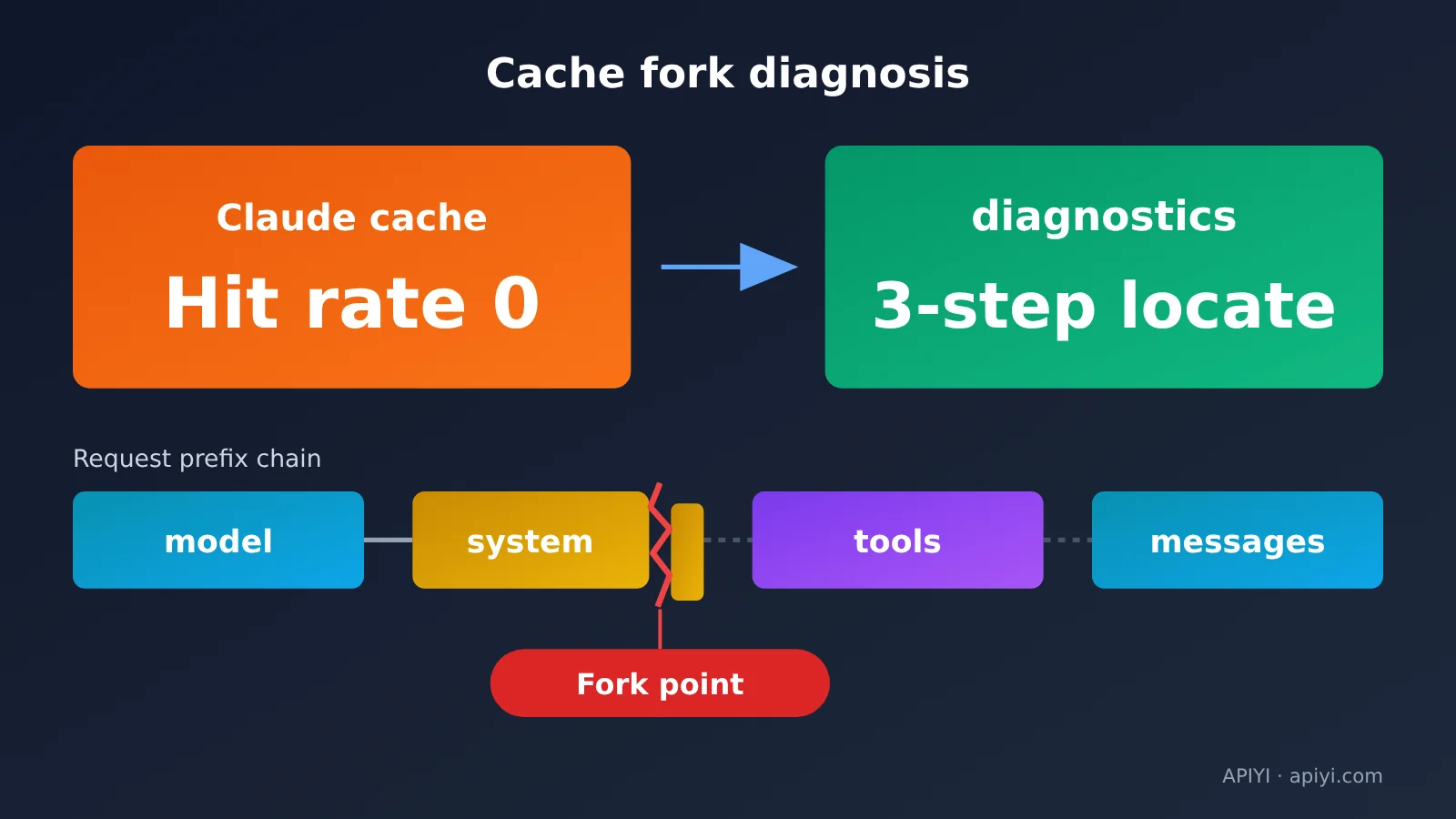
A cache miss isn’t black magic — the API tells you which segment the prefix diverges from. All you do is pass back the id from the previous response, and the API shows you where the first mismatch lands: model, system, tools, or messages.
This is not a feature-launch writeup. It’s written for developers who already use Claude prompt caching but whose hit rate has suddenly dropped to zero or whose bill refuses to come down. Every troubleshooting step spells out exactly what you’ll see at that step.
The payoff: by the end of this article, you’ll be able to pinpoint why the cache broke within three requests. You’ll also understand what diagnostics and usage each tell you, and know which two fields to compare against each other when you’re going through a proxy service.
Claude Cache Diagnostics: Key Points
Here’s the one-sentence version: pass in the id of the previous response, and the API compares the two requests and tells you where the first divergence happens — in model, system, tools, or messages. Before this, when a cache silently broke, all you’d see was usage.cache_read_input_tokens dropping to 0, with no clue which part had changed.
| Point | What it means | Why you care |
|---|---|---|
| Toggle | Fingerprints are only stored when a top-level diagnostics object is present in the request body |
No need to touch your business logic — just add one field |
| How comparison works | Pass the previous response id as previous_message_id |
Pins down the first diverging segment directly |
| Verdict field | cache_miss_reason returns one of six types |
Each type points to a specific place to fix |
| Pair with metrics | Read it alongside usage.cache_read_input_tokens |
Keeps you from mistaking “no divergence” for “not working” |
| Availability | Only offered on the official Claude API | Other channels need to self-check via usage |
Timeline of Claude cache diagnostics
The feature launched in beta in May 2026, and at the time you had to send the anthropic-beta: cache-diagnosis-2026-04-07 header. The rules tightened once during September: only requests that explicitly include a diagnostics object get their fingerprint stored — requests that carry just the header aren’t recorded.
On September 23 it went GA. You no longer need cache-diagnosis-2026-04-07, and requests still sending the old header work fine. These days the POST /v1/messages response always includes a diagnostics field, set to null when the feature isn’t enabled. So seeing null there doesn’t mean the endpoint is broken.
Fingerprints store only hashes and estimated token counts — no raw prompt content. They’re indexed by response id and scoped to your organization and workspace, with a fairly short retention period.
3 Steps to Troubleshoot Claude Cache Hit Rate with diagnostics
The three steps below follow the official field documentation. If you’re calling through APIYI, point base_url at https://api.apiyi.com/v1 for the native Messages endpoint, and the request path is /v1/messages. That said, the hands-on section further down covers what diagnostics actually returns in a proxy scenario.
Step 1: Add a diagnostics object at the top level of the request
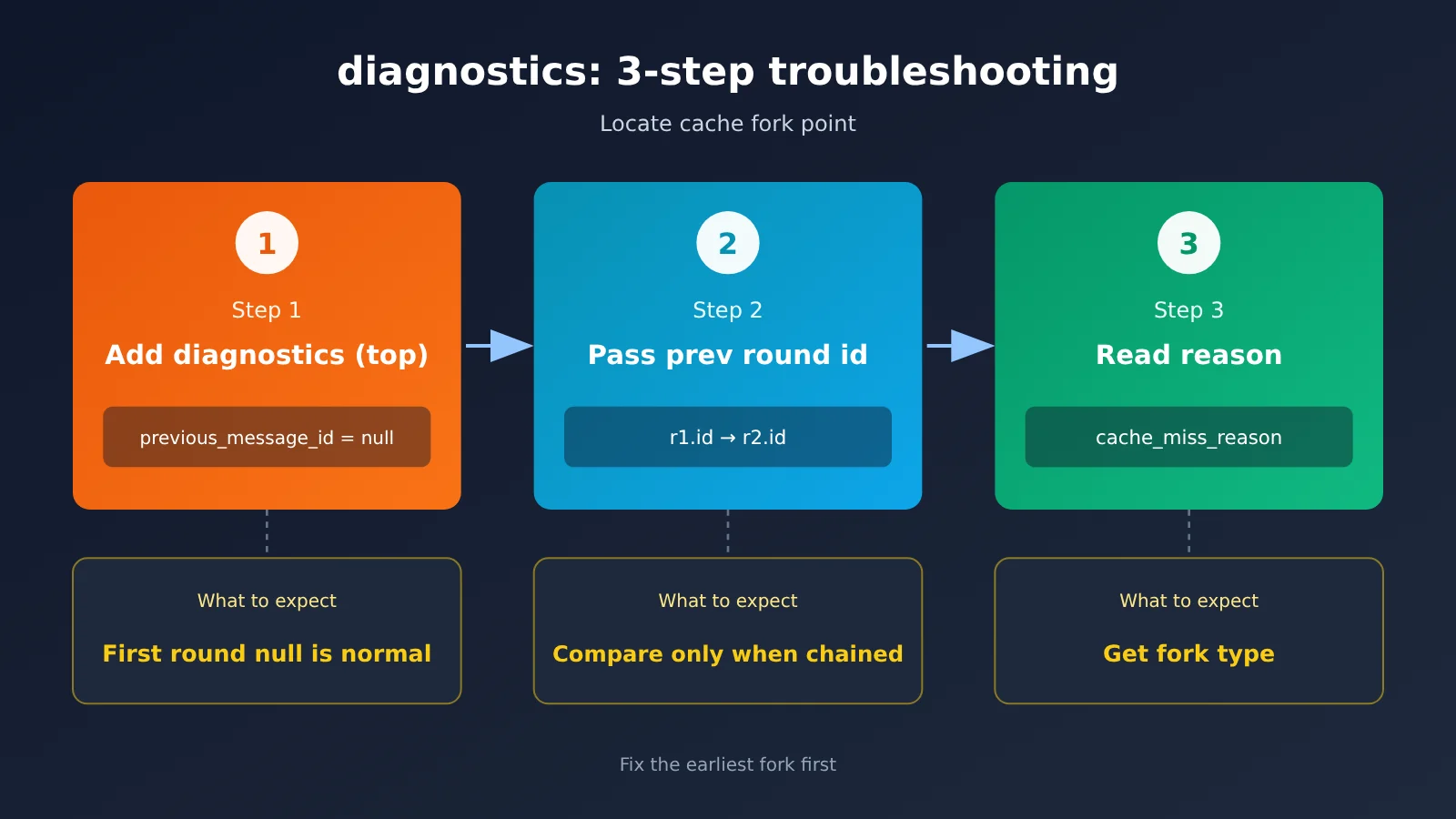
diagnostics is the only switch. A request without it stores no fingerprint, so there’s nothing to compare later. The first round has nothing to compare against, so pass null for previous_message_id, meaning “start recording from this round.”
- Keep the usual version header:
anthropic-version: 2023-06-01 - Not needed once GA ships:
anthropic-beta: cache-diagnosis-2026-04-07 - Add this at the top level of the request body:
"diagnostics": {"previous_message_id": null} - Put the breakpoint on the system block you want cached, as usual:
"cache_control": {"type": "ephemeral"} - What you’ll see:
diagnosticsisnullin the response,cache_read_input_tokensis usually 0, andcache_creation_input_tokensis greater than 0
Seeing null on the first round doesn’t mean failure. That round is writing the cache — there was never a previous round to compare against, so there’s nothing to troubleshoot.
Step 2: Pass the previous round’s response id on every round after that
From round two onward, drop the previous response’s id into previous_message_id. The most common mistake is including diagnostics only on the first round and forgetting it afterward. The request the next round points to was never recorded, so you get previous_message_not_found.
- Round two request body:
"diagnostics": {"previous_message_id": "<id of the round-one response>"} - Round three request body:
"diagnostics": {"previous_message_id": "<id of the round-two response>"} - The loop pattern: round one passes
null, round two passesr1.id, round three passesr2.id, and so on - With streaming calls, the result shows up in the
message_startevent, and the id still moves forward round by round - What you’ll see: once adjacent rounds are close enough together and within the same workspace, comparison results start appearing in the response
Step 3: Read cache_miss_reason and fix the matching issue
diagnostics has three possible values, so sort them out before you read:
null: the request didn’t includediagnostics; orprevious_message_idwasnull; or the comparison completed and found no divergence{"cache_miss_reason": null}: the comparison is still running — the response started too quickly, so this round draws no conclusion; check the next onecache_miss_reasonis an object: a conclusion is in, carrying the divergence type and details- What you’ll see: once you have the type, fix it using the table in the next section. Fix the earliest divergence first, because only the first divergence point gets reported — anything behind it may be hidden.
🚀 Quick start: If you want to first confirm whether your cache prefix can be written and hit, use the same key on APIYI apiyi.com to switch between Claude models and run a two-round comparison. The key thing to check is whether the cache write and cache read numbers in
usageline up.
The six cache_miss_reason types and where to fix them
Once you have the cache_miss_reason, use this table to map it to the place you need to change:
| Type | Meaning | Where to fix it |
|---|---|---|
model_changed |
The model differs from the previous turn — for example, routing, an A/B test, or a fallback switched models. The cache is isolated per model | Pin the model for the entire cached conversation |
system_changed |
The system prompt changed. The most common cause is inserting a timestamp, request ID, or some other value that differs every time | Make the system prompt a byte-for-byte stable constant, and move dynamic data into the first user message after the breakpoint |
tools_changed |
Tools were added, removed, or reordered, or the input_schema serialization isn’t stable |
Send the same tool list every turn, in a fixed order, with serialization keys sorted |
messages_changed |
Earlier messages were modified, reordered, or deleted instead of appended at the end | Only append to history; pass assistant content and tool results back verbatim |
previous_message_not_found |
The corresponding fingerprint can’t be found — this doesn’t mean the request changed | Send diagnostics on every turn, don’t cross workspaces, and don’t leave gaps that are too long between turns |
unavailable |
No diagnostic result is available for this turn — for example, tool_choice, thinking, context_management, output_config, output_format, or the beta header set isn’t consistent, or the conversation is simply too long |
Keep these parameters unchanged across the entire lifecycle of a cached conversation |
The four *_changed types also come with cache_missed_input_tokens, which tells you roughly how many cacheable input tokens were lost after the divergence point. This number is converted from byte length, so it’s only good for gauging the order of magnitude — it’s not a billing figure, and it can occasionally even be larger than usage.input_tokens.
Looking at diagnostics alone can mislead: combine with usage to judge Claude cache hits
diagnostics answers “did my request change?” while usage.cache_read_input_tokens answers “did the cache hit?” These are two different questions, and looking at only one of them can easily lead you to the wrong conclusion.
| diagnostics result | Cache read tokens | Conclusion | What to do |
|---|---|---|---|
null |
High | Prefix is stable, cache hit | No action needed |
null |
Low or 0 | Request didn’t change, but the cache has expired | Shorten the request interval, or switch to a 1-hour TTL |
*_changed |
Low | Request changed, so the cache missed | Fix it using the table in the previous section |
*_changed |
High | The change happened later in the request, so earlier breakpoints still hit | Worth fixing, but the impact is small |
Let’s stress this again: null doesn’t mean it didn’t work—it might be the best possible result. There are also a few cases where this table doesn’t apply: the first round, when cache_miss_reason is null (comparison still in progress), and previous_message_not_found and unavailable. In these cases, no valid comparison was produced at all.
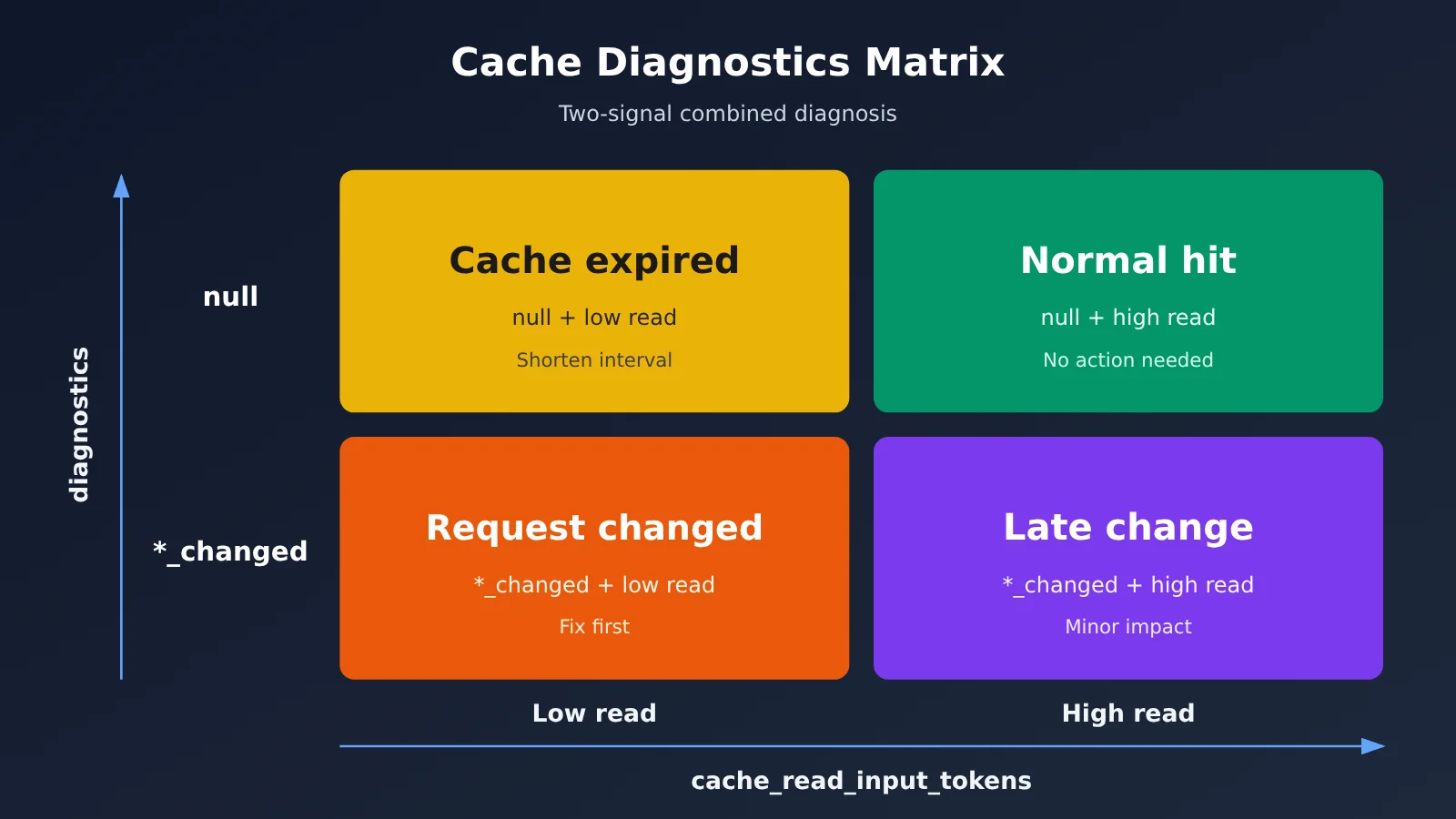
If you’re not sure which round falls into which cell, you can send the same request twice in a row on APIYI apiyi.com, record the cache read and write numbers for each round, and then check them against the matrix above one by one.
Common Reasons for a Low Claude Cache Hit Rate: Three Hard Requirements
A lot of the time, a low hit rate isn’t because the request changed — it’s because the cache was never written in the first place. Miss any one of these three conditions, and caching simply won’t happen:
- You have to explicitly set
cache_control: you can attach it to a specific content block to create an explicit breakpoint, or place acache_controlat the top level of the request and let the system automatically drop the breakpoint on the last cacheable block. Ifcontentis just a plain string with no content blocks to attach a marker to, it will never be cached. - The length has to reach the minimum cacheable length: on the Claude API, that’s 512 tokens for both Sonnet 5.5 and Opus 5.5. If the prefix isn’t long enough, the cache is silently ignored — and no error is raised.
- The prefix has to be byte-for-byte identical: history should only be appended, while system and tools stay stable. If a single space, the field order in your JSON, or a timestamp changes anywhere, it’s treated as a brand-new prefix.
APIYI’s caching documentation also lays out two hard limits: a maximum of 4 cache_control breakpoints per request, and each breakpoint only looks back over the most recent 20 content blocks. In a long multi-turn conversation, marking only the last message won’t cover the whole history.
TTL is easy to overlook as well. It defaults to 5 minutes, and every hit renews it — but the clock starts from the write or read request, not from when the response finished. If a single streaming response takes 4 minutes to output, your next request needs to go out within roughly a minute. When you need a longer window, you can add "ttl": "1h" inside cache_control.
What It Costs When Claude’s Cache Hit Rate Drops to Zero
Here are the prices first, in USD per million tokens, as of 2026-10-25. Always check the live console pricing for the latest numbers:
| Model | Input | Output | Cache read | 5-minute write | 1-hour write |
|---|---|---|---|---|---|
| Claude Sonnet 5.5 | $2 | $10 | $0.10 | $2.50 | $4 |
| Claude Opus 5.5 | $4 | $20 | $0.20 | $5 | $8 |
| Claude Haiku 5.5 (up to 100K tokens) | $0.10 | $0.50 | $0.01 | $0.125 | $0.20 |
| Claude Haiku 5.5 (over 100K tokens) | $0.50 | $2.50 | $0.05 | $0.625 | $1 |
You need to look at the multipliers separately. The general guidance in APIYI’s caching guide is: 0.1× on hits, 1.25× for 5-minute writes, and 2× for 1-hour writes. Sonnet 5.5 changed with the official update on October 7: cache reads dropped from $0.20 to $0.10, making them 0.05× the base input price. Write pricing didn’t change.
This wasn’t a blanket price cut—Sonnet 5 cache reads are still $0.20. So don’t use 0.1× to calculate Sonnet 5.5. For specific models and prices, check the platform’s model list.
Using the platform’s general 0.1× assumption, the break-even point works like this: with a 5-minute TTL, two uses break even (1.25 + 0.1 = 1.35, less than the 2.0 you’d pay without caching); with a 1-hour TTL, three uses are needed (2 + 0.2 = 2.2, less than 3.0).
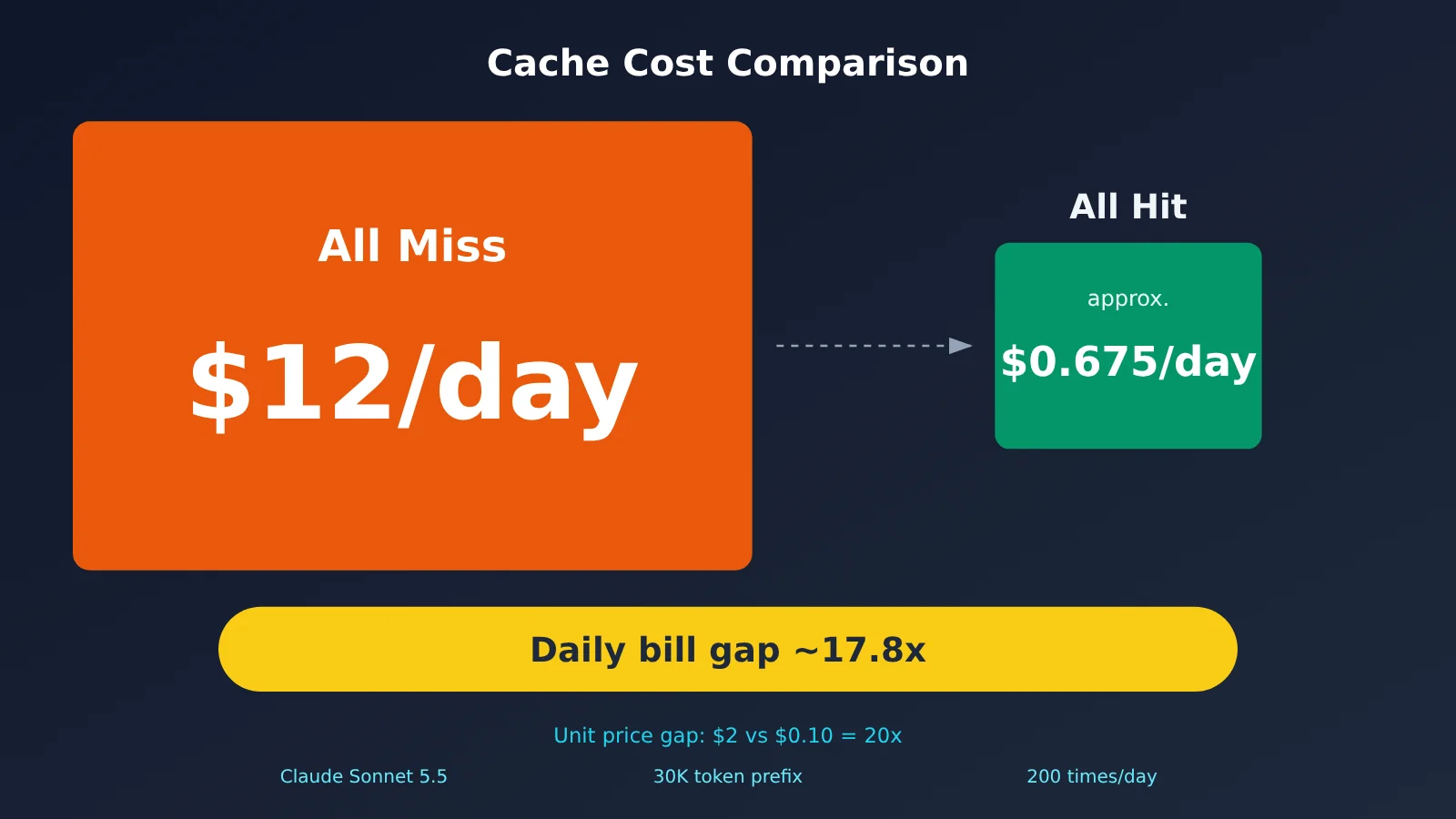
Here’s an example. Sonnet 5.5, a fixed prefix of 30K tokens, 200 requests per day, all within the 5-minute TTL:
- All cache hits: 200 × 30K × $0.10 per million tokens = $0.60, plus one write at $0.075, for about $0.675/day total
- All misses: 200 × 30K × $2 per million tokens = $12/day
The full-day bill differs by about 17.8×—and that’s not the unit-price difference. The unit prices are $2 vs. $0.10, a 20× gap. If you switch to a 1-hour TTL, one write costs $0.12, and the hit price stays the same. When request intervals often exceed 5 minutes, it’s worth comparing which is lower: the extra write cost, or the cost of repeatedly rebuilding the prefix.
How to Troubleshoot Claude Cache Hit Rates When Using APIYI
Let’s start with the actual test results. On 2026-10-26 we ran two rounds on APIYI with Claude Sonnet 5.5: the first round wrote 2523 tokens to cache and read 0; in the second round, we sent the same content back as-is, and got a cache read of 2523 with 0 writes — the token counts matched exactly. Claude Opus 5.5 with the same long prefix also wrote to cache and hit it successfully.
But the response had no diagnostics field. Not in non-streaming calls, and not in the message_start of streaming calls. We sent the request again with the beta header, and also deliberately modified the system prompt to force a real miss (read 0, write 2526) — still no such field in the response. Every request returned 200, with no errors. The upstream channel behind a proxy doesn’t necessarily go through the official Claude API, so in a proxy setup, you mainly compare the two fields in usage against each other.
| What you’ll see | What it means |
|---|---|
This round’s cache_read_input_tokens exactly equals last round’s cache_creation_input_tokens |
The prefix hit completely |
| This round’s read is clearly smaller than last round’s write | Only an earlier segment hit; something in the middle changed |
| Writes are always 0 | No marker set, prefix too short, or you used the OpenAI-compatible format |
| The second round writes again while reads stay at 0 | The prefix changed — check timestamps, UUIDs, and serialization order |
One more thing to watch: caching only works with the native /v1/messages endpoint. If you call Claude through the OpenAI-compatible /v1/chat/completions format, you won’t get cache billing no matter what parameters you pass.
💡 Troubleshooting tip: APIYI (apiyi.com) forwards
cache_controlto the upstream as-is, and returns the two cache fields in the response unchanged too — your code doesn’t need any extra adaptation for the proxy layer. Turn “this round’s read = last round’s write” into a log alert, and you can replace most of your manual troubleshooting.
Limitations of Claude Cache Diagnostics
Diagnostics won’t solve everything, so before you use it, it helps to know where it draws the line:
- It’s only available through the official Claude API. Claude hosted on Amazon Bedrock and Google Cloud doesn’t have it.
- Fingerprints are kept only for a short time, so you need to send requests across consecutive turns with short gaps between them.
- Both requests must belong to the same organization and the same workspace. You can verify this with the
anthropic-workspace-idresponse header. - In long conversations, if the change sits deep in the message list, you might only get back
unavailable. - It’s a best-effort mechanism. If it can’t produce a result, it won’t block the request or cause it to fail.
FAQ
Q1: Why is diagnostics always null?
There are three cases: you didn’t include the `diagnostics` object; it’s the first turn and `previous_message_id` is `null`; or the comparison completed with no divergence. Read the cache numbers alongside it: a high read count means everything’s fine, and a read count of 0 usually means the cache expired. If you’re going through an API proxy service, the field might not be returned at all—in that case, fall back to a self-check with usage.
Q2: Does previous_message_not_found mean the request changed?
No. It only means the corresponding fingerprint couldn’t be found. There are three common reasons: the previous turn didn’t include `diagnostics`, the previous turn came from a different workspace, or too much time passed. Just include `diagnostics` on every turn and shorten the interval.
Q3: Does diagnostics cost extra?
The official docs don’t list a separate “diagnostics fee”—it’s billed along with normal Messages requests. The docs also don’t explicitly say there’s no markup, so for billing, trust your invoice and the console.
Q4: Can I still use this diagnostics setup through an API proxy service?
In our testing with APIYI, we didn’t get back the `diagnostics` field, but cache writes and hits both worked normally. You can judge by checking whether “this turn’s read count exactly equals the previous turn’s write count.” For integration details, see the cache billing docs at APIYI apiyi.com.
Q5: I set cache_control, so why has nothing ever been written to cache?
Check three things first: is the content a plain string; does the prefix hit 512 tokens (Sonnet 5.5 and Opus 5.5); and are you using the OpenAI-compatible format? If any one of these isn’t satisfied, the cache is silently skipped.
Q6: If several problems show up at once, which one should I fix first?
Fix the one reported by `cache_miss_reason` first. It only reports the earliest fork in the path—fix that, run another turn, and the problems that were blocked behind it will surface. Replaying the same request repeatedly on APIYI apiyi.com lets you rule them out one by one fairly quickly.
Claude Cache Diagnostics Key Takeaways
- What diagnostics is: Pass in the previous response id to pinpoint the first divergence segment in the prefix
- How to enable it: Include
diagnosticsat the top level, passnullon the first round, then pass it every round after that - What
nullmeans: It’s alsonullon the first round or when there’s no divergence, so it can’t be treated as a failure signal on its own - How to judge: You need to look at diagnostics together with
cache_read_input_tokensto reach a conclusion - Hard requirements: Set explicit markers, hit 512 tokens, and keep the prefix byte-for-byte identical
- Cost gap: With a 30K prefix and 200 calls a day, the full-day bill differs by roughly 17.8x
- Proxy self-check: On APIYI apiyi.com, check whether “this round’s read equals the previous round’s write”
Summary
Troubleshooting Claude cache hit rates comes down to three things:
- Locate the divergence: Include
diagnosticsevery round, readcache_miss_reason, and fix the earliest reported one first - Cross-check: Look at both diagnostics and usage together—
nulldoesn’t mean it isn’t working - Stick to the hard requirements: Set your markers, hit the length threshold, only append to history, and keep system and tools stable
If your call chain can’t get diagnostics, build a self-check using the two fields in usage. We recommend first verifying the cache read/write numbers with two rounds of requests on APIYI apiyi.com before rolling out to production.
📚 References
- Claude Official Docs: Cache diagnostics: Diagnostic fields, six types, and decision matrix
- Link:
platform.claude.com -
Notes: The fields, timeline, and limitations of the diagnostics in this article are based on this document
-
Claude Official Docs: Prompt caching: Caching rules, TTL, minimum length, and pricing
- Link:
platform.claude.com -
Notes: Source for the minimum cacheable length and the official price table
-
APIYI Model List: Input, output, and cache read pricing for each Claude model
- Link:
docs.apiyi.com/models -
Notes: Price data updated on 2026-10-25
-
APIYI Claude Prompt Caching Billing Guide: Multipliers, break-even point, and self-check criteria
- Link:
docs.apiyi.com/api-capabilities/claude-prompt-caching - Notes: Troubleshooting reference for proxy scenarios
Author: APIYI Technical Team
Technical Discussion: Feel free to reach out to us via the APIYI website homepage. More resources are available at the docs.apiyi.com documentation center