Fal.ai Alternative: Why More Developers Are Looking for Alternatives
Fal.ai has carved out a niche as an AI inference platform focused on media generation, boasting over 600 models and high-speed inference. However, as developers dive deeper, they’re hitting some real-world roadblocks: unpredictable costs due to compute-time billing, reliance on third-party proxies for LLM text generation, and technical support that’s primarily community-driven—these pain points have made “fal ai alternative” a trending search term in developer communities.
In this article, we’ll compare APIYI with Fal.ai across 8 core dimensions to help you decide which platform better fits your project requirements.
Core Value: By the end of this post, you’ll clearly understand APIYI’s specific advantages over Fal.ai in terms of pricing, feature coverage, and integration ease—especially considering that Nano Banana Pro costs just $0.05/call, compared to Fal.ai’s $0.15/call.
APIYI vs. Fal.ai: 8-Dimension Comparison
Here is a direct comparison of the two platforms across key dimensions:
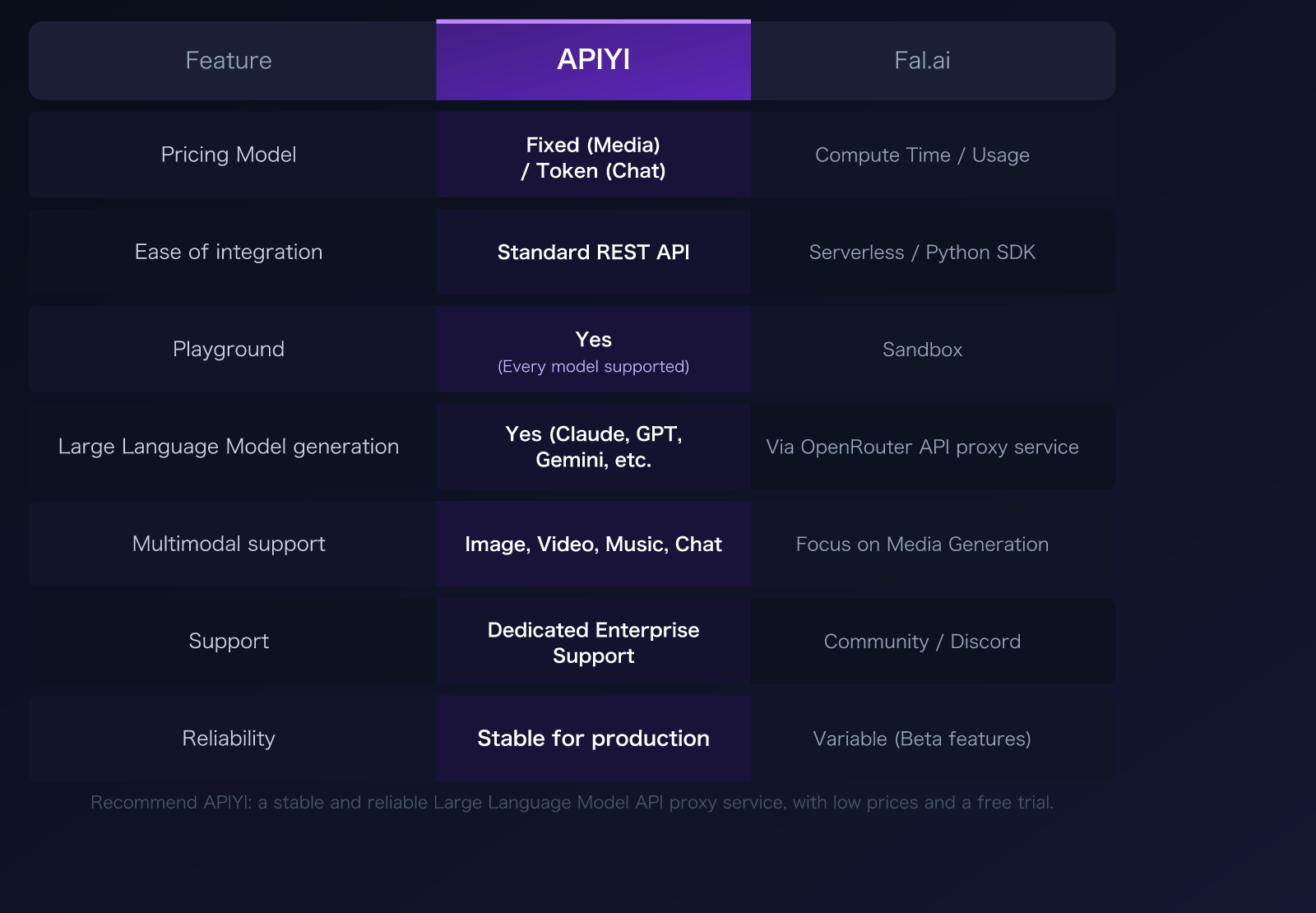
| Comparison Dimension | APIYI | Fal.ai | Winner |
|---|---|---|---|
| Pricing Model | Fixed price (media) / Token-based (chat) | Compute-time / Usage-based | APIYI ✅ |
| Integration | Standard REST API, OpenAI-compatible | Serverless / Python SDK-first | APIYI ✅ |
| Playground | Available, test all models online | Available, Sandbox environment | Tie |
| LLM Text Generation | Native support (Claude, GPT, Gemini, etc.) | Via OpenRouter proxy, not native | APIYI ✅ |
| Multimodal Support | Full coverage (image, video, audio, chat) | Focused on media (image/video/audio) | APIYI ✅ |
| Technical Support | Dedicated enterprise-level support | Community / Discord | APIYI ✅ |
| Reliability | Stable for commercial use, dedicated ops | Some features in Beta | APIYI ✅ |
| NB Pro Pricing | $0.05/call (1-4K same price) | $0.15/call (1K), $0.30/call (4K) | APIYI ✅ |
🎯 Recommendation: If your project requires a mix of LLM and image generation capabilities, or if you have strict cost-control requirements, APIYI (apiyi.com) is the more cost-effective choice. The platform uses fixed-price billing, making costs completely predictable and eliminating the “bill shock” often associated with compute-time billing.
Fal.ai Alternative Comparison Dimension 1: Pricing Model
Pricing is the most sensitive factor for developers when choosing an API platform. The two platforms adopt completely different billing philosophies.
Fal.ai Billing Method
Fal.ai uses a compute time / usage-based billing model:
- GPUs are billed by the second (H100: $0.0005/sec, A100: $0.0003/sec)
- Image models are charged per image, with prices varying significantly based on the model and resolution
- Video models are charged per second of video duration
- The actual cost depends on the generation time, meaning the bill is unpredictable until the generation is complete
The problem with this model is that the same prompt can result in different costs depending on the time of day and server load. Users on Reddit have reported spending $10.66 for a 2-minute video, which was far beyond their expectations.
APIYI Billing Method
APIYI uses a fixed-price model:
- Media generation (images/video): Fixed price per invocation, unaffected by generation time
- Chat models (Claude/GPT/Gemini): Standard token-based billing
- NB Pro full resolution pricing: 1K, 2K, and 4K are all $0.05 per invocation
- Bills are completely predictable—you know the exact cost before you make the call
Nano Banana Pro Price Comparison
| Resolution | APIYI | Fal.ai | APIYI Savings |
|---|---|---|---|
| 1K (1024px) | $0.05 | $0.15 | 67% (only 1/3) |
| 2K (2048px) | $0.05 | ~$0.22 | 77% |
| 4K (4096px) | $0.05 | $0.30 | 83% (only 1/6) |
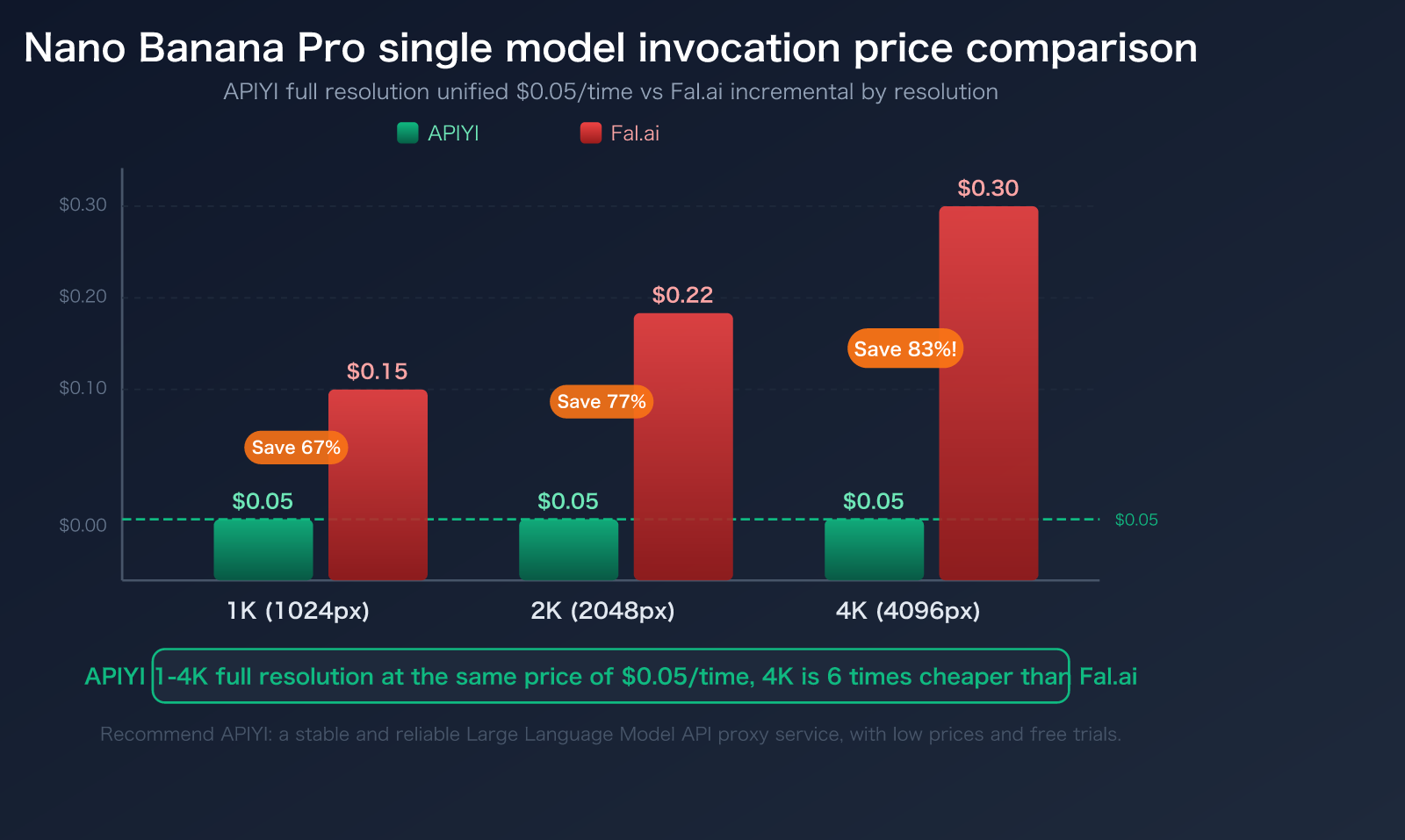
APIYI’s NB Pro pricing advantage is particularly prominent at 4K resolution—generating a 4K ultra-high-definition image costs only $0.05 on APIYI, compared to $0.30 on Fal.ai, a 6x difference.
Fal.ai Alternative Actual Cost Calculation
Here is a comparison of monthly costs at different usage scales:
| Use Case | Daily Volume | APIYI Monthly Fee | Fal.ai Monthly Fee | Monthly Savings | Annual Savings |
|---|---|---|---|---|---|
| Individual Developer | 20 images/day (1K) | $30 | $90 | $60 | $720 |
| Small Team | 100 images/day (2K) | $150 | $660 | $510 | $6,120 |
| Mid-sized Business | 500 images/day (4K) | $750 | $4,500 | $3,750 | $45,000 |
| Large Enterprise | 2000 images/day (4K) | $3,000 | $18,000 | $15,000 | $180,000 |
Key Finding: The higher the usage, the more significant APIYI’s cost advantage becomes. For a mid-sized business (500 4K images/day), the annual savings can reach $45,000—enough to cover the salary of a junior developer.
Other Model Price Advantages
Beyond NB Pro, APIYI maintains a price advantage across other models as well:
| Model | APIYI | Fal.ai | Notes |
|---|---|---|---|
| NB Pro | $0.05/call | $0.15/call | APIYI 1-4K same price |
| NB 2 | $0.035/call | $0.039/call | APIYI slightly lower |
| Claude Sonnet | Token-based, from 15% off | Via OpenRouter proxy | Fal.ai not native |
| GPT-4o | Token-based, from 15% off | Via OpenRouter proxy | Fal.ai not native |
| Gemini Pro | Token-based, from 15% off | Via OpenRouter proxy | Fal.ai not native |
APIYI’s overall pricing strategy: media generation models start at 15% off official rates, with NB Pro as low as 20% of the original cost ($0.05/call vs. $0.234/call on the official site).
💰 Cost Calculation: Assuming 100 4K images are generated daily, the monthly cost difference is: APIYI $150 vs. Fal.ai $900, saving $750 per month. Register at APIYI apiyi.com to get free testing credits and experience the price advantage firsthand.
Fal.ai Alternative Comparison Dimension 2: Integration and API Compatibility
Fal.ai Integration Approach
Fal.ai focuses on a Python SDK and Serverless architecture:
- Promotes the
fal-clientPython SDK - Uses an asynchronous queue pattern (
queue.fal.run), which requires polling for results - Authentication via the
FAL_KEYenvironment variable - REST API is available but documentation is sparse
- Requires GitHub login for registration, which can be a barrier for some users
# Fal.ai invocation method
import fal_client

result = fal_client.subscribe(
    "fal-ai/nano-banana-pro",
    arguments={
        "prompt": "A cat sitting on a windowsill",
        "image_size": "landscape_4_3"
    }
)
APIYI Integration Approach
APIYI uses a standard REST API that is compatible with native OpenAI and Google formats:
- Use OpenAI or Google SDKs directly; no extra dependencies required
- Synchronous result returns; no polling needed
- Standard API key authentication
- Comprehensive REST API documentation with multi-language examples
# APIYI invoking NB Pro — using the official Google SDK
import google.generativeai as genai

genai.configure(
    api_key="your-apiyi-key",
    client_options={"api_endpoint": "api.apiyi.com"}
)

model = genai.GenerativeModel("gemini-3-pro-image-preview")
response = model.generate_content(
    "A cat sitting on a windowsill",
    generation_config=genai.GenerationConfig(
        response_modalities=["TEXT", "IMAGE"],
        image_config={"image_size": "4K"}
    )
)
Core Difference: APIYI is compatible with official Google documentation formats; you only need to swap the request URL and API key. If you’ve used official Google or OpenAI APIs before, the migration cost to APIYI is virtually zero.
🚀 Quick Start: APIYI (apiyi.com) provides a standard REST API supporting mainstream languages like Python, Node.js, cURL, and Go. No need to learn a new SDK—just connect using the tools you’re already familiar with.
Fal.ai Alternative Comparison Dimension 3: Model Coverage and LLM Support
This is where the positioning of the two platforms differs the most.
Fal.ai: The Media Generation Expert
Fal.ai positions itself as a media generation inference platform:
- Rich image generation models: FLUX, Stable Diffusion, Nano Banana, Recraft, Ideogram, etc.
- Extensive video generation support: Sora 2, Veo 3.1, Kling 3.0, etc.
- Audio and 3D generation support
- LLM text generation is only available via OpenRouter proxy—it’s not natively supported, which adds latency and external dependencies.
APIYI: Full-Stack AI Capability Platform
APIYI covers full-stack capabilities including Large Language Models + media generation:
- LLM Chat: Claude (Opus/Sonnet/Haiku), GPT-4o, Gemini Pro, DeepSeek, etc.
- Image Generation: Nano Banana Pro, Nano Banana 2, FLUX series, etc.
- Video Generation: Support for various video models
- Music Generation: Supports AI music creation
- All models are accessed via a unified API interface—one key grants access to everything.
| Capability Dimension | APIYI | Fal.ai |
|---|---|---|
| LLM Chat | Native support for Claude/GPT/Gemini | Via OpenRouter proxy |
| Image Generation | NB Pro/NB2/FLUX, etc. | 600+ image models |
| Video Generation | Supported | Supported |
| Music Generation | Supported | Supported |
| Unified Interface | One key for all models | Different endpoints for different models |
| Model Playground | Online testing for all models | Sandbox environment |
💡 Key Distinction: If your application requires both LLM chat and image generation (e.g., an AI chatbot that creates images), APIYI (apiyi.com) allows you to handle everything with a single API key. Conversely, Fal.ai’s LLM capabilities require an extra dependency on OpenRouter, which increases architectural complexity and potential points of failure.
Fal.ai Alternative Comparison Dimension 4: Technical Support and Reliability
Technical Support Comparison
| Support Dimension | APIYI | Fal.ai |
|---|---|---|
| Support Method | Dedicated enterprise-level support | Community / Discord |
| Response Time | Rapid response | Inconsistent user feedback |
| Billing Issues | Transparent billing, proactive resolution | Multiple reports of unresolved billing disputes |
| Documentation Quality | Comprehensive multilingual documentation | Gaps in documentation (per user feedback) |
Reliability Comparison
APIYI Reliability Guarantees:
- Nano Banana Pro is the platform’s highest daily consumption flagship model
- Significant investment in operations and maintenance resources to ensure official direct proxy
- No rate limits, stable and ready for commercial use
- Dedicated operations team for core models
Fal.ai Reliability Status:
- No public SLA commitment (competitors like Crusoe Cloud offer 99.98% SLA)
- Some features are still in Beta
- User feedback indicates a lack of billing transparency
- Higher proportion of negative feedback on Trustpilot and Reddit
Fal.ai Alternative Use Case Recommendations: When to Choose APIYI
Scenarios for Choosing APIYI
- High-frequency use of Nano Banana Pro: $0.05/call vs $0.15/call, saving 67%-83% in costs.
- Need for LLM + Image hybrid capabilities: Use one API key to invoke Claude/GPT + NB Pro.
- Cost-sensitive projects: Fixed-price billing makes costs fully predictable.
- Chinese-speaking developers: Full Chinese documentation and technical support.
- Commercial deployment: Proven stability with dedicated operations for core models.
- Rapid integration: Standard REST API, compatible with OpenAI/Google formats.
Scenarios for Choosing Fal.ai
- Need for a vast library of niche models: Fal.ai has a library of 600+ models, covering obscure requirements.
- LoRA training needs: Fal.ai provides an online LoRA trainer.
- Pure media generation projects: No need for LLM capabilities, just images/videos.
- Deeply bound to Fal.ai SDK: Existing projects where migration costs are high.
Migration Cost Assessment
If you’re currently using Fal.ai and considering a move to APIYI, the core changes are minimal:
# Original Fal.ai code
import fal_client
result = fal_client.subscribe("fal-ai/nano-banana-pro", arguments={...})

# Migration to APIYI — Using standard Google SDK
import google.generativeai as genai
genai.configure(api_key="your-apiyi-key",
                client_options={"api_endpoint": "api.apiyi.com"})
model = genai.GenerativeModel("gemini-3-pro-image-preview")
response = model.generate_content(...)
The core of the migration involves replacing the fal_client.subscribe() call with a standard SDK call. APIYI is compatible with the official Google format, so you can just refer to the official documentation to complete the process.
View full migration code comparison
# ===== Original Fal.ai code =====
import fal_client

def generate_image_fal(prompt, aspect_ratio="1:1"):
    result = fal_client.subscribe(
        "fal-ai/nano-banana-pro",
        arguments={
            "prompt": prompt,
            "image_size": aspect_ratio,
            "num_images": 1
        }
    )
    image_url = result["images"][0]["url"]
    return image_url

# ===== Migration to APIYI =====
import google.generativeai as genai

genai.configure(
    api_key="your-apiyi-key",
    client_options={"api_endpoint": "api.apiyi.com"}
)

def generate_image_apiyi(prompt, aspect_ratio="1:1", size="4K"):
    model = genai.GenerativeModel("gemini-3-pro-image-preview")
    response = model.generate_content(
        prompt,
        generation_config=genai.GenerationConfig(
            response_modalities=["TEXT", "IMAGE"],
            image_config={
                "image_size": size,
                "aspect_ratio": aspect_ratio
            }
        )
    )
    for part in response.candidates[0].content.parts:
        if hasattr(part, "inline_data"):
            return part.inline_data.data  # Base64 image data
    return None
Key Migration Considerations
| Migration Item | Fal.ai | APIYI | Note |
|---|---|---|---|
| SDK Dependency | fal-client |
google-generativeai |
Standard SDK, no extra dependencies |
| Authentication | FAL_KEY env var |
API Key parameter | More flexible |
| Result Retrieval | Asynchronous polling | Synchronous return | Cleaner code |
| Image Format | URL link | Base64 data | Can be saved directly |
| Resolution | image_size string |
image_config.image_size |
1K/2K/4K |
- Google Official Documentation:
ai.google.dev/gemini-api/docs/image-generation - APIYI Online Image Generation Test:
imagen.apiyi.com - Sample Code Download:
xinqikeji.feishu.cn/wiki/W4vEwdiCPi3VfTkrL5hcVlDxnQf
Other Fal.ai Alternative Options
Beyond APIYI, there are several other Fal.ai alternatives on the market, each with its own focus:
| Alternative | Positioning | Pros | Cons |
|---|---|---|---|
| APIYI | Full-stack AI API proxy service | 20% cost of NB Pro, unified LLM + media API | Fewer models than Fal.ai |
| Replicate | General ML model hosting | Excellent documentation, active community | Higher unit price |
| Together AI | Open-source model inference | FP8 inference cost reduction | Limited media generation capabilities |
| RunPod | GPU rental | Transparent GPU pricing | Requires self-deployment of models |
| OpenRouter | LLM routing aggregation | Wide coverage | Limited image generation capabilities |
🎯 Decision Advice: If your core requirement is Nano Banana Pro image generation combined with LLM chat capabilities, APIYI (apiyi.com) is the optimal choice in terms of both price and feature coverage. The official NB Pro price is $0.234 per request, while APIYI is only $0.05 per request (approx. 20% of the cost), with uniform pricing for 1K-4K resolutions and free testing available.
FAQ
Q1: How long does it take to migrate from Fal.ai to APIYI?
The core migration effort is minimal. APIYI is compatible with both the official Google API format and the OpenAI format; you only need to replace the request URL and API key. For NB Pro invocations, you can refer to the official Google documentation at ai.google.dev/gemini-api/docs/image-generation. A typical project migration can be completed in 1-2 hours. You can test the image generation quality at imagen.apiyi.com before making the final switch. Register at APIYI (apiyi.com) to receive free testing credits.
Q2: Is there any difference in image quality between APIYI’s Nano Banana Pro and Fal.ai’s NB Pro?
No difference at all. Both platforms invoke Google’s gemini-3-pro-image-preview model, which is built on the same underlying Gemini 3 Pro architecture. APIYI uses direct official API forwarding, ensuring you get the authentic model. There is zero difference in image quality; the only difference is the price—APIYI costs $0.05 per request (same price for all resolutions), while Fal.ai costs $0.15-$0.30 per request. Through APIYI (apiyi.com), you can use both NB Pro and NB2, switching flexibly based on your specific use case.
Q3: Does APIYI support all Fal.ai models?
APIYI’s model coverage strategy differs from Fal.ai’s. While Fal.ai pursues breadth (600+ models), APIYI focuses on the deep maintenance of core models. APIYI supports mainstream Large Language Models (Claude, GPT, the full Gemini series, NB Pro/NB2, etc.) and invests dedicated resources into maintaining the stability of these core models. If you specifically need models like FLUX or Stable Diffusion, we recommend checking the current support status at apiyi.com first.
Summary: Core Recommendations for Choosing a Fal.ai Alternative
When evaluating a “fal ai alternative,” the core advantages of APIYI compared to Fal.ai can be summarized in three points:
- Unbeatable Pricing: NB Pro costs just $0.05 per request (compared to Fal.ai’s $0.15-$0.30), with overall model pricing starting at a 15% discount off official rates.
- Full-Stack Capabilities: A unified interface for Large Language Models, image generation, video, and music. You can access everything with a single API key, whereas Fal.ai requires third-party proxies for LLM support.
- Predictable Costs: Fixed-price billing means you can say goodbye to the bill anxiety caused by variable compute time.
If you’re looking for a Fal.ai alternative that’s more affordable, feature-rich, and easier to integrate, we recommend trying APIYI at apiyi.com. The platform offers free testing credits, and you can experience the image generation quality of NB Pro online at imagen.apiyi.com. You can complete your migration from Fal.ai in just 5 minutes.
Technical Support: APIYI apiyi.com — A stable and reliable AI Large Language Model API proxy service. NB Pro full-resolution generation is just $0.05 per request.