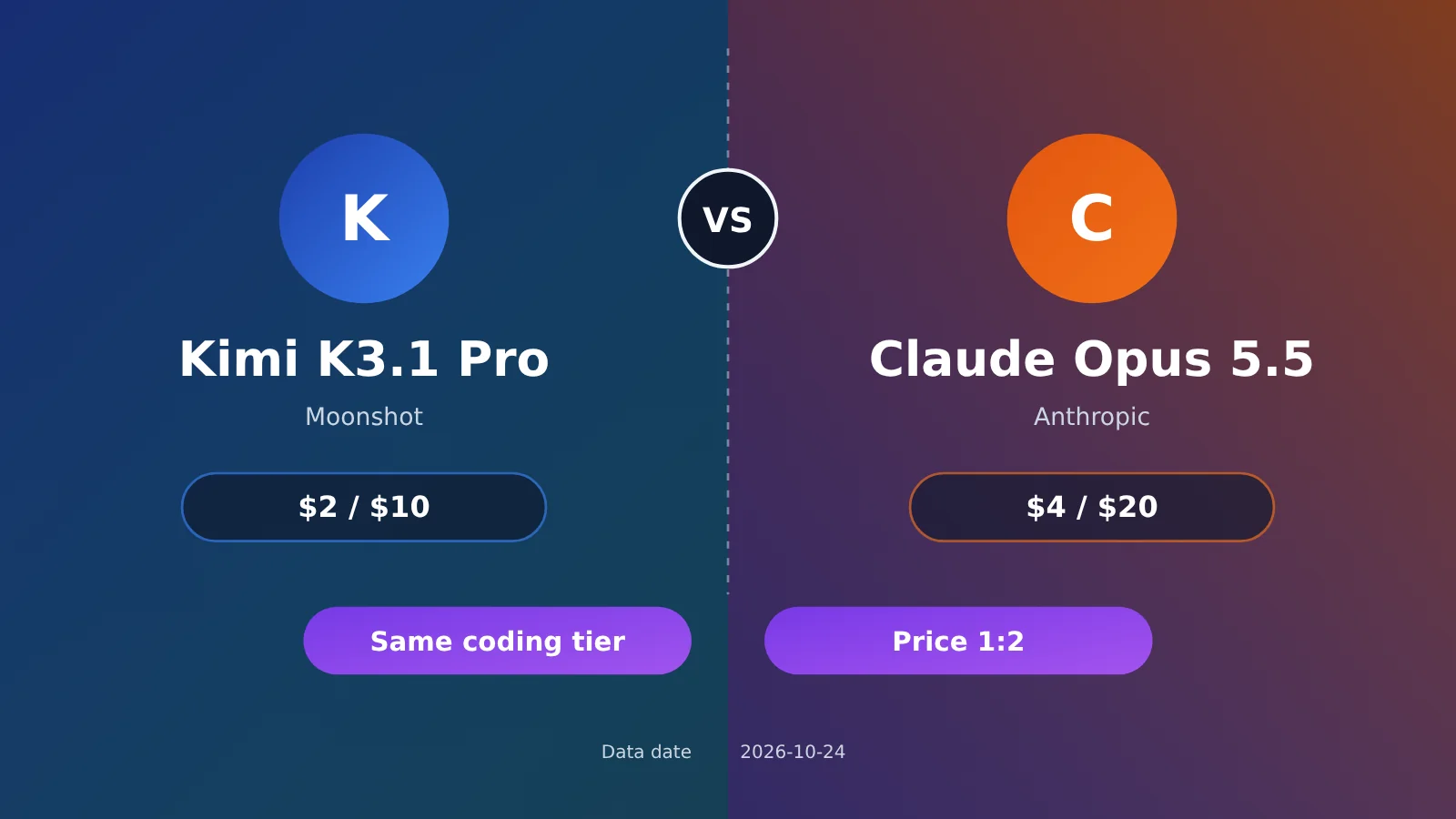
To start with the bottom line: Kimi K3.1 Pro and Claude Opus 5.5 are in the same tier for coding. In Moonshot’s official self-reported Terminal-Bench 4.0 results, K3.1 Pro scored 65.7%, compared with 66.4% for Opus 5.5—a gap of about 0.7 percentage points. Looking only at Terminal-Bench 4.0, third-party evaluator Artificial Analysis actually ranks K3.1 Pro highest. As for pricing, K3.1 Pro’s input and output rates are exactly half of Opus 5.5’s ($2/$10 versus $4/$20), while their cache-hit rates are the same. However, K3.1 Pro uses longer reasoning traces, so third-party estimates suggest its actual cost per task isn’t quite half.
All data below is labeled by source and grouped into three categories: officially self-reported (Moonshot’s blog and official Kimi and Anthropic documentation), third-party (Artificial Analysis, referred to below as AA), and unverified (no public data is currently available, so only directional assessments are possible). You can think of tokens as the “units of text” used for model billing. One Chinese character corresponds to a little over one token on average. All prices are in dollars per million tokens.
This article isn’t about declaring one model the winner. Each has strengths and weaknesses. We’ll compare the data on a like-for-like basis, then offer recommendations for different use cases.
What you’ll get from this article: You’ll be able to decide whether your tasks are a better fit for Kimi K3.1 Pro or Claude Opus 5.5, and understand the real difference in their costs.
1. Kimi K3.1 Pro vs. Claude Opus 5.5: Key Differences at a Glance
Here’s a table of the most important differences. The sections that follow take a closer look at each one. The “Source” column shows where each figure comes from, so you can verify it for yourself.
| Comparison | Kimi K3.1 Pro | Claude Opus 5.5 | Source |
|---|---|---|---|
| Terminal-Bench 4.0 (official figures) | 65.7% | 66.4% | Official self-reported figures (Moonshot blog) |
| Terminal-Bench 4.0 (AA figures) | 67%, the highest among the models tested by AA | Not listed in the reference materials | Third-party (AA) |
| Input / output price | $2 / $10 | $4 / $20 | Official pricing |
| Cached input price | $0.20 | $0.20 | Official pricing |
| Context length | 1,048,576 tokens | Up to 1M, depending on the model | Official documentation |
| Can thinking be turned off? | No; you can only adjust its intensity | Refer to Anthropic documentation | Official documentation / unverified |
| Open weights | Committed to release them by 2026-11-04 | Not open | Official self-reported |
“Context” refers to the total amount of content a model can process at once. Both models support context windows in the million-token range, so you can fit most medium-sized codebases into a single prompt. That means context length isn’t a key factor when choosing between them.
2. Kimi K3.1 Pro vs. Claude Opus 5.5 Pricing: A Side-by-Side Comparison of Five Pricing Tiers
First, let’s clarify two billing terms. Cache hit: When you repeatedly send the same opening content, such as a system prompt or code repository summary, the model provider stores it and charges a much lower rate when it’s read again. Cache write: The fee for storing that content in the cache for the first time. The price differs depending on whether it’s stored for 5 minutes or 1 hour.
| Model | Input | Output | Cache hit | 5-minute cache write | 1-hour cache write |
|---|---|---|---|---|---|
| Kimi K3.1 Pro | $2.00 | $10.00 | $0.20 | $2.00 | $4.00 |
| Claude Opus 5.5 | $4.00 | $20.00 | $0.20 | $5.00 | $8.00 |
| Claude Sonnet 5.5 (reference) | $2.00 | $10.00 | $0.10 | $2.50 | $4.00 |
Pricing note: Retrieved on 2026-10-24. Prices are in USD per million tokens and exclude tax. Sources: official Kimi and Anthropic pricing pages.
2.1 How the prices compare: 2x for input and output, no difference for cache hits
For input and output, Opus 5.5 costs exactly twice as much as K3.1 Pro. Both models charge $0.20 for cache hits, so there’s no difference there. Kimi is cheaper for cache writes: $2 vs. $5 for the 5-minute tier, and $4 vs. $8 for the 1-hour tier.
Adding Claude Sonnet 5.5 as a reference point reveals that its input and output prices are identical to K3.1 Pro’s, while its cache hit price is half as much ($0.10). So if you’re looking for a more affordable flagship-tier model, Sonnet 5.5 is a more direct comparison for Kimi than Opus 5.5 is.
2.2 Both models have a high-speed option
Both providers offer faster, more expensive versions, so make sure you’re comparing the right variants when choosing a model:
kimi-k3.1-pro-highspeed: $4 / $20, with cache hits at $0.20, 5-minute writes at $4, and 1-hour writes at $8 (official pricing)- Claude Opus 5.5 Fast mode: $8 / $40, covering the full context window, including tokens beyond 200k (official pricing)
As you can see, Kimi’s high-speed version has the same input and output prices as the regular Claude Opus 5.5, but its 5-minute cache writes are still cheaper.
3. Kimi K3.1 Pro vs. Claude Opus 5.5 on Coding Benchmarks: Two Sets of Results to Consider Separately
Terminal-Bench 4.0 evaluates real-world tasks completed in a terminal, such as installing dependencies, fixing bugs, and getting scripts to run. A task only passes if the final result is correct. The two tables below come from different organizations, so their numbers aren’t directly comparable.
3.1 Official self-reported results (Moonshot blog)
| Benchmark | Kimi K3.1 Pro | Claude Opus 5.5 | GPT-6 Astra |
|---|---|---|---|
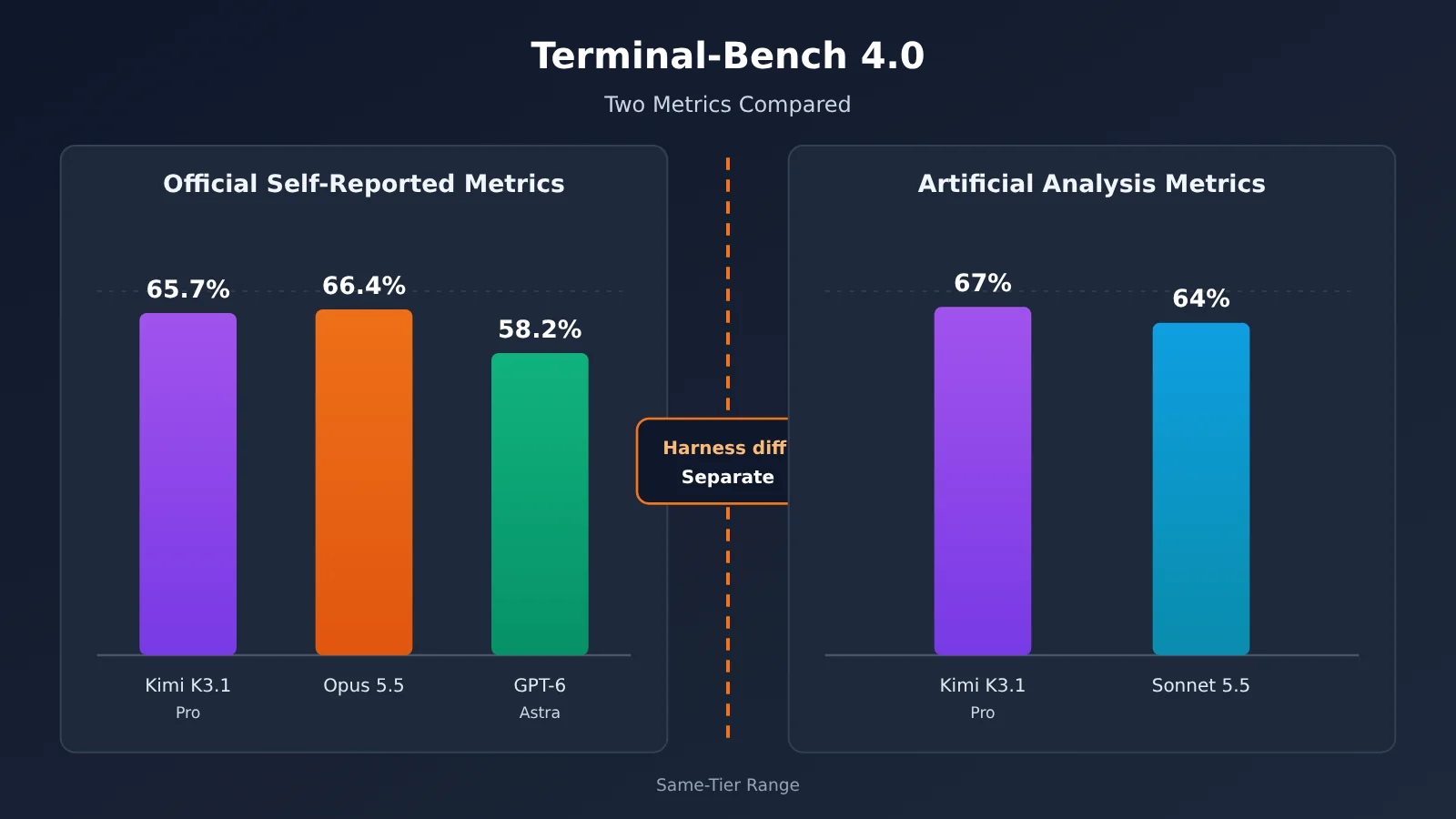
| Terminal-Bench 4.0 | 65.7% | 66.4% | 58.2% |
| BenchCAD (reconstructing 3D models from multi-view images using generated CAD code) | 92.7% (with tools) | 96.2% | — |
The tests were run with reasoning_effort set to max (the highest reasoning intensity), and K3.1 Pro used Claude Code’s harness. Moonshot described its own results in the blog as “narrowly behind Claude Opus 5.5”—that is, K3.1 Pro trails Opus 5.5 by a small margin.
3.2 Third-Party Benchmarks (Artificial Analysis, 2026-10-23)
| Test | Kimi K3.1 Pro | Claude Opus 5.5 | Claude Sonnet 5.5 |
|---|---|---|---|
| Intelligence Index (overall intelligence score) | 55 (4th) | 58 | 56 |
| Terminal-Bench 4.0 | 67% (highest overall) | Not listed in the reference materials | 64% |
| GDPval-AA (Elo) | 1846 (3rd) | 1866 | — |
| AA-Omniscience (knowledge reliability) | Index 30, hallucination rate 44% | Not listed in the reference materials | — |
Opus 5.5’s overall index was measured under the “max with fallback” test condition. Muse Wonder Full also scored 56 on the same leaderboard. Elo is a rating system similar to those used in chess: it calculates scores from head-to-head wins and losses, and higher is better. The hallucination rate is roughly the proportion of times a model makes up an answer when it doesn’t know. K3.1 Pro’s 44% rate is worth noting.
3.3 Why You Can’t Combine the Two Sets of Results
K3.1 Pro’s Terminal-Bench 4.0 scores are 65.7% in the official results and 67% from AA, but the tests used different harnesses. A harness is the “wrapper program” used to test a model. It determines which tools the model can use, how it reads and writes files, and how long it gets before timing out. Change the wrapper, and the same model can get a different score.
So you can’t say, “K3.1 Pro scored 67% at AA, which is higher than Opus’s official 66.4%.” The correct interpretation is: under the official testing setup, K3.1 Pro is 0.7 percentage points behind; under AA’s setup, it’s the highest-scoring model that organization has tested. Both conclusions are valid on their own. Taken together, they only show that the two models are in the same general range.
3.4 What Does a One-Point Score Difference Mean in Practice?
Terminal-Bench 4.0 uses strict pass/fail scoring. A one-percentage-point difference works out to roughly one more or one fewer task completed correctly for every 100 tasks. These gaps often show up on rare, long-tail tasks, such as niche toolchains or unusual environment configurations. You’re unlikely to notice much difference in everyday work like writing APIs, updating business logic, or adding unit tests.
What really affects the development experience comes down to two differences in “personality.” The first is reasoning style: K3.1 Pro always has reasoning enabled, and AA observed that it produces longer outputs per task (third-party data). The second is its tool-calling habits—for example, how often it runs commands or whether it tends to read files before editing them. There’s no reliable public comparison data on this yet (unverified), so it’s best to test a few real tasks in your own repository.
4. Pros and Cons of Kimi K3.1 Pro and Claude Opus 5.5
Kimi K3.1 Pro’s strengths (official documentation):
- Input and output cost half as much as Opus 5.5, and cached input is cheaper too.
- It has a 1,048,576-token context window.
max_completion_tokensdefaults to 131072 and can go up to 1048576. - It supports both the OpenAI and Anthropic API formats. The official recommendation is to use it with coding agents such as Kimi Code, Codex, and Claude Code.
- It supports structured outputs, tool calls, and
partialcontinuation. API customers can opt for zero data retention, and the official commitment is to release the full weights by 2026-11-04.
Kimi K3.1 Pro’s limitations (official documentation + third-party data):
- Reasoning can’t be turned off.
reasoning_effortcan only be set tolow,high, ormax, and defaults tomax. temperatureis fixed at 1.0 andtop_pat 0.95; you can’t set these parameters yourself.- Image inputs don’t support public URLs. You can only provide base64-encoded data (which turns the image into a long string of text) or
ms://file-id. - AA measured a 44% hallucination rate, and outputs tend to be long for individual tasks.
Claude Opus 5.5’s strengths: It ranks higher in both official benchmarks and the AA composite index, leads by about 3.5 percentage points on BenchCAD, and scores higher on GDPval-AA. It also offers a one-hour cache tier and Fast mode, letting you trade off speed and cost as needed. Its main limitation is price: input and output cost twice as much as K3.1 Pro, and Fast mode doubles the price again.
5. Kimi K3.1 Pro vs. Claude Opus 5.5: Which Model to Choose for 6 Types of Tasks
An “Agent” is a model application that can plan steps, call tools, and execute tasks over multiple turns—for example, a coding assistant that automatically edits code and runs tests.
| Task type | Recommendation | Bottom line |
|---|---|---|
| Large-scale offline tasks | Kimi K3.1 Pro | It costs half as much, and cache writes are cheaper too, so the savings are most noticeable when running batch jobs. |
| Multi-turn coding Agents | Either one; test them with your own setup | Their benchmark scores are in the same range. The main factors are whether their reasoning length and tool-calling habits suit your codebase. |
| 3D / CAD code generation | Claude Opus 5.5 | According to the vendors’ self-reported BenchCAD results, Opus 5.5 is more reliable, scoring 96.2% vs. 92.7%. |
| Image understanding | Choose based on how you integrate the model | K3.1 Pro supports images, but you can’t pass it a public URL directly. There’s no verified, apples-to-apples data comparing the two models’ image capabilities. |
| Enterprise scenarios with stability and compliance requirements | Lean toward Claude Opus 5.5; consider Kimi if you need data controls | Opus 5.5 has a higher overall index. Kimi offers zero data retention, and its weights are expected to become available soon. |
| Low-latency scenarios where reasoning needs to be disabled | Claude | You can’t turn off reasoning in K3.1 Pro. Check Anthropic’s documentation for Claude’s reasoning settings, or consider Fast mode. |
6. Kimi K3.1 Pro vs. Claude Opus 5.5: A Cost Breakdown—Half the Price Doesn’t Mean Half the Cost
Let’s start with a simple calculation: the same request, with 50K input tokens and 5K output tokens.
- Kimi K3.1 Pro: 50K × $2 ÷ 1M + 5K × $10 ÷ 1M = $0.10 + $0.05 = $0.15
- Claude Opus 5.5: 50K × $4 ÷ 1M + 5K × $20 ÷ 1M = $0.20 + $0.10 = $0.30
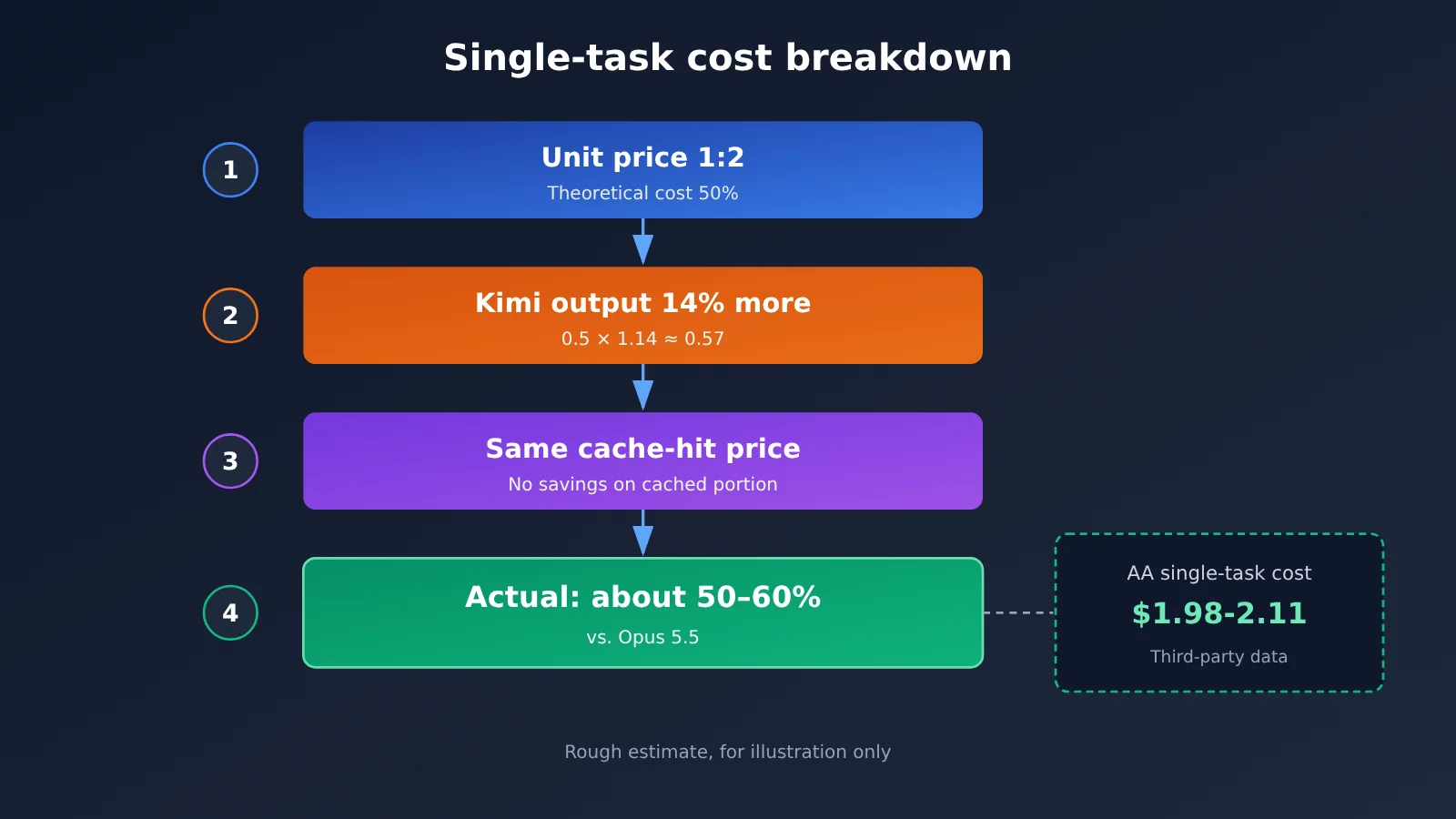
Based on per-token rates, Kimi costs exactly half as much. But that assumes both models produce the same amount of output. In practice, they don’t. AA’s data shows that Kimi generates about 14% more output tokens per task, averaging around 55K output tokens per task, with a cost of about $1.98 per task ($2.11 as shown on the model page) (third party). AA’s takeaway: Kimi’s per-token rates are half of Opus 5.5’s, but its more verbose reasoning means the actual cost per task isn’t half as much.
Here’s a rough estimate (unverified, for illustration only): since output accounts for most of the cost of a coding agent task, if Kimi generates 14% more output, its output cost would be about 1.14 × 0.5 ≈ 57% of Opus 5.5’s. That means savings of a little over 40%, rather than 50%. Still, saving over 40% is significant—just don’t budget on the assumption that you’ll save half.
7. How to Call Kimi K3.1 Pro and Claude Opus 5.5 in China
Developers in China who connect directly to overseas official APIs often run into payment and network issues. APIYI (apiyi.com) is an API aggregation platform that lets you call models from multiple providers with a single API key. Its API is compatible with the OpenAI format, and billing is usage-based. As of 2026-10-24, the prices listed on the platform for claude-opus-5-5 are $4 for input, $20 for output, and $0.2 for cache reads. For claude-sonnet-5-5, they’re $2 / $10 / $0.1, matching Anthropic’s official pricing. The Kimi models currently available include:
kimi-k3: $3 / $15, with cache reads at $0.3kimi-k2.7-code: $0.95 / $3.99kimi-k2.6: $0.6 / $2.4kimi-k2.5: $0.6 / $3.15
kimi-k3.1-pro isn’t on the list yet. Check APIYI’s model list for its model name and pricing once it’s available. We’ll launch support for this model as soon as we can. Here’s how to connect:
- OpenAI-compatible format: set
base_urltohttps://api.apiyi.com/v1 - Anthropic format: set the base URL to
https://api.apiyi.com - Programming agents such as Claude Code generally use the Anthropic format, while standard SDKs use the OpenAI format
Quick start tip: Try the free allowance for new users on APIYI at apiyi.com. Run a few real tasks in your own repository with
claude-opus-5-5andclaude-sonnet-5-5to establish a baseline for comparison. Check the platform’s model list for the latest model names and prices. We’ll launch Kimi K3.1 Pro as soon as we can; once it’s available, you can switch the model name and compare it directly.
8. Recommendations: Kimi K3.1 Pro vs. Claude Opus 5.5
If you have a high workload, are budget-conscious, and don’t mind having the model think continuously, Kimi K3.1 Pro offers better value. If you prioritize overall reliability, need 3D/CAD generation, or want to turn off thinking for lower latency, a Claude model—Opus 5.5 or Sonnet 5.5—is a better fit. For multi-turn coding agents, the two are in the same tier on benchmarks. Rather than relying on leaderboard scores, try them with your own codebase for a week.
There’s another option that’s easy to overlook: if you’re considering Kimi mainly because it’s “half the price,” Claude Sonnet 5.5 has the same input and output prices, a lower cache-hit price, and a slightly higher overall AA score. It’s worth adding to your shortlist.
Frequently Asked Questions
Q1: How big is the difference in coding ability between Kimi K3.1 Pro and Claude Opus 5.5?
According to Moonshot’s own reported results, K3.1 Pro trails by 0.7 percentage points on Terminal-Bench 4.0 (65.7% vs. 66.4%). In AA’s third-party tests, K3.1 Pro scored highest among all models tested on Terminal-Bench 4.0. They’re in the same tier, with a gap of roughly 1–3 percentage points.
Q2: How many times higher are the prices?
The per-token input and output prices differ by a factor of two. Cache-hit pricing is the same for both ($0.20), while Kimi’s cache-write price is lower. Since Kimi generates longer outputs, the estimated cost per task is roughly 50–60% of Opus 5.5’s.
Q3: Why are the official score of 65.7% and AA’s score of 67% different?
They use different test harnesses. The official test uses the Claude Code harness. Scores from different setups can only be compared within their respective setups, not directly against each other.
Q4: Can I turn off thinking in Kimi K3.1 Pro?
No. You can only set `reasoning_effort` to `low`; `temperature` and `top_p` are also fixed. For applications with strict latency requirements, consider a model from the Claude family.
Q5: How can I call both models from China to compare them?
You can use APIYI at apiyi.com to call `claude-opus-5-5` with the same key. Set `base_url` to `https://api.apiyi.com/v1`. Check the platform’s model list for Kimi K3.1 Pro’s model name and pricing. We’ll add this model as soon as possible; in the meantime, you can use `kimi-k3` for an initial comparison.
Q6: Which one is more cost-effective for beginners to try first?
We recommend starting with Claude Sonnet 5.5 to establish a baseline; its price is the same as K3.1 Pro’s. Register at APIYI apiyi.com to get free testing credits. Check the platform’s model list for available models and pricing. We’ll add K3.1 Pro as soon as possible, and once it’s available, you can compare the models by simply switching the model name.
Kimi K3.1 Pro vs Claude Opus 5.5: Key Takeaways
- Comparable coding performance: Official figures put K3.1 Pro 0.7 percentage points behind. In AA’s results, K3.1 Pro has the highest Terminal-Bench 4.0 score.
- A 1:2 price ratio: $2/$10 vs. $4/$20. Both charge $0.20 for cache hits.
- Costs aren’t cut in half: Kimi generates about 14% more output per task. AA measured a per-task cost of $1.98–$2.11.
- Don’t mix benchmarks: The official 65.7% and AA’s 67% were measured using different harnesses.
- Opus’s strengths: It leads in the overall index, BenchCAD, and GDPval-AA.
- Kimi’s limitations: Thinking can’t be turned off, images can’t be submitted via public URLs, and its hallucination rate is 44%.
- Getting started: You can test the Claude series first on APIYI (apiyi.com). K3.1 Pro’s model availability and pricing will be listed on the platform; we’ll make it available as soon as we can.
Summary
The comparison between Kimi K3.1 Pro and Claude Opus 5.5 comes down to three points:
- Capabilities: Their coding and agent capabilities are in the same range. Score differences fall within the margin of testing error and differences in evaluation methods.
- Price: Kimi’s listed price is exactly half of Claude’s, but Kimi spends more time thinking, so actual costs are roughly 40% lower.
- Choosing a model: Consider Kimi first for batch tasks and budget-sensitive workloads. Choose Claude for 3D/CAD, low-latency applications, or tasks that require greater overall reliability.
The most reliable way to decide is to test the models on your own tasks. You can first establish a baseline with the Claude series on APIYI (apiyi.com). Check the platform’s model list for available models and pricing. We’ll make Kimi K3.1 Pro available as soon as we can, and once it’s live, you can switch the model name to compare.
References
- Moonshot official blog and Kimi API documentation: K3.1 Pro benchmark scores, parameter limits, and pricing
- Link:
platform.moonshot.cn/docs -
Notes: Officially reported Terminal-Bench 4.0 and BenchCAD scores, plus parameter details
-
Anthropic official pricing: Five pricing tiers for Claude Opus 5.5 / Sonnet 5.5
- Link:
anthropic.com/pricing -
Notes: Includes Fast mode and the one-hour cache tier
-
Artificial Analysis: Third-party composite indices and per-task costs
- Link:
artificialanalysis.ai -
Notes: Data from 2026-10-23, including Terminal-Bench 4.0, GDPval-AA, and AA-Omniscience
-
APIYI model list: Platform models and pricing
- Link:
docs.apiyi.com/models - Notes: Verified on 2026-10-24; check the live list for the latest information
Author: APIYI Technical Team
Technical discussions: For more information, visit the documentation center at docs.apiyi.com. Model availability and pricing are subject to the platform model list. We’ll make the Kimi K3.1 Pro model available as soon as possible.