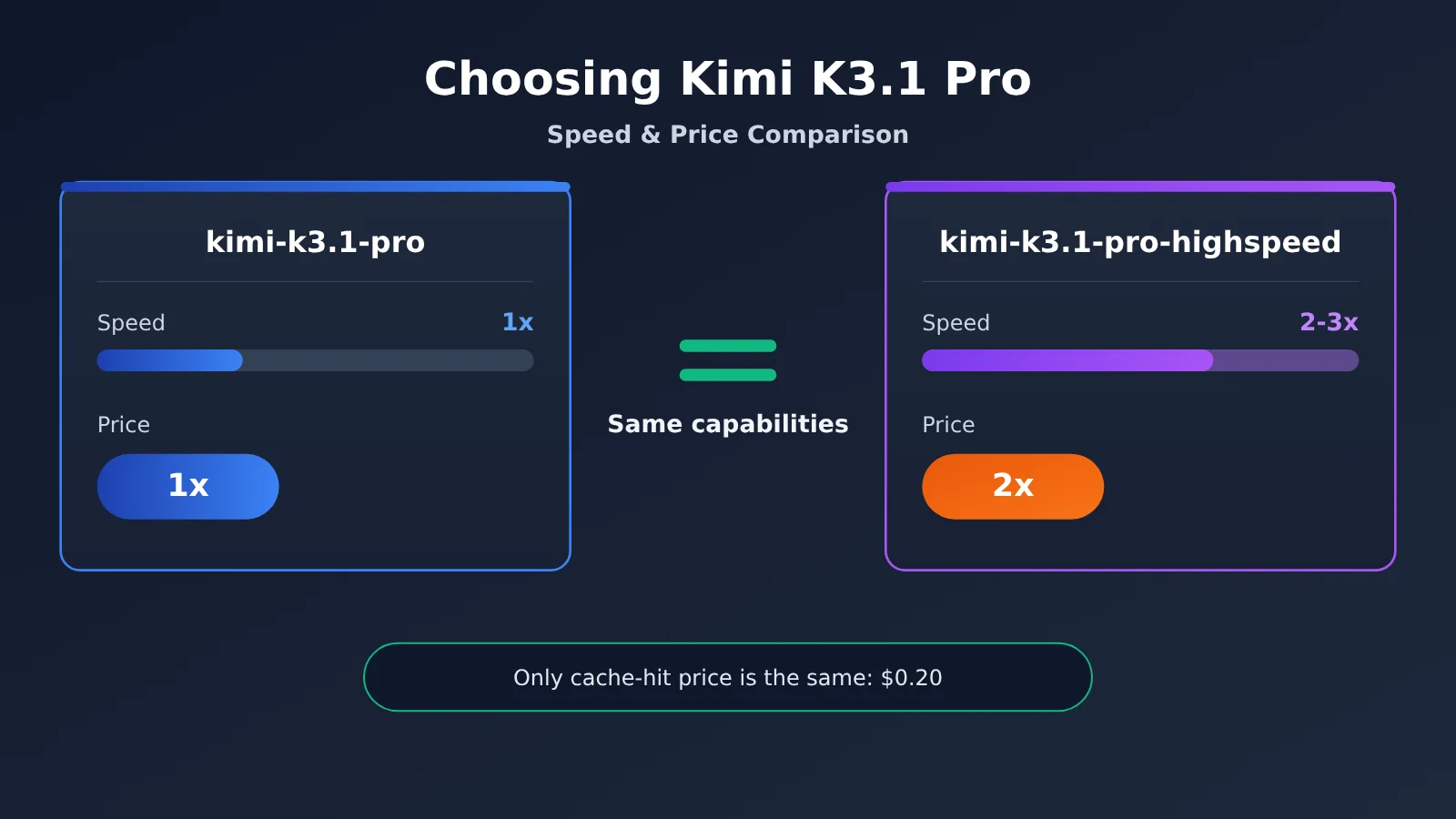
Kimi K3.1 Pro and the Highspeed version have the same capabilities. The only thing Highspeed adds is speed: according to the official claim, it’s 2–3x faster. The trade-off is that prices are almost twice as high across the board; the only exception is the cache-hit price, which remains $0.20 for both versions. So if you’re watching the screen and waiting for a result, choose Highspeed. If you’re running jobs in the background in batches, choose the standard version.
This conclusion is based on three sources: the Moonshot official blog says the two models have “same capabilities”; the official pricing page lists five unit prices; and the Kimi Code official docs say Highspeed uses about twice the quota. Below, each fact is labeled by source as “official claim,” “third-party,” or “unverified.” Where data isn’t available, I’ll say so rather than present an estimate as a measured result.
This isn’t a comparison of which model is smarter. The two versions have the same capabilities. The only question this article answers is one of cost: is it worth paying twice as much to get the same quality of results faster?
What you’ll get from this article: a five-tier price table, a way to weigh waiting time against cost, two calculations you can check for yourself, and a decision table with recommendations for six types of scenarios.
1. Kimi K3.1 Pro vs. Highspeed: Same Capabilities, Different Speed and Price
Let’s start with the big picture. The table below compares every dimension available for the two models, with the last column indicating the source tier for each piece of information. Context length is the total amount of text a model can “see” at once, measured in tokens. Tokens are the basic units used for model billing and computation; think of them roughly as word fragments.
| Comparison | kimi-k3.1-pro (standard) | kimi-k3.1-pro-highspeed | Source |
|---|---|---|---|
| Model capabilities | Baseline | Same as the standard version | Official claim |
| Context length | 1,048,576 tokens | 1,048,576 tokens | Official claim |
| Generation speed | Baseline | Officially claimed to be 2–3× faster | Official claim, no detailed figures |
| Price | Baseline | 2×, except for cache hits | Official pricing |
| Kimi Code access requirement | Plus membership or higher (Pro or higher for 1M context) | Pro membership or higher | Official documentation |
| Kimi Code quota usage | Baseline | About 2× | Official documentation |
| Officially available through | kimi.ai, Kimi Work, Kimi Code, Kimi API | Same as standard | Official blog |
The takeaway is simple: the two models differ only in speed, price, and membership requirements. Choosing the wrong one won’t affect the results you get—it’ll just cost you more money or time.
1.1 Kimi K3.1 Pro vs. Highspeed Pricing: All Five Tiers
The prices below were retrieved on 2026-10-24, in US dollars per million tokens, excluding tax. They’re from the official pricing page. First, a quick explanation of the billing categories. “Input” is the content you send to the model, and “output” is the content it generates in response. “Cache” refers to content from a repeated prefix—such as project code included in multiple requests—that the platform temporarily stores. When the same prefix appears in a later request, the platform can reuse it; this is called a “cache hit” and is billed at a lower rate. The first time content is added to the cache, you pay a “cache write” fee. There are two retention periods: 5 minutes and 1 hour.
| Billing item | kimi-k3.1-pro | kimi-k3.1-pro-highspeed | Multiplier |
|---|---|---|---|
| Input (cache miss) | $2.00 | $4.00 | 2× |
| Output | $10.00 | $20.00 | 2× |
| Cache-hit input | $0.20 | $0.20 | Same—the only price that hasn’t gone up |
| Cache write (5 minutes) | $2.00 | $4.00 | 2× |
| Cache write (1 hour) | $4.00 | $8.00 | 2× |
Public records from third-party developer Simon Willison confirm this: Highspeed costs twice as much, but cache-hit input is priced the same as the standard version. This detail matters for the calculations later on. If most of your request input gets cache hits, Highspeed’s actual total cost will be less than double, because the largest input component hasn’t gone up in price.
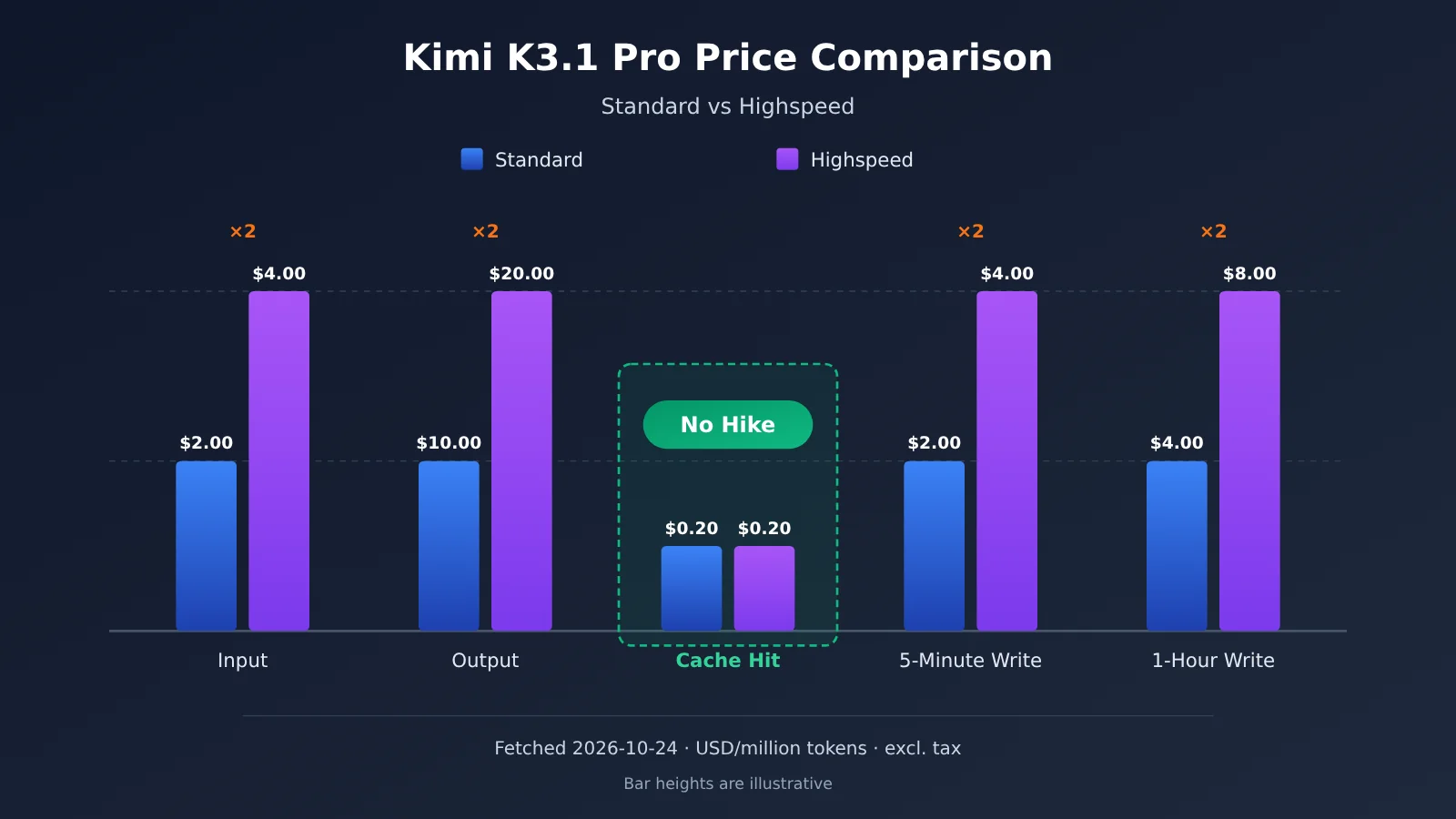
Pricing note: The chart and table above show official pricing. If you call the models through APIYI at apiyi.com, check the platform’s model list for the model names and prices available there. These two models are still being integrated, and we’ll make them available as soon as possible.
2. How Much Faster Is Kimi K3.1 Pro Highspeed?
Let’s be upfront: there’s very little speed data available right now. The official source gives only a speed multiplier range, and third parties have tested only the standard version. No public benchmark has measured Highspeed’s specific tokens per second. Tokens per second refers to how many tokens a model can generate each second. The higher the number, the sooner you’ll see the complete response.
| Data point | Value | Source rating | Notes |
|---|---|---|---|
| Highspeed relative speed | 2–3× the standard version | Official claim | Test conditions and detailed results haven’t been published |
| Standard version output speed | 80.7 tokens/second | Third party (Artificial Analysis) | Rated 2 out of 4 tiers |
| Highspeed output speed | Not available | Unverified | Third parties haven’t measured it separately |
| Standard version average output per task | About 55K tokens | Third party (Artificial Analysis) | Refers to tasks in its Intelligence Index test |
| Standard version cost per task | About $1.98 (the model page lists $2.11) | Third party (Artificial Analysis) | Same as above |
So there’s no reliable answer yet to the question, “How many tokens per second does Highspeed generate?” Any article giving a specific number is either reporting its own hands-on test (check the test conditions) or estimating by multiplying 80.7 by 2 or 3. We won’t give a number based on that kind of estimate. Instead, here’s a way to make the call without relying on benchmark data.
2.1 How to Choose Between Kimi K3.1 Pro Versions: Put the Time People Spend Waiting in Dollar Terms
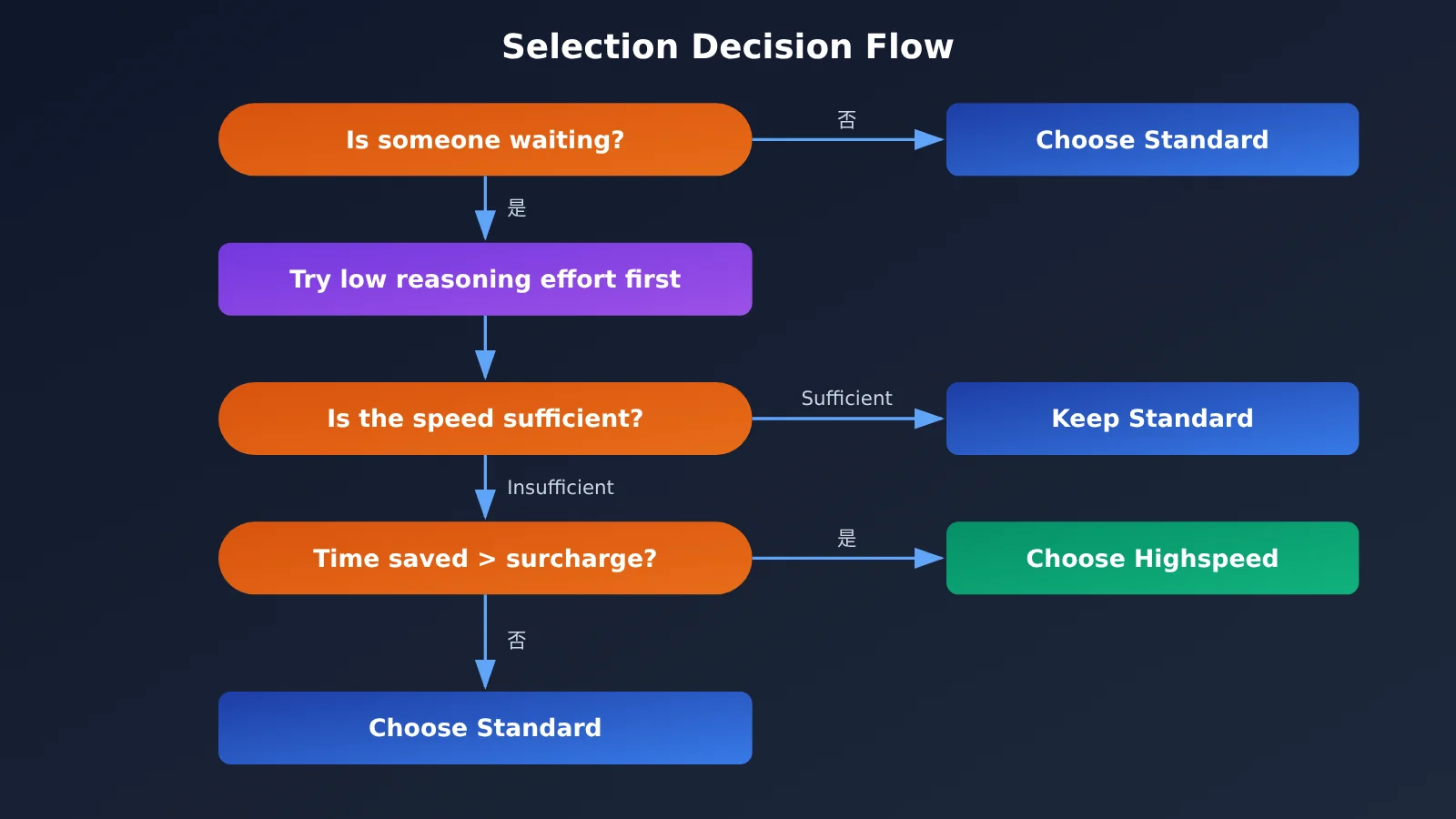
Speed itself isn’t valuable; what matters is how much time it saves someone who’s waiting. If no one is waiting, faster doesn’t make a difference. Here’s a four-step way to assess it:
- Estimate the wait for a single response: Output tokens ÷ speed. For example, at the standard version’s 80.7 tokens per second, an output of 1,500 tokens takes about 19 seconds to appear. Keep in mind that both versions always have thinking enabled, and the thinking process takes time too, so the actual wait will be longer. How much longer depends on the task.
- Estimate how much time Highspeed could save: Based on the official 2–3× speed claim, the same output would take about 6–10 seconds, saving roughly 10 seconds each time. This is an estimate, not a measured result, so validate it with your own requests.
- Multiply by the number of requests and your hourly rate: If you interact with the model 100 times a day and save 10 seconds each time, that’s about 17 minutes. Multiply those 17 minutes by your or your team’s time cost.
- Compare the savings with the extra cost: Use the method in Section 3 to calculate how much more Highspeed costs per day. If the value of the time saved is greater than the extra cost, it’s worth it.
One common misconception to avoid: a model that’s 3× faster doesn’t make your work 3× more efficient. Model output is only one part of a workflow. The time you spend reading code, thinking, making changes, and running tests won’t get shorter. You’re only saving the few seconds spent waiting for the model, so in Step 3, use the actual wait time—not the speed multiplier—to estimate the value.
3. The Math Behind Kimi K3.1 Pro and Highspeed
Here are two cost breakdowns based on the official pricing. The calculations are shown in full, so you can plug in your own token counts and run the numbers again.
3.1 Scenario A: 20 Interactive Code-Editing Requests
Assumptions: Each request uses 30,000 input tokens, including 25,000 tokens of repository context that gets sent repeatedly and 5,000 tokens of new content. Each request generates 1,500 output tokens. You make 20 consecutive requests, each less than 5 minutes apart, so the cache stays active.
Standard:
- First request: Input costs
30000 × $2 / 1 million = $0.06, including25000tokens written to the cache, which costs25000 × $2 / 1 million = $0.05 - Each subsequent cache hit:
25000 × $0.2 / 1 million = $0.005 - New content per request:
5000 × $2 / 1 million = $0.01 - Output per request:
1500 × $10 / 1 million = $0.015 - Total per request:
$0.005 + $0.01 + $0.015 = $0.03
Highspeed:
- The cache-hit price stays the same at
$0.005 - New content costs twice as much:
5000 × $4 / 1 million = $0.02 - Output costs twice as much:
1500 × $20 / 1 million = $0.03 - Total per request:
$0.005 + $0.02 + $0.03 = $0.055, or about $0.06
Including the one-time cost of writing to the cache on the first request, 20 requests cost about $0.66 with Standard and $1.26 with Highspeed. Looking strictly at per-request costs, Highspeed is about 1.8 times the price of Standard—not quite double, because cache hits aren’t more expensive. The takeaway: It costs about twice as much, but according to the official speed multiplier, it can cut waiting time by more than half. The extra $0.60 buys back a few minutes across those 20 waits, which is worth it for most developers.
3.2 Scenario B: 1,000 Batch Offline Requests
Assumptions: Each request uses 8,000 input tokens and generates 600 output tokens. You run 1,000 requests, with no reusable prefixes between them, so the cache can’t help.
- Standard per request:
(8000 × $2 + 600 × $10) / 1 million = $0.016 + $0.006 = $0.022; 1,000 requests cost$22 - Highspeed per request:
(8000 × $4 + 600 × $20) / 1 million = $0.032 + $0.012 = $0.044; 1,000 requests cost$44
The takeaway: It’s a pure loss. Nobody’s waiting for each result, and the total runtime is usually determined by concurrency and queueing. The extra $22 doesn’t buy any noticeable benefit.
| Cost item | Scenario A: Interactive code editing | Scenario B: Batch offline processing |
|---|---|---|
| Number of requests | 20 | 1,000 |
| Cache hits? | Yes, 25,000 tokens reused | No |
| Standard total cost | About $0.66 | $22 |
| Highspeed total cost | About $1.26 | $44 |
| Actual price multiplier | About 1.8–1.9× | 2× |
| Is anyone waiting? | Yes | No |
| Takeaway | Costs about twice as much, cuts waiting time by more than half—worth it | Pure loss; choose Standard |
4. Choose Kimi K3.1 Pro or Highspeed Based on the Use Case
Apply the guidelines above to common scenarios, and you can use this table to make the choice. There are just two things to consider: Is someone waiting, and can you take advantage of caching?
| Scenario | Recommendation | Reason |
|---|---|---|
| Interactive coding | Highspeed | The user is watching the screen and waiting for changes. Repository context can hit the cache, keeping the effective cost below 2x. |
| Conversational agents | Highspeed | Multiple rounds of short requests and tool calls add up, making the difference in wait time noticeable. |
| Demos and livestreams | Highspeed | The audience is watching, so slow responses can hurt the live experience. Any cost difference across a few dozen calls is negligible. |
| Batch data cleaning | Standard | No one is waiting for individual results, so speed adds no value. The doubled price is pure cost. |
| Offline evaluation | Standard | Evaluations only care about output quality. Both versions have the same capabilities, and scores won’t change with speed. |
| Scheduled tasks | Standard | When a task runs overnight or in the background, finishing a few minutes earlier doesn’t matter. Cost is the priority. |
If your product has both types of workloads, you can use both models: route requests that involve direct user interaction to kimi-k3.1-pro-highspeed, and send background summarization, archiving, and batch processing to kimi-k3.1-pro. The two models have the same capabilities, so switching model names doesn’t require changing your prompt.
5. The Third Kimi K3.1 Pro Speedup Option: reasoning_effort and Kimi Code Quotas
Before paying more, there’s a free speedup option worth trying. Both models are “always-thinking” models, meaning they reason internally before answering. The reasoning_effort parameter controls how long they think—you can think of it as telling the model how deeply to reason. The lower the setting, the less time it spends thinking and the faster it responds. The following details are from the official documentation:
reasoning_effortsupports three settings:low,high, andmax. The default ismax.- To get faster responses, try lowering the standard model to
lowfirst. If the speed is good enough and the quality is acceptable, there’s no need to pay twice as much for Highspeed. - Lowering the setting reduces the depth of reasoning on complex tasks. That’s trading quality for speed. Highspeed, by contrast, trades money for speed without compromising quality. The trade-offs are different.
- You can also combine the two: Highspeed with
lowis a good fit for latency-sensitive scenarios involving relatively simple tasks.
Another easy-to-miss detail concerns Kimi Code. Moonshot’s coding tool, Kimi Code, measures usage against your membership quota. According to the official Kimi Code documentation:
k3.1-prorequires a Plus membership or higher. Using a 1M context window requires a Pro membership or higher.k3.1-pro-highspeedrequires a Pro membership or higher.- The Highspeed version uses about twice the quota. With the same membership allowance, you’ll be able to do roughly half as much with Highspeed.
When calling the API, note that the following parameters have fixed values. The official documentation says to omit them from your request rather than setting them manually:
temperatureis fixed at1.0top_pis fixed at0.95nis fixed at1presence_penaltyandfrequency_penaltyare fixed at0max_completion_tokensdefaults to131072, with a maximum of1048576
6. A More Convenient Way to Use Kimi K3.1 Pro: Connect Through APIYI
The official API supports both OpenAI and Anthropic formats, including the Chat Completions, Responses, and Messages interfaces. “OpenAI-compatible” means you can use your existing OpenAI SDK code with little or no modification: just change the endpoint and API key, then update the model name.
Developers in China can use APIYI at apiyi.com to call models from multiple providers with a single API key and pay by usage. New users get free credits to try it out. Here’s how to connect:
- OpenAI format: Set
base_urltohttps://api.apiyi.com/v1 - Anthropic format: Set the base URL to
https://api.apiyi.com - Set
modelto the corresponding model name from the platform’s model list
One thing to note: as of our check on 2026-10-24, the Kimi models listed on APIYI include kimi-k2.5, kimi-k2.6, kimi-k2.7-code, and kimi-k3, but kimi-k3.1-pro and kimi-k3.1-pro-highspeed aren’t available yet. Check the platform’s model list for the model names and prices once they’re listed. We’ll work to add these models as soon as possible. In the meantime, you can use an available Kimi model to test your invocation flow and caching strategy. Once the new models are listed, you’ll only need to change the model name.
7. Recommendations for Choosing Between Kimi K3.1 Pro and Highspeed
Recommendation: Start by asking, “Is anyone waiting?” If not, choose the standard version. If someone is waiting, try lowering
reasoning_efforttolowfirst. If it’s still too slow, switch to Highspeed. To decide whether the upgrade is worth it, use the method in Section 2 to convert the time saved into money, then compare that amount with the price difference calculated in Section 3. We recommend running a small-scale comparison with your own real requests on APIYI at apiyi.com. The available K3.1 Pro models and their prices will be listed on the platform. We’ll make this model available as soon as possible.
A few principles you can put into practice right away:
- Use the standard version by default. Treat Highspeed as an option to enable when needed, not as your default configuration.
- The more prefixes you reuse, the better value you get from Highspeed, because the price for cache hits doesn’t double.
- Route traffic by entry point when your team uses both versions: use Highspeed for user-facing interactions and the standard version for background tasks.
- Factor in your quota when using Highspeed in Kimi Code: it consumes about twice as much.
Frequently Asked Questions
Q1: What is Kimi K3.1 Pro Highspeed?
It’s a high-speed version released alongside Kimi K3.1 Pro by Moonshot. Its model name is `kimi-k3.1-pro-highspeed`. According to the official announcement, it’s 2–3 times faster than K3.1 Pro, with the same capabilities and a context window of 1,048,576 tokens.
Q2: Is Highspeed less capable than the standard version, or more capable?
According to the official announcement, both versions have the same capabilities. So it’s not a case of “faster means less intelligent” or “more expensive means smarter.” The `reasoning_effort` setting, not the version you choose, is what actually affects answer quality.
Q3: How much faster is Highspeed? Are there specific tokens-per-second figures?
The official announcement only gives a range of “2–3 times faster” and doesn’t provide detailed figures. Third-party testing by Artificial Analysis measured the standard version at 80.7 tokens per second, but Highspeed hasn’t been tested separately. Highspeed’s exact speed hasn’t been independently verified, so we recommend testing it with your own requests.
Q4: Why might Highspeed not actually cost twice as much?
The input price for cache hits is $0.20 per million tokens for both versions. If a large portion of your input consists of repeated prefixes that hit the cache, that portion won’t cost extra, so the total price increase will be less than 2×. In Scenario A in this article, a single request costs about 1.8 times as much as with the standard version.
Q5: How can I call Kimi K3.1 Pro and Highspeed from within China?
You can use the official Kimi API or call the models through APIYI’s OpenAI-compatible interface at apiyi.com. Set `base_url` to `https://api.apiyi.com/v1`. The model names and prices on APIYI will be listed on the platform. Integration is still in progress, and we’ll make the models available as soon as possible.
Q6: What known limitations does the Kimi K3.1 Pro series have?
– Both models always use reasoning. You can’t turn reasoning off completely; you can only adjust it with `reasoning_effort`.
– Parameters such as `temperature` and `top_p` are fixed and must be omitted from requests. You can’t use sampling parameters to control the style.
– Highspeed in Kimi Code requires a Pro or higher membership and consumes about twice the quota.
– The official announcement says the full weights will be released by 2026-11-04, but they haven’t been released yet.
Kimi K3.1 Pro vs. Highspeed: Key Takeaways
- Same capabilities: Highspeed buys you speed, not better answer quality.
- Double the price: Input, output, and both cache-write rates are 2× higher. The cache-hit rate is the same at $0.20.
- Limited speed data: The official claim is that Highspeed is 2–3× faster. Third-party testing measured only the standard version, at 80.7 tokens/second.
- Base your decision on wait time: Put a dollar value on the time people spend waiting, then compare it with the price difference. Don’t mistake a speed multiplier for an efficiency multiplier.
- Choose Highspeed for interactive use: It’s a good fit for interactive coding, conversational agents, and live demos.
- Choose standard for batch jobs: Using Highspeed for batch cleanup, offline evaluation, or scheduled tasks is just wasted money.
- Try a lower setting before paying more: Reducing
reasoning_efforttolowis a free way to speed things up.
Summary
There are three key points to keep in mind when choosing between Kimi K3.1 Pro and Highspeed:
- Both versions have the same capabilities: Your choice won’t affect answer quality. The differences are speed, price, and membership requirements.
- There’s one exception to the price increase: Four of the five rates double, while the cache-hit rate stays the same. The more prefixes you reuse, the smaller the actual Highspeed premium.
- Highspeed is worthwhile when someone is waiting: In interactive scenarios, you’re paying about twice as much to cut the wait by more than half. For batch jobs, it just means paying more.
In practice, start with the standard version and test it with reasoning_effort=low. If it’s still not fast enough, switch to Highspeed and use the formula in Section 3 with your own token counts to check the cost. When integrating through APIYI (apiyi.com), refer to the platform’s model list for the K3.1 Pro series model names and prices. We’ll make this model available as soon as possible.
References
- Kimi official site and blog: Release notes, capabilities, and availability information for K3.1 Pro and Highspeed
- Link:
kimi.ai -
Note: Source for the official claim that Highspeed is “2–3 times faster with the same capabilities”
-
Artificial Analysis: Third-party measurements of model speed and cost
- Link:
artificialanalysis.ai -
Note: Source for the standard version’s speed of 80.7 tokens per second, output volume per task, and cost data
-
Simon Willison’s blog: Public notes from a developer
- Link:
simonwillison.net -
Note: Confirms that Highspeed costs twice as much, while its cache-hit pricing is the same as the standard version’s
-
APIYI model list: Models available on the platform and their prices
- Link:
docs.apiyi.com/models - Note: Kimi series availability on the platform was checked on 2026-10-24
Author: APIYI Technical Team
Technical support: For more integration resources, visit the docs center at docs.apiyi.com. The available Kimi K3.1 Pro models and prices are listed on the platform’s model list. We’ll add this model as soon as possible.