Author's Note: A detailed guide on how to invoke kimi-k2.5 via the APIYI platform, enable the enable_thinking parameter, and enjoy stable pricing at less than 80% of the official rate. Includes complete sample code for curl, Python, and JavaScript.
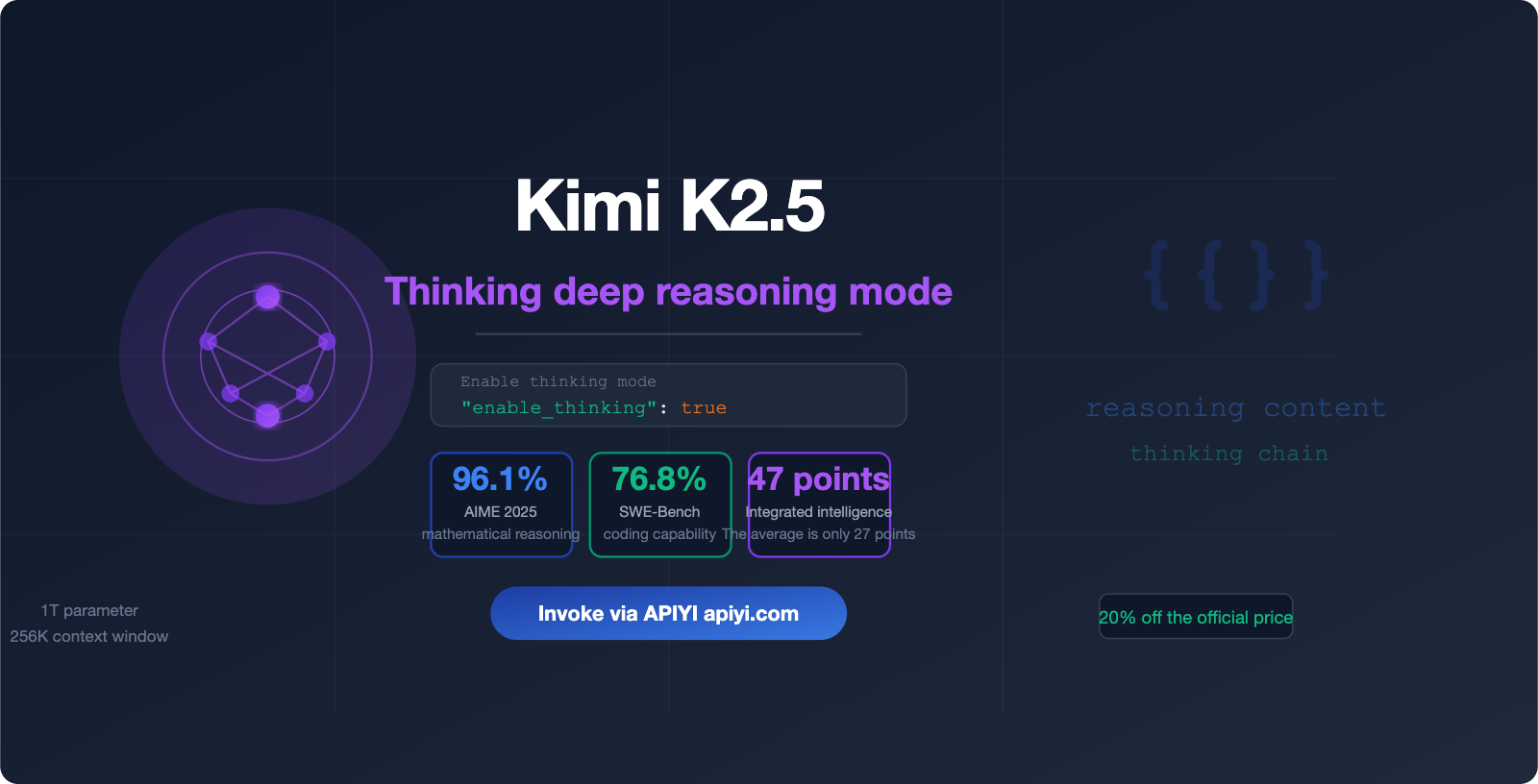
The thinking mode of Kimi K2.5 is currently one of the most powerful reasoning capabilities among open-weights models, boasting an AIME 2025 math benchmark score of 96.1%. However, many developers run into the same issue when integrating it: the model doesn't output its thought process after the API call.
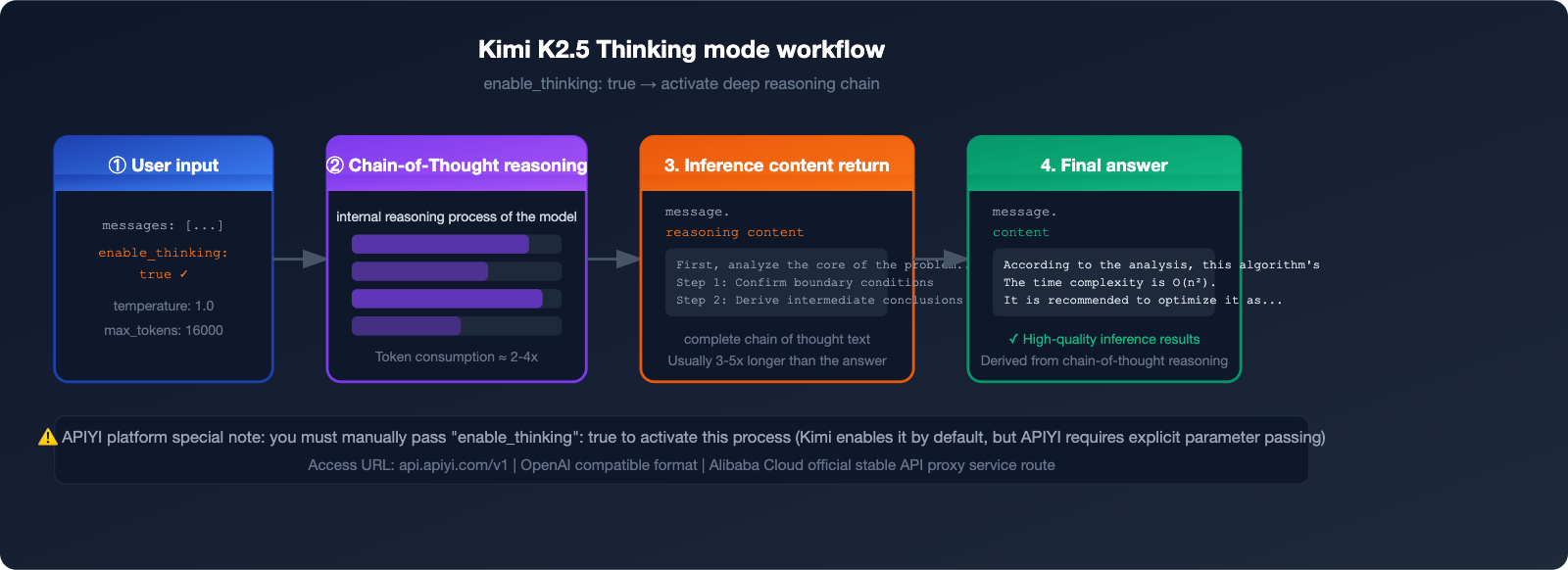
This happens because you need to manually pass the "enable_thinking": true parameter to the APIYI platform to activate the thinking mode. In this article, we'll walk you through the complete configuration for integrating Kimi K2.5's thinking mode from scratch.
🎯 Key Takeaway: By the end of this guide, you'll know how to fully invoke the
kimi-k2.5thinking mode and how to use this capability reliably via APIYI at a price point lower than 80% of the official rate.
Core Highlights of Kimi K2.5 Thinking Mode
| Feature | Description | Value |
|---|---|---|
| Activation Parameter | Must pass "enable_thinking": true |
Unlocks deep reasoning |
| Recommended Temperature | Set to 1.0 (fixed value) |
Ensures stable reasoning quality |
| Recommended max_tokens | ≥ 16000 | Ensures complete output of thoughts |
| Price Advantage | Group price 0.88, < 80% of official | Significantly lowers inference costs |
| Stability | Equivalent to Alibaba Cloud official proxy | Enterprise-grade reliability |
💡 Quick Start: Register an account at APIYI (apiyi.com), top up your balance, and you're ready to invoke
kimi-k2.5. It supports OpenAI-compatible interfaces, so there's no need to change your existing code framework.
What is Kimi K2.5: The 1 Trillion Parameter Open-Source Inference Flagship
Released by Moonshot AI on January 27, 2026, Kimi K2.5 stands as one of the most powerful multimodal Large Language Models in the open-source community today.
Kimi K2.5 Core Architecture Specifications
| Specification | Value | Description |
|---|---|---|
| Total Parameters | 1 Trillion (1T) | MoE (Mixture of Experts) architecture |
| Active Parameters | 32 Billion (32B) | Actually used during inference |
| Context Window | 256K tokens | Ultra-long document processing capability |
| Number of Experts | 384 expert layers | MLA + MoE dual architecture |
| Training Data | ~15 Trillion tokens | Text + Image hybrid |
| Open Source Status | Fully open source | Downloadable via HuggingFace |
Kimi K2.5 utilizes Multi-Head Latent Attention (MLA) and a 384-expert MoE structure. By maintaining a total of 1 trillion parameters while only activating 32 billion during inference, it achieves an optimal balance between performance and cost.
Four Operating Modes of Kimi K2.5
K2.5 Instant      → Rapid response, no thinking process, suitable for simple tasks
K2.5 Thinking     → Deep reasoning, outputs reasoning_content, suitable for complex problems
K2.5 Agent        → Autonomous task execution, tool calling capability
K2.5 Agent Swarm  → Multi-agent collaboration, up to 100 sub-agents in parallel
The APIYI platform currently supports K2.5 Thinking mode, which can be activated via the enable_thinking: true parameter to output the complete reasoning chain.
💡 Usage Tip: We recommend accessing kimi-k2.5 through APIYI (apiyi.com). It provides a stable, official Alibaba Cloud proxy link, so you don't have to worry about service interruptions.
Kimi K2.5 Performance Benchmarks: Thinking Mode Real-World Data
Once you enable the thinking mode, the reasoning performance of Kimi K2.5 sees a massive boost. Here are the key benchmark results:
Key Benchmark Scores
| Benchmark | Kimi K2.5 Score | Comparison Notes |
|---|---|---|
| AIME 2025 (Math Reasoning) | 96.1% | Near-perfect score, top-tier math capability |
| SWE-Bench Verified (Coding) | 76.8% | Leading level among open-source models |
| HLE-Full w/ tools (Agentic) | +4.7 points | #1 in tool-calling tasks |
| BrowseComp (Web Browsing) | 60.6% / 78.4%* | *In Agent Swarm mode |
| Comprehensive Intelligence Index | 47 points | Industry average is 27 points |
Note: The data above is sourced from the Artificial Analysis Intelligence Index, January 2026 evaluation results.
Compared to the standard mode, the thinking mode delivers a 30-50% significant improvement in complex math, multi-step reasoning, and code generation tasks. The trade-off is that token consumption is about 2-4 times higher than the standard mode, so keeping a close eye on max_tokens is key to controlling costs.
3 Steps to Enable Kimi K2.5 Thinking Mode on APIYI
Step 1: Register and Get Your API Key
Visit the APIYI official website at apiyi.com to register your account and complete the following:
- Register and verify your email address.
- Go to "Console" → "API Key Management".
- Create a new API Key and save it securely.
🎯 Pricing Advantage: Get a $10 bonus when you top up $100. With group pricing at 0.88 (input tokens), your actual usage cost is significantly lower than 80% of the official Kimi pricing. APIYI provides stable routes comparable to Alibaba Cloud's official transit, ensuring enterprise-grade reliability.
Step 2: Configure Request Parameters
To activate the Kimi K2.5 thinking mode, you need to configure these three parameters:
{
  "model": "kimi-k2.5",
  "enable_thinking": true,
  "temperature": 1.0,
  "max_tokens": 16000
}
⚠️ Important Note: The parameter logic on the APIYI platform differs from the official Kimi API:
- Official Kimi: Thinking is enabled by default; you must pass a parameter to disable it.
- APIYI Platform: You must manually pass
"enable_thinking": trueto activate it.
Step 3: Send Requests and Parse Thinking Content
Below is a complete example of how to trigger the thinking mode and parse the response.
curl Example (Fastest way to verify)
curl --location 'https://api.apiyi.com/v1/chat/completions' \
--header "Authorization: Bearer sk-YOUR_API_KEY" \
--header 'Content-Type: application/json' \
--data '{
    "model": "kimi-k2.5",
    "messages": [
        {
            "role": "system",
            "content": "You are a helpful assistant."
        },
        {
            "role": "user",
            "content": "Explain step-by-step: Why does 0.1 + 0.2 not equal 0.3 in computing?"
        }
    ],
    "enable_thinking": true,
    "temperature": 1.0,
    "max_tokens": 16000
}'
Python Example (Recommended for production)
from openai import OpenAI

client = OpenAI(
    api_key="sk-YOUR_API_KEY",
    base_url="https://api.apiyi.com/v1"
)

response = client.chat.completions.create(
    model="kimi-k2.5",
    messages=[
        {
            "role": "system",
            "content": "You are a helpful assistant."
        },
        {
            "role": "user",
            "content": "Analyze the time complexity of this code and provide optimization suggestions:\n\ndef find_duplicates(arr):\n    result = []\n    for i in range(len(arr)):\n        for j in range(i+1, len(arr)):\n            if arr[i] == arr[j] and arr[i] not in result:\n                result.append(arr[i])\n    return result"
        }
    ],
    extra_body={
        "enable_thinking": True
    },
    temperature=1.0,
    max_tokens=16000
)

# Parse thinking content (if present)
message = response.choices[0].message

# Output the reasoning process (reasoning_content field)
if hasattr(message, 'reasoning_content') and message.reasoning_content:
    print("=== Thinking Process ===")
    print(message.reasoning_content)
    print()

# Output the final answer
print("=== Final Answer ===")
print(message.content)
Expand for full JavaScript / Node.js example
import OpenAI from 'openai';

const client = new OpenAI({
  apiKey: 'sk-YOUR_API_KEY',
  baseURL: 'https://api.apiyi.com/v1',
});

async function callKimiThinking(userMessage) {
  const response = await client.chat.completions.create({
    model: 'kimi-k2.5',
    messages: [
      {
        role: 'system',
        content: 'You are a helpful assistant.',
      },
      {
        role: 'user',
        content: userMessage,
      },
    ],
    // Pass enable_thinking via extra_body
    // @ts-ignore
    enable_thinking: true,
    temperature: 1.0,
    max_tokens: 16000,
  });

  const message = response.choices[0].message;

  // Extract reasoning process
  const reasoningContent = message.reasoning_content;
  if (reasoningContent) {
    console.log('=== Thinking Process ===');
    console.log(reasoningContent);
    console.log();
  }

  // Extract final answer
  console.log('=== Final Answer ===');
  console.log(message.content);

  return {
    thinking: reasoningContent,
    answer: message.content,
  };
}

// Usage example
callKimiThinking('Prove step-by-step: There are infinitely many prime numbers (Euclid\'s proof)');
💡 Integration Tip: Simply replace the
base_urlwithhttps://api.apiyi.com/v1in the code above. The rest of the parameters are fully compatible with the OpenAI SDK, so there's no extra learning curve. APIYI (apiyi.com) supports calling all mainstream models with a single Key.
Key Parameters Explained: Configure Correctly to Avoid Pitfalls
Parameter Configuration Reference Table
| Parameter | Recommended Value | Description | Error Example |
|---|---|---|---|
model |
"kimi-k2.5" |
Model identifier | Don't use kimi-k2 or kimi-k2.5-thinking |
enable_thinking |
true |
Activate thinking mode (APIYI exclusive) | Missing this will prevent reasoning output |
temperature |
1.0 |
Officially recommended fixed value | Setting it to 0.7, etc., leads to unstable quality |
max_tokens |
≥ 16000 |
Ensure complete output | Setting this too low will truncate reasoning content |
stream |
false (initial test) |
Supports both streaming and non-streaming | Streaming requires extra handling for the reasoning field |
API Response Structure Explained
{
  "choices": [
    {
      "message": {
        "role": "assistant",
        "content": "Final answer content...",
        "reasoning_content": "The model's thought process, including step-by-step reasoning..."
      }
    }
  ],
  "usage": {
    "prompt_tokens": 150,
    "completion_tokens": 3200,
    "total_tokens": 3350
  }
}
The reasoning_content field contains the complete chain-of-thought, which is typically 3-5 times longer than the content field and is the core data for understanding the model's decision-making process.
🎯 Cost Control Tip: Token consumption in thinking mode is about 2-4 times higher than in standard mode. We recommend accessing it via APIYI (apiyi.com), where group pricing of 0.88 can significantly reduce reasoning costs. Plus, you get a $10 bonus for every $100 topped up.
APIYI vs. Official: Price and Stability Comparison
Platform Comparison Overview
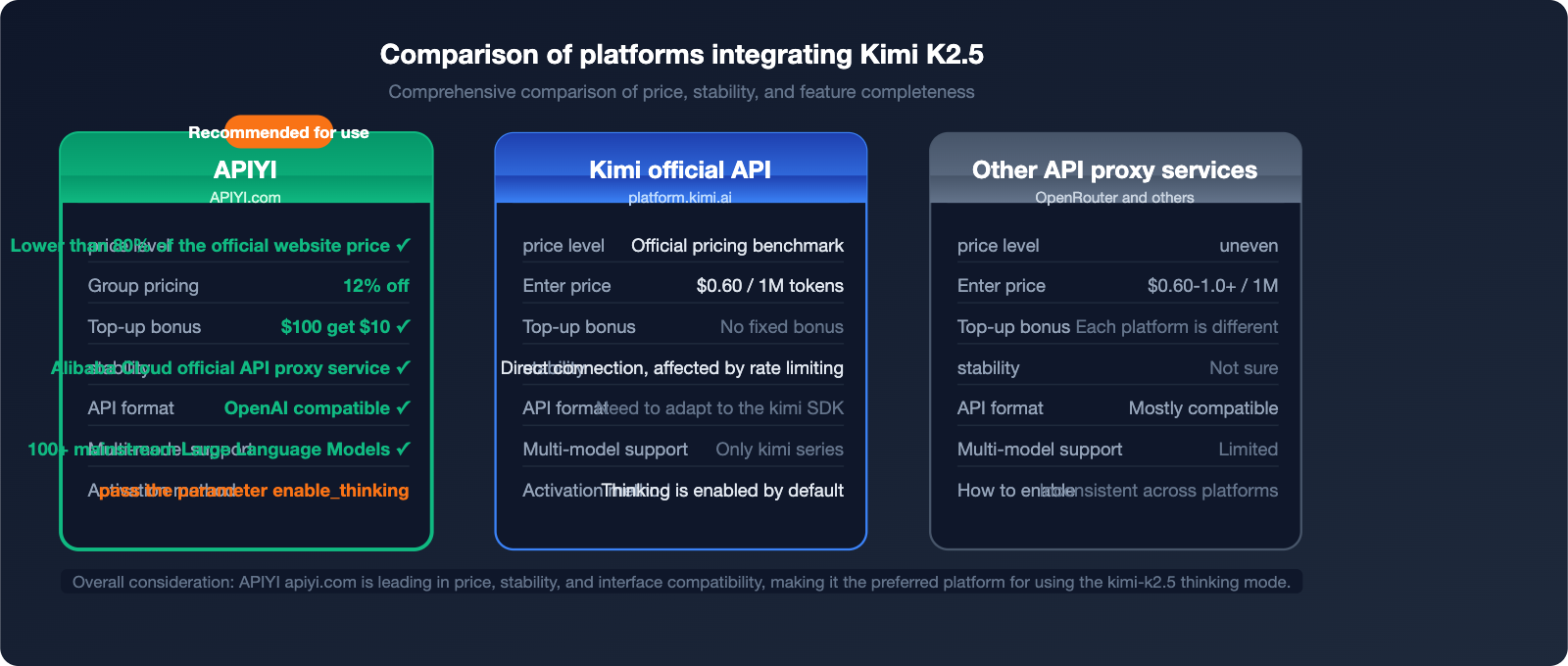
| Comparison Dimension | APIYI (apiyi.com) | Kimi Official API | Other API proxy services |
|---|---|---|---|
| Price Level | 20% off official (0.88 group pricing) | Official pricing | Inconsistent |
| Stability | Alibaba Cloud official relay level | Direct connection, subject to rate limits | Uncertain |
| Top-up Bonus | Deposit $100, get $10 free | No fixed bonus | Varies |
| API Compatibility | OpenAI format, 100% compatible | Requires Kimi SDK | Mostly compatible |
| Model Support | 100+ mainstream models | Kimi series only | Limited |
| Enterprise Support | Dedicated support + Invoices | Standard support | Limited |
APIYI Price Advantage Calculation Example
Taking 1,000 monthly calls to the kimi-k2.5 thinking mode (averaging 3,000 input tokens + 5,000 output tokens per call) as an example:
Input token cost:
  Official price approx. $0.60/1M → 1000 calls × 3000 tokens = 3M tokens → $1.80
  APIYI group price 0.88 discount → approx. $1.58

Output token cost (including reasoning):
  Official price approx. $2.50/1M → 1000 calls × 5000 tokens = 5M tokens → $12.50
  APIYI group price 0.88 discount → approx. $11.00

Monthly savings: approx. $1.72 + top-up bonus covers an additional ~10% of costs
💡 Actual Savings: The "under 20% off" at APIYI comes from two combined factors: group price discounts (0.88) + top-up bonuses (deposit $100, get $10, which is an extra 10% budget). The actual total cost is roughly 79-80% of the official price.
Best Use Cases for Kimi K2.5 Thinking Mode
Scenarios Recommended for Thinking Mode
1. Complex Mathematical Reasoning
# Suitable for thinking mode
prompt = "Please prove Fermat's Last Theorem for n=3 and provide detailed steps."
2. Code Debugging and Optimization
# Suitable for thinking mode
prompt = """
The following code has a hidden concurrency bug. Please identify and fix it:
[Paste complex multi-threaded code here]
"""
3. Multi-step Logical Analysis
# Suitable for thinking mode
prompt = "Analyze the logical loopholes in this business plan and rank them by priority."
4. Scientific Derivation
# Suitable for thinking mode
prompt = "Derive the energy level formula for the hydrogen atom from the basic principles of quantum mechanics."
Scenarios Where Thinking Mode Is Unnecessary
# Use standard mode (without enable_thinking) for these scenarios to save 50-70% on token costs

# Simple Q&A
"What's the weather like today?"  # No reasoning required

# Text Translation
"Please translate the following content into English: ..."  # No reasoning required

# Formatted Output
"Format the following JSON data for display"  # No reasoning required

# Creative Writing
"Write a poem about spring"  # No deep reasoning required
🎯 Usage Tip: We recommend dynamically switching modes based on task complexity. By connecting via APIYI (apiyi.com), you can use a single API key to flexibly call kimi-k2.5 (thinking mode) alongside other lightweight models, mixing and matching as needed.
Streaming Output: Handling Real-time Responses in Thinking Mode
When using streaming with the thinking mode, you need to handle the incremental chunks of reasoning_content specifically:
from openai import OpenAI

client = OpenAI(
    api_key="sk-YOUR_API_KEY",
    base_url="https://api.apiyi.com/v1"
)

# Streaming invocation example
stream = client.chat.completions.create(
    model="kimi-k2.5",
    messages=[
        {"role": "user", "content": "Please analyze the worst-case time complexity of the quicksort algorithm."}
    ],
    extra_body={"enable_thinking": True},
    temperature=1.0,
    max_tokens=16000,
    stream=True
)

thinking_buffer = []
answer_buffer = []
is_thinking = True

for chunk in stream:
    delta = chunk.choices[0].delta

    # Process reasoning content stream
    if hasattr(delta, 'reasoning_content') and delta.reasoning_content:
        thinking_buffer.append(delta.reasoning_content)
        print(delta.reasoning_content, end='', flush=True)

    # Process final answer stream
    elif delta.content:
        if is_thinking:
            print("\n\n=== Final Answer ===\n")
            is_thinking = False
        answer_buffer.append(delta.content)
        print(delta.content, end='', flush=True)

print()  # Newline
💡 Streaming Key Points:
reasoning_contentandcontentare independent fields during streaming. Typically, thereasoning_contentis output in full before thecontentbegins. You need to listen for incremental data from both fields separately.
FAQ
Q1: I don't see the reasoning_content field after calling the API. Is the thinking mode not working?
A: Please check the following three points:
- Have you correctly passed the
"enable_thinking": trueparameter? - Is
max_tokensset to 16000 or higher? - When using the Python SDK, are you passing the parameter via
extra_body={"enable_thinking": True}?
We recommend testing directly with curl first to confirm the parameter format is correct before integrating it into your code. APIYI customer support at apiyi.com is available for technical assistance.
Q2: Token consumption is too high in thinking mode. How can I control costs?
A: You can optimize from these perspectives:
- Disable thinking mode for simple tasks (do not pass the
enable_thinkingparameter). - Appropriately lower
max_tokens(minimum 8000, though this may truncate complex reasoning). - Route tasks: use
kimi-k2.5thinking for complex reasoning and lightweight models likegpt-4o-minifor simple tasks. - Reduce base costs through APIYI (apiyi.com) group pricing (0.88).
Q3: Must temperature be set to 1.0?
A: It is highly recommended by the official documentation to set it to 1.0, as this is the optimal temperature parameter for the kimi-k2.5 thinking mode. Setting it too low (e.g., 0.7) can make the model too conservative during reasoning, leading to lower quality; setting it too high (e.g., 1.5) may result in incoherent reasoning chains. Using 1.0 is the safest choice.
Q4: Is the kimi-k2.5 on APIYI exactly the same as the official one?
A: Yes. APIYI uses the official Alibaba Cloud transit link; the model weights and capabilities are identical to the official Kimi. The only difference lies in how parameters are passed: the official version enables thinking by default, while APIYI requires you to manually pass enable_thinking: true. This is a standard difference for an API proxy service and does not affect the model's output quality.
Summary: Key Takeaways from Kimi K2.5 Thinking Mode
| Key Point | Description |
|---|---|
| Activation Parameter | Must include "enable_thinking": true |
| Temperature Setting | Fixed at temperature: 1.0 |
| Token Budget | max_tokens ≥ 16,000 |
| Response Fields | Reasoning content is in reasoning_content, final answer in content |
| API Endpoint | https://api.apiyi.com/v1 (OpenAI compatible) |
| Pricing Discount | Over 20% off official rates; get $10 free with a $100 top-up |
Kimi K2.5 excels in core benchmarks such as AIME mathematical reasoning (96.1%) and code generation (SWE-Bench 76.8%). Its thinking mode is particularly well-suited for complex tasks that require multi-step reasoning.
🎯 Get Started Now: Visit the APIYI website at apiyi.com, register for an account to get your API key, and you can integrate the Kimi K2.5 thinking mode in under 5 minutes. Top up $100 to receive a $10 bonus, and when combined with our group discounts, your total cost will be more than 20% lower than the official Kimi rates.
Article written by the APIYI technical team | Data sources: Moonshot AI official documentation and Artificial Analysis evaluation report (January 2026)
For technical support, please visit the APIYI Help Center: help.apiyi.com