Ever run into this headache? You're building a project that uses OpenAI's GPT, Anthropic's Claude, and Google's Gemini, but every model has a different SDK, a different API format, and even different error-handling logic. One model swap means rewriting half your codebase.
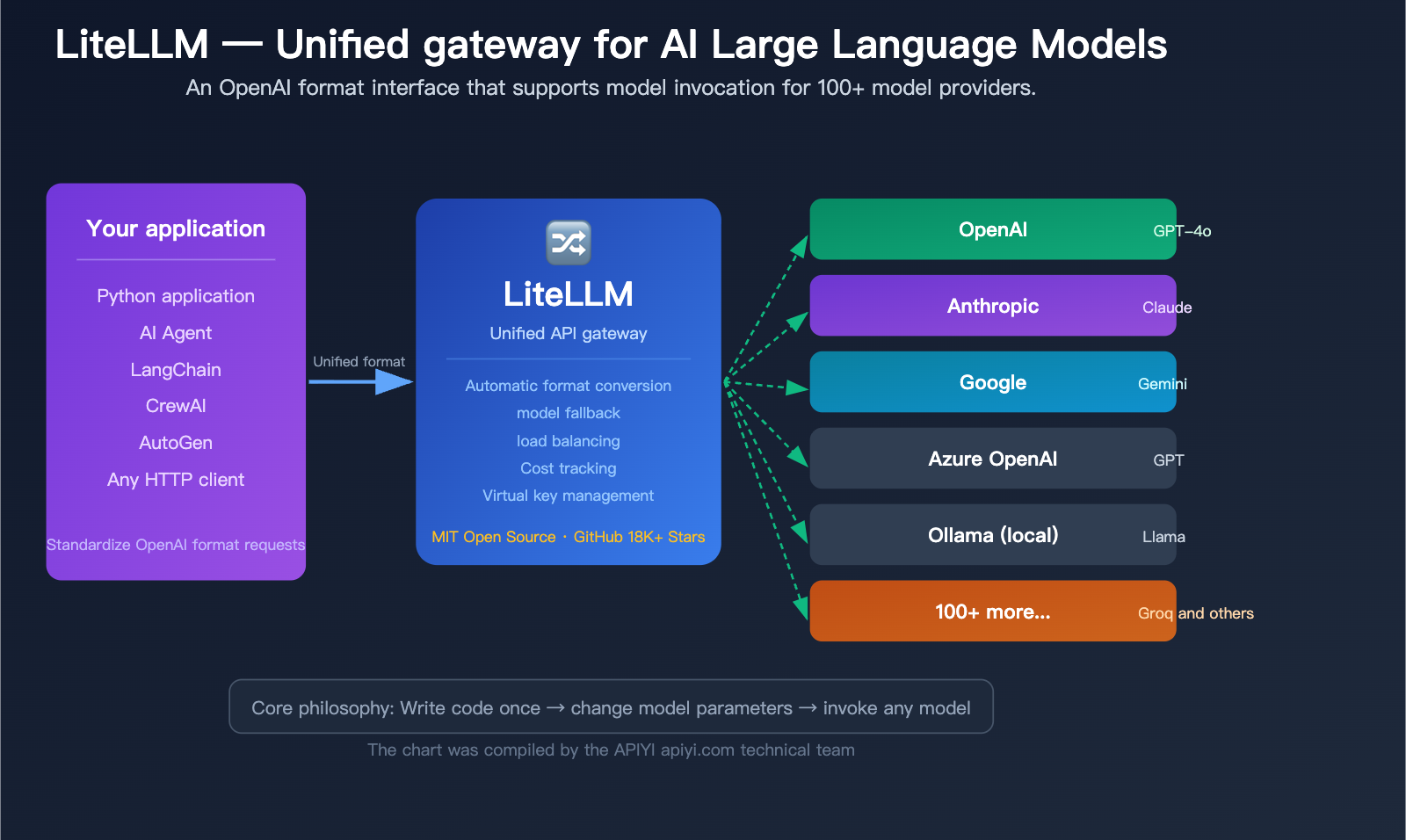
That’s exactly what LiteLLM solves. Simply put, LiteLLM is the "universal translator" for AI Large Language Models—you only need to learn one way to call them (the OpenAI format), and it handles the translation into the specific API formats for over 100 different model providers.
Core Value: By the end of this article, you'll understand what LiteLLM is, why AI Agent frameworks are all using it, and how to get started in under 5 minutes.
What is LiteLLM: 5 Core Concepts
Before you dive in, let’s break down the 5 core concepts of LiteLLM in plain English. Once you grasp these, everything else will fall into place.
| Core Concept | Simple Explanation | Problem Solved |
|---|---|---|
| Unified Interface | Call all models the same way | No need to learn a new SDK for every model |
| Provider | Model vendors like OpenAI, Anthropic, etc. | Manages connections for different vendors |
| Fallback | Automatically switch to model B if model A fails | Ensures service continuity |
| Virtual Key | Issue "sub-accounts" to team members | Controls usage and budgets |
| Proxy | A standalone API proxy service | Allows any language or tool to connect |
What pain points does LiteLLM solve?
Imagine a world without LiteLLM:
Calling OpenAI:
from openai import OpenAI
client = OpenAI(api_key="sk-xxx")
response = client.chat.completions.create(
    model="gpt-4o",
    messages=[{"role": "user", "content": "Hello"}]
)
Calling Anthropic:
import anthropic
client = anthropic.Anthropic(api_key="sk-ant-xxx")
response = client.messages.create(
    model="claude-sonnet-4-20250514",
    max_tokens=1024,  # Anthropic requires this
    messages=[{"role": "user", "content": "Hello"}]
)
Calling Google Gemini:
import google.generativeai as genai
genai.configure(api_key="AIza-xxx")
model = genai.GenerativeModel("gemini-2.0-flash")
response = model.generate_content("Hello")
See the issue? Three models, three SDKs, three different ways to write code. If your project needs to support model switching, your code ends up littered with if provider == "openai"... elif provider == "anthropic"... conditional statements.
With LiteLLM:
import litellm

# Call OpenAI
response = litellm.completion(model="gpt-4o", messages=[{"role": "user", "content": "Hello"}])

# Call Anthropic — same syntax
response = litellm.completion(model="anthropic/claude-sonnet-4-6", messages=[{"role": "user", "content": "Hello"}])

# Call Gemini — still the same syntax
response = litellm.completion(model="gemini/gemini-2.0-flash", messages=[{"role": "user", "content": "Hello"}])
Just one litellm.completion() call, and you just swap the model parameter. LiteLLM handles the format conversion, parameter adaptation, and response standardization in the background.
🎯 Pro Tip: The unified interface philosophy of LiteLLM is similar to APIYI (apiyi.com)—both provide a single interface to call multiple models. The difference is that LiteLLM is an open-source, self-hosted solution, while APIYI is a managed service that requires no deployment. Choose the one that best fits your team's technical capabilities.
Understanding the Two Usage Modes of LiteLLM
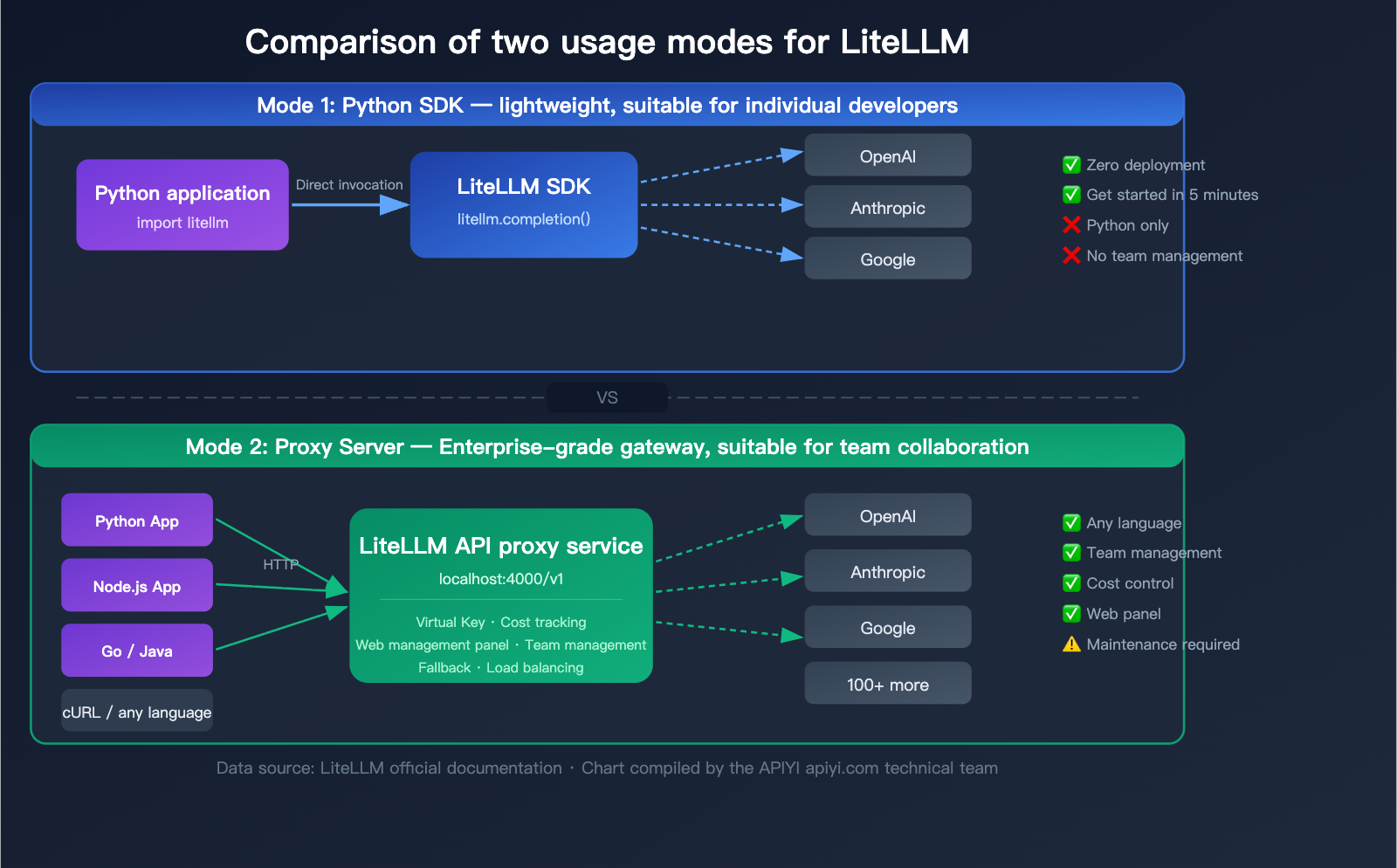
LiteLLM offers two distinct usage modes, each tailored to different scenarios. Understanding the differences between these two is key to choosing the right approach for your project.
Mode 1: Python SDK (Lightweight)
Simply import the litellm package into your Python code and use it just like a standard function call.
Best for:
- Individual developers
- Pure Python projects
- Rapid prototyping
- Scenarios where team management features aren't needed
Installation:
pip install litellm
Basic Usage:
import litellm
import os

# Set API keys (via environment variables)
os.environ["OPENAI_API_KEY"] = "sk-your-key"
os.environ["ANTHROPIC_API_KEY"] = "sk-ant-your-key"

# Invoke any model
response = litellm.completion(
    model="gpt-4o",
    messages=[{"role": "user", "content": "Explain what an API gateway is"}]
)

print(response.choices[0].message.content)
Mode 2: Proxy Server (Enterprise Gateway)
Runs as an independent server, exposing an OpenAI-compatible HTTP interface. Any programming language or tool capable of sending HTTP requests can use it.
Best for:
- Team collaboration
- Multi-language projects (Java, Go, Node.js, etc.)
- Cost tracking and budget management
- Assigning virtual keys to different teams
- Integrating with AI Agent frameworks
Installation and Startup:
# Installation
pip install 'litellm[proxy]'

# Start using a config file
litellm --config config.yaml --port 4000

# Or use Docker
docker run -p 4000:4000 \
  -e OPENAI_API_KEY=sk-xxx \
  ghcr.io/berriai/litellm:main-latest
Once started, any application can call it just as if it were calling OpenAI:
from openai import OpenAI

# Point base_url to your LiteLLM Proxy
client = OpenAI(
    api_key="sk-your-virtual-key",
    base_url="http://localhost:4000/v1"
)

response = client.chat.completions.create(
    model="gpt-4o",
    messages=[{"role": "user", "content": "Hello"}]
)
Comparison: LiteLLM SDK vs. Proxy Mode
| Feature | Python SDK | Proxy Server |
|---|---|---|
| Installation | pip install litellm |
pip install 'litellm[proxy]' or Docker |
| Invocation | Python function call | HTTP API (any language) |
| Configuration | Set in code | config.yaml file |
| Virtual Key Management | Not supported | Supported, with budget limits |
| Web Dashboard | None | Included, for visual management |
| Team Management | Not supported | Supported (users/teams/budgets) |
| Cost Tracking | Basic (code-level) | Full (database persistence) |
| Deployment Complexity | None | Requires server maintenance |
| Target Audience | Individual developers | Teams/Enterprises |
💡 Recommendation: If you're an individual developer building a prototype, the SDK mode can be up and running in 5 minutes. If you're working in a team or production environment, the Proxy mode is a better fit. Of course, if you'd rather avoid the hassle of deploying and maintaining your own server, you can also use a managed unified interface service like APIYI (apiyi.com) for an out-of-the-box experience.
LiteLLM Quick Start Guide
Here are the complete steps to get started with LiteLLM from scratch.
Getting Started with LiteLLM SDK Mode
Step 1: Installation
pip install litellm
Step 2: Set environment variables
# macOS / Linux
export OPENAI_API_KEY="sk-your-key"
export ANTHROPIC_API_KEY="sk-ant-your-key"

# Windows
set OPENAI_API_KEY=sk-your-key
Step 3: Write your code
import litellm

# Basic invocation
response = litellm.completion(
    model="gpt-4o",
    messages=[
        {"role": "system", "content": "You are a technical assistant"},
        {"role": "user", "content": "What is an LLM gateway?"}
    ],
    temperature=0.7
)

print(response.choices[0].message.content)
print(f"Token usage: {response.usage.total_tokens}")
print(f"Estimated cost: ${response._hidden_params.get('response_cost', 'N/A')}")
View full code: With Fallback and streaming
import litellm
import os

os.environ["OPENAI_API_KEY"] = "sk-your-key"
os.environ["ANTHROPIC_API_KEY"] = "sk-ant-your-key"

# Invocation with Fallback: Automatically switch to Claude if GPT-4o fails
response = litellm.completion(
    model="gpt-4o",
    messages=[{"role": "user", "content": "Explain RESTful API"}],
    fallbacks=["anthropic/claude-sonnet-4-6"],
    num_retries=2
)

# Streaming output
stream = litellm.completion(
    model="gpt-4o",
    messages=[{"role": "user", "content": "Write a poem about programming"}],
    stream=True
)

for chunk in stream:
    content = chunk.choices[0].delta.content
    if content:
        print(content, end="", flush=True)
Getting Started with LiteLLM Proxy Mode
Step 1: Create a config.yaml configuration file
model_list:
  - model_name: gpt-4o
    litellm_params:
      model: openai/gpt-4o
      api_key: os.environ/OPENAI_API_KEY

  - model_name: claude-sonnet
    litellm_params:
      model: anthropic/claude-sonnet-4-6
      api_key: os.environ/ANTHROPIC_API_KEY

  - model_name: gemini-flash
    litellm_params:
      model: gemini/gemini-2.0-flash
      api_key: os.environ/GEMINI_API_KEY

litellm_settings:
  drop_params: true
  num_retries: 3

general_settings:
  master_key: sk-my-master-key
Step 2: Start the Proxy
litellm --config config.yaml --port 4000
Step 3: Call using the standard OpenAI SDK
from openai import OpenAI

client = OpenAI(
    api_key="sk-my-master-key",
    base_url="http://localhost:4000/v1"
)

# Call GPT-4o (via LiteLLM Proxy)
response = client.chat.completions.create(
    model="gpt-4o",
    messages=[{"role": "user", "content": "Hello"}]
)
print(response.choices[0].message.content)
You can also call it directly using cURL:
curl http://localhost:4000/v1/chat/completions \
  -H "Authorization: Bearer sk-my-master-key" \
  -H "Content-Type: application/json" \
  -d '{
    "model": "claude-sonnet",
    "messages": [{"role": "user", "content": "Hello"}]
  }'
🚀 Quick Start: LiteLLM Proxy requires you to manage your own server and API keys. If you prefer a unified interface without the need for deployment, check out APIYI (apiyi.com). It supports OpenAI-compatible calls for 100+ models without requiring any infrastructure setup.
The Core Role of LiteLLM in AI Agents
This is a common question for newcomers: Why do almost all mainstream AI Agent frameworks support or even recommend using LiteLLM?
Why do AI Agents need LiteLLM?
When AI Agents perform tasks, they often need to:
- Invoke different models: Use cheap, small models for simple tasks and large models for complex reasoning.
- Automatic fallback: Automatically switch to a backup model if the primary model is rate-limited or down.
- Control costs: Track and limit token usage across multiple parallel agents.
- Team collaboration: Share API resource pools among different developers.
LiteLLM perfectly addresses these needs. It acts as a "scheduling center" between the Agent and the models.
Integration of LiteLLM with Mainstream AI Agent Frameworks
| Agent Framework | Integration Method | Typical Usage |
|---|---|---|
| LangChain / LangGraph | Built-in SDK support | ChatLiteLLM as LLM backend |
| CrewAI | Proxy connection | Multi-Agent shared model resource pool |
| AutoGen (Microsoft) | Proxy connection | Access via OpenAI-compatible endpoint |
| Dify | Custom Provider | Configured as an OpenAI-compatible endpoint |
| Open WebUI | Proxy connection | Backend API endpoint |
| Aider | Proxy connection | Model layer for code generation agents |
| Continue.dev | Proxy connection | Backend for AI coding assistant in IDE |
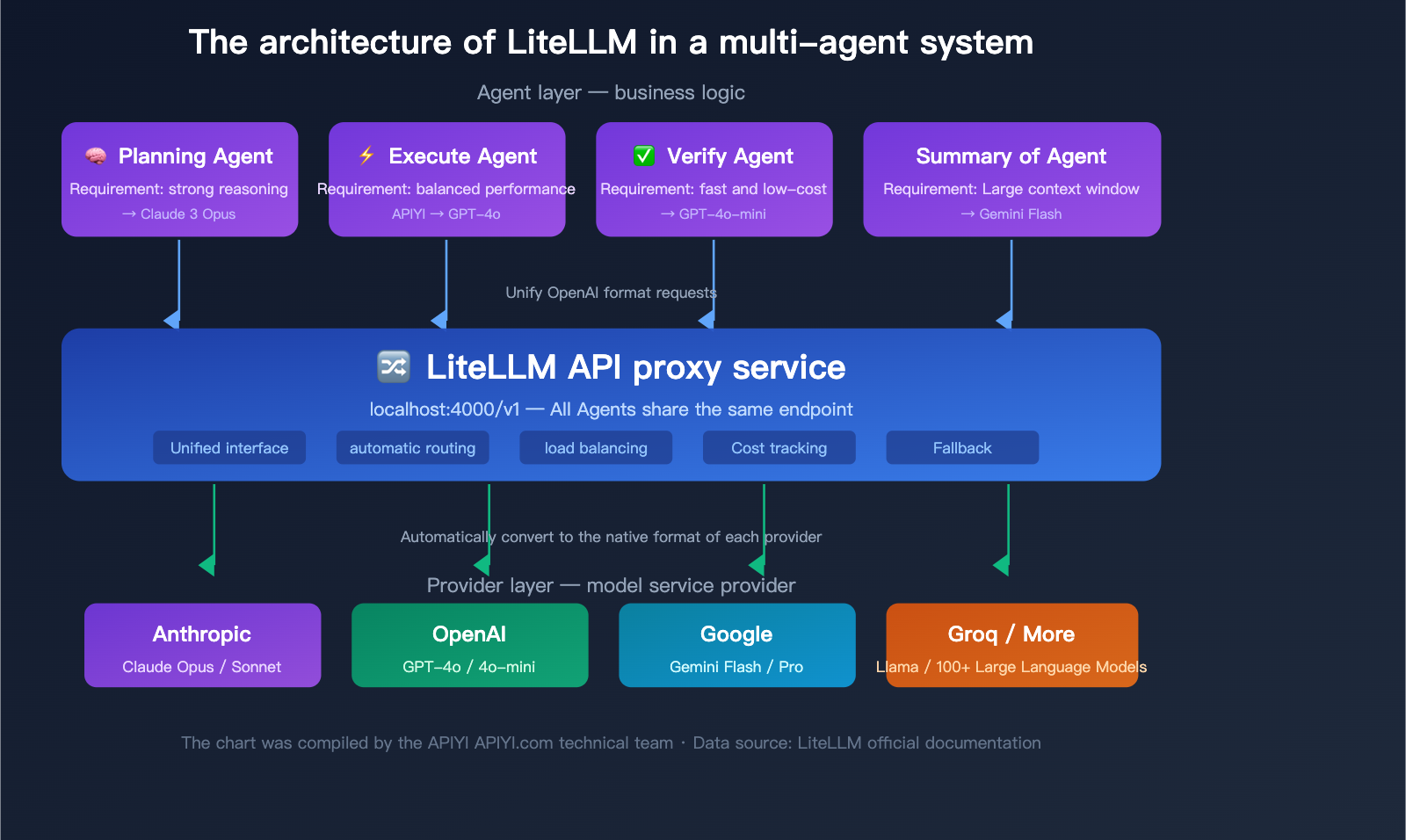
Typical Architecture of LiteLLM in Multi-Agent Systems
In a multi-agent system, the LiteLLM Proxy typically works like this:
- Planning Agent → Calls Claude Opus (strong reasoning model)
- Execution Agent → Calls GPT-4o (balanced performance)
- Validation Agent → Calls GPT-4o-mini (fast and low cost)
- Summary Agent → Calls Gemini Flash (large context window)
All agents call through the same LiteLLM Proxy endpoint, and the Proxy automatically routes to the correct backend model. Administrators can use the dashboard to centrally view token usage and costs for all agents.
🎯 Technical Advice: In production multi-agent systems, LiteLLM Proxy needs to be paired with PostgreSQL and Redis to fully utilize cost tracking and caching features. If your team is small or you prefer not to manage extra infrastructure, APIYI (apiyi.com) provides similar unified interface capabilities with built-in cost tracking and usage statistics, without the need to deploy additional databases.
Deep Dive into Advanced LiteLLM Features
Once you've mastered the basics, these three advanced features are essential for production environments.
Advanced Feature 1: Model Fallback
When your primary model hits rate limits, timeouts, or errors, LiteLLM automatically switches to a backup model, ensuring your service stays up and running.
Configuring Fallback in the SDK:
response = litellm.completion(
    model="gpt-4o",
    messages=messages,
    fallbacks=["anthropic/claude-sonnet-4-6", "gemini/gemini-2.0-flash"],
    num_retries=2
)
Execution logic: Try GPT-4o first → if it fails, try Claude Sonnet → if that fails, try Gemini Flash.
Configuring Fallback in the Proxy (config.yaml):
litellm_settings:
  fallbacks:
    - gpt-4o: [claude-sonnet, gemini-flash]
    - claude-sonnet: [gpt-4o, gemini-flash]
Advanced Feature 2: Load Balancing
You can configure multiple backend deployments for the same model name, and LiteLLM will automatically distribute requests across them.
model_list:
  # Two different backends for the same model name
  - model_name: gpt-4o
    litellm_params:
      model: openai/gpt-4o
      api_key: os.environ/OPENAI_KEY_1

  - model_name: gpt-4o
    litellm_params:
      model: azure/gpt-4o-deployment
      api_key: os.environ/AZURE_KEY_1
      api_base: https://my-azure.openai.azure.com

router_settings:
  routing_strategy: least-busy  # Prioritize the least busy backend
  # Other strategies: simple-shuffle, latency-based
When calling the model, just specify model="gpt-4o", and LiteLLM will automatically balance traffic between your OpenAI direct connection and your Azure deployment.
Advanced Feature 3: Cost Tracking and Virtual Keys
Generating Virtual Keys (Proxy Mode):
curl http://localhost:4000/key/generate \
  -H "Authorization: Bearer sk-master-key" \
  -H "Content-Type: application/json" \
  -d '{
    "max_budget": 50.0,
    "budget_duration": "monthly",
    "models": ["gpt-4o", "claude-sonnet"],
    "metadata": {"user": "developer-01"}
  }'
This generates a virtual key with a $50 monthly budget, restricted to calling only GPT-4o and Claude Sonnet.
Cost Tracking:
LiteLLM includes built-in pricing tables for various models, automatically calculating costs for every model invocation. You can view these in the Proxy dashboard:
- Total spend by model
- Detailed spend by user/team
- Spending trends over time
- Token usage statistics
💰 Cost Optimization: LiteLLM's cost tracking helps you identify which model invocations are the most expensive. Combined with the pricing advantages of APIYI (apiyi.com), you can often secure better rates for the same model invocations, further reducing your AI application's operational costs.
Overview of 100+ Model Providers Supported by LiteLLM
LiteLLM supports a massive number of providers. Here are the most commonly used categories:
| Category | Provider | Model Prefix | Representative Models |
|---|---|---|---|
| Commercial LLMs | OpenAI | openai/ |
GPT-4o, GPT-4o-mini, o3 |
| Anthropic | anthropic/ |
Claude Opus 4, Sonnet 4, Haiku | |
gemini/ |
Gemini 2.0 Flash, Gemini 2.5 Pro | ||
| Cloud Platforms | Azure OpenAI | azure/ |
GPT series deployed on Azure |
| AWS Bedrock | bedrock/ |
Claude/Llama hosted on Bedrock | |
| Google Vertex AI | vertex_ai/ |
Gemini hosted on Vertex | |
| Inference Acceleration | Groq | groq/ |
Llama 3.1 70B (ultra-fast inference) |
| Together AI | together_ai/ |
Various open-source models | |
| Fireworks AI | fireworks_ai/ |
High-performance inference | |
| Local Deployment | Ollama | ollama/ |
Locally running Llama/Mistral |
| vLLM | openai/ (custom base) |
Self-hosted inference engine | |
| Domestic Models | Deepseek | deepseek/ |
Deepseek Chat/Coder |
| Search Enhanced | Perplexity | perplexity/ |
Sonar Pro |
| Aggregation Platforms | OpenRouter | openrouter/ |
Various models |
🎯 Selection Advice: The right model depends on your specific use case. If you're unsure which one to use, you can quickly test different models on the APIYI (apiyi.com) platform, which also supports OpenAI-compatible API calls for most of the models listed above.
LiteLLM FAQ
Q1: What’s the difference between LiteLLM and using the OpenAI SDK directly?
The OpenAI SDK is limited to calling OpenAI models. LiteLLM extends the OpenAI SDK, allowing you to use the same code format to call 100+ model providers like Anthropic, Google, and Azure. If your project only uses OpenAI models, the OpenAI SDK is perfectly fine. However, if you need multi-model support, failover, or cost management, LiteLLM is the better choice.
Q2: Is LiteLLM free?
The core functionality of LiteLLM is completely open-source and free (MIT License). Keep in mind: while LiteLLM itself is free, the model APIs you call through it are not. You'll need to obtain your own API keys from official sources like OpenAI or Anthropic and pay for your model usage. If you don't want to manage multiple API keys separately, you can use a unified interface platform like APIYI (apiyi.com) to simplify key management.
Q3: What server configuration does the LiteLLM Proxy require?
The LiteLLM Proxy itself is very lightweight and can run on a server with 1 vCPU and 1GB of RAM. However, if you need full features (like cost tracking or virtual key management), you'll also need a PostgreSQL database and Redis. For production environments, we recommend at least 2 vCPUs, 4GB of RAM, plus PostgreSQL and Redis.
Q4: What’s the difference between LiteLLM and OpenRouter?
The biggest difference is that LiteLLM is an open-source self-hosted solution, while OpenRouter is a managed service.
- LiteLLM: Free, self-hosted, you manage your own API keys, and you have full control over data flow.
- OpenRouter: Ready to use out of the box, but it adds a markup to API call prices, and your data passes through a third party.
If you prioritize data privacy or have your own API keys, choose LiteLLM. If you want a zero-deployment, quick-start solution, consider a managed service like APIYI (apiyi.com).
Q5: Does LiteLLM support streaming?
Yes, it does. Whether you're using the SDK or the Proxy mode, LiteLLM fully supports SSE streaming. Streaming responses from all providers are normalized into the OpenAI chunk format, ensuring a consistent streaming experience.
# Streaming example
stream = litellm.completion(
    model="gpt-4o",
    messages=[{"role": "user", "content": "Write a story"}],
    stream=True
)
for chunk in stream:
    print(chunk.choices[0].delta.content or "", end="")
Q6: Should a beginner choose the SDK mode or the Proxy mode?
If you're a Python developer just starting out, the SDK mode is the easiest way to go—pip install litellm and you're up and running in a few lines of code. Once you need team collaboration, multi-language support, or production deployment, you can migrate to the Proxy mode. Since the core invocation method is the same for both, the migration cost is very low.
Q7: Where should I put the LiteLLM config.yaml file?
There's no fixed location. Just specify the path using the --config parameter when starting the Proxy:
litellm --config /path/to/your/config.yaml
We generally recommend keeping it in your project root or a dedicated configuration directory. If you're deploying with Docker, you can mount it into the container using a volume.
LiteLLM Quick Decision Guide
Choose the best solution based on your specific needs:
| Your Situation | Recommended Solution | Reason |
|---|---|---|
| Individual developer, Python project | LiteLLM SDK | Zero deployment, 5-minute setup |
| Team development, need budget control | LiteLLM Proxy | Virtual keys + cost tracking |
| Don't want to manage infrastructure | APIYI (apiyi.com) | Managed service, ready to use |
| Multi-agent system | LiteLLM Proxy | Unified routing + load balancing |
| Using only OpenAI models | OpenAI SDK | No extra layer needed |
| High priority on data privacy | LiteLLM Self-hosted | Data doesn't pass through third parties |
Summary
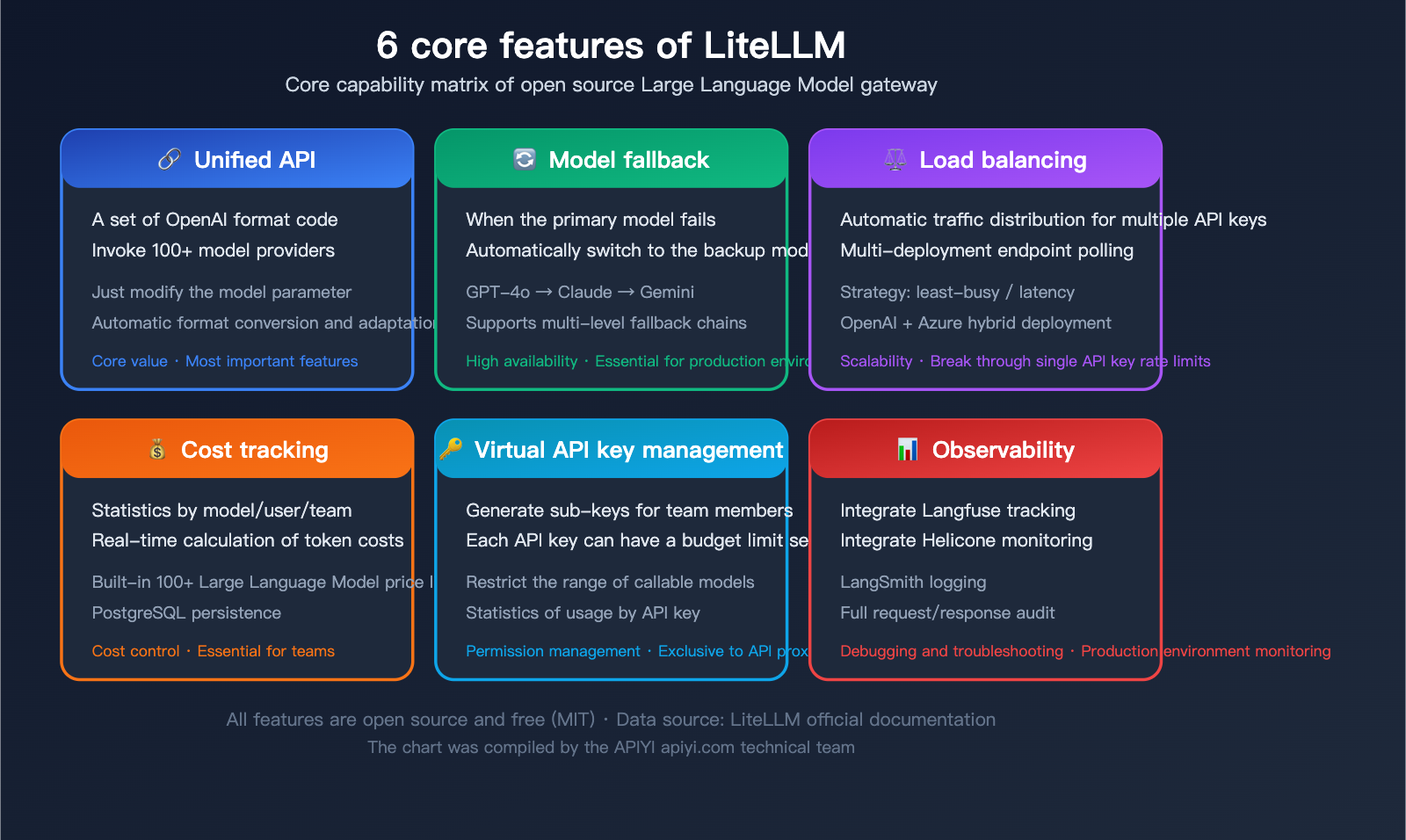
LiteLLM is an incredibly practical piece of infrastructure for AI application development. Its core value can be summed up in one sentence: Use a single set of OpenAI-formatted code to call APIs from 100+ model providers.
For those just getting started, here are the key takeaways:
- LiteLLM is a "translator": It helps translate requests in a unified format into the specific API formats required by different model providers.
- Two modes: SDK (a lightweight Python package) and Proxy (a standalone gateway server).
- Core value: Unified interface + Fallback + Load balancing + Cost tracking.
- Standard for Agent frameworks: Almost all major frameworks like LangChain, CrewAI, and AutoGen support LiteLLM.
- Completely open-source and free: Released under the MIT license, there are no costs for self-hosting.
If you find the operational overhead of self-hosting a LiteLLM Proxy too high, you can also use managed unified interface services like APIYI (apiyi.com). These allow you to call all mainstream models with a single API key, saving you the burden of deployment and maintenance.
Author: APIYI Technical Team
Technical Support: Visit APIYI at apiyi.com for more tutorials and technical support on model invocation.
Last Updated: April 2026
Applicable Version: LiteLLM v1.x+
References:
- LiteLLM Official Documentation: docs.litellm.ai
- LiteLLM GitHub Repository: github.com/BerriAI/litellm
- LiteLLM Official Website: litellm.ai
- BerriAI Official Website: berri.ai