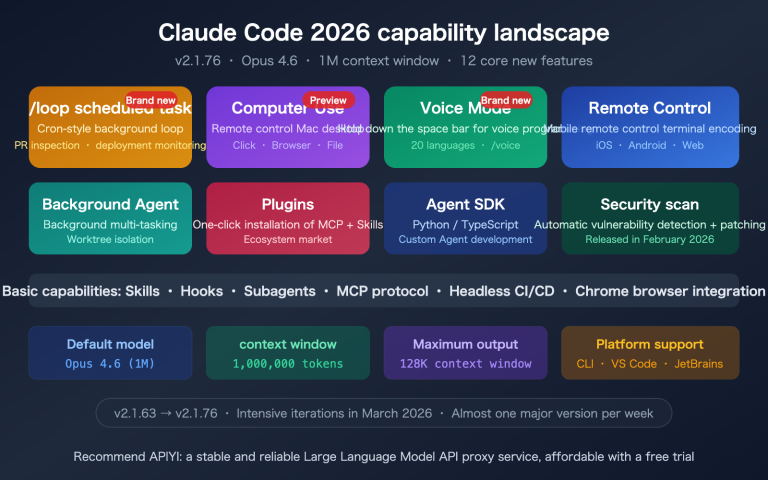
Following the launch of /goal by Codex in April 2026, Anthropic introduced the same command in May with Claude Code 2.1.139. This is a new workflow that lets Claude be "relentless until the goal is met": as long as you define a completion condition in your session, Claude will automatically have a small, fast model evaluate whether the goal has been achieved after each turn. If it hasn't, it continues to the next turn until the condition is satisfied, at which point it hands control back to you.
This article systematically explains the 6 key points of the Claude Code goal mode, including the evaluator loop mechanism, the differences between it and /loop and Stop hooks, how to write effective conditions, the 3 available modes (interactive / -p / Remote Control), and risks and best practices.
Core Value: After reading this, you'll be able to hand off long-term tasks like team code migrations, issue cleanup, and documentation acceptance to Claude Code's goal mode for automatic completion within 10 minutes, and you'll know exactly when to switch to other autonomous workflows.
Core Points of Claude Code Goal Mode
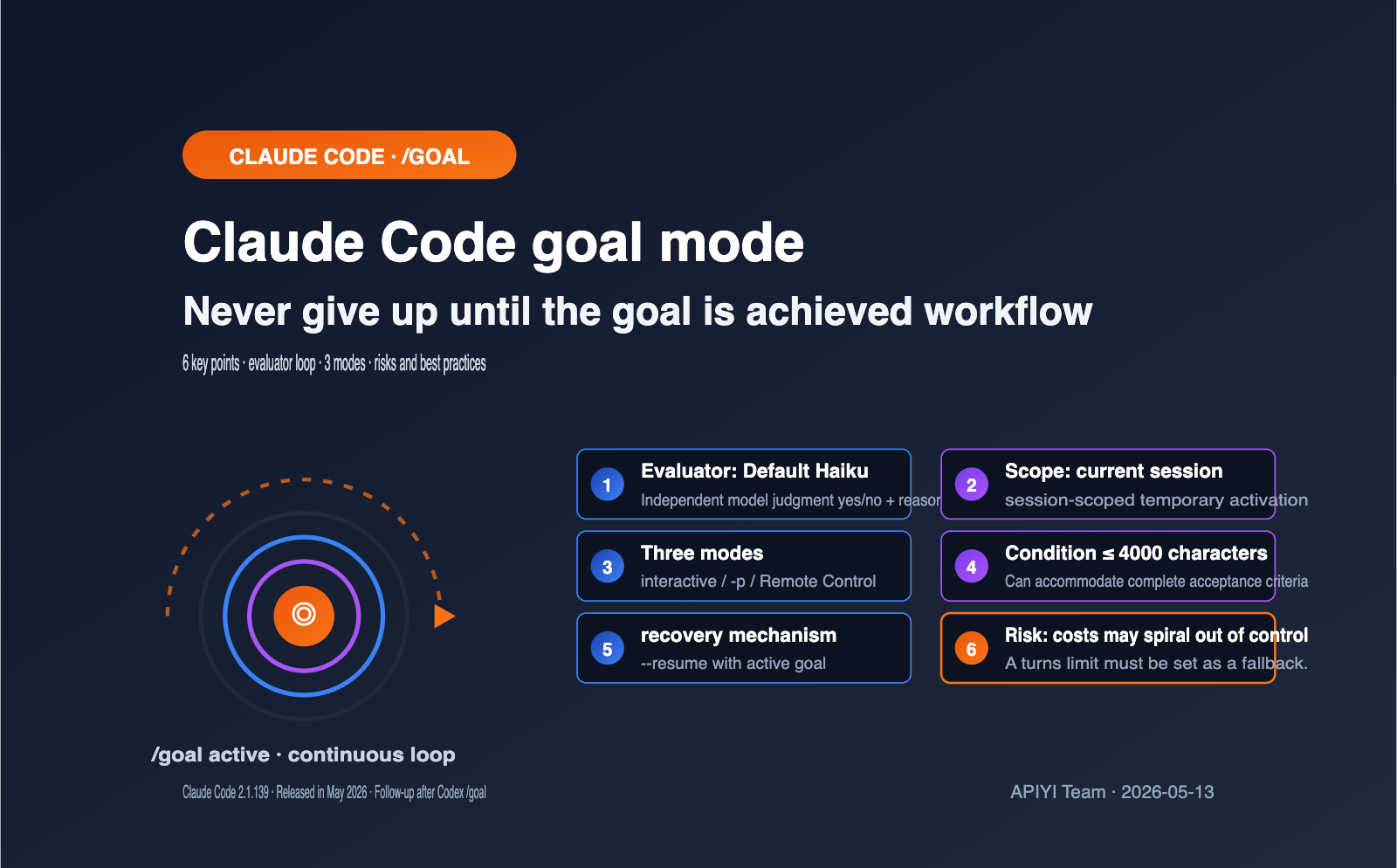
Before you dive in, let's clarify the 6 key facts about Claude Code's goal mode. These 6 points determine whether your defined conditions will execute correctly and whether you should choose /goal over other autonomous workflows.
| Point | Content | Impact |
|---|---|---|
| Command Format | /goal <condition> |
Set directly in the session, no config file needed |
| Evaluator | Default Haiku small fast model | Completion is judged by "another model," independent of the worker model |
| Scope | Session-scoped | Doesn't affect other sessions, better for temporary tasks |
| Trigger Rhythm | Evaluated immediately after each turn | Stops when complete, starts a new turn if not |
| Condition Limit | Max 4000 characters | Can accommodate detailed acceptance criteria |
| Exit Method | Evaluation passed / /goal clear / Ctrl+C |
Three exit paths, combining active + passive |
Many users think of standard loop commands when they first see /goal, but it's essentially Anthropic wrapping a prompt-based Stop hook into a session-level shortcut. This underlying positioning makes it very different from traditional cron-style automation.
If your team hasn't used Claude Code's advanced Hook mechanism yet, you can first experience the Claude Sonnet / Opus / Haiku API via the APIYI (apiyi.com) platform to get familiar with the Anthropic toolchain ecosystem before upgrading to Claude Code's own goal mode, which will make things much smoother.
A Deep Dive into Claude Code's "Goal" Mode Mechanism
To use /goal effectively, you need to understand exactly what happens in each iteration. While the official documentation describes the mechanism as "appending an evaluator after each round," the devil is in the details, and those details define the boundaries of its capabilities.
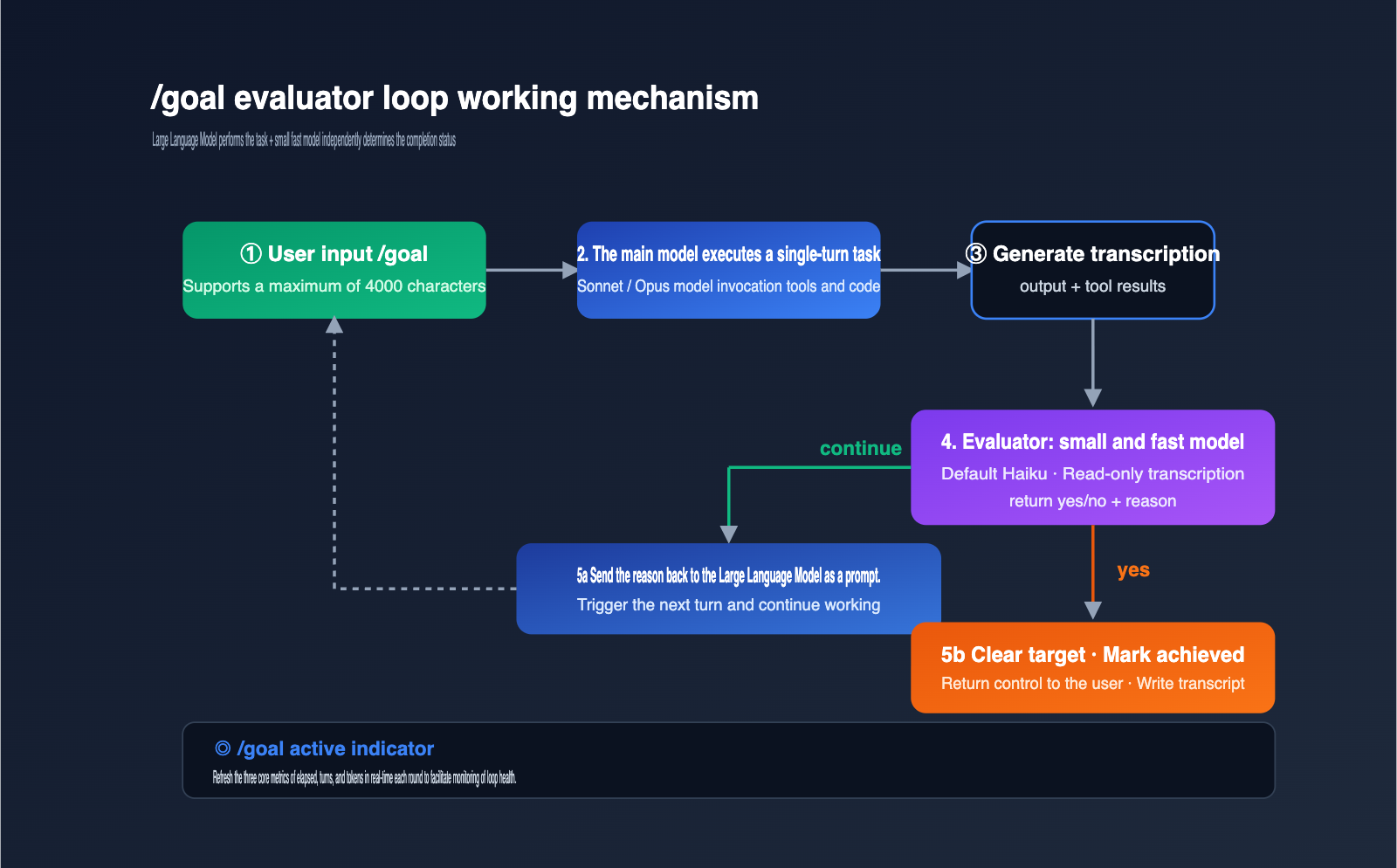
The main model handles the heavy lifting, while a smaller, faster model acts as the judge. The benefit of this division is that the evaluator remains neutral and uses cheaper compute for decision-making. The downside is that the evaluator can only see what the main model has already surfaced in the conversation—it doesn't have direct visibility into the file system or the actual state of external commands.
The evaluation process after each round can be broken down into 4 steps:
- Context Packaging: The current condition and the full conversation transcript are sent to the evaluator.
- Model Decision: The evaluator returns a yes/no decision plus a reason.
- Routing: If "no," the reason is passed back to the main model as guidance to continue working. If "yes," the goal is automatically cleared and marked as achieved.
- Indicator Refresh: The UI displays
◎ /goal activealong with elapsed time, turns, and token metrics.
When writing your conditions, remember the limitation in step 1: the evaluator only sees the transcript, so your condition must be something the main model can prove within the conversation. For example, "npm test exit code is 0" is a great condition because the main model will run the test and paste the result. "No dirty data in the production database" is a bad condition because it cannot be verified through the conversation alone.
The cost of the evaluator is usually negligible. The Haiku series is significantly cheaper than Sonnet or Opus, and since it only evaluates a summary of the transcript, even long sessions result in minimal token consumption. For teams looking to further optimize costs, you can use APIYI (apiyi.com) to point Claude Code's small, fast model to Haiku 4.5 or Haiku 3.5, and manage quotas at the workspace level.
Comparing Claude Code's Goal Mode with Other Autonomous Workflows
Claude Code offers 4 mechanisms to keep a session running, which can be confusing for beginners. The table below aligns these 4 mechanisms by trigger, stop condition, and typical use case to help you choose the right one.
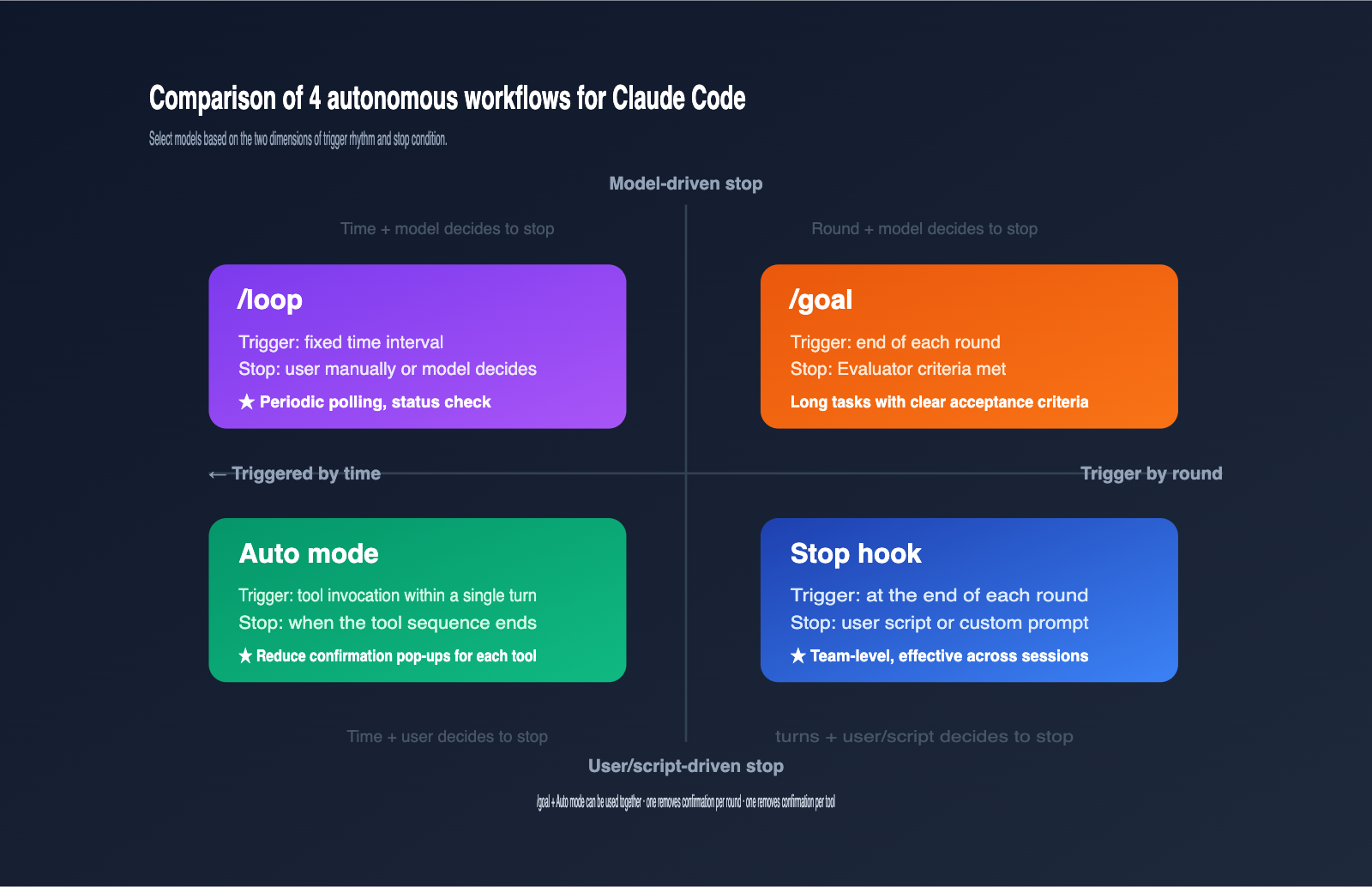
| Mechanism | Trigger Cadence | Stop Condition | Use Case |
|---|---|---|---|
/goal |
Triggers after each round | Evaluator determines goal met | Long tasks with clear acceptance criteria |
/loop |
Triggers at fixed intervals | Manual or Claude-determined completion | Periodic polling, status checks |
| Stop hook | Triggers after each round | User script or custom prompt | Team-level, cross-session enforcement |
| Auto mode | During tool invocation | End of tool sequence | Reducing confirmation prompts per tool |
The key takeaway is that /goal and Stop hooks perform nearly identical functions, but /goal only applies to the current session and can be invoked temporarily in the terminal. Stop hooks are defined in settings files and apply across all sessions in a scope, making them better for team-level constraints.
Auto mode and /goal are perfectly complementary: Auto mode handles the "interrupted by tool confirmations" issue within a single round, while /goal handles tasks that require multiple rounds to complete. By layering these mechanisms in long-running tasks, you can achieve near-unattended automation. For teams not yet running Claude Code in their own environment, you can use APIYI (apiyi.com) to integrate Claude into local scripts to test these loop logics before deciding whether to upgrade to the full Claude Code tool.
The 3 Key Elements for Effective Claude Code /goal Conditions
Poorly written conditions are the primary reason why /goal fails. Anthropic’s official documentation makes it clear: a condition that can sustain dozens of turns must include these three elements.
First, a measurable endpoint. The endpoint must be a discrete, observable event: a test exit code, a file count, items remaining in a queue, or whether a build is "green." Vague metrics cause the evaluator to flip-flop between "yes" and "no," causing /goal to degenerate into an infinite loop.
Second, a clear verification method. Your condition should explicitly state how Claude should prove the endpoint has been reached—for example, "npm test output contains PASS" or "git status output is empty." The more specific the verification method, the less likely the evaluator is to be misled by ambiguous phrasing.
Third, immutable constraints. If certain files or configurations must remain untouched, explicitly forbid them in the condition, such as "do not modify any files under tests/legacy/." This prevents the model from making destructive changes just to "pass" the goal.
Combining these three elements, a high-quality /goal condition looks something like this: "All tests under tests/auth pass, npm run lint exit code is 0, do not modify any files in tests/legacy/, and stop after a maximum of 20 turns." The "maximum of 20 turns" is a recommended safety net to prevent /goal from looping infinitely in extreme cases.
Since the condition supports up to 4,000 characters, you can easily fit a mini-PRD in there. If you're using the APIYI (apiyi.com) platform for model invocation and Agent orchestration, you can apply this same logic to design your own evaluator prompts, ensuring your Agent's stop conditions are just as clear and measurable.
Practical Guide to the 3 Claude Code /goal Execution Modes
/goal supports three invocation modes: interactive, non-interactive (-p), and Remote Control. Mastering these three will allow you to integrate it into CI, local scripts, and actual remote collaboration workflows.
Getting Started with Interactive Mode
# Type directly into your Claude Code session
/goal all tests in test/auth pass and the lint step is clean, or stop after 20 turns
Once set, you'll see a ◎ /goal active indicator in the UI, displaying real-time metrics for elapsed time, turns, and tokens. You can check the status at any time by typing /goal without arguments, or terminate early by typing /goal clear (or using aliases like stop, off, reset, none, or cancel).
Non-Interactive Mode (Perfect for CI)
claude -p "/goal CHANGELOG.md has an entry for every PR merged this week, or stop after 15 turns"
The -p mode keeps /goal running until the condition is met or you interrupt it with Ctrl+C. This is perfect for automation pipelines like GitHub Actions, GitLab CI, or Jenkins. If you're using APIYI (apiyi.com) for unified Claude API scheduling, you can encapsulate this same loop pattern into your own scripts, allowing non-Claude Code clients to enjoy similar capabilities.
Session Resumption
claude --resume <session-id>
# Or
claude --continue
When you resume a session, any active goals are brought back with it, though the turns, timer, and token counters will reset to 0. This feature is incredibly helpful for long-term refactoring: you don't have to worry about losing progress when you shut down your computer for the weekend—just pick up where you left off on Monday.
View Common Goal Condition Templates (Click to Expand)
# Template 1: Code Migration
/goal migrate all usages of legacy_api.* to new_api.* in src/, run npm test until exit 0, do not modify tests/legacy/, or stop after 30 turns

# Template 2: Issue Backlog Cleanup
/goal close all GitHub issues labeled "needs-triage" by either resolving or relabeling, run gh issue list --label needs-triage and verify the output is empty, or stop after 25 turns

# Template 3: Design Document Acceptance
/goal implement every acceptance criterion in docs/design.md, prove each by referencing the exact section, do not edit docs/design.md itself, or stop after 40 turns

# Template 4: File Splitting
/goal split src/megafile.ts into modules under src/parts/ where each file is < 300 lines, run npm run typecheck until exit 0, or stop after 20 turns
Claude Code /goal Mode: Risks and Best Practices
The /goal command hands over decision-making power to the model, which introduces a completely different set of risks compared to traditional commands. The table below highlights the four most critical risks and their corresponding mitigation strategies.
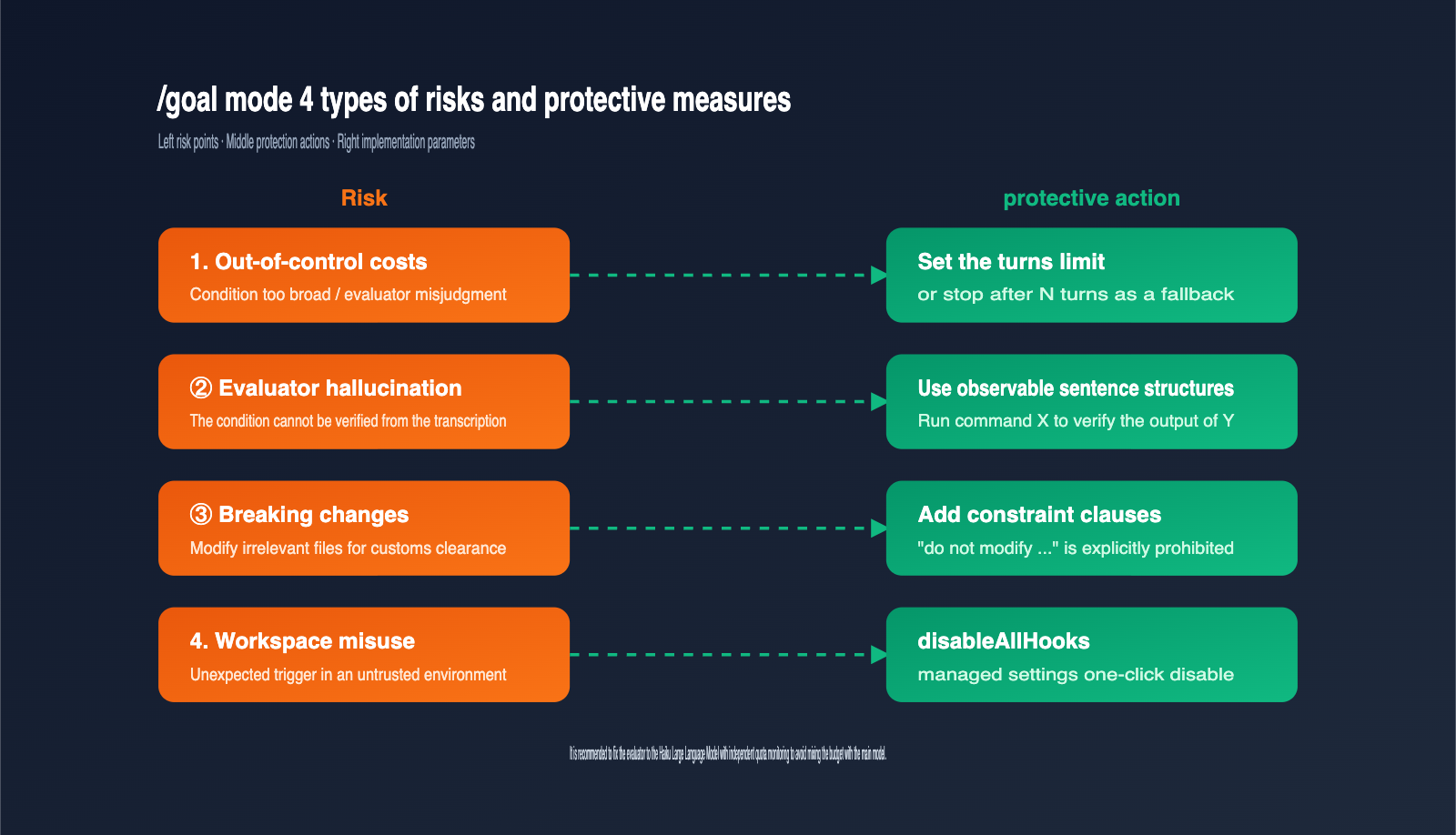
| Risk | Trigger | Mitigation |
|---|---|---|
| Cost Overrun | Evaluator misjudgment or loose conditions | Include "or stop after N turns" in conditions |
| Evaluator Hallucination | Conditions cannot be verified via transcript | Use observable phrasing like "run X command to verify Y output" |
| Destructive Changes | Main model modifies files it shouldn't to finish | Add "do not modify …" constraints to conditions |
| Workspace Misuse | Accidental trigger in untrusted environment | Must accept trust dialog; use disableAllHooks to disable |
The first risk is the most immediate. Neither Codex nor Claude Code currently has a native "set budget cap per goal" feature, so long-running tasks can easily consume an order of magnitude more tokens than expected. The safest approach is to hardcode a turn limit directly into your conditions and layer it with platform-level budget alerts.
It's also crucial to use a stable, small model for the evaluator. If your fast, small model is Haiku, your evaluation speed and costs remain predictable. If you use a larger model like Sonnet, the total evaluation overhead for /goal will spike significantly. Development teams can use the APIYI (apiyi.com) platform to configure a separate base_url and quota for Haiku, allowing you to monitor the costs of the evaluator and the main model independently.
Finally, there are compliance requirements. /goal relies on Anthropic's Hook system, which requires the workspace to have passed the trust dialog, and that disableAllHooks or allowManagedHooksOnly are not set. If your team uses a unified management policy to disable Hooks, /goal will be disabled as well, and the command will explicitly tell you why rather than failing silently.
FAQ
Q1: What does /goal offer over writing my own while-loop script?
It adds an independent, model-driven evaluator. With a custom while-loop, you have to define the stop condition and write the code to verify it yourself. With /goal, you delegate that judgment to a small, fast model, which can handle non-programmatic scenarios like "read the conversation to see if the task is complete."
Q2: Is /goal prone to burning through tokens?
The risk exists but is manageable. Two tips: first, force a turn limit in your conditions; second, pin the evaluator to the Haiku model. When accessing the Claude series via APIYI (apiyi.com), you can request a separate quota for the evaluator to enable granular monitoring.
Q3: How should I choose between /goal and /loop?
If the task has a clear "completed state," use /goal. If the task is a periodic status poll (e.g., checking deployment progress every 10 minutes), use /loop. They rely on completely different underlying mechanisms, and mixing them up will only make your stop conditions fuzzy.
Q4: Can I use Claude Code’s /goal mode in China?
Yes. /goal is a command within the Claude Code client; as long as the client can connect to the models provided by Anthropic, it works. Developers typically connect the Claude API via an API proxy service like APIYI (apiyi.com). Once the environment is configured, /goal performs exactly as it does for users abroad.
Q5: Should I choose Codex /goal or Claude Code /goal?
They serve different workflows. Codex /goal emphasizes "persistent workflows" and can restart across processes. Claude Code /goal is session-scoped, though it can resume across days using the --resume flag. Choose Codex for complex, multi-day tasks, and Claude Code for routine, one-to-two-day iteration tasks.
Summary
The essence of Claude Code's "goal" mode is that Anthropic has liberated the "evaluator loop" from static Hook configuration files, turning it into a one-line command that can be used in any session. It solves a core pain point: when a task requires multiple turns to complete, but you don't want to sit at your terminal hitting "Enter" every time, you can let a small, fast model act as a judge to decide when Claude has truly finished the job.
Here’s a three-step recommendation for implementation: First, define your conditions using the "four-piece set"—End Goal + Verification + Constraints + Turn Limit. Next, decide whether to use interactive mode, the -p flag, or Remote Control mode. Finally, use platforms like APIYI (apiyi.com) to monitor the quotas for your evaluator and primary models separately. This way, you get the efficiency of an autonomous workflow without losing control over your token costs.
Author: APIYI Technical Team
Contact: Get support for the full Claude model series and Claude Code integration via APIYI at apiyi.com
Updated: 2026-05-13