description: A deep dive into the Qwen3.5-Omni native multimodal model, covering its Thinker-Talker MoE architecture, 256K context window, and Audio-Visual Vibe Coding capabilities.
Author's Note: A detailed breakdown of the Alibaba Qwen3.5-Omni native multimodal model, covering its Thinker-Talker MoE architecture, 256K context window, audio-video encoding capabilities, and the emergent Audio-Visual Vibe Coding ability.
On March 30, 2026, the Alibaba Qwen team officially released Qwen3.5-Omni, a native multimodal model capable of processing text, images, audio, and video within a single computational pipeline. As part of Alibaba's aggressive release schedule throughout March and April, Qwen3.5-Omni achieved SOTA status across 215 benchmarks, marking a significant breakthrough for Chinese AI developers in the field of full-modality large language models.
Key Takeaways: Spend 3 minutes learning about the Qwen3.5-Omni Thinker-Talker architecture, the selection strategy for its three model variants, and its emergent Audio-Visual Vibe Coding capability.
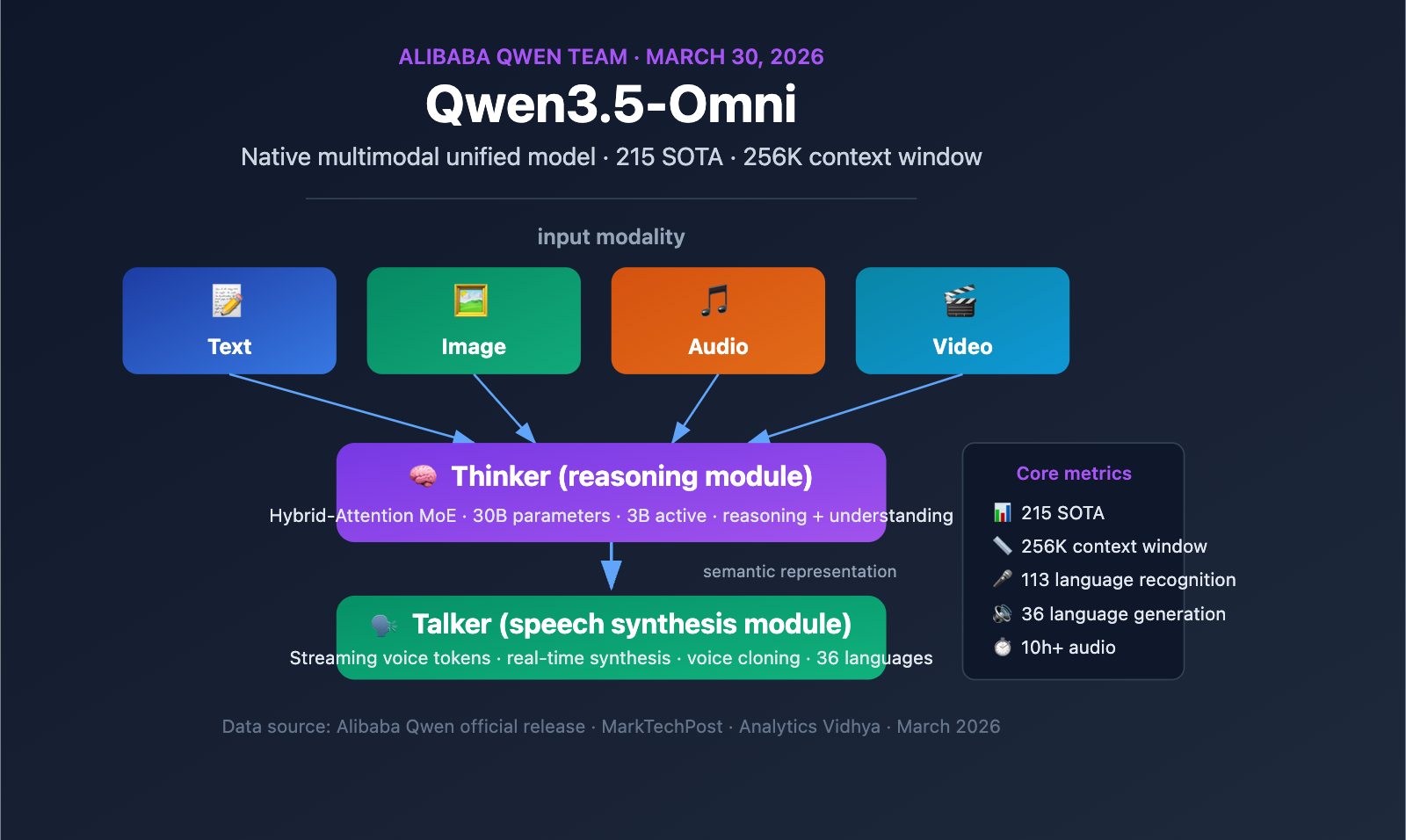
Qwen3.5-Omni Multimodal Model Core Information
Qwen3.5-Omni Quick Specs
| Parameter | Details |
|---|---|
| Release Date | March 30, 2026 |
| Developer | Alibaba Qwen Team |
| Architecture | Thinker-Talker + Hybrid-Attention MoE |
| Model Variants | Plus (30B-A3B MoE), Flash (Lightweight MoE), Light (Dense model/Open weights) |
| Context Window | 256K tokens |
| Audio Capacity | 10+ hours of continuous audio |
| Video Capacity | 400+ seconds of 720p video (1 FPS sampling) |
| Speech Recognition | 113 languages and dialects (up from 19) |
| Speech Generation | 36 languages (up from 10) |
| Training Data | Over 100 million hours of audio/video data |
| Benchmark Results | SOTA on 215 audio/video understanding benchmarks |
Qwen3.5-Omni Positioning
The core significance of Qwen3.5-Omni lies in its native multimodal design—this isn't a text model patched together with external audio and video modules, but a unified model pre-trained from scratch on over 100 million hours of audio and video data. All modalities are processed within the same computational pipeline, meaning the model truly understands semantic information in audio and video rather than simply transcribing them into text for processing.
Furthermore, Qwen3.5-Omni is one of several models released by Alibaba during their intensive March-April 2026 rollout. Just days later, on April 2, Alibaba released the Qwen3.6-Plus model (supporting a 1 million token context window, focused on agentic programming), demonstrating Alibaba's strong commitment to the large language model space.
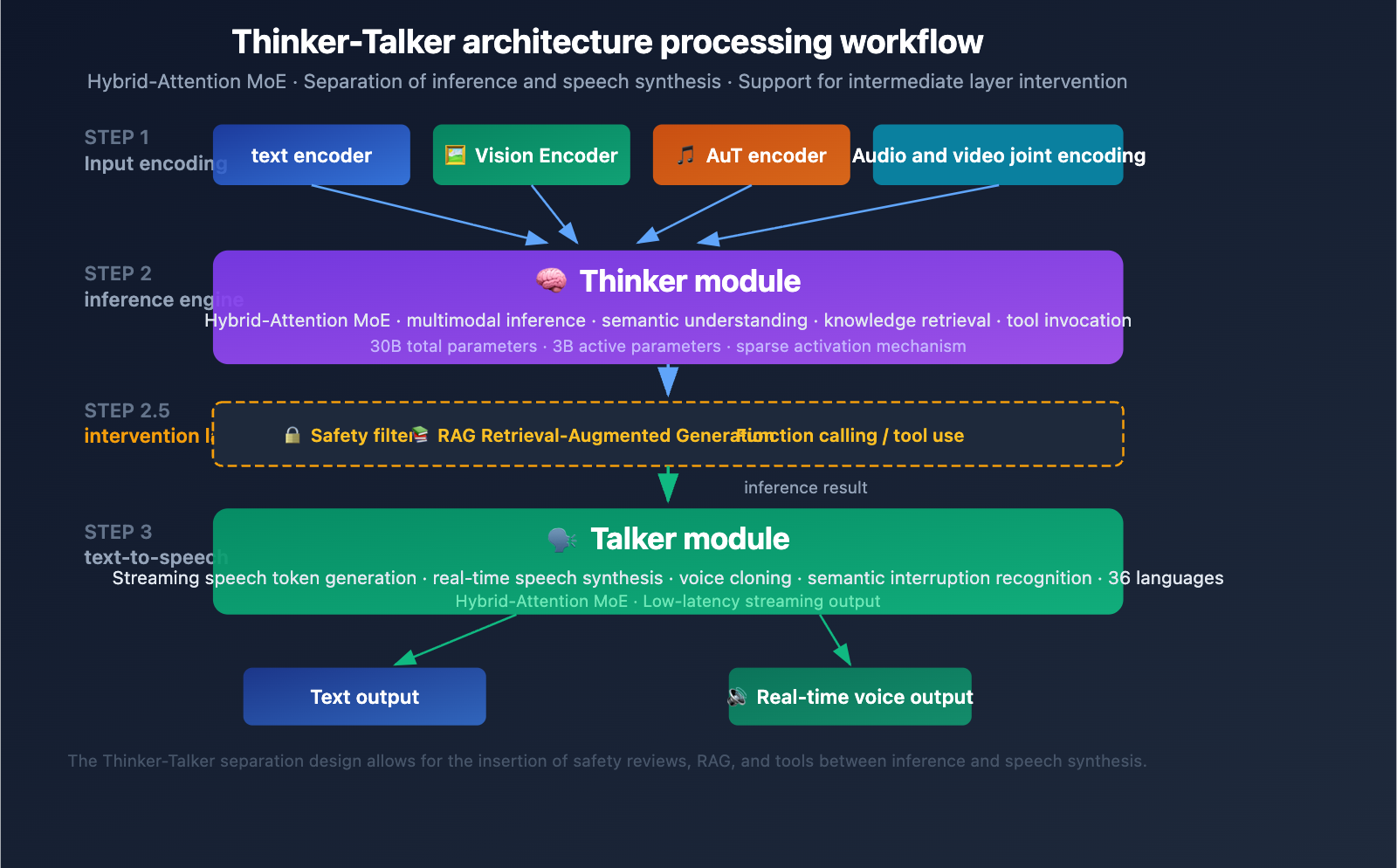
Qwen3.5-Omni Thinker-Talker Architecture Explained
The Thinker-Talker Dual-Module Design
Qwen3.5-Omni features a unique Thinker-Talker dual-module architecture. First introduced in Qwen2.5-Omni, this design has received a major upgrade in the 3.5 version—both modules now utilize the Hybrid-Attention MoE (Mixture-of-Experts) architecture.
Thinker Module:
- Processes all input modalities: text, image, audio, and video
- Executes reasoning and comprehension tasks
- Generates internal reasoning representations
- Uses a native Audio Transformer (AuT) encoder to process audio
- Outputs structured semantic representations
Talker Module:
- Receives the reasoning representation from the Thinker
- Converts semantic representations into streaming speech tokens
- Supports real-time speech synthesis
- Enables natural vocal expression (including intonation, emotion, and pauses)
Engineering Value of the Thinker-Talker Architecture
The core advantage of this decoupled design is intermediate intervention capability—external systems (RAG retrieval pipelines, safety filters, function calling) can intervene between the Thinker's output and the Talker's synthesis. This means:
- Enterprises can add safety reviews before speech output
- Developers can trigger tool calls based on reasoning results
- RAG systems can supplement knowledge retrieval results before answering
MoE Sparse Activation Mechanism
The heart of the Hybrid-Attention MoE design is sparse activation—the model only activates a fraction of its parameters for each token processed (only 3B active out of 30B total parameters). This mechanism allows the model to maintain high capacity while keeping the computational cost of a single inference within an acceptable range, which is crucial for real-time applications like voice conversations.
🎯 Development Tip: The Thinker-Talker decoupled architecture of Qwen3.5-Omni is perfect for building multi-step AI workflows. If you need to integrate multimodal capabilities into your own applications, you can quickly test the performance differences between Qwen3.5-Omni and other mainstream multimodal models via the APIYI (apiyi.com) platform.
Qwen3.5-Omni Model Variants Comparison
Plus / Flash / Light Selection Guide
Qwen3.5-Omni offers three model variants tailored for different scenarios:
| Variant | Architecture Type | Parameter Scale | Availability | Use Case |
|---|---|---|---|---|
| Plus | MoE (30B-A3B) | 30B Total/3B Active | API (DashScope) | Highest quality reasoning, complex multimodal tasks |
| Flash | Lightweight MoE | Fewer parameters | API (DashScope) | Low-latency scenarios, real-time conversation |
| Light | Dense Model | Smaller scale | Open Weights (HuggingFace) | Local deployment, edge devices |
Selection Advice:
- For best results → Choose the Plus variant, which holds the top score across 215 benchmarks.
- For low latency → Choose the Flash variant, ideal for real-time voice conversations and streaming interactions.
- For local deployment → Choose the Light variant, with open weights that can run on local GPUs.
Qwen3.5-Omni API Integration
The Qwen3.5-Omni API follows the standard /v1/chat/completions format, using the modalities parameter to specify the output type:
import openai

client = openai.OpenAI(
    api_key="YOUR_API_KEY",
    base_url="https://api.apiyi.com/v1"  # Unified access via APIYI
)

response = client.chat.completions.create(
    model="qwen3.5-omni-plus",
    modalities=["text", "audio"],
    messages=[
        {
            "role": "user",
            "content": [
                {"type": "text", "text": "Please analyze the content of this video."},
                {"type": "video_url", "video_url": {"url": "https://example.com/video.mp4"}}
            ]
        }
    ]
)
View full example of multimodal input
import openai
import base64

client = openai.OpenAI(
    api_key="YOUR_API_KEY",
    base_url="https://api.apiyi.com/v1"
)

# Multimodal input: Image + Audio + Text
response = client.chat.completions.create(
    model="qwen3.5-omni-plus",
    modalities=["text", "audio"],
    messages=[
        {
            "role": "user",
            "content": [
                {"type": "text", "text": "Please generate an analysis report based on the image and audio description."},
                {
                    "type": "image_url",
                    "image_url": {"url": "data:image/png;base64,..."}
                },
                {
                    "type": "input_audio",
                    "input_audio": {
                        "data": base64.b64encode(audio_bytes).decode(),
                        "format": "wav"
                    }
                }
            ]
        }
    ],
    max_tokens=2000
)

# Get text response
print(response.choices[0].message.content)

# If audio output was requested, retrieve the audio data
if hasattr(response.choices[0].message, 'audio'):
    audio_data = response.choices[0].message.audio
    print(f"Audio format: {audio_data.format}")
💡 Integration Tip: The Qwen3.5-Omni API is compatible with the OpenAI SDK format. If you already have code based on the OpenAI SDK, you can quickly switch by simply updating the
base_urlandmodelparameters. You can test the multimodal performance of Qwen3.5-Omni, GPT-4o, and other models simultaneously via the APIYI (apiyi.com) platform.
Qwen3.5-Omni Benchmark Performance Analysis
Audio Understanding Capabilities
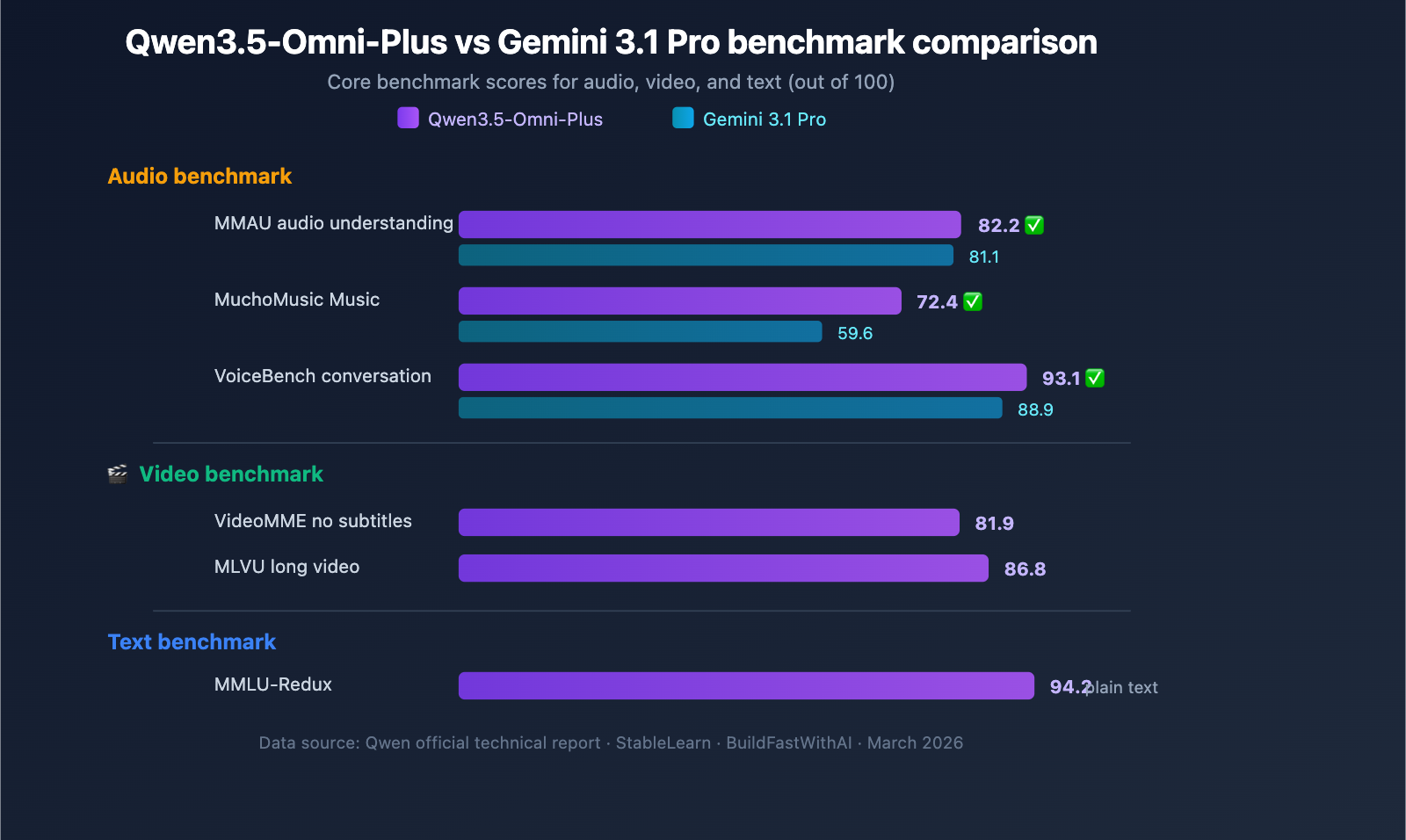
Qwen3.5-Omni-Plus comprehensively outperforms Google Gemini 3.1 Pro across audio-related benchmarks:
| Benchmark | Qwen3.5-Omni-Plus | Gemini 3.1 Pro | Winner |
|---|---|---|---|
| MMAU Audio Understanding | 82.2 | 81.1 | Qwen |
| MuchoMusic Music Understanding | 72.4 | 59.6 | Qwen (+21%) |
| VoiceBench Conversation | 93.1 | 88.9 | Qwen |
Qwen3.5-Omni shows a particularly significant advantage in music understanding (MuchoMusic), leading by a margin of 21%.
Visual and Video Capabilities
| Benchmark | Qwen3.5-Omni-Plus | Description |
|---|---|---|
| MMMU-Pro | 73.9 | Top score in multimodal understanding |
| RealWorldQA | 84.1 | Real-world visual Q&A |
| VideoMME (No Subtitles) | 81.9 | Video multimodal understanding |
| MLVU | 86.8 | Long video understanding |
| MVBench | 79.0 | Multi-dimensional video benchmark |
| LVBench | 71.2 | Long video benchmark |
Maintained Text Reasoning Performance
While gaining full-modal capabilities, Qwen3.5-Omni's text reasoning performance remains virtually unchanged:
| Benchmark | Qwen3.5-Omni-Plus | Qwen3.5-Plus (Text-only) | Gap |
|---|---|---|---|
| MMLU-Redux | 94.2 | 94.3 | -0.1 |
| C-Eval | 92.0 | 92.3 | -0.3 |
| IFEval | 89.7 | 89.7 | 0 |
This means choosing Qwen3.5-Omni doesn't require sacrificing text reasoning quality—you can cover both text and multimodal scenarios with a single model.
🎯 Selection Advice: Qwen3.5-Omni has clear advantages in audio and music understanding. If your application involves voice interaction or audio analysis, we recommend prioritizing this model. You can use the APIYI (apiyi.com) API proxy service to quickly compare the performance of Qwen3.5-Omni and GPT-4o in your specific use cases.
3 Key Differentiated Capabilities of Qwen3.5-Omni
Capability 1: Audio-Visual Vibe Coding
Qwen3.5-Omni demonstrates an emergent capability that the Qwen team calls "Audio-Visual Vibe Coding"—the model can write executable code by watching videos + listening to voice instructions without being specifically trained for this task.
In actual tests, the model can:
- Convert hand-drawn sketches (captured via camera) into executable React web pages.
- Write functional code based on video demonstrations and verbal descriptions.
- Understand visual design intent and generate corresponding front-end implementations.
This capability is significantly valuable for rapid prototyping and low-code scenarios.
Capability 2: Semantic Interruption Recognition
Traditional voice interaction systems cannot distinguish between a user's backchanneling responses (like "uh-huh" or "yeah") and actual interruption intent. Qwen3.5-Omni introduces native Turn-Taking Intent Recognition, which can distinguish between:
- Backchanneling: Feedback like "uh-huh" or "right" that lacks semantic interruption intent.
- Semantic Interruption: Situations where the user has a clear intent to take over the conversation.
This makes the voice conversation experience with Qwen3.5-Omni feel much more like a natural human interaction.
Capability 3: Voice Cloning
Users can upload a voice recording, and Qwen3.5-Omni will learn and clone those voice characteristics, using the cloned voice for all subsequent voice outputs. The cloned voice maintains naturalness and stability even in multilingual scenarios.
The Role of Qwen3.5-Omni in Alibaba's AI Offensive
Alibaba's AI Model Release Schedule: March–April 2026
| Release Date | Model | Positioning | Key Features |
|---|---|---|---|
| March 30 | Qwen3.5-Omni | Native Multimodal Model | Unified processing of text, image, audio, and video |
| April 2 | Qwen3.6-Plus | Enterprise Agent Model | 1M token context window, agentic programming |
| Ongoing | Qwen3-TTS | Speech Synthesis | Open-source TTS series, supports voice cloning |
This rapid-fire release schedule shows that Alibaba is pushing hard to build out its Large Language Model capabilities across the board. Qwen3.5-Omni handles multimodal perception and understanding, while Qwen3.6-Plus focuses on enterprise-grade code generation and agentic capabilities, making them a powerful, complementary duo.
It's worth noting that the Plus and Flash variants of Qwen3.5-Omni have been released as closed-source APIs, marking a shift from Alibaba's previous open-source-first strategy. Media outlets like WinBuzzer suggest this reflects a pivot toward profitability under commercial pressure—a sentiment echoed by Bloomberg’s headline: "Alibaba Launches Third Closed-Source AI Model, Focusing on Profit."
💰 Cost Tip: If you're considering integrating Qwen3.5-Omni into your product, I recommend starting with a proof-of-concept using the free credits on the APIYI (apiyi.com) platform. Once you've confirmed the model's performance, you can move to production deployment. The platform supports the full range of models, including Qwen, GPT, Claude, and Gemini, making it easy to switch and choose the right fit for your specific needs.
Frequently Asked Questions
Q1: Is Qwen3.5-Omni open-source or closed-source?
Qwen3.5-Omni comes in three variants: the Plus and Flash versions are currently only available via the Alibaba Cloud DashScope API (closed-source), while the weights for the Light variant are available for download on HuggingFace (open-source). While the previous Qwen3-Omni was fully open-source under the Apache 2.0 license, the 3.5 series has shifted the Plus/Flash variants to an API-only model. If you need local deployment, the Light variant is your best bet.
Q2: How does Qwen3.5-Omni compare to GPT-4o?
In terms of audio and music understanding, Qwen3.5-Omni-Plus is clearly ahead of GPT-4o. When it comes to video understanding, both have their own strengths. For text reasoning, Qwen3.5-Omni is nearly on par with Alibaba's own text-only model, Qwen3.5-Plus. I suggest running comparative tests in your specific application scenarios via the APIYI (apiyi.com) platform, as performance can vary significantly depending on the use case.
Q3: How can I quickly start using the Qwen3.5-Omni API?
The Qwen3.5-Omni API is compatible with the standard OpenAI SDK format, making integration a breeze. Simply install the openai SDK, set your API key and base_url, and you're ready for model invocation. You can grab free test credits on APIYI (apiyi.com) to quickly verify the multimodal capabilities using the code examples provided in this article.
Summary
Key highlights of the Qwen3.5-Omni multimodal model:
- Native Multimodality: It handles text, images, audio, and video within a single pipeline, rather than using a patchwork approach.
- Thinker-Talker Architecture: Reasoning and speech synthesis are decoupled, allowing for intermediate-layer intervention and tool invocation.
- Three Model Variants: Plus (most powerful), Flash (low latency), and Light (open weights for local deployment).
- 215 SOTA Benchmarks: It significantly outperforms Gemini 3.1 Pro in audio and music comprehension.
- Emergent Capabilities: Features "Audio-Visual Vibe Coding," enabling the model to write code based on video and audio input.
Qwen3.5-Omni represents a major leap in multimodal AI—a single model that covers text, vision, audio, and video without compromising on text reasoning performance. For developers needing robust multimodal capabilities, it's definitely an option worth evaluating.
We recommend using APIYI (apiyi.com) to quickly test Qwen3.5-Omni alongside other mainstream multimodal models. The platform offers free credits and a unified API interface, making it easy to compare and select the right model for your needs.
📚 References
-
MarkTechPost Report: Detailed breakdown of the Qwen3.5-Omni release
- Link:
marktechpost.com/2026/03/30/alibaba-qwen-team-releases-qwen3-5-omni-a-native-multimodal-model-for-text-audio-video-and-realtime-interaction - Note: In-depth technical analysis and architectural breakdown.
- Link:
-
Qwen3-Omni GitHub Repository: Open-source code and model weights
- Link:
github.com/QwenLM/Qwen3-Omni - Note: Full code and documentation for the previous Qwen3-Omni generation.
- Link:
-
Analytics Vidhya Deep Dive: Analysis of the Qwen3.5-Omni technical report
- Link:
analyticsvidhya.com/blog/2026/03/qwen3-5-omni-ai-model - Note: Detailed analysis covering voice cloning, Vibe Coding, and other capabilities.
- Link:
-
eWeek Report: Qwen3.5-Omni as Alibaba's most advanced multimodal model
- Link:
eweek.com/news/qwen3-5-omni-alibaba-multimodal-ai-launch - Note: Industry-perspective analysis and competitor comparison.
- Link:
-
HuggingFace Model Page: Qwen3-Omni-30B-A3B-Instruct
- Link:
huggingface.co/Qwen/Qwen3-Omni-30B-A3B-Instruct - Note: Model weight downloads and technical specifications.
- Link:
Author: APIYI Technical Team
Technical Discussion: Feel free to discuss multimodal AI application practices in the comments. For more AI development resources, visit the APIYI documentation center at docs.apiyi.com.