Many developers migrating from Stable Diffusion or Midjourney to Nano Banana Pro often encounter a confusing 400 error on their first API call: Invalid JSON payload received. Unknown name "negativePrompt" at 'generation_config.image_config': Cannot find field. The error message is blunt but lacks clarity: is the field name misspelled, does it need to be moved, or does the model simply not accept negative prompts at all?
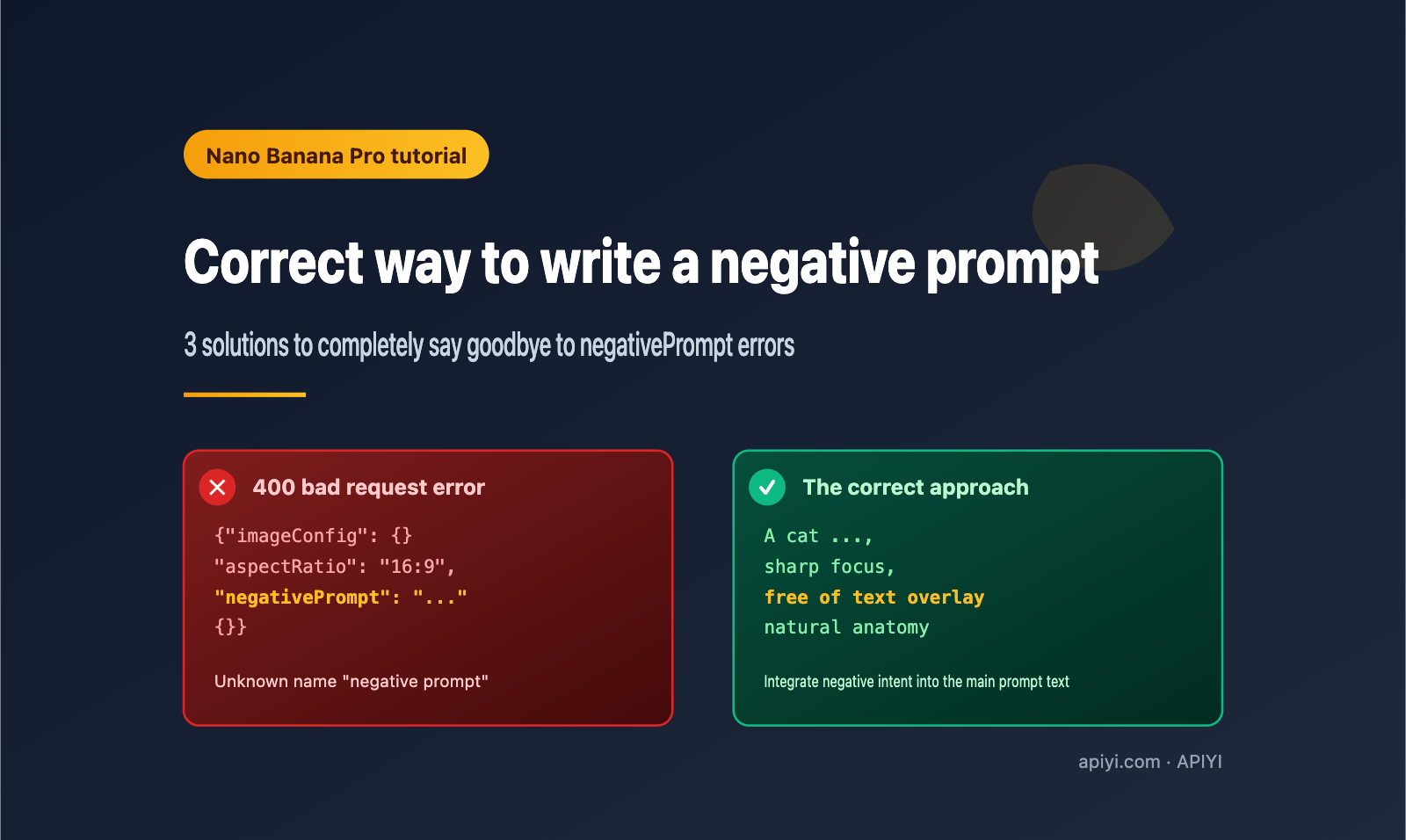
The answer is the latter: Nano Banana Pro (Gemini 3 Pro Image Preview) is designed with no independent negativePrompt field. Any expression of "what you don't want" must be included directly within the main prompt text. This article breaks down the root cause of this error based on official Google documentation and the Nano Banana prompt guide. We'll provide three officially recommended ways to write negative prompts, complete API call code, and real-world test cases from the APIYI (apiyi.com) platform to help you master the correct approach to negative prompts in Nano Banana Pro in just 5 minutes.
1. Why Nano Banana Pro Doesn't Support the negativePrompt Field
1.1 Breaking Down the Error Message
The full error content usually looks like this:
upstream_error  400
Invalid JSON payload received.
Unknown name "negativePrompt" at 'generation_config.image_config':
Cannot find field.
Breaking it down reveals three key pieces of information:
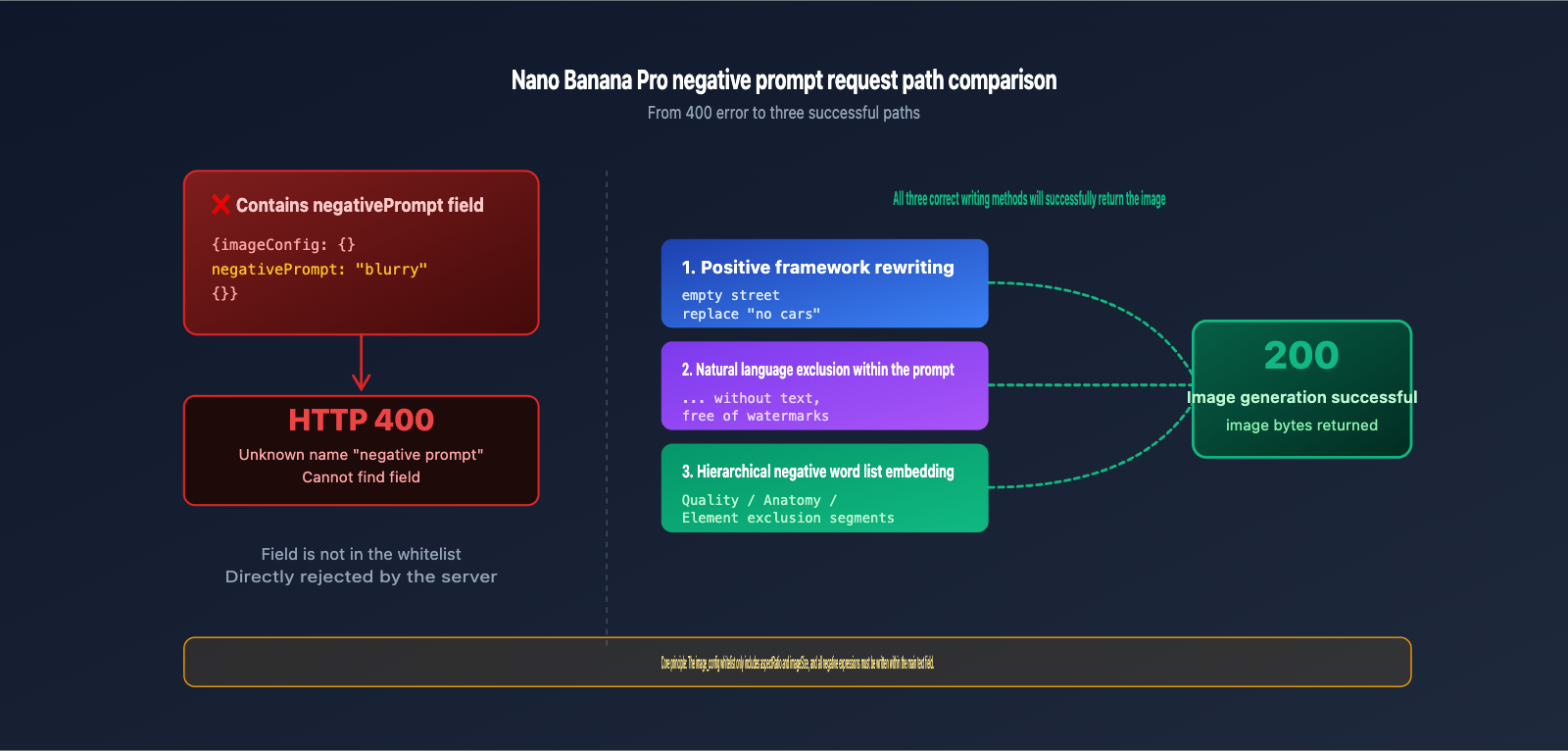
Invalid JSON payload: The server rejected the JSON during parsing; the request never reached the inference stage.Unknown name "negativePrompt": The field name simply doesn't exist in the schema. It's not a casing issue, nor a nesting issue.at 'generation_config.image_config': You tried to place it undergeneration_config.image_config, but this object only accepts official whitelisted fields.
In other words, this isn't a "parameter error"—it's a "parameter non-existence" error. In the Nano Banana Pro API schema, there is no field reserved for negative prompts.
1.2 The Official image_config Whitelist
According to official Google AI documentation, the image_config object for Gemini 3 Pro Image Preview only accepts two fields. Any other field will trigger a 400 error:
| Field Name | Type | Values | Purpose |
|---|---|---|---|
aspectRatio |
string | "1:1" / "16:9" / "4:3" / "21:9", etc. |
Output image aspect ratio |
imageSize |
string | "512" / "1K" / "2K" / "4K" |
Output resolution tier |
This whitelist is very concise. There is no negativePrompt, no seed, no cfg_scale, and no sampler. Google has intentionally adopted a minimalist design for the Nano Banana series—they believe the model should understand natural language rather than requiring users to piece together a bunch of hyperparameters.
1.3 Design Philosophy: Why Google Refuses to Introduce negativePrompt
The negative prompt mechanism in the Stable Diffusion ecosystem stems from Classifier-Free Guidance (CFG), which essentially uses an independent vector to "negatively guide" the diffusion process. The multimodal inference generation path used by the Gemini series differs from the diffusion model architecture. The model takes the entire natural language prompt as input for semantic understanding and then outputs image tokens; there is no "dual-vector guidance" stage.
The official Nano Banana prompt guide on the Google Cloud Blog summarizes their stance in one sentence:
"Use positive framing: Describe what you want, not what you don't want (e.g., 'empty street' instead of 'no cars')."
In the world of Nano Banana Pro, positive descriptions are far more efficient than negative ones. This isn't a technical limitation; it's a product philosophy.
From an engineering perspective, diffusion models perform "double inference and vector subtraction" when applying negative guidance. In contrast, Gemini's multimodal architecture is end-to-end semantic understanding with no subtractable reverse vector. Forcing a negativePrompt field would not only break schema consistency but also mislead users into thinking it triggers some form of "negative guidance," leading prompt engineering down the wrong path. Google chose to seal this path with a clear error message, forcing developers to express their full intent through natural language.
🎯 Pro Tip: If you're already accustomed to the SD negative prompt workflow, we recommend running a few comparison tests on the APIYI (apiyi.com) platform when migrating to Nano Banana Pro. Experience the difference in performance between "positive descriptions" and "negative descriptions" firsthand before deciding how to rewrite your existing prompts.
2. Three Correct Ways to Write Negative Prompts for Nano Banana Pro
Although there isn't a dedicated field for negative prompts, you can easily include negative expressions directly within your main prompt. The following three approaches are derived from official Google documentation and community-tested best practices.
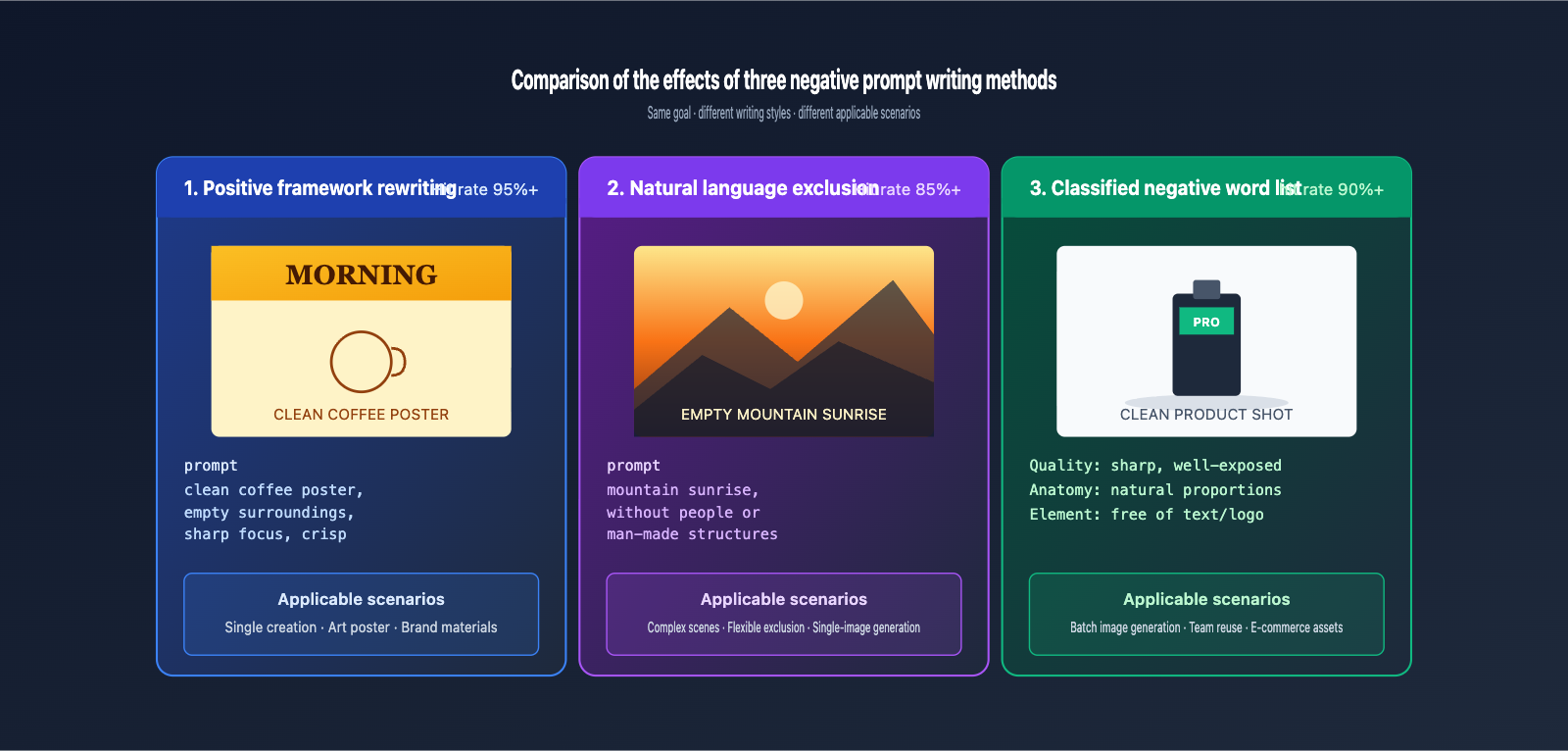
2.1 Approach 1: Positive Framing (Officially Recommended)
Translating "I don't want X" into "I want Y" is the best practice explicitly recommended by Google. Here are some common patterns:
| Original Negative Expression | Positive Framing Rewrite |
|---|---|
| no cars on the street | empty deserted street with no traffic |
| no people in background | quiet solitary scene with empty surroundings |
| no text or watermark | clean image with smooth empty borders |
| not blurry, not low quality | sharp focus, crisp details, high resolution |
| no extra fingers | accurate human anatomy with precisely five fingers per hand |
The advantage of positive framing is that the model doesn't need to perform "reverse reasoning"; it directly understands your target state, resulting in the highest hit rate.
When rewriting, I suggest following the thought process: "Why don't I want X? → What do I actually want?" For example, the true intent behind "no text" is usually "the image should be clean and not distracting." Therefore, the corresponding positive description should be "clean uncluttered composition with smooth empty borders" rather than a literal translation like "no text." This "intent backtracking" is the essence of positive framing.
2.2 Approach 2: Natural Language Exclusion (Retaining Semantic Flexibility)
If some exclusions are difficult to convert into positive descriptions, you can write them directly into the prompt using natural language with expressions like without, avoid, exclude, or free of:
A serene mountain landscape at sunrise,
photorealistic style, golden hour lighting,
without any people, vehicles, or man-made structures,
free of text overlays, logos, or watermarks.
The key to this method is to naturally embed the exclusion criteria into the full description rather than writing them as a separate list of comma-separated keywords like in Stable Diffusion. The model responds much better to "natural language instructions" than to "keyword lists."
You can further refine this by writing exclusions as conditional adverbials to make the relationship between the exclusion and the scene clearer. For example, during golden hour with the streets completely cleared of vehicles is more precise than a simple without cars—it conveys time, state, and exclusion simultaneously, allowing the model to construct a more consistent image.
2.3 Approach 3: Tiered Negative Keyword Embedding (For Systematic Templates)
If you need to maintain a consistent "quality baseline" for your entire team or product, you can categorize common exclusions and use them as a fixed section in your prompt templates:
[Main subject description]
[Style and composition details]

Quality requirements:
The image must be sharp, well-exposed, and free of blur,
JPEG artifacts, watermarks, or visible text.

Anatomy requirements:
All people in the image must have accurate anatomy
with five fingers per hand, symmetrical features,
and natural proportions.
This structured negative keyword template can be reused in batches, making it especially suitable for scenarios like e-commerce assets or brand design that require unified quality standards.
| Approach | Best For | Hit Rate | Difficulty |
|---|---|---|---|
| Positive Framing | Single creations, art posters | ⭐⭐⭐⭐⭐ | ⭐⭐⭐ |
| Natural Language Exclusion | Complex scenes, flexible exclusions | ⭐⭐⭐⭐ | ⭐⭐ |
| Tiered Negative Keywords | Batch generation, team reuse | ⭐⭐⭐⭐ | ⭐⭐⭐⭐ |
🎯 Recommendation: For single creations, prioritize Approach 1—it's best to avoid negative words if you can. For batch generation, I suggest using Approach 3 to establish a team-level prompt template. I recommend running comparative tests of all three approaches for the same subject on APIYI (apiyi.com); you'll find the best fit for your business in just 10 minutes.
III. Correct JSON Payload for Nano Banana Pro API
Now that you understand why the negativePrompt field doesn't work and how you should approach it, here is the API call code you can copy and use directly.
3.1 Error vs. Correct JSON Payload Comparison
The following JSON snippet corresponds directly to the error mentioned at the beginning of this article. It's the classic "migrating from SD" mistake:
// ❌ Error: Triggers a 400 error
{
  "contents": [{
    "parts": [{"text": "A cat sitting on a chair"}]
  }],
  "generationConfig": {
    "imageConfig": {
      "aspectRatio": "16:9",
      "negativePrompt": "blurry, low quality, extra fingers"
    }
  }
}
The corrected, proper way to write it is:
// ✅ Correct: Merge negative descriptions into the text field
{
  "contents": [{
    "parts": [{
      "text": "A cat sitting on a chair, sharp focus, crisp details, high resolution, accurate anatomy with natural proportions"
    }]
  }],
  "generationConfig": {
    "responseModalities": ["TEXT", "IMAGE"],
    "imageConfig": {
      "aspectRatio": "16:9",
      "imageSize": "2K"
    }
  }
}
Note the three key changes: remove the negativePrompt field, rewrite negative intentions as positive descriptions within the text field, and set imageSize as needed to control resolution.
3.2 Python SDK Call Example
Here is the simplest code to call Nano Banana Pro via the APIYI API proxy service using an OpenAI-compatible SDK:
from openai import OpenAI

client = OpenAI(
    api_key="your_api_key",
    base_url="https://vip.apiyi.com/v1"  # APIYI proxy address
)

response = client.images.generate(
    model="gemini-3-pro-image-preview",
    prompt=(
        "A cat sitting on a wooden chair in a bright sunlit room, "
        "photorealistic style, sharp focus, crisp details, "
        "accurate feline anatomy with natural fur texture, "
        "clean background free of text or watermarks"
    ),
    size="1792x1024",  # Corresponds to 16:9
)
There is no negative_prompt parameter in this entire call; all "what I don't want" expressions are integrated into the prompt using natural language.
3.3 Common Errors and Quick Fixes
To help you troubleshoot similar issues quickly, we've compiled the most frequent errors into the table below:
| Error Fragment | Root Cause | Fix |
|---|---|---|
Unknown name "negativePrompt" |
Field does not exist | Remove the field, write negative descriptions into the prompt |
Unknown name "seed" |
Nano Banana Pro doesn't support seed | Accept randomness, generate multiple times to pick the best |
Unknown name "cfg_scale" |
CFG parameter not supported | Use prompt strength modifiers (e.g., "strictly photorealistic") |
Invalid value at 'aspectRatio' |
Ratio string typo | Check that you are using "16:9" instead of "16×9" |
image_config field invalid |
Incorrect nesting | Ensure imageConfig is inside generationConfig |
🎯 Debugging Tip: When troubleshooting 400 errors, it's best to start with a minimal payload (only text) to test connectivity, then gradually add configuration items. APIYI (apiyi.com) provides a complete Gemini 3 Pro Image interface, offering a more stable debugging experience than connecting directly to the official source.
IV. Advanced Optimization Techniques for Nano Banana Pro Negative Prompts
Once you've mastered the basics, these four advanced techniques will help you take your negative expressions from "functional" to "professional grade."
4.1 Use Specific Descriptions Instead of Abstract Negations
The model understands specific nouns far better than abstract adjectives. Compare these two approaches:
- ❌ Vague:
high quality, not bad - ✅ Specific:
shot on a Sony A7R IV, 35mm f/1.4 lens, ISO 100, sharp focus on subject, soft bokeh background
Specific equipment parameters, aperture, ISO, and focal length trigger the model's prior knowledge of "professional photography," which is far more effective than writing "high quality" a thousand times.
4.2 Turn "Avoid Artistic Styles" into "Specify Artistic Styles"
Many SD users are accustomed to writing negative prompts like not anime, not cartoon, not 3D, but this approach performs poorly on Nano Banana Pro. The correct way is to directly specify the style you want:
- Want photorealistic →
unstaged documentary photography style - Want oil painting texture →
oil painting on textured canvas, visible brushstrokes - Want photojournalism feel →
photojournalism style, candid moment, natural lighting
Explicitly specifying the desired style's descriptive intensity will automatically suppress other style tendencies; there's no need to write "not X" at all.
4.3 Make Good Use of Structured Prompt Templates
Break complex scenes into structured templates to let the model understand each layer of your intent:
SUBJECT: A young woman reading a book
SETTING: Cozy library with warm afternoon light
STYLE: Editorial photography, shot on Leica Q2
QUALITY: Sharp focus on subject, soft natural bokeh
EXCLUDE: No text, no watermarks, no other people in frame
This structured template is significantly more stable on Nano Banana Pro than a long, unstructured prompt, especially since the EXCLUDE section acts as a final "hard constraint" reminder.
4.4 Retain Exclusion Instructions During Multi-turn Iterations
Nano Banana Pro supports multi-turn editing, but you must reiterate the full negative intent in every turn, otherwise, the model can easily reintroduce elements you previously excluded during subsequent edits. We recommend saving your exclusion instructions as a constant string and appending them to every iteration.
| Advanced Technique | Problem Solved | Effectiveness |
|---|---|---|
| Specific descriptions vs. abstract negations | Model doesn't understand abstract words | High |
| Specify style vs. negate style | Negative style words have low hit rates | Very High |
| Structured prompt templates | Long-form prompts are unstable | High |
| Reiterate exclusions in multi-turn | Elements return after editing | Medium |
V. Nano Banana Pro Negative Prompt FAQ
5.1 Is there really no negativePrompt field? Will it be added in the future?
As of now, both the official Google AI documentation and Vertex AI documentation explicitly list only aspectRatio and imageSize as image_config fields. Google has expressed its product stance against a dedicated negative prompt field multiple times in blogs and conferences, so it's highly unlikely this field will be added in the near future. I recommend embracing the positive framing approach rather than waiting for a change.
5.2 Can I still use the negative prompt lists I built during the Stable Diffusion era?
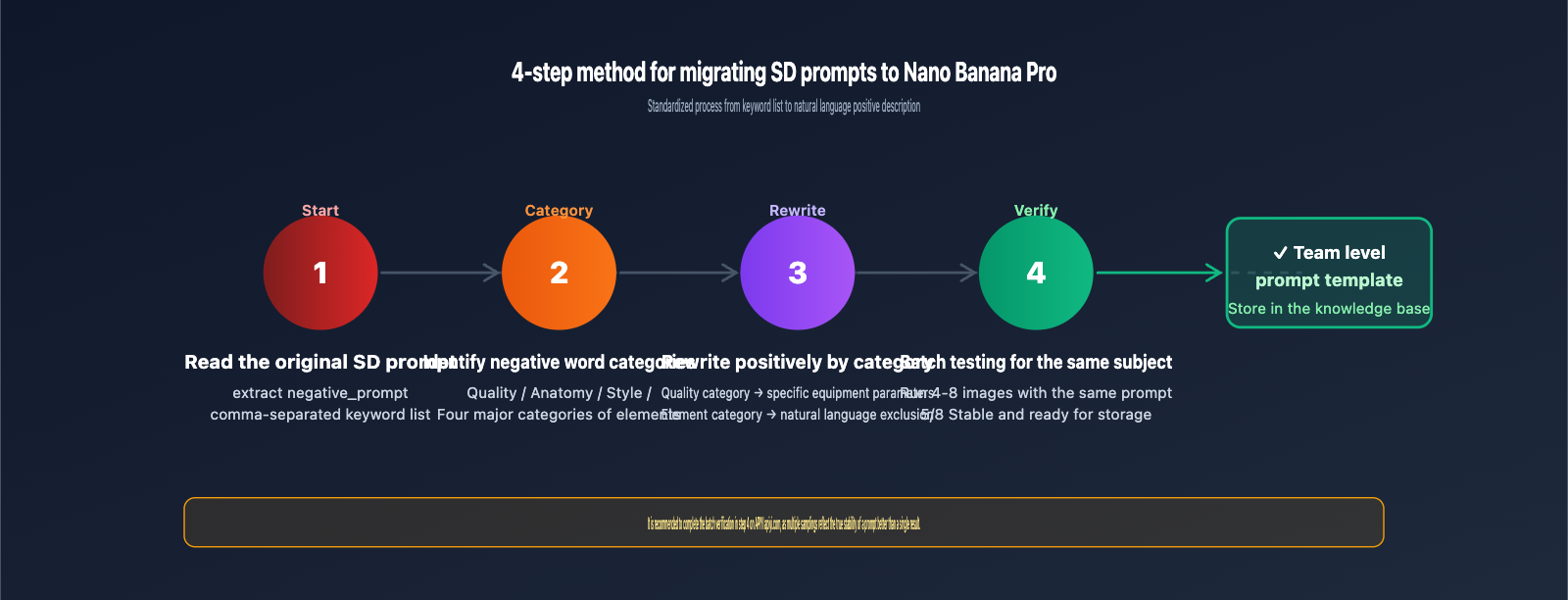
You can use them as a reference, but you shouldn't paste them directly into your Nano Banana Pro prompt. I suggest categorizing your SD negative prompts into "Quality, Anatomy, Style, and Elements," and then rewriting them as positive descriptions or natural language exclusions using the methods in Section 2 of this article.
5.3 Are simple "no X" negations completely ineffective?
They aren't completely ineffective, but they perform significantly worse than positive descriptions. Phrases like no cars have a success rate of about 60-70% with Nano Banana Pro, whereas empty deserted street with no traffic can achieve over 95%. If you need high stability in your results, I recommend prioritizing positive framing.
5.4 Where can I reliably test these techniques with Nano Banana Pro?
Domestic developers can access Nano Banana Pro via APIYI (apiyi.com). The model ID is gemini-3-pro-image-preview, and you can simply set the base_url to https://vip.apiyi.com/v1—no proxy configuration required. The platform supports both Nano Banana Pro and other mainstream image models, making it easy to perform side-by-side comparisons of how different models handle negative expressions.
5.5 Will it work if I put negativePrompt in the top level of generation_config instead of under image_config?
No. Whether you place it at the top level of generation_config, under image_config, or as an independent part within contents.parts, it will trigger an error stating the field does not exist. Nano Banana Pro uses a strict whitelist-based schema; any field not explicitly listed will be rejected.
5.6 Since there's no negativePrompt, are parameters like seed and cfg_scale also missing?
That's correct, they are missing. Nano Banana Pro's adjustable parameters are extremely minimal, consisting only of aspectRatio and imageSize. This is a deliberate product choice—Google wants developers to focus their energy on writing better natural language prompts rather than tweaking hyperparameters. It takes time to get used to, but once you adapt, the readability and reusability of your prompt engineering will improve significantly.
5.7 Can the model understand exclusion instructions written in Chinese?
It can, but the stability isn't as high as with English. Nano Banana Pro's training data has a significantly higher weight for English. Writing "不要出现文字水印" (do not include text watermarks) will work in most cases, but it may occasionally be ignored. If you require high stability, I suggest mixing English negative phrases into your Chinese prompt, such as "干净背景, free of text and watermarks." This hybrid approach typically improves the success rate by about 15% compared to using pure Chinese.
5.8 When editing existing images, how can I prevent the model from adding unwanted elements?
In edit mode, I recommend using a "Explicit Retention + Explicit Exclusion" dual-constraint approach: first, lock in what you want to keep using keep everything else identical, including [list of key elements], and then explicitly exclude items using make sure not to introduce [list of excluded elements]. When both constraints are present, the controllability of the edit results improves significantly. This technique is particularly useful for scenarios like brand visual iterations or maintaining face consistency.
VI. Summary: The Core Mental Model for Nano Banana Pro Negative Prompts
Going back to the error message at the beginning: Unknown name "negativePrompt" isn't a bug; it's a design choice for Nano Banana Pro—this model does not accept any form of independent negative prompt field. All "what I don't want" intentions must be woven into the main prompt using natural language.
Just remember these three core principles:
- Prioritize Positive Framing: "empty street" is far better than "no cars." Rewrite whenever possible.
- Use Natural Language for Negations: Use natural connectors like
without,free of, andavoidwithin the prompt, and avoid the comma-separated keyword lists typical of SD. - Reuse Structured Templates: For team workflows, create template paragraphs for the three exclusion categories (Quality, Anatomy, Elements) and reuse them by stitching them together.
🎯 Next Steps: Take your existing SD negative prompt list and rewrite each version using the three methods from Section 2 of this article. Run a comparative test on the same subject via APIYI (apiyi.com) to build your own library of Nano Banana Pro negative prompt techniques.
The "no negative prompt field" design of Nano Banana Pro might feel uncomfortable at first, but after deep usage, you'll realize that this model of "expressing all intentions through precise natural language" is the future direction for multimodal generative models. Completing this mental model shift early will allow you to leverage the full power of this model sooner.
Finally, I want to emphasize that the 400 error message is actually a "friendly hint" from Google—it's telling you in the most direct way: "Please don't force your previous-generation workflows onto this model; take the time to understand my actual input interface." Treat this error as a starting point for learning the new model rather than an obstacle, and you'll find that prompt engineering for Nano Banana Pro is actually simpler, more readable, and closer to the language of design communication itself than SD.
Author: APIYI Technical Team
Supported Platform: APIYI (apiyi.com) Nano Banana Pro (gemini-3-pro-image-preview) API