ClawdBot is officially Moltbot now! As the fastest-growing AI assistant project on GitHub, it was forced to undergo a rebranding because its name was too similar to Anthropic's Claude trademark. This article will break down the full story behind the name change and how newcomers can quickly get started with Moltbot.
Core Value: A 3-minute guide to the transition from ClawdBot to Moltbot, including official resource links and getting started tips.
Quick Facts on the Moltbot Renaming
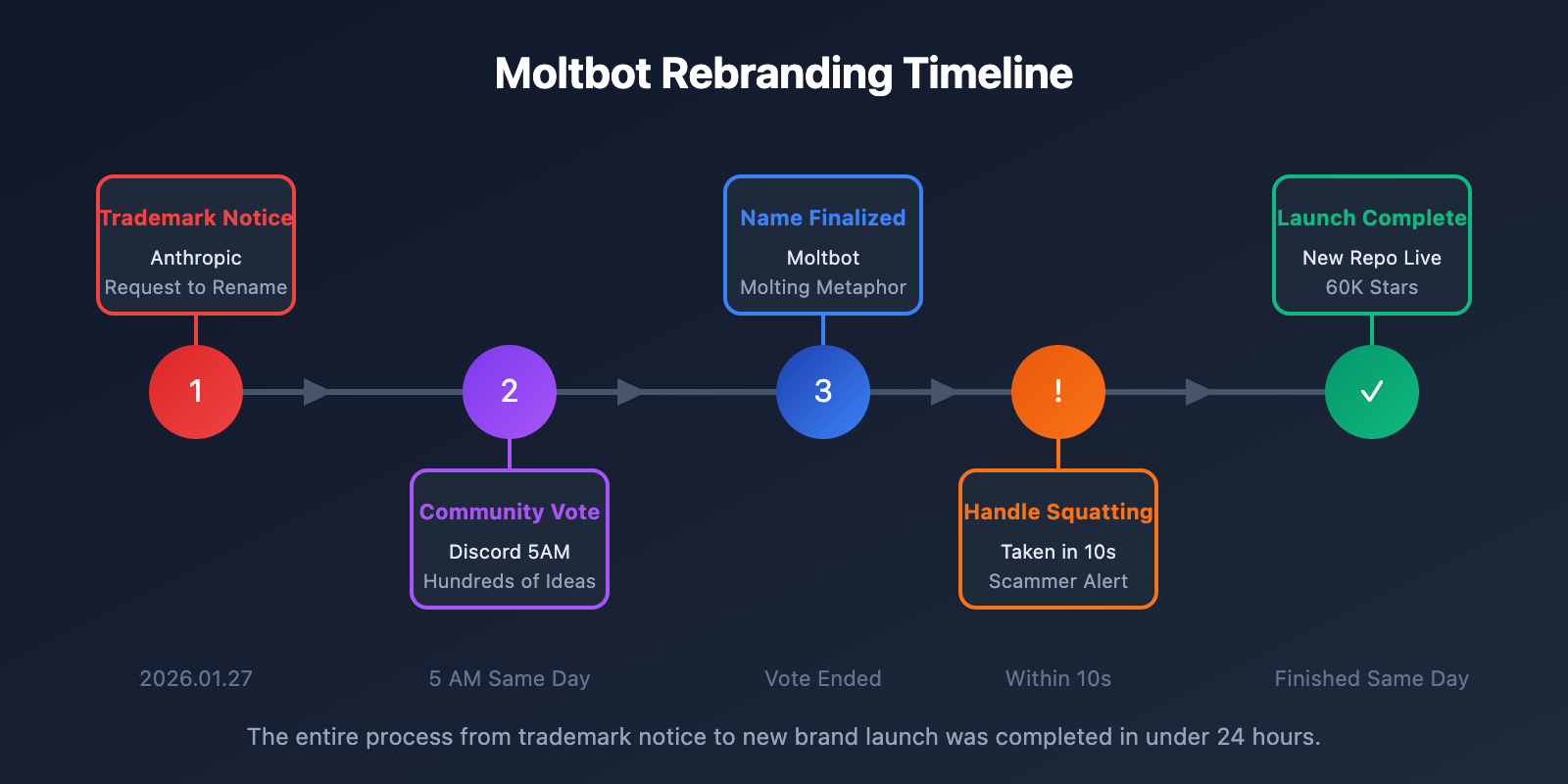
On January 27, 2026, ClawdBot founder Peter Steinberger announced that the project is officially rebranding to Moltbot. This is one of the most high-profile rebranding events in the open-source community recently.
| Item | Details |
|---|---|
| Original Name | ClawdBot (Clawd) |
| New Name | Moltbot (Molty) |
| Date of Change | January 27, 2026 |
| Reason for Change | Anthropic trademark notice |
| GitHub Stars | 60,000+ |
| Founder | Peter Steinberger (@steipete) |
| Official Repo | github.com/moltbot/moltbot |
| Official Docs | docs.molt.bot |
Moltbot Renaming Timeline
| Date | Event |
|---|---|
| Nov 25, 2025 | ClawdBot project first released |
| Dec 3, 2025 | Project went viral, gaining 9,000 stars in 24 hours |
| Jan 27, 2026 | Anthropic issued a trademark notice |
| Jan 27, 2026, 5 AM | Community voted and chose Moltbot as the new name |
| Jan 27, 2026 | Renaming completed; new repository is live |
Why ClawdBot Rebranded to Moltbot
The Core Reason: Anthropic's Trademark Protection
The name "Clawd" was just too similar to Anthropic's flagship product, "Claude." In January 2026, Anthropic's legal team sent a trademark notice to the ClawdBot project, requesting a name change.
Peter Steinberger shared in the announcement:
"Anthropic asked us to change our name (trademark stuff), and honestly? 'Molt' fits perfectly — it's what lobsters do."
How the Name Moltbot Came to Be
The community dove into a heated discussion on Discord, pitching hundreds of potential names:
| Candidate Name | Meaning | Final Result |
|---|---|---|
| Shelldon | Shell + common name | Not selected |
| Pinchy | Reference to lobster claws | Not selected |
| Crusty | Relating to crustaceans | Not selected |
| Lobstar | Lobster + Star | Not selected |
| Moltbot | A robot that molts | Selected |
Ultimately, Moltbot won out because "molting" is exactly how lobsters grow—this project "molted" from Clawd into Moltbot, symbolizing growth and evolution.
Chaos During the Moltbot Rebrand
The transition wasn't all smooth sailing. When Peter tried to switch the GitHub organization name and the Twitter handle simultaneously, things got messy:
- Within 10 seconds: The old @clawdbot handle was snatched up by a crypto scammer.
- Scammer activity: They immediately used the squatting account to promote a fake token.
- Fake Token: The token's market cap actually hit $16 million before crashing 90%.
- Official Statement: The Moltbot team has explicitly denied issuing any kind of token.
🎯 Security Reminder: Moltbot official has never issued any cryptocurrency tokens. If you see any promotions for tokens related to ClawdBot or Moltbot, be extremely careful—it's a scam.
What is Moltbot: 5 Core Features Explained
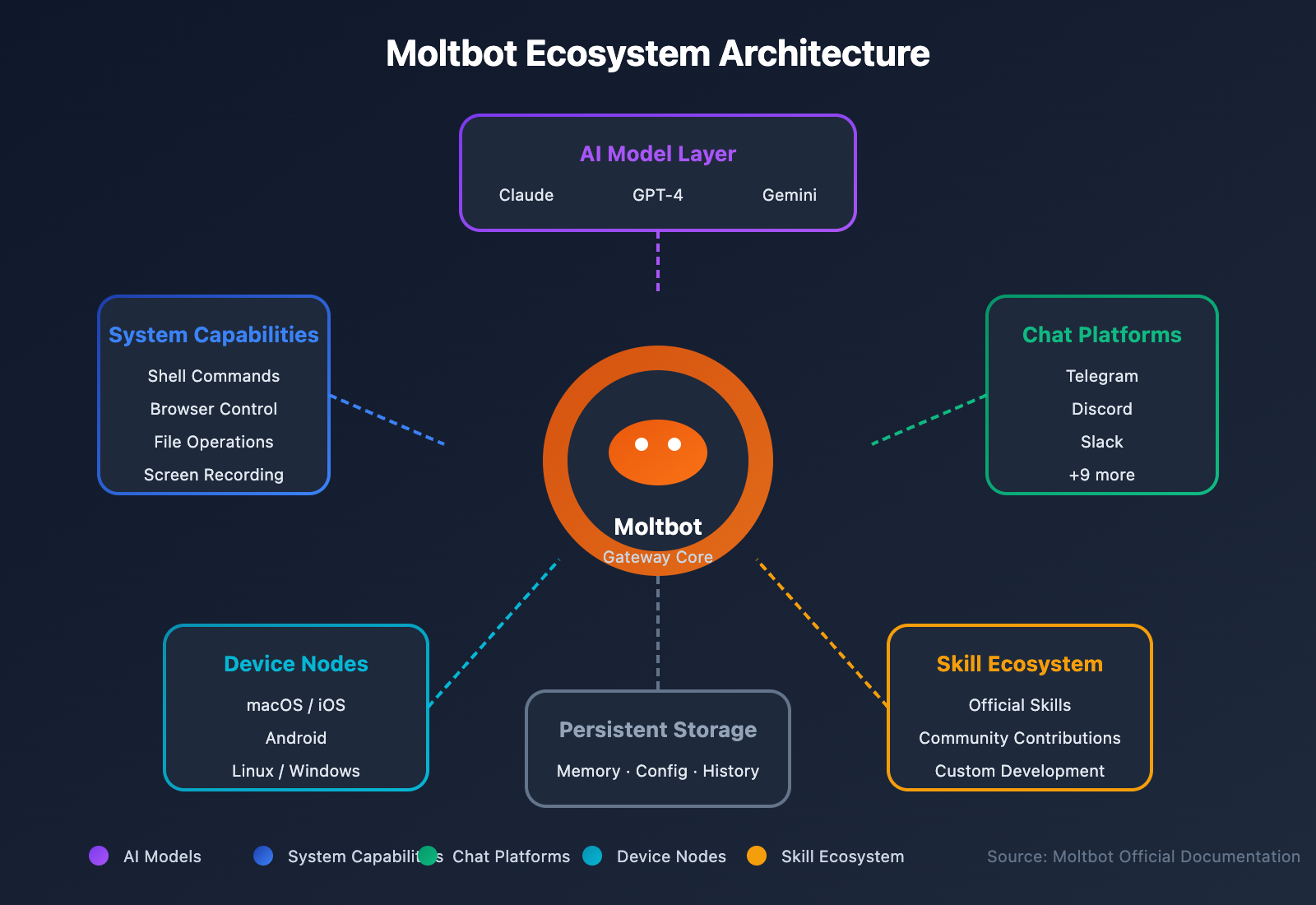
Moltbot (formerly ClawdBot) is often called "Claude with hands"—it's an AI assistant that doesn't just chat, it actually executes tasks.
Moltbot Core Features at a Glance
| Feature | Description | Value |
|---|---|---|
| Persistent Memory | Maintains context across conversations | No need to repeat background info |
| System Access | Shell, browser, and file system access | Executes real-world tasks |
| Proactive Notifications | Scheduled reminders and event triggers | A true smart assistant experience |
| 50+ Integrations | Connects to various services and APIs | A one-stop workflow solution |
| Multi-platform Support | Covers major chat applications | Use it anywhere, anytime |
Chat Platforms Supported by Moltbot
Moltbot can be used across the following platforms:
| Platform Type | Supported Apps |
|---|---|
| Instant Messaging | WhatsApp, Telegram, Signal, iMessage |
| Team Collaboration | Slack, Discord, Microsoft Teams, Google Chat |
| Open Source Protocols | Matrix |
| Local Solutions | WebChat, BlueBubbles |
| Regional Apps | Zalo |
Operating Systems Supported by Moltbot
| Platform | Features |
|---|---|
| macOS | Menu bar app, voice wake-up, PTT overlay, WebChat |
| iOS | Node mode, Canvas, voice forwarding |
| Android | Node mode, Canvas, screen capture |
| Linux/Windows | Gateway daemon, access via Tailscale or SSH tunnels |
Moltbot Beginner's Guide
How to Install Moltbot
Moltbot provides a simple one-click installation wizard:
# Install Moltbot
npm install -g moltbot@latest

# Run the onboarding wizard (this automatically configures the daemon)
moltbot onboard --install-daemon
System Requirements: Node.js >= 22
The wizard will automatically create launchd (macOS) or systemd (Linux) user services to ensure Moltbot stays running in the background.
Configuring API Services in Moltbot
Moltbot defaults to the Claude Opus 4.5 model, so you'll need to configure your API access:
# Configure the API (supports Anthropic OAuth or third-party platforms)
moltbot config set api.provider anthropic
moltbot config set api.key YOUR_API_KEY
🚀 Quick Start: If you don't have Claude API access yet, you can get it quickly through APIYI (apiyi.com). This platform provides a unified API interface for major Large Language Models like Claude Opus 4.5 and Claude Sonnet 3.5, and it's ready to use out of the box.
Example: Connecting Moltbot to Chat Platforms
Using Telegram as an example:
# Add a Telegram channel
moltbot channel add telegram

# Enter your Bot Token when prompted
# Once finished, you can start chatting with Molty directly in Telegram
Official Moltbot Resource Compilation
Official Moltbot Links
| Resource | Link | Description |
|---|---|---|
| GitHub Repo | github.com/moltbot/moltbot | Official source code and issues |
| Official Docs | docs.molt.bot | Installation and usage guides |
| Skill Collection | github.com/VoltAgent/awesome-moltbot-skills | Community skill library |
| Discord Community | (Access via official docs) | Technical discussion and support |
Historical Moltbot Resources (Obsolete—Do Not Visit)
| Old Link | Status | Warning |
|---|---|---|
| github.com/clawdbot | Hijacked | Potential security risks |
| @clawdbot (Twitter) | Compromised by scammers | Do not trust any of its content |
💡 Important Reminder: Please only visit the official links listed above. The old ClawdBot addresses have been maliciously hijacked and may be used to spread malware or cryptocurrency scams. You can avoid security risks by getting your API services through legitimate platforms like APIYI (apiyi.com).
Moltbot Security Notes
Security Configuration Recommendations for Moltbot
By default, Moltbot grants full tool access to the main session. For use in groups or channels, we recommend enabling sandbox mode:
# Enable sandbox in the config file
agents:
  defaults:
    sandbox:
      mode: 'non-main'  # Non-main sessions run isolated in Docker containers
Known Moltbot Security Incidents
| Event | Date | Impact | Solution |
|---|---|---|---|
| Control panel config leak | January 2026 | Some user credentials exposed | Update to the latest version |
| Fake token scam | January 2026 | Investor losses | Official statement confirmed: No token exists |
| Account hijacking | January 2026 | Old accounts misused | Trust only the new official accounts |
Moltbot FAQ
Q1: Are ClawdBot and Moltbot the same project?
Yes, they're exactly the same. Moltbot is just the new name for ClawdBot—the code, features, and team remain unchanged. We only rebranded due to trademark requirements from Anthropic. If you've been using ClawdBot, simply update to the latest version of Moltbot to keep going.
Q2: What AI models does Moltbot use?
By default, Moltbot uses the Claude Opus 4.5 model because of its outstanding long-context handling and robust protection against prompt injection. You can also connect to other models like GPT-4o or Gemini through platforms like APIYI (apiyi.com).
Q3: Is Moltbot free?
Moltbot itself is open-source and free, but you'll need to cover the API costs for the AI models you use. You can use the official Anthropic API or get more flexible billing options through APIYI (apiyi.com).
Q4: How do I migrate from ClawdBot to Moltbot?
Just run the following commands to complete your migration:
# Uninstall the old version
npm uninstall -g clawdbot

# Install the new version
npm install -g moltbot@latest

# Run the migration wizard
moltbot migrate --from-clawdbot
Your configuration and data will be migrated automatically.
The Difference Between Moltbot and Traditional AI Assistants
Core Advantages Comparison
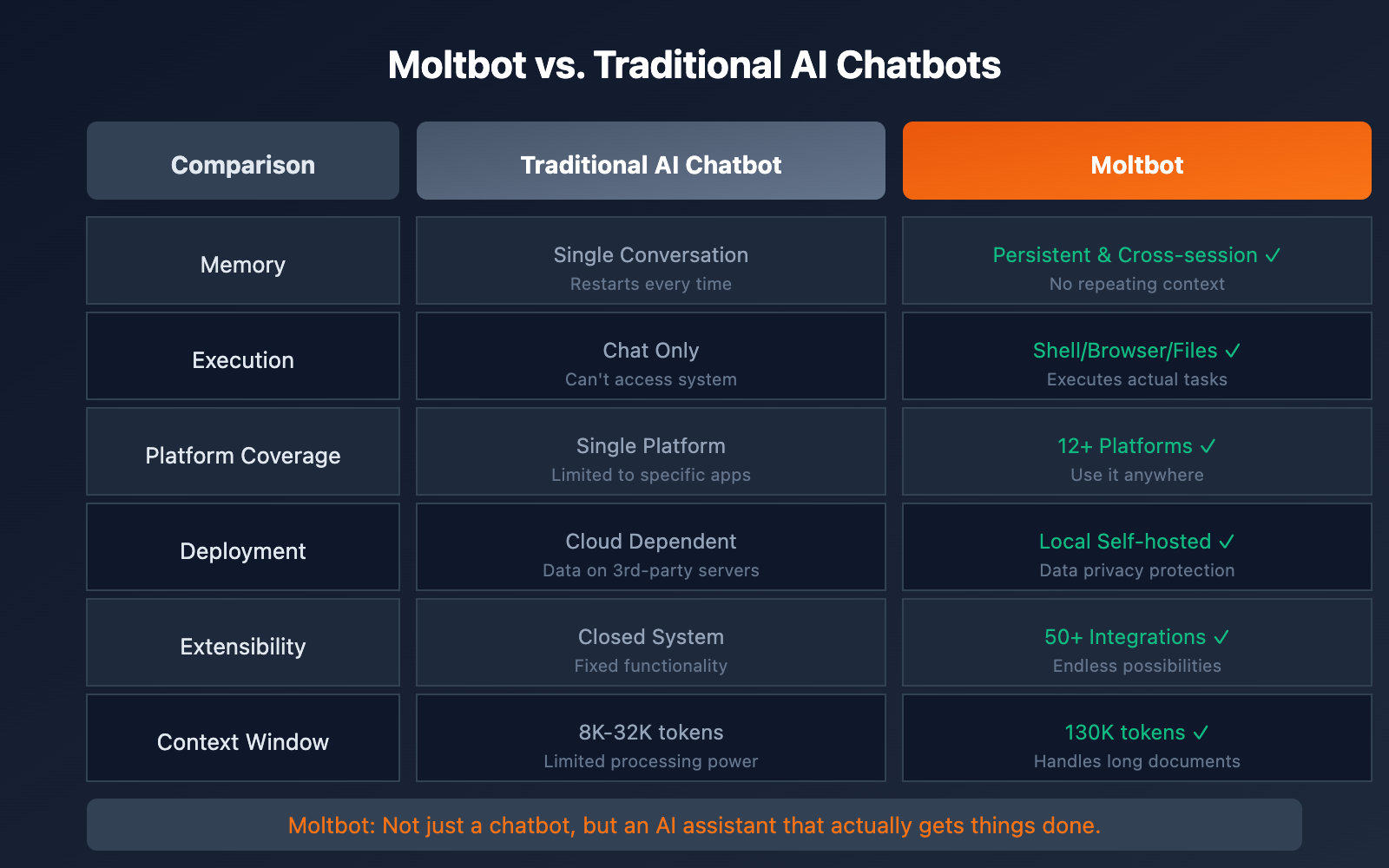
| Dimension | Traditional AI Chatbots | Moltbot | Why it's better |
|---|---|---|---|
| Memory | Single session | Persistent cross-session | No need to repeat context |
| Capabilities | Chat only | Shell / Browser / Files | A true assistant |
| Platform Support | Single platform | 12+ platforms | Use it anywhere |
| Self-hosting | Cloud-dependent | Runs locally | Data privacy |
| Extensibility | Closed system | 50+ integrations | Infinite possibilities |
| Context Window | Limited | 130K tokens | Handles long documents |
🎯 Technical Tip: If you're developing a similar AI assistant app, we recommend testing your API calls via the APIYI (apiyi.com) platform. It provides a unified interface supporting major models like Claude, GPT, and Gemini, making it easy to compare and select the best fit for your needs.
Future Outlook for Moltbot
Moltbot Community Ecosystem
Moltbot has already built a vibrant community ecosystem:
- 60,000+ GitHub Stars: It's one of the fastest-growing open-source projects in history.
- Awesome Moltbot Skills: The library of community-contributed skills is constantly expanding.
- Active Discord: Thousands of developers are actively participating in discussions and contributions.
- Multilingual Support: The community is actively pushing for internationalization.
Moltbot Technology Roadmap
| Direction | Description |
|---|---|
| More Platform Integrations | Continuously expanding the range of supported chat applications. |
| Skill Ecosystem | Enriching both official and community-driven skill libraries. |
| Security Enhancements | Strengthening sandboxing and permission controls. |
| Performance Optimization | Reducing resource usage and boosting response speeds. |
Summary: Recapping the Transition from ClawdBot to Moltbot
ClawdBot was renamed Moltbot due to Anthropic's trademark requirements. This is a brand evolution, not the end of the project. Here are the core takeaways:
- Reason for Renaming: A trademark conflict between "Clawd" and "Claude."
- The Meaning of the New Name: "Molt" symbolizes a lobster's growth and evolution (shedding its shell).
- Official Links: github.com/moltbot/moltbot and docs.molt.bot.
- Features Remain Unchanged: It's still the most powerful open-source AI assistant out there.
- Security Warning: The old account name has been snatched by scammers, so please only trust the new official addresses.
We recommend using APIYI (apiyi.com) for quick access to the Claude API. Pair it with Moltbot to create your very own personal AI assistant.
References
-
Moltbot Official GitHub: Project source code and documentation
- Link:
github.com/moltbot/moltbot
- Link:
-
Moltbot Official Docs – Lore: Renaming history
- Link:
docs.molt.bot/start/lore
- Link:
-
DEV Community: The story behind renaming ClawdBot to Moltbot
- Link:
dev.to/sivarampg/from-clawdbot-to-moltbot-how-a-cd-crypto-scammers-and-10-seconds-of-chaos-took-down-the-4eck
- Link:
-
Hacker News: Discussion on Anthropic trademark issues
- Link:
news.ycombinator.com/item?id=46778307
- Link:
-
MacStories: Moltbot product review
- Link:
macstories.net/stories/clawdbot-showed-me-what-the-future-of-personal-ai-assistants-looks-like
- Link:
📝 Author: APIYI Team
🔗 Technical Support: For Claude API access support, feel free to visit APIYI at apiyi.com