
Summary: In multi-turn Responses API calls with GPT-6.2, rewriting earlier input can reduce cache hits and can also make some reasoning items ineligible for reuse. Developers can switch to an append-only context structure, then use paired usage logs to pinpoint the cost difference.
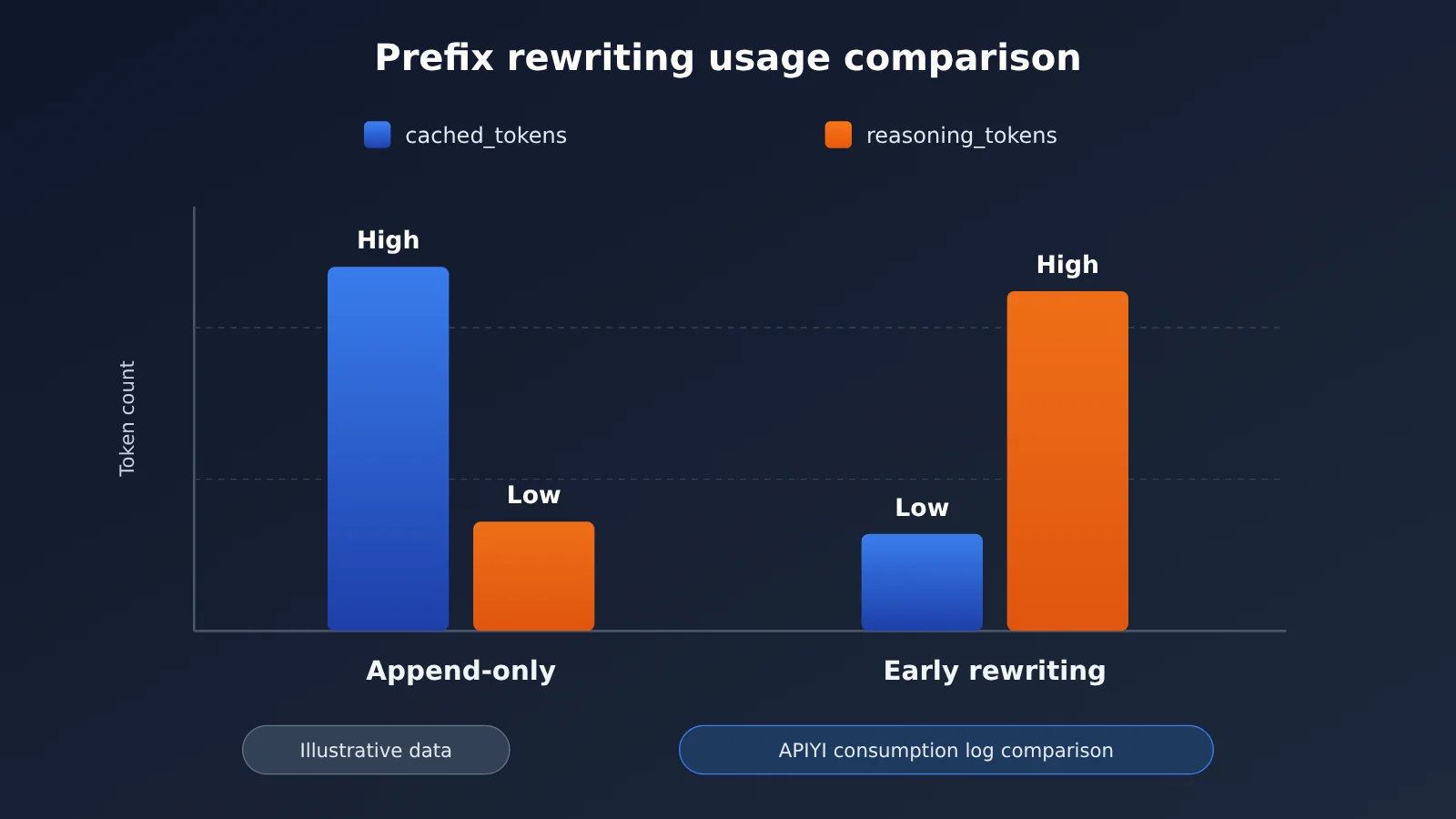
Let’s start with the bottom line. A higher bill usually has more than one cause, and two sources may be involved at the same time: first, after the input prefix is changed, fewer cache reads occur, and input that was billed at the cached rate is billed at the regular input rate; second, GPT-6.2 drops earlier reasoning items because of prefix_mismatch, so the model has to reason again, which may add extra reasoning cost. Whether these two effects occur and how much each accounts for depends on the model version, where the change was made, and the actual usage. The worked examples below only demonstrate how to break down the charges; they don’t represent any real bill. If you’re calling through APIYI (apiyi.com), I recommend building a control group from your own managed input history, then reconciling against the usage logs.
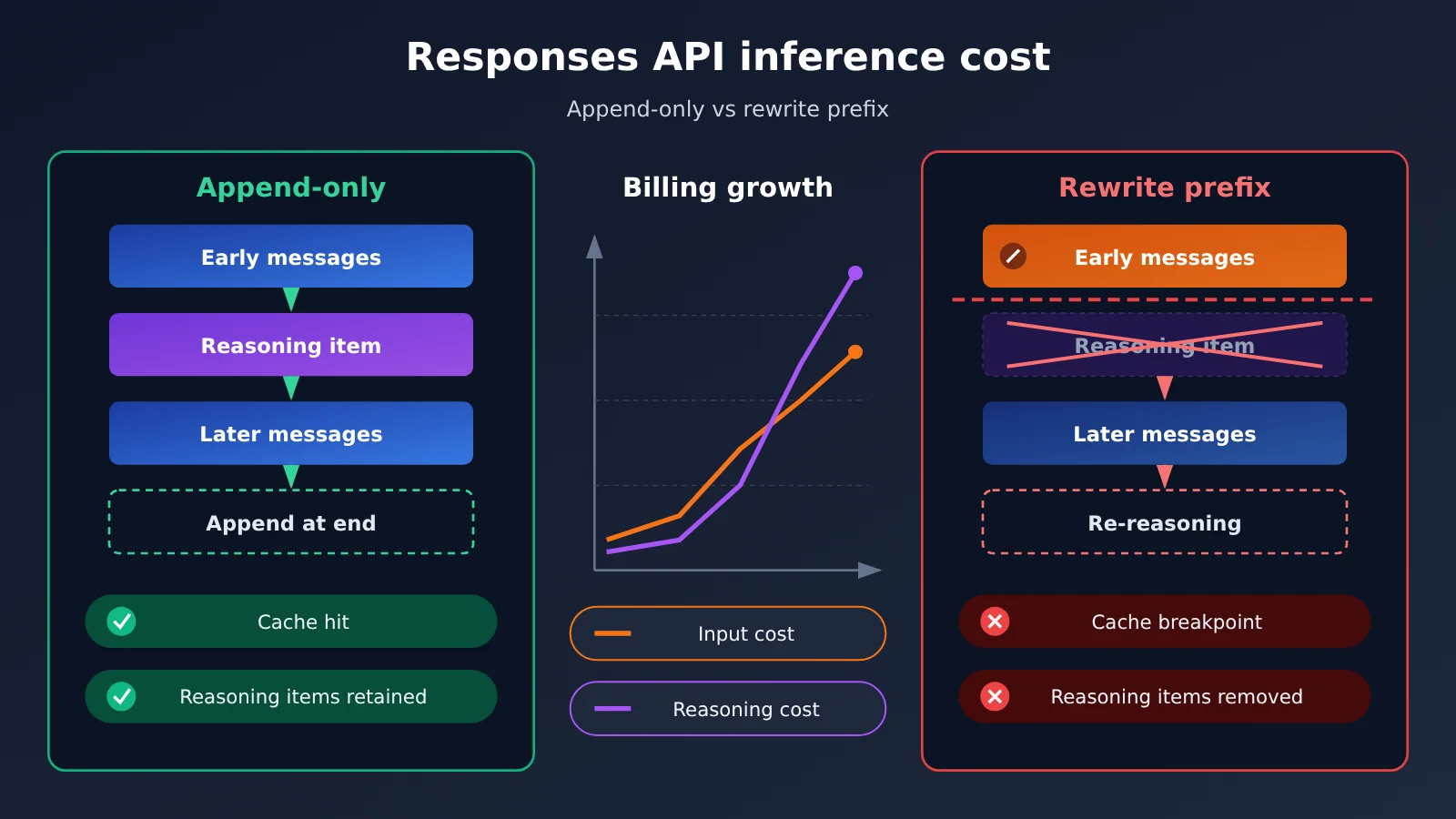
OpenAI Responses API Inference Cost Knowledge Map
The table below lists the four sections of this article, how they relate to one another, and the reading order. Section 1 explains where the costs come from, Section 2 shows which operations trigger them, Section 3 gives you a way to measure them, and Section 4 converts the measured numbers into money and lays out a remediation plan.
| No. | Question it answers | What it sets up for the next section | What you can do after reading |
|---|---|---|---|
| 1 | Where the costs rise | Two lines of observation: cache reads and newly added output | Understand what the relevant fields in usage mean |
| 2 | Which editing actions trigger it | A checklist of code locations to inspect | Assess whether your context maintenance approach is risky |
| 3 | How to isolate the change | A set of paired data you can compare | Use a controlled experiment to confirm whether the problem exists |
| 4 | How much money is involved, and how to fix it | A charge breakdown formula and three changes | Estimate the difference and verify actual billing by request ID |
If you’ve already confirmed that prefix rewriting is happening, you can jump straight to Section 3. Sections 1 and 2 can serve as reference material during your investigation.
To Know: Terminology Around Responses API Reasoning Costs
| Term | Plain-language explanation |
|---|---|
| Responses API | OpenAI’s interface for handling model responses, reasoning, and tool calls in a unified way |
| Input prefix | The early input content and configuration that stays in the same order at the start of multi-turn requests |
| Cache hit | This request reuses input tokens that were already processed, and that portion is billed at the cache-read price |
| Reasoning item | A type of structured item in a reasoning model’s response that can be reused in compatible follow-up requests |
prefix_mismatch |
A reason value in GPT-6.2-related diagnostics indicating that an earlier prefix was changed, causing reasoning items to be dropped |
| Append-only | A history maintenance approach that keeps existing content and order intact and only adds later events at the end |
reasoning_tokens |
The reasoning sub-item within output usage, used to observe reasoning consumption |
x-request-id |
The request identifier in the response headers, used to link a client response with the provider’s logs |
1. Why Responses API Reasoning Costs Rise in Two Places
1.1 The first line: fewer cache reads
According to OpenAI’s “Prompt caching” documentation, prompt caching matches from the start of the request. As soon as some earlier piece of content gets rewritten, everything after the change point can no longer be billed at the cache-read price and falls back to the standard input price. Take the short-context list price of gpt-6.2-sol in the APIYI price table: standard input is $2 per million tokens, while cache reads are $0.10 — a 20x gap.
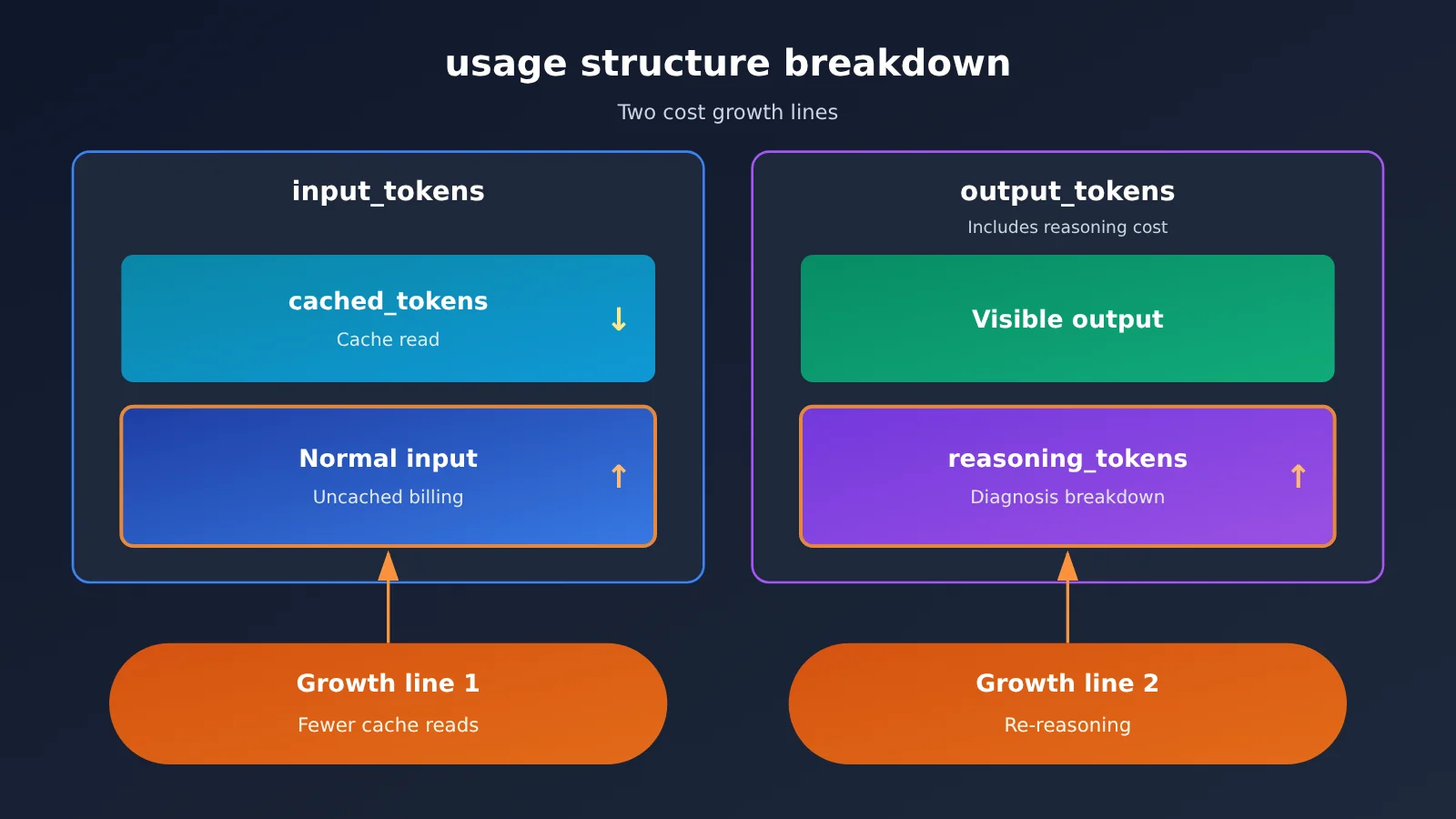
This cost shift has a matching field in usage: the total input_tokens may stay roughly the same, but the cached_tokens within it will shrink. Looking only at total input volume won’t reveal the problem — you have to track cache reads separately.
1.2 The second line: new output after reasoning items lose reuse eligibility
In its API Changelog dated 2026-11-17, OpenAI labeled “editing early history causes reasoning items to be removed with prefix_mismatch” as behavior starting with GPT-6.2. Once reasoning items are removed, the model can’t see the earlier reasoning content in subsequent turns and may need to reason again, which can produce extra reasoning cost.
This line shows up on the output side, as more reasoning_tokens and more total output. It can happen at the same time as reduced cache reads, but they’re two separate fields in usage, so you need to observe them separately when troubleshooting.
1.3 How output_tokens and reasoning_tokens relate
According to OpenAI’s “Counting tokens,” output_tokens already includes reasoning consumption; output_tokens_details.reasoning_tokens is just a diagnostic breakdown within it. To calculate cost, multiply output_tokens by the output unit price. If you add reasoning_tokens on top of that separately, you’ll be double counting.
2. Which prefix-editing actions drive up reasoning costs
2.1 Common operations that trigger prefix_mismatch
According to OpenAI’s “Keep the prefix unchanged” and “Reasoning models” documentation, the following operations rewrite the prefix and can cause reasoning items to be dropped on GPT-6.2:
| Operation | Typical code scenario | Risk |
|---|---|---|
| Rewriting old messages | Going back to fix the wording of the user’s second turn, or adding a timestamp to an old message | Rewrites the prefix |
| Rewriting old tool results | Shortening the JSON returned by an earlier tool call to save tokens | Rewrites the prefix (shortening still counts as rewriting) |
| Inserting content before a related reasoning item | Dropping newly retrieved material into the middle of the history | Rewrites the prefix |
| Deleting a whole item while leaving everything else unchanged | Removing one complete old message | Does not trigger this particular drop reason, though cache hits may still change |
| Appending after a reasoning item | Adding new messages in chronological order | Does not trigger this drop reason |
“Shortening old tool output” looks like it’s saving tokens, but it counts as a rewrite. The only case that doesn’t trigger prefix_mismatch is deleting complete items while leaving the rest untouched. Even then, the starting point where the cache matches may shift, so how much gets read from cache still needs to be measured in practice.
2.2 The difference between version, tier, and model-family switches
These three kinds of changes need to be assessed separately:
- Version differences: OpenAI states explicitly that dropping reasoning items due to
prefix_mismatchis behavior that starts with GPT-6.2. GPT-6.1 Sol supportsreasoning.context: all_turns, which can render earlier reasoning when compatible history is available. When migrating from 6.1 to 6.2, your existing context-maintenance approach needs to be re-validated. - Reasoning tier: both generations of Sol offer five tiers —
low,medium,high,xhigh, andmax— and 6.2 Sol rejectsnone. The approach outlined in a third-party article, OrcaRouter, is not to modifyreasoning.effortdirectly between requests, but instead to append aconfiguration_updateitem toinput. That article also notes that histories containing such items get automatically truncated and rejected by/responses/compact. Before adopting this approach, defer to OpenAI’s official documentation. - Model-family switches and downgrades: per OpenAI, switching model families or moving to a less capable model can also drop existing reasoning items. This is a different cause from
prefix_mismatch, so the two should be counted separately.
2.3 Where GPT-6.2’s top-level instructions go, and how they’re billed
OpenAI’s “Using GPT-6.2” explains that GPT-6.2 appends top-level instructions after input, and bills them as uncached input. That makes them a good fit for temporary developer hints for the current turn, and a poor fit for large, long-lived system settings.
Instructions you need to reuse long-term should go into input as the first developer message so they can be cached. If you need to adjust long-term instructions, append a new developer message at the end of the history — don’t go back and edit the first one.
3. Isolate Changes in Responses API Reasoning Costs with Controlled Requests
3.1 Designing the Control Group
Fix the model, reasoning tier, tool definitions, and input size, and change only one variable: how history is maintained. Group A only appends, while Group B rewrites one piece of content early on. Run multiple rounds in each group and use the same task set for both.
Log every request uniformly according to the table below. Task quality needs to be scored manually or by an evaluation script, because a drop in cost can’t come at the expense of worse results.
| Field | Source | Purpose |
|---|---|---|
| Group | Custom | Distinguishes the append-only group from the rewrite group |
cached_tokens |
usage.input_tokens_details |
Observe the first line |
reasoning_tokens |
usage.output_tokens_details |
Observe the second line |
output_tokens |
usage |
Calculate output cost |
| Latency | Client-side timing | More reasoning usually comes with longer duration |
| Task quality | Manual or evaluation score | Rule out trading quality for cost |
x-request-id |
Response header | Reconciliation |
3.2 Append-Only Call Example
The code below maintains its own input history and appends only at the end of each turn. It also writes usage and the request ID to the log:
import json, time
from openai import OpenAI

client = OpenAI(
    api_key="YOUR_API_KEY",
    base_url="https://api.apiyi.com/v1",
)

MODEL = "gpt-6.2-sol"
EFFORT = "medium"  # Fixed for the whole session; don't change it between turns

# Stable prefix: put reusable instructions in the first input item, then don't modify them afterward
history = [{"role": "developer", "content": "你是代码审查助手,回答简洁。"}]

def ask(user_text, variant="append_only", log_path="usage_log.jsonl"):
    history.append({"role": "user", "content": user_text})
    t0 = time.time()
    raw = client.responses.with_raw_response.create(
        model=MODEL,
        reasoning={"effort": EFFORT},
        input=history,
        store=False,
        include=["reasoning.encrypted_content"],  # Check first whether the target group returns this
    )
    resp = raw.parse()
    latency = round(time.time() - t0, 2)

    # Append-only: put this turn's output (including reasoning items) back at the end of history as-is
    history.extend(item.model_dump(exclude_none=True) for item in resp.output)

    u = resp.usage
    record = {
        "variant": variant,
        "model": MODEL,
        "effort": EFFORT,
        "request_id": raw.headers.get("x-request-id"),
        "response_id": resp.id,
        "input_tokens": u.input_tokens,
        "cached_tokens": getattr(u.input_tokens_details, "cached_tokens", 0),
        "output_tokens": u.output_tokens,
        "reasoning_tokens": getattr(u.output_tokens_details, "reasoning_tokens", 0),
        "latency_s": latency,
    }
    with open(log_path, "a", encoding="utf-8") as f:
        f.write(json.dumps(record, ensure_ascii=False) + "\n")
    return resp.output_text
The rewrite group reuses the same function: before the Nth turn, modify the contents of history[1], set variant to "early_rewrite", and keep all other parameters unchanged.
🚀 Quick start: When setting up the comparison group, you can use the same API key to switch between
gpt-6.1-solandgpt-6.2-solthrough APIYI at apiyi.com. With the same log structure, you can compare how version differences affect caching and reasoning usage.
3.3 Auxiliary Diagnostics on a Direct Official Connection
When you’re connecting straight to OpenAI, you can set prompt_cache_options.comparison_response_id to the ID of an earlier response, then read back the diagnostic reason and the cached token count. The input_transformations field in the response lists which reasoning items were dropped and why, and prefix_mismatch maps by ID back to the reasoning items in the older response’s output.
# For direct official OpenAI connections only
resp = openai_client.responses.create(
    model="gpt-6.2-sol",
    input=history,
    extra_body={"prompt_cache_options": {"comparison_response_id": prev_response_id}},
)
print(getattr(resp, "input_transformations", None))
This diagnostic comes with two limitations: the cache check is best-effort and only reports the first difference, and it can’t confirm whether the model actually reused the reasoning that was kept. It tells you “a reasoning item was removed,” but it can’t tell you “and here’s how much extra that cost you” — you still have to work out the cost from the paired usage described in section 3.1.
3.4 Things to Watch Out For When Calling Through APIYI
A direct OpenAI connection supports resuming session state with previous_response_id. The main text of APIYI’s Responses API native invocation guide (docs.apiyi.com) says this chained approach doesn’t work, but the FAQ on the same page records that it was verified working on 2026-09-02. Since the two statements conflict, the safer baseline is to manage the input history yourself, the way section 3.2 describes.
State resumption, sending encrypted reasoning items back, and the diagnostic fields above may all behave differently depending on the token group, so you’ll need to verify them separately on the group you’re targeting. If the diagnostic fields aren’t available, paired usage logs are still a solid basis for judgment.
4. Break Down Responses API Inference Costs by the Numbers and Implement the Changes
4.1 List Prices Used for the Estimate
The following are the default short-context list prices from the APIYI apiyi.com master price table (updated November 20, 2026, 15:17 Beijing time; prices are in USD per million tokens). The actual charge also depends on the token group the model belongs to and top-up costs, so you’ll need to check those separately.
| APIYI model ID | Standard input | Cached read | Output |
|---|---|---|---|
gpt-6.2-sol, gpt-6.1-sol |
$2 | $0.10 | $10 |
gpt-6-sol |
$2 | $0.20 | $10 |
gpt-6.2-astra |
$8 | $0.40 | $40 |
Long context needs to be calculated separately. When the input for gpt-6.2-sol exceeds 272,000 tokens, APIYI’s current master table lists an input price of $3, while OpenAI’s official Standard model page lists $4; for gpt-6.1-sol, the long-context input price is $4 on both. For cached and output prices in the long-context tier, check the real-time billing rules for each channel.
4.2 A Cost Breakdown Example for Two Requests
Assumptions: short context, APIYI Sol default pricing, both requests have 12,000 input tokens, no separately itemized cache writes, and no tool fees. All numbers below are hypothetical, not measured data.
| Item | Preserved prefix | Rewritten prefix |
|---|---|---|
| Cache read | 9,000 × $0.10/M = $0.0009 | 3,000 × $0.10/M = $0.0003 |
| Regular input | 3,000 × $2/M = $0.0060 | 9,000 × $2/M = $0.0180 |
| Total output | 1,000 × $10/M = $0.0100 | 1,600 × $10/M = $0.0160 |
| Total | $0.0169 | $0.0343 |
The two differ by $0.0174, which splits into two parts: $0.0114 comes from 6,000 input tokens shifting from the cached price to the regular input price, i.e. 6,000 × ($2 − $0.10) / 1,000,000; $0.0060 comes from the extra 600 total output tokens. These two parts map to the two lines in Section 1. Your actual difference should be based on your own usage. If cache writes are itemized separately, calculate them across three mutually exclusive categories: regular input, cache read, and cache write.
4.3 Reconcile with Request IDs
Once you’ve got the estimate, it’s time to verify the actual charges. In the APIYI apiyi.com usage logs, take the x-request-id from the response header and find the matching type=2 record, then convert quota ÷ 500,000 into the actual dollar amount charged. Along the way, jot down the model, token group, the time window of the call, and the input and output usage for that request.
At the moment, there’s no publicly available prefix comparison billing for APIYI within the same group and the same task. So when you’re evaluating how well the changes worked, go by your own paired request logs and billing records.
💰 Reconciliation tip: Match the
request_idfrom the logs in Section 3.2 against the usage logs one by one, giving you three columns: “usage field → estimated amount → actual charge”. Whichever column shows a discrepancy tells you which step has the problem.
4.4 Three Changes
- Fix tool definitions and stable instructions: Keep tool definitions in their original order and don’t modify them mid-conversation. Put long-term instructions in the first developer message of
input; temporary prompts for the current turn can go in GPT-6.2’s top-levelinstructions, but accept that they’ll be billed as uncached input. - Append context in order: New messages, new tool results, and newly retrieved materials all get appended to the end. If you really need to trim, delete whole items rather than rewriting their contents.
- Test long context and version migration separately: Once a long context exceeds 272,000 input tokens, a different price tier applies, so build a separate control group for it. When migrating from
gpt-6.1-soltogpt-6.2-sol, or adjusting tiers or switching model families, validate with the comparison method from Section 3 first, then roll out to everyone.
After these changes are in place, here’s how to check whether they worked: rerun the two control groups on the same task set. If the append-only group’s cached_tokens share stays steady, reasoning_tokens doesn’t spike abnormally, and the actual charges verified by request ID line up with your estimates, that portion of the cost is under control.
References
- OpenAI “Keep the prefix unchanged”: Prefix preservation and
prefix_mismatchdiagnostics- Link:
developers.openai.com/api/docs/guides/keep-prefix-unchanged
- Link:
- OpenAI “Reasoning models”: Reasoning item reuse and exceptions where the entire item is dropped
- Link:
developers.openai.com/api/docs/guides/reasoning
- Link:
- OpenAI “Prompt caching” and “Counting tokens”: Cache matching rules and usage fields
- Link:
developers.openai.com/api/docs/guides/prompt-caching
- Link:
- OpenAI API Changelog (GPT-6.2 entry, 2026-11-17)
- Link:
developers.openai.com/api/docs/changelog
- Link:
- OrcaRouter “GPT-6.2 Preserved Reasoning”: A third-party write-up of the append-only rewriting approach
- Link:
orcarouter.ai/blog/gpt-6-2-preserved-reasoning
- Link:
- APIYI “Complete Model Pricing Table”
- Link:
docs.apiyi.com/models
- Link:
- APIYI “Log Query API”
- Link:
docs.apiyi.com/api-capabilities/log-query
- Link:
- APIYI “OpenAI Responses API Native Invocation Guide”
- Link:
docs.apiyi.com/api-capabilities/openai/native
- Link:
Author: APIYI Technical Team
Technical discussion: Feel free to reach us through the APIYI website homepage. More resources are available at the docs.apiyi.com documentation center.