Short answer: When integrating the GPT-6.2 API, change the model name to gpt-6.2-astra or gpt-6.2-sol. For new integrations, use medium for reasoning effort; in older code, change none or minimal to low. Text-only requests can still use Chat Completions, but as soon as tool calls are involved, you must use the Responses API. Also, remove sampling parameters such as temperature and top_p. If you’re migrating from GPT-5.5 or earlier, also change the cache parameter to prompt_cache_options.ttl="30m". The most commonly overlooked part of migration is the history prefix: append new instructions after the existing history instead of rewriting it.
What you’ll learn from this article
- Which details about GPT-6.2 Astra and Sol, released by OpenAI on November 17, 2026, are confirmed—and which are official benchmark marketing.
- Standard API pricing for both models, plus the billing multiplier once input exceeds 272K.
- A version-specific parameter migration checklist: which changes apply to all GPT-6.2 migrations, and which only apply to GPT-5.5 and earlier.
- A Responses tool-call loop example adapted from the official format.
- How to diagnose common errors, plus a checklist for limited-traffic acceptance and rollback.
Contents: Start with “To Know” and “Impact at a Glance” to align on terminology and understand how different roles are affected. Part 1, “The Facts,” covers release details, official evaluations, pricing, and key points from the original migration guide. Part 2, “Migration Practice and Analysis,” walks through model selection, a minimal example, the parameter checklist, the tool loop, error diagnosis, and acceptance and rollback. This part reflects editorial judgment and operational recommendations.
GPT-6.2 API Essentials: Key Concepts
| Concept | Brief explanation |
|---|---|
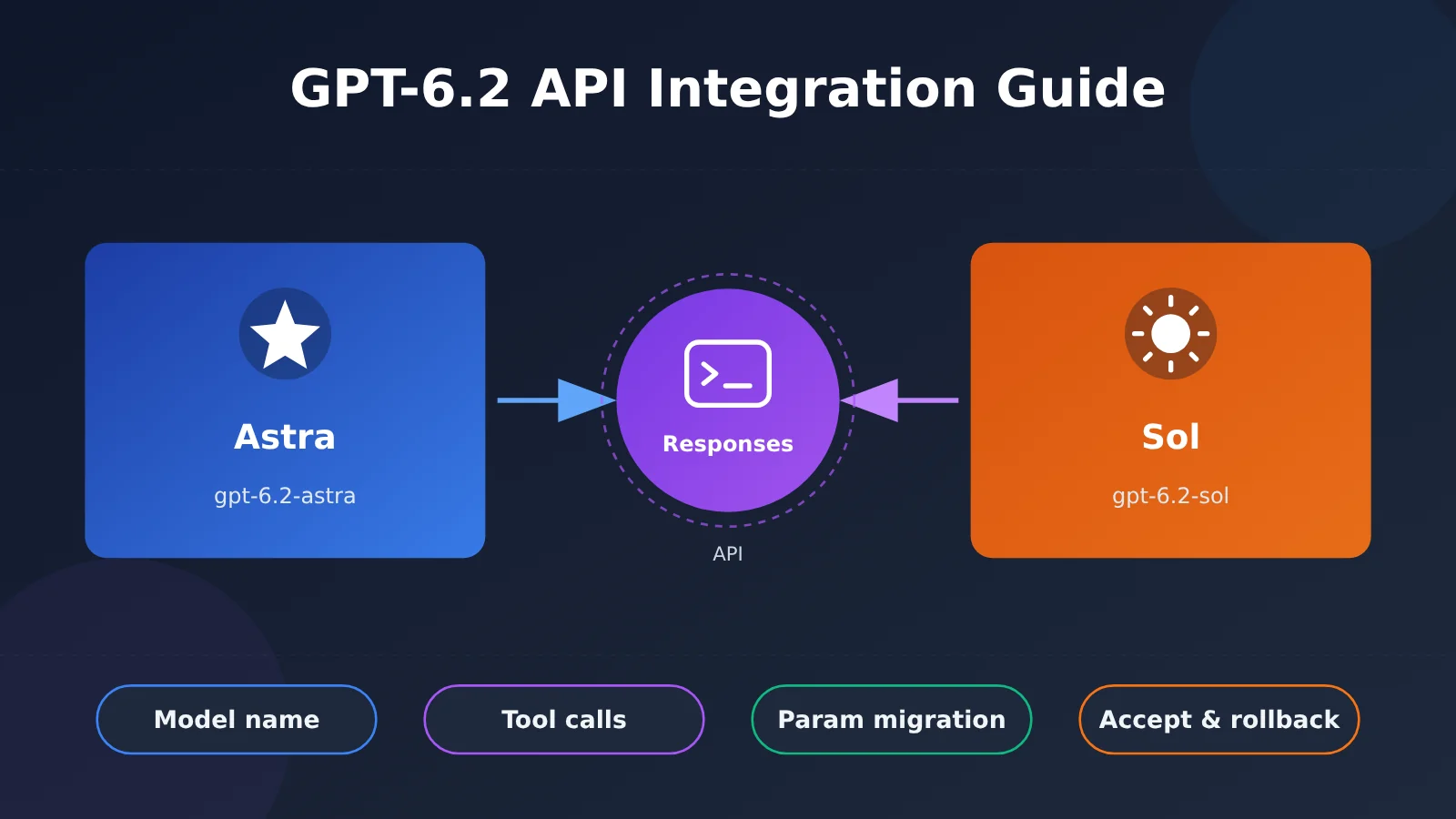
| GPT-6.2 Astra / Sol | The two models OpenAI released in this round. Their API model names are gpt-6.2-astra and gpt-6.2-sol; Astra is priced higher, Sol lower |
| Responses API | OpenAI’s newer unified interface. Tool calling on GPT-6.2 has to go through this API |
| Chat Completions | The traditional chat completion interface. GPT-6.2 still supports it for text-only requests |
| reasoning effort | The reasoning effort level. For new integrations, the official recommendation is medium |
| reasoning items | The reasoning-related output items a model returns in its response. In multi-turn conversations and tool loops, they need to be passed back exactly as received |
| history prefix | The input sequence already sent in a multi-turn conversation. Keeping it unchanged helps with cache hits and reasoning continuity |
| prompt caching | Prompt caching. Repeated prefixes can be billed at the lower cache-read rate |
| GDPval v2 / ALE / FrontierCode 2.0 | Evaluation names cited in OpenAI’s launch materials. Scores from the three can’t be mixed or compared against each other |
GPT-6.2 API Impact at a Glance
- Developers with existing OpenAI API apps: Changing the model name isn’t the hard part — the real work is cleaning up parameters and switching interfaces. Chat Completions apps that use function calling need to move over to the Responses API, and that’s the bulk of this migration.
- Apps that depend on sampling parameters: If you steer output style with
temperatureortop_p, or uselogprobsfor confidence scoring, those capabilities have been removed on GPT-6.2, so you’ll need a different approach. - Cost owners: Astra and Sol differ by 4x in unit price. Once a long-context request goes past 272K, the entire request is billed at a higher rate, so budgets need to be recalculated against your actual request-length distribution.
- Regular ChatGPT users: This round’s rollout covers ChatGPT Work, Codex, and the API. Regular Chat isn’t part of it.
1. Objective Facts About the GPT-6.2 API
This section only compiles information from OpenAI’s official materials, verified as of November 18, 2026. All benchmark data in this article comes from OpenAI’s official reports, not from our own testing.
1.1 GPT-6.2 API release date, model names, and availability scope
OpenAI released GPT-6.2 Astra and GPT-6.2 Sol on November 17, 2026. The API model names are gpt-6.2-astra and gpt-6.2-sol. Both models accept text and image input and output text — they don’t have native video generation capability.
The rollout is being phased in gradually, covering ChatGPT Work, Codex, and the API; regular ChatGPT Chat isn’t part of this round. So for the time being, some accounts or organizations may not be able to invoke these models yet. Before making a formal switch, you should first confirm availability within your own organization.
1.2 GPT-6.2 API Official Benchmark Data (Official Marketing Claims)
OpenAI presented the following benchmark results in its launch materials. Each result holds only within its own benchmark:
- GDPval v2: GPT-6.2 Astra is 6.2 percentage points higher than GPT-6 Astra, with 22% fewer output tokens. GPT-6.2 Sol is 5.3 percentage points higher than GPT-6.1 Sol.
- Agents’ Last Exam (ALE): GPT-6.2 Astra improves by 5.2 points over GPT-6 Astra.
- FrontierCode 2.0: At the max reasoning tier, Sol and Astra differ by 0.5 points, and task cost is about 1/5 that of Astra. This conclusion applies only to that test; it shouldn’t be generalized into a universal cost claim.
These three sets of numbers use different units and comparison baselines, so they can’t be added together or ranked against one another. For example, GDPval v2’s “6.2 percentage points” and ALE’s “5.2 points” are not on the same scale.
1.3 GPT-6.2 API Standard Pricing
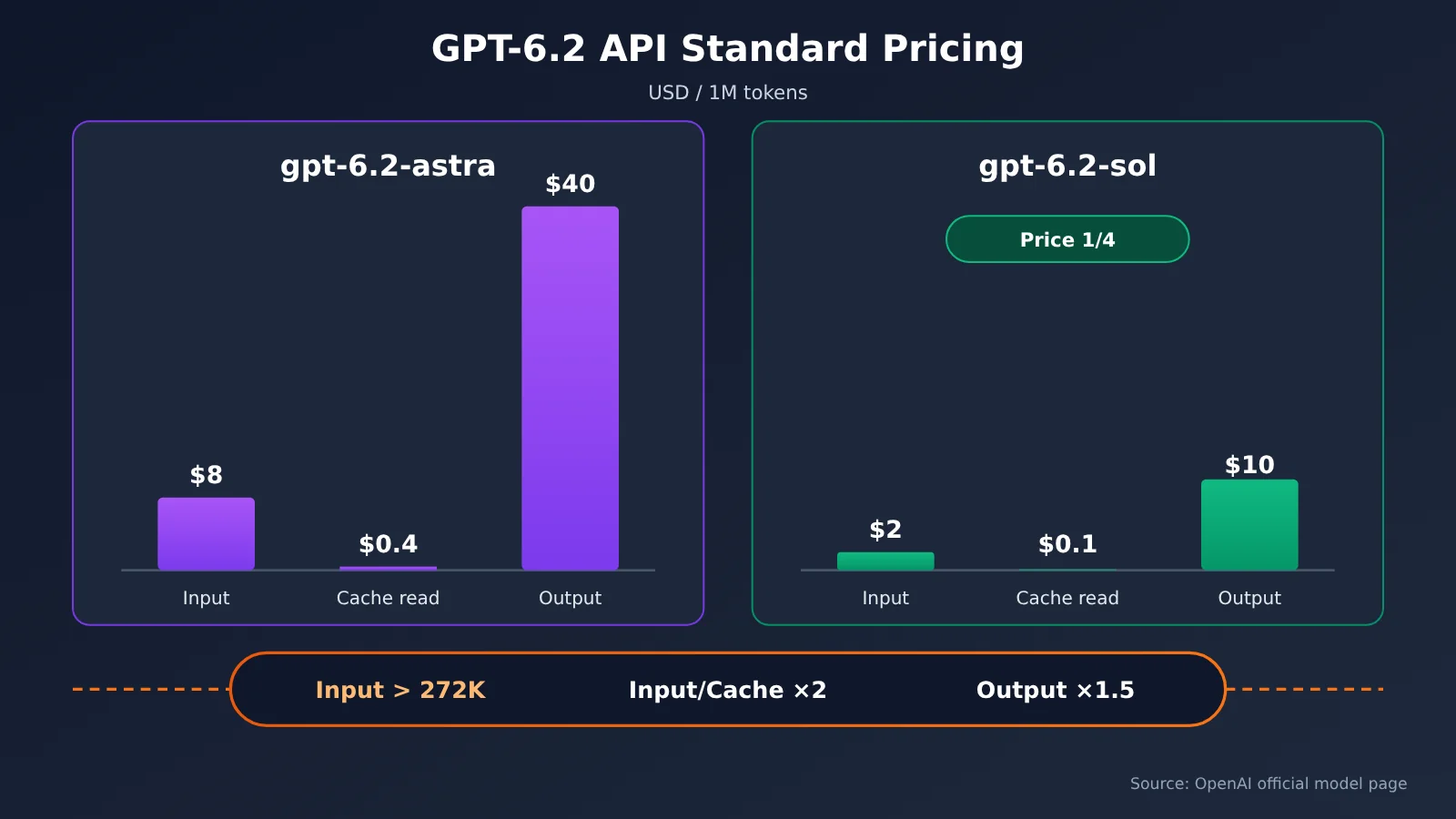
The table below shows the official API standard prices in USD per million tokens:
| Model | Uncached input | Cache read | Output | When input exceeds 272K |
|---|---|---|---|---|
gpt-6.2-astra |
$8 | $0.4 | $40 | Input and cache rates for the whole request ×2, output ×1.5 |
gpt-6.2-sol |
$2 | $0.1 | $10 | Input and cache rates for the whole request ×2, output ×1.5 |
There are two more things to keep in mind. First, cache writes are billed separately and aren’t listed in the table. Second, long-context surcharges are calculated on a whole-request basis. That means as long as the input for a request exceeds 272K, all input in that request is billed at 2x, not just the portion above the threshold.
1.4 Key Points from the Official GPT-6.2 API Migration Guide
OpenAI’s latest model migration guide (the latest-model page) lists the following adjustments:
| Item | Chat Completions | Responses API | Applies to |
|---|---|---|---|
| Tool calling | Not supported — you must switch to Responses | Supported | All apps migrating to GPT-6.2 |
| Sampling parameters | temperature and top_p removed |
temperature and top_p removed |
All migrations |
| Probability outputs | logprobs and top_logprobs removed |
top_logprobs removed, and message.output_text.logprobs dropped from include |
All migrations |
| Reasoning effort | New integrations use medium; none and minimal become low |
Same as the left column | All migrations |
| Cache retention | prompt_cache_retention becomes prompt_cache_options.ttl="30m" |
Same as the left column | Migrations from GPT-5.5 and earlier |
On multi-turn conversations, the guide adds a specific note: keep the existing history prefix as-is, append new instructions after it, and don’t rewrite it. When you downgrade a model, or switch users or organizations, reasoning items may be lost.
II. GPT-6.2 API Migration in Practice and Analytical Judgment
This part contains the editor’s own judgments and hands-on recommendations based on the official information above. The code follows the official documentation format and has not been verified by running it — please check each item against the official docs before integrating.
2.1 GPT-6.2 API Model Selection: Sol First, Then Astra
If you look only at official pricing, Sol’s input and output unit prices are both 1/4 of Astra’s. The FrontierCode 2.0 result — “Sol and Astra differ by 0.5 points, at about 1/5 the cost” — suggests Sol’s cost-effectiveness may be outstanding on certain coding tasks. That said, this conclusion comes from a single benchmark; whether it holds for your business can only be verified with your own data.
The recommended default strategy is: first run the entire regression set with gpt-6.2-sol, identify the task types where Sol fails to meet the quality bar, and then evaluate Astra specifically for those tasks. Also note that in GDPval v2, Astra’s “22% fewer output tokens” is measured against GPT-6 Astra — it can’t be used directly to offset the unit price gap between Astra and Sol.
💡 Selection tip: When comparing Astra and Sol, use the same regression set and the same reasoning level, and track quality, latency, and token consumption separately. If you need to compare multiple models behind one interface, first check the model list on APIYI apiyi.com to see whether the GPT-6.2 series is already available; if it isn’t, use the OpenAI official API directly.
2.2 Minimal Responses Example for the GPT-6.2 API
Below is the minimal text-only call example, using the Responses API and the medium reasoning level. First install or upgrade the official Python SDK: python -m pip install --upgrade openai. Configure OPENAI_API_KEY in your runtime environment — don’t hard-code real keys into source code, articles, or version control. The example below calls the OpenAI official API by default.
import os
from openai import OpenAI

# Adapted from the official documentation format; not run or verified
client = OpenAI(api_key=os.environ["OPENAI_API_KEY"])  # Calls the OpenAI official API by default

response = client.responses.create(
    model="gpt-6.2-sol",
    reasoning={"effort": "medium"},
    input="用三句话说明什么是提示词缓存。"
)
print(response.output_text)
Notice that the example deliberately omits temperature and top_p, because GPT-6.2 has removed these two parameters. If your wrapper function adds them by default, you’ll need to filter them out consistently at the call layer.
🎯 Technical tip: When integrating with third-party services such as APIYI apiyi.com, first verify the service’s official documentation, model list, Responses support, and actual pricing, then configure its endpoint and the dedicated key it issues. Don’t send your OpenAI official key to a third-party endpoint. This article has not verified third-party API compatibility.
2.3 GPT-6.2 API Parameter Migration Checklist
The migration checklist is split into two groups based on the source version, so you don’t apply changes meant only for older versions to every project.
2.3.1 Required for Every Project Migrating to GPT-6.2
- Replace the model name with
gpt-6.2-astraorgpt-6.2-sol, and manage it centrally in your config center so you can roll back easily later. - Remove
temperatureandtop_p. If you previously used low temperature to make output more stable, switch to clearer instructions, structured output formats, or validation logic instead. - For projects using Chat Completions, remove
logprobsandtop_logprobs. For projects using Responses, removetop_logprobsand removemessage.output_text.logprobsfrom theincludearray. - Reasoning level: new integrations should default to
medium; existing configs set tononeorminimalshould be changed tolow. - Any request that includes
toolsmust switch to the Responses API.
2.3.2 Only Needed When Migrating from GPT-5.5 and Earlier
- Change
prompt_cache_retentiontoprompt_cache_options.ttl="30m". - After migration, check whether the cache hit rate is normal. Cached reads cost only 1/20 of uncached input, so a drop in hit rate directly drives up costs.
If you’re migrating from GPT-6 or GPT-6.1, you still need to check each item in checklist 2.3.1. Also confirm that your tool-calling code, which may already be using Responses, doesn’t contain any removed parameters.
2.4 GPT-6.2 API Tool Loops and History Prefix
Tool calling is the riskiest part of this migration. In the Responses API, a complete tool loop involves four steps: the model returns a function_call item; your code executes the corresponding function; you append the result as a function_call_output to the input; and you request the model again. The model may keep requesting tools, so you can’t assume the second response is necessarily the final answer.
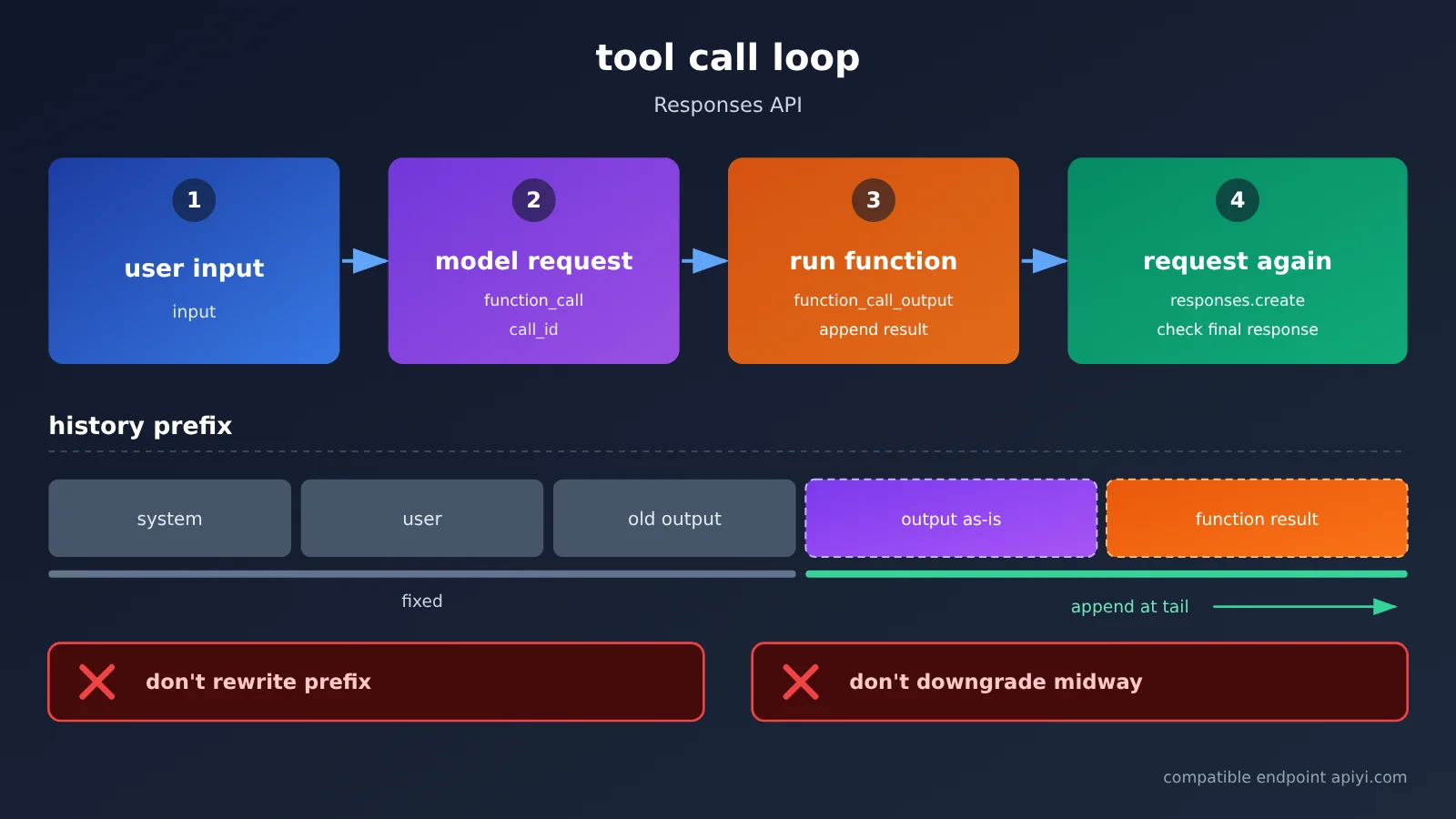
The key principle is: append the model’s returned output to the history exactly as-is — no filtering, no reassembly. The reasoning items are included in these outputs. If you keep only the text portions, or rewrite earlier system instructions midway, later turns may lose reasoning continuity and the cache prefix will be invalidated.
View a single-turn function call example (adapted from the official format, not run or verified)
import os
import json
from openai import OpenAI

client = OpenAI(api_key=os.environ["OPENAI_API_KEY"])  # Calls the official OpenAI API by default

MODEL = "gpt-6.2-sol"

tools = [{
    "type": "function",
    "name": "get_order_status",
    "description": "Look up the order status by order ID",
    "parameters": {
        "type": "object",
        "properties": {"order_id": {"type": "string"}},
        "required": ["order_id"],
        "additionalProperties": False
    },
    "strict": True
}]

def get_order_status(order_id: str) -> dict:
    # Replace with your real business logic
    return {"order_id": order_id, "status": "shipped"}

# Existing history prefix: keep it unchanged and only append at the tail
history = [
    {"role": "user", "content": "Help me check the status of order A1024"}
]

first = client.responses.create(
    model=MODEL,
    input=history,
    tools=tools,
    reasoning={"effort": "medium"}
)

# Append the model output exactly as-is (including reasoning items and function_call items)
history += first.output

for item in first.output:
    if item.type == "function_call" and item.name == "get_order_status":
        args = json.loads(item.arguments)
        result = get_order_status(**args)
        history.append({
            "type": "function_call_output",
            "call_id": item.call_id,
            "output": json.dumps(result, ensure_ascii=False)
        })

final = client.responses.create(
    model=MODEL,
    input=history,
    tools=tools,
    reasoning={"effort": "medium"}
)
if final.status != "completed":
    raise RuntimeError(f"Response not completed: {final.status}")
if any(item.type == "function_call" for item in final.output):
    raise RuntimeError("The model is still requesting tools; keep processing with the same flow — don't treat this as the final answer")
print(final.output_text)
The function above returns demo data, not a real order lookup; the example only demonstrates a single-turn function call. In production you’ll also need to validate call names and arguments, check query permissions, handle tool errors, set a bounded loop for subsequent tool requests, and deal with timeouts and incomplete responses.
When you need to add a new constraint — for example, “answer in English from now on” — it should be appended as a new input at the tail of history, not edited back into the opening instructions. Within the same session, don’t switch to a lower-version model, and don’t migrate the session between users or organizations. The official docs state that these changes can cause reasoning items to be lost.
2.5 Diagnosing GPT-6.2 API Errors
The table below turns the official migration notes into troubleshooting directions. The “Possible cause” column is our own inference — the exact error text depends on what the API actually returns:
| Symptom | Possible cause | What to do |
|---|---|---|
| Request rejected with an unsupported-parameter error | Removed parameters like temperature, top_p, or logprobs are still being sent |
Filter them out in one place inside your invocation wrapper |
Chat Completions fails when tools is included |
GPT-6.2 only supports tool calling on Responses | Migrate to responses.create |
| Reasoning effort error | Still using none or minimal |
Switch to low |
| Cache config has no effect, or hit rate drops sharply | Still using prompt_cache_retention, or the historical prefix is being rewritten |
Switch to prompt_cache_options.ttl="30m" and keep the prefix stable |
| Quality drops noticeably in the later turns of a multi-turn conversation | Reasoning items weren’t passed back, or the model was downgraded / the org was switched mid-conversation | Append output as-is, and pin the same model for the whole session |
| Bill far exceeds your estimate | Some requests have inputs over 272K, triggering the higher rate across the entire request | Measure your input-length distribution and truncate or summarize long requests |
| Model name doesn’t exist or you get a permission error | The official rollout is gradual, or the third-party endpoint doesn’t offer that model yet | Confirm org permissions; for third-party endpoints, go by the platform’s model list |
🛠 Troubleshooting tip: If the problem only shows up on a third-party endpoint, send the same request to the official API first as a control. That tells you whether the issue is in your code or in the endpoint’s compatibility layer. If you hit compatibility issues on APIYI apiyi.com, contact platform support and include your request ID.
2.6 GPT-6.2 API Small-Traffic Acceptance and Rollback
The recommendation is not to switch everything at once, but to move in three steps: shadow testing → small-percentage canary rollout → scale-up. Each step needs clear acceptance criteria and rollback triggers:
| Stage | Suggested traffic | Acceptance criteria | Rollback trigger |
|---|---|---|---|
| Shadow testing | Copy production requests, but don’t return results to users | Regression suite quality, tool invocation success rate, structured output parse rate | Quality on critical tasks is clearly lower than the old model |
| Small-percentage canary rollout | A small number of real users | Error rate, P95 latency, tokens per request, cache hit rate | Error rate or cost exceeds predefined thresholds |
| Scale-up | Gradually increase the percentage | Share of long-context requests, daily cost, user feedback | A large number of requests over 272K cause costs to spiral |
There are two key points in rollback design. First, put the model name, API type, and reasoning tier into configuration switches, so rollback only changes config and doesn’t require a redeploy. Second, roll back on a per-new-session basis: for sessions already in progress on GPT-6.2, try to let them finish on the original model, avoiding a mid-flight downgrade that loses reasoning items.
🚀 Quick start: During canary rollout, you can use the same API key on APIYI apiyi.com to call both the old model and the candidate model for comparison, provided the platform offers the corresponding models. Check the platform console for availability; this article makes no guarantee.
The real work in this GPT-6.2 migration isn’t changing the model name. It’s in three places: moving tool calls to Responses, cleaning up removed parameters, and keeping the historical prefix stable. Official benchmarks point to directions worth watching, especially Sol’s cost-effectiveness on some tasks. But whether those numbers hold in your business depends on your own regression suite and canary data.
Knowledge from paper always feels shallow; true understanding comes from practice. — Lu You, Winter Night Reading: To My Son Ziyu
References
For the code structure, also see the OpenAI Quickstart and the Function calling guide. This article only cross-checks the documentation and code structure — no paid API testing was carried out.
-
OpenAI announcement: Introducing GPT-6.2 Astra and Sol
- Link: Official source
- Note: Release date, benchmark data, and availability
-
OpenAI model page: GPT-6.2 Astra
- Link: Official source
- Note: Model name, modalities, and standard pricing
-
OpenAI model page: GPT-6.2 Sol
- Link: Official source
- Note: Model name, modalities, and standard pricing
-
OpenAI migration guide: Latest model
- Link: Official source
- Note: Parameter removals, reasoning levels, cache configuration, and historical prefix requirements
-
OpenAI Help Center: ChatGPT Work and Codex
- Link: Official source
- Note: Availability details on the ChatGPT Work and Codex side
Author: APIYI Technical Team
Technical discussion: If you hit API compatibility issues during migration, feel free to reach out through the APIYI apiyi.com homepage. More integration resources are available in the docs.apiyi.com documentation center.