Author’s note: This article explains how to assign tasks based on difficulty, splitting the work between MiniMax M3.1 Flash and Claude Opus 5.5 to keep costs down without sacrificing the quality you need.
In a nutshell: Give high-volume, repetitive tasks with clear requirements to MiniMax M3.1 Flash. Reserve Claude Opus 5.5 for difficult tasks that require planning, judgment, or major changes.
When using Large Language Models, many people pick the strongest model and use it for everything. It’s convenient, but the bill can climb quickly once you start running tasks in bulk—and most of that work doesn’t need the most powerful model. This article introduces a workflow of “Claude Opus 5.5 plans the approach, M3.1 Flash handles bulk tasks, and Claude Opus 5.5 reviews the results and wraps up”. It’ll help you use a single API key to put each model to work where it fits best.
This isn’t another launch announcement. We’ve already covered the M3.1 Flash launch separately. Here, we focus on how to divide the work, how to calculate the cost, and when splitting tasks isn’t necessary.
What you’ll get: By the end, you’ll have a task allocation table you can use as-is, a three-step workflow with clear completion criteria, and the know-how to switch models in a graphical interface by changing only the model name.
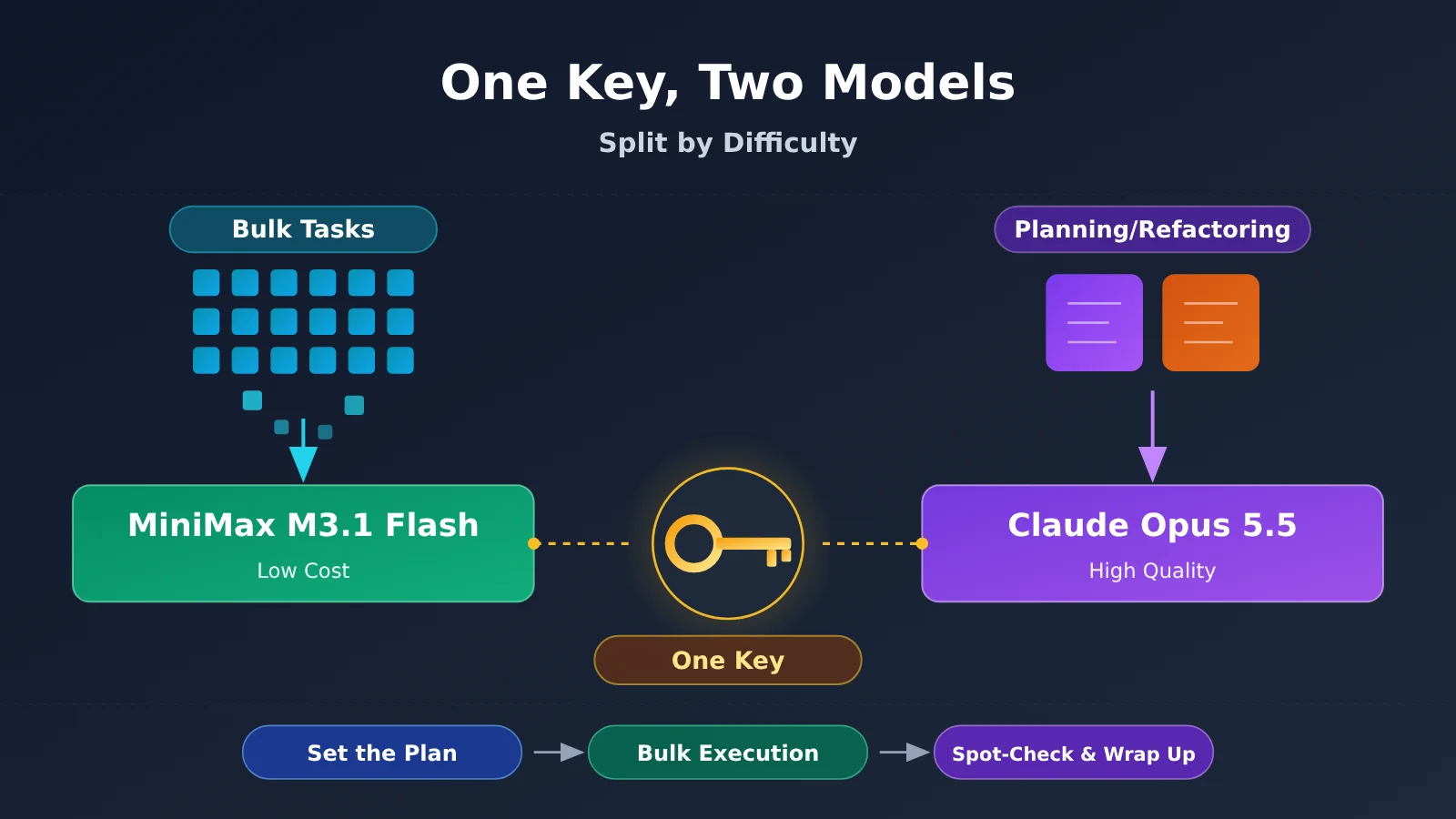
Key Takeaways: Pairing M3.1 Flash with Opus 5.5
First, let’s define two terms you’ll see throughout this article. A token is the unit models use to measure billing and processing length. You can think of it roughly as a “chunk of text”: the official estimate is about 750 English words per 1,000 tokens. An Agent is a way of using a model that lets it call tools in multiple steps and complete a series of actions, such as automatically organizing a spreadsheet or following a workflow in a software application.
| Key point | Explanation | Benefit |
|---|---|---|
| Divide work by difficulty | Assign bulk, repetitive tasks to M3.1 Flash, and planning and refactoring to Opus 5.5 | Balance quality and cost |
| Big difference in pricing | At official rates, Opus 5.5 costs about 26.7 times more than Flash for input and 33.3 times more for output | Switching models for bulk tasks delivers the biggest savings |
| Three-step workflow | Plan → execute in bulk → spot-check and wrap up, with completion criteria for each step | Keep rework manageable and avoid making a bigger mess with each change |
| Switch with one API key | Use an OpenAI-compatible API and change only the model name | No need to manage two accounts and balances |
The Rationale Behind Splitting Work Between M3.1 Flash and Opus 5.5
This division of labor works because the two models differ significantly in both price and capabilities. According to MiniMax’s official pricing page, M3.1 Flash costs $0.15 per million input tokens, $0.60 per million output tokens, and $0.015 per million cached-read tokens, with no extra charge for long context. Claude Opus 5.5’s official rates are $4 per million input tokens and $20 per million output tokens. Cached reads are repeated instances of the same prefix content that are billed at a lower rate. In bulk tasks, you can save significantly by reusing a long prompt across requests.
In terms of capabilities, M3.1 Flash stands out at office automation, visual understanding, and finance and tax tasks, but falls noticeably behind Claude’s flagship models on long, multi-step command-line tasks and code refactoring. In other words, it’s good at “following the rules over and over,” but not as good at “figuring out how to do the job.” That makes it a natural complement to Opus 5.5.
💡 Official recommendation: Before putting this division of labor into practice, try running a few real examples through both models with the same API key on APIYI (apiyi.com). Compare their outputs on your own tasks, then decide where to draw the line.
Why M3.1 Flash and Opus 5.5 Need Different Roles: Start by Checking the Data Sources
Before discussing how to divide the work, we need to distinguish between different levels of data reliability. The figures below fall into three categories: officially reported means scores published by MiniMax; third-party evaluations come from independent organizations such as Vals AI; and unknown/not published means there’s currently no reliable source. A benchmark is a standardized set of tests used to compare model capabilities.
| Item | Score | Category |
|---|---|---|
| Automation-Bench v1.0.6 (office automation) | Flash 62.2, Opus 5 50.3 | Officially reported |
| BankerToolBench (financial tool tasks) | 76.2, tied with Opus 5 | Officially reported |
| BabyVision (vision with tools) | 91.0 | Officially reported |
| Terminal Bench 4.0 (long-horizon command-line tasks) | 38.1, Opus 5 51.8 | Officially reported |
| SWE Refactor Bench (code refactoring) | 23.0, Opus 5 31.0 | Officially reported |
| Tax Agent Bench / Finance Agent v2.1 | 32.14% / 58.83%, both improved over M3 | Third-party (Vals) |
| Terminal-Bench 4.0 | 25.25%, ranked 22nd out of 51 models | Third-party (Vals) |
| Vals Index overall | 53.78%, ranked 15th out of 22 models | Third-party (Vals) |
| Head-to-head comparison with Opus 5.5 | Not published | Unknown |
| Technical report explaining what changed in Flash | Not published | Unknown |
One point needs to be especially clear: Claude’s comparison model in MiniMax’s official table is Opus 5, not Opus 5.5. Opus 5.5 remains Anthropic’s strongest flagship model, and the company hasn’t published a task-by-task comparison between it and Flash. So we can’t say Flash has “caught up with” or “surpassed” Opus 5.5. The table only shows how Flash compares with Opus 5.
Also, although both results are for Terminal-Bench 4.0, the official score is 38.1 while Vals reports 25.25%. The test conditions differ—Vals used the official API with effort set to max—so the scores shouldn’t be directly subtracted. But both sets of data point to the same conclusion: long-horizon, multi-step command-line work is a clear weakness for Flash.
M3.1 Flash vs. Opus 5.5: Which Tasks Should Go to Which Model?
Use the table below as a practical guide for assigning work. The last column shows availability on APIYI; check the pricing page for the latest information.
| Task type | Use | Why | Availability on APIYI |
|---|---|---|---|
| Office automation: organizing spreadsheets in bulk, filling out forms, following fixed workflows | M3.1 Flash | Anthropic reports an Automation-Bench score of 62.2, above Opus 5’s 50.3; OSWorld V2 score: 61.7 | Check the pricing page; MiniMax-M3 is currently available |
| Bulk extraction and verification of financial and tax documents | M3.1 Flash | Anthropic reports a BankerToolBench score of 76.2, matching Opus 5; Vals shows improvements over M3 on finance and tax tasks | Same as above |
| Bulk understanding and tagging of screenshots, images, and videos | M3.1 Flash | Anthropic reports a BabyVision score of 91.0; its documentation confirms support for image and video input | Same as above |
| Generating small scripts and page drafts in bulk | M3.1 Flash | Vals Vibe Code Bench score of 73.94%, a substantial improvement over M3’s 47.57% | Same as above |
| Multi-step troubleshooting and long-running command-line tasks | Opus 5.5 | Anthropic reports a Terminal Bench score of 38.1, below Opus 5’s 51.8; Vals results on similar tests are also relatively weak | claude-opus-5-5 |
| Large-scale refactoring across multiple files | Opus 5.5 | Anthropic reports an SWE Refactor Bench score of 23.0, below Opus 5’s 31.0 | claude-opus-5-5 |
| Breaking down tasks, setting standards, and final acceptance checks | Opus 5.5 | These tasks require judgment and a broad perspective; Opus 5.5 is Anthropic’s most capable flagship model | claude-opus-5-5 |
To decide which model should handle a task, ask yourself: Can you describe it as “follow this template N times”? If so, it’s probably a good fit for Flash. If not—if the task requires judgment along the way—Opus 5.5 is the safer choice. M3.1 Flash supports a 1-million-token context window (the maximum amount of content a model can “see” at once), so processing long documents in batches isn’t the issue. The key question is whether the task requires deep planning.
Recommended Workflow for M3.1 Flash + Opus 5.5: 3 Steps
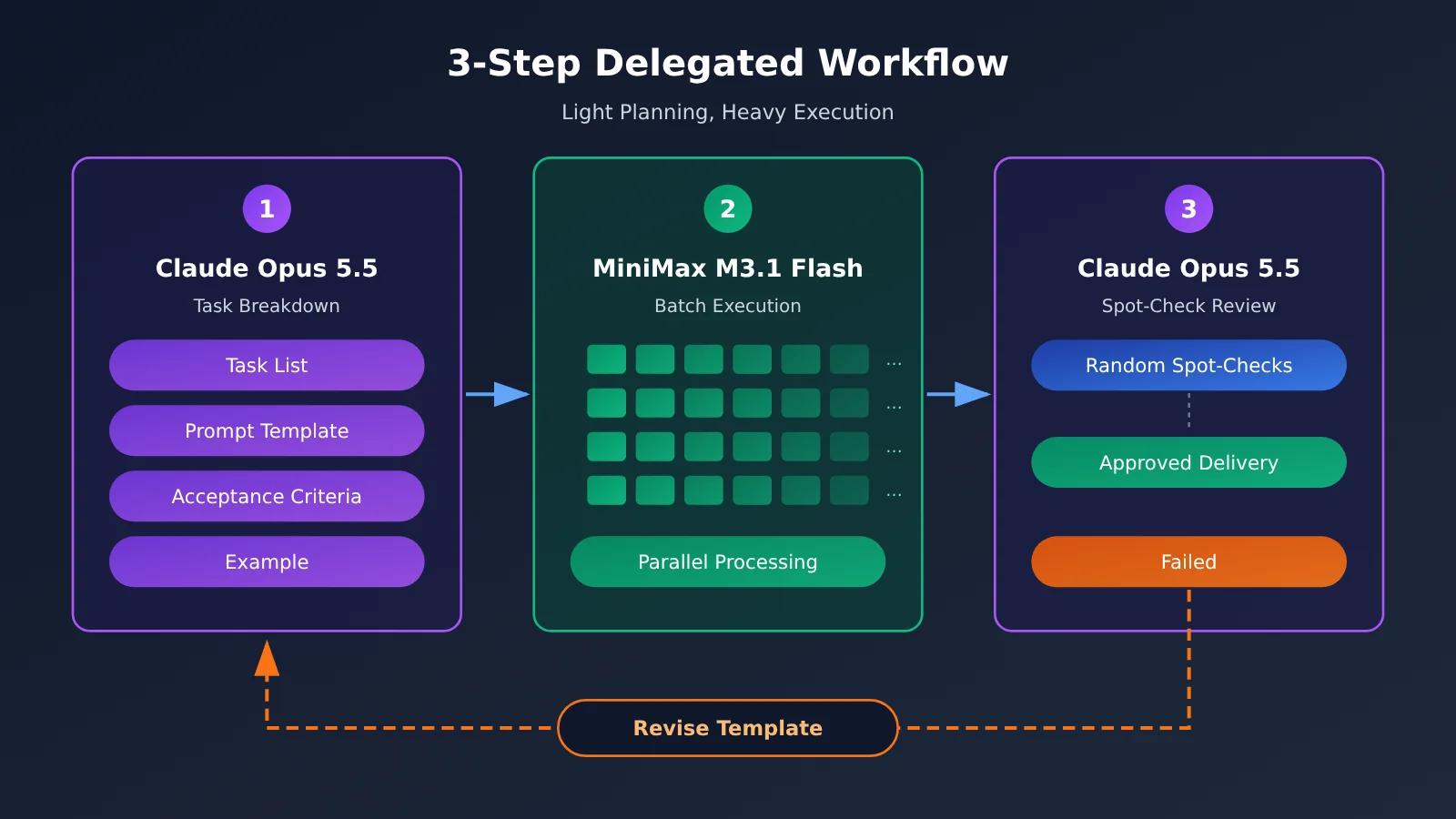
The core idea behind this workflow is simple: use the expensive model for a small number of high-value tasks, and the cheaper model for large volumes of repetitive work. Be clear about what “done” means at every step. Otherwise, you might only discover that you went in the wrong direction after processing everything—and the cost of rework can wipe out your savings.
| Step | Model | What it does | What counts as done |
|---|---|---|---|
| 1. Develop the plan and break down the work | Opus 5.5 | Understands the goal, breaks it into independently executable subtasks, and creates a standard prompt template, output format, and acceptance criteria, along with a few sample outputs | Each subtask can be completed without follow-up questions; the output format can be checked directly by a person or a program; and there are at least 3–5 acceptable examples |
| 2. Process in bulk | M3.1 Flash | Processes every item using the template, with the reasoning effort set to low or medium | Every item has an output; the format passes checks at or above your predefined threshold; and failed items are listed separately |
| 3. Review a sample and wrap up | Opus 5.5 | Reviews a random sample of results along with all failed items, summarizes issues, and prepares the final deliverable | If the error rate in the sample is below your threshold, deliver the results. If it’s above the threshold, return to Step 1 and revise the template instead of having Opus 5.5 redo every item |
Step 1: Use Opus 5.5 to handle the hard parts upfront
This is where your effort pays off most. Give Opus 5.5 the original requirements and a few examples of real data, and have it produce three things: a subtask list, a prompt template for Flash, and acceptance criteria. The more specific the template, the more consistently Flash will perform. For example, you could specify: “Output JSON only, with fields A, B, and C. Use null for missing values.”
Step 2: Process in bulk with M3.1 Flash, and pay attention to reasoning effort
M3.1 Flash offers several reasoning effort settings: low, medium, high, xhigh, and max. If you don’t set one, the default is max. The higher the setting, the more the model thinks, the more output tokens it uses, and the longer you’ll wait. For batch work that already has a template, start with a small batch at medium. If the quality is good enough, stick with it; if not, increase the setting. According to the official documentation, Flash can produce 200+ TPS (output tokens per second) in everyday use, which can significantly reduce the overall time for batch tasks.
Step 3: Have Opus 5.5 review a sample, not redo the work
The purpose of sampling is to determine whether the template is reliable—not to have Opus rework Flash’s output. If the review finds the same kind of error repeatedly, the template likely has a flaw. Go back to Step 1 and have Opus 5.5 revise it, then have Flash rerun the affected items. This keeps usage of the expensive model to a minimum.
M3.1 Flash with Opus 5.5: Let’s Run the Numbers
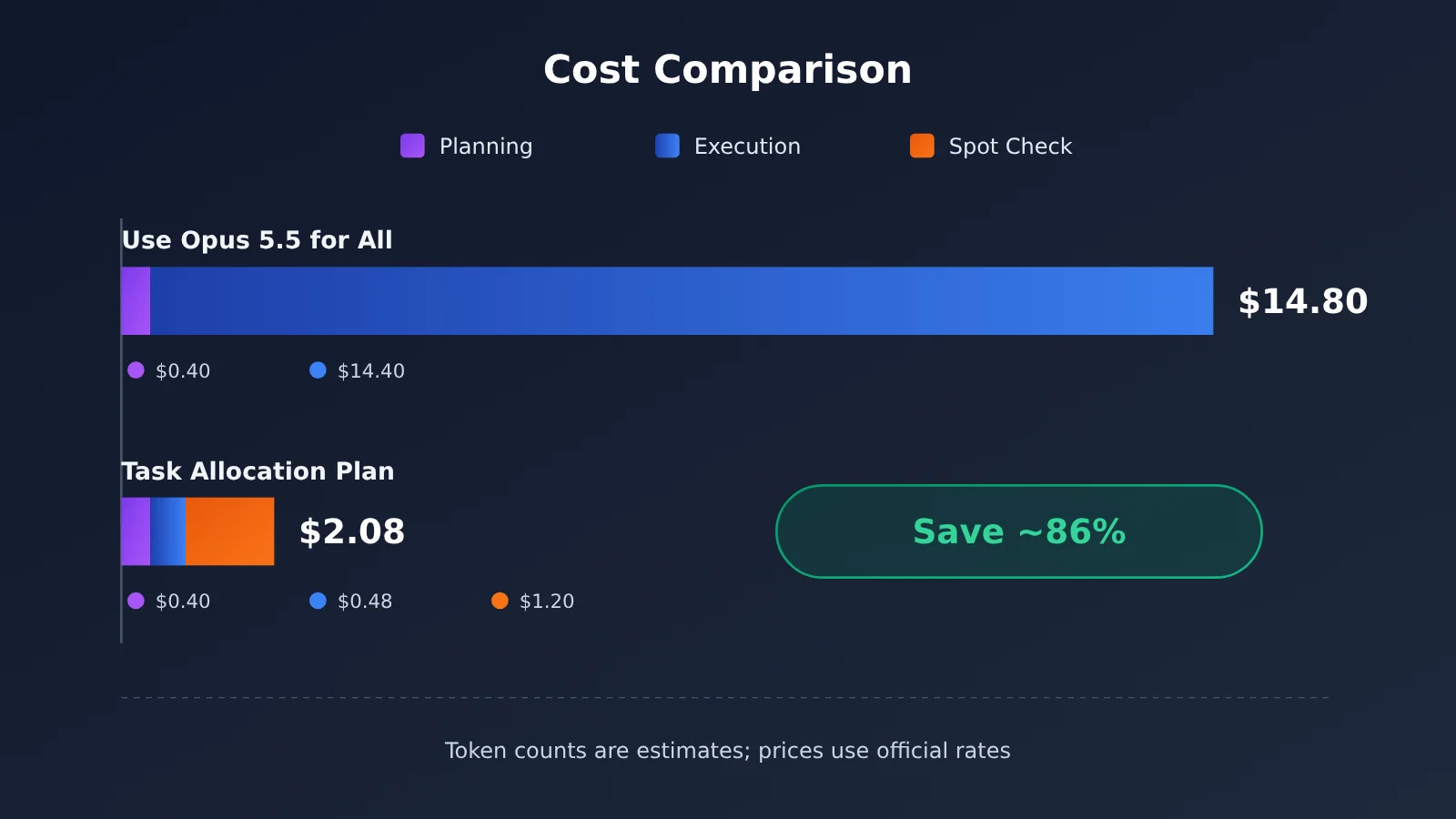
Let’s use a hypothetical task to compare costs: processing 200 documents in batches, extracting information from each one and generating a summary. All token counts below are hypothetical and are only meant to demonstrate the calculation—not actual measured data. Prices are based on official rates: Opus 5.5 costs $4 per million input tokens and $20 per million output tokens; M3.1 Flash costs $0.15 per million input tokens and $0.60 per million output tokens. The billing formula matches MiniMax’s official guidance: usage ÷ 1,000,000 × price, then add up the individual charges.
Hypothetical usage:
– Planning: 50,000 input tokens and 10,000 output tokens;
– Batch processing: 200 documents × 8,000 input tokens and 2,000 output tokens each, for a total of 1,600,000 input tokens and 400,000 output tokens;
– Spot checks: 20 documents × 10,000 input tokens and 1,000 output tokens each, for a total of 200,000 input tokens and 20,000 output tokens (only needed for the delegated approach).
| Stage | All Opus 5.5 | Delegated approach |
|---|---|---|
| Planning (Opus 5.5) | 0.05×4 + 0.01×20 = $0.40 | 0.05×4 + 0.01×20 = $0.40 |
| Batch processing | Opus: 1.6×4 + 0.4×20 = 6.40 + 8.00 = $14.40 | Flash: 1.6×0.15 + 0.4×0.60 = 0.24 + 0.24 = $0.48 |
| Spot checks (Opus 5.5) | None | 0.2×4 + 0.02×20 = 0.80 + 0.40 = $1.20 |
| Total | $14.80 | $2.08 |
In the table, “0.05” represents 50,000 ÷ 1,000,000, and the other figures follow the same calculation. Check: 14.80 − 2.08 = 12.72, and 12.72 ÷ 14.80 ≈ 0.86. So, under these assumptions, the delegated approach saves about 86%, costing roughly 14% of the all-Opus 5.5 approach.
There are three things to keep in mind. First, M3.1 Flash’s reasoning can’t be turned off, so its actual output token count may be higher than assumed. Even if output tokens during execution doubled to 800,000, the execution cost would only rise to 0.24 + 0.48 = $0.72, bringing the total to $2.32. The conclusion wouldn’t change. Second, this calculation doesn’t include cache discounts, so using shared templates could bring the actual cost down further. Third, if a failed spot check means you have to rerun the task, include the rework cost. That’s another reason to make the template solid in Step 1.
If you temporarily use MiniMax-M3 instead of Flash for execution, at MiniMax’s official rates for inputs of up to 512K ($0.30 / $1.20), the execution cost is 1.6×0.30 + 0.4×1.20 = 0.48 + 0.48 = $0.96. The total comes to 0.40 + 0.96 + 1.20 = $2.56—still far below $14.80.
💰 Cost optimization: The figures above use official list prices. For actual rates on APIYI (apiyi.com), check the pricing page. We recommend testing with 20–50 real examples first, then estimating the cost of processing the full batch based on those results.
How to Switch Between M3.1 Flash and Opus 5.5 with One Key in a GUI
The division of labor may sound complicated, but in practice, you just “change the model name.” An OpenAI-compatible API follows OpenAI’s request format, which most chat clients and open-source applications support. If your tool has a “Custom Provider” or “OpenAI-Compatible” option, you can configure it by following these steps.
Configure a Chat Client
- Open the client’s settings and look for “Model Provider” or “API Settings.” Add a provider with the type OpenAI-Compatible.
- For the Base URL, enter the address shown in the APIYI console. It’s usually
https://api.apiyi.com/v1. - For the API Key, enter the key you created in the APIYI dashboard.
- Manually add these model names to the model list:
claude-opus-5-5andMiniMax-M3. IfMiniMax-M3.1-Flashis listed on the pricing page, add that too. - When starting a new conversation, select the model you want from the model dropdown. Use Opus 5.5 for planning and spot checks, and MiniMax for batch processing.
Configure Your Own Application
If you’re using an open-source Agent platform, an automation tool, or an application you built yourself, the settings page will usually have fields for “Base URL,” “API Key,” and “Model Name.” You only need to enter the first two once. To switch between tasks, change only the “Model Name” field. Many tools let you assign different models to different nodes. You can set the “Planning” and “Spot Check” nodes to claude-opus-5-5 and use a MiniMax model for the “Batch Processing” node.
Two Things to Watch Out for When Setting Up M3.1 Flash Thinking
- Don’t turn off thinking: According to MiniMax’s official documentation, thinking can’t be disabled in M3.1 Flash. Sending a request to “turn off thinking” will return a 400 error:
model "MiniMax-M3.1-Flash" requires adaptive thinking. If your client has a “Disable Thinking” toggle, leave it enabled when using Flash. To save time and tokens, lower the reasoning intensity instead. - Thinking content is displayed separately: With the OpenAI-compatible protocol, the thinking process is returned in a separate
reasoning_contentfield, while the response body contains only the final answer. If your previous tool extracted thinking content from M3’s think tags, you’ll need to adjust it when switching to Flash.
🚀 Get started quickly: Create a key at APIYI apiyi.com, then configure both
claude-opus-5-5andMiniMax-M3in your client. Ask each model the same question using the same source material. In just a few minutes, you’ll be able to see the differences in their results and speed.
One more thing: MiniMax also offers its own MiniMax Code desktop app, which lets you use M3.1 Flash by signing in with an M Plan subscription account. This is MiniMax’s official way to use the model, but an M Plan subscription key and a pay-as-you-go API key are two different types of keys. The cross-model workflow described in this article doesn’t depend on an M Plan subscription.
When You Don’t Need to Split Work Between M3.1 Flash and Opus 5.5
Splitting the work has benefits, but it also comes with management overhead: you have to write templates, spot-check results, and switch between models. In the following situations, using a single model is simpler.
- There’s not much work: If you’re only processing a dozen or so items, the total cost of using Opus 5.5 for everything won’t be that high. Writing templates could take more time than it saves.
- The workflow is short: If a task can be completed in a single question and answer, there’s no “planning” step to separate out, so a two-step process isn’t necessary.
- The quality requirements are modest: For internal drafts or notes just for your own use, use the MiniMax series for everything. There’s no need to have Opus 5.5 spot-check the results.
- Every item is difficult: If each item requires deep analysis, such as troubleshooting complex issues one by one, there’s no batch of work you can hand off to Flash. Use Opus 5.5 for everything.
- Mistakes aren’t acceptable: For conclusions that require individual accountability, such as legal or financial advice, spot-checking means some items won’t be reviewed. In these cases, use a stronger model for every item and have a human review the results.
- You’re still figuring out the requirements: If the requirements aren’t clear yet, use Opus 5.5 to get the process working first. Once the workflow is stable, consider handing repetitive parts off to Flash.
Use One APIYI Key to Call Both the MiniMax Series and Claude Opus 5.5
The biggest headache with splitting work is having “two models and two sets of accounts”: separate balances, separate API keys, and separate endpoint URLs. The more configuration you have, the easier it is to make mistakes. APIYI lets you use one key to call international models like Claude, GPT, and Gemini, as well as domestic models like DeepSeek and MiniMax. To switch models, you only need to change the model name.
As of 2026-10-22, the related models available directly on APIYI include claude-opus-5-5, claude-opus-5, and MiniMax models such as MiniMax-M3 (which supports both OpenAI and Anthropic API formats), MiniMax-M2.7, and MiniMax-M2.5. MiniMax-M3.1-Flash isn’t on the pricing page yet, but it’ll be available soon. Check the APIYI pricing page to confirm whether it’s available to call. Until then, you can use MiniMax-M3 for batch execution. The workflow and configuration are exactly the same; when the new model is available, you’ll only need to change the model name.
The recommended division of work is simple: hand inexpensive batch tasks to MiniMax, and leave difficult planning, refactoring, and final review to Opus 5.5. To sign up and get an API key, visit the APIYI website at api.apiyi.com.
Frequently Asked Questions
Q1: What does it mean to pair M3.1 Flash with Opus 5.5?
It means choosing a model based on task difficulty: Opus 5.5 breaks down tasks, sets standards, and spot-checks results, while M3.1 Flash handles template-based tasks in bulk. The goal is to use the more expensive model only for a few critical steps while maintaining acceptable quality.
Q2: Has M3.1 Flash already surpassed Claude Opus 5.5?
That’s not a fair conclusion. MiniMax’s official comparison table uses Claude Opus 5: Flash outperforms Opus 5 in office automation but falls behind in long command-line workflows and code refactoring. Opus 5.5 is still Anthropic’s most capable flagship model, and the company hasn’t published a direct, category-by-category comparison with Flash.
Q3: Can I call M3.1 Flash through APIYI now?
As of publication, MiniMax-M3.1-Flash isn’t listed on APIYI’s pricing page. Check the pricing page for availability. For now, you can use MiniMax-M3 for batch execution, and call `claude-opus-5-5` directly. The same API key works for both on APIYI at apiyi.com.
Q4: Can I turn off M3.1 Flash’s reasoning? How can I save tokens?
No. The official documentation says that disabling reasoning will return a 400 error. To save time and tokens, you can only lower the reasoning effort from the default of max. For batch tasks, try medium first, then increase it if the results aren’t good enough.
Q5: What’s a good spot-check rate?
There’s no universal standard. You can start at around 10%, plus all entries that fail formatting checks. If several consecutive batches pass inspection, gradually lower the rate. If errors cluster in a particular category, improve the template first rather than increasing the number of spot checks.
Q6: What are M3.1 Flash’s known limitations?
It ranks 15th out of 22 models in the third-party Vals overall rankings and is weaker at long-horizon Agent tasks. MiniMax hasn’t released a technical report. The official claim that it costs one-third as much as M3 is based on cost per task, but the calculation method hasn’t been disclosed. Speed figures also vary: the launch blog says 200+ TPS, while the product page lists around 150 tokens per second.
Q7: Can I use this division of labor without writing code?
Yes. In a chat client or automation tool that supports the OpenAI-compatible API, enter APIYI’s endpoint and API key, add the model names for Opus 5.5 and MiniMax, then switch between them as needed. You can do all of this through a graphical interface.
M3.1 Flash + Opus 5.5: Key Takeaways
- Divide work by strengths: Use Flash for tasks that can be handled repeatedly with a template; use Opus 5.5 for tasks that require judgment or major changes.
- Price gap: At the official rates, Opus 5.5 costs about 26.7 times as much as Flash for input tokens and 33.3 times as much for output tokens.
- Flash’s strengths: According to the vendor’s own benchmarks, Flash performs especially well in office automation, financial tools, and vision tasks.
- Flash’s weaknesses: It trails Opus 5 on long command-line workflows and code refactoring, and third-party evaluations also suggest weaker performance.
- Comparison caveat: The official comparison is against Opus 5, not Opus 5.5, so it doesn’t show that Flash has caught up with the flagship model.
- Cost example: In a hypothetical scenario, a split-work approach costs about $2.08, compared with about $14.80 for using Opus 5.5 for everything.
- How to switch: Keep the same API key and change only the model name. Check the APIYI pricing page to confirm whether Flash is available.
Summary
Here are the key takeaways for pairing MiniMax M3.1 Flash with Claude Opus 5.5:
- Divide work by difficulty: Give M3.1 Flash batch, repetitive tasks with clear standards; use Opus 5.5 for planning, refactoring, and final review.
- Use a three-step workflow: Opus 5.5 creates a plan and breaks it into tasks → Flash handles batch execution → Opus 5.5 spot-checks the results and wraps up. Set clear completion criteria for each step.
- Run the numbers first: Test with a small batch of real data, and factor in the cost of rework.
- Know when not to split the work: If there’s little to do, the workflow is short, quality requirements are modest, or every task is difficult, using a single model may be simpler.
The value of splitting the work isn’t just “switching to a cheaper model”—it’s letting each model do what it does best. Start with a small, repetitive task and use the same API key on APIYI at apiyi.com to run through the three-step workflow. Once you’ve confirmed the results are consistent, you can scale up.
📚 References
- MiniMax official launch blog: Official benchmark scores, speed, and pricing for M3.1 Flash
- Link:
minimax.io/blog/minimax-m31f -
Notes: Primary source for figures reported by MiniMax
-
MiniMax model invocation docs: Model name, context window, reasoning depth, and API format
- Link:
platform.minimax.io/docs/guides/text-generation -
Notes: Details on why reasoning can’t be disabled and how to configure
reasoning_effort -
MiniMax official pricing page: Billing rules for M3.1 Flash and M3
- Link:
platform.minimax.io/docs/guides/pricing -
Notes: Unit prices and calculation method used to verify the costs in this article
-
Vals AI model evaluation page: Third-party evaluation results for M3.1 Flash
- Link:
vals.ai/models/minimax_MiniMax-M3.1-flash -
Notes: Third-party evaluation data and test conditions
-
MarkTechPost report: Official comparison table and item-by-item data for Opus 5
- Link:
marktechpost.com/2026/10/19/minimax-m3-1-flash-release - Notes: Summary of the figures comparing M3.1 Flash with Opus 5 in the official table
Author: APIYI Technical Team
Technical questions: Contact us at api.apiyi.com, the official APIYI website. For more integration resources, visit the documentation center at docs.apiyi.com.