Author's Note: A deep comparison of Seedream 5.0 Lite and GPT Image 1.5 across price, image quality, speed, text rendering, editing capabilities, and smart features to help you pick the perfect Large Language Model for your visual needs.
The two hottest AI image generation models in early 2026 are here: ByteDance Seedream 5.0 Lite—the industry's first image model to support web search—and OpenAI GPT Image 1.5—the reigning champion across LMArena, Design Arena, and AA Arena. These two follow completely different technical paths, but which one is right for you?
Core Value: By the end of this article, you'll know exactly which model to choose for different business scenarios and how to leverage price differences to optimize your costs.
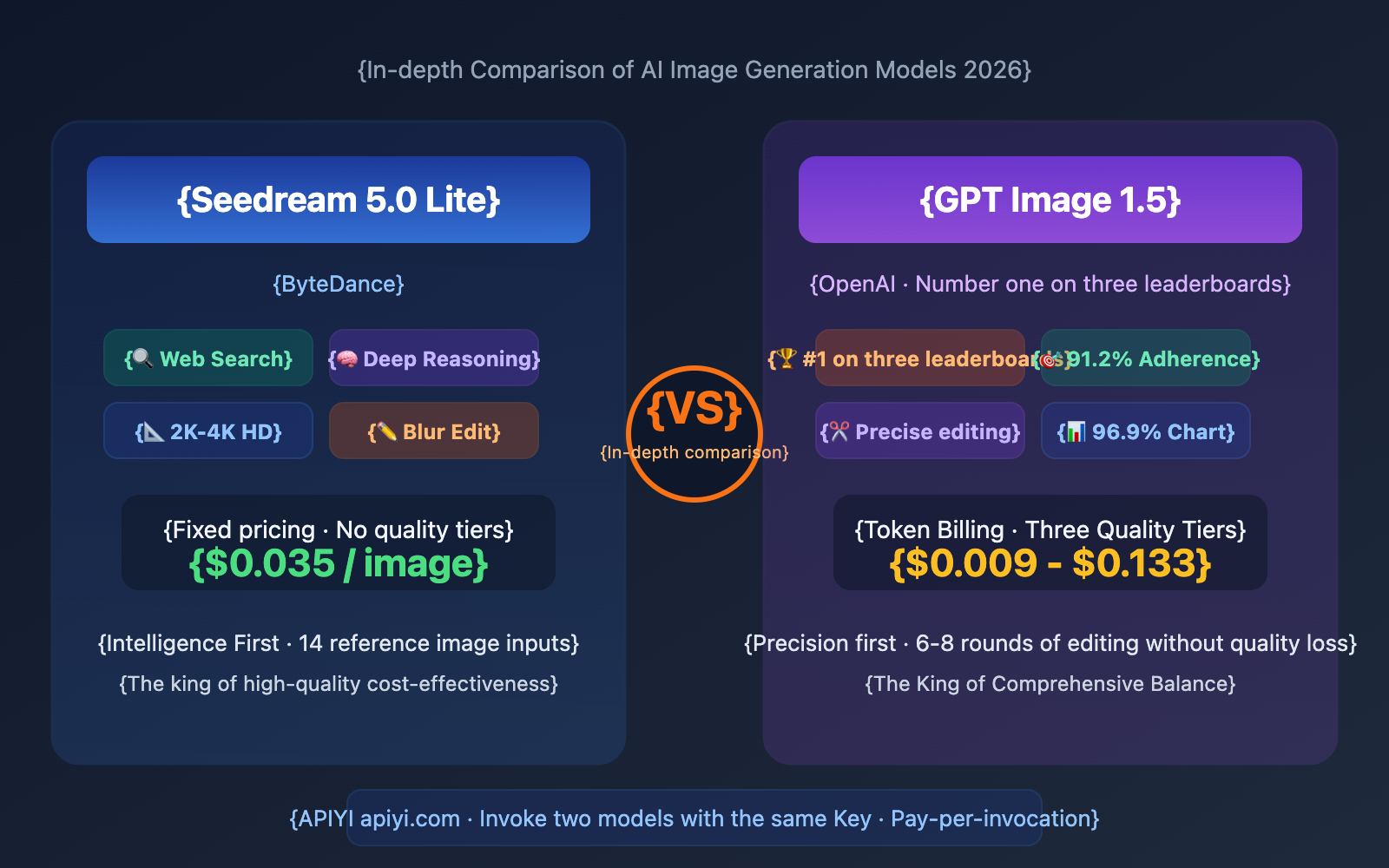
Seedream 5.0 vs GPT Image 1.5: Core Differences at a Glance
Let's look at the key data to help you decide in 30 seconds:
| Comparison Dimension | Seedream 5.0 Lite | GPT Image 1.5 | Winner |
|---|---|---|---|
| Developer | ByteDance | OpenAI | — |
| Pricing (Medium Quality) | $0.035/img (Fixed) | ~$0.034/img (Medium) | Roughly Equal |
| Pricing (High Quality) | $0.035/img (Fixed) | ~$0.133/img (High) | Seedream (74% cheaper for HQ) |
| Max Resolution | 2K Native, 4K AI Enhanced | 1536×1024 | Seedream 5.0 |
| Web Search | ✅ Industry First | ❌ Not Supported | Seedream 5.0 |
| Deep Reasoning | ✅ Multi-step logic | ✅ Native multimodal | Both have strengths |
| Text Rendering | ⭐⭐⭐⭐ Good | ⭐⭐⭐⭐½ 85-90% accuracy | GPT Image 1.5 |
| Generation Speed | 8-15 seconds | 5-18 seconds | Roughly Equal |
| Editing Precision | Fuzzy + Precise | Precise, no quality loss (6-8 rounds) | GPT Image 1.5 |
| Reference Image Input | Up to 14 images | Multi-image support | Seedream 5.0 |
| Leaderboard Rank | MagicArena Internal | #1 on LMArena/Design/AA | GPT Image 1.5 |
| Fuzzy Intent Editing | ✅ Supported | ❌ Requires precise prompts | Seedream 5.0 |
Deep Dive: Key Differences Between Seedream 5.0 and GPT Image 1.5
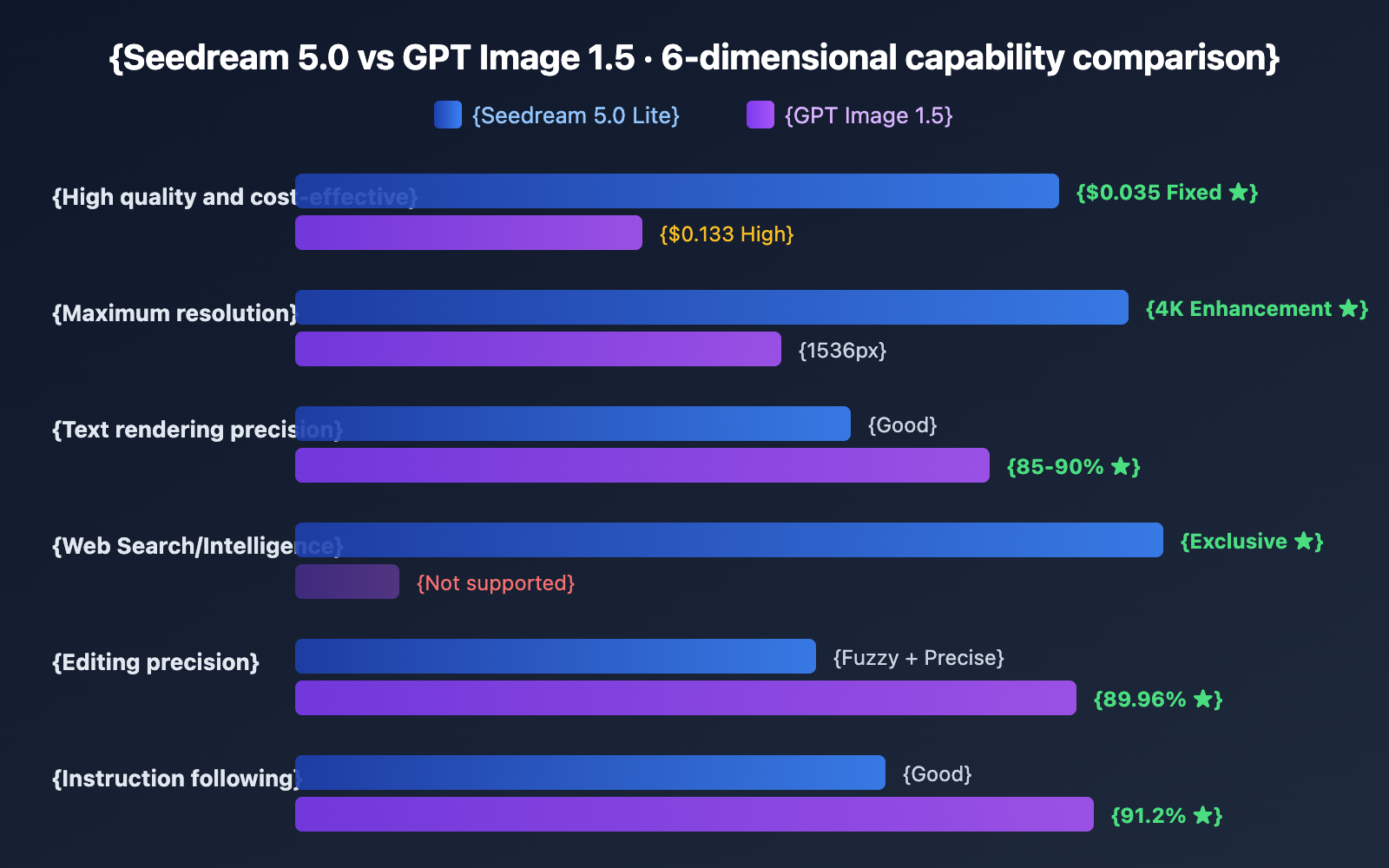
Pricing structures are worlds apart: Seedream 5.0 Lite uses a flat rate of $0.035 per image, regardless of quality settings. GPT Image 1.5 uses token-based billing, where "Low" quality costs about $0.009, "Medium" is roughly $0.034, and "High" jumps to $0.133. This means that while they're neck-and-neck for medium quality, Seedream 5.0 is a staggering 74% cheaper if you need high-quality output.
Technological paths are fundamentally different: Seedream 5.0 follows an "Intelligence First" route—focusing on web search, deep reasoning, and fuzzy intent editing. GPT Image 1.5 follows a "Precision First" route—boasting a 91.2% instruction following rate, 89.96% facial consistency during editing, and 96.9% accuracy in flowchart generation. One is "smarter," while the other is "more precise."
A noticeable gap in resolution: Seedream 5.0 offers native 2K (upgradable to 4K), while GPT Image 1.5 tops out at 1536px. For printing or large-screen displays, Seedream 5.0 has a clear advantage.
🎯 Selection Advice: These two models target different needs. We recommend integrating both via the APIYI (apiyi.com) platform and switching based on the task—use Seedream 5.0 for web search and high-resolution needs, and GPT Image 1.5 for precise editing and strict instruction following.
Seedream 5.0's Unique Edge: Web Search + High Res + Fuzzy Editing
Seedream 5.0 Web Search (Something GPT Image 1.5 Lacks)
Seedream 5.0 Lite is currently the only image generation model that supports real-time web searching. While GPT Image 1.5 has strong reasoning capabilities, its knowledge is limited by its training data cutoff, meaning it can't access the latest information.
| Test Scenario | Seedream 5.0 | GPT Image 1.5 |
|---|---|---|
| "2026 Grammy Best Album Cover Style" | ✅ Generated after searching | ❌ Based on legacy data |
| "Latest iPhone Ad Image" | ✅ Fetches latest product info | ❌ Might generate older models |
| "Today's New York Weather Real-time Scene" | ✅ Real-time weather visualization | ❌ Generic weather scene |
Seedream 5.0 Resolution Advantage
| Resolution | Seedream 5.0 | GPT Image 1.5 |
|---|---|---|
| 1K (1024px) | ✅ Native | ✅ Native |
| 1.5K (1536px) | ✅ Native | ✅ Max Native |
| 2K (2048px) | ✅ Native | ❌ Not supported |
| 4K | ✅ AI Enhanced | ❌ Not supported |
For scenarios requiring high resolution—like print materials, exhibition screens, or high-end brochures—Seedream 5.0 is the way to go.
Seedream 5.0 Fuzzy Intent + Exemplar-based Editing
| Editing Capability | Seedream 5.0 | GPT Image 1.5 |
|---|---|---|
| Precise Instruction Editing | ✅ | ✅ More precise |
| Fuzzy Intent Editing | ✅ "Make it look more premium" | ❌ Requires precise description |
| Exemplar-based Editing (A→B Learning) | ✅ | ❌ |
| Multi-round Editing without Quality Loss | Average | ✅ 6-8 rounds |
| Face Consistency | Good | ✅ 89.96% |
GPT Image 1.5's Unique Edge: Triple Leaderboard Champion + Editing Precision + Prompt Adherence
GPT Image 1.5 Leaderboard Performance
GPT Image 1.5 is currently the only image model to rank #1 across three major public leaderboards simultaneously:
| Leaderboard | GPT Image 1.5 | Description |
|---|---|---|
| LMArena Text-to-Image | ELO 1277, #1 | The most authoritative human blind test leaderboard |
| Design Arena | ELO 1344, #1 | Professional design evaluation |
| AA Arena | ELO 1272, #1 | Artificial Analysis comprehensive evaluation |
Keep in mind that being #1 on a leaderboard doesn't mean it's the strongest in every single dimension. Community feedback suggests that users still prefer the Seedream or Flux series for pure realism. GPT Image 1.5's strength lies more in its balanced overall performance and precise prompt adherence.
GPT Image 1.5 Editing Precision
GPT Image 1.5 currently offers the best performance in precise editing:
- Face Consistency 89.96%: Facial features remain almost unchanged even after multiple rounds of editing.
- 6-8 Rounds of Editing without Quality Loss: Its predecessor, GPT Image 1, could only handle 3-4 rounds.
- Logo and Trademark Protection: Accurately preserves brand identity during the editing process.
- Prompt Adherence 91.2%: Can accurately execute complex, multi-step editing instructions.
This makes GPT Image 1.5 particularly suitable for commercial design workflows that require constant fine-tuning—tasks like changing backgrounds, adjusting lighting, or swapping elements won't destroy existing details.
GPT Image 1.5 Text Rendering and Chart Generation
| Text/Chart Capability | GPT Image 1.5 | Seedream 5.0 |
|---|---|---|
| English Text Accuracy | 85-90% | Good |
| Flowchart/Chart Generation | 96.9% Accuracy | Room for improvement |
| UI Prototype Text | Clear and readable | Mostly accurate |
| Infographic Layout | Ready to use | Needs optimization |
| Chinese Text | Average | ✅ Better |
💡 Practical Tip: If you need to generate infographics, flowcharts, or UI prototypes containing a lot of English text, GPT Image 1.5's 96.9% chart accuracy is currently the highest in the industry. You can quickly test this via the APIYI (apiyi.com) platform.
Seedream 5.0 vs GPT Image 1.5: A Deep Dive into Pricing
The pricing models for these two are completely different, so you'll really need to crunch the numbers to see which fits your workflow.
Pricing Model Comparison
| Pricing Feature | Seedream 5.0 | GPT Image 1.5 |
|---|---|---|
| Billing Method | Fixed Price per Image | Token-based (Tiered by Quality) |
| Low Quality | $0.035 | ~$0.009 |
| Medium Quality | $0.035 | ~$0.034 |
| High Quality | $0.035 | ~$0.133 |
| Billing Transparency | ✅ Fixed and Predictable | ⚠️ Includes hidden reasoning token costs |
Monthly Costs for Different Quality Needs
| Monthly Volume | Seedream 5.0 | GPT 1.5 Low | GPT 1.5 Medium | GPT 1.5 High |
|---|---|---|---|---|
| 1,000 Images | $35 | $9 | $34 | $133 |
| 5,000 Images | $175 | $45 | $170 | $665 |
| 10,000 Images | $350 | $90 | $340 | $1,330 |
Key Takeaways:
- If you only need low-quality drafts, the GPT Image 1.5 Low mode is incredibly cost-effective ($0.009).
- At medium quality, the prices for both are almost identical.
- For high-quality scenarios, Seedream 5.0 is 74% cheaper, offering a massive advantage.
- Seedream 5.0's fixed pricing is more transparent, so you won't run into unexpected costs.
Combined with APIYI top-up bonuses (starting at 10% extra for a $100 top-up), the effective price for Seedream 5.0 can drop as low as $0.028 per image.
📊 Cost Strategy: A hybrid approach is the optimal solution—use GPT Image 1.5 Low ($0.009) for quick drafts and Seedream 5.0 ($0.035) for final high-quality output. This saves you 74% compared to using GPT 1.5 High for everything. You can invoke both models using the same key from APIYI (apiyi.com).
Seedream 5.0 vs GPT Image 1.5 API Quick Start
Seedream 5.0 API Invocation
curl https://api.apiyi.com/v1/images/generations \
  -H "Content-Type: application/json" \
  -H "Authorization: Bearer sk-YOUR_API_KEY" \
  -d '{
    "model": "seedream-5-0-260128",
    "prompt": "Professional commercial photography, luxury watch on a black marble surface, soft side lighting, shallow depth of field",
    "size": "3K",
    "watermark": false
}'
GPT Image 1.5 API Invocation
curl https://api.apiyi.com/v1/images/generations \
  -H "Content-Type: application/json" \
  -H "Authorization: Bearer sk-YOUR_API_KEY" \
  -d '{
    "model": "gpt-image-1.5",
    "prompt": "Professional commercial photography, luxury watch on black marble surface, soft side lighting, shallow depth of field",
    "size": "1024x1024",
    "quality": "medium"
}'
View Python Dual-Model Comparison Test Code
import requests

url = "https://api.apiyi.com/v1/images/generations"
headers = {
    "Content-Type": "application/json",
    "Authorization": "Bearer sk-YOUR_API_KEY"
}

prompt = "Futuristic city skyline at sunset, neon lights, cinematic color grading, ultra detailed"

# Seedream 5.0 Lite invocation
seedream = requests.post(url, headers=headers, json={
    "model": "seedream-5-0-260128",
    "prompt": prompt,
    "size": "3K",
    "watermark": False
}).json()

# GPT Image 1.5 invocation
gpt = requests.post(url, headers=headers, json={
    "model": "gpt-image-1.5",
    "prompt": prompt,
    "size": "1024x1024",
    "quality": "medium"
}).json()

print(f"Seedream 5.0 URL: {seedream['data'][0]['url']}")
print(f"GPT Image 1.5 URL: {gpt['data'][0]['url']}")
Get Started: Visit APIYI (apiyi.com) to register and get your API key. A single key lets you invoke both models, and you pay as you go without needing large upfront deposits.
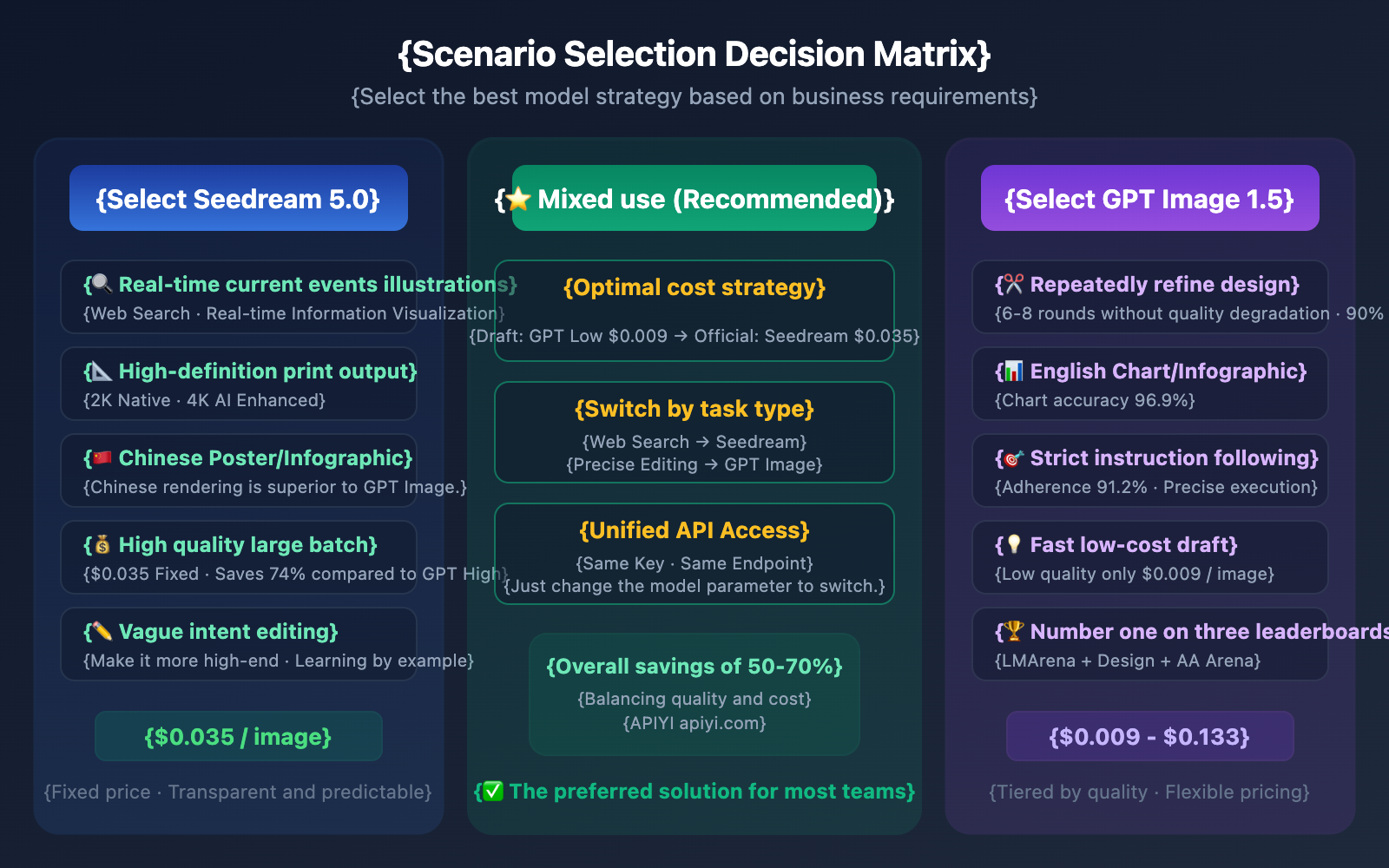
Seedream 5.0 vs GPT Image 1.5: Which One Should You Choose?
When to Choose Seedream 5.0
Scenario 1: Current Events and Real-time Content Creation
Whether you're generating images for breaking news, product launches, or trending topics, Seedream 5.0’s unique web-search capability gives it a massive edge.
Scenario 2: High-Resolution Output
For print materials, exhibition posters, or high-end brochures, Seedream 5.0 is the way to go. It offers native 2K output that can be enhanced to 4K, while GPT Image 1.5 caps out at 1536px.
Scenario 3: Chinese Language Content
If you're designing Chinese posters or infographics, Seedream 5.0 handles Chinese text rendering significantly better than GPT Image 1.5.
Scenario 4: High-Quality Bulk Generation
If you're producing over 10,000 high-quality images a month, Seedream 5.0’s flat rate of $0.035/image is 74% cheaper than GPT 1.5 High ($0.133).
When to Choose GPT Image 1.5
Scenario 1: Iterative Commercial Design
For brand VI adjustments or fine-tuning product shots, GPT Image 1.5 is excellent. It supports 6-8 rounds of editing without quality loss and maintains a face consistency of 89.96%.
Scenario 2: English Charts and Infographics
When it comes to flowcharts, architecture diagrams, or data dashboards, GPT Image 1.5 is the leader, boasting 96.9% chart accuracy and 85-90% text accuracy.
Scenario 3: Fast, Low-Cost Drafting
For creative exploration or A/B testing assets, GPT Image 1.5 Low is one of the most affordable options on the market at just $0.009/image.
Scenario 4: Strict Instruction Following
If you need to execute complex prompts with precision—like specific camera angles, lighting, composition, or color tones—GPT Image 1.5 delivers with a 91.2% instruction following rate.
FAQ
Q1: GPT Image 1.5 is ranked #1 on three different leaderboards. Does that mean it completely crushes Seedream 5.0?
Not exactly. Leaderboards like LMArena primarily measure "general preference," where GPT Image 1.5 scores very high due to its balance and instruction following. However, each model has its own strengths. Seedream 5.0 offers web search, higher resolution (2K-4K), superior Chinese rendering, and better cost-performance for high-quality output—features GPT Image 1.5 either lacks or doesn't do as well. Community feedback also suggests that users still prefer the Seedream series for pure photorealism.
Q2: How do I compare the pricing of these two models fairly?
Seedream 5.0 uses a flat rate of $0.035/image regardless of quality. GPT Image 1.5, on the other hand, has three quality tiers ($0.009 / $0.034 / $0.133). While their prices are similar at the "medium" quality level, Seedream 5.0’s $0.035 already gives you its highest quality, whereas GPT 1.5’s high-quality tier costs $0.133. We recommend choosing based on your actual needs: use GPT Low for drafts and Seedream 5.0 for final output. You can easily switch between them using the same key via the API proxy service APIYI (apiyi.com).
Q3: Can I use both models at the same time?
Absolutely. The APIYI (apiyi.com) platform allows you to use a single API key for model invocation across both models. They use a unified /v1/images/generations endpoint, so you just need to change the model parameter to switch. This hybrid strategy is currently the most recommended approach for professional workflows.
Summary
Here's the bottom line on the Seedream 5.0 vs. GPT Image 1.5 comparison:
- GPT Image 1.5 is the king of overall balance: It ranks first on three major leaderboards, boasts 91.2% prompt adherence, and offers industry-leading editing precision.
- Seedream 5.0 is the king of intelligent differentiation: It features unique web search capabilities, supports 2K-4K HD, is highly Chinese-friendly, and provides high-quality output at a fixed low price.
- Key pricing differences: Prices are roughly equal for medium quality. However, Seedream is 74% cheaper for high-quality results, while GPT is more cost-effective for low-quality drafts.
- The best strategy is a hybrid approach: Use GPT Low ($0.009) for draft exploration and Seedream ($0.035) for final production. You can switch between them seamlessly using the same API key.
Both models are now live on the APIYI (apiyi.com) platform, supporting a unified API and pay-per-use billing. We recommend testing both with the same prompt to see which fits your needs best.
📚 References
⚠️ Link Format Note: All external links use the
Resource Name: domain.comformat. This makes them easy to copy but prevents them from being clickable to avoid SEO weight loss.
-
OpenAI Official Announcement: GPT Image 1.5 release notes and technical specifications
- Link:
openai.com/index/new-chatgpt-images-is-here/ - Description: Official technical introduction to GPT Image 1.5
- Link:
-
Microsoft Foundry Benchmarks: Official performance data for GPT Image 1.5
- Link:
techcommunity.microsoft.com/blog/azure-ai-foundry-blog/introducing-openai-gpt-image-1-5/ - Description: Official benchmarks covering prompt adherence, chart generation accuracy, and more
- Link:
-
ByteDance Seed Product Page: Seedream 5.0 Lite technical specifications
- Link:
seed.bytedance.com/en/seedream5_0_lite - Description: Official technical parameters for Seedream 5.0 Lite
- Link:
-
APIYI Platform: Unified API access for Seedream 5.0 and GPT Image 1.5
- Link:
apiyi.com - Description: Access both models with a single key, pay-per-use billing, and recharge bonuses
- Link:
Author: Technical Team
Tech Talk: Feel free to share your model selection experiences in the comments. For more AI image generation comparison news, visit APIYI at apiyi.com.