On February 19, 2026, a wave of developers reported that the gemini-3-pro-image-preview model was consistently returning 503 errors—this isn't an issue with your account; it's server-side overload at Google. The error message clearly states: "This model is currently experiencing high demand." You won't be charged for these failed requests, but you also won't be able to generate any images.
Even more importantly, this isn't a one-off. Since late 2025, Gemini's image models have hit these peak-time overloads multiple times. Meanwhile, the first-gen gemini-2.5-flash-image (the original Nano Banana Pro model) and the Gemini text series are running just fine. This shows the bottleneck is specifically in the compute allocation for Gemini 3 Pro Image.
Core Value: By the end of this post, you'll know how to troubleshoot 503 errors, discover 5 reliable alternative image generation models, and learn how to implement a multi-model disaster recovery architecture.
Full Analysis of Gemini 3 Pro Image 503 Errors
What a 503 Error Actually Means
When you receive an error message like this:
{
  "error": {
    "message": "This model is currently experiencing high demand. Spikes in demand are usually temporary. Please try again later.",
    "code": "upstream_error",
    "status": 503
  }
}
This is a server-side capacity issue, not a client-side error. Unlike a 429 error (personal quota limit), a 503 indicates that the entire inference server cluster Google assigned to the Gemini 3 Pro Image Preview model is overloaded, affecting all users globally.
503 Error vs. Other Common Errors
| Error Code | Meaning | Billed? | Impact Scope | Recovery Time |
|---|---|---|---|---|
| 503 | Server Overload | ❌ No | All global users | 30-120 minutes |
| 429 | Personal Quota Exhausted | ❌ No | Current account only | Wait for quota refresh |
| 400 | Request Parameter Error | ❌ No | Current request only | Fix parameters and retry |
| 500 | Internal Server Error | ❌ No | Uncertain | Usually a few minutes |
Why 503 Errors Happen So Frequently
Gemini 3 Pro Image is currently in its Preview stage, running on a shared pool of inference servers. According to community monitoring data, the 503 error rate peaks during the following times:
| Time (Beijing Time) | Error Rate | Reason Analysis |
|---|---|---|
| 00:00 – 02:00 | ~35% | North America peak work hours |
| 09:00 – 11:00 | ~40% | Asia-Pacific morning testing peak |
| 20:00 – 23:00 | ~45% | Global overlap peak |
| Other times | ~5-10% | Regular fluctuations |
🎯 Pro Tip: If your business relies on AI image generation, sticking to a single model isn't enough. We recommend using APIYI (apiyi.com) to access multiple image models. This allows for automatic disaster recovery switching, ensuring a single point of failure doesn't take down your service.
5 Reliable Alternatives to Gemini 3 Pro Image
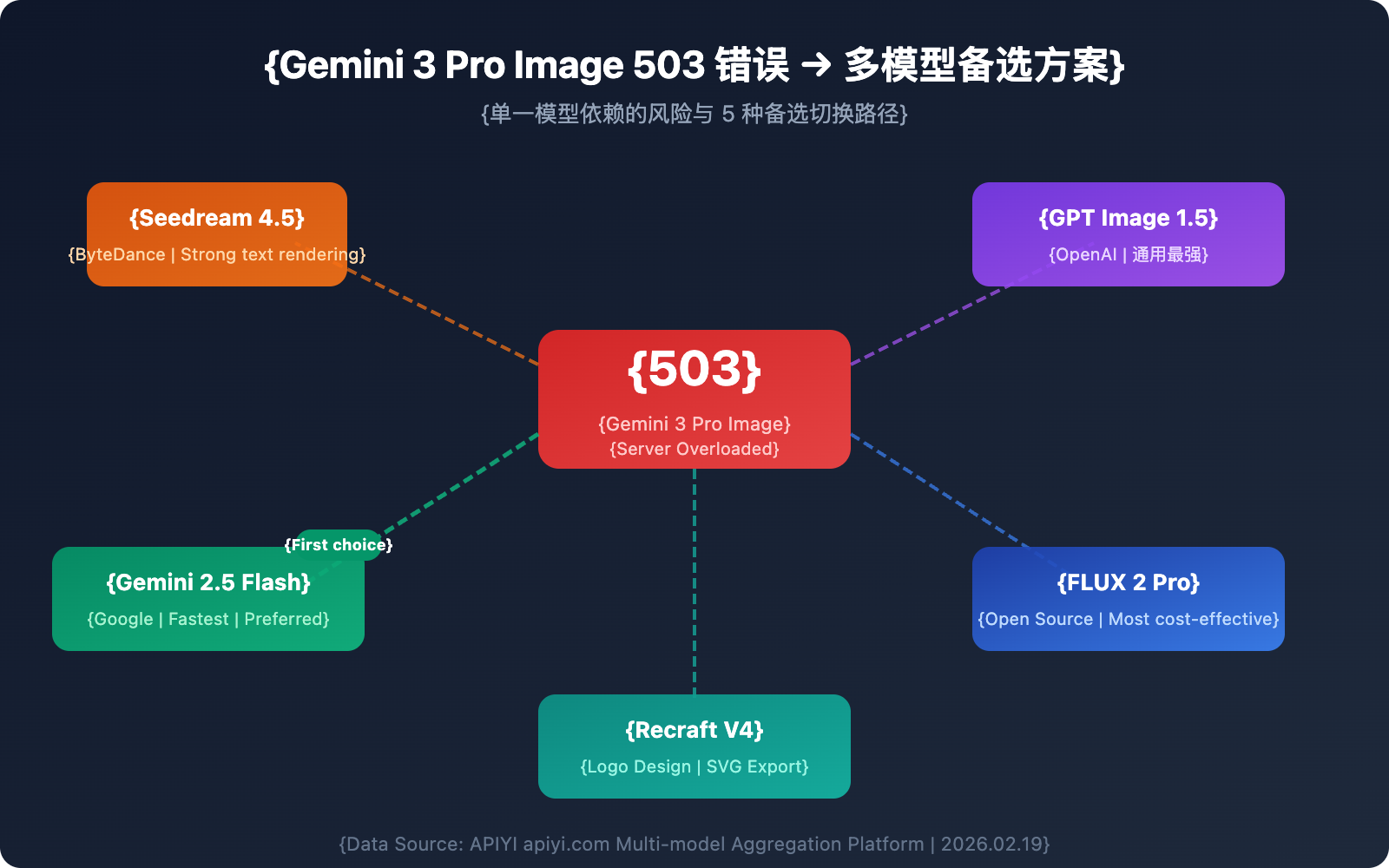
When Gemini 3 Pro Image is unavailable, these five models serve as reliable alternatives to keep your workflow moving.
Alternative 1: Seedream 4.5 (ByteDance)
Seedream 4.5 is an image generation model launched by ByteDance. It currently ranks 10th on the LM Arena leaderboard with a score of 1147.
Core Strengths:
- Outstanding Text Rendering: It can accurately generate readable text within images, making it perfect for marketing materials and posters.
- High-Resolution Output: Supports up to 2048×2048 pixels, reaching 4K quality levels.
- Strong Consistency: Details of characters, objects, and environments remain consistent across multiple generated images.
- Cinematic Aesthetics: Color and composition are close to professional photography standards.
Best For: E-commerce product photos, brand marketing assets, and images requiring precise text rendering.
Worth Noting: Seedream 5.0 is expected to launch on February 24, 2026, adding web search, example-based editing, and logical reasoning capabilities.
Alternative 2: GPT Image 1.5 (OpenAI)
Released by OpenAI in December 2025, this is currently one of the strongest text-to-image models for general-purpose scenarios.
Core Strengths:
- Precise Editing: You can upload an image and modify specific parts with high precision without affecting other elements.
- Rich World Knowledge: It can infer scene details based on context (e.g., entering "Bethel, NY, 1969" will correctly infer the Woodstock Festival).
- Clear Text Rendering: Features precise typography and high contrast.
- Speed Boost: It's 4x faster than GPT Image 1.0.
Pricing: $0.04–$0.12 per image (depending on quality settings), which is about 20% cheaper than GPT Image 1.0.
Alternative 3: FLUX 2 Pro (Black Forest Labs)
The FLUX series is a benchmark in the open-source image generation field. FLUX 2 Pro strikes an excellent balance between quality and cost-effectiveness.
Core Strengths:
- High Value: At approximately $0.03 per image, it's the most economical high-quality choice.
- Mature Open-Source Ecosystem: Supports private deployment, ensuring data security.
- Active Community: A massive number of fine-tuned models and LoRAs are available.
- Batch Processing Friendly: Ideal for large-scale image generation tasks.
Best For: Bulk content production, budget-sensitive projects, and enterprises requiring private deployment.
Alternative 4: Gemini 2.5 Flash Image (Nano Banana Pro Gen 1)
While part of the Google ecosystem, it uses a different architecture. When Gemini 3 Pro Image goes down, this model is usually unaffected.
Core Strengths:
- Fastest Speed: Takes about 3–5 seconds per image, significantly faster than other models.
- High Stability: During the Preview phase, server load is lower; 503 errors usually recover within 5–15 minutes.
- Complements Gemini 3: Its independent architecture means there's no single point of failure between the two.
- Low Cost: Friendly pricing makes it suitable for high-frequency calls.
Best For: Real-time applications requiring high speed and as the primary fallback for Gemini 3.
Alternative 5: Recraft V4
Recraft V4 ranks first in HuggingFace benchmarks and is particularly skilled at Logo and branding design.
Core Strengths:
- Best for Logo Design: Widely recognized as the top AI logo generator in 2026.
- SVG Export Support: Generates vector graphics that are infinitely scalable.
- Brand Style Tools: Features built-in brand color palettes and style consistency controls.
- Professional Design Output: Suitable for formal commercial and design use.
Best For: Logo design, brand visuals, and scenarios requiring vector output.
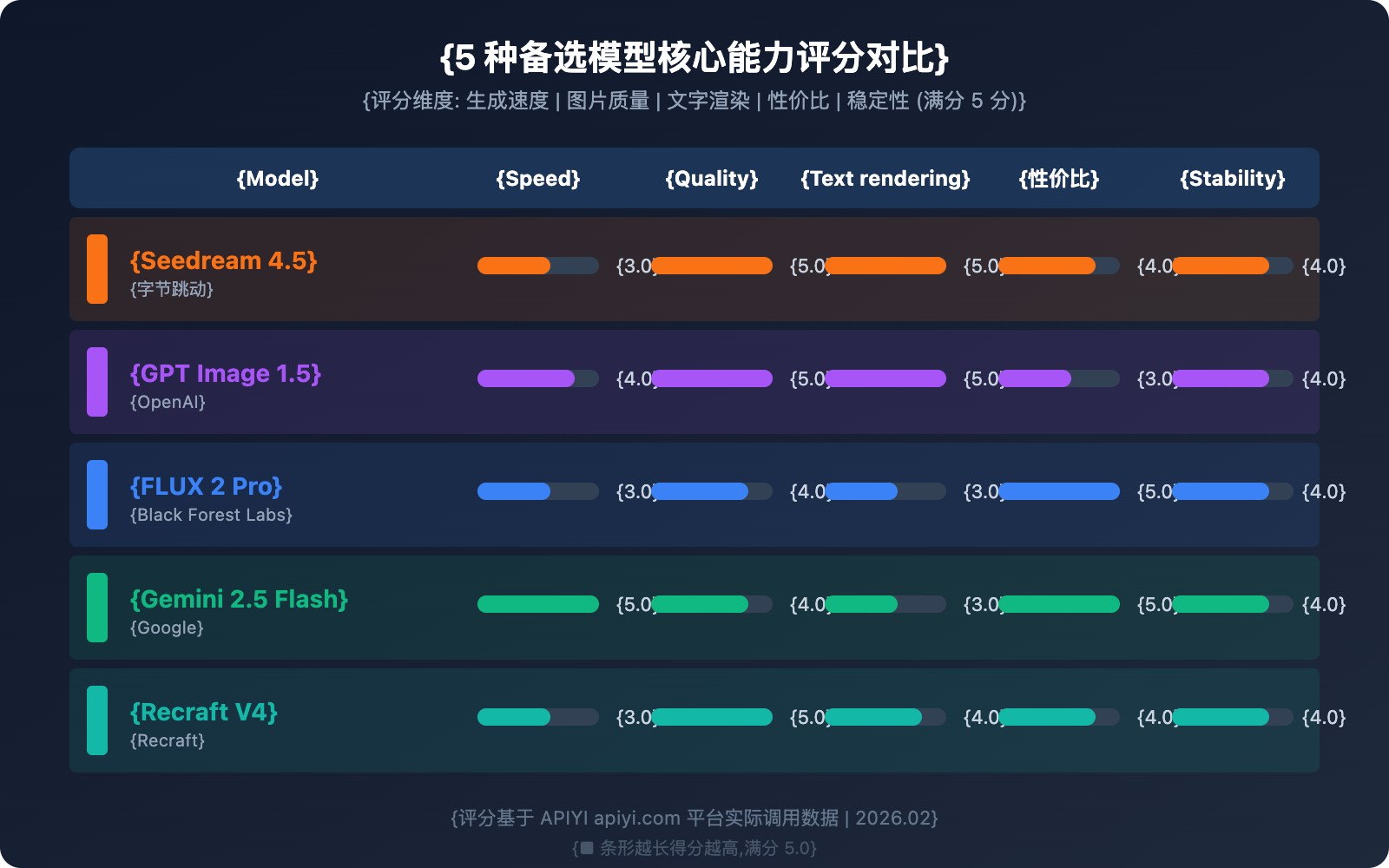
Comparison of the 5 Alternatives
| Model | Speed | Quality | Price | Text Rendering | Stability | Available Platforms |
|---|---|---|---|---|---|---|
| Seedream 4.5 | ⭐⭐⭐ | ⭐⭐⭐⭐⭐ | ~$0.04/img | ⭐⭐⭐⭐⭐ | ⭐⭐⭐⭐ | APIYI (apiyi.com), etc. |
| GPT Image 1.5 | ⭐⭐⭐⭐ | ⭐⭐⭐⭐⭐ | $0.04-0.12/img | ⭐⭐⭐⭐⭐ | ⭐⭐⭐⭐ | APIYI (apiyi.com), etc. |
| FLUX 2 Pro | ⭐⭐⭐ | ⭐⭐⭐⭐ | ~$0.03/img | ⭐⭐⭐ | ⭐⭐⭐⭐ | APIYI (apiyi.com), etc. |
| Gemini 2.5 Flash | ⭐⭐⭐⭐⭐ | ⭐⭐⭐⭐ | Extremely Low | ⭐⭐⭐ | ⭐⭐⭐⭐ | APIYI (apiyi.com), etc. |
| Recraft V4 | ⭐⭐⭐ | ⭐⭐⭐⭐⭐ | ~$0.04/img | ⭐⭐⭐⭐ | ⭐⭐⭐⭐ | APIYI (apiyi.com), etc. |
Multi-Model Automatic Disaster Recovery Architecture Design
Just knowing the alternatives isn't enough; a real production environment needs an automated disaster recovery switching mechanism. Here's a proven multi-model disaster recovery architecture.
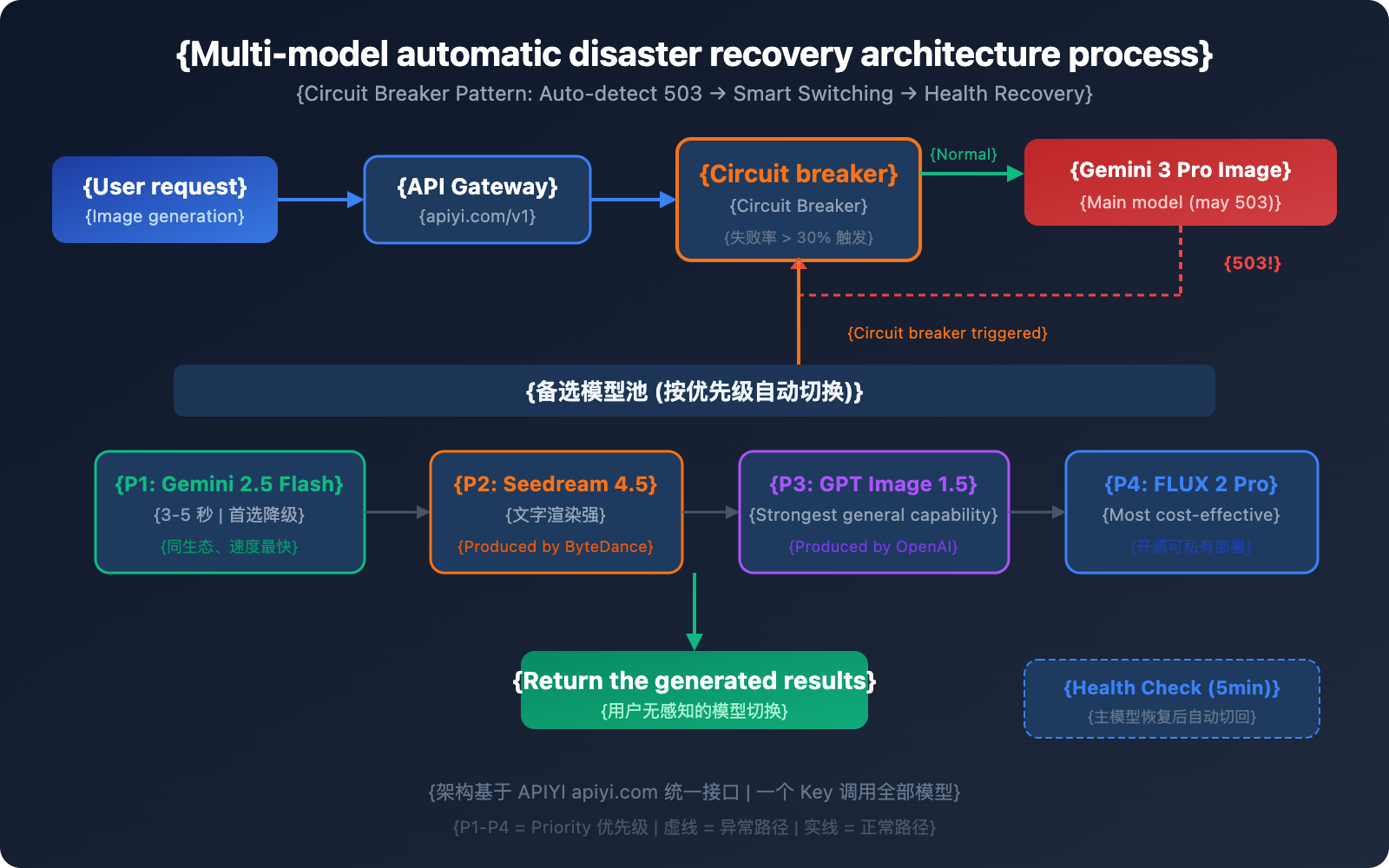
Core Architecture: The Circuit Breaker Pattern
A Circuit Breaker tracks failure rates through a sliding window. When the failure rate exceeds a certain threshold, it automatically switches to a fallback model:
import openai
import time

# Multi-model disaster recovery configuration
MODELS = [
    {"name": "gemini-3-pro-image-preview", "priority": 1},
    {"name": "gemini-2.5-flash-image", "priority": 2},
    {"name": "seedream-4.5", "priority": 3},
    {"name": "gpt-image-1.5", "priority": 4},
]

client = openai.OpenAI(
    api_key="YOUR_API_KEY",
    base_url="https://api.apiyi.com/v1"  # APIYI unified interface; one key calls all models
)

def generate_with_fallback(prompt, models=MODELS):
    """Multi-model disaster recovery image generation"""
    for model in models:
        try:
            response = client.images.generate(
                model=model["name"],
                prompt=prompt,
                size="1024x1024"
            )
            return {"success": True, "model": model["name"], "data": response}
        except Exception as e:
            if "503" in str(e) or "overloaded" in str(e):
                print(f"[Failover] {model['name']} unavailable, switching to the next model")
                continue
            raise e
    return {"success": False, "error": "All models are unavailable"}
View full Circuit Breaker implementation code
import openai
import time
from collections import deque
from threading import Lock

class CircuitBreaker:
    """Model Circuit Breaker - Automatically detects failures and switches"""

    def __init__(self, failure_threshold=0.3, window_size=60, recovery_time=300):
        self.failure_threshold = failure_threshold  # 30% failure rate triggers circuit breaking
        self.window_size = window_size              # 60-second sliding window
        self.recovery_time = recovery_time          # 300-second recovery wait time
        self.requests = deque()
        self.state = "closed"  # closed=normal, open=broken, half_open=recovering
        self.last_failure_time = 0
        self.lock = Lock()

    def record(self, success: bool):
        with self.lock:
            now = time.time()
            self.requests.append((now, success))
            # Clean up expired records
            while self.requests and self.requests[0][0] < now - self.window_size:
                self.requests.popleft()
            # Check failure rate
            if len(self.requests) >= 5:
                failure_rate = sum(1 for _, s in self.requests if not s) / len(self.requests)
                if failure_rate >= self.failure_threshold:
                    self.state = "open"
                    self.last_failure_time = now

    def is_available(self) -> bool:
        if self.state == "closed":
            return True
        if self.state == "open":
            if time.time() - self.last_failure_time > self.recovery_time:
                self.state = "half_open"
                return True
            return False
        return True  # half_open allows probe requests


class MultiModelImageGenerator:
    """Multi-model disaster recovery image generator"""

    def __init__(self, api_key: str):
        self.client = openai.OpenAI(
            api_key=api_key,
            base_url="https://api.apiyi.com/v1"  # APIYI unified interface
        )
        self.models = [
            {"name": "gemini-3-pro-image-preview", "priority": 1},
            {"name": "gemini-2.5-flash-image", "priority": 2},
            {"name": "seedream-4.5", "priority": 3},
            {"name": "gpt-image-1.5", "priority": 4},
            {"name": "flux-2-pro", "priority": 5},
        ]
        self.breakers = {m["name"]: CircuitBreaker() for m in self.models}

    def generate(self, prompt: str, size: str = "1024x1024"):
        """Multi-model disaster recovery generation with circuit breaker"""
        for model in self.models:
            name = model["name"]
            breaker = self.breakers[name]

            if not breaker.is_available():
                print(f"[Circuit Open] {name} is broken, skipping")
                continue

            try:
                response = self.client.images.generate(
                    model=name,
                    prompt=prompt,
                    size=size
                )
                breaker.record(True)
                print(f"[Success] Generation complete using {name}")
                return {"success": True, "model": name, "data": response}
            except Exception as e:
                breaker.record(False)
                print(f"[Failed] {name}: {e}")
                continue

        return {"success": False, "error": "All models are unavailable or circuit-broken"}


# Usage Example
generator = MultiModelImageGenerator(api_key="YOUR_API_KEY")
result = generator.generate("A cute kitten napping in the sun")
if result["success"]:
    print(f"Model used: {result['model']}")
Recommended Failover Priorities
| Priority | Model | Reason for Switch | Recovery Strategy |
|---|---|---|---|
| Primary | Gemini 3 Pro Image | Best quality | Auto-recover after passing health check |
| Tier 1 Fallback | Gemini 2.5 Flash Image | Same ecosystem, fastest speed | Demote once primary recovers |
| Tier 2 Fallback | Seedream 4.5 | Comparable quality, strong text rendering | Demote once primary recovers |
| Tier 3 Fallback | GPT Image 1.5 | Strongest general capabilities | Demote once primary recovers |
| Tier 4 Fallback | FLUX 2 Pro | High cost-performance, open-source/controllable | Demote once primary recovers |
💡 Architecture Tip: By using the unified interface from APIYI (apiyi.com), you only need one API Key to call all the models mentioned above. There's no need to integrate with different providers individually, which significantly lowers the cost of implementing multi-model disaster recovery.
Availability Status Display Solutions for Consumer Products
For consumer-facing products, the frontend should provide a clear status display when a Large Language Model becomes unavailable. This is your fallback plan—you might not need it day-to-day, but it's a lifesaver when things go south, helping you slash user complaints and churn.
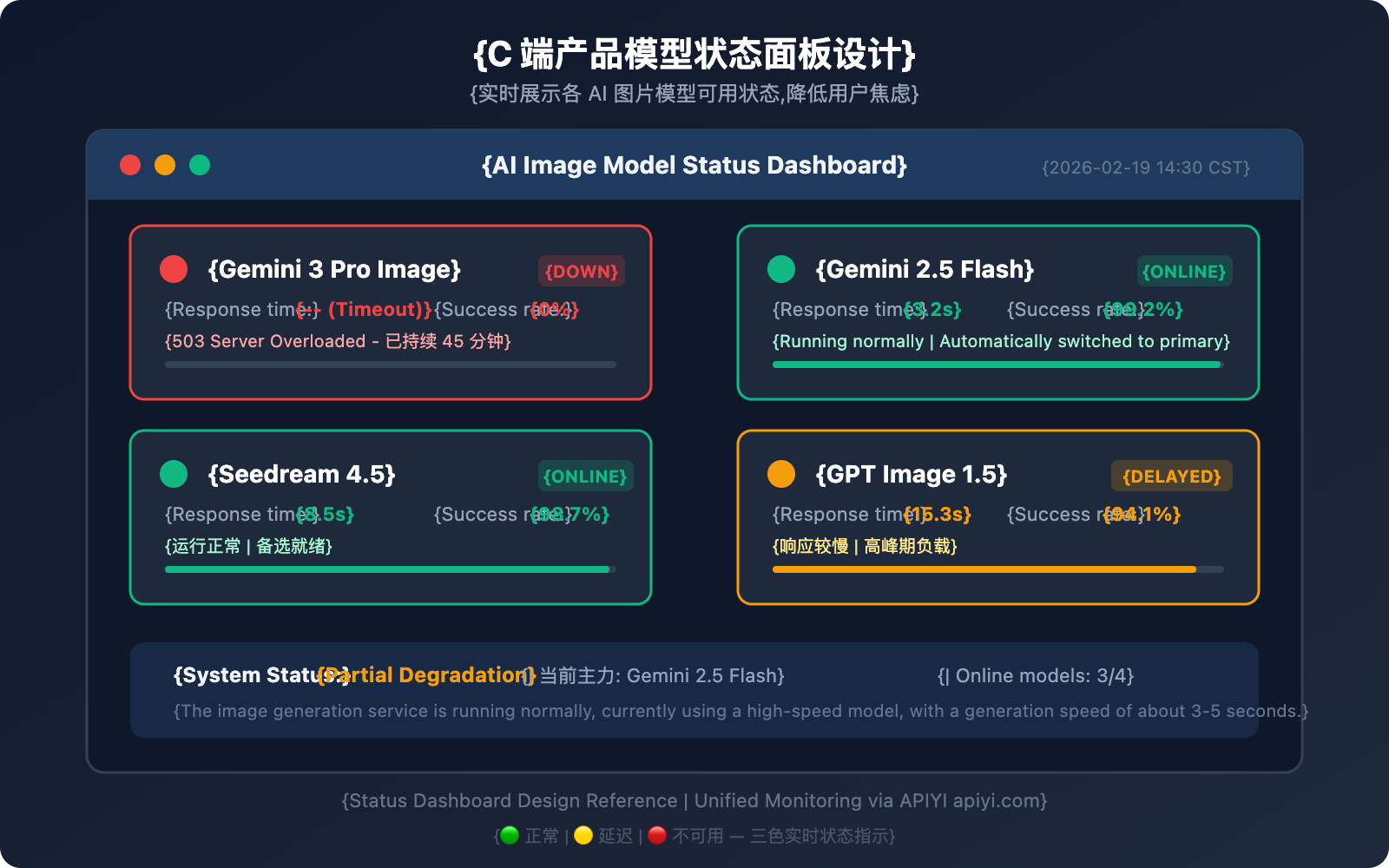
Key Design Points for Status Display
Three-Color Status Indicators:
- 🟢 Normal: Model is available, and response times are within the expected range.
- 🟡 Delayed: Model is available but responding slowly (more than 2x the normal latency).
- 🔴 Unavailable: Model is returning 503 errors or experiencing consecutive failures.
Frontend Implementation Suggestion:
// Example API call for model status check
const MODEL_STATUS_API = "https://api.apiyi.com/v1/models/status";

async function checkModelStatus() {
  const models = [
    "gemini-3-pro-image-preview",
    "gemini-2.5-flash-image",
    "seedream-4.5",
    "gpt-image-1.5"
  ];

  const statusMap = {};
  for (const model of models) {
    try {
      const start = Date.now();
      const res = await fetch(`${MODEL_STATUS_API}?model=${model}`);
      const latency = Date.now() - start;
      statusMap[model] = {
        available: res.ok,
        latency,
        status: res.ok ? (latency > 5000 ? "delayed" : "normal") : "unavailable"
      };
    } catch {
      statusMap[model] = { available: false, latency: -1, status: "unavailable" };
    }
  }
  return statusMap;
}
User Experience Optimization Strategies
| Strategy | Description | Implementation |
|---|---|---|
| Real-time Status Page | Display the availability of each model on the product page | Polling + WebSocket push |
| Auto Model Switching | Seamless backend model switching for a smooth user experience | Circuit breaker + Priority queue |
| Queueing Notifications | Show queue position and estimated wait time during peak hours | Request queue + Progress updates |
| Degradation Notice | Inform users that a fallback model is currently in use | Frontend Toast notifications |
💰 Balance Cost and Experience: With the APIYI (apiyi.com) platform, you can implement all the status checks and model switching logic mentioned above using a unified interface. No need to maintain multiple SDKs or authentication systems.
Gemini 3 Pro Image 503 Error: Emergency Response Workflow
When you run into a 503 error, follow this workflow to get things back on track:
Step 1: Confirm the Error Type
- Check if the error message contains
high demandorupstream_error. - Confirm it's a 503 and not a 429 (quota limit) or 400 (parameter error).
Step 2: Assess the Impact
- Check if Gemini 2.5 Flash Image is working (it's usually unaffected).
- Check if Gemini text models are working (they're usually unaffected).
- If all models are down, it might be a broader GCP (Google Cloud Platform) outage.
Step 3: Trigger Disaster Recovery
- If you've deployed a circuit breaker: The system will switch automatically, so no manual intervention is needed.
- If not: Manually change the
modelparameter to your backup model.
Step 4: Monitor for Recovery
- Gemini 3 Pro Image 503 errors typically resolve within 30-120 minutes.
- Once it's back up, we recommend running a few small-batch tests to confirm stability before switching back completely.
🚀 Quick Recovery: We recommend using the unified interface of the APIYI (apiyi.com) platform for disaster recovery switching. You won't need to change the
base_urlin your code—just swap themodelparameter to switch seamlessly between different models.
FAQ
Q1: Will I be charged for Gemini 3 Pro Image 503 errors?
Nope. A 503 error means the request wasn't processed by the server, so it won't incur any charges. This is different from a 200 success response—you're only billed when an image is successfully generated. This same rule applies when calling via the APIYI (apiyi.com) platform; failed requests are free.
Q2: How long do 503 errors last? How much extra will alternative models cost?
Based on historical data, Gemini 3 Pro Image 503 errors usually last between 30 to 120 minutes. The cost difference for alternatives is minimal: Seedream 4.5 is about $0.04/image, GPT Image 1.5 is around $0.04-$0.12/image, and FLUX 2 Pro is about $0.03/image. By using the APIYI (apiyi.com) platform's unified API, you can get better pricing, and the cost of switching is practically zero.
Q3: How can I tell if a 503 is a temporary overload or a long-term outage?
Keep an eye on two indicators: first, check if Gemini 2.5 Flash Image (from the same ecosystem) is working—if it is, it's likely just a local overload. Second, check the official Google status page at status.cloud.google.com for any announcements. If things aren't back to normal after 2 hours and there's no official word, it's a good idea to switch to an alternative model as your primary choice.
Q4: Is it complicated to set up a multi-model disaster recovery architecture?
If you're connecting to each provider's API individually, it definitely is—you'd have to manage multiple SDKs, auth keys, and billing systems. But with a unified interface platform like APIYI (apiyi.com), all models share the same base_url and API Key. Switching for disaster recovery is as simple as changing the model parameter, making the integration incredibly easy.
Summary: Building an Unstoppable AI Image Generation Service
Gemini 3 Pro Image 503 errors are par for the course during the Preview stage. The key is to have a multi-model backup plan ready in advance:
- Don't rely on a single model: Even Google can't guarantee 100% uptime for Preview models.
- Prioritize same-ecosystem downgrades: Gemini 2.5 Flash Image is the most cost-effective first choice for a backup.
- Build a cross-vendor model reserve: Seedream 4.5, GPT Image 1.5, and FLUX 2 Pro each have their own unique strengths.
- Deploy an automatic disaster recovery architecture: Use the circuit breaker pattern to achieve automatic switching without any manual intervention.
- Show status clearly in consumer products: Transparent status updates keep users around much better than making them wait in silence.
We recommend using APIYI (apiyi.com) to quickly validate your multi-model disaster recovery plan—one unified interface, one key, and the ability to switch between multiple models anytime.
References
-
Google AI Developers Forum: Gemini 3 Pro Image 503 Error Discussions
- Link:
discuss.ai.google.dev - Description: Community feedback and official responses from Google.
- Link:
-
Google AI Studio Status Page: Real-time Service Status
- Link:
aistudio.google.com/status - Description: Check the real-time availability of various models.
- Link:
-
Seedream 4.5 Official Page: ByteDance's Image Generation Model
- Link:
seed.bytedance.com/en/seedream4_5 - Description: Model capabilities and API documentation.
- Link:
-
OpenAI GPT Image 1.5 Documentation: The Latest Image Generation Model
- Link:
platform.openai.com/docs/models/gpt-image-1.5 - Description: Model parameters and pricing information.
- Link:
📝 Author: APIYI Team | For technical discussions, please visit APIYI (apiyi.com)
📅 Updated on: February 19, 2026
🏷️ Keywords: Gemini 3 Pro Image 503 error, AI image generation multi-model backup, disaster recovery architecture, Seedream 4.5, GPT Image 1.5