Author’s note: Starting with a 30-minute software development Agent task, this article breaks down the costs of ordinary input, cache writes, cache reads, output, and tool round trips across multiple Agent calls. It compares cache pricing from three providers and uses a 12-call example to show when caching actually saves money.
On November 9, 2026, Google Cloud announced two eighth-generation TPU systems, TPU 8tx and TPU 8i Max, and open-sourced TPU Sync for transferring KV Cache. The “memory wall in the Agent era” is back in the spotlight. Naturally, many developers are asking: As underlying KV Cache gets faster, will my Agent API bill get cheaper too?
What you’ll learn: By the end of this article, you’ll have a complete Agent cost formula, a cache pricing comparison across three providers, and a practical checklist for optimizing costs right away.
Agent API Costs Across Multiple Calls: Key Takeaways
| Item | Details |
|---|---|
| Background event | On 2026-11-09, Google announced TPU 8tx, TPU 8i Max, and TPU Sync, focusing on Agent memory and KV Cache bottlenecks |
| Developer concern | Can low-level optimizations translate into lower Agent API bills? |
| Key takeaway | Bills depend on regular input, cache writes, cache reads, output tokens, number of calls, and tool costs |
| Key variables | Whether the prefix stays stable, whether the cache TTL covers tool wait times, and whether the conversation history grows out of control |
| Who’s affected | Multi-call scenarios such as coding Agents, long-document Agents, and multi-Agent collaboration |
What Does a 30-Minute Agent Task Look Like?
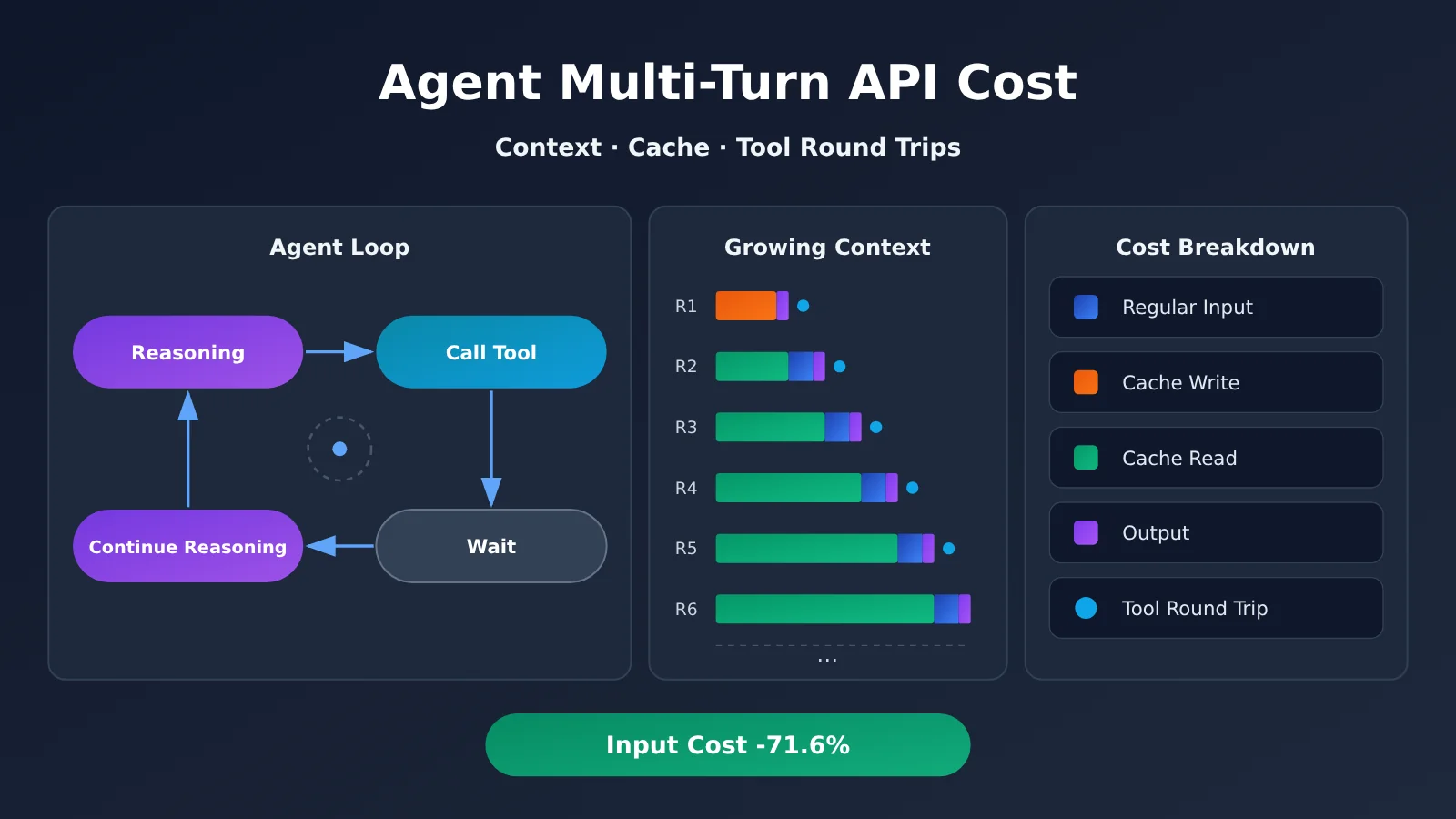
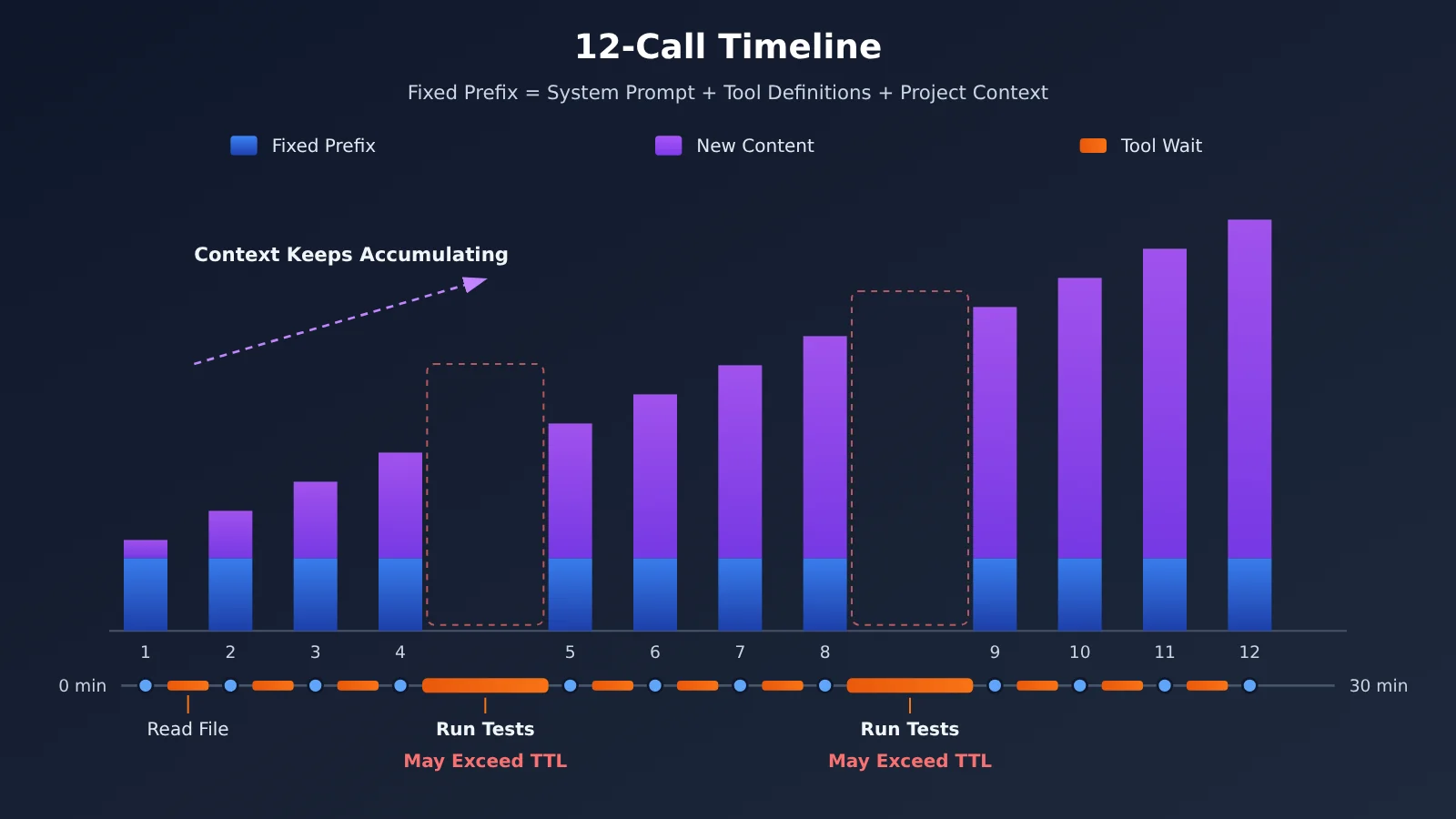
Imagine a software development Agent tasked with fixing failing tests in a module. It first reads the project structure and relevant source code, then comes up with a fix. It uses tools to edit files and run tests, waits for the results, and then reasons through any errors. Over 30 minutes, this “reason—use a tool—wait—reason” loop could happen a dozen times or more.
The problem is that Large Language Model APIs are essentially stateless. With every request, the Agent has to send the system prompt, tool definitions, project context, and the conversation history and tool outputs so far back to the model. The 12th request often includes nearly all the history from the previous 11 rounds. That’s where “recomputing the same context” comes from.
What Makes Up the Cost of Multi-Turn Agent API Calls
Break down an Agent task, and its costs fall into at least five categories. The first four are model token costs. The fifth comes from outside the model but is often overlooked.
| Cost item | What it means | How it’s billed |
|---|---|---|
| Regular input | Input Tokens that don’t hit the cache and are charged at the standard rate | Standard input price |
| Cache writes | Input used to create reusable cache entries | Some providers and models charge a higher rate than the standard input price |
| Cache reads | Input that hits an existing cache entry | Usually much cheaper than the standard input price |
| Output Tokens | Content generated by the model, including tool-call parameters | Usually the most expensive per Token; caching can’t reduce this cost |
| Tools and external execution | External services such as search, code execution, and databases | Billed separately by each service, and can increase the number of model calls |
Based on this, we can write a cost formula for a single task:
Total task cost = Σ (regular input × input price + cache writes × write price + cache reads × read price + output × output price) + tools and external execution costs
The Σ in the formula means summing the costs of every model call within the task. That means the number of calls acts as a multiplier: the more tool round trips, the more model calls—and the more often the fixed prefix is billed. Tool calls don’t just incur the tools’ own costs; they also split a single reasoning process into multiple calls, each of which has to include the context again.
The Difference Between KV Cache, Prompt Cache, and Context Compression in Multi-Turn Agent Calls
When discussing Agent costs, these three concepts are easy to confuse. They operate at different layers and affect your bill in very different ways.
| Technology | Layer | What it does | Impact on API users |
|---|---|---|---|
| KV Cache | Model inference infrastructure | Stores Key/Value states from attention computations to avoid recalculating historical tokens | Users don’t control it directly; it affects the provider’s costs and latency |
| Prompt Cache | API service layer | Reuses repeated prompt prefixes and bills separately for cache writes and reads | Shows up directly in the cache fields on your bill |
| Context compression | Application layer | Summarizes, filters, or trims historical content before passing it in | Reduces the number of tokens actually sent, but may lose details |
It’s worth noting that OpenAI’s official documentation says Prompt Cache stores KV tensors, not raw token text. So Prompt Caching can be understood as a productized, billable form of the underlying KV state reuse capability. The two aren’t entirely unrelated, but users only see the billing rules.
Context compression is different. It changes what a subsequent request “carries,” not how that content is reused. The more aggressively you compress, the fewer tokens you use—but the higher the risk that the Agent forgets important details.
Why Under-the-Hood Optimizations for Multi-Turn Agent Calls Don’t Automatically Lower Your Bill
Google’s latest TPU 8i Max doubles HBM bandwidth and on-chip SRAM. In internal tests on the Ironwood platform, TPU Sync reduced KV Cache transfer latency by more than 90%. Agent Compute Engine pauses sessions when Agents are idle and moves their working memory off the chip. These optimizations improve the provider’s resource utilization and inference latency (such as TTFT), which may mean faster responses for users.
But API prices are set by the provider as a business decision, and user bills are still calculated by token usage. Hardware efficiency gains may affect pricing over time, but there’s no automatic, proportional pass-through. Also, as of 2026-11-10, TPU 8tx and TPU 8i Max are still marked as Coming soon, with no prices announced. For developers, the thing you can control right away is your own token structure—not the hardware upstream.
Agent Multi-Turn API Costs: Comparing Cache Pricing Across Three Providers
All three major providers offer caching, but their cache triggers, TTLs, and pricing models differ significantly. The table below is based on each provider’s official documentation. Check the documentation for the specific model and API you’re using for the latest details.
| Provider | Caching mechanism | TTL options | Write pricing | Read pricing | Available platforms |
|---|---|---|---|---|---|
| OpenAI | Prompt Caching, with automatic prefix caching for supported models | 30 minutes by default for some newer models; 12 hours for some models | For models and APIs that support the relevant configuration: 1.25× the standard input price for 30-minute caching, and 2.5× for 12-hour caching. Other caching modes may not charge an additional write fee. | Typically 0.1× the standard input price; lower for some models | Official API, APIYI apiyi.com |
| Anthropic | Prompt Caching | 5 minutes by default; can be extended to 1 hour | 1.25× the standard input price for 5-minute caching, and 2× for 1-hour caching | Varies by model | Official API, APIYI apiyi.com |
| Google Gemini | Context Caching, with implicit and explicit caching | TTL can be set for explicit caching | Explicit caching has additional fees based on the number of cached tokens and storage duration | Cache hits can reduce the cost of repeated input | Official API, APIYI apiyi.com |
For example, Claude Sonnet 5.5’s official pricing is $2.00 per million tokens for standard input, $2.50 for a 5-minute cache write, $4.00 for a 1-hour cache write, and $0.10 for a cache read. Cache reads cost just 5% of standard input, which is why repeated prefixes can significantly reduce costs.
Keep in mind that OpenAI explicitly states that cache hits aren’t guaranteed every time. Gemini’s explicit caching also isn’t “free storage”—you’re charged for the storage duration itself. Caching is a conditional discount, not an automatic price reduction.
🎯 Technical recommendation: Caching capabilities, pricing rules, and response fields vary across upstream models. A unified gateway won’t automatically give every model the same caching discounts. We recommend using APIYI apiyi.com to test candidate models with the same OpenAI-compatible code, then checking the returned
usagefields and your bill.
A Real-World Cost Breakdown for Agent Multi-Turn Caching: 12 Calls
Building on the 30-minute development task from the previous section, let’s work through an example using Claude Sonnet 5.5’s official pricing. Assume:
- The task makes 12 model calls, each with 22,000 input tokens;
- 20,000 tokens are repeated system prompts, tool definitions, and project context;
- Each call adds 2,000 new tokens;
- A 1-hour cache is used, and all subsequent requests successfully reuse it.
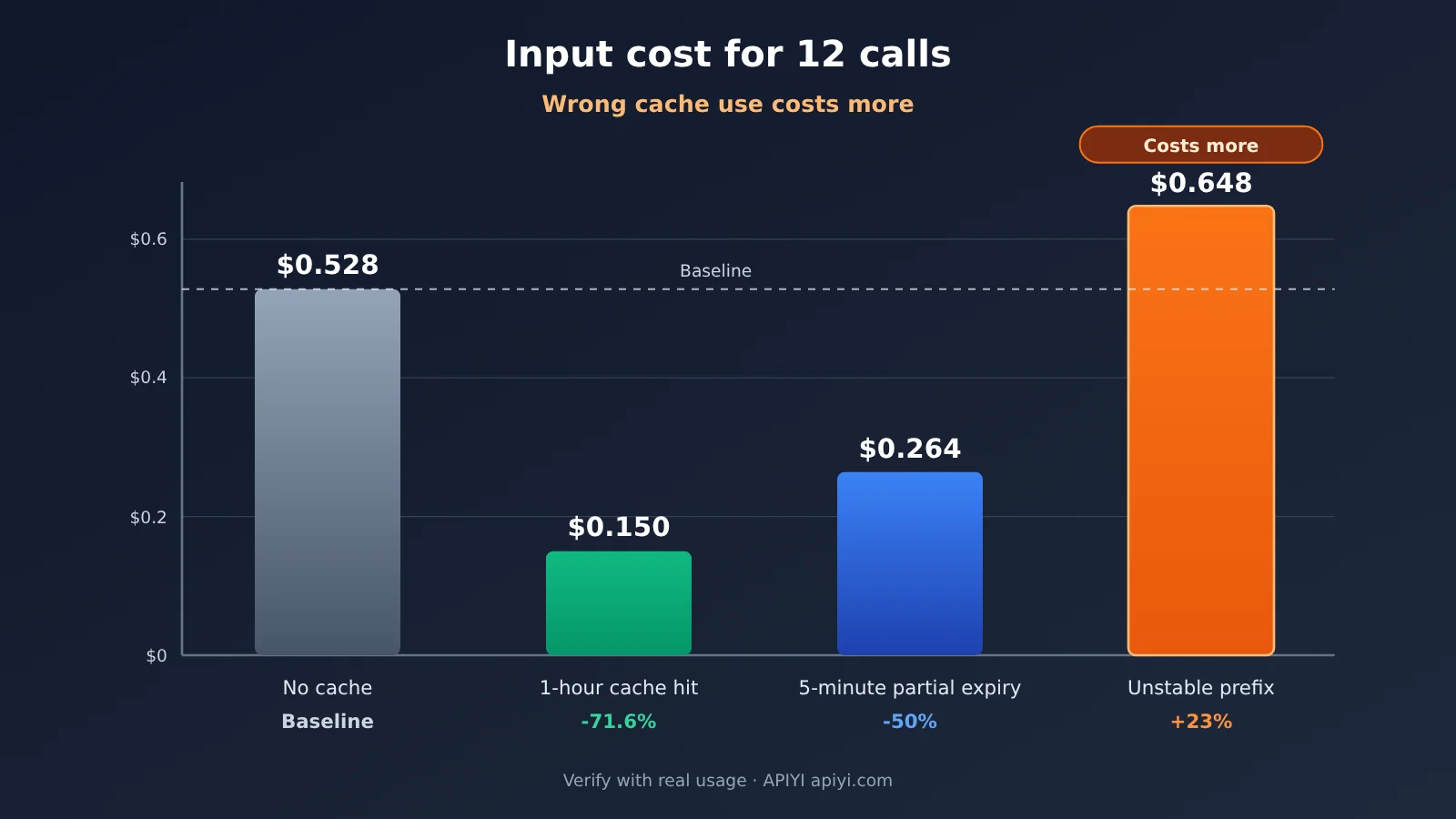
Without caching: 12 × 22,000 × $2 / 1,000,000 = $0.528.
With a 1-hour cache: The initial write of 20,000 tokens costs $0.080, the initial 2,000 regular input tokens cost $0.004, the next 11 cache reads cost $0.022, and the 11 subsequent additions cost $0.044. The total is $0.150, for an input cost reduction of about 71.6%.
This example only covers input tokens; it doesn’t include output tokens, tool calls, or external service costs. In a real Agent, the conversation history also grows with each turn, but the overall takeaway holds: repeated context is one of the costs most likely to balloon during multi-turn Agent calls.
How Cache Expiration, Prefix Changes, and TTL Affect Agent Costs
The example above assumes ideal conditions. Using the same prices, let’s look at three common scenarios where things don’t go as planned. (The figures below are illustrative scenarios calculated using the official rates.)
| Scenario | Assumption | Input cost | Compared with no caching |
|---|---|---|---|
| No caching | All 12 calls billed at the regular input rate | $0.528 | Baseline |
| 1-hour cache, all hits | 1 write, 11 reads | $0.150 | About 71.6% saved |
| 5-minute cache, all hits | Write rate of $2.50, 11 reads | $0.120 | About 77.3% saved |
| 5-minute cache, partial expiration | Tool wait times out, resulting in 4 writes and 8 reads | $0.264 | About 50% saved |
| Unstable prefix | Prefix changes every time, so all 12 calls are billed as 5-minute cache writes | $0.648 | About 23% more |
Here are a few takeaways you can use directly when making decisions:
- Set the TTL to cover tool wait times: A 5-minute cache has a lower write rate, but if a test run or human approval takes more than 5 minutes, the cache expires and has to be written again, significantly reducing the savings.
- A stable prefix matters more than the TTL: Putting timestamps or random IDs at the beginning of the prompt prevents cache hits. In modes that charge a write premium, caching can actually increase your bill.
- A longer TTL isn’t always better: The 1-hour write rate is 1.6 times the 5-minute rate, so it’s only worth it when the interval between calls might actually exceed 5 minutes.
How to Lower API Costs for Multi-Turn Agent Calls
Minimal example: Track cache hits for every call
The first step to optimizing costs is to make them visible. The code below sends a request through an OpenAI-compatible interface and prints the cache-related fields from usage:
import openai

client = openai.OpenAI(
    api_key="YOUR_API_KEY",
    base_url="https://api.apiyi.com/v1"  # APIYI OpenAI-compatible interface
)

resp = client.chat.completions.create(
    model="your-model-name",  # Replace with the model you want to test
    messages=[
        {"role": "system", "content": "固定的系统提示词与工具说明……"},
        {"role": "user", "content": "本轮新增的任务内容"}
    ]
)
usage = resp.usage
details = getattr(usage, "prompt_tokens_details", None)
print("输入:", usage.prompt_tokens, "输出:", usage.completion_tokens,
      "缓存命中:", getattr(details, "cached_tokens", None))
View the full implementation: Stable prefix + per-task cost tracking
import openai
from dataclasses import dataclass, field

client = openai.OpenAI(
    api_key="YOUR_API_KEY",
    base_url="https://api.apiyi.com/v1"
)

# Fixed prefix: Put system instructions, tool definitions, and shared project context first, and keep them byte-for-byte unchanged
STABLE_PREFIX = [
    {"role": "system", "content": "你是代码修复 Agent。工具定义与项目规范如下……"},
]

@dataclass
class TaskCost:
    # Prices: USD per million tokens; fill in the official prices for the model you're using
    input_price: float
    cache_read_price: float
    output_price: float
    records: list = field(default_factory=list)

    def add(self, usage):
        details = getattr(usage, "prompt_tokens_details", None)
        cached = getattr(details, "cached_tokens", 0) or 0
        uncached = usage.prompt_tokens - cached
        cost = (uncached * self.input_price
                + cached * self.cache_read_price
                + usage.completion_tokens * self.output_price) / 1_000_000
        self.records.append({"cached": cached, "uncached": uncached,
                             "output": usage.completion_tokens, "cost": cost})

    def summary(self):
        total_in = sum(r["cached"] + r["uncached"] for r in self.records)
        hit = sum(r["cached"] for r in self.records) / max(total_in, 1)
        return {"calls": len(self.records), "cache_hit_rate": round(hit, 3),
                "total_cost": round(sum(r["cost"] for r in self.records), 4)}

def run_turn(history, new_msg, tracker, model="your-model-name"):
    # Only append new messages; don't reorder the history. Put dynamic information, such as timestamps, at the end
    history.append({"role": "user", "content": new_msg})
    resp = client.chat.completions.create(
        model=model, messages=STABLE_PREFIX + history)
    tracker.add(resp.usage)
    history.append({"role": "assistant",
                    "content": resp.choices[0].message.content})
    return resp

tracker = TaskCost(input_price=2.0, cache_read_price=0.1, output_price=0.0)
history = []
run_turn(history, "测试 test_auth 失败,报错如下……", tracker)
print(tracker.summary())
Note that the estimate above only accounts for discounted cache reads. If the model you use charges separately for cache writes, add a write-cost component based on the fields it returns. Usage field names and meanings can vary between models, so check the actual response.
🚀 Get started quickly: We recommend using the free testing credits on APIYI apiyi.com to run the tracking script above. Compare the cache hit rate and per-task cost for the same task across different models, then decide which model and TTL to use in production.
Five Ways to Optimize Costs for Multi-Turn Agent Calls
- Keep prompt prefixes stable: Put system instructions, tool definitions, and shared reference materials at the beginning. Place timestamps and dynamic user information at the end. Keep the order and fields of tool definitions consistent, too.
- Choose the right TTL: Use a short TTL for tasks with frequent calls and short intervals. For Agents that involve long testing or build periods, or wait for human approval, assess whether the write premium for a longer TTL is offset by the rewrites it avoids.
- Manage conversation history: Append context without reordering it, so you don’t break the cached prefix. Summarize lengthy tool outputs while keeping key conclusions, task status, and necessary evidence.
- Avoid unnecessary model calls: Combine tools that can run in batches into a single call. Let code handle deterministic steps instead of asking the model to decide, reducing round trips at the source.
- Monitor real-world metrics: Track uncached input, cache writes, cache reads, output tokens, cache hit rate, TTFT, and total cost for each task. Evaluate cost per task rather than cost per individual request.
How Multi-Turn Agent Calls Affect API Costs
Impact on Developers
- Shift cost analysis from “per request” to “per task”: Agent costs depend on the entire chain of calls. Looking only at the unit price can significantly underestimate the actual bill.
- Prompt engineering must account for billing structure: Prefix stability directly determines whether caching works, making prompt structure design part of cost engineering.
- Test models before choosing one: Cache discounts, TTLs, and write premiums vary by model, so switching models can significantly change the cost of the same task.
Impact on the Industry
- Infrastructure competition is centering on Agent workloads: Google’s focus on memory bandwidth, KV Cache transfers, and Agent pause-and-resume capabilities shows that multi-turn interactions and long contexts have become common workload patterns.
- Users will likely see latency improvements first: Infrastructure optimizations initially improve TTFT and throughput. Whether Token prices come down depends on providers’ pricing strategies, so developers shouldn’t factor in price cuts prematurely.
Frequently Asked Questions (FAQ)
Q1: Why are API costs for multi-turn Agent calls higher than expected?
APIs are stateless, so every call has to include the system prompt, tool definitions, and conversation history again. The more calls you make, the more often you’re billed for this repeated content. Tool round trips also increase the number of calls.
Q2: Are KV Cache and Prompt Cache the same thing?
Not exactly. KV Cache reuses state at the model inference level. Prompt Cache refers to a provider’s API-level caching and billing for reusable prefixes. OpenAI’s documentation says that the cached data consists of KV tensors. Users can only observe Prompt Cache through billing rules; they can’t directly control KV Cache.
Q3: Will API prices drop as soon as Google releases its new TPUs?
There’s no basis for assuming that. As of 2026-11-10, TPU 8tx and TPU 8i Max are still listed as Coming soon, with no prices announced. Hardware optimizations mainly improve providers’ resource utilization and latency. Whether those benefits translate into lower Token prices depends on each provider’s pricing.
Q4: Does caching always save money?
Not necessarily. If the prefix changes on every request and therefore can’t be cached, and the caching mode you use charges a premium for cache writes, your costs may be higher than if you didn’t use caching. Frequent rewrites can also reduce savings when tool wait times exceed the TTL.
Q5: How can I quickly compare caching performance across different models?
Run the same Agent task with the same workflow across multiple models, and track the cache hit rate and total cost per task. With APIYI at apiyi.com, you can call models such as OpenAI, Claude, and Gemini using a single API key. Just switch the `model` parameter to compare them.
Q6: What are the risks of context compression?
Compression changes what’s included in subsequent requests, so it may discard important details. This can cause the Agent to repeat mistakes and increase the number of calls. Also, if the compressed content is regenerated on every turn, it can break the cache prefix. Compression should be designed alongside your caching strategy.
Q7: Are caching discounts the same across all models when using a unified gateway?
No. Caching capabilities, billing rules, and returned fields depend on the upstream model. When testing with APIYI at apiyi.com, verify the caching fields and actual charges for each model separately before including them in your cost budget.
Key Takeaways: API Costs for Multi-Turn Agent Calls
- The task is the unit of cost: An Agent’s bill adds up across the entire call chain, not just a single request.
- Repeated context is the biggest cost driver: In the 12-call example, a one-hour cache cuts input costs by about 71.6%.
- Caching discounts come with conditions: Unstable prefixes or TTLs that are too short can shrink the savings—or even increase costs.
- The three providers calculate costs differently: Check the specific model’s write multiplier, read discount, and storage fees.
- Hardware optimization doesn’t automatically lower your bill: KV optimizations at the infrastructure level can first improve latency; pricing depends on the provider.
- Measure before you optimize: Use APIYI apiyi.com’s unified interface to test cache hit rates and task costs across models.
Summary
API costs for multi-turn Agent calls depend on three factors: repeated context, cache hits, and tool round trips. All three matter:
- Repeated context sets the cost baseline: the more calls you make, the more context gets repeated.
- Cache hits determine how much you save on repeated content. Prefix stability and TTL are key.
- Tool round trips add external costs and increase the number of model calls.
Google’s investment in KV Cache and the memory wall at the infrastructure level will help Agents run faster, but the part developers can control right away is their own token structure. Start with five areas: stable prefixes, appropriate TTLs, shorter conversation history, fewer calls, and task-level monitoring. Then use APIYI apiyi.com to validate each optimization with real data.
📚 References
- Google Cloud Blog – Introducing TPU 8tx and TPU 8i Max: Announcement of the eighth-generation TPU systems
- Link:
cloud.google.com/blog/topics/ai-infrastructure/tpu-8tx-and-tpu-8i-max -
About: Learn about the Agent memory wall and KV Cache
-
Google Cloud Blog – Introducing TPU Sync: An open-source library for KV Cache and weight transfer
- Link:
cloud.google.com/blog/topics/ai-infrastructure/introducing-tpu-sync-fast-kv-cache-and-weight-transfer-on-tpu -
About: Low-level KV Cache transfer optimizations and benchmarking methodology
-
OpenAI API Docs – Prompt Caching: Caching mechanisms and best practices
- Link:
platform.openai.com/docs/guides/prompt-caching -
About: Prefix caching rules, retention periods, and monitoring recommendations
-
Anthropic Docs – Prompt Caching: Cache TTL and pricing
- Link:
docs.anthropic.com/en/docs/build-with-claude/prompt-caching -
About: Write and read prices for 5-minute and 1-hour caches
-
Google AI for Developers – Context Caching: Implicit and explicit caching in Gemini
- Link:
ai.google.dev/gemini-api/docs/caching - About: Explicit cache TTL and storage costs
Author: APIYI Technical Team
Technical questions: Visit the APIYI homepage at apiyi.com to get in touch. For more integration resources, see the docs center at docs.apiyi.com.