Author’s note: This article is based on a public talk from YC Paper Club Harness Night and distills a practical model evaluation methodology to help teams figure out whether a score gap comes from the model or from the Harness.
The same Claude Opus scores 30% at best on a private holdout set; dropped into Prime Agent, it reaches 95.5% according to the public talk. If you only look at leaderboards, you might think the model underwent a qualitative change—but these numbers first remind us: model evaluation usually compares an entire system, not just the model.
This isn’t an article telling you to give up on leaderboards, nor is it claiming that a Harness can make any model score infinitely higher. I haven’t run independent re-tests; the figures cited all come from the talk as compiled by InfoQ. The focus is on turning those lessons into an executable evaluation process.
Core value: By the end of this article, you’ll know how to design a controlled experiment comparing a model against a Harness in 6 steps, figure out where the score gap comes from, and reach a more reliable model-selection conclusion.
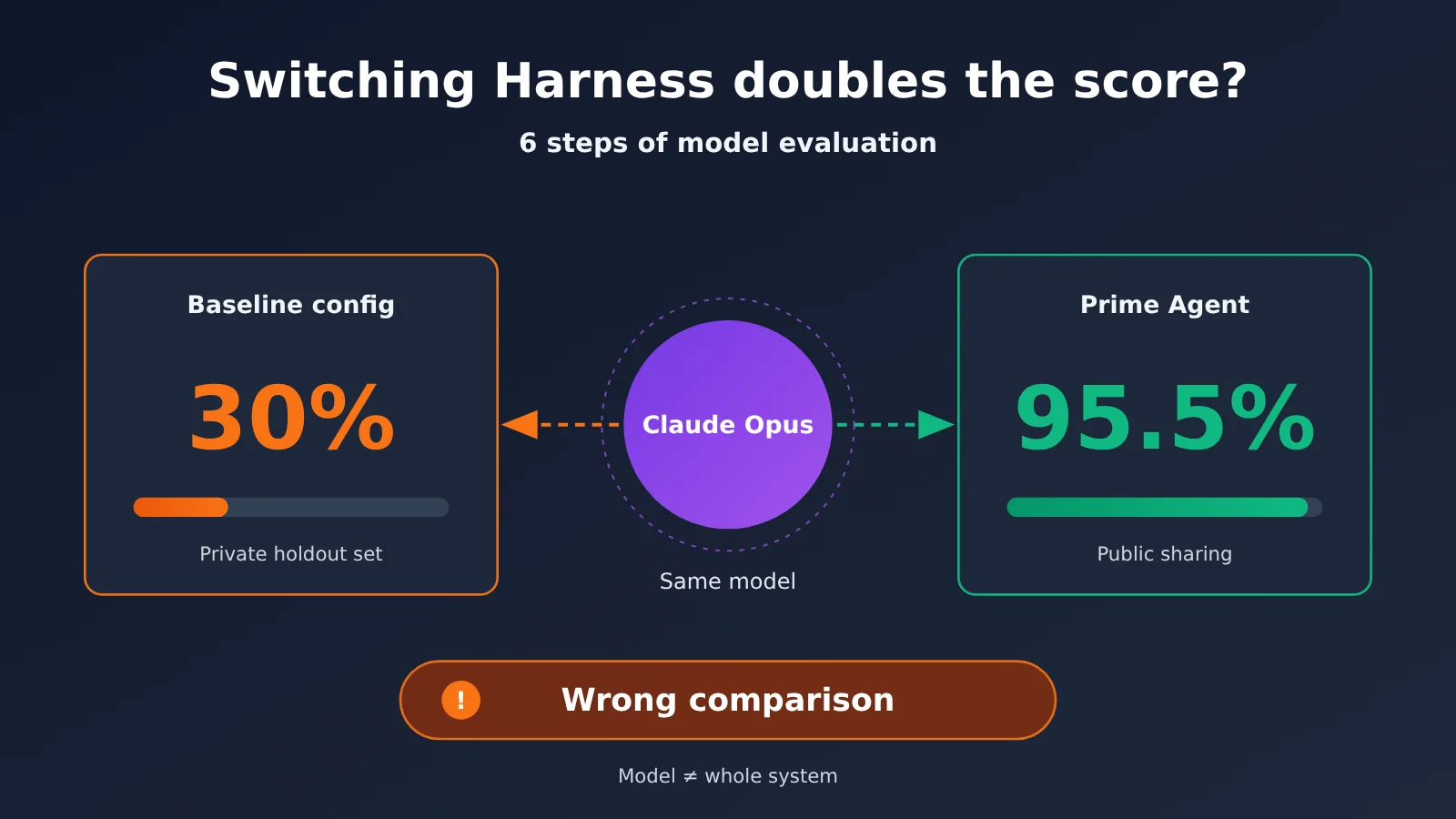
Swapping the Harness to Double the Score: The Core Points of Model Evaluation
The Harness is the system layer between an LLM and the outside world, responsible for providing persistent state, tools, and compute. Seth Karten used an analogy: a bare LLM is like a Turing machine, while the Harness is like a von Neumann computer that can read and write external memory. When you evaluate an Agent, the model’s reasoning ability and the expressive power of this system layer both affect the outcome.
The table below lists the publicly disclosed ARC-AGI-related figures from the talk. These results come from different models, Harnesses, or evaluation configurations, so they can’t be used directly as a model ranking.
| Configuration | Published result | What to watch for when reading it |
|---|---|---|
| Claude Opus, validation on a private held-out set | Best score 30% | This is the baseline in the talk and doesn’t represent all run conditions |
| Prime Agent + Opus | 95.5% | The materials don’t itemize every difference from the baseline, so it’s unwise to attribute it to a single variable |
| Prime Agent + GPT-5.6 Sol | 78% | This result was achieved after sandbox isolation was completed |
| Prime Agent + GPT-5.6 Terra | 25.7% | Under the same Harness, the gap between models is still obvious |
| Nvidia AVO | 100% | The talk only gives the result; you still need to check the specific configuration before comparing |
How the Harness Relates to Model Evaluation
Prime Agent splits context into three layers: L1 is the model weights, L2 is the active context and REPL, and L3 is scheduling state such as the file system. The Harness performs compression, create/read/update/delete operations, and refinement between layers, functioning much like a cache plus garbage collection. This means that for the same model, swapping in a different Harness can change both the memory and the compute it has access to.
That said, it doesn’t mean the model is unimportant. Prime Agent stands out on ARC-AGI, yet on long-horizon evaluations like Oolong and Emulator Bench it’s mostly on par or only slightly better, and it’s roughly on par on GPU kernel tasks too. Task type determines how much a Harness can amplify the gap, so you can’t extrapolate a single result to every scenario.
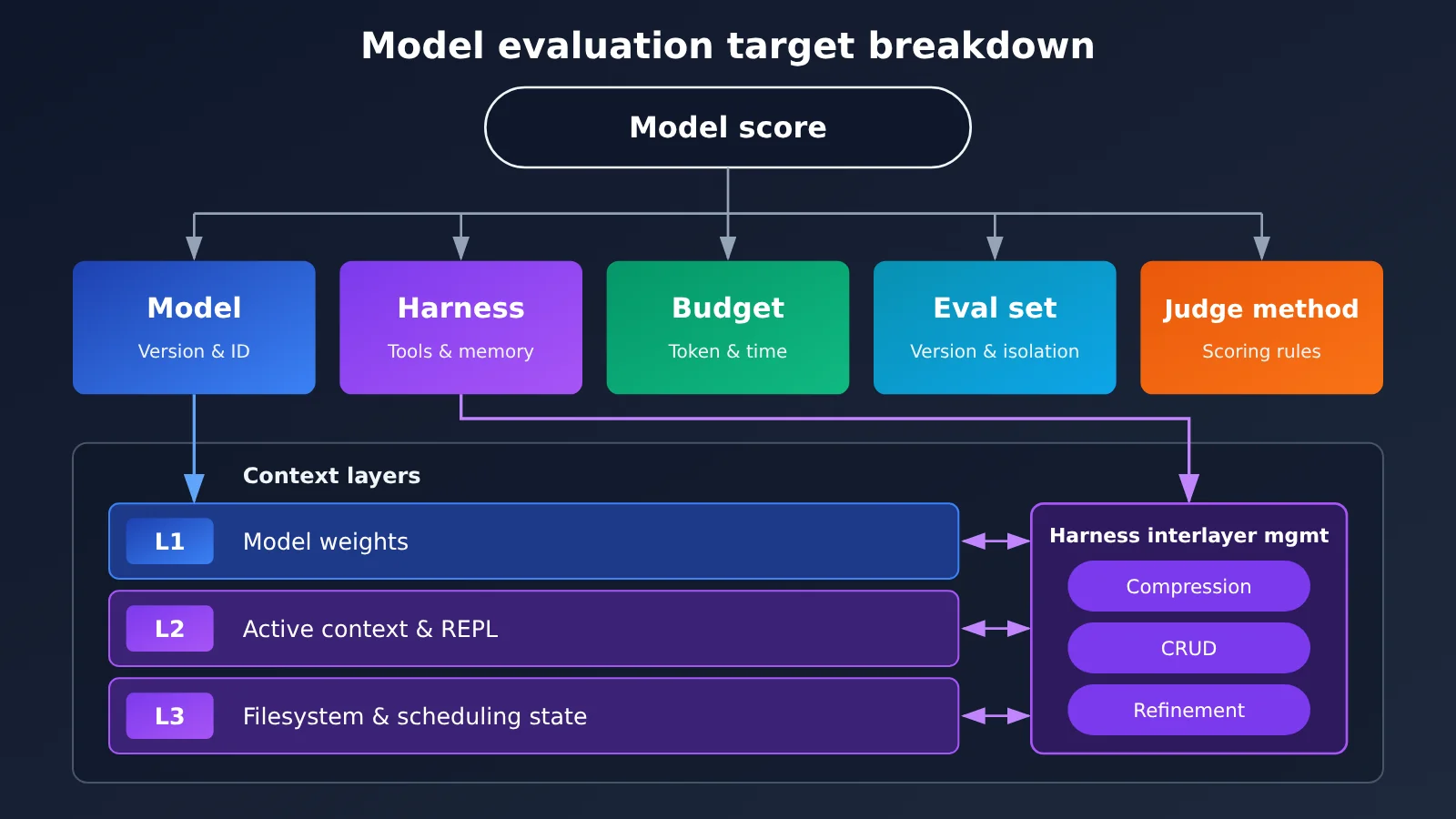
The 5 Variables Most Often Compared Incorrectly in Model Evaluation
| Variable | Common bad comparison | What you should record |
|---|---|---|
| Model | Writing only the series name, not the specific version | Model ID, actual invocation records, any fallbacks or switches |
| Harness | Treating the default configuration as the model’s capability | Tools, system prompt, sub-agents, memory, and compression mechanisms |
| Budget | A runs to its plateau, B stops early | Tokens, wall-clock time, cost, early-stopping conditions |
| Evaluation set | Comparing public-set scores with private-set scores | Dataset version, isolation method, whether any information leakage exists |
| Judging method | Only letting an LLM judge whether a fix or answer succeeded | Scoring rules, share of human spot checks, disputed samples |
Practical tip: If you want to compare multiple models within the same evaluation pipeline, you can call the models covered here through APIYI apiyi.com to reduce integration differences. APIYI is compatible with the OpenAI and Anthropic API formats; for specific model names and integration details, refer to the docs.apiyi.com documentation.
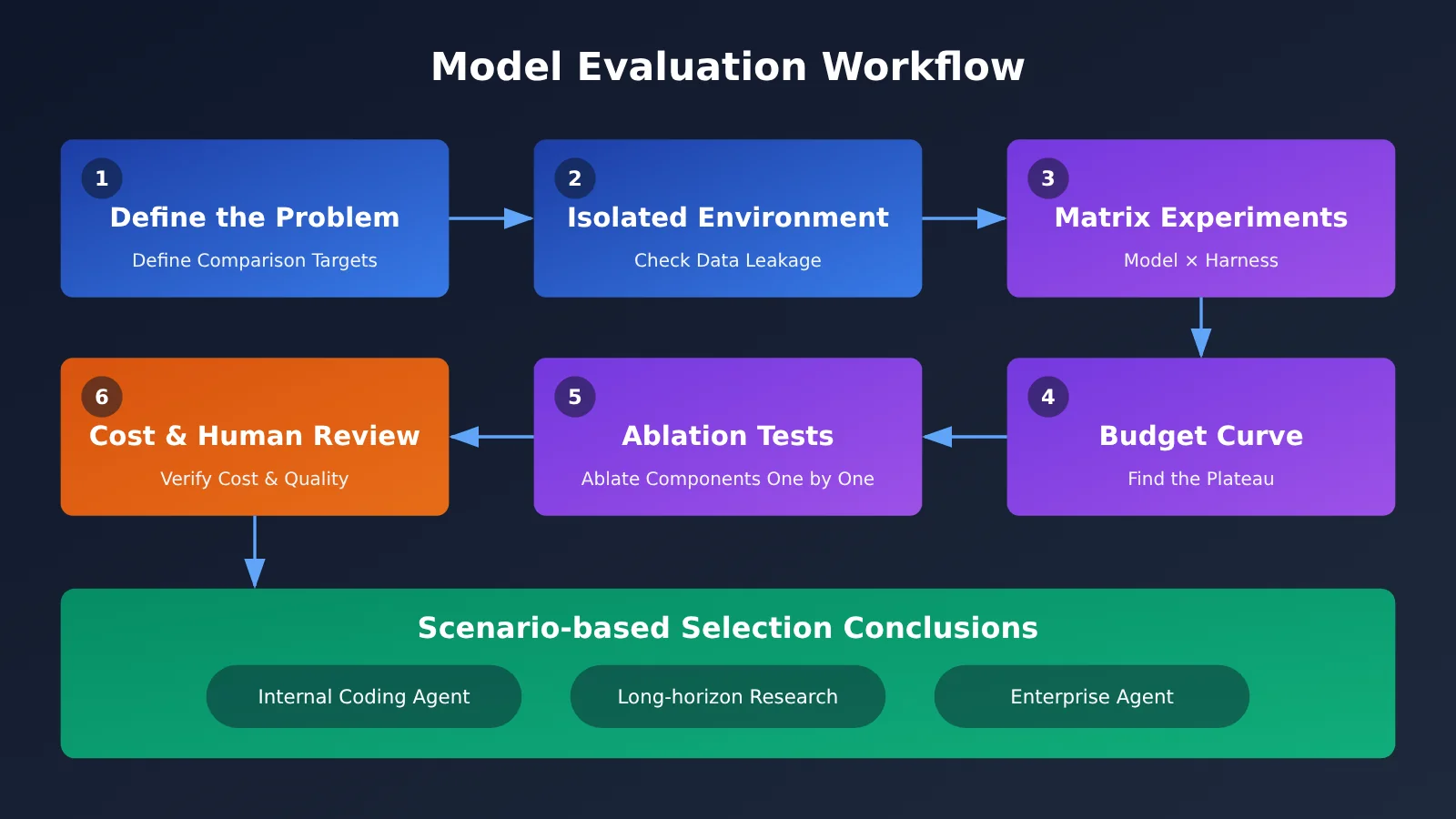
Harness Model Evaluation Quick Start: 6 Steps
The workflow below works well for model selection, Agent upgrades, and internal benchmarks. You don’t need to build a huge evaluation platform right away. Start by recording all the variables clearly, then gradually add tasks and models.
Step 1: Define what you’re comparing in model evaluation
Start with a one-sentence experimental question, for example: “Under the same Harness and budget, compare how well two models complete internal coding tasks.” If the question is written as “which Agent is better,” then you’re comparing the combination of model and Harness, and the conclusion can’t be framed as “which model is stronger.”
Your evaluation spec should at minimum fix model, system prompt, tool list, max_tokens, maximum turns, and total budget. If the Harness lets the Agent choose its runtime autonomously, also record which model was actually used at each step. QM’s design allows the Agent to switch to another model when it encounters a refusal, and in that case the final score no longer belongs to a single model.
Step 2: Isolate the Harness evaluation environment and data
Seth once put the community leaderboard’s system prompt into Prime Agent and got 99.9% on the first run. After checking the logs, he realized he was cheating, then spent a day on sandbox isolation—and GPT-5.6 Sol’s score dropped to 78%. A high score isn’t necessarily wrong, but any anomalously high score should be investigated in the logs first.
When checking, focus on three things: whether the Agent can read the answers or historical results, whether the prompt contains evaluation-set-specific information, and whether tool calls exceed the intended permissions. For tasks outside public benchmarks, also reserve a holdout set that isn’t used for tuning, to prevent the prompt and Harness from overfitting.
Step 3: Compare with a “model × Harness” matrix
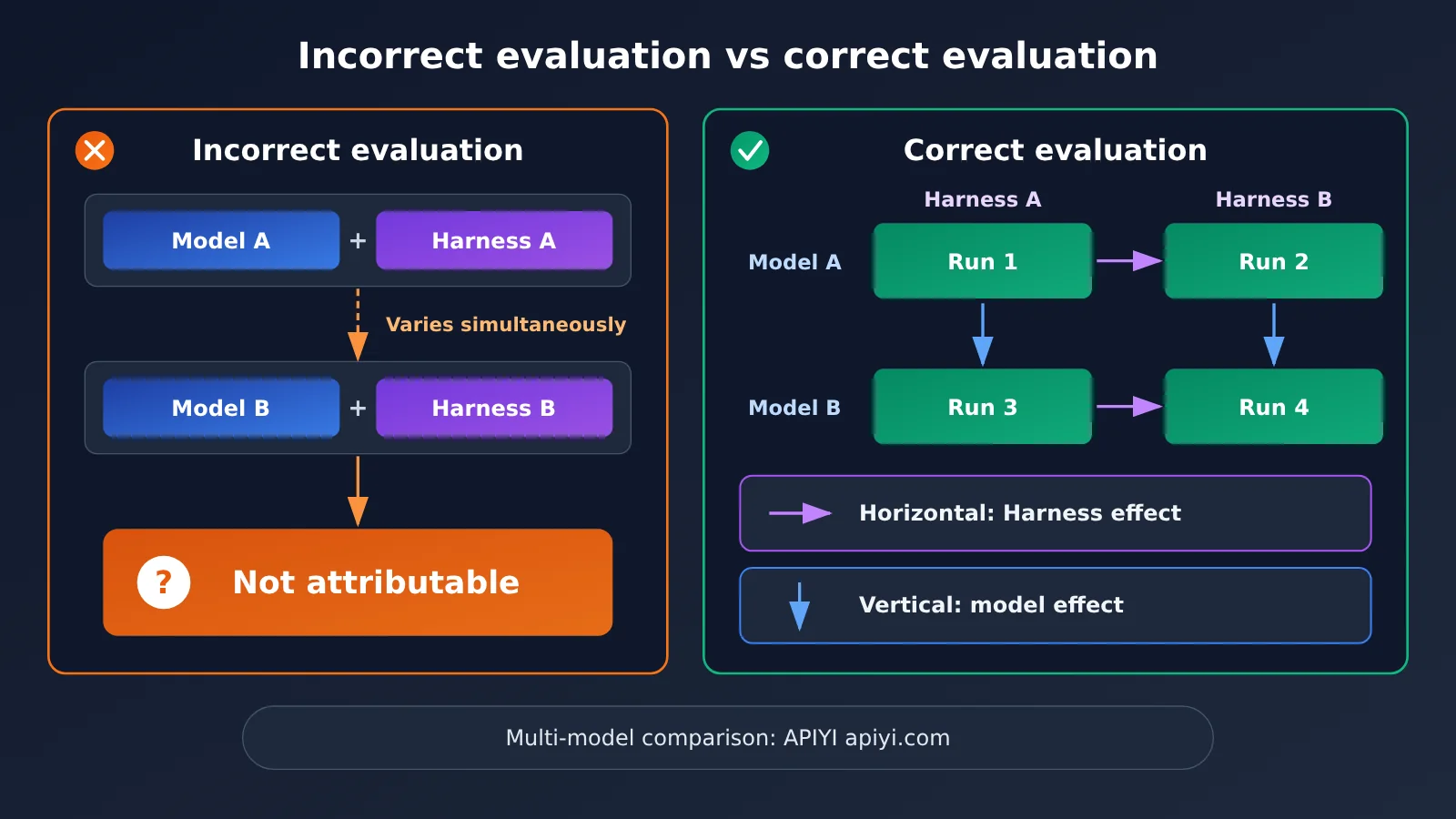
Don’t just run “Model A + Harness A” and “Model B + Harness B,” because changing two variables at once makes attribution impossible. The minimal setup is a 2 × 2 matrix: run two models in two Harnesses, keeping the task set and budget the same.
| Matrix result | More likely explanation | Next step |
|---|---|---|
| Changing the model causes a clear change; changing the Harness causes little change | The current task depends more on model capability | Prioritize model selection |
| Changing the Harness causes a clear change; changing the model causes little change | System capability is the main bottleneck | Prioritize improving tools and context management |
| Clear interaction between the two | There’s a compatibility relationship between model and Harness | Select by combination; don’t write a single ranking |
| Neither shows a clear change | Task is too easy, too hard, or scoring isn’t sensitive enough | Redesign the evaluation set and metrics |
Controlled experiment tip: Matrix experiments require frequent model switching. You can use APIYI apiyi.com to call different models with a unified account and API configuration, and keep the model ID in your experiment records for later traceability.
Step 4: Align budgets and watch for the model performance plateau
Seth pointed out in his talk that if one model doesn’t run long enough, or stops when the budget runs out while another keeps going, you’re neither comparing at the same spend nor seeing the real performance. A better approach is to set multiple budget points and watch how scores curve upward with tokens or time.
The QM team’s experience also shows how much budget matters. They found that agents often give up too early, so they tried “sharpening the tools”: set a budget for the goal, and don’t allow the agent to give up before it has actually consumed the time or tokens — and the research output improved as a result. So an eval spec shouldn’t just state a budget cap; it should also spell out whether there’s a minimum investment requirement.
Step 5: Ablate the harness
Once you see the harness deliver gains, the next step is figuring out which capability those gains come from. Prime Agent emphasizes expressiveness, arguing that compression, the Python REPL, programmatic sub-agents, state access, and feedback mechanisms shouldn’t be removed lightly — but on your task, you still need to test the actual contribution of each capability.
The way to do it is to turn off one capability at a time — disable the REPL, disable sub-agents, or disable long-term memory — while keeping everything else the same. If scores barely change after turning something off but costs drop noticeably, that capability may not be worth keeping for now. High-variance tasks like automated research need multiple repeated runs, since as Seth also noted, it’s hard to attribute results directly to the harness or the model in those cases.
Step 6: Account for costs and add manual review
Seth also mentioned that when he ran evaluations with Hermes Agent, he burned through $5,000 quickly without seeing any obvious improvement and had to stop. That doesn’t represent the upper limit of Hermes Agent’s capabilities, but it’s enough to show that cost-performance ratio should be part of the evaluation conclusion. The final report should list success rate, completion time, token consumption, and cost per successful run side by side.
When calculating costs, don’t hard-code prices into the evaluation script’s documentation. For the model’s input/output unit prices, cache pricing, and billing basis, use the actual data on the APIYI pricing page https://docs.apiyi.com/models, and note the date you checked it in the report.
Keep manual spot checks in the scoring process as well. The QM team found that when you ask an LLM to judge fix results, it can develop “main character syndrome”: it only sees part of the elephant and misses the whole system. When business processes are involved, you also need to test permission boundaries, because agents have a poor understanding of social context, and privileged information can leak into contexts where it doesn’t belong.
How to Implement a Model Evaluation Matrix with APIs
In practice, it’s a good idea to split the evaluation into three parts: the task set, the run configuration, and the results record. That way, when you switch models or harnesses, you only need to change one config item instead of rewriting the whole process.
| Configuration item | What to record | Notes |
|---|---|---|
| API format | OpenAI-compatible or Anthropic format | Tool calls and message structures can differ between formats, so validate each separately |
| Endpoint and API key | base_url, environment variable name |
Use the docs at docs.apiyi.com for the endpoint, and don’t put API keys in the evaluation report |
| Run parameters | model, max_tokens, max turns, number of repetitions |
Make sure every experiment can be reproduced |
| Cost basis | Input, output, cache, and date checked | Use actual data from the APIYI pricing page at docs.apiyi.com/models |
| Run results | Score, failure reason, tokens, duration, invocation logs | Used to analyze plateaus and cost-performance ratio |
If your harness supports both API formats, run a format comparison first with the same model. That lets you confirm that message conversion, tool definitions, and streaming responses aren’t affecting the results, so you don’t mistake an integration issue for a difference in model capability.
Integration note: APIYI provides API access to the models covered in this article, compatible with both OpenAI and Anthropic API formats. Before you start experimenting, check the currently available models and invocation methods at docs.apiyi.com, then write the model ID into your evaluation spec.
Frequently Asked Questions (FAQ)
Q1: What is a harness in model evaluation?
A harness is the system layer that connects a model to the outside world. It typically includes loop control, context management, tools, sub-agents, memory, and state access. It determines what the model can see, what it can call, and how long it can run.
Q2: If the harness score is higher, does that mean the model got stronger?
No. When the weights stay the same, a higher score more likely means the system unlocked more capability, or that the configuration simply suits this task better. If the harness, budget, and model all change at once, you can’t attribute the gain to any single factor — and it could also be leakage in the evaluation environment.
Q3: When should you re-run a model evaluation?
You should re-evaluate whenever the model version, system prompt, tool permissions, compression strategy, or business task changes. The harness field moves fast — the data in this article comes from an InfoQ roundup published in November 2026, and results may change later.
Q4: What scenarios is this model evaluation method good for?
It’s mainly suited to these scenarios:
– **Choosing an internal coding agent**: compare task completion rates across model and harness combinations.
– **Long-horizon research tasks**: observe the plateau and result variance as the budget increases.
– **Pre-launch validation for enterprise agents**: test quality, cost, and permission boundaries at the same time.
Q5: How do I quickly connect multiple models for a harness comparison?
Start by defining the evaluation tasks and the model list, then connect through APIYI apiyi.com. The platform offers API access to the models covered in this article and is compatible with both OpenAI and Anthropic API formats. For specific model IDs and configuration details, check the docs.apiyi.com documentation, and keep all other variables constant during the experiment.
Q6: How should model pricing be written in an evaluation report?
Only cite pricing data you’ve verified, and note the date you looked it up. For input/output unit prices, cache pricing, and billing conventions, always go by the actual data on the APIYI pricing page at https://docs.apiyi.com/models — don’t reuse old tables or estimates.
Q7: What are the limitations of this harness evaluation method?
Matrix experiments, repeated runs, and manual review all add time and cost. Variance on long-horizon tasks can also be high, so even after controlling the main variables, precise attribution is still difficult. That makes it better for supporting decisions than for treating a single result as an absolute ranking.
Key Takeaways for Harness Model Evaluation
- Define what you’re comparing first: be clear whether you’re comparing models, or the combination of a model and a Harness.
- Check the logs when a score looks too good: in 99.9% of cases, an isolated environment is a prerequisite for evaluation.
- Separate variables with a matrix: connect to multiple models through APIYI, then run a model × Harness comparison.
- Budgets have to line up: observe the curve at several budget points to find the real plateau.
- Use ablation to pin down the contribution: turn off one capability at a time to confirm where the gains actually come from.
- Verify cost data: for prices and billing definitions, go by the APIYI pricing page.
- Keep humans in the loop: LLM judging can be one-sided, and permission risks need dedicated testing.
Summary
“Swap the Harness and your score doubles” is worth taking seriously, but it shouldn’t be read as “the model doesn’t matter.” The data shared in the talk shows both the amplifying effect of the Harness and the fact that clear gaps still exist between models and between tasks. Reliable conclusions have to be built on controlled experiments.
When putting this into practice, three things are worth remembering first:
- State the evaluation target clearly: record the model, Harness, budget, evaluation set, and judging method.
- Design experiments you can attribute results to: use matrix experiments and ablation tests to separate variables, and isolate the evaluation environment.
- Make conclusions scenario-oriented: look at the plateau, the cost-performance ratio, human review results, and permission risk together.
If you’re ready to validate your own model setup, you can access the models covered in this article through APIYI at apiyi.com, then follow the docs at docs.apiyi.com to finish the configuration. For cost estimates, check https://docs.apiyi.com/models to get current pricing data.
📚 References
- InfoQ: The Same Model Goes from 30 Points to 95 Points — What Creates the Gap Isn’t the Model, It’s the Harness
- Link:
infoq.cn/article/C1C1DThg8z1Dy0rZAmLB -
Description: The scores, case studies, and design perspectives cited in this article all come from this compiled piece.
-
YC Paper Club Harness Night Talk Videos
- Link:
youtube.com/watch?v=n9xKblqyQ28 -
Description: Watch the full context of all three sessions — Prime Agent, OpenJarvis, and QM.
-
APIYI Documentation Center
- Link:
docs.apiyi.com -
Description: Use this to verify available models, API formats, and integration configuration.
-
APIYI Model Pricing Page
- Link:
docs.apiyi.com/models - Description: Model unit prices, cache pricing, and billing rules are all based on the actual data on this page.
Author: APIYI Technical Team
Technical Inquiries: If you’d like to learn about model integration, feel free to visit the APIYI official website at apiyi.com. For more resources, check out the docs.apiyi.com documentation center.