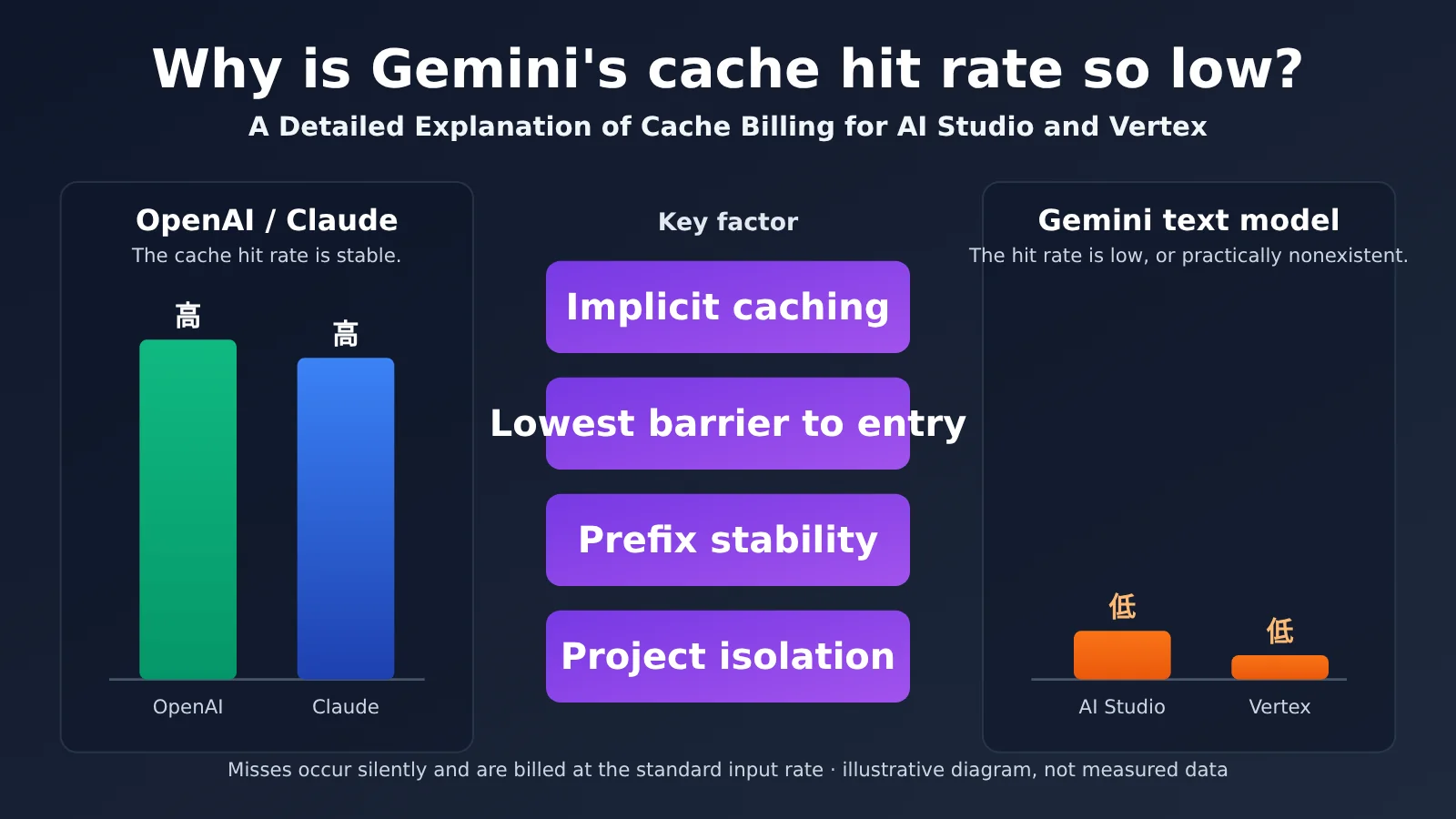
In real-world use of APIYI, cache writes and hits work normally for OpenAI and Claude models, and hit rates are high. Gemini text models are different: their cache hit rates are low, sometimes close to zero. This is something you can reproduce in billing and usage details, and it’s one of the things developers find most confusing when reconciling their bills.
Based on Google’s official documentation as of October 20, 2026, this article breaks down 5 reasons Gemini cache hit rates are low and explains how caching is billed in AI Studio (Gemini Developer API) and Vertex AI.
This isn’t an attempt to shift the blame. Google’s official documentation doesn’t say that “using an API proxy service lowers Gemini cache hit rates,” and without upstream request logs, we can’t claim that any specific cause definitely applies. Instead, we’ll start with the official rules, explain which conditions can prevent caching from working as expected, and then walk through troubleshooting and billing checks you can run yourself.
What you’ll learn: By the end of this article, you’ll understand when Gemini caching does and doesn’t work, know that “total input includes cached tokens” is an important billing detail, and be able to independently verify your bill using official response fields.
Key Points About Gemini Cache Hit Rates
Let’s start with the bottom line. To understand Gemini caching, you first need to distinguish between implicit caching and explicit caching. They work in different ways and are billed differently.
| Type | How it works | How you get the caching discount | Is there a storage fee? |
|---|---|---|---|
| Implicit caching | Automatically enabled for supported models; no cache object needs to be created | Tokens are billed at the cached-input price when a request actually hits the cache; hits aren’t guaranteed every time | No |
| Explicit caching | Create a cache object and reference it in later requests | Cached input gets the cached-input price when the cache object is valid and referenced | Yes |
Google’s documentation for implicit caching in the Developer API includes one key statement: it doesn’t guarantee cost savings. Explicit caching is more predictable, but it requires additional development work, including creating cache objects, managing their expiration, and referencing them in subsequent requests.
Why Gemini Feels Different from OpenAI and Claude
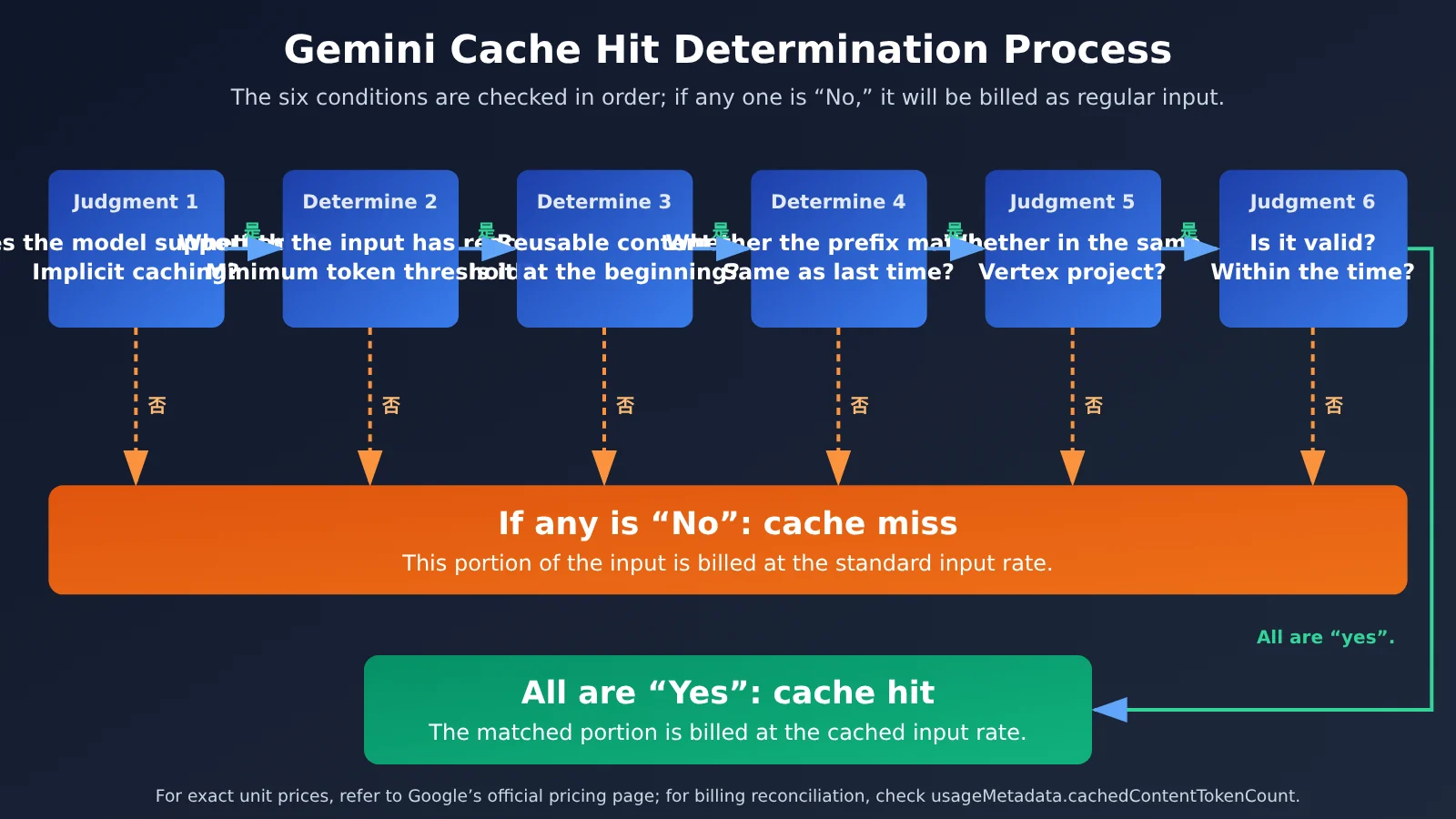
From the user’s perspective, OpenAI and Claude models on APIYI seem to work like this: “Send the same long prefix, and you’ll consistently see cache writes and hits.” Gemini has several conditions to meet at once: the model must support implicit caching; the request must meet that model’s minimum token threshold; reusable content must appear at the beginning of the prompt; similar requests must be sent within a short time; and, on Vertex AI, they must also belong to the same Google Cloud project.
If any one of these conditions isn’t met, the request is billed at the regular input price. There’s no error or warning. That’s why low hit rates often go unnoticed: cache misses happen silently.
First, What Does “AI Studio” Mean Here?
In this article, “AI Studio channel” refers to the Gemini Developer API—the path used to make calls with an API key generated in AI Studio—as distinct from Vertex AI on Google Cloud. The two use similar caching principles, but differ in minimum thresholds, isolation scope, and storage fee rules. We’ll cover these differences one by one below.
5 Reasons Gemini Cache Hit Rates Are Low
The analysis below has two parts: the first two reasons are rules explicitly stated in the official documentation; the last three are conditional explanations of how those rules might be violated in an API proxy or engineering setup. We can’t determine the exact cause just from knowing that a proxy is being used. We’d need records from the upstream project and requests to pinpoint it.
Reason 1: The Request Doesn’t Meet the Minimum Token Threshold
Implicit caching has a minimum token threshold. Requests with too little input won’t be cached. The thresholds also differ between the two platforms. Here are some of the model values listed in the current documentation:
| Model | Developer API implicit caching threshold | Vertex implicit caching threshold |
|---|---|---|
| Gemini 3.8 Flash | 4,096 | 6,144 |
| Gemini 3.1 Pro Preview | 4,096 | 6,144 |
| Gemini 2.5 Pro (previous generation, for comparison) | 2,048 | 2,048 |
There are two easy-to-miss details here. First, newer models like Gemini 3.8 Flash have higher thresholds than the 2.5 series, so using the earlier 2,048-token figure to estimate eligibility can lead to the wrong conclusion. Second, the threshold for the same model may be higher on Vertex. A 5,000-token request qualifies on the Developer API but not on Vertex.
Everyday chat requests usually contain only a few hundred to a couple thousand tokens, which is naturally below the threshold. This is one of the most direct reasons Gemini’s cache hit rate can be very low in chat scenarios. Keep in mind that meeting the threshold is necessary, but it doesn’t guarantee a cache hit.
Reason 2: Reusable Content Isn’t at the Start of the Prompt
Google gives the same advice for both platforms: put longer, frequently reused content at the start of the prompt, and send requests with similar prefixes within a short period of time. Caching relies on a shared prefix, not simply on “the request containing the same document.”
In other words, including the same document in two requests isn’t enough to guarantee a hit. Its position in the request matters, as does whether the content before it stays consistent. A structure like this can easily break the prefix:
# Counterexample: changing content comes first
[Current time: 2026-10-20 10:31:07]
[Request ID: a8f3...]
{system instructions}
{long document}
{user question}
If even one character at the beginning changes, the long document can’t form a shared prefix with the previous request. This conclusion is an inference based on the official guidance, but it’s a common issue in practice.
Reason 3: The Proxy Changes the Prefix (Conditional)
If the proxy inserts changing timestamps, identifiers, or tracing fields at the start of the prompt—or reorders, compresses, or truncates multi-turn context—it changes the shared prefix and reduces the chance of a cache hit. This is a conditional analysis; it doesn’t establish that any particular service behaves this way.
When investigating, distinguish between two things: whether the prefix in the request you send to the proxy is stable, and whether the prefix in the request the proxy sends to Google is stable. You can control the first yourself; the second requires upstream request records.
Reason 4: Requests Are Split Across Different Vertex Projects (Conditional)
Vertex explicitly states that caches are isolated by Google Cloud project and aren’t shared across projects. If multiple requests in the same conversation are routed to different Vertex projects, a cache created in Project A won’t be available to Project B.
Be careful here: whether changing a key causes a cache miss depends on whether the project changes too. Don’t assume that changing a key always clears the cache; first confirm how keys map to projects.
Reason 5: Only Generation Requests Are Forwarded; Explicit Caching Isn’t Used
If the call chain only forwards generateContent requests, without creating a cache object and referencing it in subsequent requests, the entire chain relies on implicit caching. Implicit caching isn’t guaranteed, so it can’t provide the same consistent benefits as explicit caching, where you “create once and reference repeatedly.”
The table below maps these proxy scenarios to the corresponding official rules:
| Actual behavior | Possible effect | Corresponding official rule |
|---|---|---|
| Requests in the same conversation are routed across different Vertex projects | A cache created in one project can’t be reused in another | Caches are isolated by project |
| Changing timestamps or identifiers are inserted at the start, or context is reordered | The shared prefix is broken, reducing the chance of a hit | Put long content at the start; keep prefixes similar |
| Requests are short, with too little fixed reusable content | The cache threshold isn’t met | Minimum token threshold |
| Only generation requests are forwarded; no explicit cache object is created or referenced | The system can only rely on implicit caching, which isn’t guaranteed | Explicit caching requires creating and referencing an object |
🎯 Technical tip: When troubleshooting Gemini caching, try sending multiple consecutive requests with the same fixed, long prefix through APIYI at apiyi.com, then compare the cached-token fields in each response. Use controlled requests to rule out prefix and threshold issues first, then check whether the issue is related to the request path.
Without upstream project and request records, you can’t determine the cause just from knowing that a proxy is being used. There’s also no official basis for claiming that Vertex necessarily has a higher hit rate than the Developer API.
How AI Studio and Vertex Handle Cache Billing
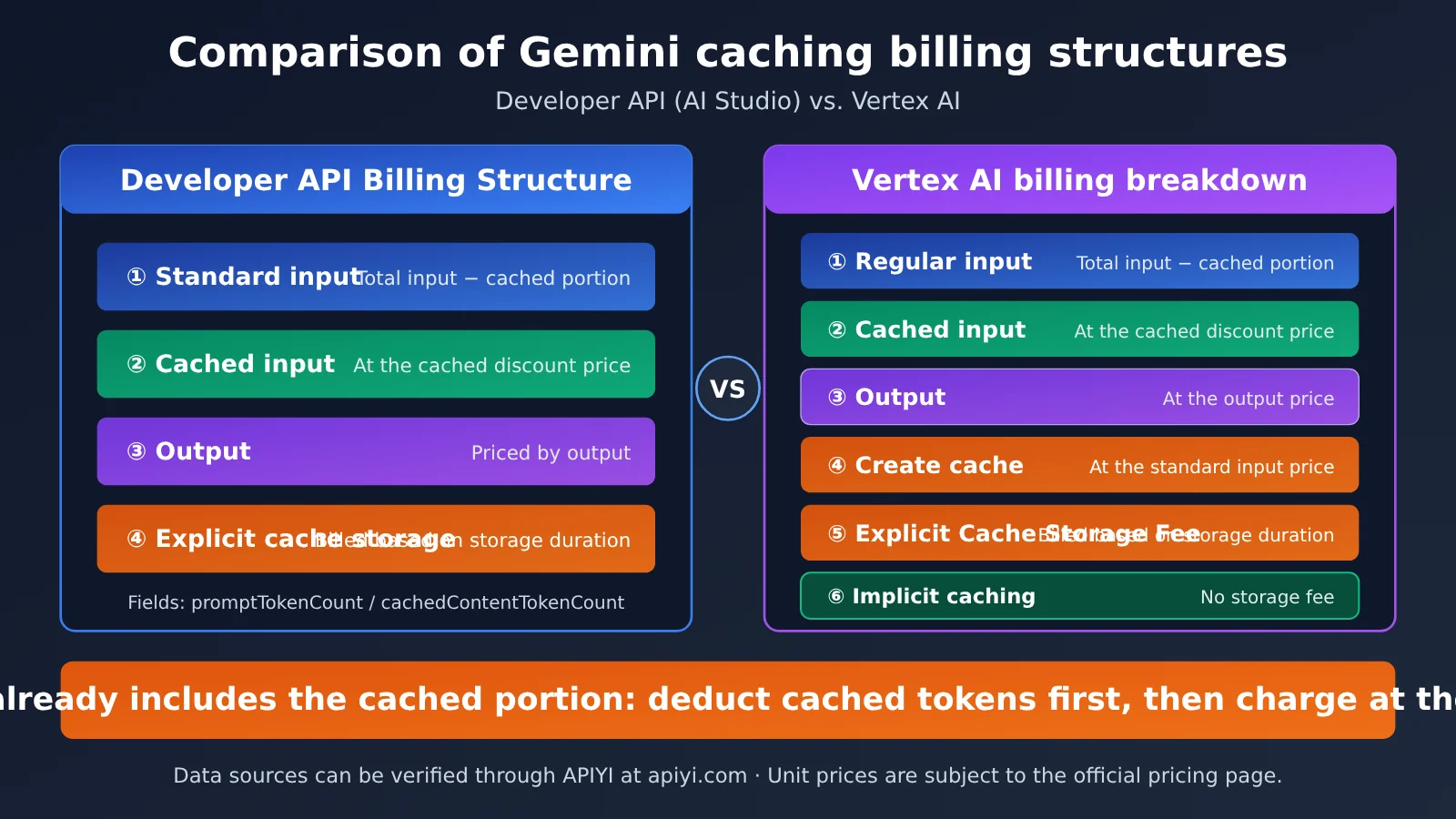
Many people assume that a “cache hit” is free or that it applies a discount to the entire request. That’s not how it works. Both platforms distinguish between four billing categories: regular input, cached input, output, and storage fees for explicit caches.
Comparing the Billing Rules
| Billing item | Developer API (AI Studio) | Vertex AI |
|---|---|---|
| Regular input (uncached portion) | Charged at the regular input rate | Charged at the regular input rate |
| Cached input (matched portion) | Charged at the cached input rate, listed separately on the pricing page | Charged at the cached input rate, listed separately on the pricing page |
| Output | Charged separately | Charged separately |
| Input used to create a cache | Counted toward cached token usage fees | Charged at the standard input rate |
| Implicit cache storage fee | None | None |
| Explicit cache storage fee | Charged based on storage duration | Storage fee applies |
The Developer API documentation lists cached token usage, storage duration, uncached input, and output as billing factors. Vertex also makes two points clear: input used to create a cache is charged at the standard input rate, and implicit caches have no storage fee, while explicit caches do. Check the current official pricing pages for exact rates, since they vary by model and version.
How to Calculate Input Costs
For a standard text generation request, you can think of the input cost like this:
Input cost =
(total input tokens − cached tokens) × regular input rate
+ cached tokens × cached input rate
Output is charged separately, and explicit caches also incur a storage fee. For example, suppose a request has 10,000 total input tokens, of which 8,000 are cache hits. Then 2,000 tokens are charged at the regular rate, and 8,000 at the cached rate.
An Easy-to-Miss Detail: Total Input Includes the Cached Portion
When reconciling charges, check Google’s raw response rather than relying only on the “cache hit rate” shown in your API proxy dashboard. In the usageMetadata of a generateContent response, there are two key fields:
| Field | Meaning | What to watch for when reconciling |
|---|---|---|
usageMetadata.promptTokenCount |
Total input tokens | Includes the cached portion |
usageMetadata.cachedContentTokenCount |
Tokens in the cached portion | Number of cache-hit tokens |
So don’t calculate the entire promptTokenCount at the regular rate and then add a separate cached input charge—that would count the cached tokens twice. Instead, subtract the cached portion from the total input to find the amount charged at the regular rate. If you’re using the newer Interactions API, the official cache usage field is usage.total_cached_tokens.
Two Things to Keep Separate
It’s also important to distinguish between how many tokens Google actually served from cache and how the API proxy applies that discount to your bill. You can measure the former using the official fields, but the latter depends on the proxy’s own billing rules. Google’s documentation can’t verify those rules for you. When reconciling charges, check both the cache fields in the upstream response and the billing details on your invoice.
💡 Tip: When reconciling charges, start with the request-level cached token fields, then check the billing summary. If you need to compare OpenAI, Claude, and Gemini on the same basis, you can use APIYI apiyi.com to call each model with the same prompt and switch between them quickly.
How Gemini’s Cache Billing Differs from Claude and OpenAI
The three providers handle caching differently, so their billing data needs to be reconciled differently too. The table below compares how caching is triggered and billed. Discount rates and durations can change across model versions, so the figures below reflect the general approach at the time of writing; check each provider’s official pricing page for current details:
| Comparison | Gemini | Claude | OpenAI |
|---|---|---|---|
| How caching is triggered | Two mechanisms: implicit automatic caching and explicit cache objects | Explicit: mark cache breakpoints with cache_control in the request |
Automatic; no code changes needed |
| Cache write fee | None for implicit caching; explicit caches are charged for input at creation and incur a storage fee | Yes. The write rate is higher than the regular input rate, with different rates for 5-minute and 1-hour cache durations | No separate write fee |
| Cache read (hit) rate | Lower than regular input; discount varies by model | About one-tenth of the regular input rate | Lower than regular input; discount varies by model |
| Storage fee | Only for explicit caches; charged based on storage duration | None; the duration is selected when writing the cache | None |
| Minimum threshold | Varies by model and channel; Vertex may have a higher threshold than the Developer API | Varies by model; commonly 1,024 tokens or more | Usually starts at 1,024 tokens |
| Hit reliability | Not guaranteed for implicit caching; more predictable for explicit caching | Usually consistent during the cache’s validity period once a breakpoint is marked | Automatic prefix matching; not guaranteed |
| Usage fields | cachedContentTokenCount (included in promptTokenCount) |
cache_creation_input_tokens, cache_read_input_tokens; listed separately from regular input tokens |
prompt_tokens_details.cached_tokens (included in prompt_tokens) |
Three things in this table are particularly easy to mix up:
- Write fees: Claude charges more to write to the cache, while cache reads cost less. So if you write often and read rarely, caching can cost more than not using it. OpenAI has no write fee, so a cache miss doesn’t cost extra. Gemini’s implicit caching also has no write fee; only explicit caches incur creation and storage costs.
- Who controls caching: With Claude, the caller explicitly marks cache breakpoints, making hits more predictable. OpenAI and Gemini handle implicit caching automatically, so developers can only improve the odds by keeping prefixes stable. This is one reason users may find Claude and OpenAI hits more consistent than Gemini’s: Gemini is affected by the threshold, prefix, and channel isolation.
- How total input is counted: Gemini and OpenAI include cached tokens in total input, so subtract them before calculating the regular input charge. Claude’s
input_tokensexcludes cache reads and writes, so calculate the cost of all three separately and add them together. Applying one provider’s formula to another will lead to incorrect totals. When comparing charges across models through APIYI apiyi.com, first confirm how each provider defines its usage fields.
Gemini Cache Hit Rate: Run a Quick Test Yourself
Theory only gets you so far—the most reliable way to verify how caching works is to test it yourself. The idea is to create a fixed prefix that exceeds the minimum threshold, put the changing question at the end, send several requests in a row, and watch how the cached-token fields change.
Minimal Example
The code below makes a request using the OpenAI-compatible format and prints the returned usage information. Field names may vary depending on the integration, so check the actual response for the names of cache-related fields:
import time
import openai

client = openai.OpenAI(
    api_key="YOUR_API_KEY",
    base_url="https://api.apiyi.com/v1"  # Use the unified APIYI endpoint
)

# Fixed long prefix: make sure it exceeds the target model's minimum cache threshold
LONG_PREFIX = "这里放一段稳定不变的长文档或系统指令……" * 800

for i in range(3):
    resp = client.chat.completions.create(
        model="gemini-3.8-flash",
        messages=[
            {"role": "system", "content": LONG_PREFIX},
            {"role": "user", "content": f"请用一句话总结,第 {i} 次提问"},
        ],
    )
    print(i, resp.usage)
    time.sleep(2)
View the full test and usage reconciliation code
import time
import openai

client = openai.OpenAI(
    api_key="YOUR_API_KEY",
    base_url="https://api.apiyi.com/v1"  # Use the unified APIYI endpoint
)

LONG_PREFIX = "这里放一段稳定不变的长文档或系统指令……" * 800


def extract_cached_tokens(usage) -> int:
    """Try to read the number of cached tokens from usage; field names depend on the actual response."""
    details = getattr(usage, "prompt_tokens_details", None)
    if details is not None:
        cached = getattr(details, "cached_tokens", None)
        if cached is not None:
            return cached
    return 0


def estimate_input_cost(total_in: int, cached: int,
                        normal_price: float, cached_price: float) -> float:
    """
    Estimate input costs using the official accounting method:
    Total input includes the cached portion, so the regular portion = total input - cached portion.
    Enter the current prices from the official pricing page (per million tokens).
    """
    normal_part = total_in - cached
    return (normal_part * normal_price + cached * cached_price) / 1_000_000


def run_test(model: str, rounds: int = 3):
    results = []
    for i in range(rounds):
        resp = client.chat.completions.create(
            model=model,
            messages=[
                {"role": "system", "content": LONG_PREFIX},
                {"role": "user", "content": f"请用一句话总结,第 {i} 次提问"},
            ],
        )
        usage = resp.usage
        cached = extract_cached_tokens(usage)
        results.append((i, usage.prompt_tokens, cached))
        print(f"第 {i} 次:总输入={usage.prompt_tokens},缓存命中={cached}")
        time.sleep(2)
    return results


if __name__ == "__main__":
    for m in ["gemini-3.8-flash"]:
        print("模型:", m)
        run_test(m)
🚀 Quick start: We recommend using APIYI at apiyi.com to set up this comparison test. Just replace the
modelparameter in the same script to test Gemini, OpenAI, and Claude models in turn and compare their caching performance.
Variables to Control During Testing
As you run the test, check each item below to avoid mistaking an issue in your setup for an issue with the request path:
| Check | What to do | Why |
|---|---|---|
| Prefix length | Make sure it exceeds the target model’s current minimum threshold | Rule out threshold issues |
| Prefix stability | Don’t put timestamps or request IDs at the beginning | Avoid breaking the prefix |
| Position of changing content | Put the user question at the end | Keep the shared prefix as long as possible |
| Time between requests | Send requests close together | Follow the official recommendation |
| Control group | Test the same prompt with OpenAI or Claude | Determine whether the difference is due to the model’s caching behavior or the request path |
How to Interpret the Results
If the prefix is long enough and stable, and requests are sent close together, but Gemini still shows almost no cache hits while the same prompt gets hits with OpenAI or Claude, the difference likely comes from Gemini’s own caching behavior and upstream conditions—not how you wrote the prompt. In that case, consider using explicit caching to keep long content available for reuse: create a cache object yourself and reference it in your requests.
If your use case is mostly short conversations, there’s little point in chasing a higher hit rate. Accept that Gemini’s caching may offer limited benefits in this scenario, and focus your cost optimization on model selection and controlling output length instead.
Frequently Asked Questions
Q1: Why is Gemini’s cache hit rate noticeably lower than OpenAI’s and Claude’s?
Gemini’s implicit caching depends on several conditions: the model must support it, the prompt must meet the minimum token threshold, the prefix must remain stable, and requests must be close together in time. On Vertex, caching is also scoped to a project, and Google explicitly doesn’t guarantee a hit. If any condition isn’t met, the request is silently billed as regular input. To identify the cause for a particular request path, you’ll need to check the upstream request records.
Q2: Has Google officially said that using a proxy reduces cache hit rates?
No. Google has only specified the conditions caching depends on: a reusable prefix, a minimum token threshold, and the cache’s scope. If the request path changes any of these conditions, the hit rate may drop. To compare caching performance across models, you can run a controlled test with the same prompt through APIYI at apiyi.com.
Q3: Are cached tokens free?
No. Cached tokens are billed at the cached-input rate, which is lower than the regular input rate but not free. Both providers list separate prices for regular and cached input on their pricing pages. Explicit caching also incurs a storage fee.
Q4: Should I add cached tokens separately to the input-token count on my bill?
No. `promptTokenCount` is the total input and already includes the cached portion. Subtract `cachedContentTokenCount` from the total input to get the portion billed at the regular rate, then calculate the cached portion separately.
Q5: Are the cache thresholds the same for AI Studio and Vertex?
Not exactly. According to the current documentation, the minimum threshold for Gemini 3.1 Pro Preview and Gemini 3.8 Flash is 4,096 tokens on the Developer API and 6,144 on Vertex. For the previous-generation Gemini 2.5 Pro, the threshold is 2,048 on both. Thresholds can change with model versions, so check the current values in the official documentation.
Q6: Will changing my API key clear the cache?
It depends on whether you change projects. Vertex caches are scoped to a Google Cloud project and aren’t shared across projects, so switching to a key from a different project means the cache won’t carry over. You can’t assume the cache is lost when switching between keys in the same project.
Q7: Should I use implicit or explicit caching?
If you need to reuse large, fixed content—such as long documents or system instructions—explicit caching is more predictable, but it requires development work and incurs storage fees. If you only reuse content occasionally, implicit caching has no setup cost, but its benefits are unpredictable. You can start with a small comparison test through APIYI at apiyi.com before deciding whether to invest in explicit caching.
Q8: Can I use the hit rate shown in my proxy dashboard directly to reconcile my bill?
Not recommended. Use the cache fields in the original response from the provider. Also, whether Google registers a cache hit upstream and how your proxy charges you are two separate matters—you’ll need to check the proxy’s own billing rules for the latter.
Cache Hit Rate Key Takeaways
- The behavior is real: Caching is consistent with the OpenAI and Claude model families, while Gemini’s hit rate is low—or close to zero—and needs to be analyzed separately.
- Google doesn’t guarantee hits: Gemini implicit caching doesn’t guarantee cost savings. With explicit caching, you need to create and reference a cache object yourself.
- Thresholds vary by model: Newer models have higher minimum token thresholds, and the numbers may differ between Vertex AI and the Gemini Developer API.
- Hits depend on the prefix: Put long content at the beginning, and don’t insert changing content like timestamps or IDs near the start, or you’ll break the shared prefix.
- Vertex AI caches are isolated by project: Caches aren’t shared across projects, so spreading requests across multiple projects can result in cache misses.
- Total input includes cached tokens:
promptTokenCountalready includes cached tokens. When reconciling usage, subtract them first, then apply the relevant rates. - Reconcile using response fields: Use the cache fields in the official API response as the source of truth, and compare models using the same prompt through APIYI at apiyi.com.
Summary
Gemini’s low cache hit rate can result from several factors combined: implicit caching doesn’t guarantee a hit, minimum token thresholds increase with newer models, prefixes must remain stable, Vertex AI caches are isolated by project, and explicit caching requires you to create a cache yourself. When the last few conditions change at the request or routing layer, the hit rate can drop. Pinpointing the cause requires checking upstream project settings and request logs.
For billing, keep three things in mind: cache hits aren’t free; total input includes cached tokens, so don’t count them twice; and explicit caching has a separate storage fee, while implicit caching doesn’t. Use the official response fields to reconcile usage, and check the proxy’s billing rules separately.
Next, use the test script in this article to compare Gemini with OpenAI and Claude using a fixed, long prefix. Then decide whether to introduce explicit caching. APIYI at apiyi.com is a quick way to validate the results: multiple models share the same interface, making cost comparisons straightforward.
References
- Gemini API Caching Documentation: Official information on implicit and explicit caching
- Link:
ai.google.dev/gemini-api/docs/caching -
Notes: Covers the minimum token threshold and billing factors
-
Gemini API Pricing: Prices for standard input, cached input, output, and storage
- Link:
ai.google.dev/gemini-api/docs/pricing -
Notes: Use this page to verify current rates
-
Vertex AI Context Caching Overview: Project isolation and billing rules for caching
- Link:
docs.cloud.google.com/vertex-ai/generative-ai/docs/context-cache/context-cache-overview -
Notes: Explains that Vertex AI caches aren’t shared across projects
-
Gemini API
generateContentReference: TheusageMetadatafield in responses - Link:
ai.google.dev/api/generate-content - Notes: Covers the cached token field used for billing reconciliation
Author: APIYI Team
Technical discussion: Share your Gemini caching troubleshooting experiences in the comments. For more resources, visit the APIYI documentation center at docs.apiyi.com.