On October 19, MiniMax officially released M3.1 Flash. Its predecessor, Space Bunny, had been running anonymously on platforms such as OpenRouter. This release once again plays to the strengths of domestic models: price. It costs $0.15 per million input tokens and $0.60 per million output tokens. According to MiniMax, it costs about one-third as much as M3 and runs about three times faster.
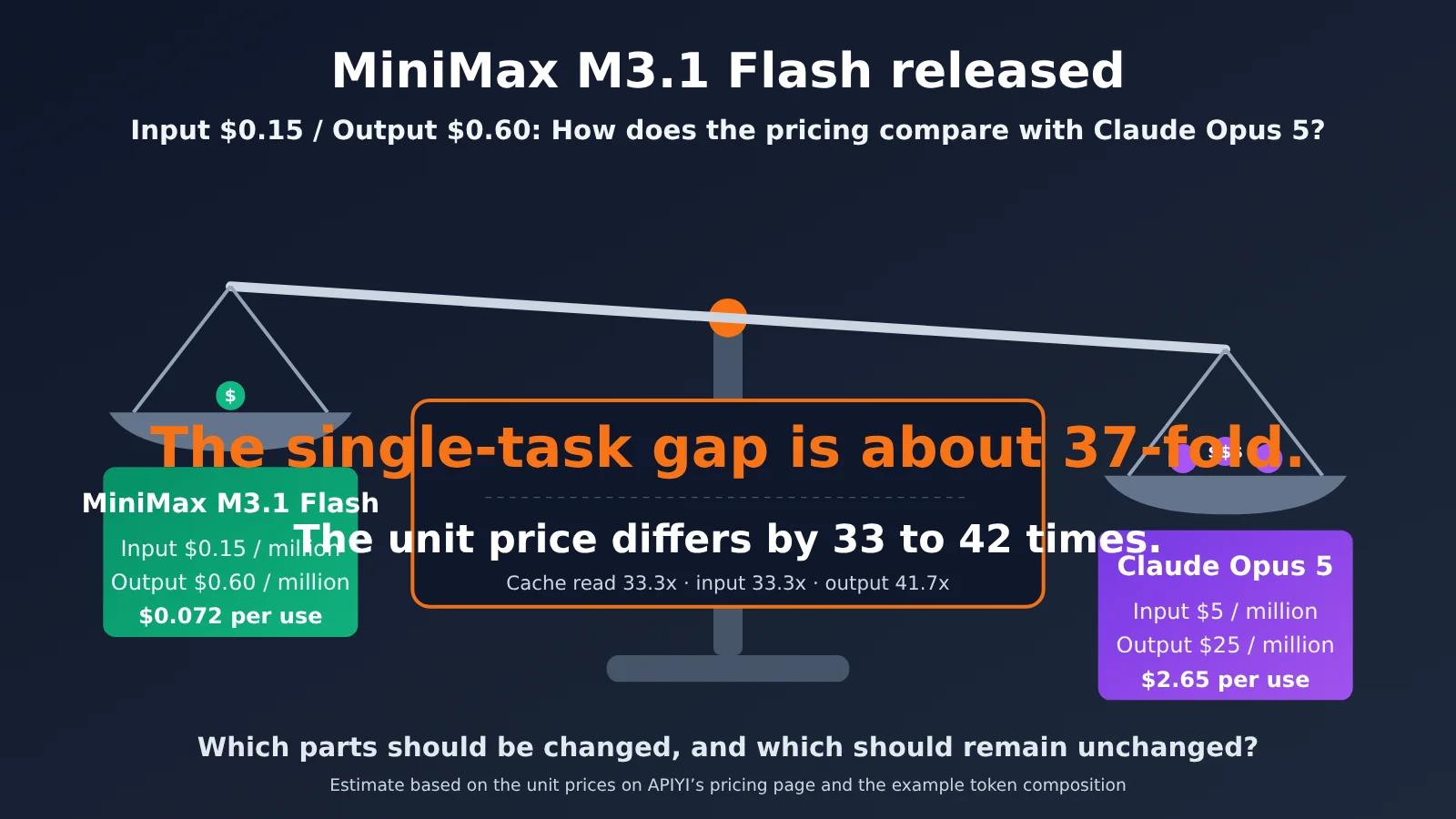
That’s an aggressive price for a new model in this batch. For comparison, the official launch graphic compares it with Claude Opus 5. Based on the rates on APIYI’s pricing page, Opus 5 costs $5 for input and $25 for output per million tokens—a price difference of 33 to 42 times. There’s an even more striking example from the community: one developer spent $0.014 using M3.1 Flash to build a landing page for a hardware product. The same task cost $1.22 with Opus 5.5, a difference of about 88 times.
Let’s cover three things: what M3.1 Flash brings to the table, what its price means for agent workflows, and which tasks you can safely switch over—and which are better left with Claude Opus 5.5.
What MiniMax M3.1 Flash brings to the table: price, speed, and capabilities
Here’s a side-by-side comparison with Claude Opus 5.
| Comparison | MiniMax M3.1 Flash | Claude Opus 5 | Takeaway |
|---|---|---|---|
| Input price | $0.15 / million tokens | $5 / million tokens (based on an APIYI multiplier of 2.5) | Opus 5 costs about 33.3x as much as M3.1 Flash |
| Output price | $0.60 / million tokens | $25 / million tokens | Opus 5 costs about 41.7x as much as M3.1 Flash |
| Cached input | $0.015 / million tokens | $0.50 / million tokens | Opus 5 costs about 33.3x as much as M3.1 Flash |
| Output speed | Officially reported at 200+ TPS, with P50 consistently above 170 TPS | No comparable data available in this article | Speed advantage is based on MiniMax’s report only; no direct comparison |
| Context window | 1M tokens (compiled by a third party; check the official documentation) | Check the official documentation (Opus 5.5 has a 1M context window and 128K maximum output) | Comparable in scale |
| Coding and agents | DeepSWE v1.1: 73.7% (officially reported) | DeepSWE v1.1: 74.0% in the same official comparison | The official comparison is with Opus 5; the scores are close, but you’ll still need to test it yourself |
| Release date | 2026-10-19 | 2026-7-25 | The older Opus can still hold its own |
There’s one gap in this table: the official launch graphic and the comprehensive benchmark table both compare against Opus 5. Opus 5.5 only appears in the cost-versus-score chart, without individual benchmark scores. So there’s just one firm conclusion: the price difference is clear, but the capability gap still needs to be tested—and you’ll need to test it on your own tasks.
Price: How does $0.15 input and $0.60 output compare with other models?
The table below lists prices in dollars per million tokens. The M3 price is taken from the current listing on APIYI’s pricing page. Claude Opus prices are calculated using the multipliers on APIYI’s pricing page (a 1x multiplier equals $2 per million tokens). Where pricing hasn’t been disclosed, we’ve said so.
| Model | Input | Output | Cached input | Notes | APIYI availability |
|---|---|---|---|---|---|
| MiniMax M3.1 Flash | $0.15 | $0.60 | $0.015 | Official fixed price | Subject to listing |
| MiniMax-M3 (previous generation) | $0.30 | $1.20 | Not disclosed | Prompt/completion prices listed on the pricing page | Available |
| Claude Opus 5 | $5 | $25 | $0.50 | Based on an APIYI multiplier of 2.5; cache writes cost $6.25 | Available |
| Claude Opus 5.5 | $4 | $20 | $0.20 | Based on an APIYI multiplier of 2; a more capable flagship that’s actually cheaper per token. Cache writes cost $5; 1M context window | Available |
Here’s a counterintuitive detail: the newer, more capable Opus 5.5 (multiplier of 2) is cheaper per token than Opus 5 (multiplier of 2.5)—$4 versus $5 for input, and $20 versus $25 for output. This article uses Opus 5 as its main comparison because the official launch graphic and individual benchmark results compare against it, and because it makes the cost difference larger. To avoid giving the impression that we’ve picked an easy target, we’ll also include the Opus 5.5 comparison figures below.
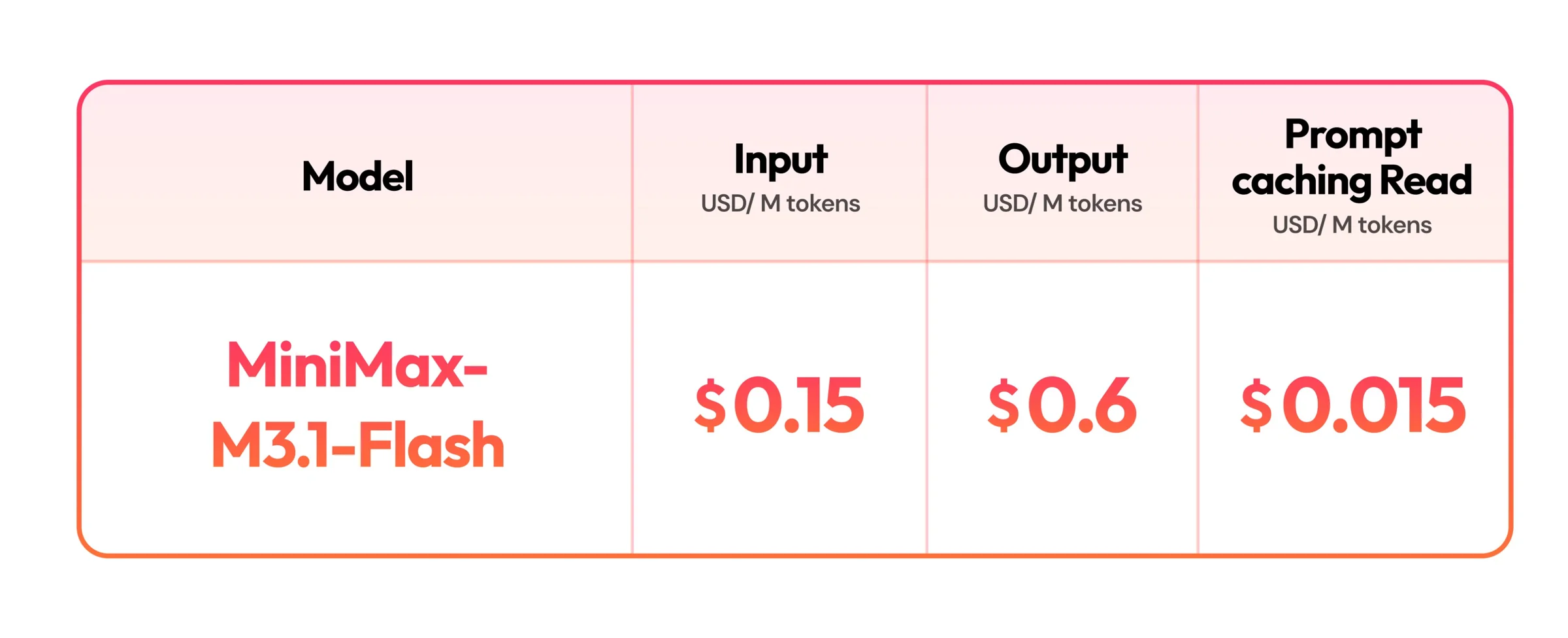
Image: MiniMax’s official X post and pricing card. Prices per million tokens: $0.15 for input, $0.60 for output, and $0.015 for prompt-cache reads.
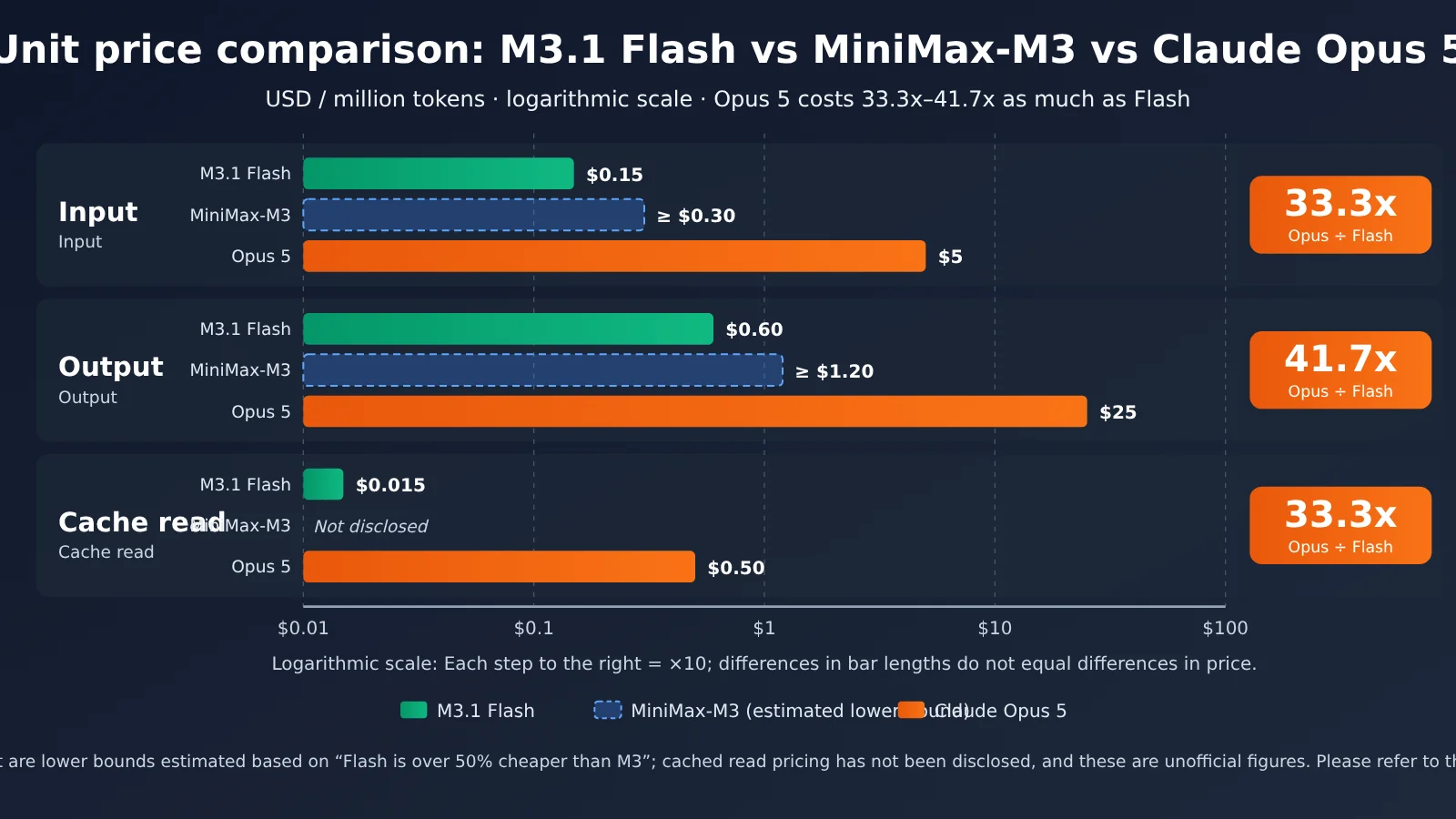
The MiniMax prices in the chart are official. Opus 5 prices are calculated using the 2.5 multiplier listed on APIYI’s pricing page. Check APIYI’s pricing page for current M3-series and Opus prices.
Capabilities and speed: How to read MiniMax’s reported results
The results MiniMax has published focus mainly on agents, computer use, and cybersecurity. All figures below are self-reported by MiniMax and haven’t been independently reproduced:
- AutomationBench scored 62% in collaborative workplace scenarios. MiniMax says it can handle end-to-end enterprise SaaS workflows in sales, marketing, operations, customer service, finance, and HR.
- DeepSWE v1.1 scored 73.7%, and BankerToolBench scored 76.2.
- For computer use, OSWorld V2 scored 61.7 and Agents Last Exam scored 29.6. MiniMax says both results rank first among Chinese models.
- In cybersecurity, CyberGym scored 82%. MiniMax highlights the model’s strengths in vulnerability discovery and validation.
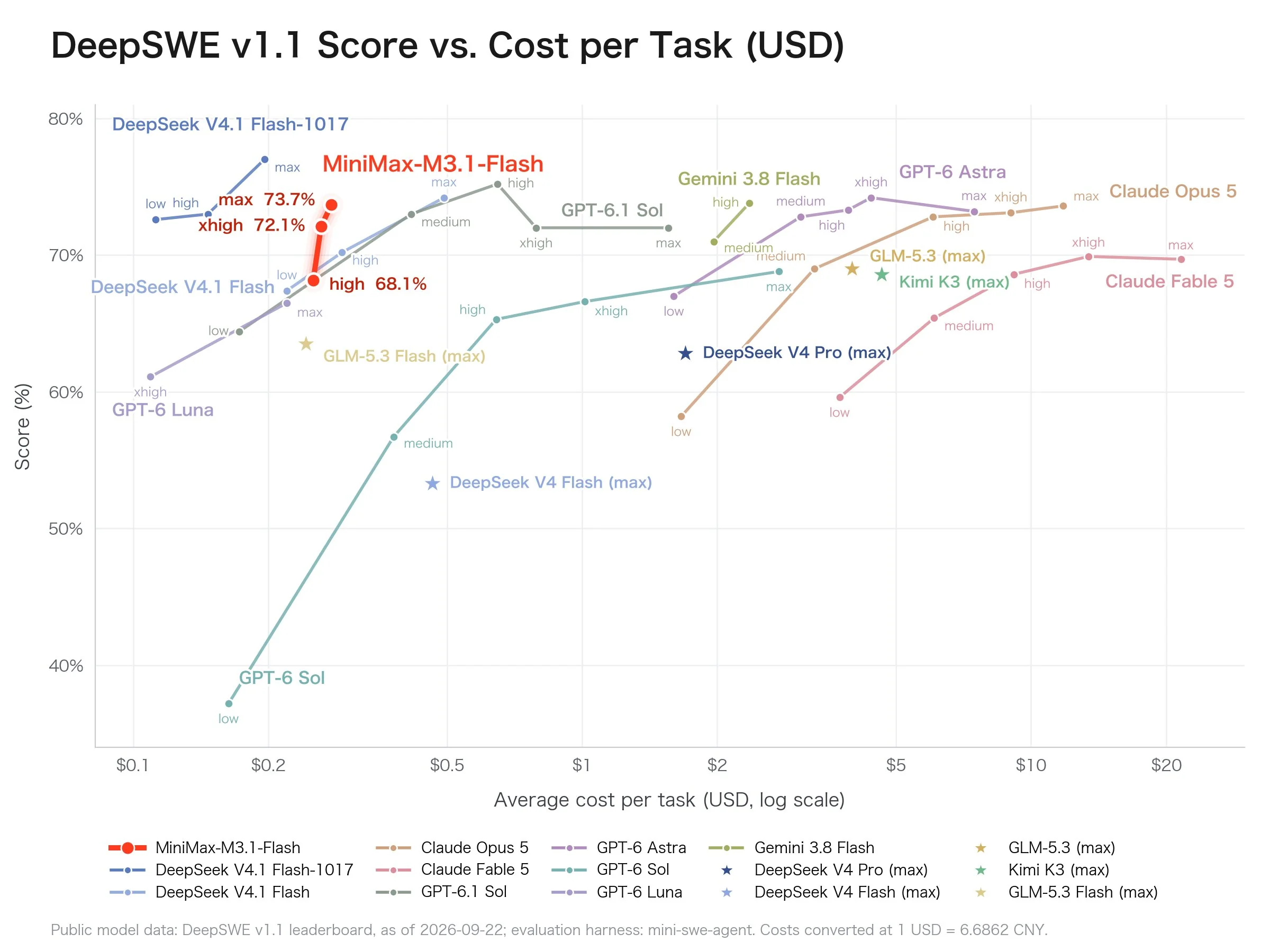
Image: MiniMax’s official X post showing DeepSWE v1.1 score versus per-task cost. The x-axis uses a logarithmic scale from $0.1 to $20. M3.1 Flash scores up to 73.7%. The chart also compares Claude Opus 5, GPT-6 Astra, Gemini 3.8 Flash, and other models. Refer to the original official chart for the figures.
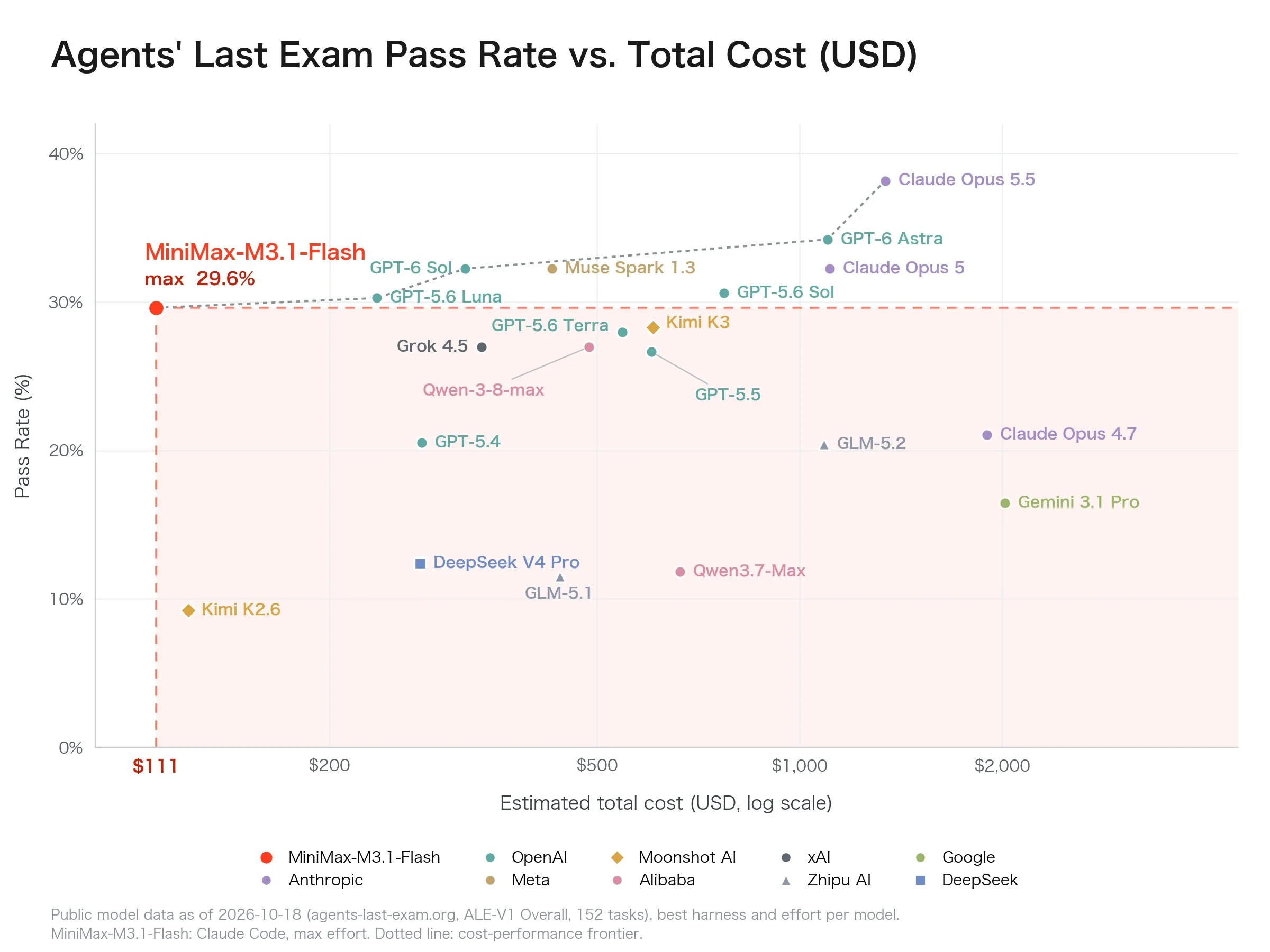
Image: MiniMax’s official X post showing Agents’ Last Exam (ALE-V1, 152 questions) pass rate versus estimated total cost. M3.1 Flash scores about 29.6%. The x-axis uses a logarithmic scale for total cost; refer to the original official chart for the other figures.
The official comprehensive benchmark table provides a more detailed comparison—and the model listed there is Opus 5. This article also uses Opus 5 for all benchmark scores and per-task cost comparisons. M3.1 Flash scores 62.2 on Automation-Bench, compared with Opus 5’s 50.3, and 60.3 on LOCA-Bench, compared with 53.7—leading on both. Its BankerToolBench score of 76.2 is tied with Opus 5. Opus 5 still scores higher on OSWorld V2 (70.6 vs. 61.7), Agents’ Last Exam (32.2 vs. 29.6), NL2Repo (75.3 vs. 61.2), SWE Refactor (31.0 vs. 23.0), and HLE (55.6 vs. 43.4). The takeaway: M3.1 Flash ties or outperforms Opus 5 on collaborative work and long-context tasks, but still trails on refactoring and general reasoning. These figures are still self-reported by MiniMax.
One important caveat: Opus 5.5 is Anthropic’s current flagship, but MiniMax’s official launch graphics don’t include a task-by-task comparison with 5.5. So “tying or beating Opus 5 on collaborative-work benchmarks” clearly doesn’t mean “catching up with 5.5.” It’s worth keeping the differences between domestic models and the world’s top models in perspective.
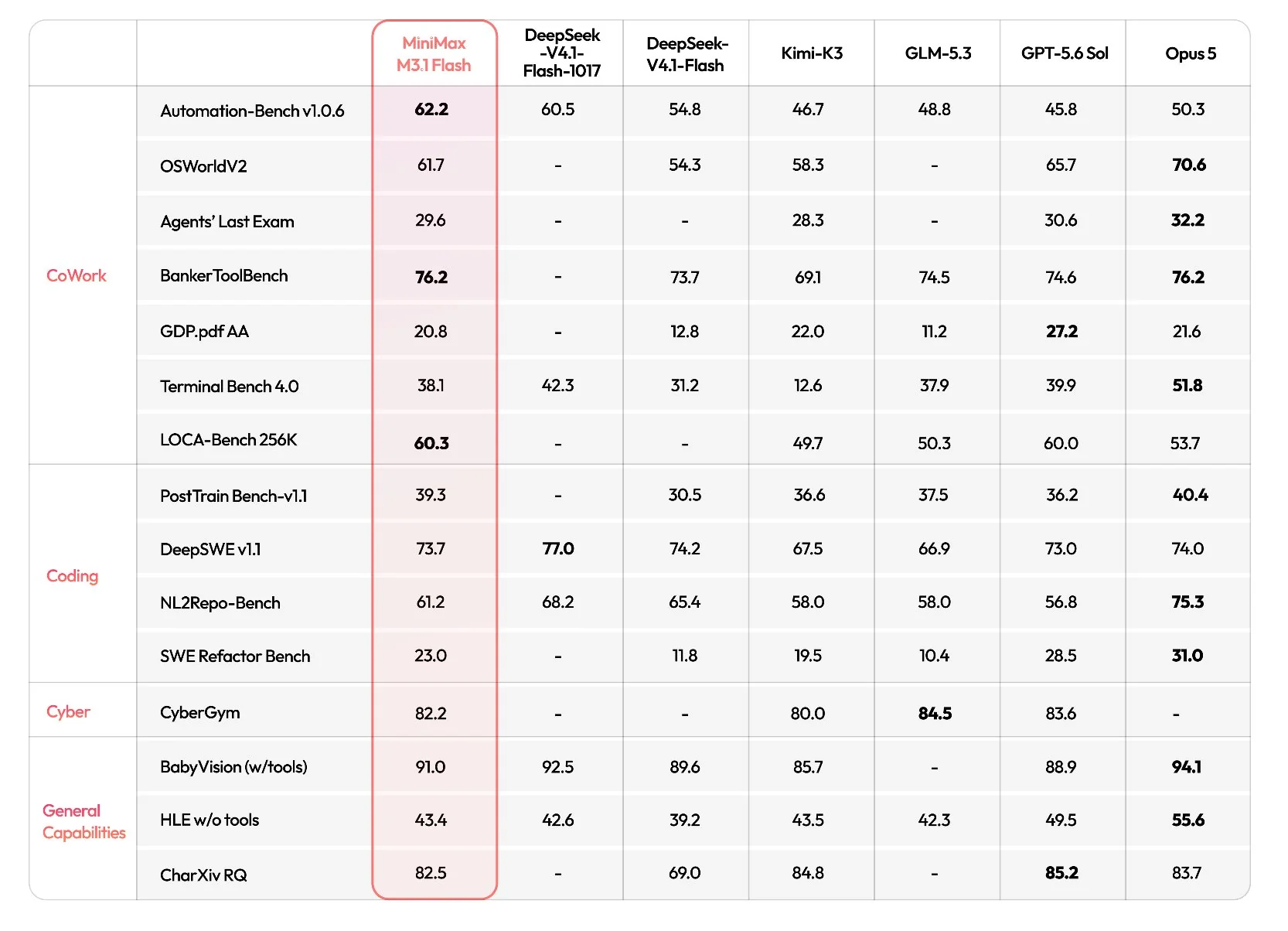
Image: MiniMax’s official X post showing its comprehensive benchmark table, split into CoWork, Coding, Cyber, and General categories. The models listed are MiniMax M3.1 Flash, DeepSeek-V4.1-Flash, Kimi-K3, GLM-5.3, GPT-5.6 Sol, and Opus 5. The comparison is with Opus 5, not 5.5. Refer to the original official chart for the figures.
How Much Does an Agent Task Really Cost? The Math and Comparisons
A price list looks straightforward, but the cost of an Agent task isn’t simply “how much input plus how much output.” A task often involves many rounds of tool calls, and each round resends the previous context. That means cached reads usually make up a large share of usage. Let’s use the following assumptions for an example calculation. These numbers are illustrative only—replace them with your actual usage:
- One Agent task uses 200,000 uncached input tokens (0.2M).
- Across multiple calls, 800,000 input tokens are served from cache (0.8M).
- The model generates a total of 50,000 output tokens (0.05M).
- Both models use the same number of tokens. Cache writes, retries, and concurrency discounts aren’t included.
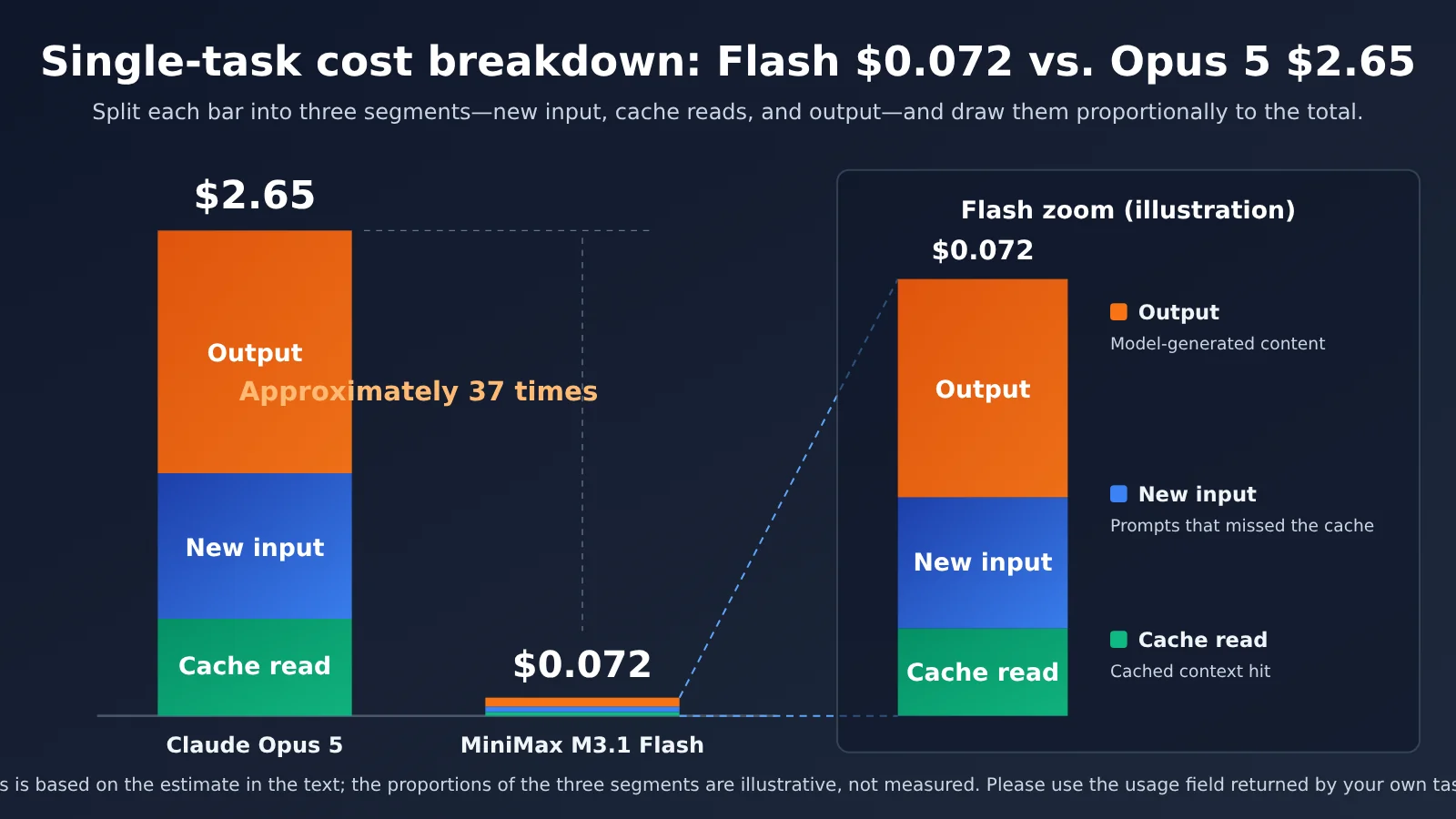
M3.1 Flash: 0.2 × 0.15 + 0.8 × 0.015 + 0.05 × 0.60 = 0.03 + 0.012 + 0.03 = $0.072
Claude Opus 5 (primary comparison): 0.2 × 5 + 0.8 × 0.5 + 0.05 × 25 = 1.00 + 0.40 + 1.25 = $2.65
The difference is $2.65 − $0.072 = $2.578, or about 36.8×. For comparison, the more capable but less expensive Claude Opus 5.5 comes to 0.2 × 4 + 0.8 × 0.20 + 0.05 × 20 = 0.80 + 0.16 + 1.00 = $1.96 using the same calculation, or about 27.2×. To see how this scales to batch workloads, here’s a comparison that also includes a “hybrid routing” option:
| Option | Per task | Per 1,000 tasks | Relative to all Opus 5 |
|---|---|---|---|
| All Opus 5 | $2.65 | $2,650 | 100% |
| All M3.1 Flash | $0.072 | $72 | About 2.7% |
| 80% Flash, 20% Opus 5 | About $0.59 on average | $587.6 | About 22.2% |
The hybrid routing calculation is 800 × 0.072 + 200 × 2.65 = 57.6 + 530 = $587.6. That’s about $2,062 less than using Opus 5 for everything, a reduction of about 77.8%. Compared with Opus 5.5, the hybrid option costs $449.6, about 77% less than the $1,960 cost of using 5.5 for everything. The takeaway is the same.
Two things are worth keeping in mind. First, even three retries on Flash would cost only about $0.216, far less than Opus 5’s $2.65, so there’s plenty of room in the retry budget. Second, routing 20% of the harder tasks to Opus accounts for about 90% of the hybrid option’s cost. That shows the biggest savings come from routing simple tasks elsewhere, not from switching out the model for harder tasks.
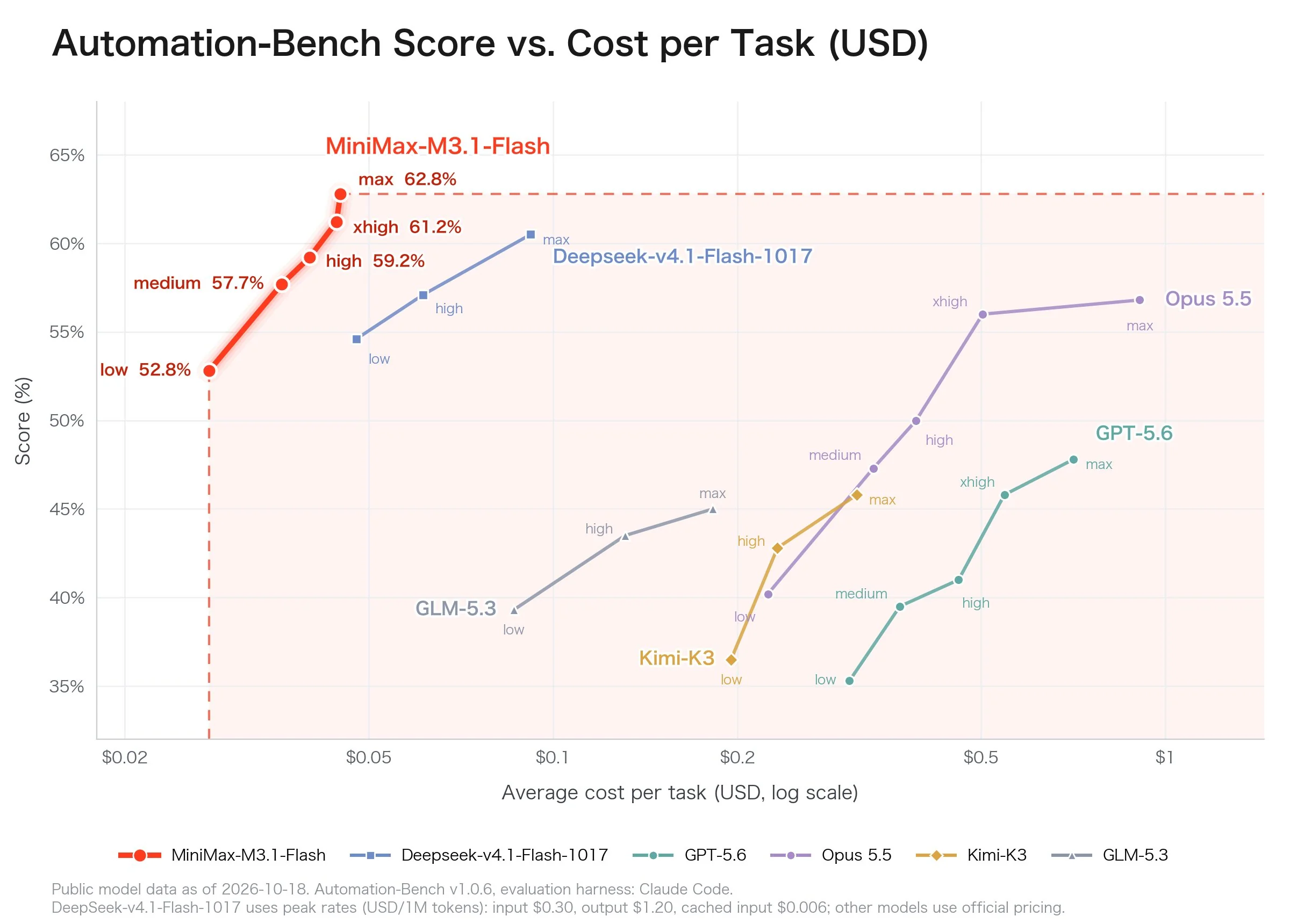
Figure: Image posted by MiniMax’s official X account, showing Automation-Bench v1.0.6 scores versus per-task cost. The x-axis uses a logarithmic scale from $0.02 to $1. M3.1 Flash reaches 62.8% at the top setting, at about $0.03 per task. An Opus 5.5 curve is also shown. Refer to the original official image for the exact values.
Where Does 88× Come From?
At Opus 5’s prices, the cost difference is about 33.3× for input, 41.7× for output, and 33.3× for cached reads. The third-party example that reported 88× compared against Opus 5.5, whose price differences are only 13× to 33× (26.7× for input, 33.3× for output, and 13.3× for cached reads). So 88× goes beyond what the price difference alone can explain.
The takeaway is simple: 88× comes from a single example with one user. Don’t put it in your budget spreadsheet—use your own task’s actual bill instead.
How to Put This into Practice: Which Steps to Move to MiniMax 3.1 Flash and Which to Keep on Claude Opus 5.5
The question shouldn’t really be “Should we switch?” but “Which steps should we switch?” Different stages in an agent pipeline place very different demands on a model. Here are some recommendations by task type.
| Stage | Recommendation | Reason |
|---|---|---|
| Tool use, information extraction, form and SaaS workflow automation | Prioritize Flash | These tasks have a clear structure. The company reports strong AutomationBench and enterprise workflow results, and usage is high and price-sensitive. |
| Page scaffolding, small feature completions, unit test generation | Try Flash first | The difficulty is manageable, and mistakes are easy to spot. A third-party one-off test found extremely low costs for landing-page tasks. |
| First-pass log and vulnerability triage, security scans | Try Flash first | CyberGym score: 82% (company-reported). However, all high-severity findings must be reviewed by a person. |
| Browser and desktop Computer Use | Roll out to a small percentage of traffic | OSWorld V2 score: 61.7 (company-reported). That’s not especially high, so start by monitoring failure patterns. |
| Long-running workflows, cross-module refactoring | Keep on Opus 5.5 | Errors can compound, and the cost of rework can far outweigh the token savings. |
| Critical workflows, or tasks directly affecting paying users | Keep on Opus 5.5 or use it as a fallback | The new model has had little time to prove itself in production, so there isn’t enough stability data yet. |
| Signal | Recommendation | Reason |
|---|---|---|
| Long workflows and difficult refactoring | Keep using Opus 5.5 | These tasks require consistency over dozens of steps. If an early step goes wrong, everything that follows may need to be redone. |
| The highest possible coding capability is required | Keep using Opus 5.5 | In the company’s comparison table, Opus 5 still scores higher on refactoring and general reasoning. The comparison isn’t against 5.5, and the scores are self-reported. |
| Critical workflows with high stability requirements | Keep using Opus 5.5, or use it as a fallback | M3.1 Flash was released just one day ago, so there’s little long-term production feedback. |
| A single task is worth only a few cents | Don’t bother switching | Even if it costs 27 to 37 times more, the absolute amount is limited. Migration and debugging may cost more. |
| Failures could have serious consequences (production changes, finances, compliance) | Keep using Opus 5.5 and retain human review | Don’t trade correctness for cost savings. |
If your only concern is Opus’s price, consider three options first: use Opus 5.5’s Batch tier ($2 / $10) for non-real-time tasks, make good use of cached reads for long contexts ($0.20), and test whether simpler subtasks can move down to a mid-tier model. None of these options introduces the risks of adopting a new model.
A practical approach is to have Opus 5.5 handle planning and final review, while Flash takes care of high-volume execution and first-pass triage. That preserves quality at critical points while shifting most token usage to a cheaper model.
Should You Wait for the October 23 Open-Source Release? Guidance for Local Deployment
MiniMax said on X that it would release the model weights on October 23—just three days from now. That’s a real factor in deciding whether to wait, but it doesn’t mean everyone should.
- You just want to reduce API costs and your usage is modest: No need to wait. Use the API and pay by usage; you can complete a comparison test in a few hours.
- Your data can’t leave your country, you need an on-premises deployment, or your usage is high enough that self-hosting could lower costs: The weight release is worth watching, but first check the license, model size, and hardware requirements. None of this has been disclosed in the information available so far, so don’t jump to conclusions.
A Four-Step Gradual Rollout
- Choose 20 real tasks from your production logs, covering simple, moderate, and difficult cases.
- Send the same prompt to Flash and Opus, and record token usage, cost, and whether each task passes.
- Route 10% to 20% of simple and moderate tasks to Flash, with automatic fallback to Opus on failure.
- Monitor results for one to two weeks, then decide whether to increase the share or keep certain task types on Opus permanently.
Quick Start: Run the Same Prompt Through Two Models Side by Side
MiniMax offers both OpenAI-compatible and Anthropic-compatible endpoints. You control reasoning depth through each endpoint’s corresponding parameter; check the official documentation for the exact parameter names. With APIYI (apiyi.com), you can use a single key in a unified OpenAI format to call models from multiple providers, so you don’t need to change your code to test them side by side.
Minimal Example: Three Steps, No Code Required
- Get a key from the APIYI console.
- Use the same OpenAI-compatible endpoint (
api.apiyi.com/v1), change the model name to M3.1 Flash and Opus 5, and run the same prompt through each. - Check the input, output, and cache-read token counts in the
usagedata returned for each run. Multiply them by the unit prices on the pricing page to get your actual cost.
🚀 Get started quickly: You can use the same APIYI key to call MiniMax models as well as Claude, GPT, and Gemini, making it easy to compare them side by side with the same prompt. MiniMax-M3 is listed on the pricing page; check the latest listing to see whether M3.1 Flash is available. This article makes no promises about its availability.
Want to Try It Now? Use M3.1 Flash for Bulk Tasks and Opus 5.5 for the Hard Ones—Get Started with One Key
With MiniMax’s official service, you need to register separately, add funds, and check a separate bill. Each new provider means another key to manage. We bring it all under one account: APIYI (apiyi.com) puts MiniMax models, Claude, GPT, and Gemini behind the same OpenAI-compatible API.
- One key for everything: Use the same key to call MiniMax models as well as Claude, GPT, and Gemini. The API is OpenAI-compatible, so you only need to change the model name when testing—there’s no need to rewrite your calling code for each provider.
- Direct access from China, pay-as-you-go: No need to deal with network setup or overseas cards. You pay only for what you use, so it’s easy to get started.
- Transparent pricing: The APIYI pricing page at apiyi.com lists each model’s input, output, and cache-read prices, along with its multiplier. MiniMax-M3 is available; check the latest listing to see whether M3.1 Flash is available.
- Check your own bill: The pricing page gives you each model’s unit prices, and every API call returns your actual usage. Multiply the two to calculate your real cost instead of taking someone else’s “88×” figure at face value.
Based on the estimates in this article, the same Agent task costs about $0.072 on Flash and $2.65 on Opus 5 (about $1.96 on Opus 5.5). Instead of getting hung up on the multiplier, try running 20 real tasks first.
Suggested split: Give inexpensive bulk tasks to MiniMax M3.1 Flash (input $0.15, output $0.60), and leave complex planning and refactoring to Claude Opus 5.5 (Anthropic’s most capable model). You can call both from APIYI using the same key and OpenAI-compatible endpoint. Opus 5.5 and Opus 5 are listed on the pricing page, as is MiniMax-M3; check the latest pricing page listing for M3.1 Flash availability. To try a new MiniMax model or Opus 5.5, just register at apiyi.com.
Frequently Asked Questions
Q1: Is MiniMax M3.1 Flash really 88 times cheaper than Claude Opus 5.5?
The 88× figure comes from a single developer’s one-off landing-page test ($0.014 versus $1.22). It’s one person’s result on one task. Based on official list prices, the difference is about 26.7× for input, 33.3× for output, and 13.3× for cache reads. Your actual multiplier depends on the token mix in your tasks.
Q2: How is M3.1 Flash better than the previous-generation MiniMax-M3?
MiniMax says it delivers a generational leap in Agent tasks, coding, Computer Use, and cybersecurity, with online inference nearly 3× faster and Agent task costs down 70%. M3 is currently listed on APIYI’s pricing page at $0.30 for prompts and $1.20 for completions. Flash’s official prices are $0.15 and $0.60, about half as much.
Q3: Do M3.1 Flash’s benchmark scores prove that it’s better than Opus 5.5?
No. All the benchmark results are self-reported by the provider. The official chart shows a cost-versus-score curve for Opus 5.5, but doesn’t give individual scores. The comparison table, meanwhile, compares against Opus 5, so you can’t draw a direct conclusion. Treat the benchmarks as a signal that the model is worth testing; your own task set should determine whether it’s right for you.
Q4: I already use Claude. How much code will I need to change to migrate my Agent?
MiniMax offers both Anthropic-compatible and OpenAI-compatible endpoints, with reasoning depth controlled through the corresponding parameter for each endpoint. If your Agent already uses the OpenAI format, you can just change the model name. You’ll still need to run regression tests on tool calls and prompts.
Q5: How can I call MiniMax and Claude at the same time to compare them?
1. Register at APIYI, apiyi.com, and get an API key.
2. Set the endpoint to APIYI’s OpenAI-compatible address.
3. Follow the three-step process above, changing only the model name to compare the models side by side with the same prompt.
Check the pricing page and documentation for model names and multipliers. The pricing page is also the source of truth for M3.1 Flash availability.
Q6: Are there any known limitations I should keep in mind?
First, M3.1 Flash was just released, so there’s little long-term production stability data. Second, the 1M context window figure comes from third-party sources; check the official documentation. Third, its Computer Use score on OSWorld V2 is 61.7 (self-reported), so it’s best not to rely on it for critical operations without oversight. Finally, the model’s weight size and hardware requirements haven’t been disclosed, so the information needed to plan a self-hosted deployment isn’t available yet.
Q7: Should I wait for the weights to be released before deciding?
If you just want to reduce costs using the API, there’s no need to wait—you can evaluate the model while waiting for the weights to be released. If you have data compliance requirements or need to deploy at scale yourself, keep an eye on the weight release on October 23, but check the license and hardware requirements first.
Key Takeaways
- The price difference is clear: Based on APIYI’s pricing page, Opus 5 costs about 33 to 42 times as much as Flash. Opus 5.5 is cheaper, at roughly 13 to 33 times the price. The 88× figure applies to just one individual example.
- You’ll need to test the capability gap yourself: Flash’s benchmark scores are self-reported and compare it with Opus 5. Opus 5.5 is currently the strongest flagship model, and it still has no equal a month after launch—unless Fable 5.5 can beat it.
- Route tasks to save money: Under the assumptions in this article, sending 80% of simple tasks to Flash cuts overall costs by about 78% compared with using Opus 5 for everything.
- Good candidates for switching: High-volume, short-running, verifiable tool calls and batch coding.
- Tasks you shouldn’t switch: Long-running refactors, critical workflows, and tasks that demand the highest possible coding ability. Keep those on Opus 5.5.
Summary
Choosing between MiniMax M3.1 Flash and Claude Opus comes down to using the cheaper model for the right tasks:
- Price: Opus 5 costs about 33 to 42 times as much as Flash, or about 37 times as much per task. Opus 5.5 is cheaper, at roughly 27 times the price. Check your actual usage to see the real multiplier.
- Task routing: Send simple, high-volume, verifiable tasks to Flash, and leave planning and final review to Opus.
- The bottom line: For long-running refactors and critical workflows with high stability requirements, we still recommend Opus 5.5.
Start by comparing the models on 20 real tasks, then decide how much traffic to shift over.
Use MiniMax M3.1 Flash for inexpensive batch work (input: $0.15, output: $0.60), and Claude Opus 5.5—Anthropic’s strongest model—to handle difficult planning and refactoring. You can call both through APIYI apiyi.com using the same key and OpenAI-compatible endpoint. Opus 5.5 and Opus 5 are available on the pricing page, as is MiniMax-M3; check the pricing page for the availability of M3.1 Flash. To try the new MiniMax model or Opus 5.5, just sign up at apiyi.com.
References
- MiniMax Official Blog: M3.1 Flash release announcement
- Link: minimax.io/blog/minimax-m31f
-
Notes: Official positioning, pricing, and self-reported benchmark scores
-
MiniMax Official X Post: Release announcement and information about weights becoming available on October 23
- Link: x.com/MiniMax_AI
-
Notes: Official claims about cost and speed, plus benchmarks for collaborative office work
-
MiniMax Open Platform: APIs and compatible endpoints
- Link: platform.minimax.io
-
Notes: OpenAI- and Anthropic-compatible endpoints and model documentation
-
APIYI Documentation Center: Model pricing and API documentation
- Link: docs.apiyi.com
-
Notes: Model names, pricing multipliers, and availability should be verified here
-
Third-party information: RMB pricing, individual test results, and context window details compiled by media outlets and the community
- Notes: For background reference only; this information isn’t official and should be cross-checked before use
Author: APIYI Technical Team
Technical discussions: Share your comparison results in the comments. For more API details, visit the APIYI documentation center at docs.apiyi.com.