Author's Note: Gemini 3.1 Flash Image and Gemini 3 Pro Image reached General Availability (GA) on May 28. This article breaks down the timeline for removing the -preview suffix, the five major changes between Nano Banana Pro and 2, and the key integration points for APIYI users.
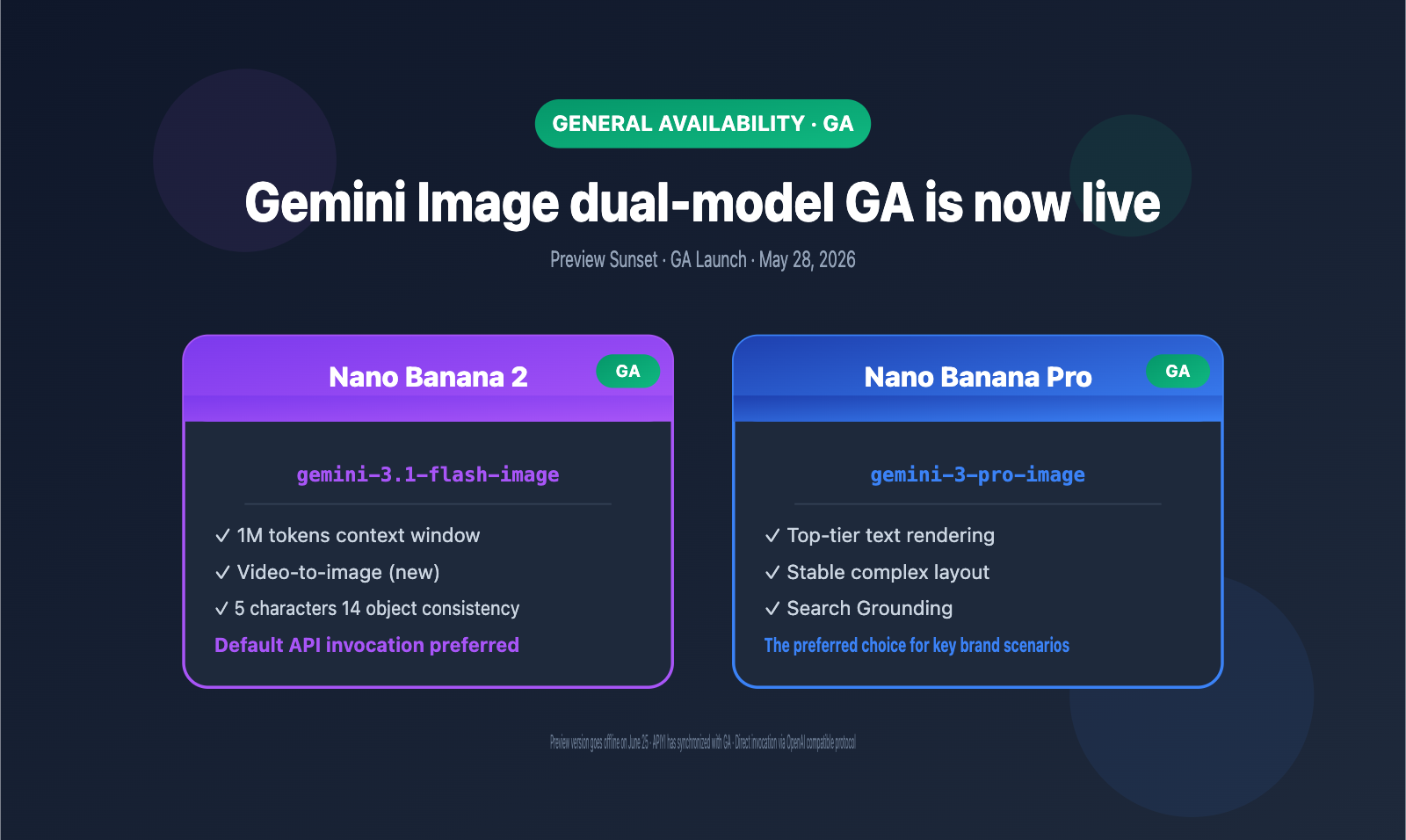
On May 28, Google DeepMind officially promoted both the gemini-3.1-flash-image-preview and gemini-3-pro-image-preview image models to General Availability (GA), corresponding to Nano Banana 2 and Nano Banana Pro, respectively. This means developers no longer need to use temporary IDs with the -preview suffix in production environments; you can now call the stable versions directly. On the same day, gemini-3.1-flash-image also gained a brand-new video-to-image capability.
For APIYI users, the most immediate change is that interfaces previously called via gemini-3.1-flash-image-preview have been seamlessly upgraded to gemini-3.1-flash-image. There's no need to rewrite your client code; simply updating the model name allows you to inherit all the new features. APIYI completed this synchronization on the day of the GA release, allowing developers to call these models via the OpenAI-compatible protocol at apiyi.com.
This article systematically covers three core questions: when exactly the -preview suffix is removed, what changes occurred for Nano Banana Pro and Nano Banana 2 during the GA transition, and how to quickly complete the migration in production. All information is sourced from official Google announcements and DeepMind model cards to avoid version confusion caused by hearsay.
Key Timeline for Removing the Preview Suffix from Gemini 3.1 Flash Image
To understand the significance of this GA transition, we need to look at the full release cadence of the two Nano Banana series models. The process from initial preview to stable version spanned about six months, following Google AI's consistent "Preview → Collect Feedback → GA" three-stage rhythm.
| Date | Event | Model ID | Status |
|---|---|---|---|
| Nov 20, 2025 | Nano Banana Pro Initial Preview | gemini-3-pro-image-preview |
Preview |
| Feb 26, 2026 | Nano Banana 2 Initial Preview | gemini-3.1-flash-image-preview |
Preview |
| May 28, 2026 | Both models reach GA | gemini-3-pro-image / gemini-3.1-flash-image |
GA ✅ |
| June 25, 2026 | Preview versions retired | *-preview suffix models |
Deprecated |
The timeline reveals several key signals:
First, Pro and 2 were "released together and graduated together." Although their preview periods were staggered by three months, Google chose to promote both to GA on the same day. This confirms the product strategy of a "dual-model approach" for image generation—one focused on extreme quality (Pro) and the other on extreme efficiency (Flash/2).
Second, the preview versions will retain a roughly four-week buffer period after GA, with official retirement on June 25. This gives developers plenty of time to migrate, but any code in production still using the *-preview suffix must be updated before June 25 to avoid 404 errors.
Third, GA isn't just about "removing the preview tag." gemini-3.1-flash-image added video-to-image capabilities on the day of GA, allowing for the generation of thumbnails, posters, and static keyframes from video inputs. This is a feature the preview version never had.
🎯 Migration Advice: If you are currently using
gemini-3.1-flash-image-previeworgemini-3-pro-image-preview, we recommend completing the model ID replacement before June 25. When calling via the APIYI (apiyi.com) platform, both old and new IDs are automatically supported, ensuring a smooth transition.
5 Key Changes in Nano Banana Pro and 2
GA isn't just a simple rebrand. From preview to stable, both models have undergone systematic optimizations in capability, stability, and pricing strategy. Here’s a breakdown of the 5 core changes.
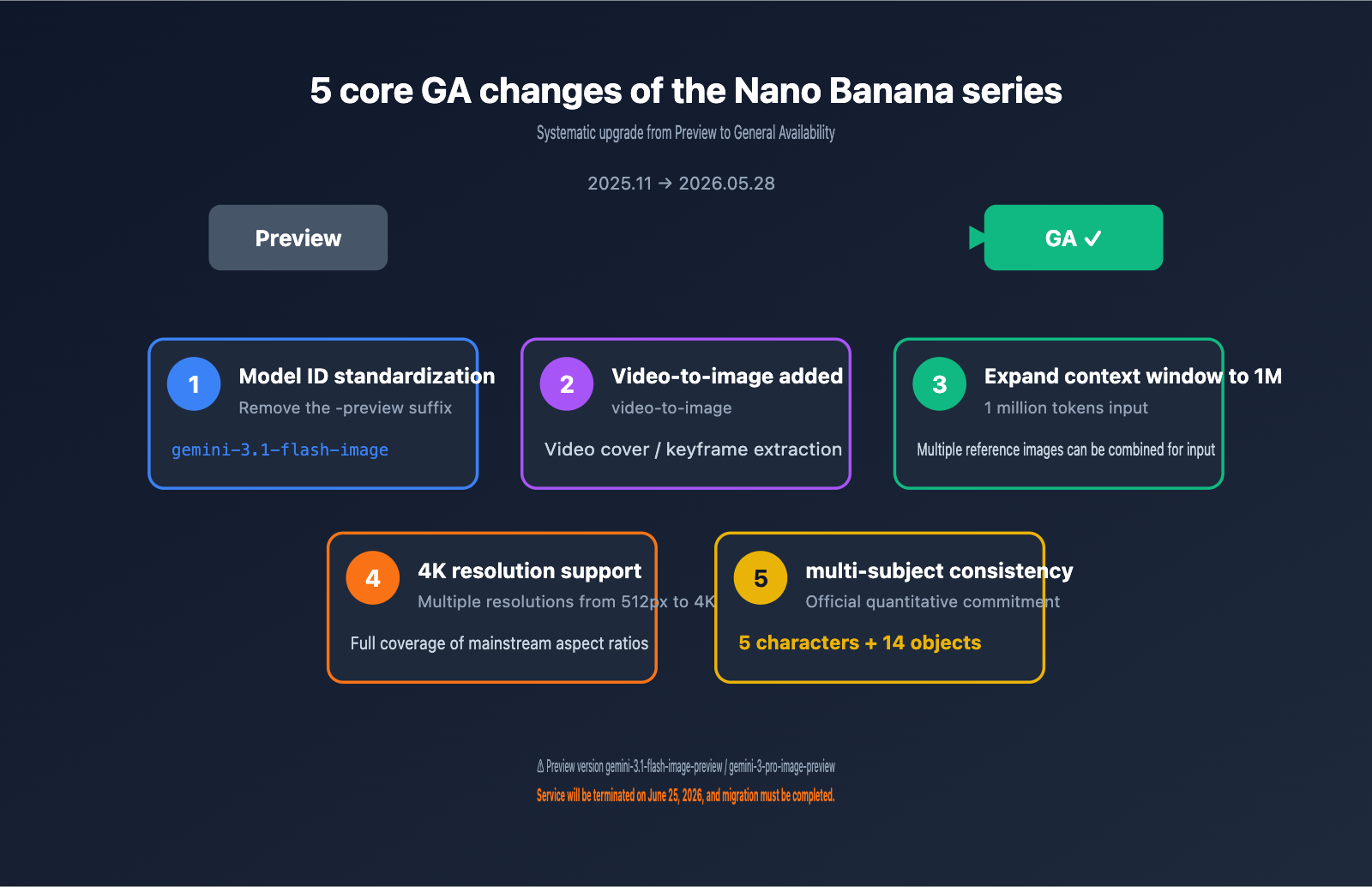
Change 1: Model ID Standardization, Removing the -preview Suffix
The most immediate change is the cleanup of model IDs. Here is the comparison between the old and new IDs:
| Model Purpose | Preview ID (Deprecated) | GA Official ID |
|---|---|---|
| High-Quality Image (Pro) | gemini-3-pro-image-preview |
gemini-3-pro-image |
| High-Efficiency Image (Flash/2) | gemini-3.1-flash-image-preview |
gemini-3.1-flash-image |
Removing the -preview suffix means more than just a cleaner name. It signifies that Google has integrated these two models into its official SLA and version management system: you now get stable regression testing, predictable capability change windows, and production-grade availability commitments.
Change 2: gemini-3.1-flash-image Adds Video-to-Image Capability
This is the most "substantial" upgrade released with GA. The new gemini-3.1-flash-image supports video as an input, allowing it to output representative static images directly—typical use cases include:
- Automatically generating thumbnails for videos
- Extracting keyframes from long videos to synthesize posters
- Capturing representative frames from live streams for broadcast covers
- Generating promotional posters by combining video + prompt
The preview version only supported text and image inputs and couldn't handle video. With this gap filled, the value of gemini-3.1-flash-image for video platforms, short-video tools, and e-commerce product videos has increased significantly.
Change 3: Context Window Expanded to 1M Tokens
DeepMind's model card shows that the input context window for gemini-3.1-flash-image can reach 1 million tokens. This specification is quite rare for image generation models, which means:
- You can feed in a large number of reference images and brand assets in a single call
- Long prompts and multi-turn editing history can be fully passed through
- It can handle complex combinations of "multi-source references + style instructions"
| Specification Dimension | gemini-3.1-flash-image (GA) |
|---|---|
| Input Context Window | 1 Million tokens |
| Image Output Capability | Up to 4K tokens |
| Text Output Capability | Up to 64K tokens |
| Input Modalities | Text, Image, Audio, Video |
| Knowledge Cutoff | January 2025 |
Change 4: Official 4K Resolution Support, with Multi-Tier Output Starting from 512px
The new version officially commits to supporting multiple resolution tiers from 512px to 4K, allowing developers to choose the appropriate tier based on their scenario to balance cost and quality. Various aspect ratios are also confirmed to be supported in GA, including common ones like 1:1, 4:3, 3:4, 16:9, and 9:16.
Change 5: Multi-Subject Consistency Improved to 5 Characters and 14 Objects
During the preview phase, Nano Banana 2 already made breakthroughs in multi-subject consistency. In the GA phase, the official team provided clear quantitative metrics: maintaining visual consistency for up to 5 characters and 14 objects in a single image. This is a rare "quantitative commitment" for publicly available image generation models, which is a direct benefit for scenarios like story illustrations, product composition images, and multi-SKU e-commerce main images.
🎯 Capability Selection: If your business focuses on multi-subject scenes or story illustrations, we recommend prioritizing
gemini-3.1-flash-image. You can quickly test stability across different subject counts via the APIYI (apiyi.com) platform, which has already fully synchronized the GA version.
Why Gemini 3.1 Flash Image and Gemini 3 Pro Image Coexist
After the GA release, Google didn't have Flash replace Pro, nor did Pro absorb Flash. Instead, they clearly positioned the two as a "dual-track" strategy. The product philosophy behind this is something every developer should understand.
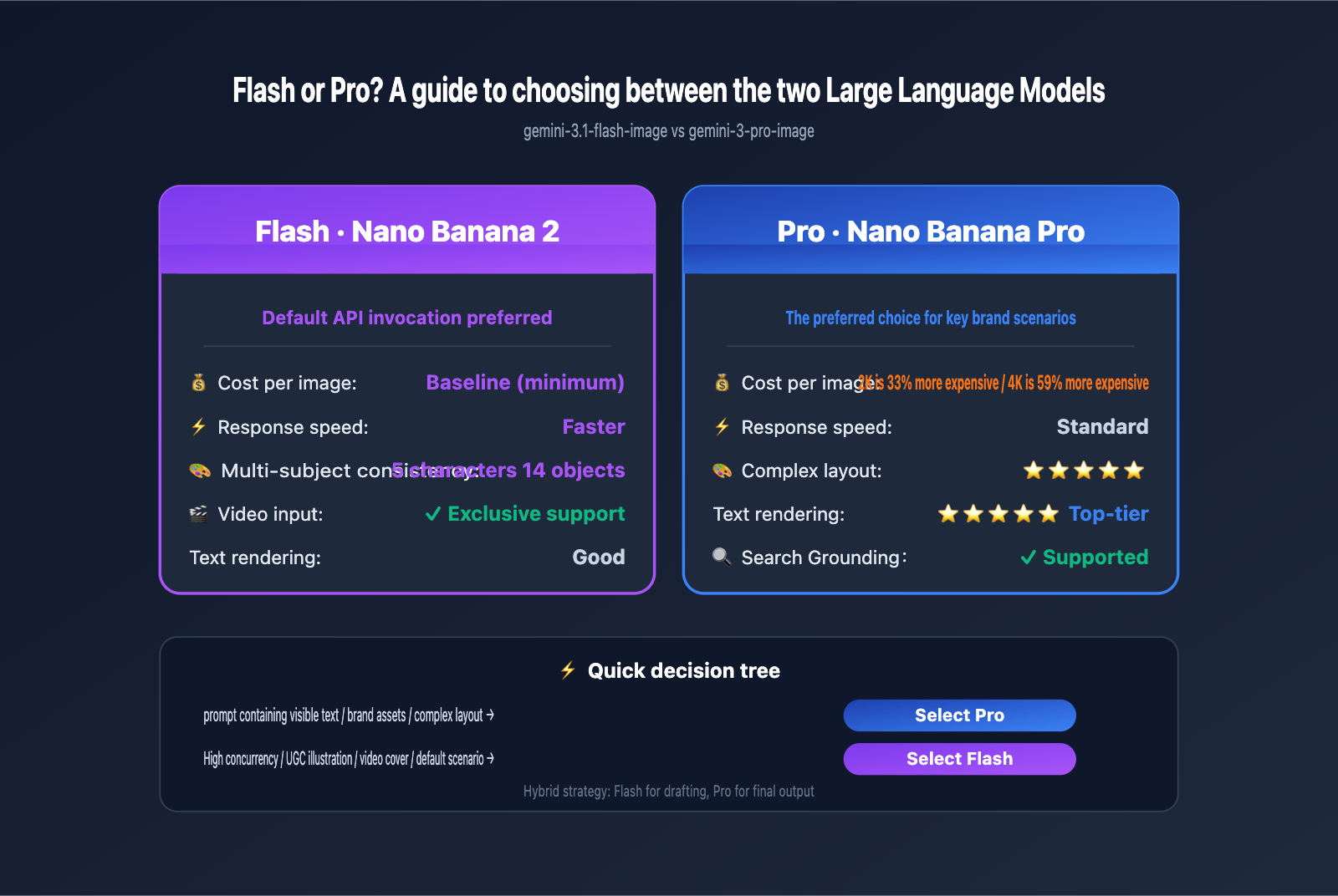
Performance Positioning: Pro for Quality, Flash for Efficiency
Pro is ideal for "visually critical moments"—posters with visible text, infographics, brand assets, and complex product mockups. Flash is perfect for "high-throughput scenarios"—UGC images for content platforms, bulk e-commerce product images, social media post visuals, and intermediate images within Agent workflows.
| Dimension | gemini-3-pro-image | gemini-3.1-flash-image |
|---|---|---|
| Core Positioning | High quality, complex layout | High efficiency, high throughput |
| Text Rendering | ⭐⭐⭐⭐⭐ | ⭐⭐⭐⭐ |
| Complex Charts | ⭐⭐⭐⭐⭐ | ⭐⭐⭐⭐ |
| Speed | Standard | Faster |
| Cost per Image | Baseline | ~33%–59% lower (2K/4K) |
| Multi-subject Consistency | ⭐⭐⭐⭐ | ⭐⭐⭐⭐⭐ (5 characters/14 objects) |
| Video Input | Partially supported | ✅ Fully supported |
| Recommended Use | Brand assets, infographics | Default API calls |
Cost Structure: Flash is Significantly Cheaper than Pro
Third-party benchmarks show that at the 2K output tier, Pro is about 33% more expensive per image than Flash, and at the 4K output tier, the gap widens to approximately 59%. For applications where images are the primary product, this difference will directly impact your monthly bill.
When to Choose Pro vs. Flash? A Decision Checklist
You can use this simplified checklist for your actual selection:
- Prompt contains visible text → Prefer Pro (more stable text rendering)
- Need precise brand colors and layout → Prefer Pro
- High-concurrency API calls → Prefer Flash
- Bulk generation of UGC images → Prefer Flash
- Complex multi-subject scenes → Prefer Flash (hard limit of 5 characters/14 objects)
- Video thumbnails/covers → Must use Flash (Pro lacks this capability)
- Uncertain scenario → Default to Flash; upgrade to Pro if quality isn't sufficient
🎯 Hybrid Strategy: Many production applications use a two-stage process: "Flash for drafts, Pro for final output." We recommend using the APIYI (apiyi.com) platform to call both models; the platform's OpenAI-compatible protocol makes switching between the two as simple as changing the
modelfield.
How to Call the Gemini 3.1 Flash Image GA Version on APIYI
APIYI launched the GA version on May 28th. Developers can call it in two ways: via the native Gemini protocol or the OpenAI-compatible protocol. The latter is better suited for projects migrating from the OpenAI ecosystem.
Minimalist Call Example (OpenAI-compatible protocol)
from openai import OpenAI

client = OpenAI(
    api_key="Your APIYI Key",
    base_url="https://api.apiyi.com/v1"
)

response = client.chat.completions.create(
    model="gemini-3.1-flash-image",   # GA official version, no -preview suffix
    messages=[
        {"role": "user", "content": "Generate an e-commerce style main image of sneakers, white background, 3:4 aspect ratio"}
    ]
)

print(response.choices[0].message.content)
Switching to the Pro Version
response = client.chat.completions.create(
    model="gemini-3-pro-image",   # Switch to the high-quality Pro version
    messages=[
        {"role": "user", "content": "Generate a main visual poster for a product launch, including the brand name ACME and the date 2026.06.10"}
    ]
)
You only need to modify the model field; the rest of the code remains exactly the same.
Video Input Example (Flash Exclusive Capability)
# Utilize the video-to-image capability of gemini-3.1-flash-image
response = client.chat.completions.create(
    model="gemini-3.1-flash-image",
    messages=[
        {"role": "user", "content": [
            {"type": "text", "text": "Generate a click-worthy cover image from this video"},
            {"type": "video_url", "video_url": {"url": "https://example.com/video.mp4"}}
        ]}
    ]
)
The entire migration process usually only requires replacing the model field. Your existing OpenAI SDK code can be reused directly without rewriting any client-side logic.
When Will the Old -preview Models Be Retired? Migration Notes
Although the GA version has been released, the preview versions were not shut down immediately. According to Google's official announcement, gemini-3.1-flash-image-preview and gemini-3-pro-image-preview will be officially retired on June 25, 2026. This gives developers about a 4-week buffer to complete the migration, but be sure not to wait until the last minute.
Migration Timeline
| Milestone | Status | Recommended Action |
|---|---|---|
| May 28 – June 10 | Dual versions available | Switch dev environment to GA for testing |
| June 10 – June 20 | Dual versions available | Batch switch in production environment |
| June 20 – June 24 | Final buffer | Complete all switches and monitor comparisons |
| June 25 and beyond | GA only | Preview versions return 404; migration must be complete |
Migration Checklist
Before finalizing the switch, we recommend verifying the following:
- All
gemini-3.1-flash-image-previewstrings in your code have been replaced withgemini-3.1-flash-image - All
gemini-3-pro-image-previewstrings in your code have been replaced withgemini-3-pro-image - Test coverage for key prompt types (including text, multi-subject, 4K output, etc.)
- Monitor latency and quality differences between GA and preview versions
- Verify that video input workflows behave as expected on GA Flash
🎯 Smooth Migration Tip: When calling via the APIYI platform, both old and new IDs are available during the buffer period, allowing you to perform a canary release on the client side. We recommend using the APIYI apiyi.com platform to verify the GA version on 10% of your traffic first, and then roll it out fully once stability is confirmed to reduce online risks.
Impact Analysis of Gemini 3.1 Flash Image GA
The transition to General Availability (GA) for this model has a more profound impact on the image generation landscape than a typical model update. It marks Google's completion of its "dual-model matrix" product strategy, establishing a clear competitive differentiation against OpenAI's GPT Image series, Midjourney, and Stable Diffusion.
For Developers: Clearer Selection Logic
During the preview phase, developers were often confused about whether to use Pro or the "2" version. With the GA release, the positioning is now crystal clear: use Flash by default, and upgrade to Pro for scenarios involving text or branding. This "clear dual-option" approach significantly reduces trial-and-error costs.
For Applications: Ready for Production
Preview models are generally not recommended for production environments (due to lack of SLA guarantees and potential API behavior changes). Now that gemini-3.1-flash-image and gemini-3-pro-image both come with production-grade SLAs, application developers can confidently integrate them into their core business workflows.
For the Competitive Landscape: Flash Cost Pressure Spills Over
The cost advantage of Nano Banana 2 at the 2K and 4K tiers will ripple down to downstream AI applications, indirectly forcing other image API providers to adjust their pricing strategies. We expect the price curves for mainstream image APIs to trend downward over the next quarter.
Gemini 3.1 Flash Image GA FAQ
When was the -preview suffix removed from gemini-3.1-flash-image?
It was removed on May 28, 2026. On the same day, gemini-3-pro-image-preview was also transitioned to gemini-3-pro-image. The preview versions are scheduled to be officially deprecated on June 25, 2026.
Are Nano Banana Pro and Nano Banana 2 the same model?
No, they are not. Nano Banana Pro corresponds to gemini-3-pro-image, which focuses on high quality and complex typography. Nano Banana 2 corresponds to gemini-3.1-flash-image, which focuses on high efficiency and throughput. Both exist in parallel, catering to different use cases.
Are the capabilities of the GA version identical to the preview version?
Not entirely. Beyond removing the -preview suffix, the GA version introduces video-to-image capabilities to gemini-3.1-flash-image and offers improved overall stability and SLA. For detailed specifications, please refer to the APIYI documentation at help.apiyi.com.
How do I invoke the GA version on APIYI?
Simply change the model field from gemini-3.1-flash-image-preview to gemini-3.1-flash-image; no other invocation parameters need to be adjusted. We recommend using the APIYI (apiyi.com) platform for your calls, as the platform has already fully synchronized with the GA version.
Should I choose Pro or Flash by default?
Google and most benchmarks recommend using Flash (gemini-3.1-flash-image) as your default option. Only upgrade to Pro if your prompt contains visible text, requires precise typography, or involves critical branding outputs. This approach ensures the best cost-to-performance ratio for most scenarios.
Which input modalities does gemini-3.1-flash-image support?
The GA version supports four input modalities: text, image, audio, and video, with an input context window of up to 1 million tokens. Video input is a new capability added during the GA phase.
Will I be affected if I am still using the preview version?
You won't be affected in the short term, but the preview version will be shut down after June 25, at which point calls will fail. We recommend completing the migration before June 20 to allow for a buffer period. You can monitor the actual behavioral differences between the two versions via the APIYI (apiyi.com) platform.
How much more expensive is Flash 4K compared to 2K? Is it worth upgrading to 4K?
The price gap between different resolution tiers isn't extreme, but the cost per image for 4K is significantly higher than for 2K. If your business scenario primarily involves social media or web imagery, 2K is usually sufficient. Only opt for 4K for print materials, large-screen displays, or professional posters.
Gemini 3.1 Flash Image GA Key Takeaways
- GA Date Confirmed: May 28, 2026. Both
gemini-3.1-flash-imageandgemini-3-pro-imageare moving out of preview. - Preview Sunset Date: June 25, 2026. You must complete your model ID migration by this date.
- New Video Input for Flash: The GA version of
gemini-3.1-flash-imagenow supports video-to-image generation. - 1M Tokens Context Window: The Flash input window has been expanded to 1 million tokens, supporting complex combinations of multiple reference images.
- Multi-Subject Benchmarks: Guaranteed visual consistency for up to 5 characters and 14 objects in a single image.
- Pro/Flash Coexistence: The dual-model matrix is now officially established, making it easier to choose the right model for your specific use case.
- APIYI Sync: APIYI completed the GA version synchronization on May 28, allowing for direct calls via the OpenAI-compatible protocol.
Summary
The simultaneous GA release of Gemini 3.1 Flash Image and Gemini 3 Pro Image marks a critical milestone for Google, transitioning from "experimental capabilities" to a "production-grade dual-model matrix" in the image generation space. Dropping the -preview suffix is just the surface; the real value lies in the stable SLA, new video capabilities, 1M tokens context window, and the quantitative commitment to multi-subject consistency.
For developers, this upgrade is virtually zero-cost—simply swap your model ID to unlock all the new features. The real question to consider is how to divide tasks between Pro and Flash: stick with Flash by default for cost-efficiency and speed, and scale up to Pro for high-stakes scenarios where quality is paramount.
🎯 Final Recommendation: We recommend using the APIYI (apiyi.com) platform to call both
gemini-3.1-flash-imageandgemini-3-pro-image. You'll benefit from a unified interface while maintaining the flexibility to switch models based on your needs. The platform completed its GA sync on May 28, and the OpenAI-compatible protocol makes integration a matter of minutes. Plus, both old and new IDs will work smoothly during the transition period ending June 25.
Author: APIYI Technical Team | For more AI model benchmarks and insights, visit help.apiyi.com