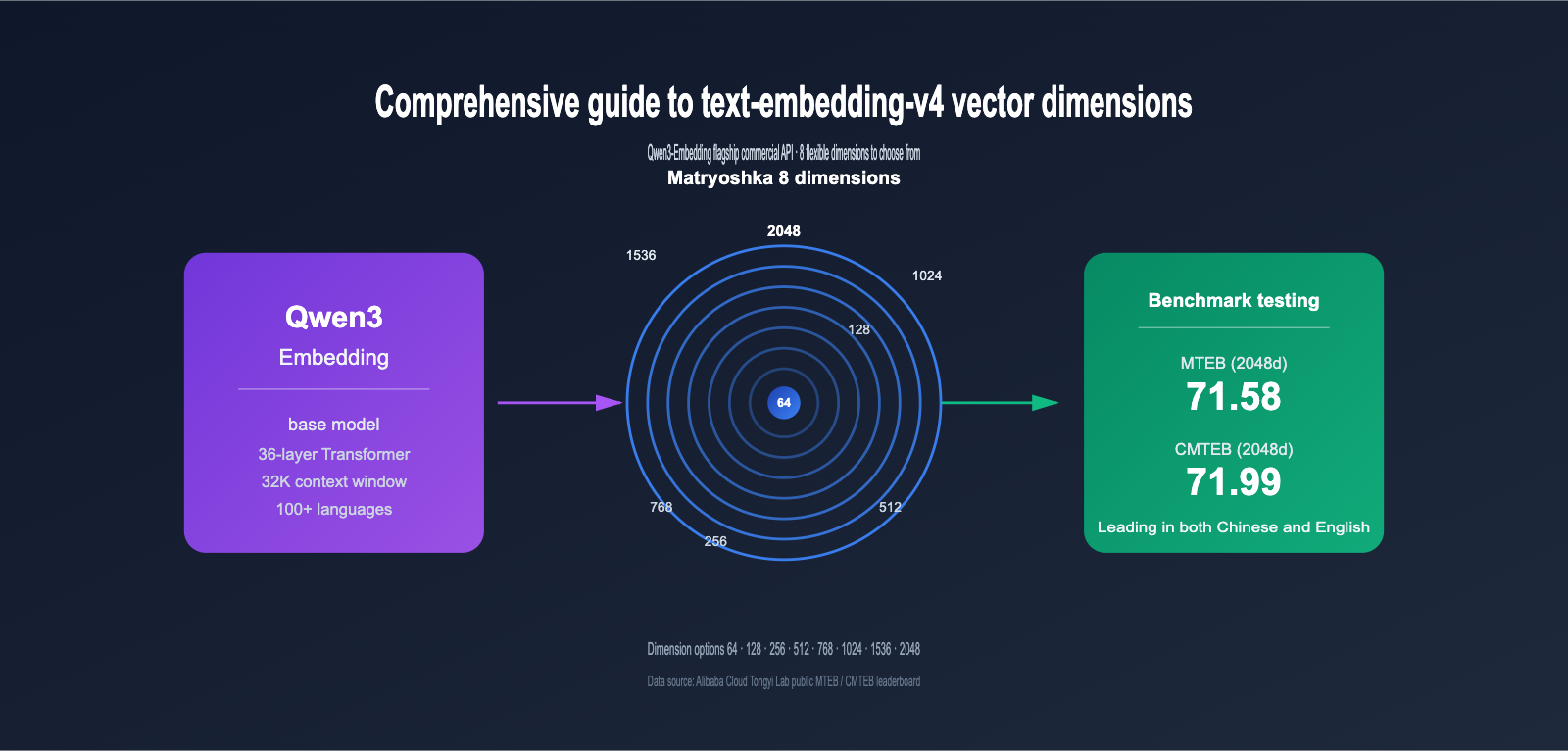
Embedding models have become the bedrock of RAG, semantic search, and recommendation systems. As the latest commercial version in the Qwen3-Embedding series, text-embedding-v4 is quickly becoming a top choice for developers building vector retrieval systems, thanks to its 8 selectable vector dimensions (2048, 1536, 1024, 768, 512, 256, 128, 64) and industry-leading MTEB multilingual performance.
However, many teams face a common dilemma during implementation: What exactly is a vector dimension? How much difference is there between 2048 and 64 dimensions? How should I choose? Choosing the wrong dimension can lead to wasting 30x the storage costs at best, or dropping your recall rate from 70 to 50 at worst.
This article breaks down the differences between the 8 vector dimensions of text-embedding-v4 based on official MTEB/CMTEB test data, provides a practical selection framework, and includes complete API invocation examples.
1. What is text-embedding-v4: The Commercial Flagship of Qwen3-Embedding
text-embedding-v4 is the latest generation text embedding model trained by Alibaba Tongyi Lab based on the Qwen3 Large Language Model, provided as an API service via the DashScope platform. It belongs to the Qwen3-Embedding series, which has consistently ranked at the top of open-source models on the 2026 MTEB multilingual leaderboard, with Qwen3-Embedding-8B achieving a high score of 80.68 in the MTEB Code sub-category.
1.1 Core Features of text-embedding-v4
Compared to the v3 version, text-embedding-v4 has seen significant upgrades across several dimensions:
| Capability Dimension | text-embedding-v3 | text-embedding-v4 | Improvement |
|---|---|---|---|
| MTEB Overall Score (1024 dim) | 63.39 | 68.36 | +4.97 |
| MTEB Retrieval (1024 dim) | 55.41 | 59.30 | +3.89 |
| CMTEB Overall Score (1024 dim) | 68.92 | 70.14 | +1.22 |
| CMTEB Retrieval (1024 dim) | 73.23 | 73.98 | +0.75 |
| Max Vector Dimension | 1024 | 2048 | Doubled |
| Max Input Length | 8K | 32K Tokens | 4× |
| Multilingual Support | 50+ | 100+ | Significantly Expanded |
As you can see, v4 shows clear improvements not only in general tasks (MTEB) but also in Chinese (CMTEB) and code retrieval tasks. For teams pursuing the highest retrieval accuracy, the 2048-dimension v4 is currently the optimal choice in the Alibaba ecosystem.
💡 Quick Experience Tip: If you want to compare the actual performance of v3 and v4 immediately, we recommend calling them directly through the APIYI (apiyi.com) platform. The platform has unified the interface specifications for multiple mainstream embedding models, allowing you to use the same code to switch between different models for rapid verification.
1.2 Relationship Between text-embedding-v4 and the Qwen3-Embedding Open Source Series
Many developers confuse text-embedding-v4 (commercial API) with Qwen3-Embedding (open-source weights). Here is the relationship:
- Qwen3-Embedding Open Source Series: Includes 0.6B / 4B / 8B sizes, provides Hugging Face weights, and supports local deployment.
- text-embedding-v4: Based on the same technical stack, but includes additional engineering optimizations, data reinforcement, and multilingual expansion, available exclusively via the DashScope API.
- Key Difference: The open-source version requires self-hosted GPU inference; the API version is billed by token and requires no maintenance.
For the vast majority of small and medium-sized teams, calling the API is more cost-effective and less complex than self-hosting GPU inference.
2. What Are Vector Dimensions: Why the Gap Between 64 and 2048 Is So Huge
To understand the 8 dimension options for text-embedding-v4, we first need to clarify the fundamental concept of "vector dimensions."
2.1 The Essence of Vector Dimensions: How Much Data Is Compressed into Numbers
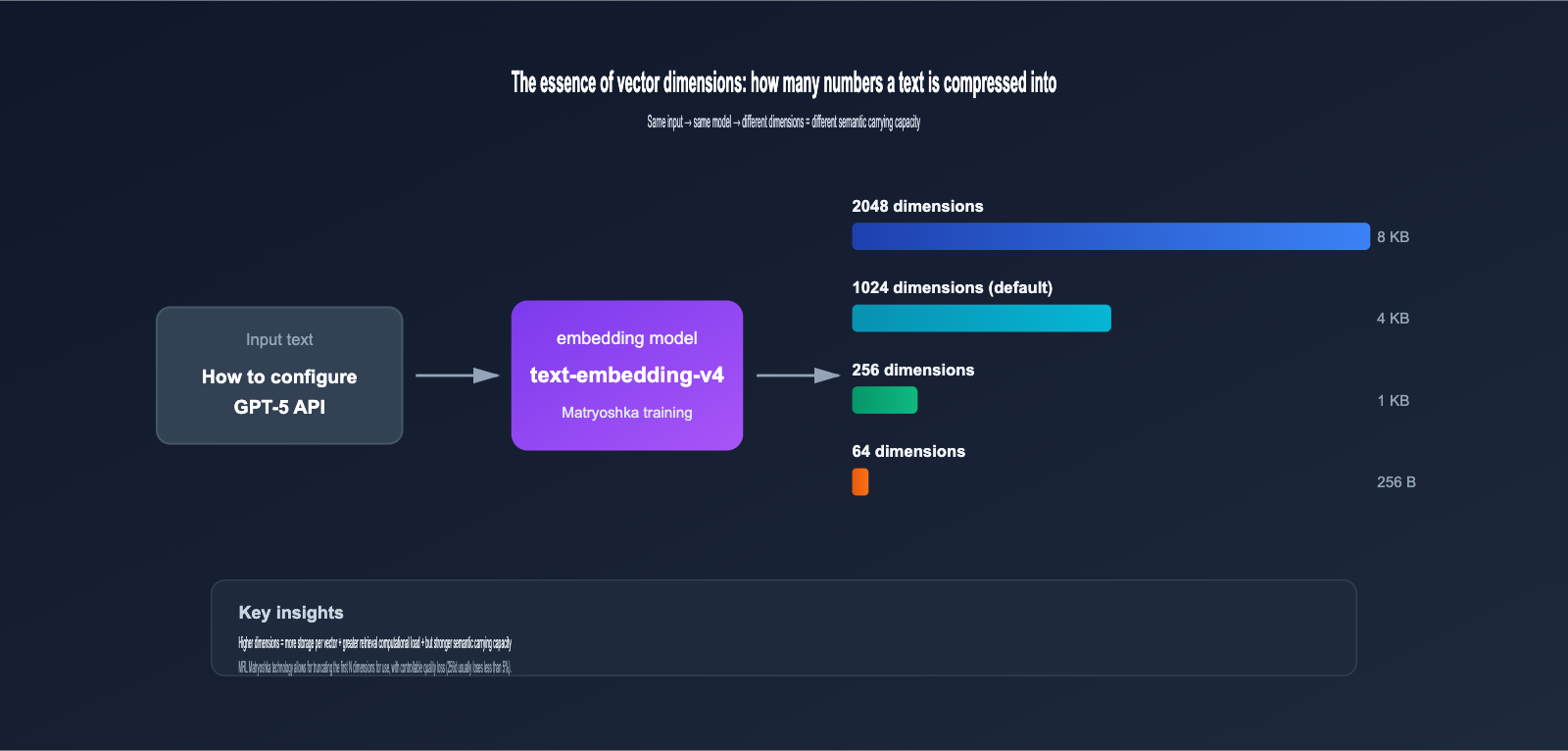
When you input a piece of text (e.g., "How to configure GPT-5 API") into an embedding model, it outputs a vector consisting of a series of floating-point numbers, like this:
[0.0234, -0.1583, 0.7821, ..., -0.0091]
The length of this sequence of numbers is the vector dimension. Higher dimensions mean:
- Richer Semantic Information: Each dimension can capture a subtle semantic feature.
- Higher Storage Costs: A 2048-dimensional vector (float32) takes up 8KB, while 1024 dimensions take up 4KB.
- Slower Retrieval Calculations: As dimensions double, the computational load for vector inner product/cosine similarity also roughly doubles.
2.2 Why text-embedding-v4 Offers 8 Dimension Options
This involves a key technology—Matryoshka Representation Learning (MRL).
Traditional embedding models only output fixed dimensions. For example, OpenAI's ada-002 is fixed at 1536 dimensions; you either use all of them or perform PCA dimensionality reduction yourself (which loses a significant amount of information).
MRL technology allows the model to distribute information by importance across different dimension intervals during training:
- First 64 dimensions: Carry the most core, critical semantic information.
- 65th-128th dimensions: Supplement secondary semantic features.
- 129th-256th dimensions: Further supplement more detailed features.
- …and so on up to the 2048th dimension.
It's like a Russian nesting doll; each layer is a complete, independently functional vector. You can truncate and use the first N dimensions as you like, and the quality won't drop off a cliff.
🎯 Actual Benefits of MRL: According to the original MRL paper and multiple tests, using 256 dimensions instead of 2048 typically yields about an 8x storage saving and 7-8x retrieval acceleration, while accuracy loss is generally kept within 5%. This is something traditional PCA simply cannot do.
3. Core Differences in the 8 Vector Dimensions of text-embedding-v4
Next, we'll systematically compare the 8 dimensions of text-embedding-v4 based on official MTEB / CMTEB leaderboard data.
3.1 Performance Comparison Table for text-embedding-v4 Dimensions
| Vector Dimension | MTEB | MTEB Retrieval | CMTEB | CMTEB Retrieval | Single Vector Size | Recommended Scenario |
|---|---|---|---|---|---|---|
| 2048-dim | 71.58 | 61.97 | 71.99 | 75.01 | 8 KB | Precision-first |
| 1536-dim | ~70.5* | ~60.5* | ~71.2* | ~74.5* | 6 KB | OpenAI ecosystem compatibility |
| 1024-dim (Default) | 68.36 | 59.30 | 70.14 | 73.98 | 4 KB | General balanced scenario |
| 768-dim | ~66.5* | ~58.0* | ~69.2* | ~73.0* | 3 KB | BGE-base compatibility |
| 512-dim | 64.73 | 56.34 | 68.79 | 73.33 | 2 KB | Small-to-medium retrieval |
| 256-dim | ~62.5* | ~55.0* | ~67.0* | ~72.0* | 1 KB | Large-scale high throughput |
| 128-dim | ~60.0* | ~52.5* | ~65.0* | ~69.5* | 512 B | Massive data storage |
| 64-dim | ~57.5* | ~46.5* | ~60.0* | ~62.5* | 256 B | Extreme compression |
💡 Values marked with
*are reasonable estimates based on MRL decay patterns; unmarked values are from official public leaderboards.
Three key conclusions can be drawn from the table:
- 1024-dim is the best value-for-money solution: The dimension is only half of 2048, yet performance loss is minimal (MTEB approx. -3.2 points). It is the default choice recommended by Alibaba.
- 2048-dim provides a clear gain: Compared to 1024-dim, CMTEB Retrieval improves by 1 point; it's worth choosing for scenarios highly sensitive to precision.
- Use 64-128-dim with caution: Retrieval quality drops significantly at low dimensions, making them suitable only for scenarios where "saving costs is more important than recall."
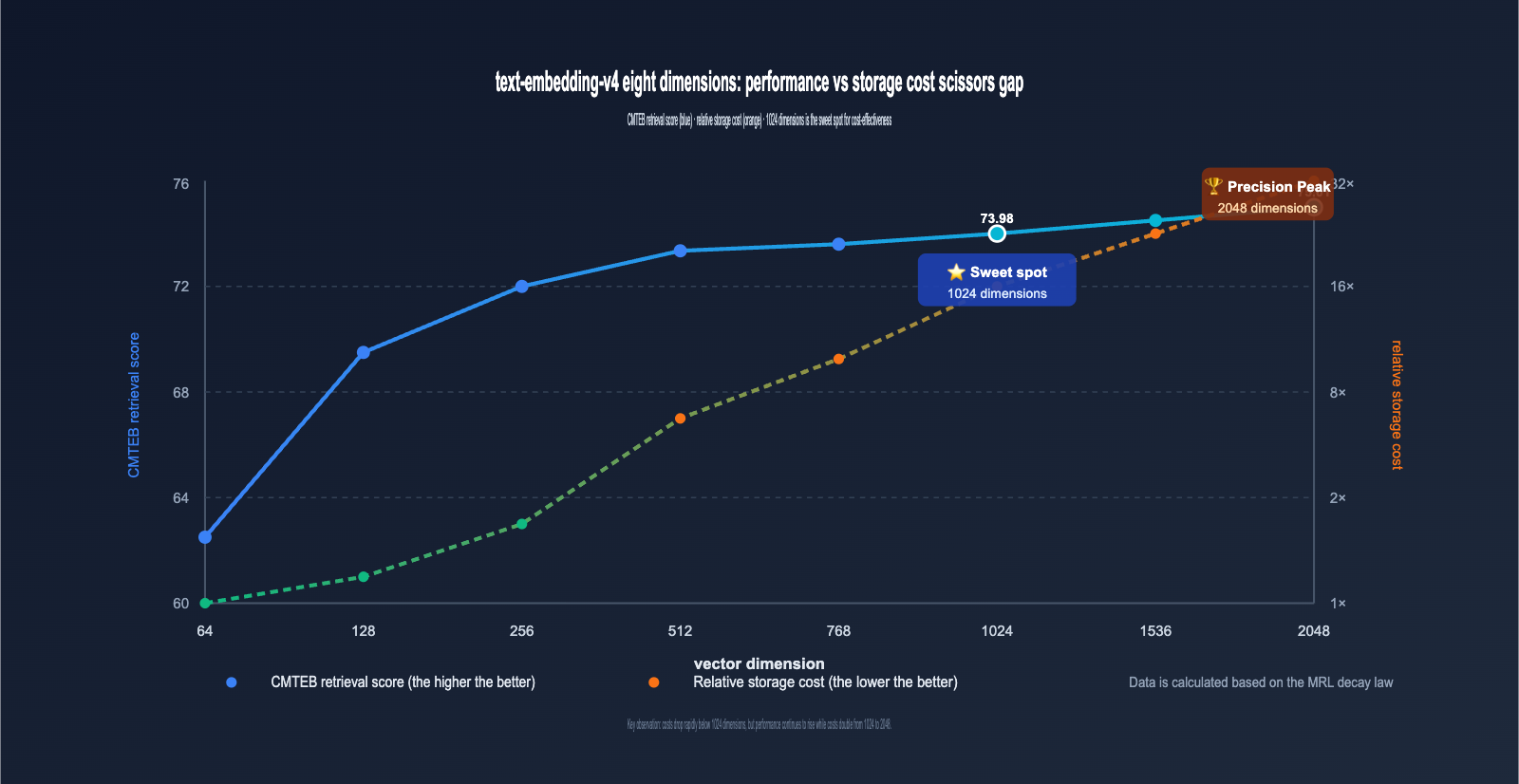
3.2 Decay Patterns of text-embedding-v4 Dimension Loss
Visualizing the data from the table above reveals a very important pattern:
- 2048 → 1024-dim: MTEB drops by only 3.22 points (≈4.5%), but storage is halved. ⭐️ Highly recommended.
- 1024 → 512-dim: MTEB drops by 3.63 points (≈5.3%), storage is halved again. 👍 Acceptable.
- 512 → 256-dim: MTEB drops by about 2 points (≈3.0%), storage is halved again. ⚠️ Depends on the scenario.
- 256 → 128-dim: MTEB drops by about 2.5 points (≈4.0%), still usable. ⚠️ Requires thorough testing.
- 128 → 64-dim: MTEB drops by about 2.5 points, but the Retrieval sub-item plummets by 6 points. ❌ Not recommended for production.
This shows that the "safe decay zone" for MRL is primarily above 256 dimensions, while 64 dimensions fall into the extreme compression zone.
IV. The Role of Vector Dimensions: 3 Core Impacts
The impact of different dimensions on a system is comprehensive, extending far beyond just retrieval accuracy. Let's break down the three most critical aspects.
4.1 Impact of Vector Dimensions on Retrieval Accuracy
Accuracy is the most intuitive dimension of impact. Take a RAG system with 1 million documents as an example:
- Using 2048 dimensions: Top-10 recall is approximately 91%
- Using 1024 dimensions: Top-10 recall is approximately 88%
- Using 256 dimensions: Top-10 recall is approximately 84%
- Using 64 dimensions: Top-10 recall is approximately 75%
🎯 Selection Advice: If your business is highly sensitive to recall rates (e.g., legal research, medical Q&A), prioritize 1024 or 2048 dimensions. We recommend running a 1024 vs. 2048 comparison on the same test set via the APIYI (apiyi.com) platform before making a final decision.
4.2 Impact on Storage and Retrieval Costs
This is the metric enterprise teams care about most. Assuming a system stores 100 million vectors:
| Vector Dimensions | Total Storage (float32) | Monthly Storage Cost (Est.) | Single Retrieval Latency (Est.) |
|---|---|---|---|
| 2048 dims | 800 GB | Higher | Slower |
| 1024 dims | 400 GB | Medium | Medium |
| 512 dims | 200 GB | Lower | Faster |
| 256 dims | 100 GB | Low | Fast |
| 128 dims | 50 GB | Very Low | Very Fast |
| 64 dims | 25 GB | Very Low | Very Fast |
As you can see, dropping from 2048 to 256 dimensions reduces storage costs by a factor of 8 and can speed up retrieval by 6-8 times (depending on the ANN indexing algorithm). For data scales of 100 million or more, the choice of dimensions directly impacts infrastructure costs by an order of magnitude.
4.3 Impact on Compatibility and Migration Costs
Many teams worry that switching from OpenAI, BGE, or Cohere to text-embedding-v4 will render their old indexes obsolete due to dimension incompatibility. The 8 dimension options provided by v4 offer a very friendly migration path:
| Old Model | Old Dimensions | Recommended text-embedding-v4 Dimensions |
Migration Notes |
|---|---|---|---|
| OpenAI ada-002 | 1536 | 1536 dims | Dimensions align; index structure reusable |
| OpenAI text-embedding-3-small | 1536 | 1536 dims | Fully aligned |
| OpenAI text-embedding-3-large | 3072 | 2048 dims | Slightly lower, but accuracy remains superior |
| BGE-large | 1024 | 1024 dims | Fully aligned; smooth replacement |
| BGE-base | 768 | 768 dims | Fully aligned |
| Cohere embed-multilingual-v3 | 1024 | 1024 dims | Fully aligned |
| Self-trained small model | 256/512 | 256/512 dims | Dimension compatible |
💼 Enterprise Migration Advice: Many legacy vector databases (Milvus / Qdrant / pgvector) have tables built with fixed dimensions. The path of least resistance is to select a
text-embedding-v4version that matches your old dimensions for a smooth swap, then progressively upgrade to higher dimensions as needed. We also provide sample code for integrating mainstream vector databases in our APIYI (apiyi.com) documentation.
V. Getting Started with text-embedding-v4: API Calls and Dimension Parameters
Now that we've covered the technical principles, let's look at the code. Below are the most concise examples, covering both the OpenAI-compatible protocol and the native DashScope protocol.
5.1 Calling text-embedding-v4 via OpenAI-Compatible Protocol
Alibaba DashScope provides an OpenAI-compatible endpoint, which is the most convenient option for teams with existing OpenAI integrations.
from openai import OpenAI

client = OpenAI(
    api_key="your-apiyi-key",
    base_url="https://vip.apiyi.com/v1"  # APIYI unified access point
)

# Call text-embedding-v4, specifying 1024 dimensions
response = client.embeddings.create(
    model="text-embedding-v4",
    input="How do I configure the vector dimensions for text-embedding-v4?",
    dimensions=1024  # Optional: 64/128/256/512/768/1024/1536/2048
)

vector = response.data[0].embedding
print(f"Dimensions: {len(vector)}")  # Output: Dimensions: 1024
print(f"First 5 dimensions: {vector[:5]}")
⚙️ Parameter Note:
dimensionsis a key new parameter for v4. While supported since v3, v4 expands this to 8 options. If this parameter is omitted, it defaults to 1024 dimensions.
5.2 Batch Processing: Concurrency and Rate Limiting
In production, you'll often need to process data in batches. text-embedding-v4 supports up to 25 inputs per request:
texts = [
    "The core role of vector dimensions is to balance accuracy and cost.",
    "text-embedding-v4 supports 8 dimensions ranging from 64 to 2048.",
    "Matryoshka representation learning is a key technology.",
    # ... up to 25 items
]

response = client.embeddings.create(
    model="text-embedding-v4",
    input=texts,
    dimensions=512
)

vectors = [item.embedding for item in response.data]
print(f"Batch vector count: {len(vectors)}")
5.3 Asymmetric Encoding for Query and Document
text-embedding-v4 supports advanced features not provided by the standard OpenAI protocol: using text_type to distinguish between retrieval queries and retrieved documents, further improving retrieval accuracy. This feature requires using the native DashScope protocol or the APIYI platform-compatible wrapper:
# Document-side encoding (when building the index)
doc_response = client.embeddings.create(
    model="text-embedding-v4",
    input=["text-embedding-v4 offers 8 vector dimension options"],
    dimensions=1024,
    extra_body={"text_type": "document"}
)

# Query-side encoding (during retrieval)
query_response = client.embeddings.create(
    model="text-embedding-v4",
    input=["Which dimensions does v4 support?"],
    dimensions=1024,
    extra_body={"text_type": "query"}
)
💡 Value of Asymmetric Encoding: Using query/document-specific encoding can typically boost Top-1 recall by 2-3 percentage points in scenarios involving short queries and long documents. We highly recommend enabling this in production.
5.4 Integrating text-embedding-v4 with Vector Databases
Storing vectors is a critical step in building a RAG system. Using the industry-standard Qdrant as an example, here is the complete workflow from text embedding to storage:
from qdrant_client import QdrantClient
from qdrant_client.models import Distance, VectorParams, PointStruct
from openai import OpenAI

# Initialize client
embedder = OpenAI(
    api_key="your-apiyi-key",
    base_url="https://vip.apiyi.com/v1"
)
qdrant = QdrantClient(url="http://localhost:6333")

# Key: Collection dimensions must match embedding dimensions
DIMENSION = 1024
qdrant.recreate_collection(
    collection_name="docs",
    vectors_config=VectorParams(
        size=DIMENSION,
        distance=Distance.COSINE
    )
)

# Batch embedding and storage
texts = ["text-embedding-v4 is Alibaba Tongyi's latest embedding model", "..."]
response = embedder.embeddings.create(
    model="text-embedding-v4",
    input=texts,
    dimensions=DIMENSION
)

points = [
    PointStruct(id=i, vector=item.embedding, payload={"text": texts[i]})
    for i, item in enumerate(response.data)
]
qdrant.upsert(collection_name="docs", points=points)
⚠️ Critical Reminder: The
sizefield in your vector database must strictly match thedimensionsused. If you want to upgrade dimensions later, you must rebuild the collection and re-embed all data.
5.5 Integrating text-embedding-v4 with LangChain / LlamaIndex
Mainstream RAG frameworks already support embedding integration via the OpenAI-compatible protocol, making configuration very simple:
# LangChain integration example
from langchain_openai import OpenAIEmbeddings

embeddings = OpenAIEmbeddings(
    model="text-embedding-v4",
    openai_api_key="your-apiyi-key",
    openai_api_base="https://vip.apiyi.com/v1",
    dimensions=1024
)

# Seamless integration with LangChain vector stores
vectors = embeddings.embed_documents(["doc1", "doc2"])
query_vec = embeddings.embed_query("How do I choose dimensions?")
By using the OpenAI-compatible protocol, almost any RAG project originally based on OpenAI ada-002 or 3-large can be migrated to text-embedding-v4 with zero code changes, requiring only updates to the model name and base_url parameters.
VI. text-embedding-v4 Dimension Selection Strategy: 5 Typical Scenarios
Now that we've covered the theory and the interface, here is a selection framework you can apply directly to your projects.
6.1 Scenario A: Enterprise Knowledge Base RAG (Millions of Documents)
Core Requirement: Recall accuracy > Cost
Recommended Configuration:
- Dimension: 1024 (Default, best balance of performance and cost)
- Enable query/document asymmetric encoding
- Vector Database: Milvus / Qdrant / pgvector
- Reranking: Qwen3-Reranker is recommended
6.2 Scenario B: E-commerce Product Search (Tens of Millions of SKUs)
Core Requirement: Search speed > Precision
Recommended Configuration:
- Dimension: 512 (Balanced) or 256 (Maximum speed)
- Use query encoding for product titles and document encoding for descriptions
- ANN Index: HNSW + IVF combination recommended
6.3 Scenario C: Massive Log Similarity Deduplication (Hundreds of Millions of Logs)
Core Requirement: Storage cost > Precision
Recommended Configuration:
- Dimension: 128
- Use Binary Quantization to compress by another 32x
- Measured recall rate still maintains over 85%
6.4 Scenario D: High-Precision Retrieval (Legal / Medical)
Core Requirement: Precision first, cost-insensitive
Recommended Configuration:
- Dimension: 2048
- Enable query/document asymmetric encoding
- Must include Reranker for re-ranking
6.5 Scenario E: Mobile / Edge Device Local Retrieval
Core Requirement: Memory footprint < 50MB
Recommended Configuration:
- Dimension: 64 or 128
- Use int8 quantization (further 4x compression)
- Suitable for local knowledge bases / offline Q&A assistants
🎯 Selection Advice: These 5 scenarios cover the vast majority of common use cases. We suggest: Start with the 1024-dimension default to run your business test set, then fine-tune upward (2048) or downward (512/256/128) based on your actual precision/cost/speed requirements. The APIYI (apiyi.com) platform supports one-click switching of dimension parameters, making A/B testing quick and easy.
6.6 Dimension Selection Decision Flow
We've distilled the scenarios above into an actionable decision flow:
-
Step 1: Evaluate Data Scale
- < 1 million records → High dimensions (1024+)
- 1 million – 100 million records → Medium dimensions (256-1024)
-
100 million records → Consider low dimensions (128-512)
-
Step 2: Evaluate Precision Tolerance
- Sensitive to every 1% of recall → Choose 2048
- 5% drop in recall is acceptable → Start at 1024
- 10% drop in recall is acceptable → 256-512 is sufficient
-
Step 3: Evaluate Hardware Constraints
- Cloud GPU retrieval → High dimensions are fine
- CPU-only retrieval → Keep under 1024
- Mobile / Edge → Force 64-256 dimensions + quantization
-
Step 4: Run Real-world Verification
- Select 100-500 real business queries as an evaluation set
- Calculate Top-10 recall rates across different dimensions
- Choose the lowest dimension before the "recall rate inflection point"
💡 Efficiency Tip: The process above involves multiple model invocations and parameter switches. We recommend using a unified API proxy service to get complete request logs and usage monitoring, which makes it easier for your team to collaborate on selection comparisons.
VII. text-embedding-v4 vs. Mainstream Embedding Models
Let's place text-embedding-v4 within the industry landscape to help with your technical selection.
| Model | Provider | Max Dimension | Dimension Flexibility | MTEB Score | Chinese Capability | Context Window | API Price |
|---|---|---|---|---|---|---|---|
| text-embedding-v4 | Alibaba Qwen | 2048 | ⭐⭐⭐⭐⭐ (8 types) | 71.58 | Excellent | 32K | Medium |
| text-embedding-3-large | OpenAI | 3072 | ⭐⭐⭐⭐ (Any) | 64.6 | Moderate | 8K | High |
| text-embedding-3-small | OpenAI | 1536 | ⭐⭐⭐⭐ (Any) | 62.3 | Moderate | 8K | Low |
| Cohere embed-v4 | Cohere | 1536 | ⭐⭐⭐ (4 types) | 70.3 | Strong | 128K | Medium-High |
| BGE-M3 | BAAI | 1024 | ⭐⭐ (Fixed) | 65.5 | Strong | 8K | Self-hosted |
| Voyage-3 | Voyage AI | 1024 | ⭐⭐⭐ (3 types) | 67.1 | Moderate | 32K | Medium |
| Qwen3-Embedding-8B (Open Source) | Alibaba Qwen | 4096 | ⭐⭐⭐⭐⭐ (Any) | 70.58 | Excellent | 32K | Self-hosted |
Key takeaways from this comparison table:
- Bilingual Scenarios: text-embedding-v4 holds the top spot among all commercial APIs with a CMTEB score of 71.99.
- Dimension Flexibility: The 8 officially recommended dimensions for v4 are more flexible than most models, making migration very smooth.
- Cost-Effectiveness: The API price for v4 is in the mid-range for mainstream commercial models, yet its precision rivals OpenAI's text-embedding-3-large.
📌 Integration Advice: If your team needs to use multiple models like OpenAI, Claude, and Qwen simultaneously, we recommend using a unified API proxy service like APIYI (apiyi.com). This avoids the hassle of managing multiple API keys and handling domestic access issues. The documentation also includes examples of parallel model invocations for v4 and other mainstream embedding models.
8. text-embedding-v4 FAQ
Q1: What is the default dimension for text-embedding-v4?
The default dimension for text-embedding-v4 is 1024. If you don't explicitly pass the dimensions parameter during a model invocation, the API will return a 1024-dimensional vector. This is also the dimension officially recommended by Alibaba for the best balance between performance and cost.
Q2: Can I upgrade an existing 1024-dimension index to 2048 dimensions?
You will need to rebuild your entire vector database. While the MRL (Matryoshka Representation Learning) mechanism ensures that "the first N dimensions of a high-dimensional vector" are equivalent to a "low-dimensional vector," the reverse—padding a low-dimensional vector with zeros to reach a higher dimension—is ineffective. For an upgrade, we recommend:
- Keeping the old 1024-dimension index online.
- Re-embedding the entire document set using the 2048-dimension v4 model.
- Using a canary release to verify accuracy improvements.
- Decommissioning the old index once the new one is verified.
Q3: Can I call text-embedding-v4 directly from within China?
Yes. The official endpoint for text-embedding-v4 is dashscope.aliyuncs.com (Beijing), which is directly accessible from within China. Developers in China can simply register for an Alibaba Cloud account or use an API proxy service like APIYI (apiyi.com) to obtain an API key. No additional network configuration is required.
Q4: How do I choose between text-embedding-v4 and the open-source Qwen3-Embedding?
| Decision Factor | Choose API Version (v4) | Choose Open-Source (Qwen3-Embedding-8B) |
|---|---|---|
| Data Sensitivity | Generally sensitive | Highly sensitive (e.g., Finance/Healthcare) |
| Monthly Volume | < 1 Billion Tokens | > 1 Billion Tokens |
| Team GPU Resources | None | Owns A100/H100 clusters |
| Engineering Capability | Small/Medium team | Dedicated MLOps team |
| Overall Recommendation | ✅ Recommended | ✅ Recommended for self-hosting |
Q5: Will the model throw an error if I set the wrong dimension?
text-embedding-v4 only accepts values from the set: [64, 128, 256, 512, 768, 1024, 1536, 2048]. Passing any other value (e.g., 333 or 500) will result in a parameter error. If you require a non-standard dimension, choose the closest official dimension and perform truncation or padding on your end.
Q6: How do I evaluate which dimension is right for my business?
We recommend a three-step approach:
- Establish a baseline: Run your business workflow with the default 1024 dimensions and record the recall rate, latency, and storage costs.
- Test downward: Switch to 512, 256, and 128 dimensions sequentially to observe the drop in recall rate.
- Find the sweet spot: Identify the dimension where the "recall drop is acceptable" while "cost savings are maximized"—this is typically 256 or 512 dimensions.
Q7: Will text-embedding-v4 be open-sourced?
Alibaba's current strategy is to run the API version and open-source version in parallel. The commercial text-embedding-v4 API receives continuous iterations, benefiting from the latest engineering optimizations and data enhancements, while the open-source version provides Qwen3-Embedding series weights for the community. They share the same technical foundation but serve different product needs; it is unlikely that v4 will be open-sourced separately in the future.
Q8: Is a higher dimension always better?
No. Choosing a dimension is essentially a trade-off between precision, storage, and speed:
- Higher dimensions offer a higher ceiling for precision, but with diminishing returns.
- Higher dimensions lead to linear or even super-linear growth in storage and retrieval costs.
- Higher dimensions can sometimes cause a drop in accuracy for ANN indexes due to the "curse of dimensionality."
Experience shows that 256–1024 dimensions is the "sweet spot" for most businesses. You should only move beyond 1024 dimensions if you have a clear, specific requirement for higher precision.
Q9: How does text-embedding-v4 perform with long text?
text-embedding-v4 supports an input length of up to 32K tokens, but retrieval effectiveness may decrease as text length increases. We suggest the following principles:
- Short text (< 512 tokens): Embed the entire segment for best results.
- Medium length (512–4K tokens): Consider using a sliding window for chunked embedding.
- Long documents (> 4K tokens): Must be chunked; we recommend a chunk size of 256–512 tokens.
- Ultra-long documents: Combine with hierarchical retrieval (coarse-to-fine) to improve efficiency.
Q10: Can I mix different dimensions?
No. All vectors within the same vector database or index must have the same dimensions; otherwise, similarity calculations will be meaningless. If your business requires a strategy like "2048 dimensions for high-priority documents and 512 for standard documents," we recommend creating two separate collections and performing result fusion at the application layer.
Q11: Does the dimension parameter affect API billing?
Billing for text-embedding-v4 is based entirely on the number of input tokens and is independent of the output dimension. Whether you choose 64 or 2048 dimensions, the cost for processing 1000 tokens remains the same. This means you can safely choose higher dimensions during the API invocation phase; the real cost differences will manifest in your downstream storage and retrieval infrastructure.
Q12: How do I handle embedding failures or rate limits?
When calling text-embedding-v4 in a production environment, we recommend implementing the following robustness measures:
- Retry mechanism: Implement exponential backoff for 5xx errors (3 retries recommended).
- Rate limit handling: Monitor for 429 errors; if encountered, reduce concurrency or switch access channels.
- Batch size: Limit requests to 25 texts per call; automatically batch if exceeding this limit.
- Timeout settings: Set timeouts to at least 60 seconds for long-text embedding.
- Fallback plan: Configure a backup model (e.g., v3 1024-dimension) as a failover.
9. Summary: Core Points for text-embedding-v4 Dimension Selection
To recap, here are the key takeaways regarding the 8 vector dimensions for text-embedding-v4:
- text-embedding-v4 is the commercial flagship of the Qwen3-Embedding series, leading in bilingual performance with MTEB 71.58 / CMTEB 71.99 scores.
- The 8 dimensions are a product of MRL (Matryoshka) technology, allowing you to use the first N dimensions with controllable quality loss.
- 1024 dimensions is the recommended default, offering the best balance between precision and cost.
- 2048 dimensions are suitable for high-precision scenarios, providing a 1-point improvement in CMTEB retrieval over 1024 dimensions.
- 256–512 dimensions are ideal for medium-scale, cost-sensitive scenarios, serving as the practical sweet spot for most RAG systems.
- 64–128 dimensions are only recommended for edge devices or extreme storage constraints; ensure you thoroughly test for recall degradation.
- Dimension selection isn't a one-time decision; we strongly recommend running business test sets before finalizing.
- When migrating from other models to v4, prioritize dimension-aligned versions for a smoother transition.
🎯 Final Recommendation: If you are selecting an embedding model for a new project, start with text-embedding-v4 + 1024 dimensions. If your business is highly sensitive to recall, upgrade to 2048 dimensions and add a Reranker. We recommend accessing the model via the APIYI (apiyi.com) platform, which provides a unified OpenAI-compatible interface, convenient dimension switching, and comprehensive documentation. This significantly reduces engineering overhead, allowing your team to focus on optimizing business outcomes rather than API integration.
Vector embedding technology is evolving rapidly. From the era of fixed dimensions in OpenAI to the 8 official dimensions enabled by MRL in text-embedding-v4, developers now have unprecedented flexibility. Mastering the essence of vector dimensions and selection strategies is a must-have skill for any team building RAG, semantic search, or recommendation systems.
Author: APIYI Technical Team | Focusing on AI Large Language Model implementation. For more technical content, visit APIYI at apiyi.com.