OpenClaw Skill Recommendations: Why You Need a Curated List
OpenClaw (formerly Clawdbot) is an open-source AI Agent framework created by Peter Steinberger. It uses messaging platforms like Telegram, Discord, and WhatsApp as its interface, allowing users to drive various automated tasks through conversation.
As of February 2026, the ClawHub skill marketplace has cataloged over 13,729 community skills. Faced with such a massive library, the core challenge for every user is how to quickly find truly useful OpenClaw Skills.
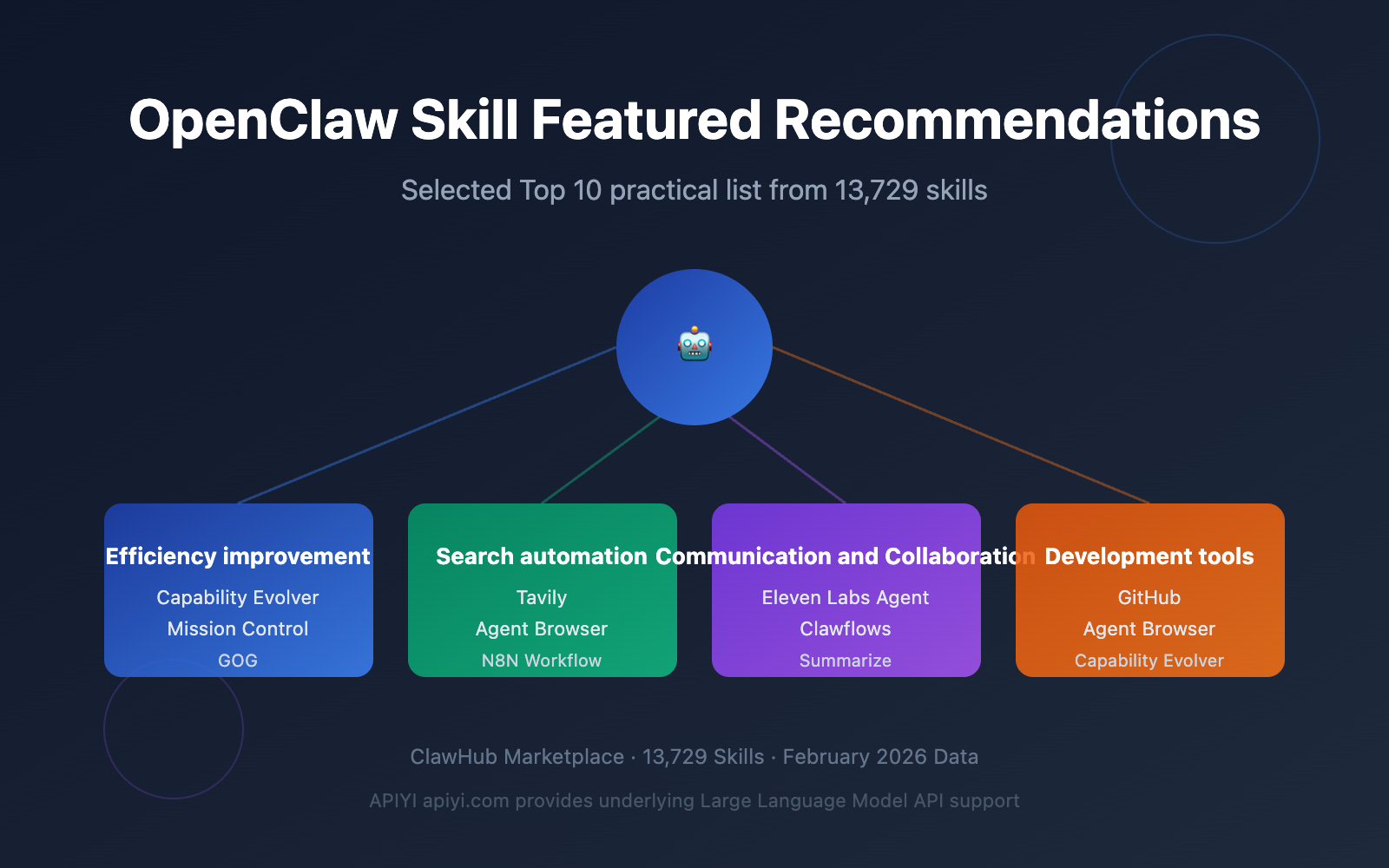
This article curates 10 of the most worthwhile OpenClaw Skills to install based on three dimensions: download volume, community reputation, and real-world usage experience. It also includes installation and configuration tutorials, along with safety tips to avoid pitfalls.
🎯 Value for Readers: This article saves you hours of filtering time, delivering a verified list of high-quality OpenClaw Skill recommendations.
If you're building AI Agent applications, you can also get underlying Large Language Model API support through APIYI (apiyi.com), using a unified interface to call various mainstream models.
Top 10 OpenClaw Skill Recommendations – Complete List
Based on ClawHub market data and community feedback, here are the 10 most recommended OpenClaw Skills to install in 2026.
OpenClaw Skill Recommendations Overview Table
| Rank | Skill Name | Downloads | Core Function | Recommended Scenario |
|---|---|---|---|---|
| 1 | Capability Evolver | 35K | Agent capability auto-evolution | Long-running agent optimization |
| 2 | GOG | 14K | Google Workspace CLI | Unified email/calendar/document management |
| 3 | Agent Browser | 11K | Browser automation control | Web data collection & operations |
| 4 | Mission Control | — | Morning task briefing aggregation | Daily productivity boost |
| 5 | Clawflows | — | Multi-step workflow orchestration | Complex task automation |
| 6 | Tavily | — | AI Agent-specific search | Research & information retrieval |
| 7 | N8N Workflow | — | n8n automation integration | Cross-platform workflows |
| 8 | Eleven Labs Agent | — | Voice synthesis + phone fallback | Voice interaction scenarios |
| 9 | GitHub | 10K | Code repository management | Developer collaboration |
| 10 | Summarize | 10K | Intelligent content summarization | Long text/meeting summaries |
OpenClaw Skill Recommendations Explained: Productivity Boosters
Productivity enhancement is the most popular category in the OpenClaw Skill ecosystem. These three Skills can significantly improve your daily workflow.
1. Capability Evolver — The Top OpenClaw Skill Recommendation
Capability Evolver tops the ClawHub charts with 35K downloads. Its core concept is enabling AI Agents to automatically evolve their own capabilities during operation.
How it works:
- Analyzes the Agent's historical interaction records
- Identifies high-frequency task patterns and bottlenecks
- Automatically adjusts prompt strategies and execution paths
- Continuously optimizes response quality and efficiency
Installation & Configuration:
# Install Capability Evolver in OpenClaw
claw install capability-evolver

# Basic configuration
claw config capability-evolver --auto-optimize=true --interval=24h
Capability Evolver is especially suitable for scenarios requiring long-running Agents. If you're using Large Language Model APIs to power your Agent, we recommend calling them via the APIYI platform at apiyi.com. It supports flexible switching between multiple models, making it easier for Evolver to find the optimal combination across different models.
2. Mission Control — The Efficiency Powerhouse OpenClaw Skill Recommendation
Mission Control aggregates task management, calendar events, and notification messages into a single morning briefing, acting as the "control tower" for your personal productivity.
Core Features:
| Feature Module | Description | Data Sources |
|---|---|---|
| Task Aggregation | Summarizes to-dos and deadlines | Todoist / Notion / Local |
| Calendar Overview | Shows today's and tomorrow's schedule | Google Calendar / Outlook |
| Notification Digest | Filters and summarizes important notifications | Slack / Email / Telegram |
| Priority Sorting | AI-powered task prioritization | Comprehensive analysis |
Configuration Example:
# Install Mission Control
claw install mission-control

# Set morning briefing time
claw config mission-control --brief-time="08:00" --timezone="Asia/Shanghai"
3. GOG — The Google Workspace Integration OpenClaw Skill Recommendation
GOG (Google Workspace CLI) ranks among the most popular with 14K downloads. It unifies six major services—Gmail, Calendar, Drive, Contacts, Sheets, and Docs—into a single command-line interface.
Supported Operations:
- Send and search emails via conversation
- Create calendar events using natural language
- Search and manage cloud files
- Query and update contacts
- Read and write spreadsheet data
- Collaborative document editing
# Install GOG
claw install gog

# Authorize Google account
claw auth gog --provider=google --scopes=full
💡 Usage Tip: GOG's email analysis works best when paired with a Large Language Model.
We recommend connecting GPT-4o or Claude models via APIYI at apiyi.com to make email summaries and reply suggestions more accurate.
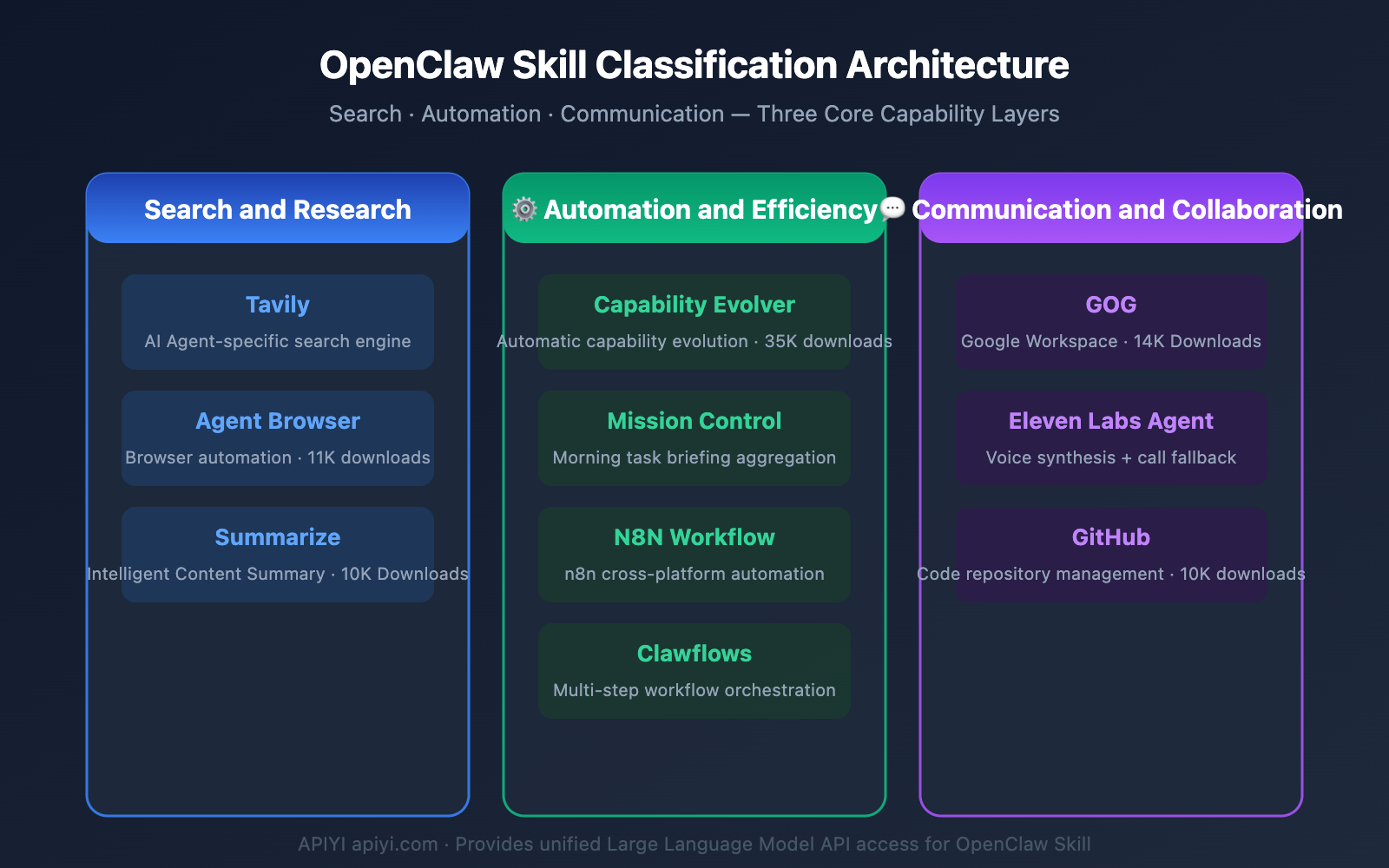
OpenClaw Skill Recommendations: Search & Automation
Search and automation are two fundamental capabilities for AI Agents. The following OpenClaw Skill recommendations can significantly enhance these areas.
4. Tavily — OpenClaw Skill Recommendation for Intelligent Search
Tavily is a search engine specifically designed for AI Agents. Unlike traditional search engines, it returns structured summary results directly, not just a list of links.
Tavily vs. Traditional Search Comparison:
| Comparison Dimension | Tavily | Traditional Search Engine |
|---|---|---|
| Return Format | Structured summary + key info | List of webpage links |
| Agent Integration | Native support, no parsing needed | Requires additional crawling & parsing |
| Information Density | High, directly usable | Low, requires secondary processing |
| Response Speed | Fast (pre-processed) | Slow (requires multiple steps) |
| Accuracy | AI-optimized ranking | Traditional algorithm ranking |
Installation & Usage:
# Install the Tavily Skill
claw install tavily

# Configure API Key
claw config tavily --api-key="your_tavily_key"
By combining Tavily search results with in-depth analysis via a Large Language Model, you can achieve an efficient research workflow. APIYI apiyi.com supports unified invocation of various models like OpenAI, Claude, and Gemini, making it easy to flexibly choose the right model for different research scenarios.
5. Agent Browser — OpenClaw Skill Recommendation for Browser Automation
With 11K downloads, Agent Browser ranks high on the popular list. It enables AI Agents to control browsers like a human, completing complex web interaction tasks.
Core Capabilities:
- Automatic form filling and submission
- Web data scraping and extraction
- Multi-tab parallel operations
- Screenshots and visual analysis
- Cookie and Session management
# Install Agent Browser
claw install agent-browser

# Launch a browser instance
claw config agent-browser --headless=true --timeout=30s
6. N8N Workflow — OpenClaw Skill Recommendation for Cross-Platform Automation
N8N Workflow integrates the n8n automation platform into OpenClaw, allowing you to create and manage complex workflows through conversation.
Typical Use Cases:
- Monitor webpage changes and send automatic notifications
- Schedule data collection and generate reports
- Cross-platform data synchronization (CRM → Spreadsheet → Email)
- Automatic routing and response to customer inquiries
# Install the N8N Workflow Skill
claw install n8n-workflow

# Connect to an n8n instance
claw config n8n-workflow --n8n-url="http://localhost:5678" --api-key="your_key"
🔧 Integration Tip: AI nodes within N8N workflows require Large Language Model API support.
By managing your API keys centrally through APIYI apiyi.com, you can flexibly switch models across different n8n nodes, reducing the complexity of multi-platform management.
OpenClaw Skill Recommendations: Communication & Development
Communication/collaboration and development tools are the OpenClaw Skill categories that professional users pay the most attention to.
7. Eleven Labs Agent — OpenClaw Skill Recommendation for Voice Interaction
The Eleven Labs Agent brings high-quality speech synthesis capabilities to OpenClaw, supporting text-to-speech, real-time voice conversations, and even phone fallback features.
Key Features:
- High-quality speech synthesis for 30+ languages
- Real-time voice conversation mode
- Phone Fallback: Automatically calls to notify users when they're offline
- Voice cloning (requires authorization)
- Emotional tone control
# Install Eleven Labs Agent
claw install elevenlabs-agent

# Configure voice parameters
claw config elevenlabs-agent --voice="alloy" --language="zh-CN"
8. Clawflows — OpenClaw Skill Recommendation for Workflow Orchestrator
Clawflows is a multi-step workflow orchestrator within the OpenClaw ecosystem. It allows you to chain multiple Skills together into an automated pipeline.
Orchestration Example:
# Example Daily Research Workflow
workflow: daily-research
steps:
  - skill: tavily
    action: search
    query: "AI industry news today"
  - skill: summarize
    action: digest
    input: previous_step
  - skill: mission-control
    action: add_brief
    content: previous_step
The power of Clawflows lies in combining various independent Skills into end-to-end automated pipelines, significantly reducing manual operations.
9. GitHub — OpenClaw Skill Recommendation for Code Management
With 10K downloads, the GitHub Skill is one of the most popular OpenClaw skills among developers. It lets you perform common Git operations through conversation.
Supported Operations:
- Create and manage Issues
- Submit and review Pull Requests
- Code search and browsing
- Release management
- Trigger Actions workflows
# Install the GitHub Skill
claw install github

# Authorize GitHub account
claw config github --token="ghp_your_token"
10. Summarize — OpenClaw Skill Recommendation for Content Summarization
With 10K downloads, Summarize ranks high on the popular list. It can intelligently summarize long articles, meeting notes, PDF documents, and more.
Summary Mode Comparison:
| Mode | Output Length | Best For | Info Retention |
|---|---|---|---|
| bullet | 5-10 points | Quick overview of key points | ★★★☆☆ |
| executive | 200-300 words | Management reporting | ★★★★☆ |
| detailed | 500-800 words | Deep analysis & review | ★★★★★ |
| action-items | Dynamic | Extracting action items | ★★★☆☆ |
# Install Summarize
claw install summarize

# Usage Example
claw run summarize --mode=executive --input="meeting_notes.md"
📝 Model Suggestion: Summary quality heavily depends on the underlying Large Language Model's capabilities.
We recommend testing the summarization performance of different models through the APIYI apiyi.com platform. For example, Claude excels at summarizing long texts, while GPT-4o has advantages in multilingual summarization.
OpenClaw Skill Security and Avoidance Guide
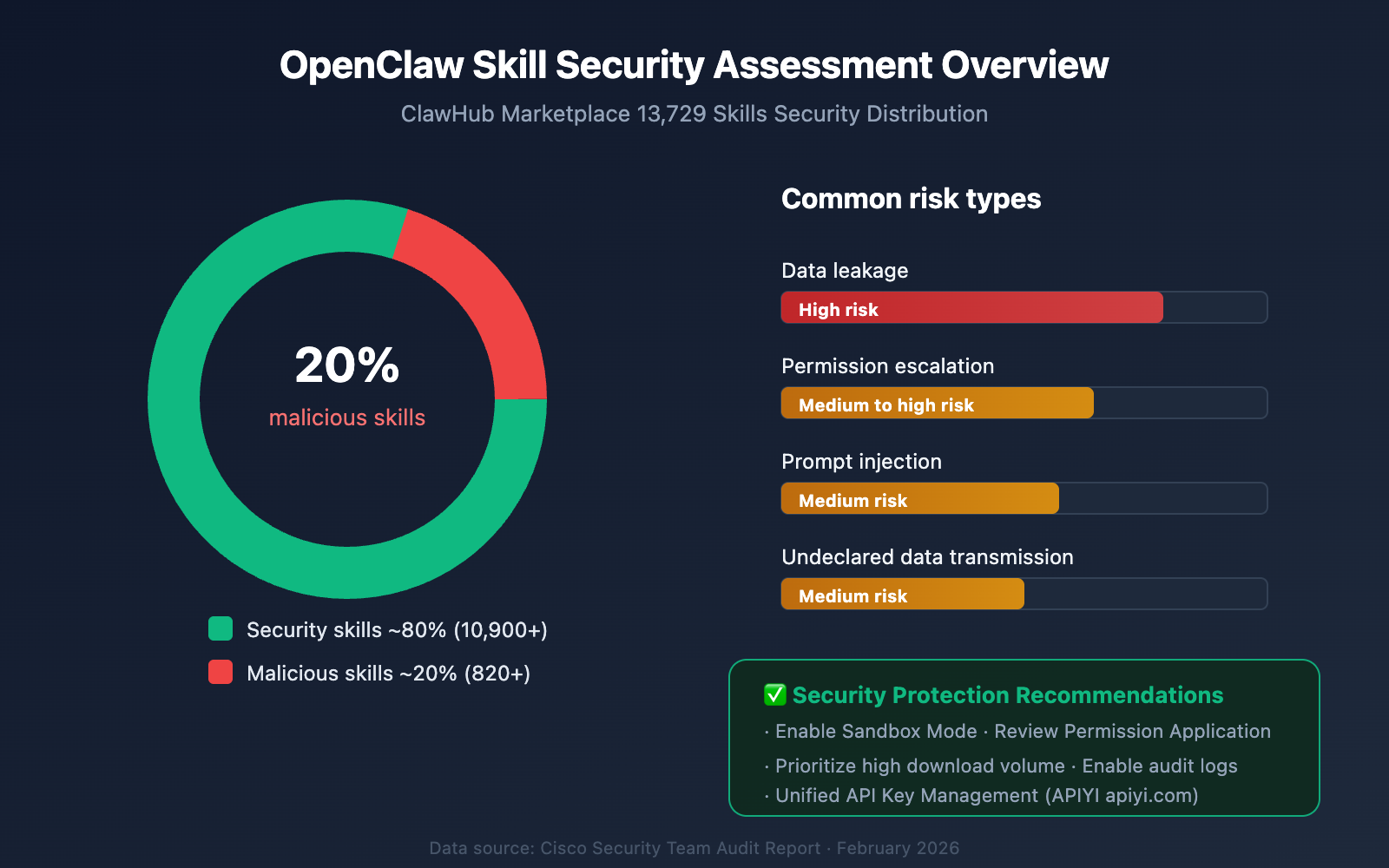
While enjoying the convenience of the OpenClaw Skill ecosystem, security should never be overlooked. According to findings from security research institutions, there are quite a few malicious skills present in the ClawHub marketplace.
OpenClaw Skill Security Risk Overview
Based on audit results from security teams like Cisco:
- 820+ malicious skills were discovered in ClawHub, accounting for roughly 20% of the total.
- Malicious behaviors include: data exfiltration, privilege escalation, and prompt injection.
- Third-party skills were found to have undeclared data transmission behaviors.
OpenClaw Skill Security Checklist
| Check Item | Description | Priority |
|---|---|---|
| Download Count Verification | Prioritize skills with 1000+ downloads | ⚠️ High |
| Source Code Audit | Check if the skill's code is open-source and reviewable | ⚠️ High |
| Permission Scope | Confirm if the permissions requested by the skill are reasonable | ⚠️ High |
| Community Reviews | Check feedback from other users | Medium |
| Update Frequency | Actively maintained skills are more reliable | Medium |
| Official Certification | Prioritize skills with official certification badges | Recommended |
Security Configuration Best Practices
# Enable skill sandbox mode
claw config --global --sandbox=strict

# Restrict network access permissions for skills
claw config --global --network-policy=whitelist

# Enable operation audit logging
claw config --global --audit-log=true --log-path="~/.claw/audit.log"
🔒 Security Recommendation: When using OpenClaw Skills to call external APIs, it's recommended to manage keys through a unified API gateway.
APIYI (apiyi.com) provides comprehensive key management and usage monitoring features, helping to avoid the security risks associated with API keys being scattered across different skills.
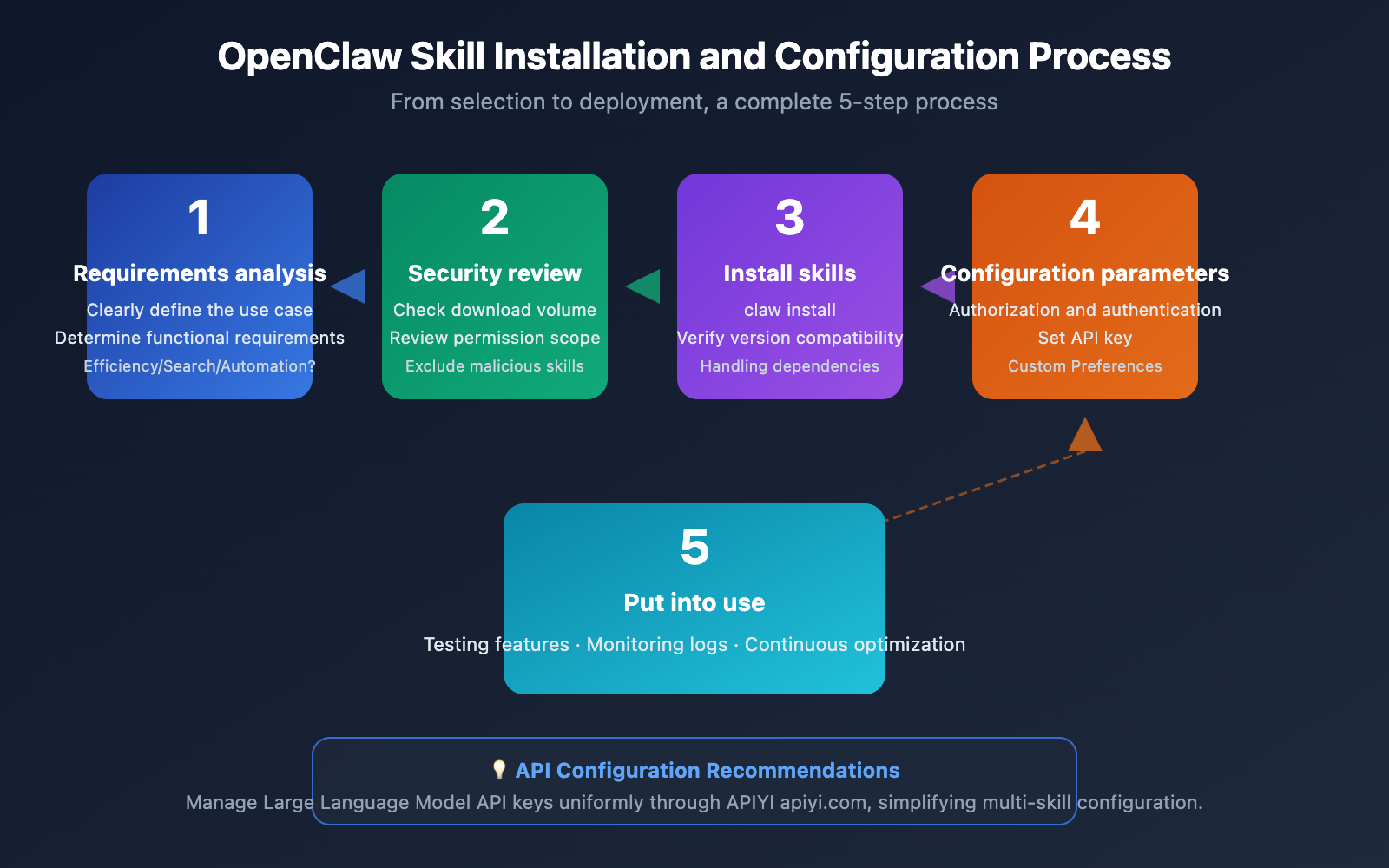
OpenClaw Skill Installation and Configuration Tutorial
OpenClaw Skill Basic Environment Setup
Before installing any OpenClaw Skill, make sure your environment meets the following requirements:
# Check OpenClaw version (requires v2.0+)
claw --version

# Update to the latest version
claw update

# View the list of installed skills
claw list --installed
Recommended OpenClaw Skill Bulk Installation Plans
Based on different usage scenarios, we've compiled three bulk installation plans:
Plan 1: Personal Productivity Suite
claw install mission-control capability-evolver summarize
claw config mission-control --brief-time="08:00"
claw config capability-evolver --auto-optimize=true
Plan 2: Developer Tools Suite
claw install github agent-browser tavily
claw config github --token="your_github_token"
claw config agent-browser --headless=true
Plan 3: All-in-One Automation Suite
claw install clawflows n8n-workflow gog elevenlabs-agent
claw auth gog --provider=google --scopes=full
claw config n8n-workflow --n8n-url="http://localhost:5678"
Integration with Large Language Model APIs
Many OpenClaw Skills require calling Large Language Model APIs to perform at their best. Configuring a unified API endpoint can simplify management:
# Configure Large Language Model API (using APIYI as an example)
claw config --global --llm-provider=openai-compatible
claw config --global --llm-base-url="https://api.apiyi.com/v1"
claw config --global --llm-api-key="your_api_key"
claw config --global --llm-model="gpt-4o"
This way, all skills that require Large Language Model capabilities will call through a unified interface, making it easy to manage and switch models.
OpenClaw Skill Recommendations FAQ
Q1: Which skill in the OpenClaw Skill recommendation list is best for beginners?
We recommend starting with Summarize. It has an intuitive function and simple configuration, allowing you to quickly experience how OpenClaw works. Once you've mastered the basics, install Mission Control to boost your daily efficiency.
Q2: Do OpenClaw Skills update automatically after installation?
Not by default. It's recommended to regularly run claw update --all to update all installed skills. Automatic updates can be enabled via claw config --global --auto-update=true, but for security reasons, it's advisable to manually confirm the contents of each update.
Q3: Can multiple OpenClaw Skills call each other?
Yes. The Clawflows orchestrator is designed for exactly this purpose, allowing you to chain multiple Skills into a workflow. Furthermore, some Skills natively support calling each other; for example, Mission Control can call Summarize to generate summaries.
Q4: How can I control the costs incurred by OpenClaw Skills calling Large Language Model APIs?
We recommend using an API management platform with usage monitoring features. Through APIYI at apiyi.com, you can set daily usage caps and alert thresholds to avoid unexpected charges caused by Agents running automatically.
Q5: How can I confirm if an OpenClaw Skill is safe and reliable?
Refer to the security checklist in this article: prioritize skills with high download counts, open-source for auditing, and reasonable permission requests. Simultaneously, enable sandbox mode and audit logs to monitor skill behavior in real-time.
Summary: Top OpenClaw Skill Picks for 2026
The rapid development of the OpenClaw ecosystem provides AI Agent users with a rich selection of skills. From over 13,000 skills on ClawHub, we've selected 10 practical skills covering efficiency enhancement, search & research, workflow automation, and communication & collaboration.
Key Takeaways:
- Efficiency Trio: Capability Evolver + Mission Control + GOG, covering capability evolution, schedule management, and office collaboration.
- Search Automation: Tavily + Agent Browser + N8N Workflow, building a complete pipeline for information acquisition and processing.
- Communication & Development: Eleven Labs Agent + GitHub + Summarize, meeting needs for voice interaction and development collaboration.
- Safety First: Approximately 20% of skills on ClawHub pose security risks, so always follow the security checklist.
When building AI Agent workflows, the stability and diversity of the underlying Large Language Model APIs are crucial. We recommend managing API access uniformly through APIYI at apiyi.com. The platform supports one-stop invocation of mainstream models like OpenAI, Claude, and Gemini, allowing your OpenClaw skill stack to deliver maximum value.
🚀 Get Started Now: Visit APIYI at apiyi.com to get an API Key. Combine it with the OpenClaw Skills recommended in this article to build your own AI Agent workflow.
This article was originally authored by the APIYI Team, based on ClawHub market data and real-world usage experience. Skill recommendation rankings are for reference only; please choose the OpenClaw Skill that best suits your needs.