title: "Can Claude Code Use GPT-5.4? Why Third-Party Proxies Don't Work and How to Use Alternatives"
description: "Answering whether Claude Code supports OpenAI models, why API proxies fail, and how to use OpenCode and Codex CLI for GPT-5.4 programming."
tags: [Claude Code, GPT-5.4, AI Programming, APIYI, OpenCode]
Author's Note: This post answers whether Claude Code can connect to OpenAI models like GPT-5.4, explains why third-party API proxy services don't support Claude Code, and shows you how to use OpenCode and Codex CLI for GPT-5.4-powered programming.
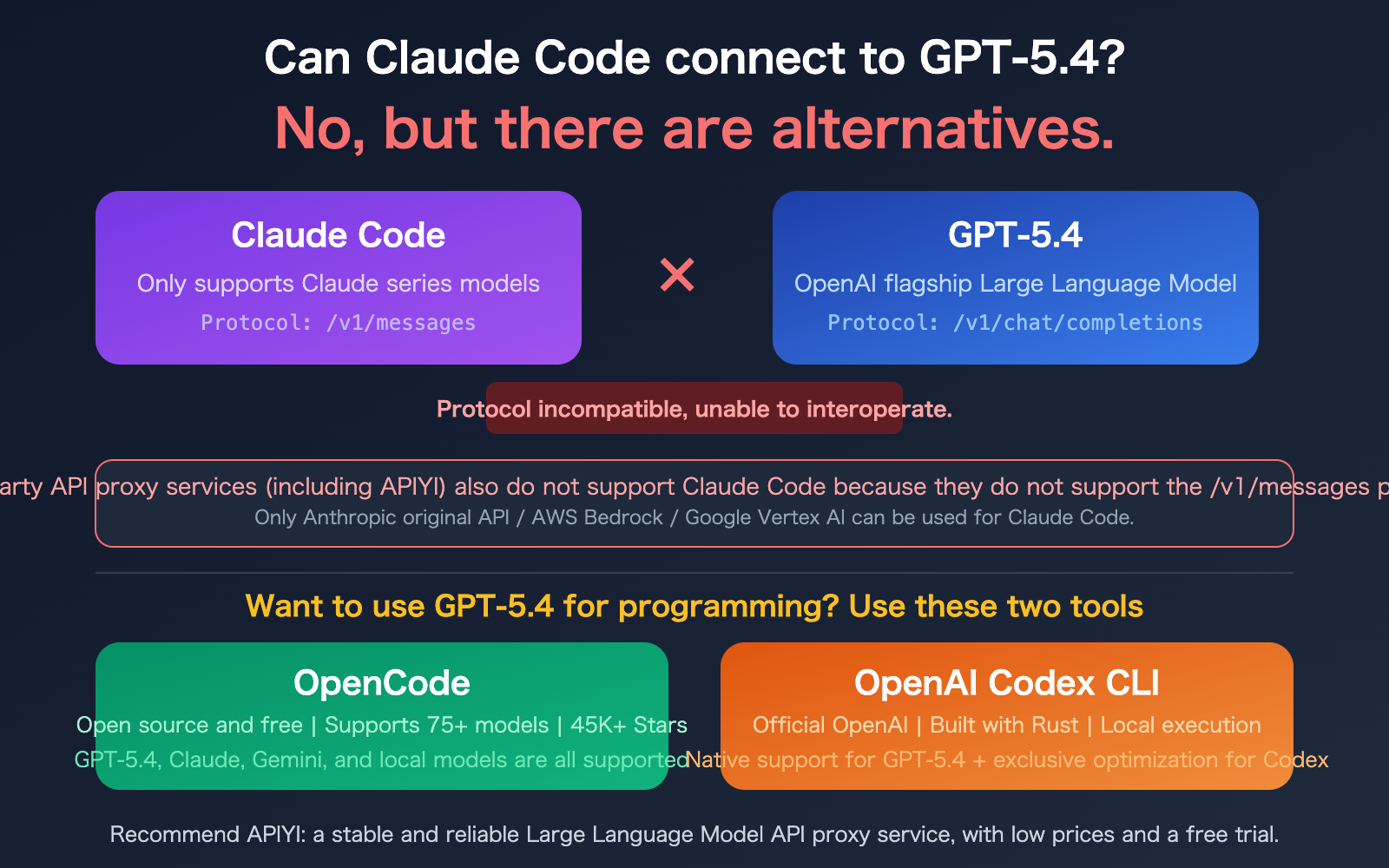
"Can Claude Code connect to your GPT-5.4 model?"—this is the question we've been getting the most lately. The answer is straightforward: No. Claude Code is strictly limited to the Claude model family; it cannot connect to OpenAI's GPT-5.4 or any other non-Claude models.
Furthermore, third-party API proxy services like APIYI cannot be used with Claude Code. The core reason is that Claude Code requires the /v1/messages endpoint (the native Anthropic protocol), and most proxy platforms do not support this specific protocol.
However, if you're determined to use GPT-5.4 for AI-assisted programming, there's definitely a way—OpenCode and Codex CLI are tools built exactly for this purpose. Let's break it down.
Core Value: After reading this, you'll understand the connection limitations of Claude Code and how to choose the right AI programming tools to leverage GPT-5.4.
Key Points for Integrating GPT-5.4 with Claude Code
| Key Point | Description | Impact |
|---|---|---|
| Claude Code only supports Claude models | Hard-coded to Anthropic's /v1/messages protocol |
Cannot connect to GPT, DeepSeek, Gemini, etc. |
| Third-party API proxy services don't support Claude Code | Platforms like APIYI do not support the /v1/messages endpoint |
Only official APIs or Bedrock/Vertex work |
| Some domestic platforms are adapted | Kimi, GLM, etc., have coding plans adapted for Claude Code | Limited to official adaptations; third-party proxies won't work |
| Alternatives exist for GPT-5.4 coding | OpenCode (open source) and Codex CLI (official OpenAI) | Both tools natively support GPT-5.4 |
Why Claude Code Can't Connect to GPT-5.4
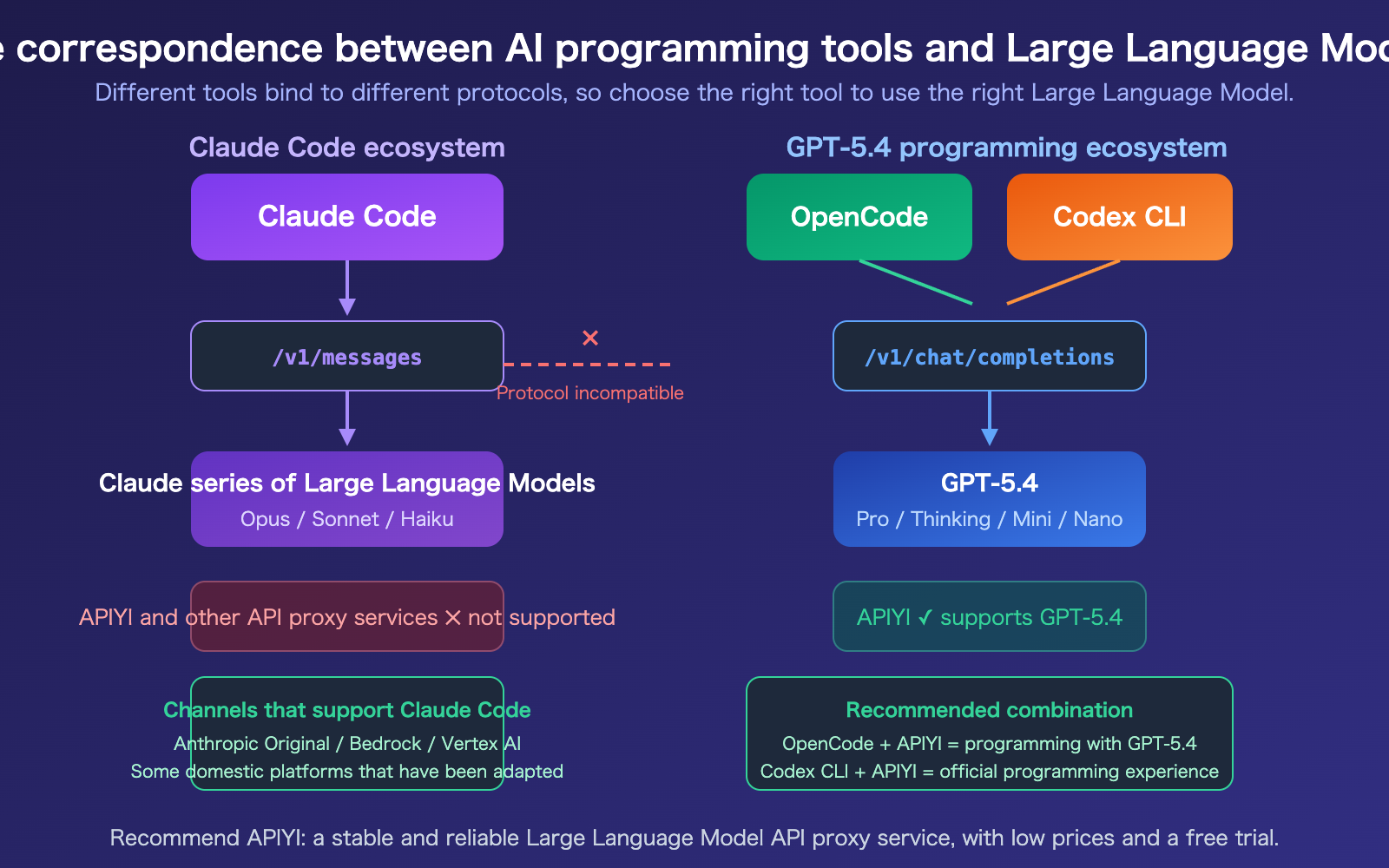
Claude Code and GPT-5.4 operate on two completely different API protocols:
Claude Code Protocol: Uses Anthropic's native /v1/messages endpoint. The request format includes content blocks, tool_use blocks, extended thinking, and other Claude-specific features. When Claude Code starts, it appends /v1/messages to the ANTHROPIC_BASE_URL to send requests.
GPT-5.4 Protocol: Uses OpenAI's /v1/chat/completions endpoint. The request format relies on the messages array, function_calling, tool_choice, and other OpenAI-standard formats.
These two protocols differ entirely in request structure, response format, and streaming output methods. Claude Code has the dependency on the Anthropic protocol hard-coded, so there's no option to "switch" to an OpenAI format.
Why Third-Party API Proxy Services Don't Work
Many developers wonder: can I use an API proxy service like APIYI to forward requests to Claude? The answer is no. Here's the core reason:
- API proxy services like APIYI primarily support the OpenAI-compatible
/v1/chat/completionsprotocol. - Claude Code requires the
/v1/messagesprotocol. - Proxy platforms have not implemented the
/v1/messagesendpoint. - Even for the most popular proxy platforms in the industry, this protocol-level limitation cannot be bypassed.
Channels that work with Claude Code:
- Official Anthropic API (register an Anthropic account directly)
- AWS Bedrock (set
CLAUDE_CODE_USE_BEDROCK=1) - Google Vertex AI (set
CLAUDE_CODE_USE_VERTEX=1) - Select domestic AI platforms that have adapted to the
/v1/messagesprotocol (e.g., platforms with coding plans like Kimi or GLM)
title: "Alternatives for Programming with GPT-5.4: OpenCode and Codex CLI"
description: "Explore the best CLI tools for AI-assisted programming with GPT-5.4, including OpenCode and Codex CLI, and learn how to integrate them using APIYI."
tags: [AI, Programming, GPT-5.4, OpenCode, Codex CLI, APIYI]
Alternatives for Programming with GPT-5.4: OpenCode
OpenCode is an open-source terminal AI programming assistant with over 45,000 stars on GitHub. You can think of it as a "model-agnostic Claude Code." It supports 75+ model providers, including GPT-5.4, Claude, Gemini, DeepSeek, and various local models.
OpenCode vs. Claude Code
| Feature | Claude Code | OpenCode |
|---|---|---|
| Model Support | Claude series only | 75+ providers, any model |
| API Protocol | /v1/messages (Anthropic) |
/v1/chat/completions (OpenAI compatible) |
| GPT-5.4 Support | No | Yes |
| APIYI Support | No | Yes |
| Open Source | No (Free CLI, closed ecosystem) | Yes (Fully open source) |
| Cost | Requires Anthropic paid plan | Software is free, pay for model API usage |
| Local Models | Not supported | Supported (Ollama, etc.) |
Configuring OpenCode for GPT-5.4
OpenCode allows you to specify your API provider via a configuration file. Here’s how to use GPT-5.4 with APIYI:
# Install OpenCode
npm install -g @opencode/cli

# Set environment variables using APIYI as the backend
export OPENAI_API_KEY="your-apiyi-key"
export OPENAI_BASE_URL="https://api.apiyi.com/v1"

# Launch OpenCode with GPT-5.4
opencode --model gpt-5.4
Recommendation: OpenCode is currently the most flexible AI programming CLI tool available. By grabbing an API key from APIYI (apiyi.com), you can freely switch between GPT-5.4, Claude, DeepSeek, and other models to find the perfect fit for your project.
Alternatives for Programming with GPT-5.4: Codex CLI
Codex CLI is an official terminal programming agent from OpenAI, built with Rust and designed to run locally. It’s a tool tailored by OpenAI for their own models, featuring native optimizations for the GPT-5 series.
Key Features of Codex CLI
- Native GPT-5.4 Optimization: Defaults to the exclusive GPT-5 series Codex model, specifically fine-tuned for programming tasks.
- Local Execution: Can read, modify, and execute your local code.
- Built with Rust: Fast startup times and low resource consumption.
- Secure Sandbox: Code execution runs in an isolated environment.
Configuring Codex CLI for GPT-5.4
Codex CLI also supports custom API endpoints, making it easy to integrate with APIYI:
# Install Codex CLI
npm install -g @openai/codex

# Set environment variables
export OPENAI_API_KEY="your-apiyi-key"
export OPENAI_BASE_URL="https://api.apiyi.com/v1"

# Launch Codex CLI
codex
View practical use cases for GPT-5.4 programming
# Refactor code with GPT-5.4
codex "Refactor src/utils.ts to convert all callback functions to async/await"

# Fix bugs with GPT-5.4
codex "Analyze the memory leak in src/api/handler.ts and fix it"

# Generate tests with GPT-5.4
codex "Generate complete unit tests for src/services/auth.ts"

# OpenCode usage is similar
opencode --model gpt-5.4 "Add CI/CD configuration to this project"
🎯 Selection Advice: If you exclusively use GPT-5.4, Codex CLI is your best bet due to official optimizations. If you need to switch between and compare multiple models, OpenCode offers more flexibility. Both can be connected to GPT-5.4 via APIYI (apiyi.com) to enjoy more cost-effective pricing.
description: A side-by-side comparison of Claude Code, OpenCode, and Codex CLI to help you choose the best programming tool for your workflow.
Claude Code vs. GPT-5.4 Programming Tool Comparison
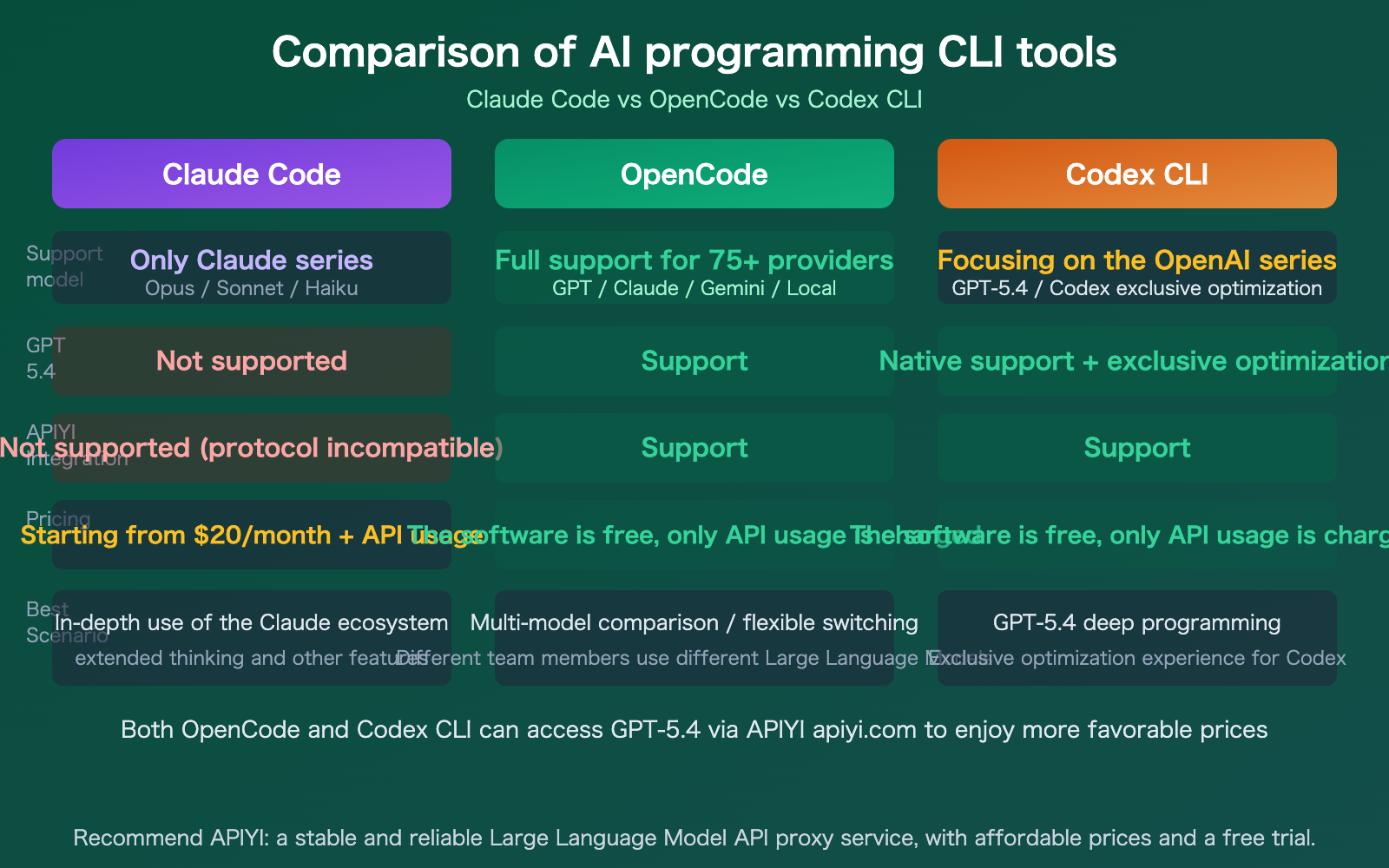
| Tool | Supports GPT-5.4 | Supports Claude | Supports APIYI | Open Source | Best Use Case |
|---|---|---|---|---|---|
| Claude Code | No | Native | No | No | Deep Claude usage |
| OpenCode | Yes | Yes | Yes | Yes | Flexible model switching |
| Codex CLI | Native Opt. | No | Yes | Yes | GPT-5.4 heavy coding |
Comparison Note: No single tool covers every scenario. If you primarily use Claude, Claude Code offers the best experience. If you're a GPT-5.4 power user, Codex CLI is the most professional choice. If you use both, OpenCode provides the most flexibility. Both of the latter can be connected via the APIYI (apiyi.com) API proxy service to enjoy more competitive pricing.
FAQ
Q1: Is there a way to make Claude Code use GPT-5.4?
There's currently no official way to do this. While some community projects (like claude-code-proxy) attempt to bridge the gap with protocol conversion, these solutions aren't stable or fully compatible, so we don't recommend them for production use. The right approach is simple: if you want to code with GPT-5.4, use OpenCode or Codex CLI; if you want to code with Claude, stick with Claude Code.
Q2: Does APIYI support Claude Code?
Not at the moment. Claude Code requires the /v1/messages endpoint (the native Anthropic protocol), whereas APIYI primarily supports the OpenAI-compatible /v1/chat/completions protocol. This is a fundamental protocol-level limitation. However, APIYI fully supports OpenCode and Codex CLI, allowing you to use your API key to perform model invocation for GPT-5.4, DeepSeek, and all other OpenAI-compatible models through those tools.
Q3: Should I choose OpenCode or Codex CLI?
It depends on your core needs:
- If you only use GPT-5.4: Go with Codex CLI; it's officially optimized and offers the best experience.
- If you need to switch between multiple models: Choose OpenCode, which supports 75+ providers.
- If you're budget-conscious: Both tools are free, so the difference comes down to API usage. By connecting to GPT-5.4 via APIYI (apiyi.com), you can get better pricing and free trial credits.
Summary
Here are the key takeaways regarding using GPT-5.4 with Claude Code:
- Claude Code doesn't support GPT-5.4: Due to its underlying protocol (
/v1/messages), it's strictly limited to the Claude model family. - Third-party API proxy services don't support Claude Code either: This includes APIYI, as they don't support the
/v1/messagesprotocol. - Use OpenCode or Codex CLI for GPT-5.4 coding: OpenCode is open-source and flexible with support for 75+ models, while Codex CLI is the official OpenAI tool with dedicated optimizations.
It's more practical to choose the right tool for the job than to try and force one tool to support every model. Claude Code is best for Claude, Codex CLI is best for GPT-5.4, and OpenCode is the most flexible for multi-model workflows.
We recommend checking out APIYI (apiyi.com) to grab some free credits and test GPT-5.4 in OpenCode or Codex CLI, where you can enjoy more competitive pricing than the official route.
📚 References
-
Claude Code Official Documentation: LLM Gateway Configuration Guide
- Link:
code.claude.com/docs/en/llm-gateway - Description: API configuration requirements and limitations for Claude Code.
- Link:
-
OpenAI Codex CLI: Official OpenAI Programming Agent
- Link:
github.com/openai/codex - Description: Installation and usage tutorial for the Codex CLI.
- Link:
-
OpenCode Project: Open-source Multi-model Programming Agent
- Link:
github.com/opencode-ai/opencode - Description: A terminal-based programming assistant supporting 75+ models.
- Link:
-
GPT-5.4 Official Release: Model Capabilities and API Documentation
- Link:
openai.com/index/introducing-gpt-5-4 - Description: Core capabilities and programming optimizations for GPT-5.4.
- Link:
-
APIYI Platform Documentation: GPT-5.4 Integration Guide
- Link:
docs.apiyi.com - Description: Configuration methods for accessing GPT-5.4 via APIYI.
- Link:
Author: APIYI Technical Team
Technical Discussion: Feel free to join the discussion in the comments section. For more resources, visit the APIYI documentation at docs.apiyi.com.