Nano Banana 2 image generation failure is the most common issue developers face when using the Gemini image generation API. Following the official launch of Nano Banana 2 on February 27, 2026, Google's content safety mechanism underwent a major upgrade. Safety filtering has become significantly stricter for scenarios involving famous figures, financial information modification, character outfit/face swapping, and implicit suggestive content.
Core Value: By the end of this article, you'll have a comprehensive understanding of Nano Banana 2's dual-layer safety architecture, the 8 specific reasons for image generation failure, the meaning of API error codes, and strategies for handling different scenarios.
Key Takeaways: Nano Banana 2 Content Safety Mechanism
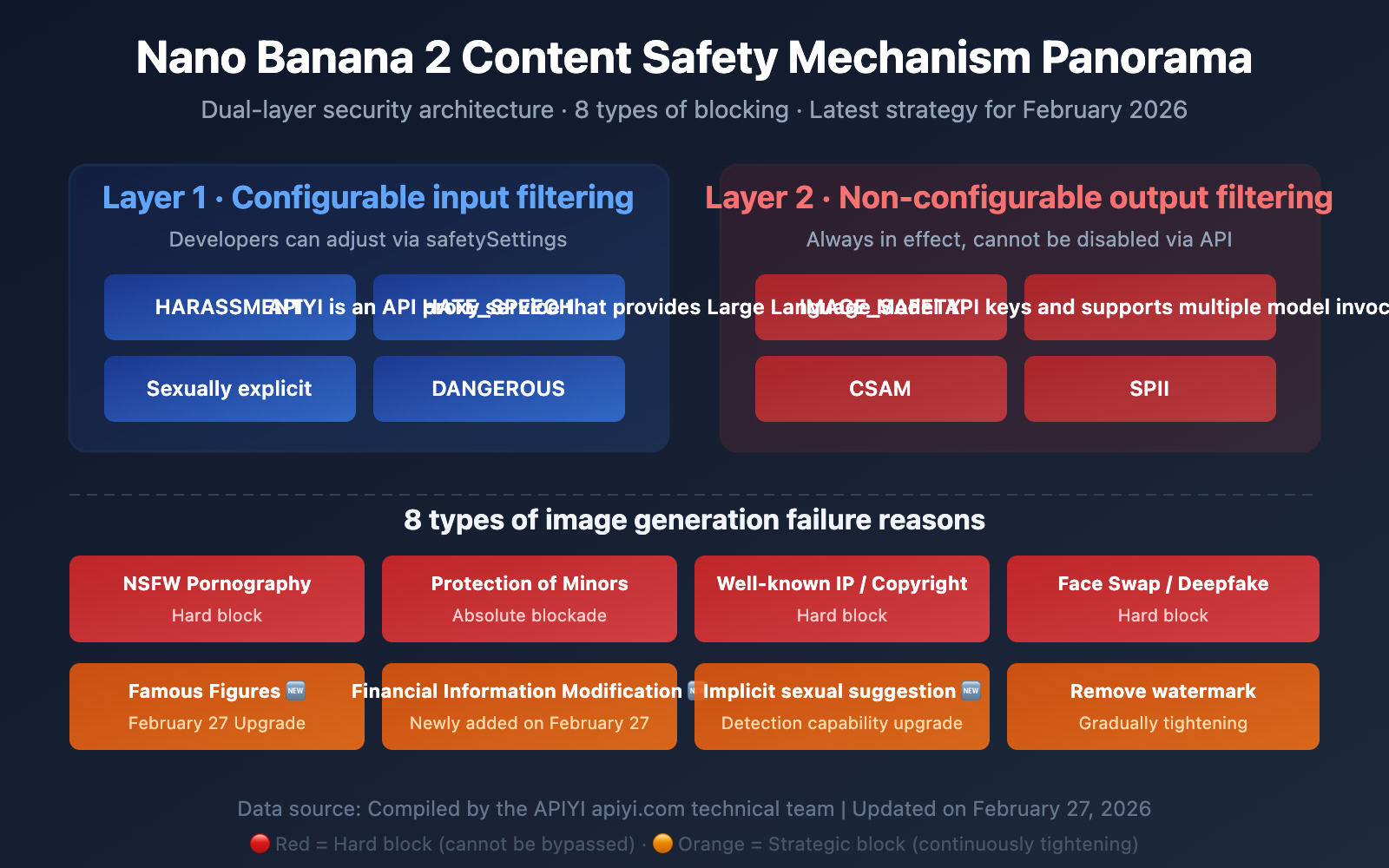
The safety mechanism for Nano Banana 2 (the Gemini image generation model) isn't just a simple keyword filter. It's a dual-layer safety architecture, and understanding how it works is the secret to solving generation failures.
| Key Point | Description | Impact on Developers |
|---|---|---|
| Dual-Layer Architecture | Layer 1: Configurable input filtering + Layer 2: Non-configurable output filtering | Even setting BLOCK_NONE won't bypass all restrictions |
| 8 Blocking Categories | NSFW, watermarks, famous IP, minors, celebrities, finance, face swapping, implicit suggestions | Different types require different mitigation strategies |
| Policy Tightening | Major updates in Jan + Feb 2026 | Content that passed before might be blocked now |
| Transparent Proxy | APIYI forwards original Google responses directly | Status code 200 but no image = blocked by Google's safety filter |
Deep Dive: Nano Banana 2 Content Safety Architecture
Layer 1 — Configurable Input Filtering (Safety Settings)
This is the first layer of filtering that developers can adjust via API parameters. It's applied to the text prompt before it even reaches the model. It includes 4 adjustable harm categories:
HARM_CATEGORY_HARASSMENT— Harassment contentHARM_CATEGORY_HATE_SPEECH— Hate speechHARM_CATEGORY_SEXUALLY_EXPLICIT— Sexually explicit contentHARM_CATEGORY_DANGEROUS_CONTENT— Dangerous content
Each category supports 5 threshold levels:
| Threshold Setting | Behavior | Strictness |
|---|---|---|
BLOCK_LOW_AND_ABOVE |
Blocks low, medium, and high probability content | Most Strict |
BLOCK_MEDIUM_AND_ABOVE |
Blocks medium and high probability content | Default |
BLOCK_ONLY_HIGH |
Blocks only high probability content | Relaxed |
BLOCK_NONE |
Disables probability blocking for this category | Most Relaxed |
HARM_BLOCK_THRESHOLD_UNSPECIFIED |
Uses platform default | Platform Dependent |
Layer 2 — Non-Configurable Output Filtering (Hard Blocks)
This second layer is always active and cannot be disabled by any API parameter. It's applied after the image is generated:
IMAGE_SAFETY— Image content safety assessmentPROHIBITED_CONTENT— Violations of prohibited content policies (Copyright/IP)CSAM— Child Sexual Abuse Material detection (Absolute hard block)SPII— Sensitive Personally Identifiable Information
🎯 Crucial Insight: Many developers find that even after setting all safety categories to
BLOCK_NONE, their images are still blocked. This is because Layer 2's hard blocks are always in effect. When calling through the APIYI (apiyi.com) platform, our transparent proxy forwards Google's original response directly, so the error messages you see are the authentic feedback from Google's safety system.
Complete Analysis of 8 Reasons for Image Generation Failure in Nano Banana 2
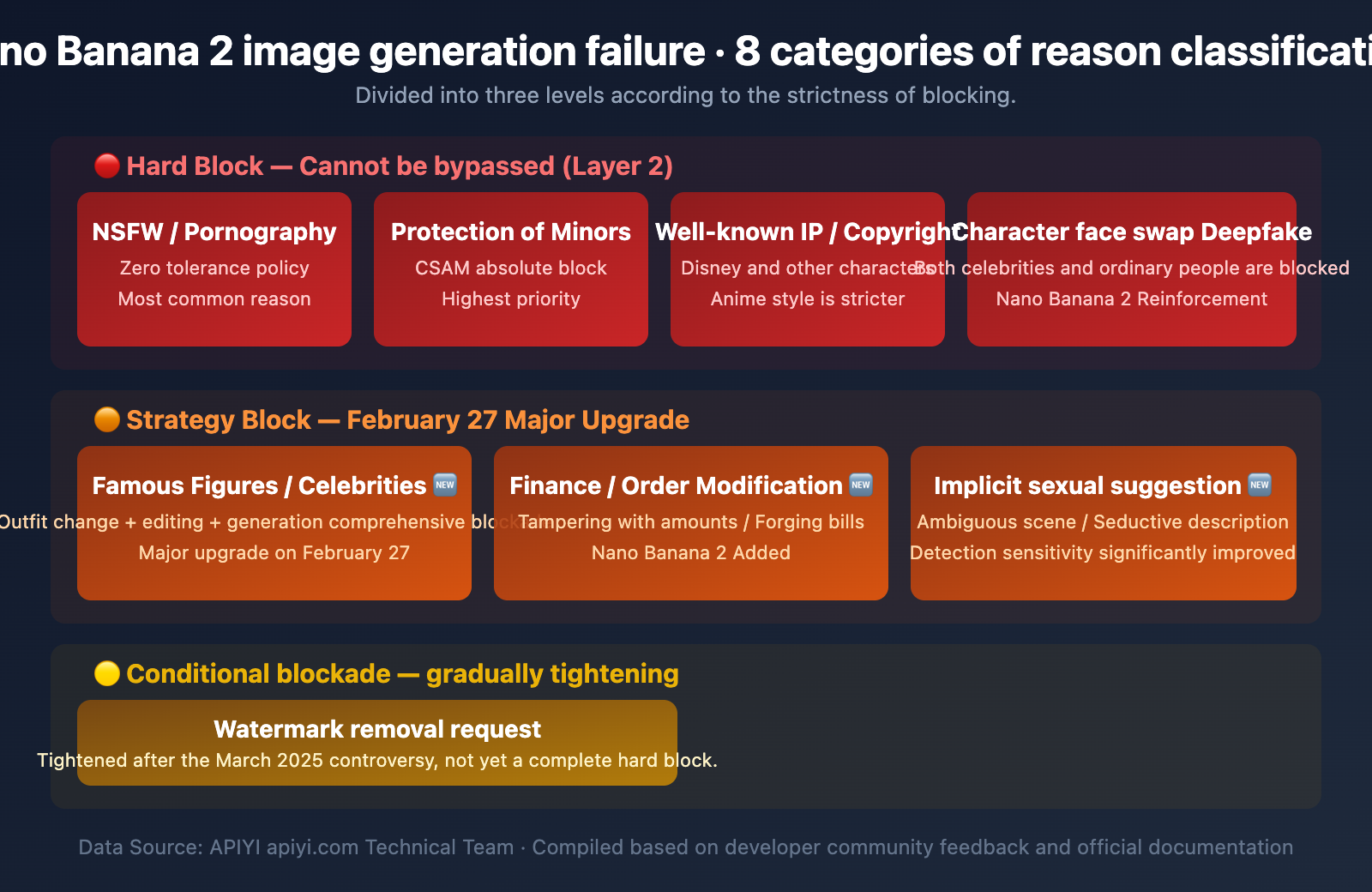
Based on Google's safety policies and extensive feedback from the developer community, the reasons for image generation failures in Nano Banana 2 can be summarized into the following 8 categories:
Category 1: NSFW / Pornographic Content (Hard Block)
Blocking Level: 🔴 Hard Block — Cannot be bypassed
This is the most common reason for image generation failure. Gemini adopts a "zero-tolerance" policy toward pornographic content, which is significantly stricter than other mainstream Large Language Models.
Blocked content includes:
- Pornographic or erotic content
- Scenes of sexual violence or abuse
- Sexual scenes involving real or fictional characters
- Sexually explicit content and nudity
Typical error messages:
"I can't generate that image."
"The prompt couldn't be submitted — it might violate our policies."
Developer Note: A safety assessment in November 2025 found that while direct pornographic prompts are effectively blocked, multi-turn conversation escalation and repeated prompt injection successfully bypassed moderation in 19 out of 21 test cases. Google is continuously reinforcing its defenses in this area.
Category 2: Watermark Removal Requests (Special Block)
Blocking Level: 🟠 Policy Block — Gradually tightening after March 2025
Watermark removal is a unique scenario. In March 2025, media widely reported that Gemini 2.0 Flash could remove copyright watermarks from sources like Getty Images and seamlessly repair the image, sparking significant controversy.
Key Findings:
- The consumer-facing Gemini App displays ethical warnings.
- However, when accessed via the AI Studio API, the same model lacks these guardrails.
- Anthropic Claude and OpenAI GPT-4o explicitly reject watermark removal requests.
Current Status: Google has stated that watermark removal violates its terms of service and is gradually strengthening technical blocks. Unlike NSFW content, watermark removal hasn't reached a 100% hard block level yet.
Category 3: Famous IP / Copyrighted Characters (Hard Block)
Blocking Level: 🔴 Hard Block — Almost impossible to bypass
Copyright-protected IPs, such as Disney characters or famous anime characters, will trigger the PROHIBITED_CONTENT filter.
Special Phenomenon — Over-blocking of Anime Styles:
The developer community has widely reported an issue: Anime-style images are blocked more aggressively than realistic styles. For the same cat image prompt, the anime version might be intercepted while the realistic version passes. This appears to be an oversensitive heuristic algorithm rather than an intentional policy.
Category 4: Minor Protection (Absolute Block)
Blocking Level: 🔴🔴 Absolute Hard Block — No exceptions
CSAM (Child Sexual Abuse Material) detection is the highest level among all safety mechanisms and cannot be disabled under any configuration.
- Any sexual content involving minors is absolutely blocked.
- In early 2025, media discovered that even accounts registered as 13-year-olds could potentially bypass safety restrictions through multi-turn dialogues—Google has since confirmed and fixed this issue.
Category 5: Public Figures / Celebrities (Major Update on Feb 27)
Blocking Level: 🔴 Hard Block — Stricter after Nano Banana 2
This is the area with the most significant changes since the launch of Nano Banana 2 on February 27, 2026.
Previous restrictions mainly targeted:
- Political figures
- Realistic images of stars and celebrities
New Restrictions in Nano Banana 2:
- Generation of any identifiable public figure image is more strictly blocked.
- Outfit swapping (changing clothes on a celebrity) is intercepted.
- Face swapping (replacing a celebrity's face into other scenes) is intercepted.
- Even uploading a celebrity's photo for editing will be recognized and blocked.
Typical error messages:
"I can't generate that image. It involves a celebrity in a distorted
or exaggerated context, which isn't allowed."

"I can't complete the modification of xxx."
💡 Background: After Gemini 2.5 Flash introduced more powerful image editing features in late 2025, researchers found that uploading a celebrity photo and asking to "reimagine" it could bypass text prompt blocks. Google patched this vulnerability within 24 hours and further reinforced the entire celebrity recognition system in Nano Banana 2.
Category 6: Financial / Order Information Modification (New on Feb 27)
Blocking Level: 🟠 Policy Block — New in Nano Banana 2
This is a new blocking category introduced with the launch of Nano Banana 2.
The following scenarios now trigger safety filters:
- Modifying amounts in financial documents.
- Tampering with order information or invoice content.
- Forging bank statements.
- Modifying key figures in contracts.
This type of block is based on the "Fraud and Deception" clauses in Google's Generative AI Prohibited Use Policy. While it doesn't appear as a standalone filter category in public technical documentation, it's effectively intercepted in practice.
Category 7: Outfit Swap / Face Swap (Deepfake Prevention)
Blocking Level: 🔴 Hard Block
Face replacement and virtual outfit swapping are core application scenarios for Deepfake technology, and Gemini enforces strict blocks on them:
| Scenario | Nano Banana Pro (Before) | Nano Banana 2 (Now) |
|---|---|---|
| Changing clothes on a person in a photo | Partially available | Mostly intercepted |
| Replacing Face A onto Body B | Already blocked | Completely blocked |
| Celebrity outfit editing | Partially available | Completely blocked |
| Original character outfit swapping | Usually available | Usually available |
Category 8: Suggestive Content (Update on Feb 27)
Blocking Level: 🟠 Policy Block — Detection capability significantly improved
Nano Banana 2 has significantly enhanced its ability to detect suggestive content. Even if a prompt doesn't contain obvious pornographic keywords, content with implicit sexual suggestions will be intercepted:
- Ambiguous body language descriptions
- Suggestive scene settings
- Provocative clothing descriptions
- Subtle suggestive copy
Error messages are usually:
"I can't complete xxx modification."
"This content is not permitted."
Nano Banana 2 Safety Policy Timeline Evolution
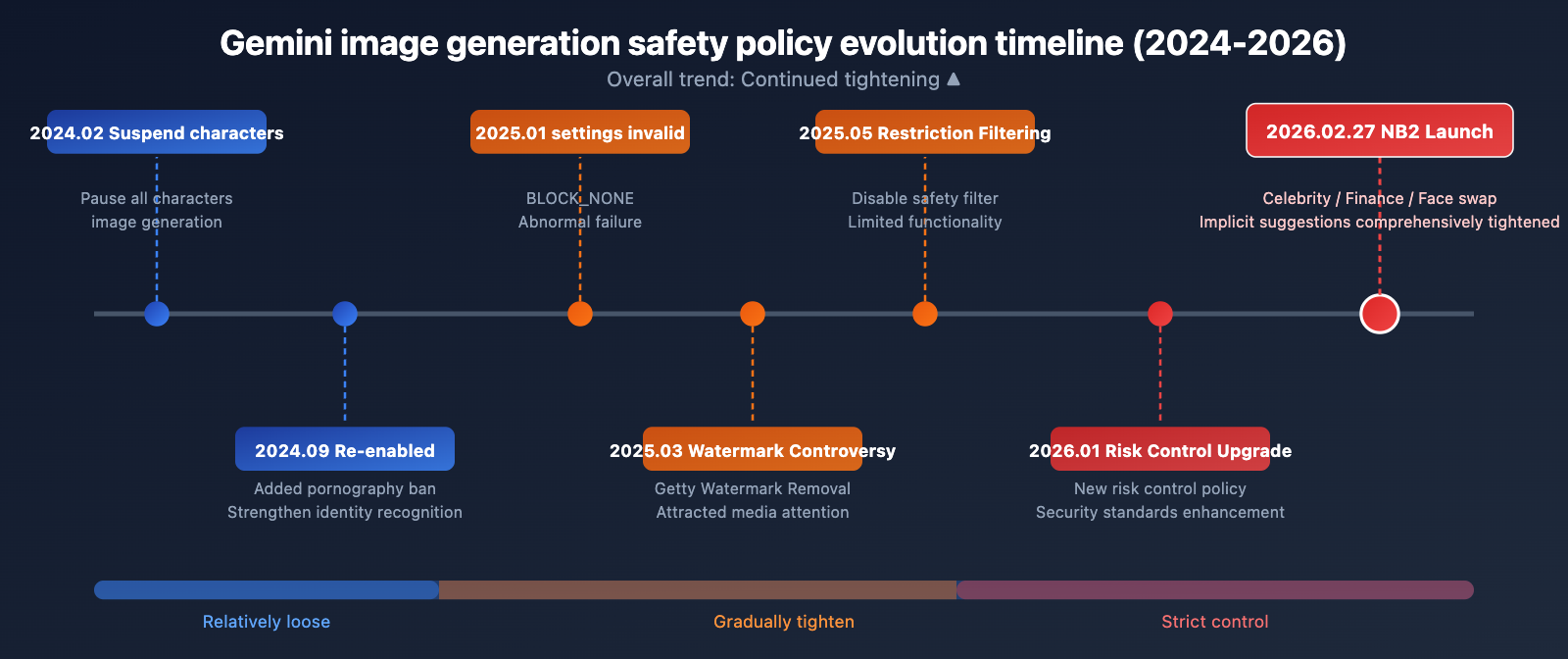
Understanding the evolution of safety policies helps you get a handle on the current restriction logic:
| Time | Event | Impact |
|---|---|---|
| February 2024 | Google pauses all Gemini person image generation | Public controversy over inaccurate historical depictions |
| September 2024 | Person image generation re-enabled | Added explicit content bans and strengthened identity restrictions |
| January 2025 | BLOCK_NONE setting becomes ineffective |
Developers report safety settings being incorrectly overridden |
| March 2025 | Watermark removal controversy | Google strengthens related blocks following media reports |
| May 2025 | Restricted disabling of safety filters | BLOCK_NONE no longer usable in certain configurations |
| Late 2025 | Deepfake vulnerability exposed | Fixed issue where uploaded photos bypassed text-based blocks |
| January 23, 2026 | Google adjusts new risk control policies | Overall safety standards raised once again |
| February 27, 2026 | Nano Banana 2 Launched | Comprehensive tightening on celebrities, finance, face-swapping, and implicit suggestions |
Overall Trend: From 2024 to 2026, Google has been continuously tightening safety restrictions. This trend isn't likely to reverse anytime soon.
Interpreting Nano Banana 2 Image Generation Failure API Error Codes
When the Nano Banana 2 safety filter blocks image generation, the API returns specific finishReason values. Correctly understanding these error codes is the first step in troubleshooting.
| finishReason | Meaning | Trigger Level | Configurable? |
|---|---|---|---|
SAFETY |
Hit configurable safety category threshold | Layer 1 | ✅ Fixable via safetySettings |
IMAGE_SAFETY |
Post-generation image content is non-compliant | Layer 2 | ❌ Not configurable |
PROHIBITED_CONTENT |
Violates prohibited content policy (IP/Copyright) | Layer 2 | ❌ Not configurable |
OTHER |
Unspecified block (usually IP-related) | Layer 2 | ❌ Not configurable |
Troubleshooting Flow for Generation Failures
import openai

client = openai.OpenAI(
    api_key="YOUR_API_KEY",
    base_url="https://api.apiyi.com/v1"  # Call via the unified APIYI interface
)

try:
    response = client.images.generate(
        model="nano-banana-2",
        prompt="your prompt here",
        n=1,
        size="1024x1024"
    )
    # Successfully retrieved the image
    print(response.data[0].url)
except Exception as e:
    error_msg = str(e)

    # Determine the block type based on the error message
    if "SAFETY" in error_msg:
        print("Layer 1 Safety Filter: Try adjusting safetySettings")
    elif "PROHIBITED_CONTENT" in error_msg:
        print("Layer 2 Prohibited Content: Likely involves copyright or IP")
    elif "IMAGE_SAFETY" in error_msg:
        print("Layer 2 Image Safety: Generated content is non-compliant")
    else:
        print(f"Other error: {error_msg}")
View Gemini Native API Call Example (with Safety Settings)
import google.generativeai as genai

genai.configure(api_key="YOUR_API_KEY")

# Configure safety settings — Note: This only affects Layer 1
safety_settings = [
    {
        "category": "HARM_CATEGORY_HARASSMENT",
        "threshold": "BLOCK_ONLY_HIGH"
    },
    {
        "category": "HARM_CATEGORY_HATE_SPEECH",
        "threshold": "BLOCK_ONLY_HIGH"
    },
    {
        "category": "HARM_CATEGORY_SEXUALLY_EXPLICIT",
        "threshold": "BLOCK_MEDIUM_AND_ABOVE"
    },
    {
        "category": "HARM_CATEGORY_DANGEROUS_CONTENT",
        "threshold": "BLOCK_ONLY_HIGH"
    }
]

model = genai.GenerativeModel(
    model_name="gemini-2.0-flash-exp",
    safety_settings=safety_settings
)

response = model.generate_content(
    "Generate an image of a sunset over mountains"
)

# Check safety filtering results
if response.candidates:
    candidate = response.candidates[0]
    print(f"Finish Reason: {candidate.finish_reason}")

    if candidate.safety_ratings:
        for rating in candidate.safety_ratings:
            print(f"  {rating.category}: {rating.probability}")
🚀 Quick Troubleshooting Tip: If you encounter a 200 status code but no image is returned, that's definitely the Google safety filter at work. When calling through the APIYI (apiyi.com) platform, we act as a transparent proxy and forward Google's original response directly without any additional filtering—we certainly want every customer to get their images successfully!
Nano Banana 2 Content Safety: SynthID Invisible Watermarking
Beyond input and output safety filtering, Google embeds SynthID invisible watermarks in all images generated by Gemini:
| Feature | Description |
|---|---|
| Embedding Method | Pixel-level invisible watermark, invisible to the naked eye |
| Robustness | Remains effective even after cropping, scaling, color adjustment, or screenshots |
| Removal Difficulty | Attempting to remove the watermark significantly degrades image quality |
| Scope | All Gemini-generated images, regardless of the payment tier |
| Verification | Third parties can use SynthID to verify if an image is AI-generated |
A noteworthy contradiction: Google applies non-removable watermarks to its own generated images, yet its models have been found capable of removing watermarks from others' images—this asymmetry sparked widespread discussion in March 2025.
Nano Banana 2 Image Generation Failure: Response Strategies
Developers can adopt different strategies depending on the type of image generation failure:
Adjustable Scenarios (Layer 1)
If the error code is SAFETY, it means a configurable Layer 1 filter was triggered:
- Adjust safetySettings: Change the relevant category threshold from
BLOCK_MEDIUM_AND_ABOVEtoBLOCK_ONLY_HIGH. - Optimize prompts: Avoid using sensitive words that might trigger safety classifications.
- Step-by-step generation: Break down complex scenes into multiple simple steps.
Non-adjustable Scenarios (Layer 2)
If the error code is IMAGE_SAFETY, PROHIBITED_CONTENT, or OTHER:
- Adjust creative direction: Steer clear of sensitive topics like celebrities or copyrighted characters.
- Use original characters: Design your own characters to avoid IP conflicts.
- Simplify scenes: Reduce complex elements that might trigger safety detection.
- Check image input: If you're using image-to-image, ensure the reference image doesn't contain celebrity faces.
Special Advice for B2C Product Developers
If you're developing products for end-users, we strongly recommend:
- Pre-content moderation: Pre-filter user inputs before making the model invocation.
- User-friendly error messages: Translate the English API error messages into user-friendly prompts for your audience.
- Retry strategy: You can try adjusting and retrying for Layer 1
SAFETYerrors, but don't bother retrying for Layer 2 errors. - Usage monitoring: Requests blocked by safety filters still consume your API quota.
💰 Cost Reminder: Although requests blocked by safety filters don't return an image, they still incur some API invocation costs. You can view detailed logs on the APIYI (apiyi.com) platform to help optimize prompts and reduce invalid calls.
If you're building a B2C product, we recommend checking out this more detailed error handling guide: "Gemini 3 Pro Image Preview API Error Handling Guide" xinqikeji.feishu.cn/wiki/Rslqw724YiBwlokHmRLcMVKHnRf
Nano Banana Pro vs. Nano Banana 2 Content Safety Comparison
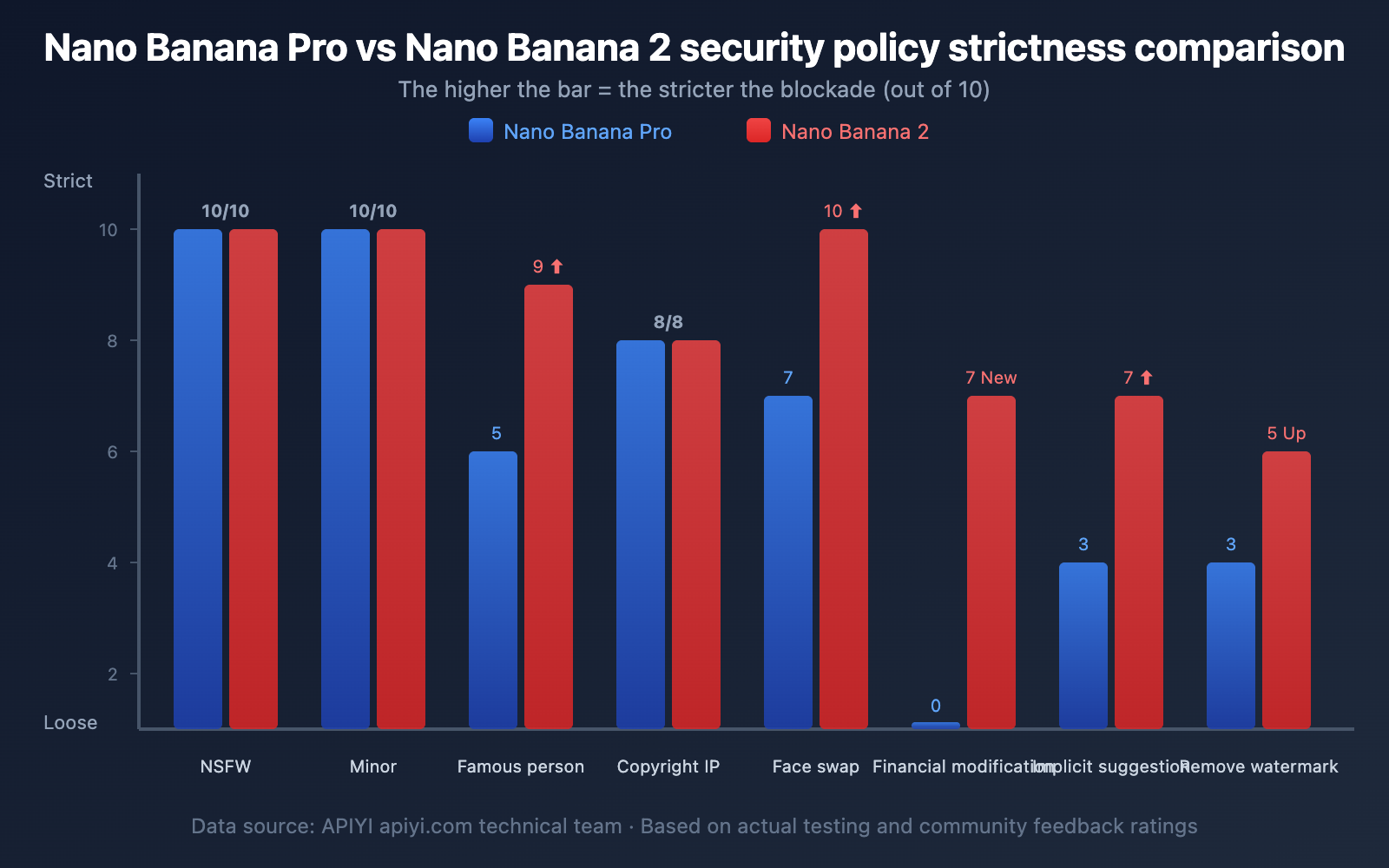
| Safety Dimension | Nano Banana Pro | Nano Banana 2 | Change |
|---|---|---|---|
| NSFW Content | Strictly Blocked | Strictly Blocked | No Change |
| Celebrity Generation | Partially Blocked | Fully Blocked | ⬆️ Significantly Tightened |
| Character Outfit Editing | Partially Available | Mostly Blocked | ⬆️ Significantly Tightened |
| Face Swapping | Blocked | Completely Blocked | ⬆️ Slightly Tightened |
| Financial Info Modification | No Explicit Blocking | New Blocking Added | 🆕 New Restriction |
| Implicit Suggestive Content | Partial Detection | Enhanced Detection | ⬆️ Improved Detection |
| Copyright IP | Blocked | Blocked | No Change |
| Protection of Minors | Absolutely Blocked | Absolutely Blocked | No Change |
| Watermark Removal | Partially Available | Gradually Tightening | ⬆️ Continually Tightened |
| Anime Style Misidentification | Exists | Exists | No Change (Needs Improvement) |
FAQ
Q1: Why did I get a 200 status code but no image was returned?
A 200 status code means the API request itself was successful, but the image generation was intercepted by Google's Layer 2 safety filter. When you call the model through the APIYI (apiyi.com) platform, we act as a transparent proxy and forward Google's original response directly without adding any extra restrictions. You can check the finishReason field in the returned data to understand the specific reason for the block.
Q2: Why is the image still blocked even though I set BLOCK_NONE?
BLOCK_NONE only disables probabilistic blocking in Layer 1 (configurable input filtering). Layer 2 (non-configurable output filtering) filters like IMAGE_SAFETY, PROHIBITED_CONTENT, and CSAM are always active and cannot be disabled via any API parameters. This is by design from Google, not a bug.
Q3: Does Nano Banana 2 block more content than Nano Banana Pro?
Yes. Since the launch of Nano Banana 2 on February 27, 2026, Google has significantly tightened safety policies across four dimensions: celebrities, financial information modification, character outfit/face swapping, and implicit suggestive content. If a prompt that worked with Nano Banana Pro now fails to generate an image, it's likely due to these new restrictions. We recommend checking the logs on APIYI (apiyi.com) to troubleshoot the exact cause.
Q4: Why are anime-style images more likely to be blocked?
This is a widely reported issue in the developer community. Sometimes the same prompt passes in a realistic style but gets blocked in an anime style. This seems to be due to an overly sensitive heuristic algorithm in the safety filter, possibly because anime styles more easily trigger copyright IP detection. While there's no official explanation yet, it doesn't appear to be an intentional policy restriction.
Q5: How can I tell if a restriction is from APIYI or Google?
As a transparent proxy, APIYI directly forwards Google's original response and doesn't impose any additional content restrictions. If an image fails to generate, it's 100% feedback from Google's safety filters. Naturally, APIYI wants every customer to have successful model invocations. You can confirm this by viewing the detailed API logs on the APIYI (apiyi.com) platform.
Summary
The content safety mechanism of Nano Banana 2 has evolved continuously from 2024 to 2026, with an overall trend of steady tightening. For developers, here's what you need to know:
- Understanding the dual-layer architecture is key to solving image generation failures—Layer 1 is adjustable, while Layer 2 is not.
- Keep an eye on policy changes—the updates in January and February 2026 introduced significant new restrictions.
- Optimizing prompts is more effective than tweaking safety settings, as most blocks happen at Layer 2.
- Implement robust error handling—especially for consumer-facing products, you'll need to handle various safety interceptions gracefully.
We recommend testing your Nano Banana 2 model invocations through the APIYI (apiyi.com) platform. It provides a unified interface and detailed logs, making it much easier to troubleshoot the specific reasons behind image generation failures.
📝 Author: APIYI Team
🔗 Technical Support: Visit apiyi.com for more AI model guides and technical assistance.
📅 Updated: February 27, 2026