"Why is Gemini 3.1 Pro Preview so slow again?" "What's up with the 429 RESOURCE_EXHAUSTED errors?" If you've been using Google's latest Gemini 3.1 Pro Preview API recently, you've probably been asking these questions daily. First token response times (TTFT) can hit 41 seconds, 429 errors are frequent even for paying users, and the Preview model's global shared quota makes resource contention even worse.
It's not your code—it's a common issue with Gemini 3.1 Pro Preview in its current stage. Google AI developer forums and GitHub Issues are filled with similar reports.
Core Value: This article won't offer a "one-size-fits-all" magic solution—because there isn't one. Instead, we'll break down the 5 root causes of the slowness and 429 errors from a technical perspective and share 7 community-validated coping strategies to help you use this genuinely powerful model more effectively in the current landscape.
How Powerful is Gemini 3.1 Pro Preview? Let's Look at the Data
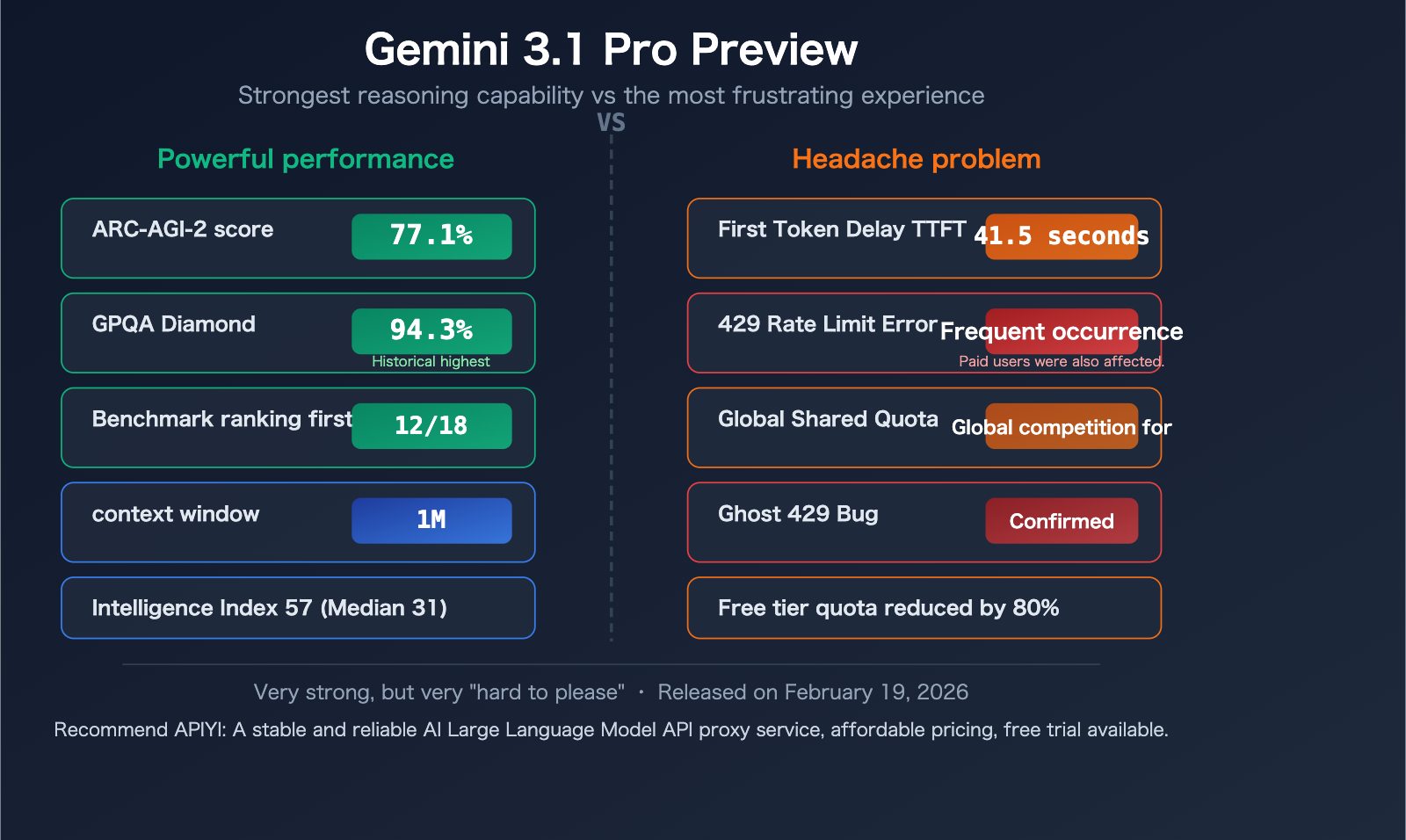
Before we dive into the issues, it's worth understanding why this model is worth the trouble. Released on February 19, 2026, Gemini 3.1 Pro Preview is currently Google's most powerful reasoning model.
| Metric | Gemini 3.1 Pro Preview | Benchmark Comparison |
|---|---|---|
| ARC-AGI-2 Score | 77.1% (validated) | More than 2x Gemini 3 Pro |
| GPQA Diamond | 94.3% | Highest score in benchmark history |
| Benchmark Ranking | 1st in 12+ out of 18 benchmarks | Coding, reasoning, Agent tasks |
| Context Window | 1,048,576 tokens (1M) | Industry-leading |
| Max Output | 65,536 tokens (64K) | Far exceeds most competitors |
| Input Modalities | Text+Image+Audio+Video+Code | Native multimodal |
| Output Speed | ~108 tokens/sec | Moderate |
| TTFT (First Token) | ~41.54 seconds | Median for similar models is only 2.65 seconds |
| Pricing (Input) | $2.00/M tokens | Moderately high |
| Pricing (Output) | $12.00/M tokens | High |
| Intelligence Index | 57 points | Far exceeds median of 31 points |
Data Sources: Artificial Analysis (artificialanalysis.ai), Google Official Blog
In a nutshell: Gemini 3.1 Pro Preview is one of the smartest publicly available models, but also one of the slowest. This isn't entirely a flaw—its "slowness" is partly by design.
The 5 Main Reasons for Gemini 3.1 Pro Preview Lag
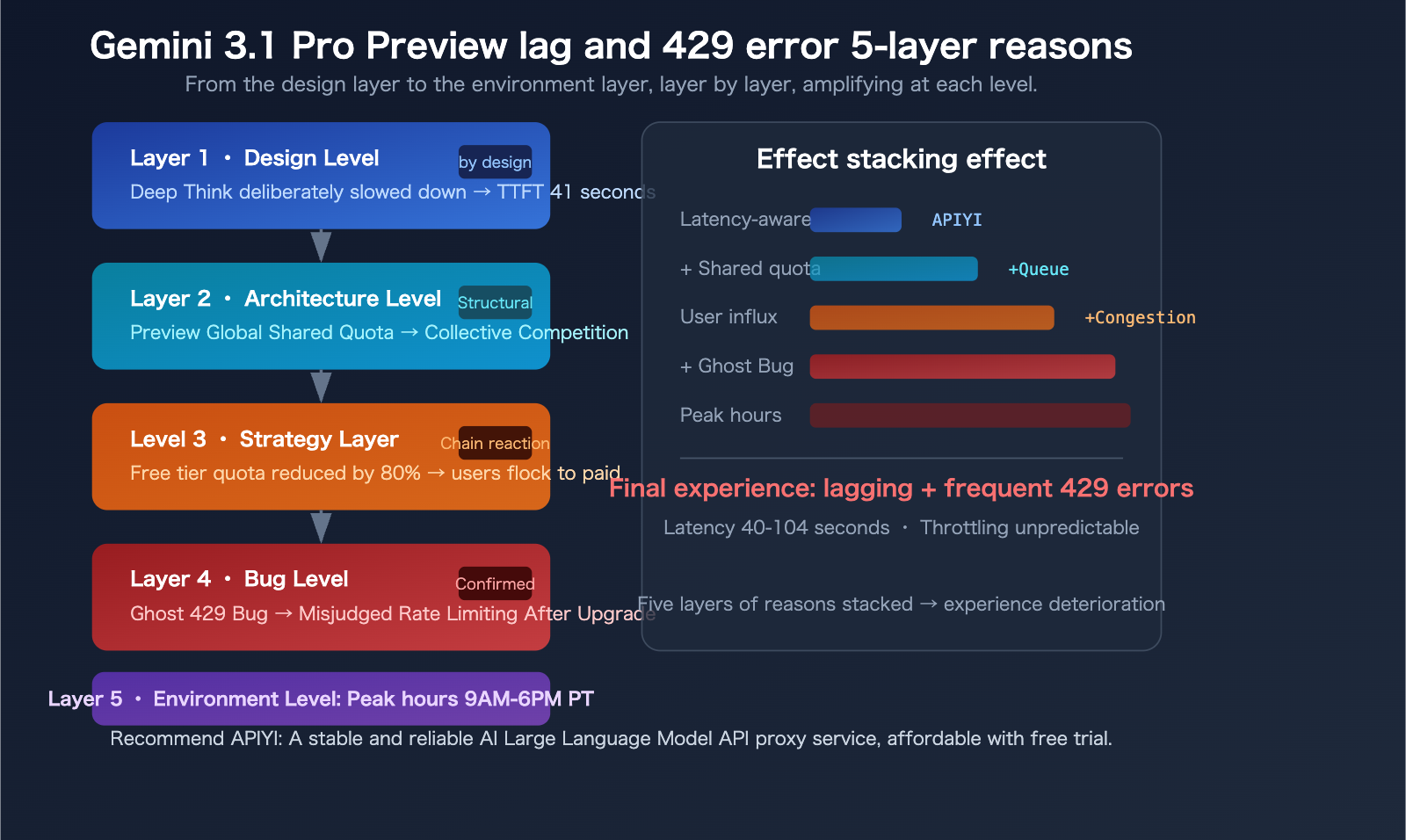
Reason 1: Deep Think – The Slowness is "Intentional"
Gemini 3.1 Pro Preview introduces a "Deep Think" feature—the model intentionally slows down to perform deeper reasoning. Google provides a thinking_level parameter with 4 levels: low, medium (new), high, and max.
By default, the model tends to use a higher thinking level, which directly leads to a TTFT of 41.54 seconds—while the median for similar models is only 2.65 seconds, a difference of over 15 times.
In other words: Those 40 seconds you're waiting, the model isn't "stuck," it's "thinking."
A developer published an article on Medium titled: "Gemini 3.1 Pro Isn't Faster, It's Deeper." This is a design philosophy trade-off—Google chose to sacrifice speed for reasoning depth.
Reason 2: Global Shared Quota for Preview Models
This is the most overlooked but impactful factor.
Preview models use a "Dynamic Shared Quota"—all users share a global capacity pool. This means even if your personal usage is far below the limit, you can still be rate-limited when the total request volume from users worldwide becomes too high.
Key differences between Preview vs. GA (Generally Available) models:
| Comparison Dimension | Preview Model | GA (Official) Model |
|---|---|---|
| Server Capacity | Lower, limited allocation | Ample, scales on demand |
| Quota Mechanism | Dynamic Shared Quota | Independent quota |
| Stability Guarantee | None, may change at any time | Has SLA guarantee |
| Rate Limiting Behavior | Can be triggered by global congestion | Only triggered by personal overage |
| Availability Period | May be discontinued at any time | Long-term maintenance |
This explains a common confusion: "I'm clearly not over my limit, why am I getting a 429?"—because the quota isn't just about your individual usage.
Reason 3: Google's Significant Free Tier Limit Cuts in Late 2025
In December 2025, Google slashed the free tier limits for the Gemini API by up to 80%. While Gemini 3.1 Pro Preview itself doesn't offer free tier access (paid users only), this reduction indirectly pushed many developers towards the paid tier's Preview model, intensifying resource competition.
Current Free Tier Limits (March 2026 data):
| Model | RPM (Requests Per Minute) | RPD (Requests Per Day) | TPM (Tokens Per Minute) |
|---|---|---|---|
| Gemini 2.5 Pro | 5 | 100 | 250,000 |
| Gemini 2.5 Flash | 10 | 250 | 250,000 |
| Flash-Lite | 15 | 1,000 | 250,000 |
| Gemini 3.1 Pro Preview | Not Available | Not Available | Not Available |
Compare to paid Tier 1: Gemini 2.5 Flash jumps from 10 RPM to 2,000 RPM—a 200x difference. But even in the paid tier, the actual limits for 3.1 Pro Preview often "feel stricter than what the documentation says."
Reason 4: The "Ghost 429" Bug – Known but Not Fully Fixed
There's a widely discussed bug on Google's developer forums: "Ghost 429."
The symptom is: Within 24-48 hours of upgrading from the free tier to paid Tier 1, you frequently receive 429 RESOURCE_EXHAUSTED errors even when the dashboard shows zero or near-zero usage.
Google has confirmed the existence of this bug on the developer forums, explaining it's caused by incorrect quota calculation in the system after an account upgrade. The temporary solution is to wait 24-48 hours for the system to recalibrate.
This bug mainly affects:
- Users who recently upgraded from free tier to Tier 1
- Users who recently created a new project and enabled billing
Reason 5: Server Congestion During Peak Hours
Based on community feedback, Gemini 3.1 Pro Preview shows significantly higher latency and 429 error rates during these time periods:
- Pacific Time 9:00 AM – 6:00 PM (Beijing Time 1:00 AM – 10:00 AM the next day)
- This coincides perfectly with the US workday peak hours
During peak times, some requests can experience delays of up to 104 seconds, and 503 Service Unavailable errors also occur occasionally. GitHub Issues #22160 documents the problem of "extremely high latency or no response when using the gemini-3.1-pro model."
🎯 Practical Experience: If you're experiencing frequent lag when using the Gemini API from within China, besides the reasons above, network latency is also a factor. Using aggregated platforms like APIYI (apiyi.com) for calls can leverage optimized network routing, reducing some transmission delays.
7 Solutions for Handling Gemini 3.1 Pro Preview Lag and 429 Errors
Disclaimer: The following solutions are based on practical sharing from the developer community and are not officially recommended by Google. Effectiveness varies by specific scenario, and there is no guarantee of completely resolving the issues.
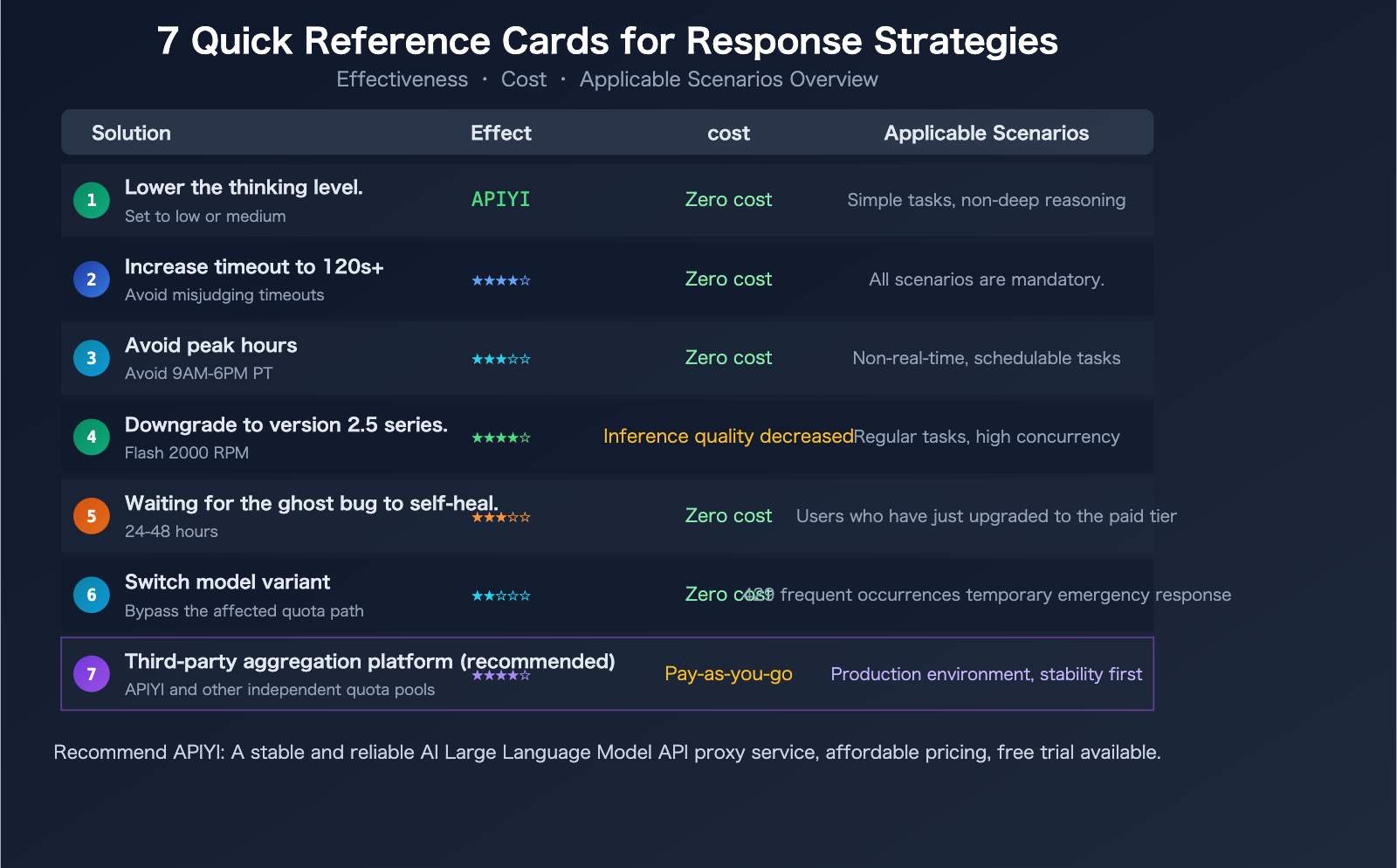
Solution 1: Adjust the thinking_level Parameter
This is the most direct way to speed things up. Setting thinking_level to low can significantly reduce TTFT (Time To First Token):
import openai

client = openai.OpenAI(
    api_key="your-api-key",
    base_url="https://api.apiyi.com/v1"  # APIYI unified endpoint
)

response = client.chat.completions.create(
    model="gemini-3.1-pro-preview",
    messages=[
        {"role": "user", "content": "Explain quantum computing in 3 sentences"}
    ],
    extra_body={
        "thinking_level": "low"  # Options: low / medium / high / max
    }
)

print(response.choices[0].message.content)
| thinking_level | Estimated TTFT | Reasoning Depth | Suitable Use Cases |
|---|---|---|---|
| low | 5-10 seconds | Basic reasoning | Simple Q&A, summarization, classification |
| medium | 15-25 seconds | Moderate reasoning | Everyday coding, content generation |
| high | 30-45 seconds | Deep reasoning | Complex analysis, mathematical proofs |
| max | 45-100+ seconds | Deepest reasoning | Extremely difficult reasoning, research-level tasks |
Trade-off: low is faster but reasoning quality decreases; if you're using 3.1 Pro specifically for its deep reasoning capabilities, lowering the thinking_level might be counterproductive.
Solution 2: Increase Client Timeout
Most HTTP clients and SDKs have a default timeout of 30 seconds—but the normal TTFT for Gemini 3.1 Pro Preview can exceed 40 seconds. It's recommended to set the timeout to at least 120 seconds:
import httpx
import openai

# Set a 120-second timeout
http_client = httpx.Client(timeout=120.0)

client = openai.OpenAI(
    api_key="your-api-key",
    base_url="https://api.apiyi.com/v1",
    http_client=http_client
)
Solution 3: Avoid Peak Hours
If your task doesn't require real-time response, try calling the API during these periods:
- Pacific Time 6:00 PM – 9:00 AM (Beijing Time 10:00 AM – 1:00 AM next day)
- Weekends are generally more stable than weekdays
- RPD (Requests Per Day) quotas reset at midnight Pacific Time
Solution 4: Downgrade to Gemini 2.5 Pro / 2.5 Flash
Not all tasks require the reasoning depth of 3.1 Pro. For regular tasks, the Gemini 2.5 series remains a reliable choice:
- Gemini 2.5 Flash: 10 RPM on the free tier, up to 2,000 RPM on paid tiers, much faster
- Gemini 2.5 Pro: 5 RPM on the free tier, still very capable
When 3.1 Pro frequently returns 429 errors, the 2.5 series is the most readily available downgrade path.
Solution 5: Wait for the "Ghost 429" Bug to Self-Resolve
If you've just upgraded from the free tier to Tier 1, or just created a new project and enabled billing:
- Wait 24-48 hours for the quota system to recalibrate
- Use other models or platforms as a transition during this period
- If the issue persists after 48 hours, submit an Issue on the Google AI Developer Forum
Solution 6: Switch Model Variants to Bypass Rate Limiting
A trick verified on the Google Developer Forums: switching to a different variant within the same model series can sometimes bypass the affected quota path.
For example:
- If
gemini-3.1-pro-previewreturns a 429, trygemini-3.1-flash-preview(if available) - Different model variants might use different quota calculation paths
Solution 7: Use a Third-Party API Aggregation Platform
Third-party platforms typically have independent quota pools, not subject to the global shared quota limits of the official Google API. This is a solution increasingly adopted by developers in the community.
View Complete Code (with Automatic Downgrade and Error Retry Logic)
import openai
import time

# Call via the APIYI aggregation platform for an independent quota pool
client = openai.OpenAI(
    api_key="your-api-key",
    base_url="https://api.apiyi.com/v1"
)

# Model fallback chain: use the strongest first, auto-downgrade on 429
model_fallback = [
    "gemini-3.1-pro-preview",
    "gemini-2.5-pro",
    "gemini-2.5-flash",
]

def call_with_fallback(prompt, max_retries=3):
    for model in model_fallback:
        for attempt in range(max_retries):
            try:
                response = client.chat.completions.create(
                    model=model,
                    messages=[{"role": "user", "content": prompt}],
                    max_tokens=2000,
                    timeout=120
                )
                return {
                    "model": model,
                    "content": response.choices[0].message.content,
                    "attempt": attempt + 1
                }
            except openai.RateLimitError:
                wait = 2 ** attempt
                print(f"[{model}] 429 rate limit, waiting {wait}s before retry...")
                time.sleep(wait)
            except openai.APITimeoutError:
                print(f"[{model}] Timeout, trying next model...")
                break
    return {"error": "All models unavailable"}

result = call_with_fallback("Analyze the computational complexity of the Transformer attention mechanism")
print(f"Model used: {result.get('model')}")
print(f"Response: {result.get('content', result.get('error'))}")
🚀 Recommended Solution: Calling Gemini 3.1 Pro Preview and other Google models through the APIYI platform at apiyi.com allows you to leverage the platform's independent quota pool and multi-channel routing, reducing the probability of 429 errors. Registration includes free credits, and it supports unified calls to models from multiple providers like Claude, GPT, and Gemini.
An Unresolved Question: Are Preview Models Worth Using?
This is a question without a standard answer, but it's worth every developer thinking about.
Reasons to use them:
- 3.1 Pro Preview ranks first in 12+ out of 18 benchmarks
- GPQA Diamond score of 94.3% is a historical high
- The reasoning depth brought by Deep Think is truly unique
- Get a head start by adapting to the latest model before the GA version is released
Reasons not to use them:
- TTFT of 41 seconds is unsuitable for real-time interactive scenarios
- Frequent 429 errors make it unstable for production environments
- Preview models may change or be discontinued at any time (Gemini 3 Pro Preview was discontinued on 2026.03.09)
- No SLA guarantee; if something goes wrong, you're on your own
A middle path: Use 3.1 Pro Preview during development and testing to verify effectiveness, use the 2.5 series or other stable models in production, and switch after the official 3.1 Pro (GA) version is released.
💡 Practical advice: If your application requires deep reasoning and can tolerate high latency, 3.1 Pro Preview is worth trying. If you need stability and speed, 2.5 Flash is a more pragmatic choice. We recommend using APIYI apiyi.com to integrate multiple Gemini model versions simultaneously, compare their performance in real scenarios, and then make a decision.
Frequently Asked Questions
Q1: Is the 429 RESOURCE_EXHAUSTED error because my free quota is used up?
Not necessarily. The 429 error can be triggered for several reasons: personal quota limits (RPM/RPD/TPM), global shared quota congestion, and the "phantom 429" bug. Especially for Preview models, which use dynamic shared quotas, you can be rate-limited due to global congestion even if your personal usage is far below your limit. It's recommended to first check your actual usage in Google AI Studio to confirm if you've truly exceeded your quota. If the dashboard shows very low usage but you're still getting 429 errors, it's likely due to shared quota issues or a bug.
Q2: Will upgrading to a paid Tier 1 plan solve the 429 problem?
It can alleviate but not completely solve it. Paid tiers do have significantly higher limits (e.g., Flash jumps from 10 RPM to 2,000 RPM), but the shared quota mechanism for 3.1 Pro Preview still applies in paid tiers. Furthermore, you might encounter the "phantom 429" bug immediately after upgrading, requiring 24-48 hours to stabilize. For scenarios needing higher quotas, calling models through aggregation platforms like APIYI apiyi.com can utilize independent quota pools, reducing the probability of being rate-limited.
Q3: When will the official version (GA) of Gemini 3.1 Pro be released?
Google has not announced a specific date. Based on historical patterns, the transition from Preview to GA typically takes 2-4 months. 3.1 Pro Preview was released on February 19, 2026, so an optimistic estimate places the GA version around late Q2 to Q3 of 2026. The GA version will have independent quotas (not shared), SLA guarantees, and more ample server capacity. Currently, you can test the invocation performance of the entire Gemini model series for free via APIYI apiyi.com.
Summary: Living with the "Imperfections" of Gemini 3.1 Pro Preview
Gemini 3.1 Pro Preview is a powerful but "high-maintenance" model. Its GPQA Diamond score of 94.3% and ARC-AGI-2 score of 77.1% prove its reasoning capabilities are truly top-tier. However, its 41-second TTFT and frequent 429 errors make everyday use quite challenging.
The Core Reasons: Design trade-offs with Deep Think, the global shared quota for Preview models, and the ripple effects from Google's significant cuts to free-tier limits.
Practical Workarounds:
- For non-deep reasoning tasks, set
thinking_level: "low"or downgrade to the 2.5 series. - Increase your timeout to 120+ seconds to avoid false timeout triggers.
- Use a third-party aggregation platform (like APIYI at apiyi.com) to access an independent quota pool.
- Wait for the GA (General Availability) release before using it in production environments.
These issues will likely be resolved in the GA version. Until then, what we can do is—understand its quirks and use it the right way.
Author: APIYI Team | Unified API access for Gemini, Claude, and GPT model series. Visit APIYI at apiyi.com for free testing credits.
📚 References
-
Google Official – Gemini API Rate Limits Documentation: Details on limits per model.
- Link:
ai.google.dev/gemini-api/docs/rate-limits - Description: Comparison table of RPM/RPD/TPM limits for free and paid tiers.
- Link:
-
Google AI Developer Forum – 429 Error Discussion Thread: Summary of community feedback.
- Link:
discuss.ai.google.dev - Description: Includes confirmation of the "phantom 429" bug and temporary workarounds.
- Link:
-
GitHub Issue #22160 – Gemini 3.1 Pro Extremely High Latency: Developer feedback.
- Link:
github.com/google-gemini/gemini-cli/issues/22160 - Description: Latency data and community discussion.
- Link:
-
Artificial Analysis – Gemini 3.1 Pro Preview Review: Independent benchmark tests.
- Link:
artificialanalysis.ai/models/gemini-3-1-pro-preview - Description: Objective data on TTFT, output speed, intelligence index, etc.
- Link:
-
Vertex AI Official Documentation – 429 Error Code Explanation: Google Cloud Platform error handling.
- Link:
docs.cloud.google.com/vertex-ai/generative-ai/docs/provisioned-throughput/error-code-429 - Description: Official classification of error causes and suggested handling methods.
- Link: