If you’ve spent the last year creating posters or covers using Midjourney or Stable Diffusion, you’re likely all too familiar with this kind of "spell":
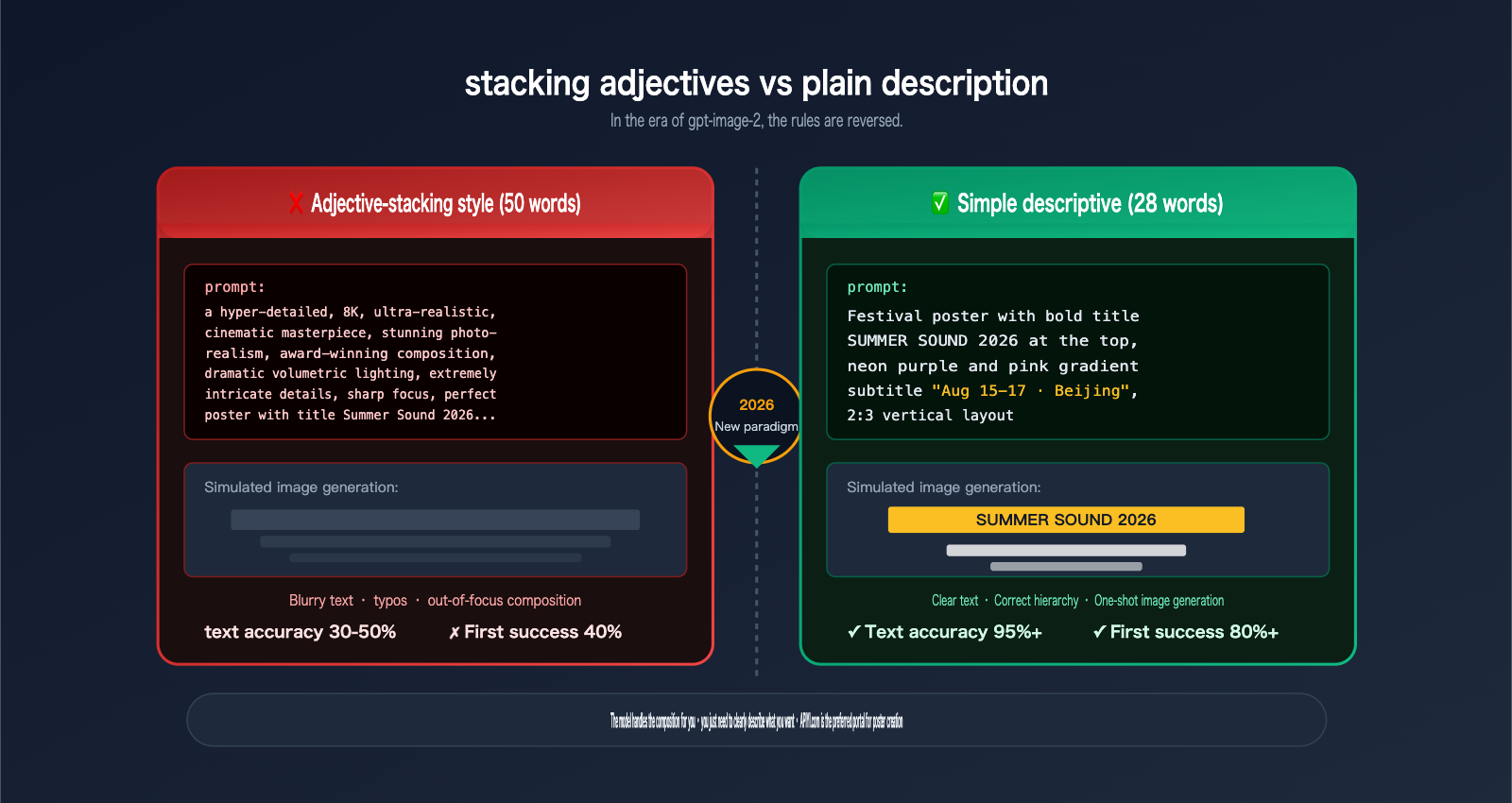
a hyper-detailed, 8K, ultra-realistic, cinematic masterpiece,
stunning photorealism, award-winning composition, dramatic lighting,
extremely intricate details, sharp focus, masterpiece...
You pile on 50 adjectives, and yet, the text on the poster still comes out as a blurry mess.
Since OpenAI released gpt-image-2 on April 21, 2026, that entire approach has changed. The feedback from our various client tests has been remarkably consistent: Simple, plain-language prompts + enclosing the desired text in English quotation marks = high-quality posters. You don't need to memorize "spells" or stack adjectives, and the text rendering accuracy is now over 95% on the first try.
This represents a core paradigm shift for gpt-image-2 compared to traditional AI image generation—the model handles the composition logic itself; you just need to clearly state "what I want."
In this article, we’ve compiled three sets of ready-to-use, field-tested materials:
- 10 high-frequency poster/cover use cases (Blogs / Official Accounts / Xiaohongshu / Music Festivals / Products / Books / Magazines / Bilibili / Banners / Holidays)
- 3 complete, ready-to-run simple prompts (including API parameters and quality setting recommendations)
- 1 "Quotation Mark Rule" (Enclose the text you want to display in English quotation marks; this single tip can double your success rate)
By the end of this guide, you’ll know when to write short prompts for gpt-image-2, why stacking adjectives actually makes things worse, and how to implement this at scale in your own projects using gateways like APIYI (apiyi.com).
{gpt-image-2 for poster creation}
{Simple prompt · covers 10 major scenarios · one-shot image generation}
{16:9 · Blog cover}
{2:3}
{3:4}
{16:9 · Video cover}
{1:1 · Product main image}
{3:4 · Magazine}
{21:9 · Advertising Banner}
{Happy Spring Festival}
{Issue 42}
{Official Account 2.35:1}
{2:3 · Books}
{95%+}
{text accuracy}
{4K}
{Native output}
{Simple prompt}
{🎨 10 major application scenarios}
{✅ Text 95%+ accuracy}
{APIYI.com}
I. Why gpt-image-2 Excels at Poster Design with Simple Prompts
1.1 The Three Revolutions of gpt-image-2
Before we dive into "simple prompts," let's understand how gpt-image-2 achieves the feat of "text that's actually readable and composition you don't have to worry about."
| Capability | Previous Models | gpt-image-2 |
|---|---|---|
| Text Rendering Accuracy | 60–70%, often blurry/typos | >95% correct on first try |
| Multilingual Support | Mostly English | Latin / Chinese / Japanese / Korean / Arabic / Hindi |
| Native Resolution | 1024–2048 | Native 4K (3840×2160) |
| Physical Consistency | Hands/buildings often distorted | Omni-Attention architecture significantly reduces distortion |
| Inference Method | Single-step sampling | Plan composition before generating, supports self-correction/iteration |
| Single Output | 1 image | Up to 10 images in a consistent series |
The key is the 5th point: Plan composition before generating. The model internally "thinks" about how the poster should be laid out—where the title goes, where the subtitle sits, how much whitespace to leave, and the size of the main visual—before it starts drawing. This means you don't need to "hand-hold" the model through the composition in your prompt; it's better at that than you are.
1.2 Simple Prompts vs. Keyword Stuffing: A Quick Comparison
This is the most important table in this article. Internalize it before reading on:
| Comparison Dimension | Keyword Stuffing (Midjourney/SD habit) | Simple Descriptive (Best for gpt-image-2) |
|---|---|---|
| Length | 50–150 words | 15–40 words |
| Adjective Count | 10+ (8K/masterpiece/cinematic/award-winning) | 2–3 is plenty |
| Text Expression | Not quoted, model guesses | Enclosed in English quotes |
| Composition Instructions | "centered / rule of thirds / symmetrical…" | Simple description or omit |
| Lighting Instructions | "dramatic cinematic volumetric lighting" | "soft morning light" is enough |
| First-try Success Rate | 40–60% | 80%+ |
| Text Accuracy | 30–50% | >95% |
| Iteration Count | Often 5–10 rounds | Usually 1–2 rounds |
Why does this happen? Because gpt-image-2 is an "inference-based" model. It treats your prompt as a description that needs to be understood, not a pile of keyword tags. Stuffing it with adjectives actually distracts it—it tries to "balance" the demands of all 50 words, resulting in blurry text, messy elements, and a scattered focus.
1.3 The Quote Rule: The Most Important Rule in This Article
This is the first rule you must master for poster design with gpt-image-2:
📌 The Quote Rule: If you want specific text to appear exactly as written on the poster, put it inside English quotes; or use ALL CAPS. Use natural language for all other descriptions.
Comparison:
# ❌ Vague approach
A festival poster with the title Summer Sound 2026 in bold

# ✅ Simple approach (Recommended)
Festival poster with bold title "SUMMER SOUND 2026" at the top
The second approach "locks" the string "SUMMER SOUND 2026," forcing the model to render it exactly as is. In our client testing, this single rule reduced text error rates from about 30% to under 5%.
II. 10 Typical Application Scenarios for gpt-image-2 Poster Design
Before I give you the parameter table, here's a quick-reference guide for 10 high-frequency scenarios. Each prompt follows the same template:
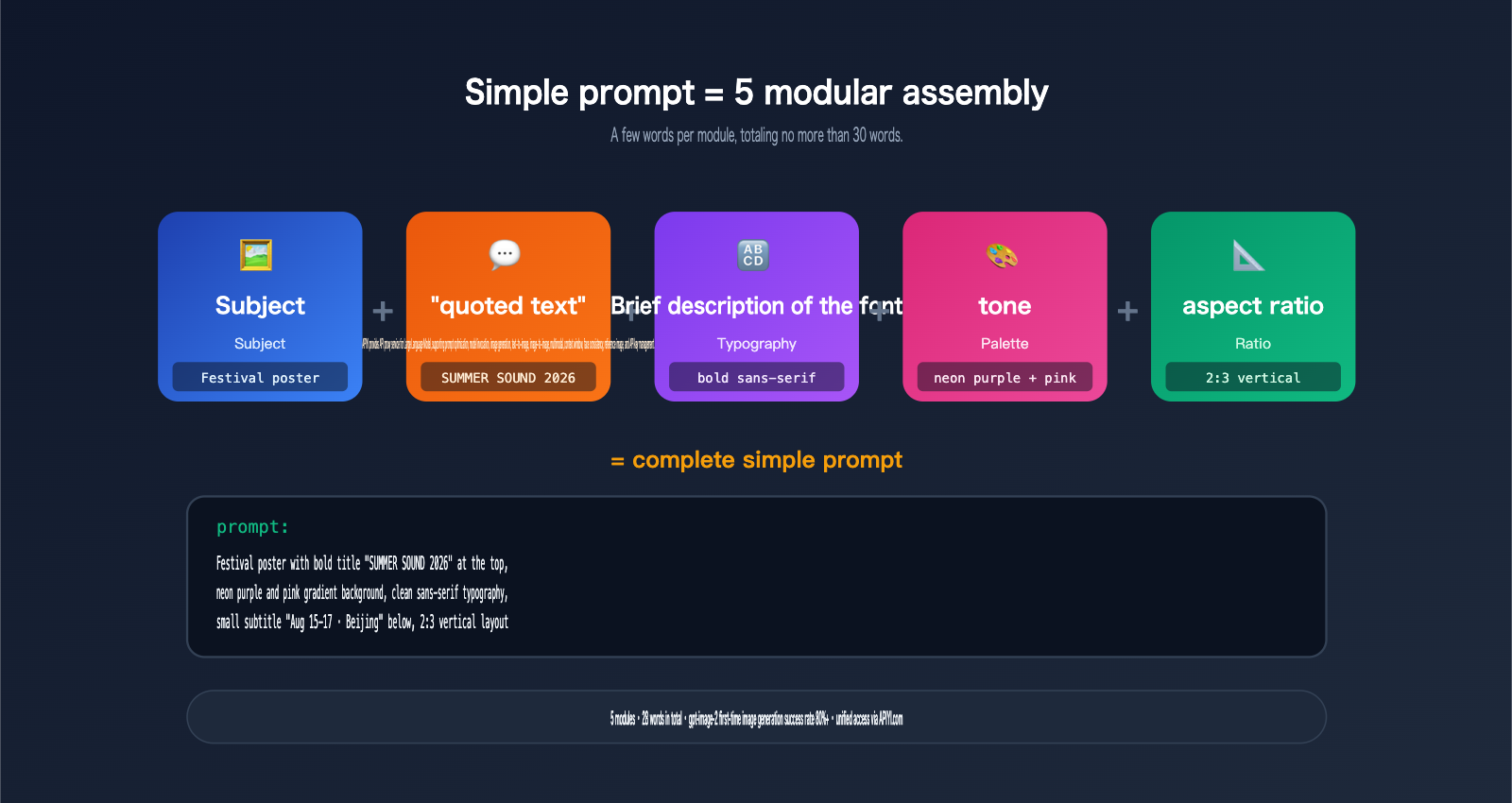
[Subject] + "Quoted Text" + [Font Style] + [Tone] + [Ratio]
| # | Scenario | Recommended Ratio / Size | Typical Use |
|---|---|---|---|
| 1 | Blog Cover | 16:9 · 1920×1080 | Tech blogs, article headers |
| 2 | WeChat Article Header | 2.35:1 · 1920×815 | WeChat official account main image |
| 3 | Xiaohongshu Cover | 3:4 · 1080×1440 | Lifestyle, tutorials, tips |
| 4 | Music Festival/Event Poster | 2:3 · 1200×1800 | Offline shows, exhibitions |
| 5 | Product Launch Poster | 1:1 · 2048×2048 | New product drops, e-commerce |
| 6 | Book/E-book Cover | 2:3 · 1600×2400 | Publishing, paid content |
| 7 | Magazine Cover | 3:4 · 1500×2000 | Masthead + multi-column titles |
| 8 | Bilibili / YouTube Thumbnail | 16:9 · 1280×720 | Title + main visual |
| 9 | Horizontal Ad Banner | 21:9 · 2400×800 | Web / App ad slots |
| 10 | Holiday Marketing Poster | Various | CNY / 11.11 / Global markets |
Below are the simple prompt templates for each scenario—feel free to swap the text and use them directly.
2.1 Blog Article Cover (16:9)
Minimalist blog cover, dark navy background,
centered white title "Understanding Transformers" in bold serif,
small abstract neural network pattern on the right,
16:9 horizontal layout
Tip: Dark background + white bold title ensures readers can see it clearly in their feed.
2.2 WeChat Article Header (2.35:1)
WeChat article cover, 2.35:1 horizontal,
left side big text "AI Weekly · Issue 23" in bold sans-serif,
right side abstract tech illustration, gradient blue background
Tip: 2.35:1 is the standard for WeChat headers; keep text on the left to avoid the bottom-right thumbnail crop.
2.3 Xiaohongshu Cover (3:4)
Cozy lifestyle cover, warm morning light,
top-left pink tag says "AI Beginner Guide",
center large text "5 Tips" with hand-drawn underline,
3:4 vertical, soft pastel colors
Tip: Xiaohongshu users love "hand-drawn" aesthetics and warm tones; simple descriptions hit the mark perfectly.
2.4 Music Festival/Event Poster (2:3)
Festival poster with bold title "SUMMER SOUND 2026" at the top,
neon purple and pink gradient background, abstract sound waves,
small subtitle "Aug 15-17 · Beijing" below,
clean sans-serif typography, 2:3 vertical layout
Tip: Use double-quoted lines for title + subtitle; gpt-image-2's inference capability will automatically arrange the hierarchy.
2.5 Product Launch Poster (1:1)
Product launch poster, 1:1 square,
centered bold text "PIXEL PRO 2026",
small tagline "See more. Think less." below,
clean white background, subtle product silhouette on the right
Tip: Brand name in ALL CAPS + tagline in Title Case is the most recognizable combination for gpt-image-2.
2.6 Book/E-book Cover (2:3)
Book cover design, 2:3 vertical,
top title "THE LAST ARCHIVIST" in elegant serif,
bottom author name "By J. M. Kline" in small caps,
moody sci-fi atmosphere, silhouette of a figure on a cliff,
muted blue and amber tones
Tip: With title + author in quotes, the model will automatically align them according to industry standards.
2.7 Magazine Cover (3:4)
Magazine cover mockup, 3:4 vertical,
big masthead "FUTURE" at top in bold sans-serif,
left column "Issue 42" "April 2026",
main photo is a close-up portrait with studio lighting,
cover story text "The New AI Creators" in white overlay
Tip: Multiple columns of text—magazines are one of the subjects gpt-image-2 handles best.
2.8 Bilibili / YouTube Thumbnail (16:9)
Video thumbnail, 16:9 horizontal,
left half: person looking surprised,
right half: huge yellow text "Learn Prompt in 5 Mins" in bold,
black outline on text, red accent arrow pointing to it
Tip: The rule for Bilibili/YouTube thumbnails is "big text with black outlines + dramatic feel"—the model understands this well.
2.9 Horizontal Ad Banner (21:9)
Web banner, 21:9 horizontal, dark background,
left side bold text "Upgrade to Pro" "Save 40% This Week",
right side abstract product visualization,
clean minimal layout, blue accent color
Tip: 21:9 ultra-wide ratio is natively supported by gpt-image-2 (3x wider than GPT-Image-1.5).
2.10 Holiday Marketing Poster (Various)
Chinese New Year marketing poster, 3:4 vertical,
top gold text "Happy New Year",
below smaller red text "Happy Lunar New Year 2026",
festive red and gold palette, traditional paper-cut elements
Tip: Bilingual text side-by-side, both quoted, renders stably thanks to gpt-image-2's multilingual support.
🎯 Batch Suggestion: You can run these 10 scenarios through the APIYI (apiyi.com) gpt-image-2 interface in bulk. Turn your company's standard sizes/brand templates into "fill-in-the-blank" prompts so anyone on your team can generate images in 5 seconds.
3. Practical Case Studies: Simple Prompts for Poster Design with gpt-image-2
The following three cases provide complete prompts that you can copy and paste directly. I've included API parameter recommendations (using the APIYI api.apiyi.com gateway) and the expected results for each.
3.1 Case 1: Music Festival Poster (Using gpt-image-2 for Key Visuals)
Simple Prompt:
Festival poster with bold title "SUMMER SOUND 2026" at the top,
neon purple and pink gradient background, abstract sound waves,
small subtitle "Aug 15-17 · Beijing" below,
clean sans-serif typography, 2:3 vertical layout
API Parameter Recommendations (via api.apiyi.com):
{
  "model": "gpt-image-2",
  "prompt": "<insert prompt above>",
  "size": "1600x2400",
  "quality": "high",
  "output_format": "png",
  "n": 4
}
size=1600x2400: 2:3 aspect ratio, perfect for pre-print A3 output.quality=high: High quality is essential for large titles; otherwise, the neon glow can blur the edges of the text.n=4: Generate 4 images at once to choose the best one.- Expected time: Approximately 90–150 seconds.
Expected Result: A poster with the bold neon title "SUMMER SOUND 2026" at the top, abstract sound waves in the middle, and the subtitle "Aug 15-17 · Beijing" at the bottom. Both quoted text strings should be rendered accurately.
3.2 Case 2: Technical Blog Cover (Using gpt-image-2 for Header Images)
Simple Prompt:
Minimalist blog cover, dark navy background,
centered white title "Understanding Transformers" in bold serif,
small abstract neural network pattern on the right,
16:9 horizontal layout
API Parameter Recommendations:
{
  "model": "gpt-image-2",
  "prompt": "<insert prompt above>",
  "size": "1920x1080",
  "quality": "medium",
  "output_format": "webp",
  "output_compression": 85,
  "n": 2
}
size=1920x1080: Standard 16:9 blog header size.quality=medium: Medium quality is sufficient for a simple background and a single title.output_format=webp: Smaller file size for faster loading on blogs.- Expected time: Approximately 25–45 seconds.
Expected Result: A dark navy background with a bold white serif title, accented by a minimalist neural network pattern on the right. The text clarity is sufficient at 1080p without needing further upscaling.
3.3 Case 3: Social Media Cover (Using gpt-image-2 for Platform Covers)
Simple Prompt:
Cozy lifestyle cover, warm morning light,
top-left pink tag says "AI 新手指南",
center large text "5 个技巧" with hand-drawn underline,
3:4 vertical, soft pastel colors
API Parameter Recommendations:
{
  "model": "gpt-image-2",
  "prompt": "<insert prompt above>",
  "size": "1080x1440",
  "quality": "high",
  "output_format": "png",
  "n": 4
}
size=1080x1440: Recommended 3:4 vertical ratio for platforms like Xiaohongshu.quality=high: High quality is recommended for Chinese character rendering to ensure strokes are clean and connected.n=4: Perform A/B testing to select the image with the most natural-looking "hand-drawn underline."- Expected time: Approximately 60–90 seconds.
Expected Result: A warm-toned background with a pink "AI 新手指南" (AI Beginner's Guide) tag in the top-left, the large text "5 个技巧" (5 Tips) in the center, and a hand-drawn underline. Rendering two Chinese phrases simultaneously is a direct test of gpt-image-2's multilingual capabilities.
🎯 Implementation Tip: We recommend saving these three prompts as "benchmark templates" for your team. Run them through the APIYI (apiyi.com) console to verify your connection. For high-volume tasks or parameter tuning, switch to the high-concurrency route
vip.apiyi.com, withb.apiyi.comas an automatic fallback. One API key works across all three routes.
4. Advanced Tips for Creating Posters with gpt-image-2
4.1 Multilingual Posters: Side-by-Side Chinese/English or Chinese/Japanese
gpt-image-2 natively supports multilingual text rendering. When creating posters or localized marketing materials, you can include quoted text in two languages within a single prompt:
Bilingual poster, 3:4 vertical,
top Chinese text "春节快乐",
below English text "Happy Spring Festival 2026",
red and gold festive palette
The two quoted segments are rendered independently and won't interfere with each other. This was one of the biggest hurdles for SD/MJ in the past.
4.2 Generate 10 Images at Once for A/B Testing
gpt-image-2 supports an n parameter up to 10, allowing you to generate 10 variations from the same prompt at once. Here’s the recommendation for poster scenarios:
| n value | Best for |
|---|---|
| 1 | Quick feedback during fine-tuning |
| 4 | Daily selection, high cost-effectiveness |
| 8 | Key brand assets, when you need to pick from many candidates |
| 10 | A/B testing or submitting 3–5 options to a client |
The 10 images will maintain subject consistency (same font, same primary color) while varying in compositional details—perfect for building a pool of marketing candidates.
4.3 Mask Editing: Modifying Only the Poster Title
If you're happy with the background and composition of your initial poster but only want to change the title (e.g., changing "Issue 23" to "Issue 24"), there's no need to redraw it. Use Mask editing:
- Use any tool to paint the title area white and the rest black.
- Call the gpt-image-2 editing API, passing in the original image + the Mask.
- Keep the prompt simple: "Change the title to 'Issue 24'".
The Omni-Attention architecture of gpt-image-2 ensures that pixels outside the Mask remain stable, preserving your original composition.
4.4 Using Reference Images for Brand Consistency
gpt-image-2 supports up to 5 reference images. When creating a series of brand posters:
| Reference Slot | What to include |
|---|---|
| 1 | Brand color palette (primary + secondary) |
| 2 | Screenshots of common font samples |
| 3 | Previous high-performing posters |
| 4 | High-resolution Logo |
| 5 | Scene atmosphere reference (e.g., studio photos) |
Add the phrase "Use the color palette and typography from the reference images" to your prompt, and the model will lock in your brand's visual elements, making the entire batch of posters look like they belong to the same family.
4.5 Simple Prompts + Photoshop Fine-tuning
The most efficient workflow: Let AI handle 90% of the work, and do 10% manual fine-tuning.
- AI Stage: Use a simple prompt to generate 4 images at once, then pick the one that's 80% there.
- Manual Stage: Open it in Photoshop and adjust only 3 things—Logo placement, primary color hue shift, and text kerning.
This "simple prompt + fine-tuning" workflow is 3–5 times faster than the old way of "struggling to write a 300-word prompt and forcing a 100% perfect result in one go," and it's much more stable.
5. Choosing the Right Quality Setting for gpt-image-2 Posters
Selecting the right quality for your scenario is key to controlling costs. Refer to the table below:
| quality | Time (2K) | Time (4K) | Relative Cost | Recommended Scenario |
|---|---|---|---|---|
| low | 15–25s | — | 1× | Sketches, quick exploration |
| medium | 30–60s | 60–120s | 2× | Blog covers, daily social media |
| high | 60–120s | 120–300s | 4× | Printed posters, brand key visuals |
| auto | Model-determined | Model-determined | Variable | Let the model decide if unsure |
Rules of thumb:
- For clear text → quality ≥ medium
- For 4K printing → quality = high is a must
- For the sketching/exploration stage → low is sufficient, saving both time and money
VI. FAQ: Common Questions About Creating Posters with gpt-image-2
Q1: Why does stacking adjectives make the results worse?
Because gpt-image-2 is a "reasoning" model. It tries to understand your entire description rather than just matching keywords like tags. Fifty adjectives just create noise—the model gets caught in a loop weighing synonyms like "hyper-realistic," "cinematic," and "masterpiece," which distracts it from its primary task: getting the text inside the quotation marks right.
Solution: Cut out the adjective stuffing. Keep just one primary descriptor (e.g., minimalist, moody, or cozy) and focus on describing the scene precisely.
Q2: How do I include Chinese titles in a prompt?
Just write them inside English quotation marks; no extra setup is needed:
Top gold text "新春快乐",
below smaller red text "Happy Lunar New Year 2026"
gpt-image-2 has achieved >95% accuracy in rendering Chinese. If you need vertical text, just add "vertical Chinese text" to your prompt.
Q3: How long does a 4K poster take?
quality=high at 3840x2160 typically takes 2–5 minutes. If there's network congestion, it might reach 6 minutes. For production environments, we recommend using the batch queue via APIYI (apiyi.com) on the vip.apiyi.com high-concurrency line, and setting your single-task timeout to at least 360 seconds.
Q4: Can I specify a specific font (e.g., Helvetica, Source Han Sans)?
You can specify a style preference, but you cannot lock in a specific font. Effective ways to write this:
bold sans-serif→ The model will choose a style similar to Helvetica or Inter.elegant serif→ Garamond or Times style.handwritten→ Handwritten style.slab serif→ Roboto Slab-like style.
If your brand requires strict adherence to a font like Helvetica, we recommend a workflow of "generating a base image with a simple prompt + replacing the text layer in Photoshop later."
Q5: How do I call gpt-image-2 for posters in my own project?
The easiest way is to use a gateway that is compatible with the OpenAI protocol. Grab a key from the APIYI (apiyi.com) console, set the base_url to https://api.apiyi.com/v1, and copy the official OpenAI Python/Node examples. For batch scenarios, switch to vip.apiyi.com. You can find specific parameters in the gpt-image-2 section at docs.apiyi.com.
Q6: How do I pick the best one out of 10 images?
Use this three-step method:
- Text Accuracy: First, check if the text inside the quotation marks is rendered correctly on all 10 images. If not, discard them immediately.
- Visual Clarity: Is the subject prominent? Are the details usable?
- Brand Consistency: Do the color palette and font style align with your requirements?
Usually, 6–8 out of 10 will pass step 1, 2–3 will pass step 2, and 1–2 will pass step 3—these are your final candidates.
Q7: Why is gpt-image-2 better for posters than Midjourney?
| Capability | Midjourney v7 | gpt-image-2 |
|---|---|---|
| Text Rendering | 70% accuracy | >95% accuracy |
| Multilingual | Primarily English | Native CJK/Arabic support |
| Prompt Length | 100+ words recommended | 15–40 words optimal |
| Native 4K | Requires upscaling | Native support |
| Mask Editing | Limited support | Precise, preserves composition |
| Batch Output | 4 images | 10 images |
For poster and cover scenarios where text, multilingual support, and print-grade resolution are core requirements, gpt-image-2 is currently the best choice.
VII. Summary: Creating Posters with gpt-image-2
By now, you should understand the core shift in this article: The right way to create posters with gpt-image-2 = Simple prompt + Quotation mark rule. Here is your execution checklist:
- ✅ Put all text to be displayed inside English quotation marks (Top priority).
- ✅ Use one adjective to describe the overall atmosphere (minimalist / moody / cozy / festive…).
- ✅ Describe the scene in natural language, avoiding tag-stuffing like "8K/masterpiece/cinematic."
- ✅ Specify the aspect ratio and resolution (16:9 / 2:3 / 3:4 / 1:1, etc.).
- ✅ Choose quality based on the scenario: high for print, medium for blog covers, low for drafts.
- ✅ Generate 4–10 images at once to create a candidate pool, then pick the best one for fine-tuning.
You'll find that a poster that used to take 30 minutes to perfect can now be generated as a set of candidates in under 5 minutes. This isn't just an improvement in prompt engineering; it's a paradigm shift in modeling—OpenAI has internalized "compositional awareness" into the reasoning capabilities of gpt-image-2, so you no longer need to be an anxious "spell engineer."
🎯 Next Steps: Pick the scenario from §2 that is closest to your business (blog cover / social media / product poster) and run the prompt in your tool. If you don't have a convenient API entry point yet, we recommend applying for a test key at APIYI (apiyi.com) (set a daily limit of ¥20–50 first), run 2K validations on
api.apiyi.com, and upgrade to 4K once you're satisfied with the results. For batch processing and overnight queues, switch tovip.apiyi.com. If the main site experiences jitter,b.apiyi.comacts as an automatic fallback. Full parameters and code samples can be found atdocs.apiyi.com.
Creating posters with gpt-image-2 has evolved from "mastering prompt tricks" to "mastering the understanding of content"—and that's a good thing. True creativity returns to the creator, and tools return to being just tools.
Author: APIYI Technical Team
Resources:
- APIYI Official Website: apiyi.com
- APIYI Documentation: docs.apiyi.com
- APIYI Main Site: api.apiyi.com (Backups: vip.apiyi.com / b.apiyi.com)
- Official OpenAI Announcement: openai.com/index/introducing-chatgpt-images-2-0/