After OpenAI released the official GPT 5.5 prompt guide, the most notable change wasn't a specific new prompt template, but a fundamental shift in the overall approach to prompt design.
In the past, many developers were accustomed to writing lengthy system prompts.
These prompts typically listed detailed workflows, fixed steps, mandatory tones, prohibitions, tool invocation sequences, and a massive list of fallback rules.
This style was valuable for earlier models because they relied heavily on external processes to maintain stability.
However, the capability boundaries of GPT 5.5 have shifted.
The official guide explicitly emphasizes that GPT 5.5 is better suited for prompts that are result-oriented, have clear constraints, and leave the process open-ended.
In other words, developers should stop treating GPT 5.5 like an older model that requires strict, step-by-step guidance.
A better approach is to tell the model what the goal is, what the success criteria are, what evidence is available, and what the final output should contain.
As for searching, reasoning, trade-offs, tool invocation, and intermediate paths, you should leave some room for the model to maneuver.
This is also the core keyword of this article: GPT 5.5 prompt guide.
In this article, we will combine official OpenAI English documentation to systematically explain the key changes in the GPT 5.5 prompt guide and provide actionable methods for migrating your old prompts.
If you are maintaining customer service assistants, knowledge base Q&A systems, research agents, code agents, content generation systems, or workflow automation tools, this article can serve as a checklist for your prompt upgrades.
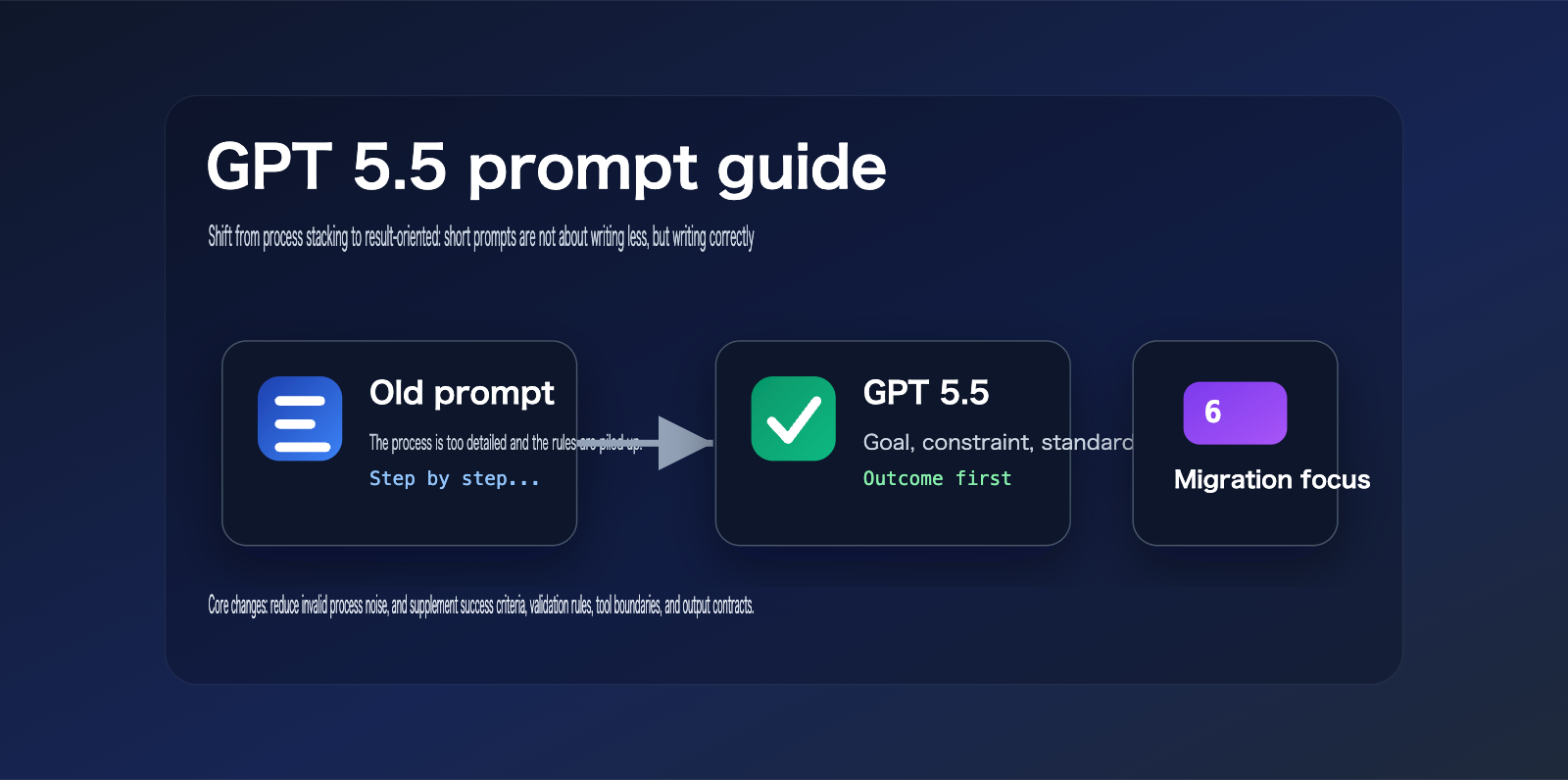
What are the core changes in the GPT 5.5 prompt guide?
The core message of the GPT 5.5 prompt guide can be summarized as: describe the destination, don't pave every step of the way for the model.
OpenAI's official documentation points out that GPT 5.5 performs better when prompts define target results, success criteria, constraints, and available context.
This doesn't mean shorter prompts are always better.
Brevity isn't the goal.
Clarity is.
If a short prompt lacks success criteria, evidence boundaries, and output structure, GPT 5.5 may still produce unstable results.
What you should really delete is the process noise that doesn't add control.
For example, generalized steps like "You must think first, then analyze, then summarize, and finally output" are usually less effective than simply defining the final deliverable.
For GPT 5.5, a better prompt structure looks like this:
Complete this task and deliver a ready-to-use result.
Success criteria:
- Cover user goals
- Adhere to constraints
- Flag uncertain information
- Output in the specified format
This type of prompt doesn't lock in every step, but it provides clear evaluation standards.
It allows the model to choose the most appropriate reasoning path based on the nature of the task.
Key Conclusions from the GPT 5.5 Prompt Guide
| Change | Official Direction | Impact on Developers | Recommended Action |
|---|---|---|---|
| Result-Oriented | Define goals and success criteria first | Old step-by-step prompts may become noise | Redesign based on output contracts |
| Less Process | Stop carrying over old prompt stacks | Over-specification shrinks search space | Delete generalized steps |
| Reasoning Tuning | low and medium need re-evaluation |
Don't default to max reasoning | Use evaluation to select levels |
| Tool Workflows | Preamble, phase, and assistant-item replay still matter | Tool-based agents can't rely on short prompts alone | Retain state and tool rules |
| User Experience | Personality, retrieval budget, and validation rules are more important | Customer-facing output must be controllable | Write short, clear experience rules |
Selection Advice: If you are integrating GPT 5.5 via API, we don't recommend directly reusing long prompts from the GPT 4 or GPT 5.2 era. We suggest using the APIYI (apiyi.com) API proxy service to set up a comparative test entry point. Evaluate your old prompts, new prompts, and different
reasoning_effortsettings on the same set of samples before deciding on a migration plan.
Why the GPT 5.5 Prompt Guide Advises Against Over-Specifying Old Prompts
The problem with old prompts isn't necessarily that they're "long."
The real issue is that long prompts are often packed with procedural instructions that are no longer necessary.
Early models required developers to explicitly write out "Step 1, Step 2, Step 3," or they’d easily go off track.
With GPT 5.5, the model possesses much stronger task comprehension, path planning, tool usage, and verification capabilities.
If you keep stuffing your prompts with historical baggage, you’re actually forcing the model to focus on following an outdated process rather than solving the problem at hand.
The official GPT 5.5 prompt guide notes that older prompts were often overly granular because early models needed more hand-holding.
On GPT 5.5, this approach can introduce noise, limit the model's search space, or make the output feel mechanical.
This is exactly why many teams feel their "output has become rigid" after upgrading their model.
They changed the model, but they didn't change the prompt.
5 Types of Noise in Old Prompts Under the GPT 5.5 Prompt Guide
-
Generalized Step Noise: For example, fixed requirements like "First analyze, then break down, then execute, then summarize."
-
Absolute Term Noise: For example, the excessive use of
ALWAYS,NEVER,must, andonly. -
Repetitive Persona Noise: For example, repeatedly stating "You are a world-class expert" without providing any actual success criteria.
-
Output Decoration Noise: For example, demanding complex headers, tables, emojis, or long explanations regardless of the task size.
-
Tool Sequence Noise: For example, hardcoding the order of tool calls without explaining when to stop.
GPT 5.5 doesn't need developers to simulate a thinking process for it.
It needs developers to define the task boundaries.
Boundaries include: goals, constraints, evidence, failure conditions, output formats, verification standards, and stopping conditions.
Old vs. New Prompts Under the GPT 5.5 Prompt Guide
| Dimension | Old Prompt Approach | GPT 5.5 Recommended Approach | Migration Focus |
|---|---|---|---|
| Task Goal | Write many steps | Define the final deliverable | Shift from process to results |
| Reasoning Process | Require fixed chains | Allow model to choose path | Remove pseudo-processes |
| Success Criteria | Usually missing | Clearly define "done" | Add completion standards |
| Constraints | Mixed in long rules | List key constraints separately | Extract hard constraints |
| Output Format | Over-decorated | Define by product scenario | Keep only necessary structure |
| Tool Calling | Fixed sequence | Trigger via decision rules | Clarify when to call |
Many prompt migrations fail because teams only perform a model name swap.
For example, changing gpt-5.4 to gpt-5.5 while keeping the entire process stack from the old prompt.
This migration method is the easiest on the surface, but it's the most likely to lead to hidden performance degradation.
A safer approach is to re-establish a "Minimum Viable Prompt" baseline for GPT 5.5.
The Result-First Structure Recommended by the GPT 5.5 Prompt Guide
The GPT 5.5 prompt guide isn't telling developers to write nothing.
It suggests focusing your attention on "what a good result looks like."
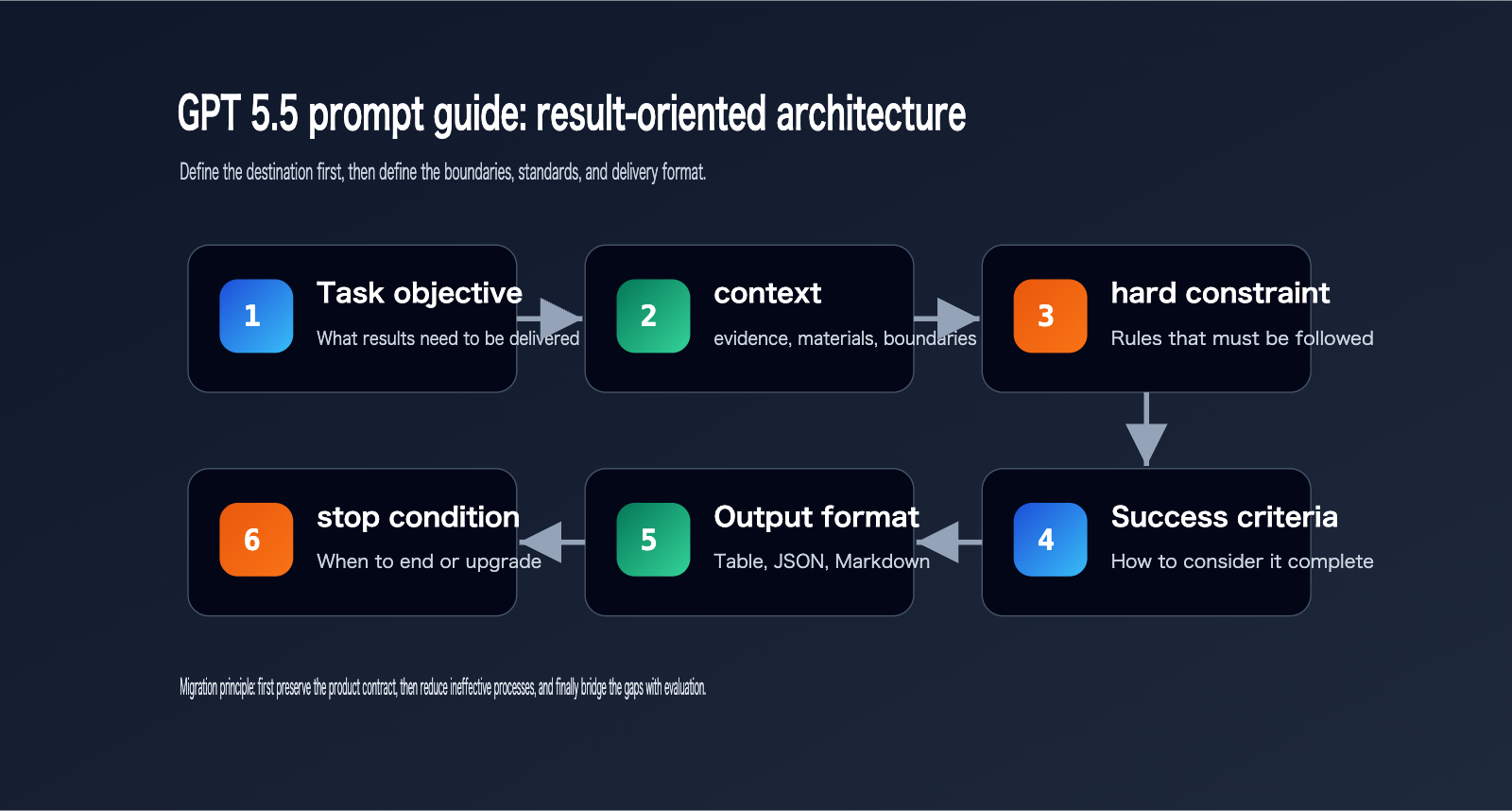
A reusable GPT 5.5 prompt structure can be broken down into 6 parts:
- Task Goal.
- Context and Evidence.
- Hard Constraints.
- Success Criteria.
- Output Format.
- Stopping or Escalation Conditions.
These 6 parts are enough to cover most production scenarios.
If the task is simple, you can keep just 3 of these parts.
If the task involves tools, retrieval, database writes, or high-stakes decisions, then add tool rules and verification loops.
Result-First Template for GPT 5.5
Task:
Complete {Goal} based on the provided materials, outputting a {Deliverable} ready for immediate use.

Context:
- Available information: {Scope of materials}
- Information that cannot be assumed: {Boundaries}

Constraints:
- Must follow: {Hard constraints}
- When uncertain: {Rules for asking or flagging}

Success Criteria:
- Results cover {Key requirements}
- Conclusions are supported by evidence
- Output matches {Format}
- Clearly list any blockers

Output Format:
{Structured format}
This template doesn't look complex, but it's more controllable than long-winded procedural prompts.
That's because it lets the model know how to judge when it's finished.
If a prompt only tells the model "how to do it" but fails to tell it "what good looks like," it's very difficult to stably migrate to a more powerful model.
Selection Tip: If you need to switch between multiple models—such as GPT 5.5, GPT 5.4 mini, Claude, or Gemini—we recommend splitting your prompt templates into "model-agnostic business contracts" and "model-specific tuning parameters." APIYI (apiyi.com) supports unified model invocation, which is perfect for this kind of migration comparison.
How to Handle Reasoning Effort in the GPT 5.5 Prompt Guide
There's one often-overlooked point in the GPT 5.5 prompt guide: don't treat reasoning_effort as a magic knob for everything.
When many teams upgrade to a new model, their first instinct is to crank up the reasoning effort.
However, this leads to higher costs and increased latency.
The official guide suggests that reasoning effort should be your "last mile" optimization, not your first choice for improving quality.
In many scenarios, clear output contracts, validation loops, and tool rules are far more effective than blindly increasing reasoning effort.
The official GPT 5.5 prompt guide specifically mentions that low and medium effort settings should be re-evaluated.
This means you can't rely on your experience with reasoning levels from older models.
For example, a task that required high on GPT 5.4 might only need medium on GPT 5.5.
For certain tasks like short text classification, field extraction, customer service routing, or format conversion, you can even start with none or low.
Conversely, tasks like research, multi-document conflict analysis, strategic writing, and complex code migration are still well-suited for medium or high.
This table isn't a fixed answer.
The truly reliable approach is to conduct evaluations using representative samples.
First, lock in your prompt, then compare the quality, latency, and cost across different reasoning_effort settings.
If low can consistently pass your evaluations, there's no need to default to high.
If medium fails, don't immediately jump to high.
First, check if your prompt is missing completion criteria, validation loops, tool persistence rules, or error recovery rules.
Selection Advice: If you're evaluating GPT 5.5 for production, I recommend preparing 30–100 real-world samples and running them against your old prompts, new prompts, and various
reasoning_effortsettings. APIYI (apiyi.com) can serve as a unified gateway for your model invocations, making it easy to track models, parameters, response times, and output quality.
Migration Steps for Old Prompts to the GPT 5.5 Prompt Guide
The biggest mistake when migrating old prompts to GPT 5.5 is making massive, one-time changes.
It becomes nearly impossible to determine whether changes in quality stem from the model, the prompt, the parameters, or the toolchain.
The official "Using GPT 5.5" page suggests treating GPT 5.5 as a new model family to be tuned, rather than a direct, drop-in replacement for older models.
Migration should start with a "minimal prompt baseline."
By "minimal," I don't mean stripping it down to a single sentence.
I mean keeping only the instructions that the product contract strictly depends on.
Product contracts include: identity boundaries, task objectives, data sources, output formats, security rules, tool permissions, and completion criteria.
Any legacy content should only be added back after it has been validated through testing.
Migration Workflow for the GPT 5.5 Prompt Guide
| Step | Action | Output | Notes |
|---|---|---|---|
| 1 | Copy old prompt | Old version baseline | Do not rewrite immediately |
| 2 | Mark hard constraints | Must-keep list | Prioritize security and format |
| 3 | Remove pseudo-processes | Streamlined prompt | Remove generalized steps |
| 4 | Add success criteria | Result-oriented prompt | Define clear completion conditions |
| 5 | Fix test samples | Evaluation set | Cover failure scenarios |
| 6 | Tune reasoning_effort |
Parameter matrix | Start with low / medium |
| 7 | Add back rules | Final prompt | Only add back what testing proves necessary |
When migrating, you can use a simple principle to decide if an instruction should be kept:
If removing it doesn't lead to a noticeable degradation in evaluation results, don't keep it.
If removing it causes the model to consistently make the same type of error, then add it back as an explicit rule.
This prevents your prompts from becoming bloated as you migrate them.
Migration Example for the GPT 5.5 Prompt Guide
Old style:
You must think step by step.
You must first analyze the user's requirements.
You must break it down into multiple stages.
You must execute in order: step one, step two, step three.
You must summarize at the end.
New GPT 5.5 style:
Deliver an actionable migration plan.
Success criteria:
- Explain the current problem
- Provide a minimal modification path
- Highlight risks and verification methods
- Output blockers at the end
The old style focuses on the process.
The new style focuses on the results.
GPT 5.5 is much better suited for the latter approach.
The Impact of GPT 5.5 Prompt Guidelines on Tool-based Agents
The GPT 5.5 prompt guidelines don't mean that tool-based agents can simply discard all procedural rules.
On the contrary, tool-based agents still require clearly defined tool boundaries.
OpenAI's official guidelines note that preambles, phase handling, and assistant-item replay remain crucial for tool-intensive response workflows.
This suggests that the short-prompt strategy of GPT 5.5 is primarily aimed at eliminating ineffective process noise.
It is not an invitation for developers to remove necessary state management and tool protocols.
For agents that search the web, read files, query databases, submit forms, generate patches, or execute shell commands, your prompts must still retain the following:
- When a tool can be used.
- When a tool cannot be used.
- Whether confirmation is required before invoking a tool.
- How to recover if a tool fails.
- When to stop further tool calls.
- How to report executed actions in the final response.
The key to a tool-based agent isn't "the fewer processes, the better."
It's that every process must have decision-making significance.
If a rule defines a security, data, or cost boundary, it should be kept.
If a rule is merely a redundant step written historically to keep older models from going off-track, it should be deleted.
Recommendation: If your GPT 5.5 agent requires web searches, database queries, or multi-tool collaboration, I suggest maintaining an independent logging system outside of APIYI (apiyi.com). This allows you to track prompt versions, tool invocations, token usage, and failure reasons, making it easier to pinpoint whether an issue stems from the model, the prompt, or the tool itself.
How to Implement GPT 5.5 Prompt Guidelines Across Different Scenarios?
Different business scenarios require different prompt lengths.
A customer service assistant shouldn't copy the prompt of a research agent.
A content generation system shouldn't copy the prompt of a code agent.
The real value of the GPT 5.5 prompt guidelines is helping you determine which rules are part of a task contract and which are just crutches left over from the era of older models.
GPT 5.5 Prompt Guideline Implementation Table
| Scenario | Recommended Prompt Focus | Pitfalls to Avoid | Verification Method |
|---|---|---|---|
| Customer Service | Results, permissions, escalation criteria | Mechanical scripts and over-empathy | Ticket resolution rate |
| Knowledge Base Q&A | Evidence, citations, handling unknowns | Fabricating sources | Random citation checks |
| Content Generation | Audience, structure, quality standards | Vague, long-winded text | Human scoring and SEO checks |
| Code Agent | Scope of changes, testing, definition of done | Partial changes without verification | Unit tests and diff reviews |
| Research Agent | Search budget, evidence level, conflict resolution | Keyword stuffing | Source quality and conclusion consistency |
Take content generation, for example.
Old prompts often instructed the model to "write an intro, then background, then features, then a summary."
A better approach for GPT 5.5 is to define the audience, core arguments, mandatory topics to cover, forbidden misconceptions, final format, and quality check standards.
For code agents:
Old prompts might have required the model to output a full plan first.
A better approach for GPT 5.5 is to define the scope of changes, verification commands, files that must not be touched, the definition of done, and how to handle blockers.
For knowledge base Q&A:
The key isn't telling the model to "read the materials carefully."
The key is telling the model: answer only based on retrieved materials, explain how to handle missing information, how to flag uncertain information, and what sources must be included in the final answer.
Recommendation: If you operate multiple sites, products, or model entry points, treat prompt management as versioned assets. By using APIYI (apiyi.com) to unify your model access, you can maintain independent prompt versions for different sites, reducing regression risks during model upgrades.
API Invocation Example for GPT 5.5 Prompt Guide
Here’s a minimalist example. The focus isn't on code complexity, but on showing how to integrate a result-oriented prompt into an API call.
This example uses the OpenAI-compatible interface style.
If you're using APIYI (apiyi.com), you can set the base_url to their compatible endpoint, making it easy to unify your calls and switch between models.
from openai import OpenAI

client = OpenAI(
    api_key="YOUR_API_KEY",
    base_url="https://api.apiyi.com/v1"
)

prompt = """
Task: Migrate the following legacy prompt to GPT 5.5 style.
Success Criteria:
- Remove ineffective process noise
- Retain safety and formatting hard constraints
- Supplement with success criteria and stopping conditions
- Output the new prompt and modification notes
"""

response = client.responses.create(
    model="gpt-5.5",
    input=prompt,
    reasoning={"effort": "low"}
)

print(response.output_text)
In this example, we aren't asking the model to "think step-by-step."
We're simply defining the task objective and the success criteria.
If your evaluation shows that low isn't enough, then consider medium.
If you find the output structure is unstable, fix the output format first rather than immediately bumping up the reasoning level.
Recommendation: When using APIYI (apiyi.com) for GPT 5.5 prompt migration testing, try saving the old prompt, new prompt, model parameters, and output results into a comparison table. This gives your team a sample-based reference for discussions, rather than relying on a single, subjective experience.
GPT 5.5 Prompt Guide Migration Checklist
Before officially deploying your GPT 5.5 prompt, I recommend running through this checklist.
Don't just look at whether a single conversation went well.
You need to see if it remains stable across different inputs, edge cases, and failure scenarios.
Pre-deployment Checklist for GPT 5.5 Prompts
| Checklist Item | Success Criteria | Failure Indicators |
|---|---|---|
| Clear Objective | Can explain the deliverable in one sentence | Model doesn't know what to produce |
| Explicit Constraints | Hard rules are listed separately | Rules are buried in long paragraphs |
| Success Criteria | Can determine if the task is complete | Output looks complete but isn't verifiable |
| Tool Boundaries | Clearly defines when to use/stop | Too many or too few tool calls |
| Reasoning Level | Based on sample comparisons | Defaults to high or xhigh |
| Output Format | Matches the product interface | Text is too long or structure is unstable |
| Failure Handling | Can handle missing data/conflicts | Hallucinating, guessing, or skipping blockers |
If more than three items on this checklist are failing, I don't recommend going live.
It usually means the prompt hasn't fully migrated away from the "legacy model" mindset.
Before deployment, you should prepare at least a small evaluation set.
The set doesn't have to be huge.
But it must be real.
Real-world samples are much better at exposing issues than perfectly crafted, artificial ones.
GPT 5.5 Prompt Guide Summary
The GPT 5.5 prompt guide isn't here to dismiss prompt engineering.
Instead, it’s a reminder to developers: more powerful models require new ways of control.
In the era of older models, prompts often relied on stacking processes to ensure stability.
GPT 5.5 is better suited for controlling results through goals, constraints, evidence, success criteria, verification loops, and output contracts.
So, the first step in migrating your prompts to GPT 5.5 isn't just shortening your old ones.
It’s about re-evaluating whether each instruction still provides actual control value.
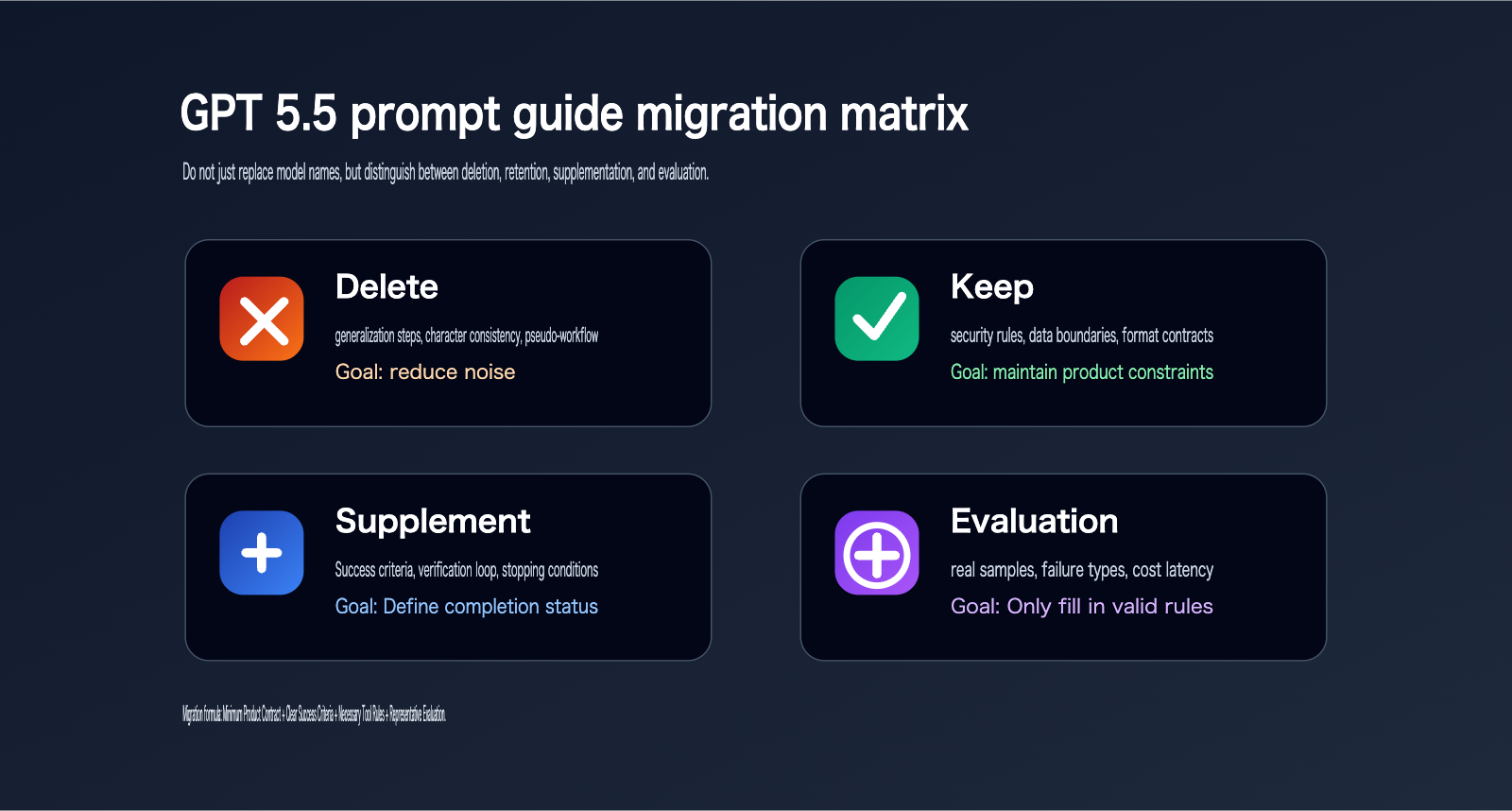
- Delete processes that lack control value.
- Keep rules related to security, formatting, permissions, and tool boundaries.
- Add missing success criteria, stopping conditions, and verification methods.
Finally, evaluate using real samples instead of relying on gut feelings before going live.
For developers, upgrading prompts for GPT 5.5 is a product engineering task.
For enterprises, it’s also an opportunity to comprehensively optimize model costs, quality, and stability.
If you need stable access to GPT 5.5 while maintaining the ability to switch between multiple models, you can use APIYI (apiyi.com) for unified interface management, prompt A/B testing, and monitoring of model invocation costs.
References:
- OpenAI GPT 5.5 Prompt guidance: developers.openai.com/api/docs/guides/prompt-guidance?model=gpt-5.5
- OpenAI Using GPT 5.5: developers.openai.com/api/docs/guides/latest-model
- OpenAI Introducing GPT 5.5: openai.com/index/introducing-gpt-5-5