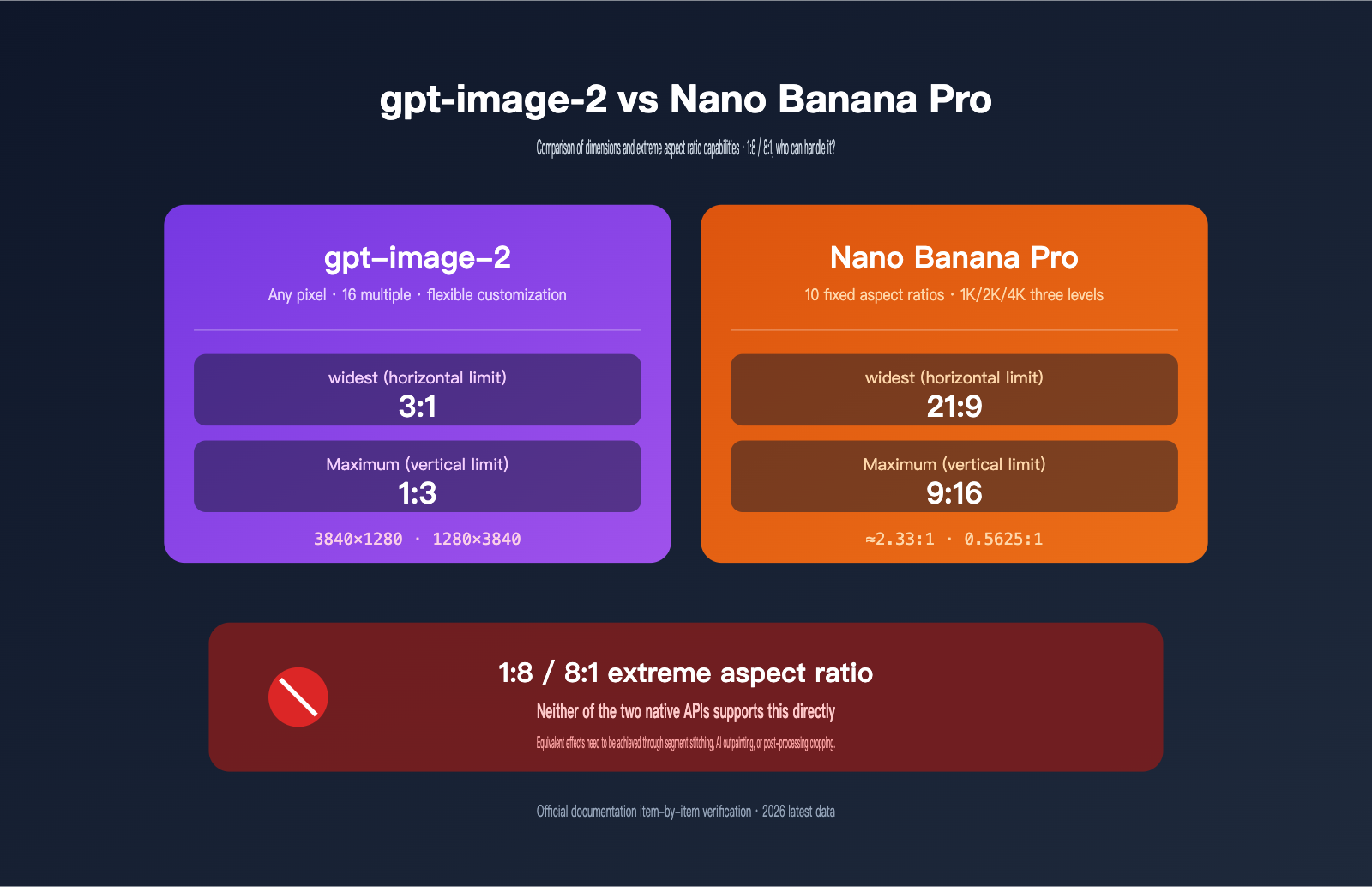
Recently, a developer in our community asked a very specific question: "Can the gpt-image-2 API generate ultra-wide panoramas or ultra-tall vertical images like 1:8 or 8:1? I want to create stretch banners, panoramic scrolls, and long infographics." To put it bluntly: gpt-image-2 does not natively support 1:8 / 8:1; the most extreme it goes is 3:1 (or 1:3). Nano Banana Pro (also known as Gemini 3 Pro Image), which is often compared in the market, doesn't support it either, capping out at 21:9.
This doesn't mean there's no solution. For real-world needs involving extreme aspect ratios (banners, cinematic widescreen, long infographics, full-body character portraits), the standard approach is "approximate ratio generation + post-processing stitching." It's all about choosing the flexibility that fits your workflow. In this article, I've cross-referenced the official documentation for both, breaking down size support, pixel rules, and workarounds to help you avoid common pitfalls.
5 Core Differences in Size Capabilities: gpt-image-2 vs. Nano Banana Pro
Let's get straight to the conclusion. The table below is based on a line-by-line check of the official documentation from OpenAI and Google DeepMind. Use it as a reference for your selection.
| Dimension | gpt-image-2 | Nano Banana Pro |
|---|---|---|
| Aspect Ratio Support | Arbitrary (subject to pixel/ratio constraints) | 10 fixed enumerated values |
| Max Width | 3:1 (3840×1280) | 21:9 (approx. 2.33:1) |
| Max Height | 1:3 (1280×3840) | 9:16 (0.5625:1) |
| Pixel Granularity | Multiples of 16 px per side | Calculated automatically by resolution |
| Max Single Side | 3840 px | 4096 px at 4K tier (short-side base) |
| Supports 1:8 / 8:1 | ❌ No | ❌ No |
| Post-processing Workarounds | Stitching / Outpainting / Cropping | Stitching / Outpainting / Cropping |
There are two key takeaways from this table. First, neither native API supports 1:8 / 8:1, so don't expect to get an ultra-long panoramic image in a single API call. Second, gpt-image-2 has better "near-extreme" capabilities—3:1 is wider than 21:9, and 1:3 is narrower than 9:16. If your requirements fall within 21:9, both work; if you need to go beyond that, gpt-image-2 is your only choice.
🎯 Selection Advice: If you truly need an ultra-long format like 1:8, neither will work out of the box. The most practical approach is to use gpt-image-2 to generate the maximum 3:1 / 1:3 dimensions and then use post-processing for outpainting or stitching. You can use the same API key to call both gpt-image-2 and Nano Banana Pro via APIYI (apiyi.com) to quickly compare which one better suits your specific scenario.
Understanding the Size Support Mechanism for gpt-image-2
OpenAI has designed "size" in gpt-image-2 as a customizable, continuous parameter rather than a set of fixed enumerated values. This gives developers a lot of flexibility, but it also comes with a few hard constraints you must follow.
Official Size Rules for gpt-image-2
OpenAI's documentation sets three layers of hard constraints on the size parameter for gpt-image-2:
| Constraint Dimension | Rule |
|---|---|
| Single-side pixels | Must be a multiple of 16 |
| Max single side | 3840 px (approx. 4K) |
| Total pixel range | 655,360 ~ 8,294,400 px² |
| Aspect ratio | ≤ 3:1 (or ≥ 1:3) |
| Experimental range | Stability decreases beyond 2560×1440 |
All four conditions must be met for the request to be accepted. In other words, you can set size = "3840x1280" (3:1, 4.91 million pixels, meets all constraints), but size = "4096x512" will be rejected (exceeds the 3840 side length limit, and the 8:1 ratio exceeds the maximum allowed).
Standard Presets vs. Custom Sizes in gpt-image-2
In addition to custom sizes, gpt-image-2 provides three "standard sizes" as shortcuts:
1024x1024(1:1, square)1536x1024(3:2, landscape)1024x1536(2:3, portrait)
These three presets don't require worrying about constraints, offer stable billing, and have the fastest inference times. We recommend using these three presets for 95% of production traffic. Only use custom sizes for special needs like posters, banners, or ultra-wide panoramic images.
🎯 Stability Tip: When calling gpt-image-2 via APIYI (apiyi.com), custom sizes are passed through to the upstream provider exactly as-is, matching the behavior of a direct OpenAI connection. However, we recommend implementing retries for requests in the "experimental range" (>2560×1440), as this range can occasionally return images with quality issues. A quick retry can significantly improve your success rate.
Why gpt-image-2 Can't Do 1:8
The 3:1 limit is a hard constraint set by OpenAI during the model training phase—the model wasn't trained on more extreme aspect ratios, so forcing it will result in a server-side rejection. Even if you try size = "3840x480" (8:1), the API will return a 400 error: "aspect ratio must be at most 3:1". This isn't a case of "the model supports it but it's disabled"; it simply lacks the capability.
From a model design perspective, extreme aspect ratios pose a much greater challenge to generation quality than standard ones. 1:8 means the model needs to maintain compositional harmony, visual focus, and reasonable text layout on a very flat canvas, which requires specialized training data and positional encoding schemes. OpenAI chose a product strategy for gpt-image-2 of "perfecting image quality within the 3:1 range" and leaving more extreme ratios to the post-processing ecosystem.
🎯 Workaround Tip: If you truly have a 1:8 requirement, we suggest using gpt-image-2 to generate a 3:1 base image first, then using the image edit interface on APIYI (apiyi.com) to perform horizontal expansion. During expansion, the model can extend the image to the sides based on existing content. This "base + expansion" workflow is much easier for maintaining visual consistency than trying to stitch 8 segments together at once.
Understanding the Size Support Mechanism for Nano Banana Pro
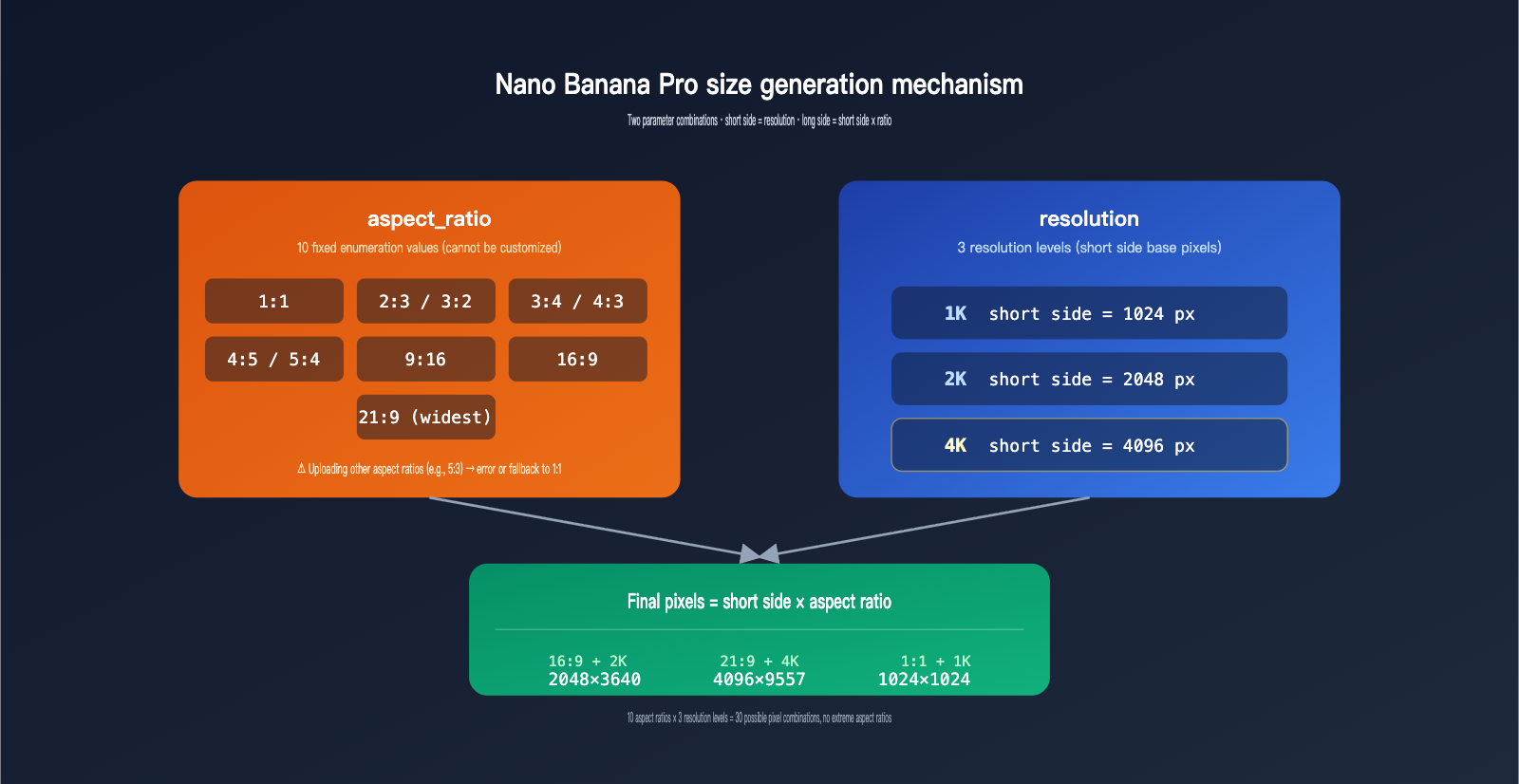
Google DeepMind chose the exact opposite design for Nano Banana Pro (marketed as Gemini 3 Pro Image, commonly known in the community as "Nano Banana 2")—fixing the aspect ratio to 10 preset enumerated values and layering them with 1K / 2K / 4K resolution tiers. Developers only need to "pick a ratio + pick a resolution," without worrying about pixel constraints.
The 10 Aspect Ratios Supported by Nano Banana Pro
The table below is the complete and only list of aspect ratios for Nano Banana Pro. Passing any other ratio (like 5:3 or 2:1) will result in an error or a fallback to 1:1.
| Type | Ratio | Value | Typical Use Case |
|---|---|---|---|
| Square | 1:1 | 1.00 | Avatars, social media squares |
| Landscape | 4:3 / 5:4 / 3:2 | 1.33 / 1.25 / 1.50 | Traditional photos, PPT |
| Landscape (Wide) | 16:9 / 21:9 | 1.78 / 2.33 | Video covers, widescreen |
| Portrait | 3:4 / 4:5 / 2:3 | 0.75 / 0.80 / 0.67 | Posters, product details |
| Portrait (Tall) | 9:16 | 0.56 | Short video covers |
The widest is 21:9 ≈ 2.33:1, and the tallest is 9:16 ≈ 0.56:1. No matter how you pass the aspect_ratio parameter, you won't be able to go outside this range. This means extreme ratios like 1:8 (=0.125) or 8:1 (=8.0) are completely unsupported.
Resolution Tiers and Pixel Calculation for Nano Banana Pro
Its pixel count is determined by two parameters: aspect_ratio (which determines the shape) + resolution (which determines the size). The calculation rule is very simple:
- Short side = resolution base value (1K=1024 / 2K=2048 / 4K=4096)
- Long side = short side × ratio multiplier
Example: 21:9 + 4K = short side 4096 × 9/21 ≈ 4096, with the long side calculated proportionally to about 9557 px. However, the system actually applies an upper limit; the true maximum long side for the 4K tier is constrained by total pixels and generation time. 21:9 + 4K takes about 30 seconds to generate per image, which is more than twice as slow as 16:9 + 4K.
🎯 Resolution Tip: For 95% of daily production requests, 2K is sufficient, offering excellent image quality and reasonable generation times. Only use 4K for scenarios with strict requirements like print previews or brand posters. When calling the
nano-banana-promodel via APIYI (apiyi.com), all three resolution tiers are covered by one API key, with pay-as-you-go billing, making it easy to compare results.
Comparison of Aspect Ratio Capabilities: gpt-image-2 vs. Nano Banana Pro
Comparing the capabilities of these two models across different scenarios makes decision-making much more straightforward.
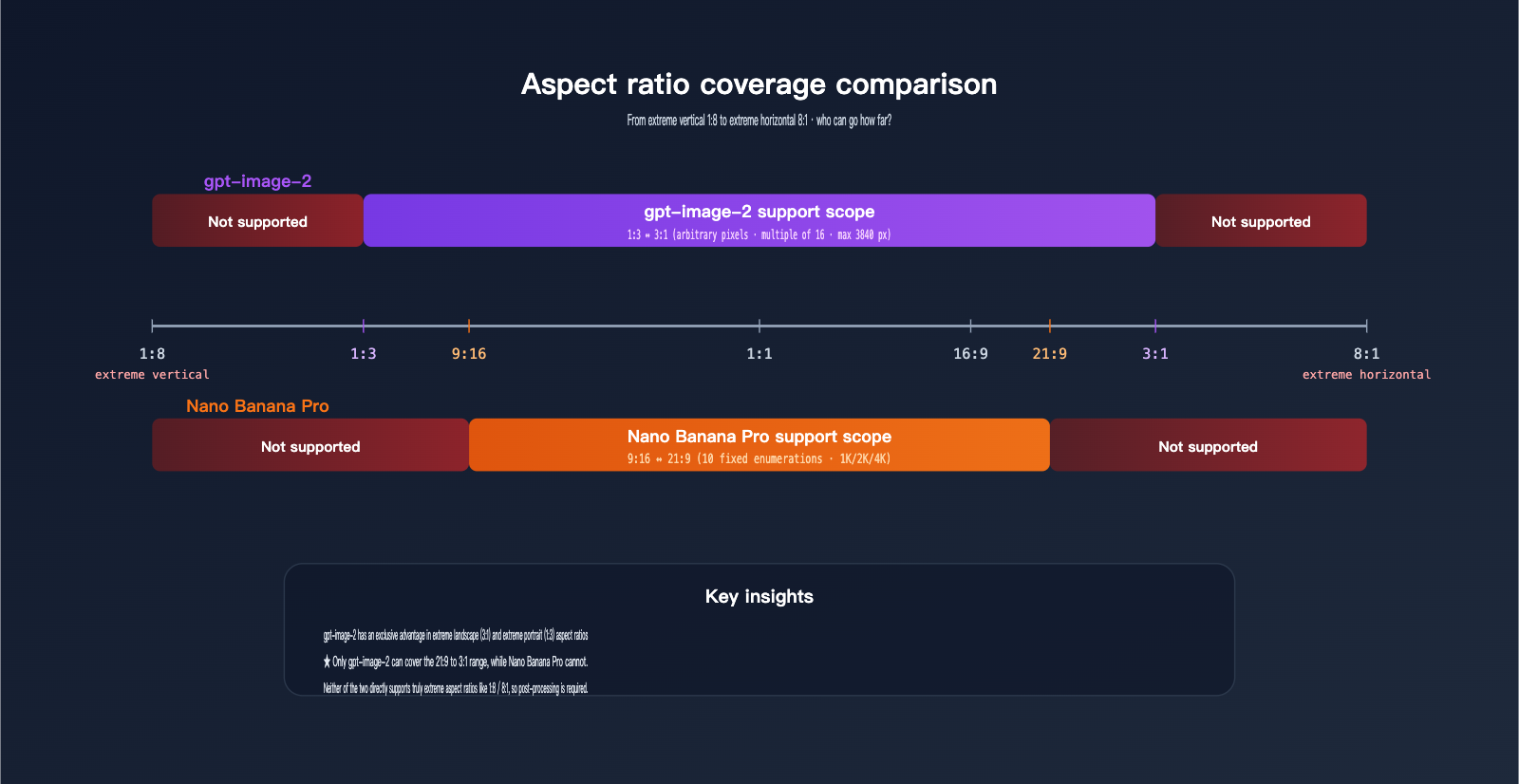
Aspect Ratio Coverage Breadth
| Extreme Aspect Ratio | gpt-image-2 | Nano Banana Pro | Notes |
|---|---|---|---|
| 1:1 (Square) | ✅ 1024×1024 | ✅ 1:1 / Any resolution | Both are rock solid |
| 16:9 (Video) | ✅ Custom arbitrary pixels | ✅ Fixed enumeration | Both supported |
| 21:9 (Cinematic) | ✅ Custom arbitrary pixels | ✅ Fixed enumeration (limit) | Both supported |
| 3:1 (Banner) | ✅ Custom (limit) | ❌ Not supported | gpt-image-2 exclusive |
| 1:3 (Ultra-tall) | ✅ Custom (limit) | ❌ Not supported | gpt-image-2 exclusive |
| 4:1 / 1:4+ | ❌ Exceeds 3:1 limit | ❌ Exceeds 21:9 limit | Both require post-processing |
| 8:1 / 1:8 | ❌ Not supported | ❌ Not supported | Both require stitching |
Pixel Flexibility
gpt-image-2 offers true "arbitrary pixel" control, provided you meet three constraints: multiples of 16, total pixel range, and aspect ratio limits. Nano Banana Pro uses "fixed enumeration," offering 30 possibilities (10 ratios × 3 resolution tiers).
This difference dictates distinct workflows. gpt-image-2 is perfect for scenarios requiring precise pixel control—like generating a 1920×1080 image to align perfectly with existing assets or batch-generating based on design grid dimensions (e.g., 768, 1280). Nano Banana Pro is better for "just get the general direction right" scenarios; developers don't need to calculate pixels, just pick one of the 10 ratios and a resolution (1K/2K/4K), and let the system handle the rest.
| Scenario | Recommendation |
|---|---|
| Need custom arbitrary pixels | gpt-image-2 |
| Need 4K large dimensions | Nano Banana Pro (3 resolution tiers up to 4K) |
| Need 3:1 / 1:3 | Only gpt-image-2 |
| Need common ratios between 21:9 and 9:16 | Either works |
🎯 Hybrid Strategy: In practice, many teams combine both—using Nano Banana Pro for common ratios (1:1, 16:9, 9:16) at 4K for large images, and gpt-image-2 for custom 3:1 banners or 1:3 vertical screens. On the APIYI (apiyi.com) platform, both models share the same account and token, with billing based on individual usage, so there's no need to switch accounts.
Practical Workarounds for 1:8 / 8:1 Extreme Aspect Ratios
While neither model natively supports 1:8 / 8:1, you can achieve equivalent results using combination strategies. These three methods have been verified in production environments:
Method 1: Segmented Generation + Horizontal Stitching
The most robust approach. Split a 1:8 panoramic image into four 1:2 segments or eight 1:1 sub-images, generate them individually, and stitch them using PIL, sharp, or Photoshop. The challenge is ensuring seamless edges; we recommend injecting a consistent style prompt for each segment (e.g., "Cyberpunk city, rainy night, neon lights, cinematic aspect ratio") and fixing the seed to significantly improve consistency.
from openai import OpenAI
import base64

# Initialize client with APIYI base URL
client = OpenAI(api_key="sk-xxx", base_url="https://api.apiyi.com/v1")

def gen_segment(prompt, idx):
    resp = client.images.generate(
        model="gpt-image-2",
        prompt=f"{prompt}, segment {idx+1}, seamless transition with adjacent segments, consistent style",
        size="1024x1024",
        quality="medium",
    )
    return base64.b64decode(resp.data[0].b64_json)

base = "Cyberpunk city skyline, rainy neon night"
segments = [gen_segment(base, i) for i in range(8)]
# Use PIL to stitch 8 1024×1024 images horizontally → 8192×1024 (i.e., 8:1)
Method 2: 3:1 Generation + AI Outpainting
Generate a 3840×1280 (3:1) base image using gpt-image-2, then use OpenAI's image.edit API or Nano Banana Pro's image editing capabilities to perform horizontal outpainting. Repeating the outpainting process twice will reach an 8:1 ratio. This method offers better visual consistency than pure stitching, though each outpainting step consumes an additional inference call, increasing both cost and time.
Method 3: 21:9 + Post-Crop
The simplest and fastest method. Generate a 4K 21:9 image (approx. 4096×1755) using Nano Banana Pro, then crop the top and bottom to reach the target 8:1 ratio (4096×512). You lose some vertical information, but the composition and style remain unified. This is ideal for banners, ad slots, or decorative images where the exact content is less critical than the aspect ratio.
🎯 Stitching Tip: These methods aren't mutually exclusive. We suggest using Method 3 to quickly generate a demo to validate your design concept, then upgrading to Method 2 or 1 for the final high-quality version. All three methods can be performed on the APIYI (apiyi.com) platform using the same token, avoiding the hassle of switching between multiple accounts.
| Method | Pros | Cons | Best For |
|---|---|---|---|
| Segmented Stitching | Any ratio possible | Potential edge artifacts | Panoramas, ultra-long infographics |
| AI Outpainting | Best visual consistency | Highest cost/time | Brand posters, print previews |
| Cropping | Fastest speed | Content loss | Banners, decorative images |
Size Selection Guide for Different Business Scenarios
Mapping your scenarios to specific models and size configurations will help you make decisions much faster.
| Business Scenario | Recommended Model | Recommended Size | Notes |
|---|---|---|---|
| Social Media Square / Avatar | Any | 1:1 + 1K/2K | Speed-focused |
| Video Cover / Banner | Nano Banana Pro | 16:9 + 2K/4K | 4K suitable for print |
| Short Video Cover | Nano Banana Pro | 9:16 + 2K | Mobile-friendly |
| Movie Poster / Promo | Nano Banana Pro | 21:9 + 4K | Ultra-widescreen |
| Ultra-wide Banner / Infographic | gpt-image-2 | 3:1 (3840×1280) | Max custom size |
| Ultra-tall Portrait / Scroll | gpt-image-2 | 1:3 (1280×3840) | Max custom size |
| 1:8 / 8:1 Panorama | Stitching solution | 8 segments of 1:1 | Requires post-processing |
| Any Custom Ratio | gpt-image-2 | Custom | Must meet constraints |
🎯 Best Practices: Before going live in production, we recommend running an A/B test using APIYI (apiyi.com). Run 50 images for each model using common ratios (1:1, 16:9, 9:16) to compare image quality and speed before deciding which model to use for your main traffic. Since the same API key covers both providers, the cost of testing is extremely low and helps you avoid selection errors after launch.
FAQ
Q1: What happens if I pass size = "3840x480" (8:1) to gpt-image-2?
The API will return a 400 error, indicating that the aspect ratio exceeds the limit. The 3:1 ratio is a hard constraint set by OpenAI during the model training phase, not a backend-adjustable parameter. Even OpenAI's own ChatGPT web interface cannot generate 1:8 or 8:1 images; you must achieve this through post-processing and stitching.
Q2: Can I pass a custom ratio to Nano Banana Pro, like 5:3?
No. The aspect_ratio parameter for Nano Banana Pro only accepts 10 enumerated values (1:1, 2:3, 3:2, 3:4, 4:3, 4:5, 5:4, 9:16, 16:9, 21:9). Passing other ratios will result in an error or a fallback to the default 1:1. If you need a 5:3 ratio or similar, we recommend generating with the closest available ratio (like 16:9) and cropping it afterward.
Q3: Is the parameter behavior consistent when calling both models via APIYI (apiyi.com)?
Yes, it's completely consistent. APIYI (apiyi.com) fully transparently passes the size parameter for gpt-image-2 and the aspect_ratio + resolution parameters for Nano Banana Pro without any conversion. The behavior maps one-to-one with official OpenAI/Google endpoints. Billing is passed through at official rates with no extra proxy fees.
Q4: When using custom sizes for gpt-image-2, are 1024×1024 and 1536×1024 considered "standard tiers" or just custom sizes?
OpenAI's documentation explicitly labels these as "standard sizes." They follow an optimized preset path, offering the shortest inference time and highest stability. Other pixel combinations that meet the constraints will work, but there may be subtle differences in behavior (especially with extreme sizes near the limits). Therefore, we recommend using the three standard tiers for 95% of your production traffic.
Q5: Can the 4K tier of Nano Banana Pro really output a 4096px short side?
The documentation states that the "short side equals the base resolution value," so at the 4K tier, the short side is 4096px. However, tests show that 21:9 + 4K requests trigger longer generation times (over 30 seconds) and occasionally downgrade to 2K before upsampling. If you have strict requirements for image purity, we recommend using the 16:9 or 1:1 + 4K combinations to avoid the overhead of extreme ratios combined with extreme resolutions.
Q6: How can I ensure there are no "breaks" between segments in the 1:8 panorama stitching solution?
Three tips: First, have all segments share a long prompt that includes descriptions like "seamless connection, consistent style." Second, fix the seed parameter (supported by gpt-image-2) so the model generates a similar style under the same semantics. Third, use an image editing interface to set the right edge of the previous segment as the reference image for the next, forcing content continuity. Combining these three techniques minimizes visible stitching marks.
Q7: Will there be models with native 1:8 support in the future?
There is currently no public information from major vendors regarding native 1:8 / 8:1 training plans. Extreme ratios pose a massive challenge to a model's composition capabilities, requiring specialized training data and architectural adjustments. In the short term (within 2026), we recommend relying on post-processing stitching. If there are any major updates, APIYI (apiyi.com) will sync them in the Help Center immediately.
Q8: Can I see size-related error logs in the APIYI dashboard?
Yes. The request logs in the APIYI (apiyi.com) dashboard fully retain the error information returned by the upstream provider, including messages like "aspect ratio must be at most 3:1" or "unsupported aspect_ratio." Developers can see the reason for rejection directly in the logs without needing to reproduce the request, which significantly shortens debugging time.
Summary: Check Aspect Ratio Ranges Before Image Quality
Let's circle back to the core question of this article: The gpt-image-2 API doesn't support 1:8 or 8:1 aspect ratios, with its most extreme options being 3:1 or 1:3. Similarly, Nano Banana Pro doesn't support them either, capping out at 21:9 or 9:16. If your business truly requires extreme aspect ratios like 1:8, please plan for a post-processing stitching workflow in advance; don't count on any single API to handle it natively.
However, within the common range of up to 21:9, both models have their strengths—Nano Banana Pro offers a "pick one + select a tier" simplified experience with native 4K, while gpt-image-2 provides flexibility for arbitrary pixel dimensions and extreme 3:1 landscape capabilities. The most robust engineering approach is to route 90% of your traffic through the range covered by both, and handle the remaining 10% of extreme requirements via post-processing.
🎯 Final Recommendation: We suggest using APIYI (apiyi.com) for a one-stop integration of both gpt-image-2 and Nano Banana Pro. You get one API key and one consolidated bill. Switch between common aspect ratios as you please, and handle extreme ratios using gpt-image-2's custom settings combined with stitching. This is the most efficient way to handle image API integration in 2026.
— APIYI Technical Team | Continuously tracking the latest in image generation models. For more in-depth comparisons, visit the APIYI (apiyi.com) Help Center.