Author's Note: This record covers the widespread Google Gemini AI Studio API outage on March 27, 2026. It analyzes the root causes behind the frequent 503 errors in the Nano Banana Pro and Nano Banana 2 image generation APIs, along with emergency and long-term mitigation strategies for developers.
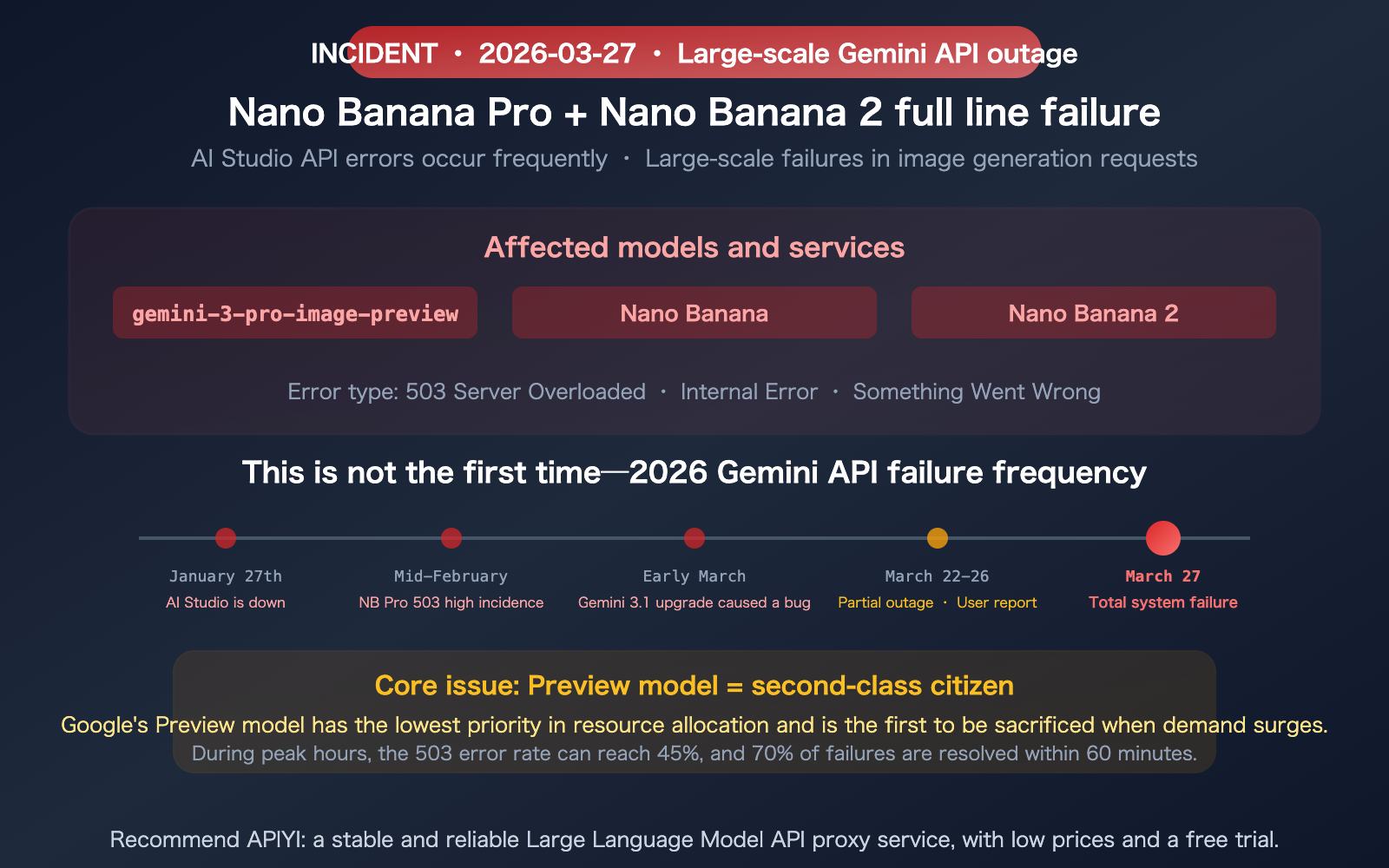
On March 27, 2026, the Google Gemini AI Studio API experienced another major outage—the gemini-3-pro-image-preview (Nano Banana Pro) and Nano Banana 2 image generation APIs were plagued by errors, causing a massive number of requests to fail. StatusGator logs show dozens of user reports over the past 24 hours, and the Google AI developer forums have been flooded with posts regarding "503 High Demand" and "Internal Error" messages. This isn't the first time—the stability of Gemini's image API has become the biggest pain point for developers in 2026. This article documents the incident, analyzes the root causes, and provides both emergency and long-term solutions.
Core Value: Understand the scope and causes of this Gemini API outage, and learn how to adjust your architecture to prevent future failures from impacting your business.
Overview of the Recent Gemini API Outage
Let's start by documenting the known facts.
| Item | Details |
|---|---|
| Outage Date | March 27, 2026 |
| Affected Models | gemini-3-pro-image-preview (Nano Banana Pro), Nano Banana 2 |
| Symptoms | 503 Server Overloaded, Internal Error, request timeouts |
| User Reports | Dozens of reports logged on StatusGator within 24 hours |
| Official Status | Google AI Studio status page shows "Partial Outage" |
| Scope | Primarily image generation API; text API is less affected |
Typical Error Messages from Developer Forums
On the Google AI developer forums, developers have reported the following errors:
503: The model is overloaded. Please try again later.500: Internal error occurredSomething went wrong. Please try again.- Requests timing out without any response
These errors aren't isolated configuration issues—they represent a widespread failure on Google's server side.
Why Does the Gemini Image API Crash So Frequently?
This isn't the first time. Since the start of 2026, failures in the Gemini image generation API have occurred almost every month.
Root Cause: The "Second-Class Citizen" Status of Preview Models
| Cause | Details | Impact |
|---|---|---|
| Lowest Resource Priority | Preview models have the lowest priority in Google's resource pool and are the first to be throttled during demand spikes | 45% failure rate during peak times |
| Limited Pre-GA Compute | Both Nano Banana Pro and NB2 are still in Preview, with limited GPU allocation from Google | Low capacity ceiling |
| Rapid User Growth | Demand for image generation has exploded, far exceeding Google's expectations | Supply cannot meet demand |
| High Peak-to-Valley Ratio | 10:00-14:00 UTC is the peak (US East + Europe overlap), with request volumes 5-10x higher than off-peak | Peaks break through capacity limits |
| Gemini 3.1 Upgrade Aftermath | The recent Gemini 3.1 Pro upgrade introduced a backend state conflict bug | Adding insult to injury |
2026 Gemini Image API Failure Frequency
| Date | Event | Duration |
|---|---|---|
| Jan 27 | AI Studio complete outage | Several hours |
| Mid-Feb | NB Pro 503 high frequency (45% at peak) | Lasted several days |
| Early March | Gemini 3.1 upgrade introduced Internal Error bug | Intermittent |
| Mar 22-26 | Partial outage, increased user reports | Lasted several days |
| Mar 27 | NB Pro + NB2 total failure | Ongoing |
According to community data, about 70% of 503 errors recover within 60 minutes, with full recovery typically taking 30-120 minutes. The problem is—it will crash again after recovery because the root cause (insufficient compute power) remains unresolved.
🎯 Developer Note: If your business relies on the Gemini image generation API, design your architecture assuming the service could go down at any moment. This isn't pessimism—it's a reasonable conclusion based on the actual failure frequency in 2026.
You can significantly mitigate the impact of these outages by using multi-channel load balancing via APIYI (apiyi.com).
Current Emergency Plan: What to Do During an Outage
If you're currently dealing with an outage, here are the emergency measures prioritized by urgency.
Emergency Plan 1: Wait for Recovery (For Non-Urgent Scenarios)
Based on historical data, 70% of 503 errors resolve within 60 minutes. If your business can afford the wait, you can implement an exponential backoff retry strategy:
import time
import random

def retry_with_backoff(func, max_retries=5):
    for attempt in range(max_retries):
        try:
            return func()
        except Exception as e:
            if "503" in str(e) or "overloaded" in str(e):
                wait = (2 ** attempt) + random.uniform(0, 1)
                print(f"503 error, retrying in {wait:.1f} seconds...")
                time.sleep(wait)
            else:
                raise
    raise Exception("Max retries exceeded")
Emergency Plan 2: Downgrade to an Available Model
If both Nano Banana Pro and NB2 are unavailable, you can temporarily downgrade to other models:
| Downgrade Option | Model | Quality | Availability |
|---|---|---|---|
| Downgrade to Nano Banana 1 | gemini-2.5-flash-image | Lower but usable | Generally more stable |
| Switch to Imagen 4 | imagen-4.0-generate-001 | Text-to-image only | Independent service |
| Switch to chatgpt-image | chatgpt-image-latest | Different style | OpenAI independent |
Emergency Plan 3: Use APIYI API Proxy Service (Recommended)
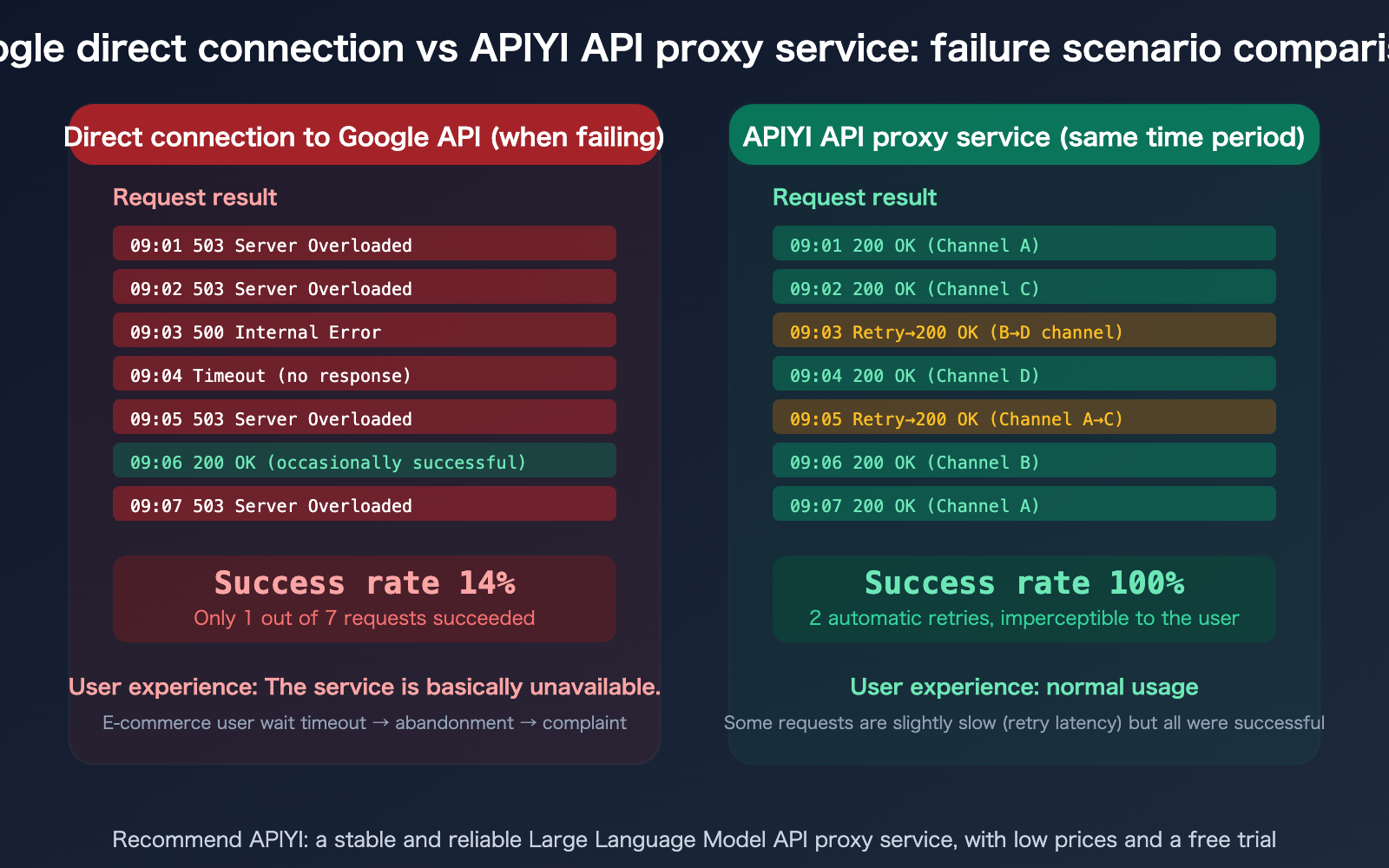
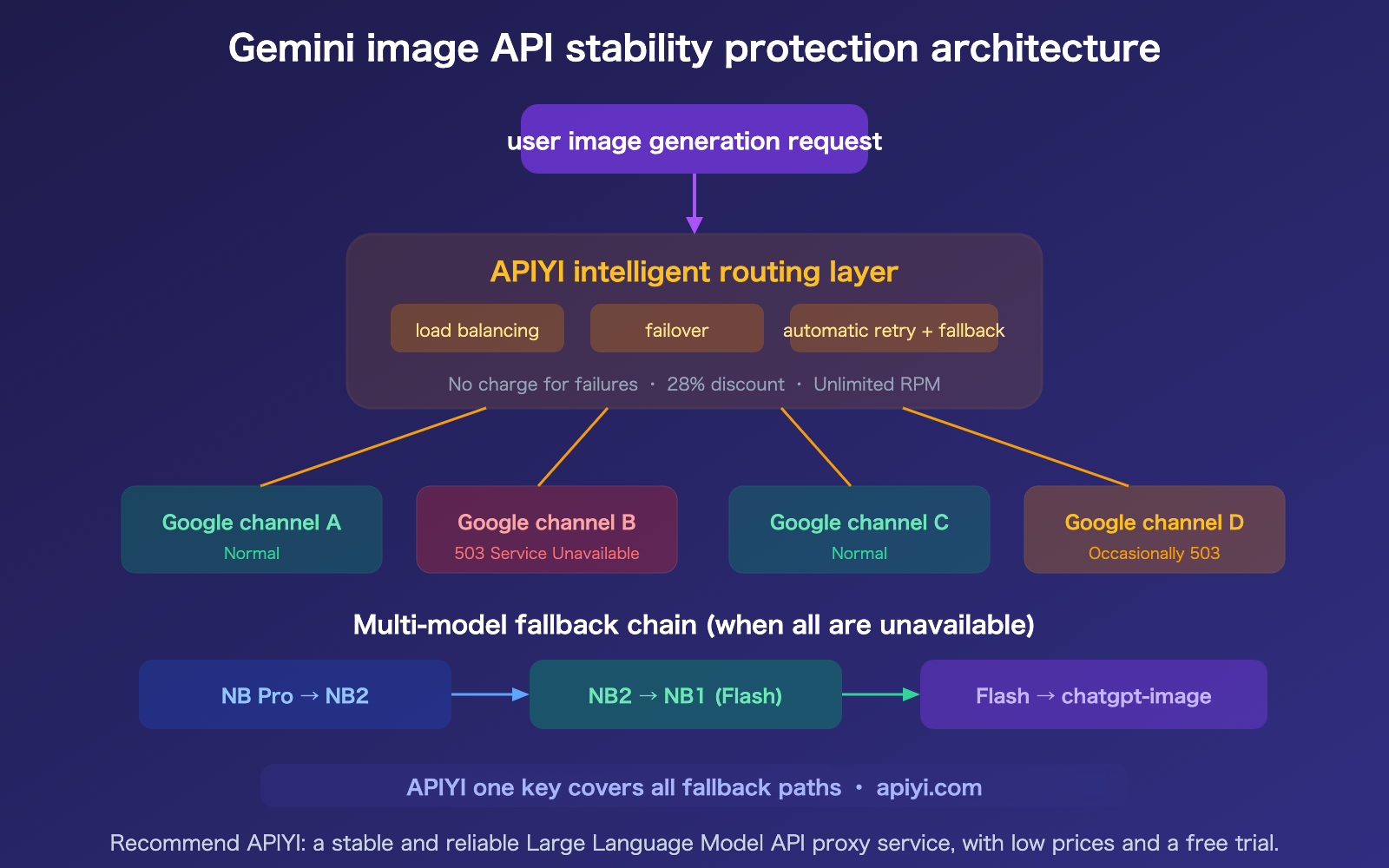
APIYI's multi-channel load balancing mechanism shines during these types of outages—when a specific Google channel returns a 503, APIYI automatically retries via other channels:
import openai

# Call via APIYI, which handles 503 retries automatically
client = openai.OpenAI(
    api_key="YOUR_API_KEY",
    base_url="https://vip.apiyi.com/v1"
)

response = client.chat.completions.create(
    model="gemini-3-pro-image-preview",
    messages=[{"role": "user", "content": "Product image description"}]
)
# APIYI handles 503 retries and channel switching in the background
Emergency Tip: If you are currently connecting directly to the Google API and experiencing an outage, the fastest way to recover is to switch to APIYI (apiyi.com)—just change the
base_urlin one line of code, with no other modifications required. APIYI's multi-channel mechanism maintains a high success rate even when some Google nodes are down.
Long-term Solutions: Stop Relying on Luck
Waiting for services to recover after every outage—and then doing it all over again next time—isn't an engineering solution. You need a systematic defense strategy.
Strategy 1: API Proxy Service + Multi-Channel Load Balancing
This is the simplest and most effective approach. Use an API proxy service like APIYI (apiyi.com) to handle your Gemini image API calls:
- Multi-Channel Load Balancing: Don't just connect to a single Google endpoint; distribute your traffic across multiple channels.
- Automatic Failover: If one channel returns a 503 error, the system automatically switches to another.
- Automatic Retries: Failed requests are retried across different channels, keeping the process transparent to your application.
- No Charge for Failures: You only pay for successful requests.
Strategy 2: Multi-Model Fallback Chain
Pre-configure a fallback chain in your code to automatically switch models when your primary choice is unavailable:
FALLBACK_CHAIN = [
    "gemini-3-pro-image-preview",    # Primary: NB Pro
    "gemini-3.1-flash-image-preview", # Fallback: NB2
    "chatgpt-image-latest",           # Cross-vendor fallback
]
Strategy 3: Off-Peak Scheduling
Community data shows that 10:00–14:00 UTC is the peak period for the Gemini API (when the US East Coast and Europe overlap). Scheduling non-real-time batch tasks for the early hours of the day (UTC) can significantly reduce the probability of encountering 503 errors.
Strategy 4: Local Caching + Batch Pre-generation
For e-commerce scenarios, many image requirements are predictable (e.g., new product launches, seasonal changes). Generate and cache these images in batches during off-peak hours instead of relying on real-time model invocation.
🎯 Architectural Advice: The most robust solution is a combination of "APIYI proxy + multi-model fallback chain + off-peak scheduling."
APIYI (apiyi.com) supports Nano Banana Pro, Nano Banana 2, and chatgpt-image-latest, allowing a single API key to cover your entire fallback path.
FAQ
Q1: When will this outage be resolved?
Based on historical data, 70% of Gemini API 503 errors are resolved within 60 minutes, with full recovery typically taking between 30 and 120 minutes. However, issues with Preview models tend to be cyclical—they may reappear during the next peak period even after recovery. We recommend not waiting for a fix, but instead immediately implementing a multi-channel API proxy service or a fallback strategy. You can check the official real-time status at aistudio.google.com/status.
Q2: Does calling via APIYI make me immune to these issues?
APIYI cannot prevent Google's servers from crashing—its core value lies in providing a buffer during outages. When one channel returns a 503 error, APIYI automatically retries through other channels. If all of Google's nodes were to crash simultaneously (an extreme scenario), APIYI would also be unable to generate images. However, in most failure scenarios (where only some nodes are overloaded), APIYI's multi-channel mechanism helps maintain a high success rate.
Q3: Why are text APIs less affected than image APIs?
Because the compute power required for a single image generation is significantly higher than for text. Text requests are completed in milliseconds, while image requests require 13–170 seconds of continuous GPU usage. When GPU resources are tight, Google prioritizes text services (which generate more revenue and have a larger user base), while image generation (especially for Preview models) is the first to be throttled. This is why Gemini image API outages are much more frequent than those for text APIs.
Q4: When will Nano Banana Pro move from Preview to GA (General Availability)?
Google has not announced a specific timeline. Historically, it takes 3–6 months for a Gemini model to move from Preview to GA. Nano Banana Pro was released in November 2025, so at that pace, it might reach GA by mid-2026 at the earliest. Once it hits GA, Google will allocate more compute resources, and stability should improve significantly. Until then, using the APIYI apiyi.com API proxy service is the most reliable way to handle the instability of the Preview period.
Summary
Key takeaways from the Gemini API outage on March 27, 2026:
- Preview Model = Unstable: Both Nano Banana Pro and NB2 are in Preview status. Google allocates limited compute power to them, and the 503 error rate can reach 45% during peak times—this isn't just a random occurrence, but a structural issue.
- Don't connect directly to Google's Preview API: Connecting directly means your business stability is entirely dependent on Google's resource scheduling. By using APIYI apiyi.com's multi-channel load balancing, you can maintain a high success rate even when some nodes fail.
- The Three-Piece Protection Architecture: APIYI proxy (multi-channel + automatic retries) + multi-model fallback chain (NB Pro → NB2 → NB1 → chatgpt-image) + off-peak scheduling (avoiding the 10:00-14:00 UTC peak).
We recommend accessing the Gemini image API via APIYI apiyi.com—it offers multi-channel load balancing, no charges for failed requests, a 28% discount, and no RPM limits, helping you minimize the impact of Google's Preview model instability on your business.
📚 References
-
Google AI Studio Status Page: Check service status in real-time
- Link:
aistudio.google.com/status - Description: Official service status dashboard
- Link:
-
Google AI Developer Forum 503 Report: Community discussion on outages
- Link:
discuss.ai.google.dev/t/constant-503-error-high-demand-when-using-nano-banana-gemini-3-preview/126434 - Description: Includes outage frequency data and community-driven solutions
- Link:
-
Gemini API Rate Limits: Official rate limit documentation
- Link:
ai.google.dev/gemini-api/docs/rate-limits - Description: Understand RPM and RPD limits for different tiers
- Link:
-
APIYI Documentation Center: Stable Gemini image API proxy service
- Link:
docs.apiyi.com - Description: Multi-channel load balancing + no charges for failed requests + 28% discount
- Link:
Author: APIYI Technical Team
Technical Discussion: Feel free to join the discussion in the comments section. For more resources, visit the APIYI documentation center at docs.apiyi.com.