title: Claude Code "Model Not Found" Error? Here's the Complete Fix for API Proxies
description: Fix Claude Code "model not found" errors when using third-party API proxy services like APIYI. Learn correct Base URL and settings.json configurations.
tags: [Claude Code, API Proxy, APIYI, Troubleshooting, Large Language Model]
Author's Note: A complete solution for the "model not found" error when connecting Claude Code to third-party API proxy services. Includes correct Base URL syntax, settings.json configuration methods, and the latest model name reference table.
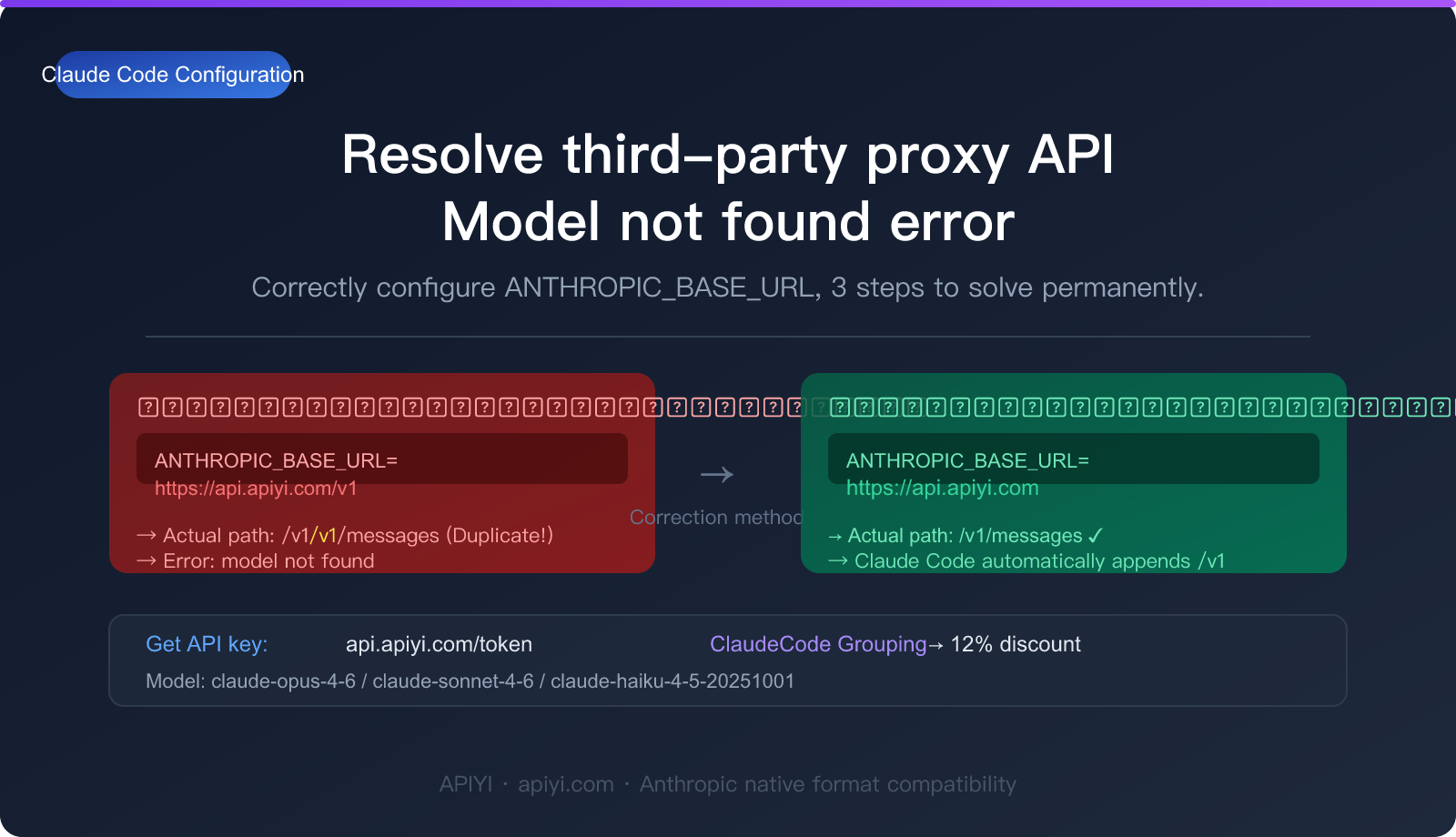
When using Claude Code, the most common error you'll likely run into is this one:
There's an issue with the selected model (claude-sonnet-4-6). It may not exist or you may not have access to it. Run /model to pick a different model.
This error typically occurs in two scenarios:
- Using an official API key but with a typo in the model name (just run
/modelto pick a new one). - Connecting via a third-party API proxy service, where the Base URL isn't configured correctly, causing model routing to fail.
This article focuses on the complete solution for the second scenario. We'll use APIYI (apiyi.com) as our example, covering environment variables, settings.json configurations, and the latest Claude model name reference table.
Core Value: By the end of this post, you'll know exactly how to configure Claude Code to work with a third-party API proxy service, eliminating "model not found" errors and ensuring stable access to all Claude Code features.
I. Quick Diagnosis: Is it the Model Name or the Base URL?
Before you start tweaking settings, take 30 seconds to figure out which issue you're facing:
| Symptom | Likely Cause | Solution Path |
|---|---|---|
Error: Run /model to pick a different model |
Model name doesn't exist or no permission | Run /model to reselect |
| Correct model name entered, but still errors | Base URL configuration issue | Check ANTHROPIC_BASE_URL |
| API key validation failed | Key is invalid or not set | Reconfigure ANTHROPIC_API_KEY |
| Network timeout / Connection refused | Incorrect proxy address | Check Base URL format |
| All models failing | Proxy doesn't support Anthropic format | Confirm proxy supports native Anthropic protocol |
If you're using an official Anthropic API key and can access anthropic.com normally, simply run the /model command within Claude Code to switch models—no extra configuration needed.
If you're using a third-party API proxy service (like apiyi.com), please continue with the configuration steps below.
🎯 Pro Tip: We recommend using the APIYI (apiyi.com) platform to access Claude Code. It's fully compatible with the native Anthropic format and supports the entire model lineup, including
claude-3-5-sonnet-20241022andclaude-3-opus-20240229, with stable connectivity.
2. Core Configuration for Connecting Third-Party Proxy APIs to Claude Code
2.1 Correct Base URL Format: Drop the /v1
This is the most critical step and the place where people most often trip up.
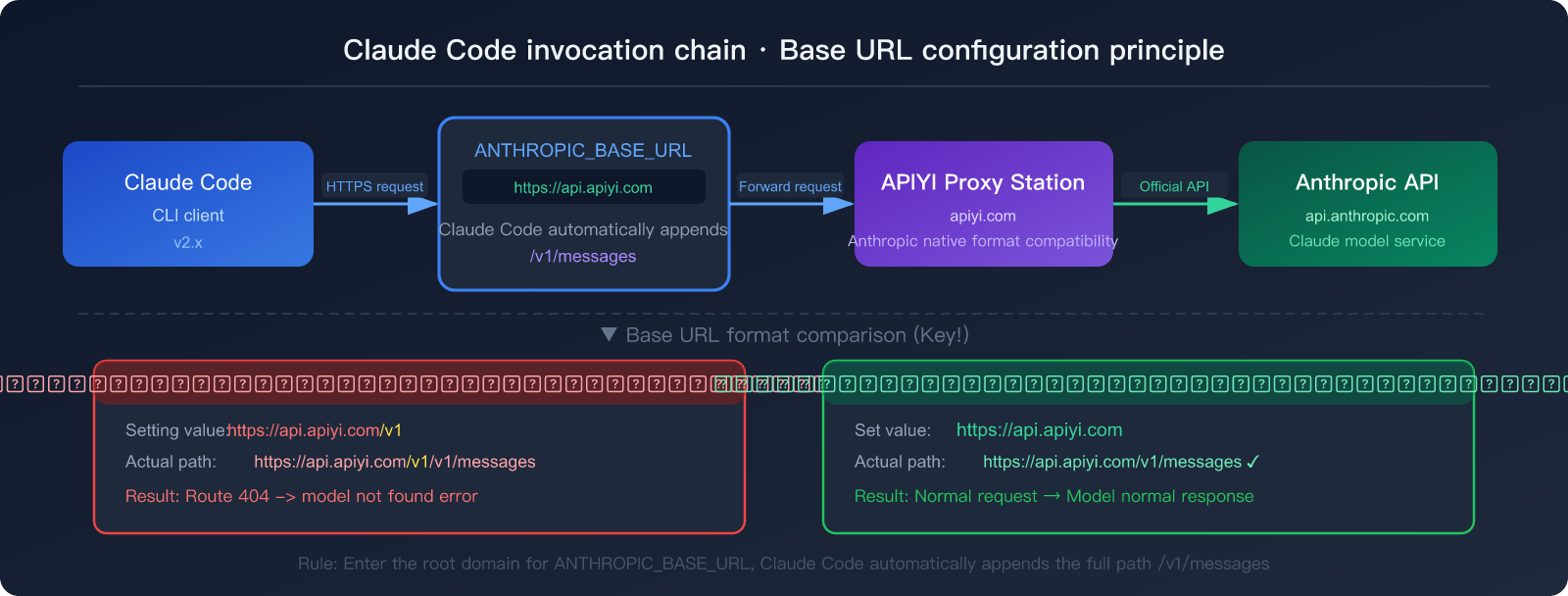
Claude Code has specific logic for handling the Base URL: It automatically appends /v1/messages to whatever Base URL you've set. Therefore:
-
❌ Incorrect Format:
ANTHROPIC_BASE_URL=https://api.apiyi.com/v1- The actual request path becomes:
https://api.apiyi.com/v1/v1/messages(doubling up on the /v1) - Result: The route can't find the endpoint, and the model throws an error.
- The actual request path becomes:
-
✅ Correct Format:
ANTHROPIC_BASE_URL=https://api.apiyi.com- The actual request path becomes:
https://api.apiyi.com/v1/messages - Result: Successfully hits the native Anthropic interface.
- The actual request path becomes:
📌 Summary: When setting
ANTHROPIC_BASE_URL, just use the root domain path. Don't add the/v1suffix. Claude Code will handle the rest of the path automatically.
2.2 Getting Your API Key
Log in to the APIYI dashboard to get your token: APIYI Token Management Page
Token Selection Recommendations:
| Token Type | Best For | Discount |
|---|---|---|
| Default Token | General use, works out of the box | Standard Price |
| ClaudeCode Group Token | Specifically for Claude Code | 12% Off (0.88x) |
When creating a new token, selecting the ClaudeCode group gives you a 12% discount, making it much more cost-effective for long-term use.
III. Detailed Guide to the Two Configuration Methods
Method 1: Environment Variable Configuration (Recommended for Temporary Testing)
Run the following commands in your terminal. They'll take effect immediately for the current session:
# Set the third-party API proxy service Base URL (Note: don't add /v1)
export ANTHROPIC_BASE_URL="https://api.apiyi.com"

# Set your API key (replace with your actual key)
export ANTHROPIC_API_KEY="sk-xxxxxxxxxxxxxxxxxxxxxxxx"

# Launch Claude Code
claude
Verify if the configuration is active:
# Check current environment variables
echo $ANTHROPIC_BASE_URL
echo $ANTHROPIC_API_KEY

# You should see:
# https://api.apiyi.com
# sk-xxxxxx...
Pros & Cons:
- ✅ Simple and fast, no file editing needed.
- ✅ Doesn't affect other session configurations.
- ❌ Needs to be reset every time you open a new terminal (unless added to
.zshrc/.bashrc).
Permanent Solution (Write to your Shell config file):
# For zsh users (macOS default)
echo 'export ANTHROPIC_BASE_URL="https://api.apiyi.com"' >> ~/.zshrc
echo 'export ANTHROPIC_API_KEY="sk-your-key"' >> ~/.zshrc
source ~/.zshrc

# For bash users
echo 'export ANTHROPIC_BASE_URL="https://api.apiyi.com"' >> ~/.bashrc
echo 'export ANTHROPIC_API_KEY="sk-your-key"' >> ~/.bashrc
source ~/.bashrc
Method 2: settings.json Configuration (Recommended for Long-term Use)
Edit the ~/.claude/settings.json file (this is a global configuration that applies to all projects):
{
  "env": {
    "ANTHROPIC_BASE_URL": "https://api.apiyi.com",
    "ANTHROPIC_API_KEY": "sk-your-API-key"
  }
}
🎯 Pro Tip: Use
~/.claude/settings.jsonfor global configuration. Set it once and it works forever without needing to mess with environment variables every time. Visit APIYI (apiyi.com) to get your key; choose the ClaudeCode group tokens to enjoy a 12% discount.
If the file doesn't exist, create it manually:
# Create the .claude directory (if it doesn't exist)
mkdir -p ~/.claude

# Create settings.json
cat > ~/.claude/settings.json << 'EOF'
{
  "env": {
    "ANTHROPIC_BASE_URL": "https://api.apiyi.com",
    "ANTHROPIC_API_KEY": "sk-replace-with-your-key"
  }
}
EOF
Configuration Priority (From highest to lowest):
| Priority | Source | Description |
|---|---|---|
| 1 (Highest) | Environment Variables | Exported directly in the terminal |
| 2 | .claude/settings.local.json |
Local project config (not committed to git) |
| 3 | .claude/settings.json |
Shared project config |
| 4 (Lowest) | ~/.claude/settings.json |
Global user config |
For the same setting, higher priority sources will override lower ones. If you have a settings.json in your project directory, keep this hierarchy in mind.
IV. Latest Model Names Supported by Claude Code
These are the latest Claude model names for 2026. Make sure to enter them exactly as shown, including case and numbers:
Standard Reasoning Models
| Model Name | Series | Capability | Use Case |
|---|---|---|---|
claude-opus-4-6 |
Claude 4.6 | Most Powerful | Complex code, deep analysis, long document processing |
claude-sonnet-4-6 |
Claude 4.6 | Balanced | Daily programming, code reviews, technical writing |
claude-haiku-4-5-20251001 |
Claude 4.5 | Ultra-fast | Simple Q&A, code completion, quick tasks |
Enhanced Reasoning Models (Thinking Mode)
By adding the -thinking suffix to the model name, you can enable extended thinking mode, where the model performs deep reasoning before responding:
| Model Name | Base Model | Features |
|---|---|---|
claude-opus-4-6-thinking |
claude-opus-4-6 | Strongest reasoning; ideal for math, logic, and complex decisions |
claude-sonnet-4-6-thinking |
claude-sonnet-4-6 | Balanced reasoning and speed; the go-to for daily use |
claude-haiku-4-5-20251001-thinking |
claude-haiku-4-5-20251001 | Lightweight reasoning |
💡 Selection Advice: For daily Claude Code use, we recommend
claude-sonnet-4-6—it offers the best balance between coding quality and response speed. For complex architecture design or debugging stubborn bugs, you can switch toclaude-opus-4-6orclaude-sonnet-4-6-thinking.
5. Switching Models in Claude Code
Once you've configured your Base URL and API key, there are two ways to switch models:
5.1 Using the /model Command (The Easiest Way)
In a Claude Code conversation, simply type:
/model
Claude Code will pop up a list of available models. If you're using a third-party API proxy service, the list might not automatically show every model, so you may need to type the model name manually.
5.2 Specifying Default Models in settings.json
{
  "env": {
    "ANTHROPIC_BASE_URL": "https://api.apiyi.com",
    "ANTHROPIC_API_KEY": "sk-your-API-key",
    "ANTHROPIC_DEFAULT_SONNET_MODEL": "claude-sonnet-4-6",
    "ANTHROPIC_DEFAULT_HAIKU_MODEL": "claude-haiku-4-5-20251001",
    "ANTHROPIC_DEFAULT_OPUS_MODEL": "claude-opus-4-6"
  }
}
By using the ANTHROPIC_DEFAULT_*_MODEL environment variables, you can specify the exact model name for each tier. This prevents Claude Code from using its built-in default names, which might not match the naming convention of your API proxy service.
🎯 Full Configuration Example: We recommend saving the above configuration in
~/.claude/settings.json. Use a ClaudeCode group token from APIYI (apiyi.com) as yourANTHROPIC_API_KEY.
6. Common Errors and Solutions (FAQ)
Q1: Claude Code won't start at all after I configured ANTHROPIC_BASE_URL?
Check if your JSON format is correct. Common mistakes include:
- Adding a comma after the last key-value pair (JSON doesn't allow trailing commas).
- Using "smart" or curly quotes
“”instead of standard straight quotes"".
# Verify your JSON format
cat ~/.claude/settings.json | python3 -m json.tool
If the output looks normal, your format is fine. If it throws an error, you've got a syntax issue.
Q2: I get an Invalid API key error, but I'm sure my key is correct?
Possible reasons:
- Extra spaces → Check if you accidentally copied a space at the beginning or end of the key.
- Key expired or disabled → Log in to
api.apiyi.com/tokento regenerate it. - Environment variable priority → You might have an old
ANTHROPIC_API_KEYset elsewhere in your system.
# Check for environment variables from multiple sources
env | grep ANTHROPIC
Q3: The model invocation works, but the results are poor or the formatting is weird?
This usually happens if the API proxy service doesn't fully support the Anthropic format, particularly regarding how system prompts are handled.
To verify, you can test the proxy service directly using curl:
curl https://api.apiyi.com/v1/messages \
  -H "Content-Type: application/json" \
  -H "x-api-key: sk-your-key" \
  -H "anthropic-version: 2023-06-01" \
  -d '{
    "model": "claude-sonnet-4-6",
    "max_tokens": 100,
    "messages": [{"role": "user", "content": "Say hello"}]
  }'
A successful response should include a content field with the actual text output. If the response is an error or looks malformed, the issue lies with the proxy service.
🎯 Quick Tip: APIYI (apiyi.com) is fully compatible with the native Anthropic format, so the
curltest above will work perfectly there. If you're testing other proxy services, use this command to quickly verify compatibility.
Q4: How do I set environment variables on Windows?
For Windows users, using the settings.json method is much simpler and more reliable:
// C:\Users\YourUsername\.claude\settings.json
{
  "env": {
    "ANTHROPIC_BASE_URL": "https://api.apiyi.com",
    "ANTHROPIC_API_KEY": "sk-your-API-key"
  }
}
If you prefer using PowerShell to set temporary environment variables:
$env:ANTHROPIC_BASE_URL = "https://api.apiyi.com"
$env:ANTHROPIC_API_KEY = "sk-your-API-key"
claude
Q5: How can I use different API configurations for different projects?
Create a .claude/settings.json file in your project's root directory. This file will take priority over your global configuration:
{
  "env": {
    "ANTHROPIC_BASE_URL": "https://api.apiyi.com",
    "ANTHROPIC_API_KEY": "sk-project-specific-key"
  }
}
Note: If this file contains a key, make sure to add it to your .gitignore so you don't accidentally commit it to your repository. Using .claude/settings.local.json (for local-only config) is even safer, as it's ignored by git by default.
7. Configuration Verification Checklist
Once you've finished the configuration, follow these steps to verify everything is working:
# Step 1: Confirm environment variables are active
echo "Base URL: $ANTHROPIC_BASE_URL"
echo "API Key: ${ANTHROPIC_API_KEY:0:10}..."

# Step 2: Test API connectivity
curl -s https://api.apiyi.com/v1/models \
  -H "x-api-key: $ANTHROPIC_API_KEY" | head -c 200

# Step 3: Launch Claude Code and test
claude --version
claude
Type /status in the Claude Code prompt to check the current connection status and confirm that the Base URL and model configuration are correct.
🎯 Pro Tip: After configuration, we recommend sending a simple test message to ensure Claude Code is responding correctly. The APIYI (apiyi.com) platform supports balance queries, allowing you to monitor Claude Code's token usage in real-time via the dashboard to keep costs under control.
Summary
If you encounter a "model not found" error when connecting Claude Code to a third-party API proxy service, 90% of the time it's because the Base URL format is incorrect. Keep these core principles in mind:
- Don't add
/v1to the Base URL: Usehttps://api.apiyi.com. Claude Code will automatically append/v1/messages. - Exact model name matching: Use full names like
claude-sonnet-4-6,claude-opus-4-6, orclaude-haiku-4-5-20251001. - Recommended settings.json configuration: Writing to
~/.claude/settings.jsonmakes the settings permanent, so you don't have to set environment variables every time. - Dedicated Claude Code tokens: Select the ClaudeCode group in the APIYI dashboard to enjoy a 12% discount.
If you're using the official Anthropic API key and have a direct network connection, you can simply run the /model command within Claude Code to select your model without any extra configuration.
🎯 Get your API Key: Visit APIYI (apiyi.com) to register an account and create a ClaudeCode group token on the token management page (
api.apiyi.com/token). The platform supports pay-as-you-go with no minimum spend, billing based on actual token usage—perfect for both individuals and teams.
This article was compiled by the APIYI technical team based on actual testing with Claude Code v2.x. If you run into any configuration issues, feel free to visit the APIYI Help Center at help.apiyi.com for support.