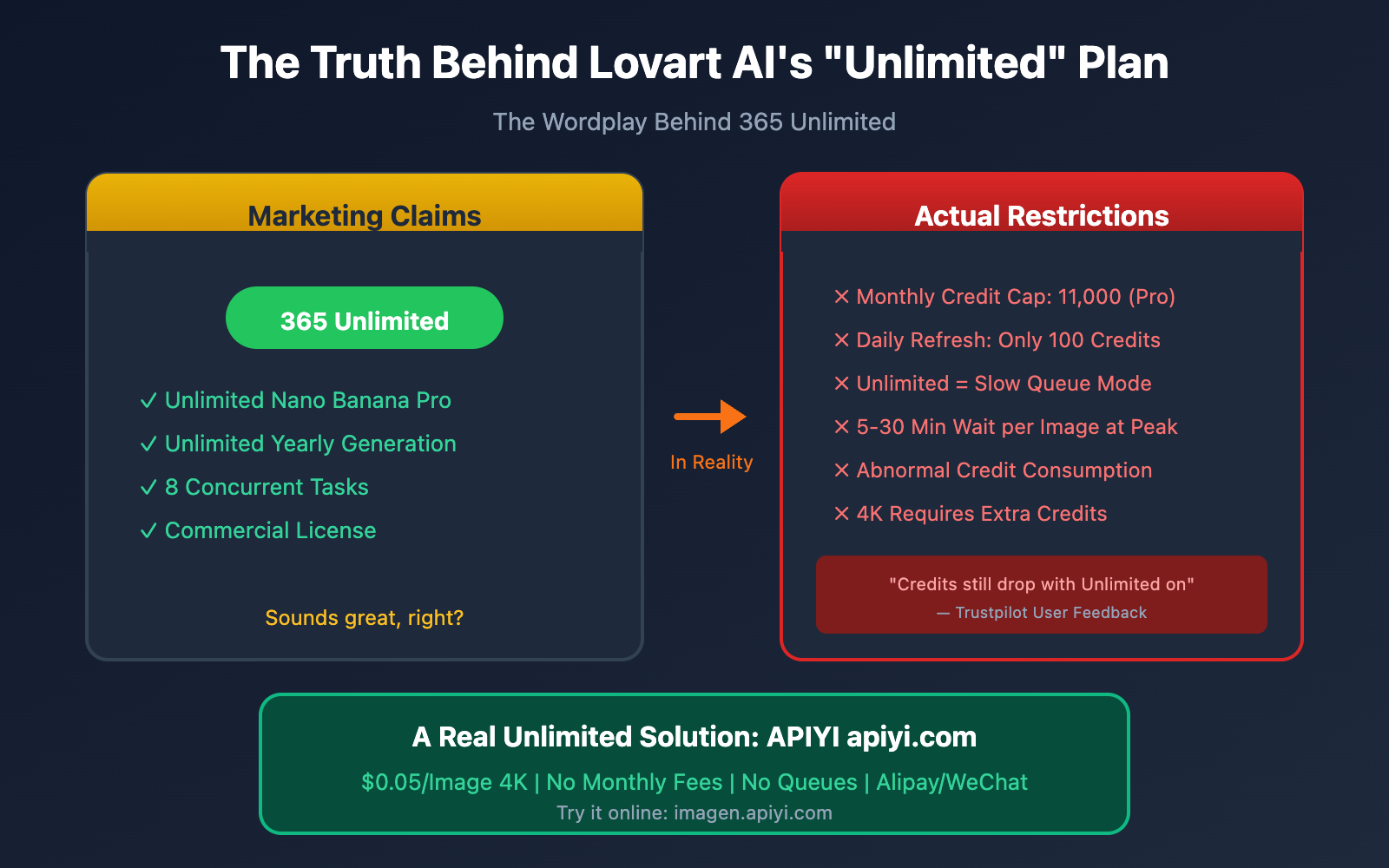
Seeing that flashy "365 Unlimited" badge on Lovart AI's pricing page, you might think you're getting unrestricted access to Nano Banana Pro once you subscribe, right?
The truth might be a bit of a letdown. This "unlimited" offer is actually a carefully crafted marketing gimmick. Behind the scenes, it's governed by monthly total credit caps, daily refresh limits, and a "Relaxed" slow-queue mode.
In this post, we'll dive deep into the real mechanics of Lovart AI's plans to help you make an informed choice. We'll also look at alternatives like APIYI, which offers true pay-as-you-go pricing without the hidden strings.
Deep Dive into Lovart AI's Plan Mechanics
What is the Lovart AI Credit System?
Lovart AI uses a dual-track billing system: Fast Credits + Unlimited Relaxed Generation.
| Concept | Description | Actual Experience |
|---|---|---|
| Fast Credits | Fixed monthly credits for high-speed generation | Use it or lose it; no rollover |
| Relaxed Generation | The so-called "Unlimited" mode | Requires queueing; long waits during peak hours |
| Daily Refresh | Daily credit top-up | Only 100 credits/day |
| 365 Unlimited | Annual unlimited badge | Only for Relaxed mode; not truly unlimited |
⚠️ Key Takeaway: The "unlimited" part only means you can use the Relaxed slow mode without consuming credits. However, you're still bound by hard caps on your monthly total and daily refresh credits.
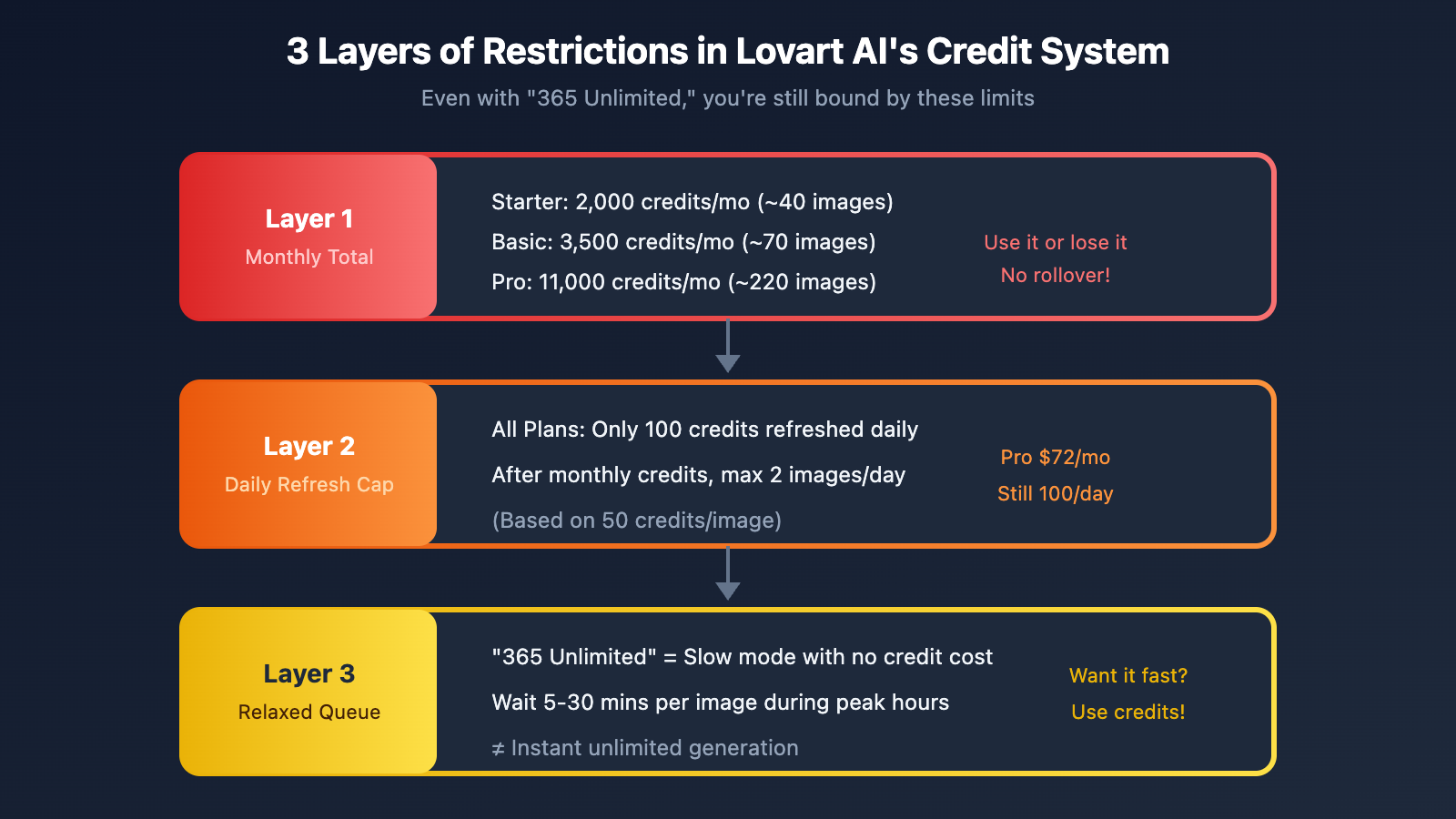
The 3 Layers of Restrictions in Lovart AI Plans
Layer 1: Monthly Total Credit Limit
| Plan | Monthly Fee | Fast Credits | Approx. Images |
|---|---|---|---|
| Starter | $15 | 2,000 | ~40 high-quality images |
| Basic | $26 | 3,500 | ~70 high-quality images |
| Pro | $72 | 11,000 | ~220 high-quality images |
Credit consumption varies based on task complexity:
- Simple image generation: 10-20 credits
- High-resolution 4K output: 50-100 credits
- Agent AI chat: 50+ credits/interaction
Layer 2: Daily Credit Refresh Limit
Even with the Pro plan ($72/month), you're only getting a 100-credit daily refresh. This means:
- Once your 11,000 monthly credits are gone
- You only get 100 credits back each day
- At 50 credits per image, you can only generate 2 images per day
Layer 3: Hidden Restrictions of Relaxed Mode
"365 Unlimited" sounds tempting, but here's the reality:
Unlimited Relaxed Generation = No credit cost + Queueing
                             ≠ Instant unlimited generation
Issues Revealed by User Feedback
According to user reviews on platforms like Trustpilot, Lovart AI has several recurring issues:
| Issue Type | User Feedback | Impact |
|---|---|---|
| Abnormal Credit Consumption | Credits still deducted even with Unlimited enabled | Severe |
| Default High-Speed Mode | Thinking Mode is on by default and can't be disabled | Severe |
| Unresponsive Support | No response to support tickets for a long time | Moderate |
| Opaque Billing | Unclear how many credits each action actually costs | Moderate |
💡 User Quote: "Even with the Unlimited option turned on, my credits keep dropping. I feel misled."
Decoding Lovart AI's "Unlimited" Wordplay
What is "365 Unlimited"?
According to Lovart AI's official documentation:
"365 Unlimited gives you one year of unlimited generations on the models in your plan. Access continues while your subscription is active."
Surface meaning: Unlimited generations for a year.
Actual meaning: Unlimited generations using "Relaxed Mode" for a year (which requires queuing).
The "Unlimited" Restrictions of Nano Banana Pro
Based on the plan details, the Nano Banana Pro under the Pro tier is labeled as "2K" and "365 Unlimited":
| Label | Surface Meaning | Actual Meaning |
|---|---|---|
| 2K | Up to 2K resolution | Only Relaxed mode supports 2K; 4K requires consuming more credits. |
| 365 Unlimited | One year unlimited | Limited to Relaxed (slow) mode, which requires queuing. |
| 8 concurrent tasks | 8 concurrent tasks | You still have to wait in line during peak hours in Relaxed mode. |
The Core Conflict:
- Want fast generation? → Use Fast Credits → Limited by your monthly credit quota.
- Want to save credits? → Use Relaxed mode → You'll have to wait in a queue.
- You can't have both speed and "unlimited" for free.
Calculating Actual Usage Costs
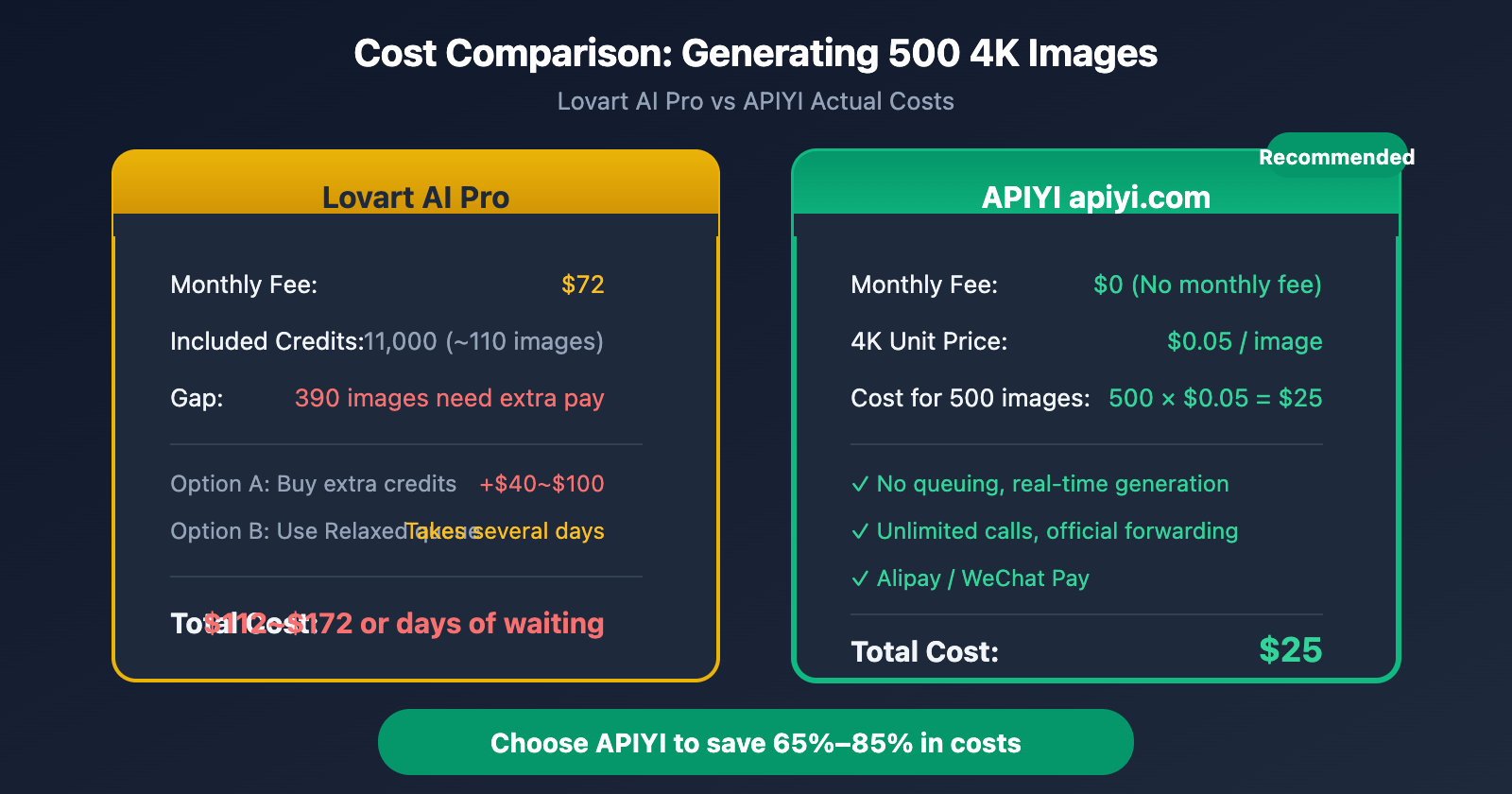
Let's say you're a Pro user ($72/month) and you need to generate 500 Nano Banana Pro 4K images:
Option 1: Using Fast Credits
- Each 4K image costs about 100 credits.
- 500 images require 50,000 credits.
- The Pro plan only provides 11,000 credits/month.
- You'd need to buy an extra 39,000 credits.
- Extra cost: Roughly $40–$100 (depending on the top-up tier).
- Total cost: $72 + $40–$100 = $112–$172/month.

Option 2: Using Relaxed Mode
- Costs zero credits.
- But you have to wait in the queue.
- During peak hours, each image might take 5–30 minutes.
- Generating all 500 images could take several days.
3 Truly Unlimited Alternatives for Nano Banana Pro
Option 1: APIYI Nano Banana Pro API (Recommended)
🎯 Top Pick: Call the Nano Banana Pro API via APIYI (apiyi.com). It's true pay-as-you-go with zero hidden restrictions.
Core Advantages of APIYI:
| Feature | Lovart AI Pro | APIYI |
|---|---|---|
| Monthly Fee | $72 | $0 |
| 4K Image Price | ~$0.24 (credit conversion) | $0.05 |
| Generation Limits | Restricted by credits/queues | Unlimited |
| Speed | Relaxed requires queuing | Real-time response |
| Payment Methods | International Credit Cards | Alipay / WeChat Pay |
| Official Forwarding | Secondary processing | Guaranteed official relay |
Cost Comparison:
Cost to generate 500 4K images:
- Lovart Pro: $72 (monthly fee) + queuing time OR extra credit purchases.
- APIYI: 500 × $0.05 = $25. That's a 65%+ saving.
Quick Integration Code:
import google.generativeai as genai

# APIYI Integration Configuration
genai.configure(
    api_key="your-apiyi-key",  # Get your key at api.apiyi.com
    transport="rest",
    client_options={"api_endpoint": "https://api.apiyi.com"}
)

# Call Nano Banana Pro to generate an image
model = genai.ImageGenerationModel("nano-banana-pro")
response = model.generate_images(
    prompt="A futuristic cityscape at sunset, 4K quality",
    number_of_images=1,
    aspect_ratio="16:9"
)

# Save the image
for i, image in enumerate(response.images):
    image.save(f"output_{i}.png")
💡 Online Test: Visit imagen.apiyi.com to experience Nano Banana Pro directly in your browser—no coding required.
Option 2: Google AI Studio Official API
Use Google's official Gemini API to call Nano Banana Pro directly:
| Pros | Cons |
|---|---|
| ✅ Direct official connection | ❌ Requires an international credit card |
| ✅ No middleman | ❌ Access restricted in mainland China |
| ✅ Full feature set | ❌ Higher price ($0.24/image) |
Official Pricing:
- Nano Banana Pro 4K: $0.24/image
- Nano Banana Pro 2K: $0.12/image
- Nano Banana Pro 1K: $0.06/image
Limitations:
- The free tier has RPM/RPD (requests per minute/day) limits.
- Tier 1 paid limits are relaxed but still exist.
Option 3: Other Nano Banana Pro Hosting Platforms
Besides Lovart AI, several other platforms offer Nano Banana Pro access:
| Platform | Pricing Model | Recommended? |
|---|---|---|
| Lovart AI | Monthly Fee + Credits | ⭐⭐ |
| Google AI Studio | Pay-as-you-go | ⭐⭐⭐ |
| APIYI | Pay-as-you-go | ⭐⭐⭐⭐⭐ |
| Other Third Parties | Varies | Use with caution |
APIYI Nano Banana Pro Detailed Guide
Why Choose APIYI
APIYI is the top choice for calling Nano Banana Pro in the domestic market, offering the following advantages:
- Top-tier Model by Daily Consumption – We invest heavily in O&M resources to ensure rock-solid stability.
- Guaranteed Official Relay – Directly forwarded from Google's official API, with no secondary processing involved.
- No Rate Limits – No RPM/RPD restrictions; call it whenever you need.
- Pricing Advantage – Flat rate of $0.05/image for 1K-4K resolutions—that's 80% off the official price.
APIYI Nano Banana Pro Pricing
| Resolution | Official Google | APIYI | Savings |
|---|---|---|---|
| 1K | $0.06 | $0.05 | 17% |
| 2K | $0.12 | $0.05 | 58% |
| 4K | $0.24 | $0.05 | 79% |
🔥 Pro Tip: Since APIYI offers a flat rate for 1K-4K, you should always go for the highest resolution to get the best bang for your buck.
Two Ways to Use
Option 1: Online Tool (No-Code)
Visit imagen.apiyi.com to experience it directly in your browser:
- Enter your prompt
- Select the aspect ratio
- Click generate
- Download the result
Best for: Designers, content creators, and quick testing.
Option 2: API Integration
import openai

# Call using OpenAI-compatible format
client = openai.OpenAI(
    api_key="your-apiyi-key",
    base_url="https://api.apiyi.com/v1"
)

response = client.images.generate(
    model="nano-banana-pro",
    prompt="A serene Japanese garden with cherry blossoms",
    size="1024x1024",
    quality="hd",
    n=1
)

print(response.data[0].url)
Best for: Developers, automated workflows, and bulk generation.
Official Documentation and Sample Code
- Google Official Docs: ai.google.dev/gemini-api/docs/image-generation
- APIYI Sample Code: xinqikeji.feishu.cn/wiki/W4vEwdiCPi3VfTkrL5hcVlDxnQf
Just swap the request URL with api.apiyi.com and use your APIYI key for a seamless migration.
Lovart AI vs APIYI: Full Comparison
Feature Comparison
| Feature | Lovart AI | APIYI |
|---|---|---|
| Nano Banana Pro | ✅ Limited | ✅ Unlimited |
| 4K Resolution | ✅ Requires Credits | ✅ Flat Rate |
| Real-time Generation | ❌ Requires queueing or credits | ✅ Real-time |
| API Integration | ✅ Limited | ✅ Unlimited |
| Online Tool | ✅ | ✅ imagen.apiyi.com |
| Other AI Models | ✅ Some | ✅ 200+ Models |
Use Case Comparison
| Scenario | Recommended Solution | Why? |
|---|---|---|
| Occasional generation | Lovart Free Version | 2 daily credits are enough |
| Daily design work | APIYI | Pay-as-you-go is more flexible |
| Developer API integration | APIYI | Unlimited calls |
| Bulk generation (100+) | APIYI | 65%+ lower costs |
| Multiple AI models needed | APIYI | One-stop shop for 200+ models |
Cost Scenario Simulation
Scenario 1: Generating 50 4K images per month
- Lovart Starter ($15): Credits are just enough
- APIYI: 50 × $0.05 = $2.5 (83% savings)
Scenario 2: Generating 200 4K images per month
- Lovart Pro ($72): Credits insufficient; requires queueing or extra purchase
- APIYI: 200 × $0.05 = $10 (86% savings)
Scenario 3: Generating 1,000 4K images per month
- Lovart: Cannot meet demand; credits fall far short
- APIYI: 1,000 × $0.05 = $50 (The only viable solution)
FAQ
Q1: How much can I actually use with Lovart AI's "365 Unlimited"?
"365 Unlimited" only means that the Relaxed (slow) mode doesn't consume credits. However:
- You'll have to wait in a queue.
- Wait times can be quite long during peak hours.
- If you want fast generation, you'll still need to use Fast Credits.
If you need stable, high-speed generation, we recommend using APIYI's (apiyi.com) pay-as-you-go service instead.
Q2: Why are my credits still decreasing even after enabling Unlimited on Lovart?
This is a common issue reported by users. Possible reasons include:
- "Thinking Mode" (high-speed mode) is turned on by default.
- Certain operations don't support the Unlimited mode.
- System bugs.
We suggest contacting Lovart's customer support to confirm, or simply switching to APIYI to avoid these headaches.
Q3: What's the difference between APIYI's Nano Banana Pro and the official version?
APIYI uses an official relay model, meaning it directly forwards Google's official API:
- Same models, same results.
- No secondary processing or compression.
- Much lower price (about 80% off the official price).
- Supports Alipay and WeChat Pay.
Q4: How do I migrate from Lovart to APIYI?
- Register for an APIYI account: apiyi.com
- Get your API Key.
- Update the endpoint and key in your code.
- You're all set for a seamless transition.
If you're using Lovart's web tools, you can directly visit imagen.apiyi.com for online generation.
Q5: Which image generation models does APIYI support?
In addition to Nano Banana Pro, APIYI also supports:
- DALL-E 3
- Midjourney (via API)
- Stable Diffusion series
- Flux series
- And over 200 other AI models
Q6: Are there discounts for bulk generation?
APIYI uses flat pricing—it's $0.05 per image regardless of volume. However, if you have high-volume needs (10,000+ images/month), feel free to contact our support team for enterprise pricing.
Summary
Lovart AI's "365 Unlimited Nano Banana Pro" sounds great on paper, but in practice, you'll find that:
- "Unlimited" is restricted to Relaxed mode – expect to wait in line.
- Fast Credits have a hard cap – even the Pro plan only gives you 11,000/month.
- Daily refresh is only 100 credits – once your monthly credits are gone, you can only generate about 2 images per day.
- Credits may vanish unexpectedly – users have reported credits decreasing even when Unlimited mode is active.
For users who truly need stable, fast, and high-volume access to Nano Banana Pro, we recommend:
- Designers/Creators: Use the APIYI imagen.apiyi.com online tool.
- Developers: Use the APIYI API for unlimited calls at 80% off the official price.
- Light Users: Lovart's free version with 2 credits per day is enough to try it out.
🎯 Final Advice: Choose APIYI (apiyi.com). With transparent pay-as-you-go pricing at $0.05 per 4K image and no hidden restrictions, it's the only way to get true "unlimited" access.
📝 Author: APIYI Team
🔗 APIYI Official Site: apiyi.com – A stable and reliable Large Language Model API relay platform.
🖼️ Online Image Generation: imagen.apiyi.com – Experience Nano Banana Pro online.