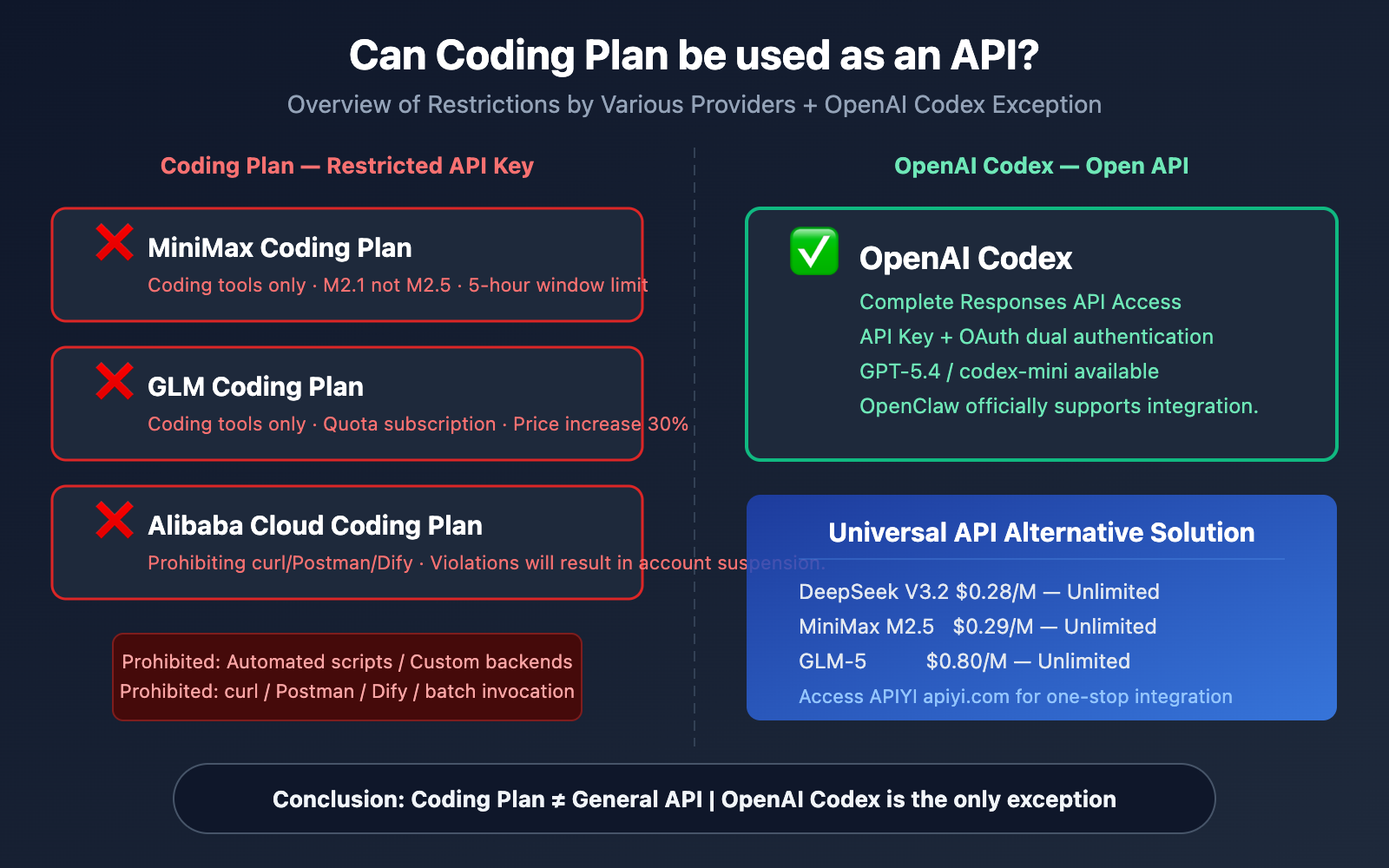
Many developers see that Coding Plans provide an API key and assume they can call it like a regular API. Actually, you can't. API Keys for Coding Plans from providers like MiniMax, GLM, and Alibaba Cloud have strict usage restrictions—they can only be used within interactive coding tools and explicitly prohibit automated scripts, custom backends, and batch calls.
Core Value: This article will break down the API restriction terms of each provider's Coding Plan, explain why OpenAI Codex is the unique exception allowed for general API access to OpenClaw, and help you decide which solution to choose in 2026.
What is a Coding Plan? Why Can't You Use It as an API?
The Nature of Coding Plans
A Coding Plan is a coding-specific subscription plan launched by major AI service providers. You pay a fixed monthly fee and get a dedicated API key to call Large Language Models within coding tools like OpenClaw, Cursor, and Cline.
Sounds similar to a regular API? The key difference lies in the usage restrictions.
The Restrictive Terms of Coding Plan API Keys
Take the Alibaba Cloud Coding Plan as an example. Its terms of use clearly state:
| Allowed Usage | Prohibited Usage |
|---|---|
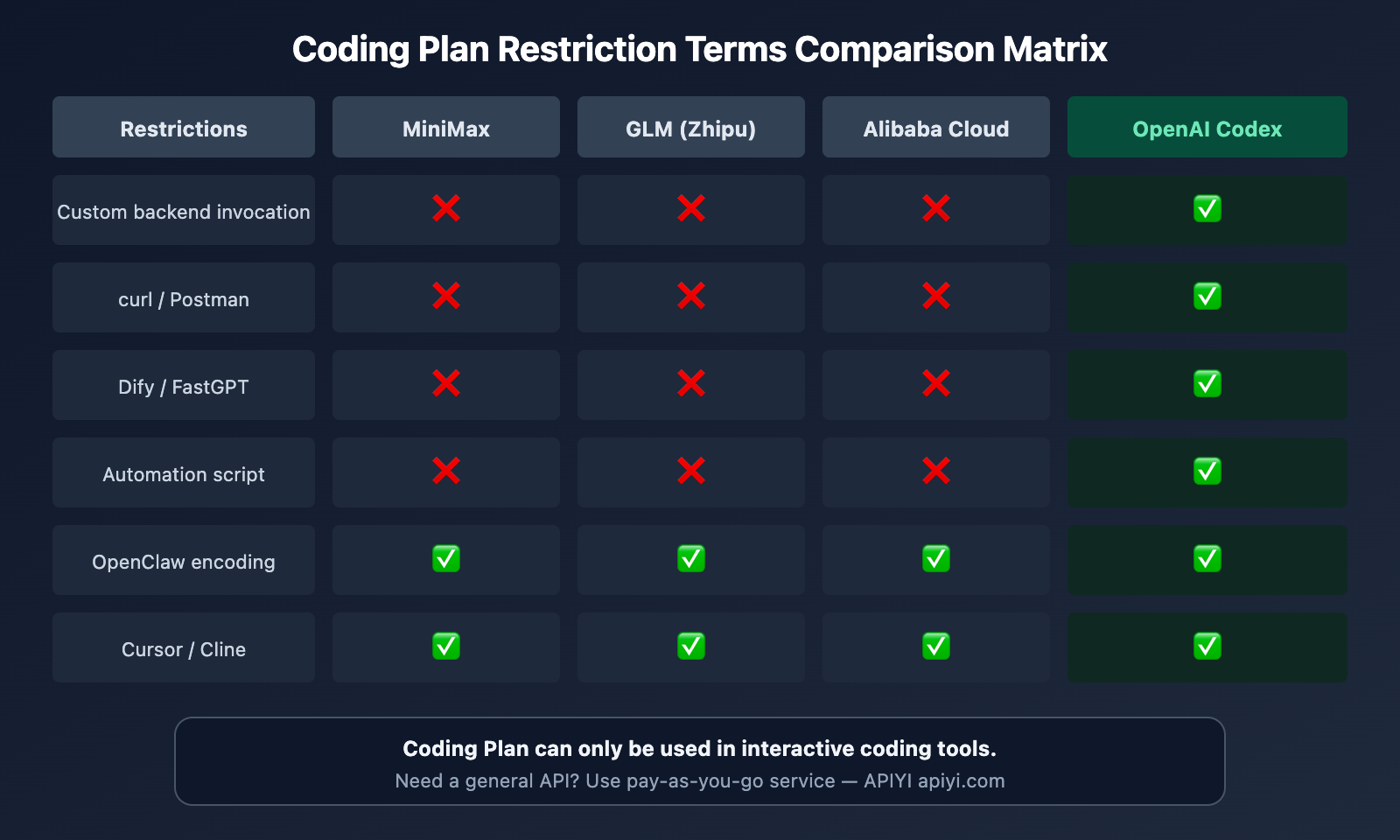
| Interactive coding in OpenClaw | Manual calls via curl / Postman |
| Integration in Cursor / Cline IDE | Calls from custom backend programs |
| Qwen Code CLI tool | Batch calls via automated scripts |
| Continue.dev editor plugin | Integration into platforms like Dify / FastGPT |
| Human-interactive coding scenarios | Unattended automated processes |
Consequences of Violation: Subscription suspension or API key revocation.
In simple terms, a Coding Plan API key is just a "login credential for coding tools," not a general API access permission. You can't use it as a regular LLM API in your own backend services.
🎯 Technical Advice: If you need to call a Large Language Model API from a custom backend or automated process, it's recommended to use a pay-as-you-go general API service. Through APIYI (apiyi.com), you can access general APIs for multiple models like DeepSeek, MiniMax M2.5, and GLM-5 in one place, without the restrictions of Coding Plans.
Detailed Comparison of Coding Plan API Limitations
MiniMax Coding Plan Limitations
MiniMax's Coding Plan provides dedicated API keys, but comes with these key restrictions:
- Dedicated Key: Coding Plan API keys and pay-as-you-go API keys are completely separate and not interchangeable
- Model Limitation: The current Coding Plan uses the M2.1 model, not the latest M2.5 (M2.5 requires pay-as-you-go keys)
- Rate Control: Uses a rolling 5-hour window with fixed prompt limits per window
- Validity: API keys only work while your subscription is active and expire immediately when it ends
This means even if you buy MiniMax's Coding Plan, you can't use its key to connect to your own application backend.
GLM Coding Plan Limitations
Zhipu AI's GLM Coding Plan has similarly strict restrictions:
- Usage Tiers: Lite version at $3/month (120 prompts/5-hour window), Pro version at $15/month (600 prompts/5-hour window)
- Model Limitation: Coding Plan uses GLM-4.7 optimized version, with Pro/Max having access to GLM-5
- Supply Constraints: In January 2026, due to surging demand for GLM-5, Zhipu limited new daily subscriptions to just 20%
- Price Trend: Starting February 11, 2026, new subscription prices increased by 30%
- Usage Restrictions: Also limited to interactive coding tools only
Alibaba Cloud Multi-Model Coding Plan Limitations
Alibaba Cloud Model Studio launched its Multi-Model Coding Plan on February 25, 2026—one subscription gives you access to four models (Qwen3.5, GLM-5, MiniMax M2.5, Kimi K2.5), which sounds tempting. But the restrictions are crystal clear:
- Lite Version: First month around $1, renewal at $5.80/month, up to 18,000 requests/month
- Pro Version: First month around $5.50, renewal at $29/month, up to 90,000 requests/month
- Usage Restrictions: Only for interactive coding tools, explicitly prohibits automated scripts, custom backends, curl, Postman, Dify, and non-interactive batch calls
- Violation Handling: Subscription suspension or API key banning
Coding Plan Limitations Summary Comparison
| Provider | Monthly Fee | Model | Rate Limits | Usable for Backend |
|---|---|---|---|---|
| MiniMax | Subscription | M2.1 (not M2.5) | 5-hour window | ❌ No |
| GLM (Zhipu) | $3-$15+ | GLM-4.7/GLM-5 | 5-hour window | ❌ No |
| Alibaba Cloud | $5.80-$29 | Four models available | Monthly request cap | ❌ No |
| OpenAI Codex | Plus/Pro subscription | GPT-5.4 | API pay-as-you-go | ✅ Yes |
Why OpenAI Codex is Different
Among all AI service providers' Coding Plans, OpenAI Codex is the only officially permitted exception that allows access via a general-purpose API to third-party tools.
Codex isn't just a "coding subscription plan"—it provides full access to the Responses API. This means you can:
- Integrate it directly as a Provider in OpenClaw
- Call it from your custom backend programs
- Authenticate using an API Key or via OAuth with a ChatGPT/Codex subscription
- Use models like
codex-mini-latestandgpt-5.4
OpenAI Codex Pricing
| Model | Input Price | Output Price | Cache Discount |
|---|---|---|---|
codex-mini-latest |
$1.50 / M tokens | $6.00 / M tokens | 75% discount on cache hits |
gpt-5.4 |
Via Responses API | — | — |
gpt-5.4-pro |
Via ChatGPT Pro subscription | — | — |
How to Configure OpenAI Codex in OpenClaw
OpenClaw's official documentation explicitly supports Codex integration. There are two authentication methods:
Method 1: API Key Authentication (Pay-as-you-go)
{
  "models": {
    "providers": [{
      "url": "https://api.openai.com/v1",
      "token": "sk-your-openai-api-key",
      "model": "gpt-5.4"
    }]
  }
}
Method 2: ChatGPT/Codex Subscription OAuth
Use your ChatGPT Plus/Pro subscription credits directly through OpenClaw's OAuth login flow—no separate API key needed.
💡 Note: The Codex subscription doesn't include embeddings functionality. If your OpenClaw Skill requires
text-embeddings-3, you'll need to configure an additional OpenAI API Key or use another Provider.

Coding Plan vs. General-Purpose API: How to Choose
Understanding the Core Differences
| Dimension | Coding Plan | General-Purpose API |
|---|---|---|
| Billing | Fixed monthly fee | Pay-per-token usage |
| Usage Limits | Coding tools only | No scenario restrictions |
| Target Users | Individual developers for daily coding | Enterprise backends / automated workflows |
| Flexibility | Low (tool-locked) | High (any scenario) |
| Cost Predictability | Fixed and controllable | Fluctuates with usage |
| API Format | OpenAI-compatible | OpenAI-compatible |
When to Use a Coding Plan
A Coding Plan is suitable for these scenarios:
- You only use tools like OpenClaw, Cursor, or Cline for coding
- You're an individual developer with a limited monthly budget ($3-$29 fixed fee vs. potentially higher pay-as-you-go costs)
- You don't need to call the API from your own backend
- You're okay with tool lock-in and usage restrictions
When to Use a General-Purpose API
A general-purpose API is suitable for these scenarios:
- You need to call AI models from your custom backend
- You have automated workflows that require AI capabilities (e.g., Dify, FastGPT workflows)
- You need the flexibility to switch between multiple models
- You want to reuse a single API Key across multiple projects/tools
🚀 Quick Start: If you need a general-purpose API, we recommend using the APIYI platform at apiyi.com. A single Key gives you access to dozens of models like DeepSeek V3.2 ($0.28/M), MiniMax M2.5 ($0.29/M), and GLM-5 ($0.80/M), with no usage scenario restrictions and more flexible pay-as-you-go pricing.
Practical Selection Strategies for OpenClaw Users
Strategy 1: Pure Coding Plan (Most Hassle-Free)
If you only use OpenClaw for coding, the Coding Plan is the most economical choice:
- Lowest Budget: Alibaba Cloud Lite at $5.80/month, switch freely between four models
- GLM Focus: Zhipu GLM Lite at $3/month, ideal for Chinese coding scenarios
- MiniMax Coding: MiniMax Coding Plan, strong coding capabilities
Limitation: Cannot be used for any scenario outside of OpenClaw.
Strategy 2: General API Solution (Most Flexible)
If your AI use cases extend beyond just coding:
{
  "models": {
    "providers": [{
      "url": "https://api.apiyi.com/v1",
      "token": "sk-your-APIYI-key",
      "model": "deepseek-v3.2"
    }]
  }
}
Advantage: The same key works in OpenClaw, Dify, and custom backends, with no usage restrictions.
Strategy 3: Codex + General API Hybrid Solution (Recommended)
For advanced users, you can combine:
- OpenAI Codex OAuth: Use your ChatGPT Plus subscription to call GPT-5.4 within OpenClaw
- APIYI General API: Call cost-effective models like DeepSeek V3.2 / MiniMax M2.5
- Switch by Scenario: Use GPT-5.4 for complex tasks, cheaper models for daily tasks
{
  "models": {
    "defaultModel": "deepseek-v3.2",
    "providers": [
      {
        "url": "https://api.apiyi.com/v1",
        "token": "sk-your-APIYI-key",
        "models": ["deepseek-v3.2", "minimax-m2.5", "glm-5"]
      },
      {
        "url": "https://api.openai.com/v1",
        "token": "sk-your-OpenAI-Key",
        "models": ["gpt-5.4"]
      }
    ]
  }
}
💰 Cost Optimization: Use DeepSeek V3.2 for daily coding ($0.28/M input) and GPT-5.4 for complex reasoning. By accessing cost-effective models through APIYI at apiyi.com, you can reduce your monthly AI expenses by 70-80%.
The Business Logic Behind Coding Plan Restrictions
Why Providers Restrict Coding Plan Usage
Understanding the reasons behind these restrictions helps you make smarter choices:
1. Cost Subsidy Model
The monthly fee for a Coding Plan is far lower than the actual token cost. Take Alibaba Cloud: $5.80/month provides 18,000 requests. If each request consumes 1000 tokens, that would cost $30+ at market rates. Providers are taking a loss to gain user volume, so they must restrict usage to prevent abuse.
2. Natural Rate Limiting of Interactive Use
Interactive coding scenarios have a natural usage cap—there's a limit to how many prompts a single developer can send per day. However, if automated script calls were allowed, one key could exhaust an entire month's quota in an hour.
3. User Profile Differences
Coding Plans target individual developers, while General APIs target enterprises. These two user groups have vastly different payment capacities and usage patterns; mixing them would break the pricing structure.
Coding Plan Trends for 2026
| Trend | Explanation |
|---|---|
| Multi-Model Bundling | Alibaba Cloud pioneered the four-in-one model package |
| Price Increases | Zhipu GLM-5 already increased by 30%, others will follow |
| Supply Constraints | Popular models limit new subscription quotas |
| Stricter Restrictions | Upgraded detection methods, faster account suspension for violations |
| OpenAI Exception | Codex maintains its open API strategy unchanged |
Frequently Asked Questions
Q1: I bought an Alibaba Cloud Coding Plan. Can I use its Key to connect to Dify?
No. The terms of use for the Alibaba Cloud Coding Plan explicitly prohibit using the Coding Plan API Key on platforms like Dify or FastGPT. If detected, your subscription may be suspended or the key blocked. If you need to invoke models within Dify, it's recommended to use a pay-as-you-go general API or connect via APIYI at apiyi.com.
Q2: What’s the difference between the OpenAI Codex API and the regular OpenAI API?
Codex uses the Responses API (not the traditional Chat Completions API) and supports models like codex-mini-latest and gpt-5.4. The main differences are that Codex models are optimized for coding tasks and support OAuth authentication via a ChatGPT subscription (not just an API Key). When used in OpenClaw, they are called via the openai/* path.
Q3: Which is more cost-effective, a Coding Plan or a pay-as-you-go API?
It depends on your usage. If you send fewer than 50 prompts per day and only use it within coding tools, a Coding Plan is more cost-effective (fixed cost of $3-29/month). If your usage is high or you need to call models in multiple scenarios, pay-as-you-go is more flexible—using DeepSeek V3.2 via APIYI at apiyi.com can cost as little as $1-3 per month for light use.
Q4: Why does the MiniMax Coding Plan use M2.1 instead of M2.5?
MiniMax positions its Coding Plan as an entry-level service, using the M2.1 model to keep costs down. To use the latest M2.5 model, you need a pay-as-you-go general API Key. This is a common strategy for Coding Plans—the models provided are often not the latest versions.
Q5: How do I configure both a Coding Plan Key and a general API Key in OpenClaw?
Simply configure multiple Providers in openclaw.json. Use the Coding Plan Key for daily coding tasks and the general API Key for scenarios requiring flexible model invocation. You can switch between them using the /model command or set a defaultModel to specify the default.

Summary
Coding Plans are NOT General-Purpose APIs — This is the core conclusion of this article. While MiniMax, GLM, Alibaba Cloud, and others offer API Keys with their Coding Plans, they come with strict usage limitations:
- ❌ CANNOT be used for automated scripts, custom backends, or batch calls
- ❌ CANNOT be integrated into workflow platforms like Dify or FastGPT
- ✅ ONLY usable within interactive coding tools like OpenClaw, Cursor, or Cline
The only exception is OpenAI Codex — It provides full access to the Responses API. You can add it as a Provider directly in OpenClaw or use it for custom backends.
Our Recommendations:
- Pure Coding Scenarios: Alibaba Cloud's Coding Plan ($5.80/month, four model options) offers the best value.
- Need Flexible Invocation: Use APIYI's (apiyi.com) general-purpose APIs (e.g., DeepSeek V3.2 as low as $0.28/M tokens), with no usage restrictions.
- Pursuing the Best Performance: A hybrid Codex + APIYI strategy, switching models based on the specific task.
We recommend getting a general-purpose API Key from APIYI (apiyi.com). One key gives you access to dozens of models without the limitations of Coding Plans, and you only pay for what you use.
This article was written by the APIYI technical team, based on official documentation and practical testing from various service providers. For more AI model integration tutorials, visit the APIYI Help Center: help.apiyi.com