title: "Gemini Image Model 'required oneof field data' 400 Error: 6 Common Causes and Fixes"
date: 2024-12-25
description: "Learn how to fix the 'required oneof field data' 400 error when calling Gemini image models like gemini-3.1-flash-image-preview."
tags: ["Gemini", "Google AI", "API Error", "Image Generation", "Multimodal AI", "Troubleshooting"]
When calling gemini-3.1-flash-image-preview (Nano Banana 2) or gemini-3.0-pro-image (Nano Banana Pro) for image generation, many developers encounter this confusing 400 error:
{
  "status_code": 400,
  "error": {
    "message": "* GenerateContentRequest.contents[0].parts[2].data: required oneof field 'data' must have one initialized field",
    "type": "upstream_error",
    "code": 400
  }
}
The core meaning of this error is: In your request body, the data field of a specific parts element is empty or incorrectly formatted. This 400 error is a client-side request parameter error and won't resolve automatically—you must fix your code.
This article outlines the 6 most common causes for this error, each with a side-by-side comparison of incorrect vs. correct code, helping you quickly pinpoint and resolve the issue.
Key Value: After reading this, you'll be able to use the parts[N] index from the error message to precisely locate the problematic part and systematically check against these 6 causes, typically fixing it within 5 minutes.
Core Analysis of the 'required oneof field data' Error in Gemini Image Models
| Key Point | Explanation | Troubleshooting Direction |
|---|---|---|
| Error Nature | An empty or malformed element exists in the parts array |
Check every element in contents[].parts[] |
| Key Clue | parts[2] indicates the 3rd element (0-indexed) |
Directly locate the corresponding part by index |
| Error Type | 400 INVALID_ARGUMENT, client-side error | Won't auto-recover, code must be changed |
| Affected Scope | Common to all Gemini image models | Applies to NB2, NB Pro, Gemini Flash, etc. |
| Fix Difficulty | Low, usually a formatting issue | Modify according to the correct format |
Decoding the Gemini Image Model Error Message Structure
Let's break down the error message structure—this is key to locating the problem:
GenerateContentRequest.contents[0].parts[2].data
                       ^^^^^^^^     ^^^^^^^^
                       │            │
                       │            └── The 3rd part (index starts at 0)
                       └── The 1st content block
contents[0]: Points to the first content object in your request body.parts[2]: Points to the third part element within that content.data: The data field of this part is empty or not correctly initialized.
Troubleshooting Approach: Directly examine the element at index [2] in the parts array of the [0] element in your contents array in your code to see what was actually sent.
{3 steps to troubleshoot and locate the error}
6 Common Causes and Fixes
1. Image Data is Empty or null (Most Common)
This happens when the image data variable passed to the parts array is empty, null, or undefined.
❌ Incorrect Code (Empty Data)
// Image data is empty or null
const imageData = null; // or undefined, or an empty string

const requestBody = {
  contents: [{
    parts: [
      { text: "Describe this image" },
      { inline_data: { mime_type: "image/jpeg", data: imageData } } // data is null!
    ]
  }]
};
✅ Correct Code (Ensure Data Exists)
// Always check if image data exists before sending
const imageData = getImageData(); // Your function to fetch image data

if (!imageData) {
  throw new Error("Image data is required but was empty.");
}

const requestBody = {
  contents: [{
    parts: [
      { text: "Describe this image" },
      { inline_data: { mime_type: "image/jpeg", data: imageData } } // data is valid
    ]
  }]
};
Quick Fix: Add a validation check before constructing the request to ensure imageData is a non-empty string.
2. Incorrect inline_data Object Structure
The inline_data object must strictly follow the { mime_type: "...", data: "..." } format. Missing or misspelled keys will cause this error.
❌ Incorrect Code (Wrong Structure)
// Missing 'data' key, or wrong key name
const requestBody = {
  contents: [{
    parts: [
      { text: "What's in this picture?" },
      { inline_data: { mimeType: "image/png", image: "base64String..." } } // Wrong keys!
    ]
  }]
};
✅ Correct Code (Correct Structure)
// Use exact key names: mime_type and data
const requestBody = {
  contents: [{
    parts: [
      { text: "What's in this picture?" },
      { inline_data: { mime_type: "image/png", data: "base64String..." } } // Correct keys
    ]
  }]
};
Quick Fix: Double-check that the object keys are exactly mime_type and data (lowercase with underscore).
3. Base64 String is Malformed or Contains Invalid Characters
The data field must be a clean, valid Base64-encoded string without data URI prefixes (like data:image/jpeg;base64,) or line breaks/whitespace.
❌ Incorrect Code (With Data URI Prefix)
// Data includes the data URI prefix
const imageBase64WithPrefix = "data:image/jpeg;base64,/9j/4AAQSkZJRgABAQEASABIAAD...";

const requestBody = {
  contents: [{
    parts: [
      { text: "Analyze this" },
      { inline_data: { mime_type: "image/jpeg", data: imageBase64WithPrefix } } // Has prefix!
    ]
  }]
};
✅ Correct Code (Pure Base64 String)
// Strip the data URI prefix, send only the Base64 payload
function extractBase64(dataUri) {
  return dataUri.replace(/^data:image\/\w+;base64,/, '');
}

const pureBase64 = extractBase64(imageBase64WithPrefix);

const requestBody = {
  contents: [{
    parts: [
      { text: "Analyze this" },
      { inline_data: { mime_type: "image/jpeg", data: pureBase64 } } // Clean Base64
    ]
  }]
};
Quick Fix: Use .replace(/^data:image\/\w+;base64,/, '') to remove the prefix before sending.
4. MIME Type Mismatch or Unsupported Format
The mime_type must accurately match the actual image format (e.g., image/jpeg for JPG, image/png for PNG). Sending an incorrect or unsupported type triggers the error.
❌ Incorrect Code (Wrong MIME Type)
// Image is PNG but MIME type says JPEG
const pngBase64 = "iVBORw0KGgoAAAANSUhEUgAAAAEAAAABCAYAAAAfFcSJAAAADUlEQVR42mP8z8BQDwAEhQGAhKmMIQAAAABJRU5ErkJggg==";

const requestBody = {
  contents: [{
    parts: [
      { text: "Check format" },
      { inline_data: { mime_type: "image/jpeg", data: pngBase64 } } // Mismatch!
    ]
  }]
};
✅ Correct Code (Correct MIME Type)
// Determine the correct MIME type, or use a library to detect it
const pngBase64 = "iVBORw0KGgoAAAANSUhEUgAAAAEAAAABCAYAAAAfFcSJAAAADUlEQVR42mP8z8BQDwAEhQGAhKmMIQAAAABJRU5ErkJggg==";

const requestBody = {
  contents: [{
    parts: [
      { text: "Check format" },
      { inline_data: { mime_type: "image/png", data: pngBase64 } } // Correct type
    ]
  }]
};
Quick Fix: Use standard MIME types: image/jpeg, image/png, image/webp, image/heic, image/heif.
5. parts Array Contains an Empty Object {}
Sometimes, due to logic errors, an unintended empty object {} sneaks into the parts array. The API expects each part to have either a text or inline_data field.
❌ Incorrect Code (Empty Object in Array)
// Logic error pushes an empty object
const parts = [];
parts.push({ text: "First prompt" });
parts.push(getImagePart()); // Suppose this returns null or undefined under some condition
// parts might become [{ text: "..." }, {}]

const requestBody = {
  contents: [{ parts: parts }] // parts[1] is an empty object!
};
✅ Correct Code (Filter Out Empty Objects)
// Filter out any empty or invalid parts before sending
const parts = [];
parts.push({ text: "First prompt" });

const imagePart = getImagePart();
if (imagePart && imagePart.inline_data?.data) {
  parts.push(imagePart);
}
// Or filter: const validParts = parts.filter(p => p.text || p.inline_data?.data);

const requestBody = {
  contents: [{ parts: parts }] // All parts are valid
};
Quick Fix: Add a filter: parts.filter(p => Object.keys(p).length > 0) before constructing the request.
6. Using file_data Instead of inline_data for Gemini 1.5/2.0
For the newer Gemini models (1.5 Flash/Pro, 2.0 Flash), you must use inline_data for base64-encoded images. Using the older file_data field (from Gemini 1.0) will cause this error.
❌ Incorrect Code (Using Deprecated file_data)
// Using the old file_data structure (Gemini 1.0)
const requestBody = {
  contents: [{
    parts: [
      { text: "Old format" },
      {
        file_data: {
          mime_type: "image/jpeg",
          file_uri: "gs://bucket/image.jpg" // Or local file path
        }
      }
    ]
  }]
};
✅ Correct Code (Using inline_data)
// For Gemini 1.5/2.0, use inline_data with base64
const requestBody = {
  contents: [{
    parts: [
      { text: "New format" },
      { inline_data: { mime_type: "image/jpeg", data: "base64String..." } } // Correct for NB2/NB Pro
    ]
  }]
};
Quick Fix: Ensure your code uses inline_data with a data field containing the base64 string for the current Gemini image models.
Summary and Best Practices
- Always Validate Data: Check that image data is not
null,undefined, or an empty string before building the request. - Use Correct Structure: The
inline_dataobject must have exactly{ mime_type: "...", data: "..." }. - Send Clean Base64: Remove the
data:image/...;base64,prefix. Thedatafield should contain only the Base64 payload. - Match MIME Types: Ensure the
mime_typeaccurately reflects the image format (JPEG, PNG, etc.). - Avoid Empty Parts: Filter your
partsarray to remove any empty objects{}. - Use
inline_datafor New Models: Forgemini-1.5-flash,gemini-2.0-flash,gemini-3.1-flash-image-preview, etc., always useinline_data, notfile_data.
By following these guidelines, you can effectively avoid the "required oneof field data" 400 error and ensure smooth calls to Gemini's powerful image models.
6 Common Causes and Fixes for Gemini Image Model Errors
Cause 1: Empty Objects or Strings in parts
This is the most common cause. The request's parts array contains empty values like {}, null, or empty strings "".
| Wrong Way | Correct Way |
|---|---|
parts contains {} (empty object) |
Each part must have text or inlineData |
parts contains {"text": ""} |
Empty text also triggers an error; write at least one character |
parts contains null elements |
Remove all null values |
Incorrect Code:
# ❌ parts contains an empty object
payload = {
    "contents": [{
        "parts": [
            {"text": "Generate a cat image"},
            {},                              # ← Empty object, triggers error
            {"text": "in watercolor style"}
        ]
    }]
}
Correct Code:
# ✅ Each part has valid content
payload = {
    "contents": [{
        "parts": [
            {"text": "Generate a cat image in watercolor style"}
        ]
    }]
}
Fix: Merge text into a single text part, or ensure every part contains a valid text or inlineData field.
Cause 2: Empty or Malformed Image Base64 Data
When sending an image-to-image request, the base64 data in inlineData might be empty, corrupted, or incorrectly formatted.
Incorrect Code:
# ❌ base64 data includes the data URI prefix
payload = {
    "contents": [{
        "parts": [
            {
                "inlineData": {
                    "mimeType": "image/png",
                    "data": "data:image/png;base64,iVBORw0KGgo..."  # ← Should not include prefix
                }
            },
            {"text": "Change the background to blue"}
        ]
    }]
}
# ❌ base64 data is an empty string
"inlineData": {
    "mimeType": "image/jpeg",
    "data": ""          # ← Empty data, directly triggers error
}
Correct Code:
import base64
import pathlib

# ✅ Correctly read image and convert to pure base64
image_bytes = pathlib.Path("input.png").read_bytes()
image_b64 = base64.b64encode(image_bytes).decode("utf-8")

payload = {
    "contents": [{
        "parts": [
            {
                "inlineData": {
                    "mimeType": "image/png",
                    "data": image_b64       # ← Pure base64 string, no prefix
                }
            },
            {"text": "Change the background to blue"}
        ]
    }]
}
Fix:
- The
datafield only accepts a pure base64 string, not thedata:image/png;base64,prefix. - Ensure the image file actually exists and is read successfully to avoid passing empty strings.
mimeTypemust match the actual image format (image/png,image/jpeg,image/webp).
Cause 3: File Object Not Correctly Converted to Content Reference
After uploading a file using the Google GenAI SDK's Files API, directly passing the File object into contents might cause the SDK to fail to convert it properly.
Incorrect Code:
from google import genai

client = genai.Client(api_key="YOUR_KEY")

# Upload file
file = client.files.upload(file="photo.png")

# ❌ In some SDK versions, passing the File object directly fails
response = client.models.generate_content(
    model="gemini-3.1-flash-image-preview",
    contents=["Edit this image", file]    # ← File object may not auto-convert
)
Correct Code:
from google import genai
from google.genai import types

client = genai.Client(api_key="YOUR_KEY")

# Upload file
file = client.files.upload(file="photo.png")

# ✅ Method 1: Manually construct file reference
response = client.models.generate_content(
    model="gemini-3.1-flash-image-preview",
    contents=[
        types.Content(parts=[
            types.Part(file_data=types.FileData(file_uri=file.uri, mime_type=file.mime_type)),
            types.Part(text="Edit this image: change background to sunset")
        ])
    ],
    config=types.GenerateContentConfig(
        response_modalities=["TEXT", "IMAGE"]
    )
)
# ✅ Method 2: Use inlineData with base64 instead (more reliable)
import base64, pathlib

image_b64 = base64.b64encode(pathlib.Path("photo.png").read_bytes()).decode()

response = client.models.generate_content(
    model="gemini-3.1-flash-image-preview",
    contents=[
        types.Content(parts=[
            types.Part(inline_data=types.Blob(mime_type="image/png", data=image_b64)),
            types.Part(text="Edit this image: change background to sunset")
        ])
    ],
    config=types.GenerateContentConfig(
        response_modalities=["TEXT", "IMAGE"]
    )
)
Fix: It's recommended to use the inlineData + base64 method to pass image data directly, as it's more stable and reliable than the Files API.
Cause 4: Empty Content in Multi-turn Conversation History
When editing images in a multi-turn conversation, if the previous response wasn't handled correctly, empty content blocks might get mixed into the conversation history.
Incorrect Code:
# ❌ Conversation history contains empty parts
history = [
    {"role": "user", "parts": [{"text": "Generate a logo"}]},
    {"role": "model", "parts": []},        # ← Empty parts, triggers error
    {"role": "user", "parts": [{"text": "Make it blue"}]}
]

payload = {"contents": history}
Correct Code:
# ✅ Filter out empty content blocks
history = [
    {"role": "user", "parts": [{"text": "Generate a logo"}]},
    {"role": "model", "parts": [{"text": "Here is the logo I generated."}]},
    {"role": "user", "parts": [{"text": "Make it blue"}]}
]

# Safe filter: remove records where parts is empty
clean_history = [msg for msg in history if msg.get("parts") and len(msg["parts"]) > 0]

payload = {"contents": clean_history}
Fix: Before sending the request, iterate through the contents array and filter out all elements where parts is an empty list or contains empty objects.
Cause 5: Incorrect JSON Field Name Casing in REST API Request
Gemini API's JSON field names use camelCase and are case-sensitive. Misspelling a field name causes it to be ignored, which is equivalent to passing empty data.
| Wrong Field Name | Correct Field Name | Notes |
|---|---|---|
inline_data |
inlineData |
REST API uses camelCase |
mime_type |
mimeType |
REST API uses camelCase |
file_uri |
fileUri |
REST API uses camelCase |
response_modalities |
responseModalities |
REST API uses camelCase |
image_config |
imageConfig |
REST API uses camelCase |
aspect_ratio |
aspectRatio |
REST API uses camelCase |
image_size |
imageSize |
REST API uses camelCase |
Incorrect Code:
# ❌ Using snake_case (Python SDK style) in REST API
payload = {
    "contents": [{
        "parts": [{
            "inline_data": {           # ← Should be inlineData
                "mime_type": "image/png",   # ← Should be mimeType
                "data": image_b64
            }
        }]
    }],
    "generation_config": {             # ← Should be generationConfig
        "response_modalities": ["IMAGE"]   # ← Should be responseModalities
    }
}
Correct Code:
# ✅ REST API uses camelCase
payload = {
    "contents": [{
        "parts": [{
            "inlineData": {
                "mimeType": "image/png",
                "data": image_b64
            }
        }]
    }],
    "generationConfig": {
        "responseModalities": ["IMAGE"],
        "imageConfig": {
            "aspectRatio": "1:1",
            "imageSize": "2K"
        }
    }
}
🎯 Important Reminder: The Python SDK (
google-genai) usessnake_case(e.g.,inline_data), while directly calling the REST API usescamelCase(e.g.,inlineData). When calling through API proxy services like APIYI (apiyi.com), you're using the REST API format and must use camelCase.
Cause 6: Unsupported Image Format or Corrupted File
The passed image has base64 data, but the image format itself is unsupported or the file is corrupted.
Gemini Image Model Supported Input Formats:
| Format | mimeType | Support Status |
|---|---|---|
| PNG | image/png |
Supported |
| JPEG | image/jpeg |
Supported |
| WebP | image/webp |
Supported |
| GIF | image/gif |
Partially Supported (first frame only) |
| BMP | image/bmp |
Not Supported |
| SVG | image/svg+xml |
Not Supported |
| TIFF | image/tiff |
Not Supported |
Troubleshooting Method:
import base64

# Check if base64 data is valid
def validate_image_data(b64_string, mime_type):
    # 1. Check if empty
    if not b64_string:
        print("ERROR: base64 data is empty")
        return False

    # 2. Check if it contains data URI prefix
    if b64_string.startswith("data:"):
        print("ERROR: Remove 'data:image/...;base64,' prefix")
        return False

    # 3. Check if base64 is decodable
    try:
        decoded = base64.b64decode(b64_string)
        print(f"OK: Decoded size = {len(decoded)} bytes")
    except Exception as e:
        print(f"ERROR: Invalid base64 - {e}")
        return False

    # 4. Check if mimeType is supported
    supported = ["image/png", "image/jpeg", "image/webp", "image/gif"]
    if mime_type not in supported:
        print(f"ERROR: Unsupported mimeType '{mime_type}'")
        return False

    print("PASS: Image data is valid")
    return True
💡 Suggestion: Adding a data validation function before sending the request can catch most format issues in advance. This also applies when calling through the APIYI (apiyi.com) platform.
Complete Troubleshooting Checklist for Gemini Image Model Errors
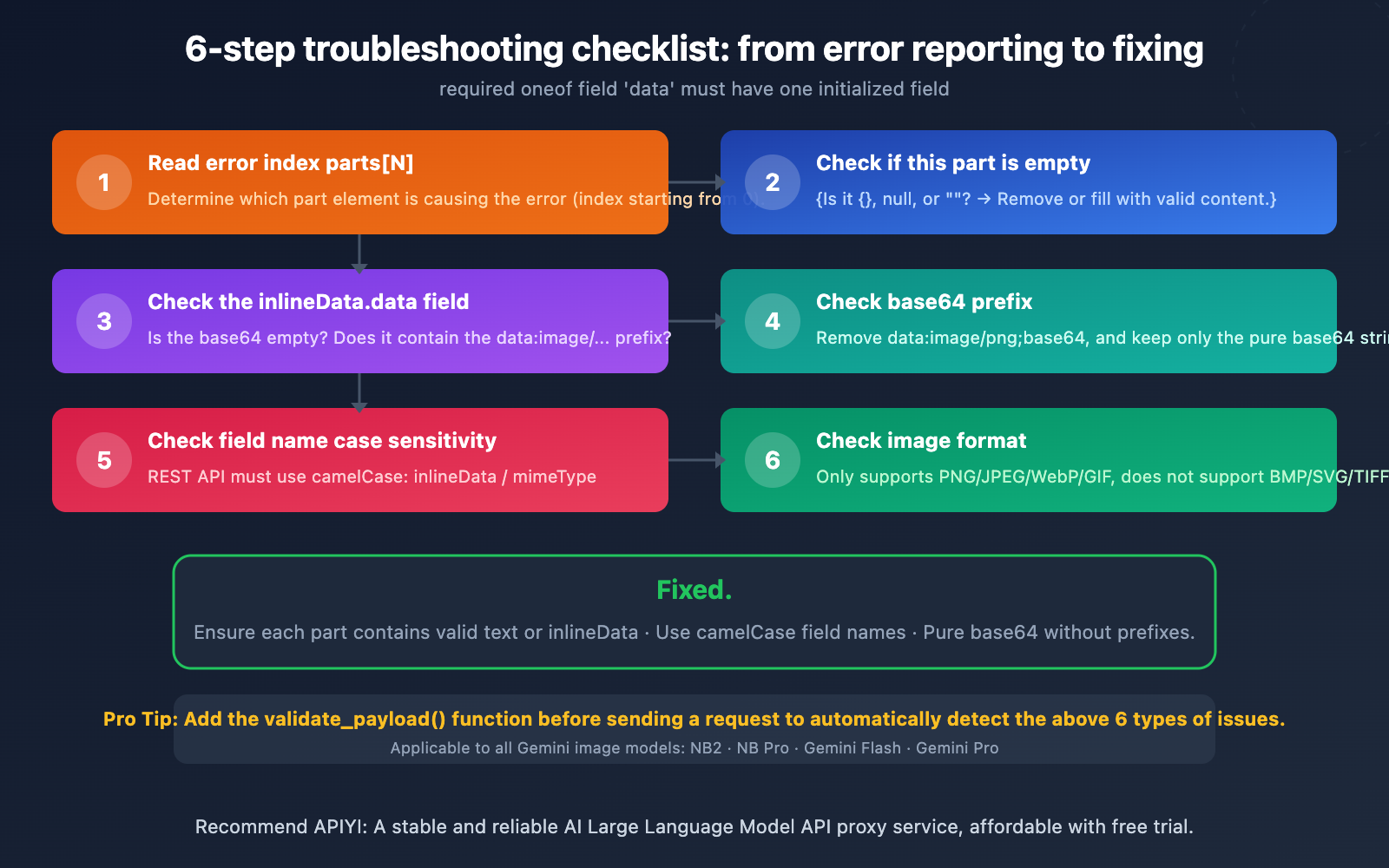
When you encounter the required oneof field 'data' error, check each item on this list:
| Step | Check | Fix |
|---|---|---|
| Step 1 | Look at which element N is in parts[N] |
Directly locate the corresponding position in your code |
| Step 2 | Is that part {}, null, or ""? |
Remove empty elements or fill with valid content |
| Step 3 | If it's inlineData, is base64 empty? |
Ensure the image file was read successfully |
| Step 4 | Does base64 contain a data: prefix? |
Remove the prefix, keep only pure base64 |
| Step 5 | Are JSON field names in camelCase? | REST API must use inlineData, not inline_data |
| Step 6 | Is the image format supported? | Only PNG/JPEG/WebP/GIF |
Quick Fix: If you frequently encounter this error during development, it's recommended to add a
validate_payload()function before sending the request to automatically check if each element in thepartsarray is valid. When calling the Gemini image model through the APIYI (apiyi.com) platform, the request format is identical to the official REST API, so the above troubleshooting methods apply.
Gemini Image Model Error: Correct Request Format Reference
Text-to-Image Correct Format
import requests, base64

API_KEY = "your-apiyi-api-key"
ENDPOINT = "https://api.apiyi.com/v1beta/models/gemini-3.1-flash-image-preview:generateContent"

# ✅ Minimal correct format
payload = {
    "contents": [{
        "parts": [
            {"text": "A cute orange cat sitting on a windowsill, watercolor style, 4K"}
        ]
    }],
    "generationConfig": {
        "responseModalities": ["IMAGE"],
        "imageConfig": {
            "aspectRatio": "1:1",
            "imageSize": "2K"
        }
    }
}

response = requests.post(
    ENDPOINT,
    headers={"Content-Type": "application/json", "x-goog-api-key": API_KEY},
    json=payload,
    timeout=120
)

result = response.json()
image_data = result["candidates"][0]["content"]["parts"][0]["inlineData"]["data"]
with open("output.png", "wb") as f:
    f.write(base64.b64decode(image_data))
Image-to-Image Correct Format
View Complete Image-to-Image Correct Code
import requests
import base64
import pathlib

API_KEY = "your-apiyi-api-key"
ENDPOINT = "https://api.apiyi.com/v1beta/models/gemini-3.1-flash-image-preview:generateContent"

# Read the original image and convert to pure base64
image_path = pathlib.Path("input_photo.png")
if not image_path.exists():
    raise FileNotFoundError(f"Image not found: {image_path}")

image_bytes = image_path.read_bytes()
image_b64 = base64.b64encode(image_bytes).decode("utf-8")

# Validate data
assert len(image_b64) > 0, "Base64 data is empty"
assert not image_b64.startswith("data:"), "Remove data URI prefix"

# ✅ Correct image-to-image request format
payload = {
    "contents": [{
        "parts": [
            {
                "inlineData": {
                    "mimeType": "image/png",
                    "data": image_b64
                }
            },
            {
                "text": "Change the background to a sunset beach scene, keep the subject unchanged"
            }
        ]
    }],
    "generationConfig": {
        "responseModalities": ["IMAGE"],
        "imageConfig": {
            "aspectRatio": "1:1",
            "imageSize": "2K"
        }
    }
}

response = requests.post(
    ENDPOINT,
    headers={"Content-Type": "application/json", "x-goog-api-key": API_KEY},
    json=payload,
    timeout=120
)

if response.status_code == 200:
    result = response.json()
    output_data = result["candidates"][0]["content"]["parts"][0]["inlineData"]["data"]
    with open("output_edited.png", "wb") as f:
        f.write(base64.b64decode(output_data))
    print("Success! Image saved.")
else:
    print(f"Error {response.status_code}: {response.text}")
Recommendation: For text-to-image scenarios, start with the minimal format, confirm it works, then gradually add parameters. Calling Nano Banana 2 via the APIYI apiyi.com platform costs $0.045 per invocation, making debugging very affordable.
Frequently Asked Questions
Q1: What does parts[2] mean in the error message?
parts[2] refers to the element at index 2 in the parts array, which is the third element (indexing starts at 0). Simply locate the third element in your contents[0].parts array and check its content. If your parts array only has 2 elements (indices 0 and 1), it means your code logic might have accidentally added an empty element while assembling the parts.
Q2: Will I encounter this error when calling via APIYI?
Yes. APIYI apiyi.com, as an API proxy service, forwards your request to the Gemini backend. If there's a format issue with the request body itself, the backend will return the same 400 error. APIYI doesn't modify your request body structure, so ensuring the request format is correct is the developer's responsibility. The good news is, the fix is exactly the same as when calling the Google API directly.
Q3: Why are the field names different between the Python SDK and REST API?
The Google GenAI Python SDK follows Python's snake_case naming convention (e.g., inline_data, mime_type). The SDK internally converts these to the camelCase format required by the API. However, if you call the REST API directly using the requests library (including via APIYI apiyi.com), you must manually use the camelCase format (e.g., inlineData, mimeType). Otherwise, the fields will be ignored, leading to errors.
Q4: Is this error the same as ‘contents.parts must not be empty’?
Not exactly the same, but the cause is similar. contents.parts must not be empty means the parts array itself is empty ("parts": []), while required oneof field 'data' means an element exists within parts, but its data field is uninitialized (e.g., "parts": [{}]). The fix is the same: ensure each part contains a valid text or inlineData.
Summary
The core points of the Gemini image model required oneof field 'data' error:
- Root Cause: Empty objects, empty data, or malformed elements exist within the
partsarray. - Debugging Method: Use the
parts[N]index number from the error message to directly locate the corresponding position in your code. - Most Common Causes: Empty object
{}, base64 string containing thedata:prefix, incorrect JSON field name casing. - REST API Requires camelCase: Use
inlineData(notinline_data) andmimeType(notmime_type). - Prevention: Add a payload validation function before sending to automatically detect empty elements and formatting issues.
We recommend using the APIYI platform (apiyi.com) to call the Gemini image model for development and debugging. Nano Banana 2 costs only $0.045 per call, making debugging extremely affordable, and its interface format is fully compatible with the official REST API.
📚 References
-
Gemini API Image Generation Official Docs: Complete request format and parameter specifications.
- Link:
ai.google.dev/gemini-api/docs/image-generation - Description: Contains the standard request format for Text-to-Image and Image-to-Image.
- Link:
-
Gemini API Troubleshooting Guide: Official error codes and suggested fixes.
- Link:
ai.google.dev/gemini-api/docs/troubleshooting - Description: Covers troubleshooting methods for common errors like 400, 429, 500.
- Link:
-
GitHub Issue: required oneof field data Error Discussion: Community reports and workarounds.
- Link:
github.com/google-gemini/cookbook/issues/786 - Description: Contains detailed analysis and workarounds for this error when passing File objects.
- Link:
-
APIYI Nano Banana 2 Integration Docs: Complete guide for calling the Gemini image model via the APIYI platform.
- Link:
docs.apiyi.com/en/api-capabilities/nano-banana-2-image - Description: Includes correct request format examples and FAQs.
- Link:
Author: APIYI Technical Team
Technical Support: If you encounter issues calling the Gemini API, visit the APIYI documentation center at docs.apiyi.com for more troubleshooting guides.