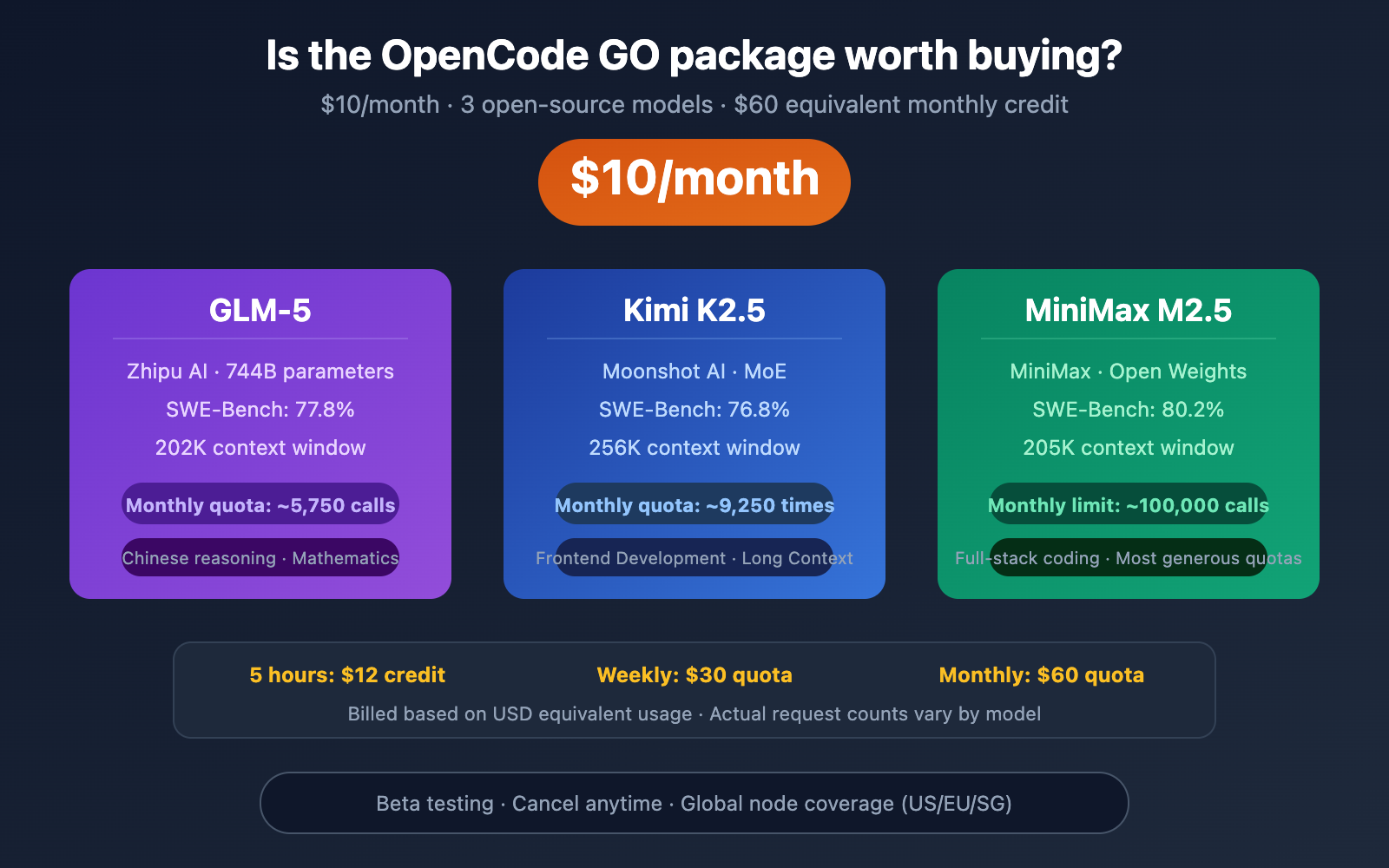
For just $10 a month, you get access to three top-tier open-source coding models: GLM-5, Kimi K2.5, and MiniMax M2.5. The OpenCode GO plan looks incredibly tempting. But is it really worth it? Are the limits enough? And how does it stack up against Alibaba Cloud's Coding Plan or a generic API in terms of value?
The Core Value: This article breaks down the OpenCode GO plan across four dimensions—limits, model quality, usage restrictions, and alternatives—to help you make a decision in under 5 minutes.

OpenCode GO Plan: Quick Overview
What is OpenCode GO?
OpenCode is one of the fastest-growing open-source AI coding agents of 2026, gaining over 30K GitHub Stars in a month. Its core features are open-source + multi-model support—you can connect to 75+ LLM providers, including OpenAI, Anthropic, and DeepSeek.
OpenCode GO is the official low-cost subscription plan at $10/month, currently in Beta. It's targeted at developers worldwide, especially programmers who don't want to splurge on Claude Max or ChatGPT Pro.
OpenCode GO Plan Specifications
| Parameter | Details |
|---|---|
| Monthly Fee | $10/month |
| Included Models | GLM-5, Kimi K2.5, MiniMax M2.5 |
| 5-Hour Quota | $12 equivalent usage |
| Weekly Quota | $30 equivalent usage |
| Monthly Quota | $60 equivalent usage |
| Server Nodes | US, Europe, Singapore |
| Current Status | Beta Testing |
| Cancellation Policy | Cancel anytime |
| Free Model | Big Pickle (200 requests/5 hours) |
Key Insight: OpenCode GO's limits aren't based on request counts, but on dollar-equivalent usage—$12 every 5 hours, $30 weekly, and $60 monthly. Since the three models have different pricing, the actual number of usable requests varies significantly.
OpenCode GO: A Breakdown of the Three Models' Actual Limits
Different Models, Different Limits
Since OpenCode GO uses a "dollar credit" billing system, and each model has a different cost per request, the actual number of usable requests varies dramatically:
| Model | 5-Hour Limit | Weekly Limit | Monthly Limit | Coding Ability |
|---|---|---|---|---|
| MiniMax M2.5 | ~20,000 requests | ~50,000 requests | ~100,000 requests | SWE-Bench 80.2% |
| Kimi K2.5 | ~1,850 requests | ~4,630 requests | ~9,250 requests | SWE-Bench 76.8% |
| GLM-5 | ~1,150 requests | ~2,880 requests | ~5,750 requests | SWE-Bench 77.8% |
Key Point: The cost per request for MiniMax M2.5 is extremely low, resulting in a massive monthly limit of 100,000 requests—more than enough for the vast majority of developers. However, GLM-5 only offers 5,750 requests per month, which might not suffice for heavy users.
Coding Capabilities Comparison of the Three Models
| Capability | GLM-5 | Kimi K2.5 | MiniMax M2.5 |
|---|---|---|---|
| SWE-Bench Verified | 77.8% | 76.8% | 80.2% |
| AIME Math | 84% | — | — |
| LiveCodeBench | — | 83.1% | — |
| Context Window | 202K | 256K | 205K |
| Parameter Count | 744B (40B active) | MoE Architecture | — |
| Specialty | Chinese Reasoning | Frontend Development | Full-Stack Coding |
| Open Source License | Open Weights | Open Weights | Open Weights |
- MiniMax M2.5: Strongest overall coding ability (SWE-Bench 80.2%) and the most generous usage limits.
- Kimi K2.5: Unique advantages in LiveCodeBench and frontend development, with a 256K ultra-long context window.
- GLM-5: Optimal for Chinese coding scenarios, with outstanding mathematical reasoning capabilities.
🎯 Recommendation: If your primary focus is writing code, MiniMax M2.5 is the most cost-effective choice in OpenCode GO—it has the highest limits and the strongest coding ability. If you also want to call these models separately via API for other projects, you might consider APIYI's (apiyi.com) pay-as-you-go plan, which has no usage limits.
OpenCode GO: Pros and Cons Analysis

5 Advantages of OpenCode GO
1. It's genuinely affordable
Getting three flagship open-source models for $10/month, with a monthly usage value equivalent to $60, means you're getting 6x the model invocation value. This price is very attractive for individual developers.
2. Freedom to switch between three models
The GLM-5, Kimi K2.5, and MiniMax M2.5 models each have their own strengths. You can switch flexibly based on the task type, unlike Claude Max which only uses Anthropic's models.
3. Global node coverage
With nodes in the US, Europe, and Singapore, latency is manageable for international users.
4. No long-term lock-in
You can cancel anytime; there's no annual or quarterly commitment to trap you.
5. Free tier for testing
The Big Pickle free model (200 requests/5 hours) lets you try it out before deciding to pay. Community feedback suggests Big Pickle performs well in code review and documentation generation.
4 Disadvantages of OpenCode GO
1. It's still a Coding Plan limitation
Like other Coding Plans, the models in OpenCode GO can only be used within OpenCode itself. You can't take this key and use it to call the models in Dify, FastGPT, or a custom backend.
2. GLM-5 limits are relatively tight
GLM-5 only offers ~5,750 requests per month. If you're a heavy GLM-5 user, this quota might not be enough.
3. Beta-stage uncertainty
The plan is currently in Beta, so the model list, limits, and pricing are all subject to change.
4. Lacks top-tier closed-source models
It doesn't include closed-source flagship models like Claude Opus, GPT-5.4, or Gemini 2.5 Pro. If your tasks require top-tier model capabilities, OpenCode GO might fall short.
OpenCode GO vs Competitors: 5 Solutions Compared Side-by-Side
Coding Plan Comparison Matrix
| Solution | Monthly Fee | Included Models | Monthly Limit | Usage Restrictions | Best For |
|---|---|---|---|---|---|
| OpenCode GO | $10 | GLM-5, K2.5, M2.5 | $60 equivalent value | OpenCode only | OpenCode users |
| Alibaba Cloud Lite | $5.80 | Qwen3.5, GLM-5, M2.5, K2.5 | 18,000 calls | Coding tools only | Very tight budget |
| Alibaba Cloud Pro | $29 | Same four models | 90,000 calls | Coding tools only | Heavy users |
| GLM Coding Lite | $3 | GLM-4.7 | 120 calls/5hr | Coding tools only | Light GLM users |
| OpenAI Codex | $20 (Plus) | GPT-5.4 | 30-150 calls/5hr | No restrictions | Need GPT capabilities |
Key Comparison Analysis
OpenCode GO vs Alibaba Cloud Coding Plan
Alibaba Cloud's Lite plan is only $5.80/month and even includes an extra model, Qwen3.5, making it cheaper. However, Alibaba Cloud's restrictions are stricter—they explicitly prohibit use in non-interactive scenarios. OpenCode GO's advantage lies in its $60 equivalent monthly allowance (especially the 100,000 call limit for MiniMax M2.5) and OpenCode's superior TUI experience.
OpenCode GO vs General-Purpose API
If you only use AI within coding tools, OpenCode GO's $10/month is much cheaper than pay-as-you-go—$60 worth of usage at market rates could cost $30-60. But if you need to call APIs in multiple scenarios (backend, Dify, automation), a general-purpose API is the right choice.

💡 Scenario Check: If you're a loyal OpenCode user and only use AI for coding, OpenCode GO offers great value. But if you also need to call models in other tools or your backend, we recommend a pay-as-you-go general-purpose API—connect to models like DeepSeek V3.2 ($0.28/M) and MiniMax M2.5 ($0.29/M) via APIYI at apiyi.com, with no scenario restrictions.
Who Should Buy OpenCode GO
4 Types of Users It's Perfect For
1. Heavy OpenCode Users
You already use OpenCode as your primary coding tool, sending 50+ prompts daily. $10/month is far cheaper than pay-as-you-go.
2. Budget-Conscious Independent Developers
Claude Max at $100/month and ChatGPT Pro at $200/month are too expensive for individual developers. OpenCode GO at $10/month is an entry-level choice.
3. Developers Who Need Multi-Model Comparison
You want to test which model—GLM-5, Kimi K2.5, or MiniMax M2.5—works best for your project. $10/month is a low cost for experimentation.
4. International Users (Outside Mainland China)
OpenCode GO's global node deployment (US/Europe/Singapore) is more friendly for overseas developers.
3 Types of Users It's NOT For
1. Users Who Need Top-Tier Closed-Source Models
If your tasks require the capabilities of Claude Opus 4.6 or GPT-5.4, OpenCode GO's open-source models might not cut it.
2. Users Who Need General-Purpose API Calls
If you need to call APIs in scenarios like Dify, FastGPT, or custom backends, OpenCode GO's key doesn't support that.
3. Users With Existing Coding Plans
If you've already subscribed to Alibaba Cloud's Coding Plan (especially the $5.80 Lite version), there's significant model overlap with OpenCode GO, making a duplicate subscription unnecessary.
🚀 General-Purpose API Alternative: If you don't just use AI within OpenCode, we recommend APIYI's pay-as-you-go plan at apiyi.com. You get the same GLM-5, MiniMax M2.5, and Kimi K2.5 models, but with no scenario restrictions. One key works across OpenCode, Cursor, Dify, and custom backends.
OpenCode GO Hands-On Experience
OpenCode TUI Interface Experience
OpenCode's terminal interface (TUI) is praised by the community as "potentially the best terminal interface among open-source coding agents." It supports:
- Terminal TUI: A command-line experience similar to Claude Code
- Desktop App: Full platform support for Mac / Windows / Linux
- IDE Extensions: Integration with editors like VS Code
- 75+ Provider Access: Not locked into a single model provider
Steps to Configure OpenCode GO
- Visit opencode.ai/go to register and subscribe
- Run
/connectin the OpenCode TUI - Select OpenCode Go
- Start coding with the three available models
Once configured, you can switch between GLM-5, Kimi K2.5, and MiniMax M2.5 using the model selector.
What to Do When Your Quota Runs Out
When your GO quota is exhausted, you have three options:
- Downgrade to the Free Model: Big Pickle remains available, suitable for simple code reviews
- Use Zen Credits: If your account has Zen Credits, you can enable the "Use balance" option to continue calling paid models using your credits
- Switch to a General API Provider: Configure a general API like APIYI as a backup Provider within OpenCode; it will automatically switch over once your GO quota is used up
Tips for Optimizing OpenCode GO Quota Usage
| Optimization Strategy | Explanation | Savings Effect |
|---|---|---|
| Prioritize M2.5 | Lowest cost per call; same quota lasts 17x longer | Saves ~94% |
| Use Big Pickle for Simple Tasks | Use the free model for code reviews, documentation generation | Saves 100% |
| Use GLM-5 for Complex Tasks | Switch only when deep reasoning is needed | Consumes on-demand |
| Mind the 5-Hour Window | Distribute usage to avoid concentrated consumption | Smoothes usage |
A More Flexible Alternative: General API Access
If you don't want to be constrained by OpenCode GO's limitations, a general API is another option.
General API vs. OpenCode GO Cost Comparison
For example, with a monthly usage of 10M tokens:
| Solution | Monthly Fee | Available Models | Usage Restrictions | Estimated Monthly Cost |
|---|---|---|---|---|
| OpenCode GO | Fixed $10 | 3 Open Source | OpenCode only | $10 |
| APIYI DeepSeek V3.2 | Pay-as-you-go | Dozens | No restrictions | ~$3-7 |
| APIYI MiniMax M2.5 | Pay-as-you-go | Dozens | No restrictions | ~$9 |
| APIYI GLM-5 | Pay-as-you-go | Dozens | No restrictions | ~$34 |
Analysis: If you primarily use DeepSeek V3.2 or MiniMax M2.5, the pay-as-you-go pricing of a general API could even be cheaper than $10/month—and it comes with no usage scenario restrictions.
Configuring a General API in OpenCode
OpenCode natively supports custom Providers. You can directly use APIYI's general API within OpenCode:
{
  "provider": {
    "openai": {
      "apiKey": "sk-your-APIYI-key",
      "baseURL": "https://api.apiyi.com/v1",
      "model": "deepseek-v3.2"
    }
  }
}
This way, you enjoy OpenCode's excellent TUI experience without being limited by the GO plan's quota or scenario restrictions.
💰 Cost Optimization: Recommended strategy—use OpenCode GO's free Big Pickle for simple tasks, while configuring APIYI's (apiyi.com) general API for tasks requiring more powerful models. Using both in combination can keep your monthly cost under $5.
Frequently Asked Questions
Q1: How much actual usage does OpenCode GO’s $10/month plan include?
OpenCode GO uses USD-equivalent billing: $12 credit every 5 hours, $30 weekly, and $60 monthly. The actual number of requests depends on which model you use—MiniMax M2.5 can reach up to 100,000 calls per month, GLM-5 about 5,750 calls, and Kimi K2.5 around 9,250 calls. For light to moderate users, the MiniMax M2.5 quota is essentially impossible to exhaust.
Q2: Can I use the OpenCode GO API Key in other tools like Cursor or Dify?
No. Like other Coding Plans, the OpenCode GO API Key can only be used within OpenCode itself. If you need to make calls from Cursor, Dify, a custom backend, or other scenarios, we recommend using a pay-as-you-go general API, such as through the APIYI proxy service at apiyi.com.
Q3: Should I choose OpenCode GO or the Alibaba Cloud Coding Plan?
If you use OpenCode as your primary tool, choose OpenCode GO ($10/month, with a more generous $60 equivalent credit). If you use multiple coding tools (Cursor, Cline, etc.), the Alibaba Cloud Coding Plan offers better compatibility. If your budget is extremely tight, Alibaba Cloud Lite at $5.80/month is cheaper.
Q4: What is the Big Pickle free model? Is it any good?
Big Pickle is a free model provided by OpenCode, featuring a 200K context window and a 128K output limit. The community speculates it might be optimized based on GLM-4.6. User feedback indicates it performs well for code review and documentation generation, but falls short of the three models in the GO plan for complex coding tasks. Its main value is as a "free trial"—experience OpenCode's workflow first, then decide whether to pay.
Q5: How can I use high-quality models in OpenCode without buying the GO plan?
OpenCode supports custom integration with 75+ providers. You can directly configure a general API (like APIYI at apiyi.com) to use models such as DeepSeek V3.2, MiniMax M2.5, and GLM-5 within OpenCode. This bypasses the GO plan's quota limits, offering more flexible pay-as-you-go billing.

Summary: Is OpenCode GO Worth Buying?
One-sentence conclusion: OpenCode GO is a good but not essential package.
Worth buying if:
- You're a loyal OpenCode user with daily coding prompts exceeding 50+
- You're on a tight budget ($10/month) and don't want to spend $100+ on Claude Max
- You only use AI for coding within OpenCode and don't need API calls in other scenarios
- You want to quickly experience three models: GLM-5, Kimi K2.5, and MiniMax M2.5
Not worth buying if:
- You need to call models on platforms like Dify or FastGPT
- You require top-tier capabilities from Claude Opus or GPT-5.4
- You already have an Alibaba Cloud Coding Plan (high model overlap)
- Your monthly usage is very low (pay-as-you-go with a general API might be cheaper)
Our recommendation: For most developers, General API + OpenCode Custom Provider is a more flexible solution. By connecting to models like DeepSeek V3.2 ($0.28/M) and MiniMax M2.5 ($0.29/M) through APIYI at apiyi.com, you can use them in OpenCode and call them from any other tool or backend, free from usage caps and scenario restrictions.
This article was written by the APIYI technical team, based on OpenCode's official documentation and real-world usage experience. For more AI coding tool comparisons and model integration tutorials, visit the APIYI Help Center: help.apiyi.com