Author's Note: An in-depth analysis of the 5 major reasons for abnormally high token consumption in OpenClaw (Open WebUI), including hidden background API calls and conversation history accumulation, along with immediately effective optimization configurations.
"I just asked 'What model are you?', so why are there over 10,000 prompt tokens?" This is a genuine point of confusion for many OpenClaw users. In this post, we'll dive into the technical reasons behind OpenClaw's high token consumption and provide 5 immediately effective optimization solutions.
Core Value: After reading this, you'll understand why OpenClaw's token usage far exceeds expectations and master specific configuration methods to slash your token costs by 60-80%.
Key Points of OpenClaw Token Consumption
| Key Point | Description | Impact Level |
|---|---|---|
| Hidden Background Calls | Each message triggers 4-5 independent API calls | ⭐⭐⭐⭐⭐ Highest |
| Conversation History Accumulation | Each round resends the entire chat history | ⭐⭐⭐⭐ High |
| Task Models Not Separated | Background tasks use the main model by default | ⭐⭐⭐⭐ High |
| System Prompt Injection | Tool descriptions and RAG context are auto-injected | ⭐⭐⭐ Medium |
| System Prompt Duplication Bug | System prompts stack during Agentic tool calls | ⭐⭐⭐ Medium |
The Root Cause of High OpenClaw Token Consumption
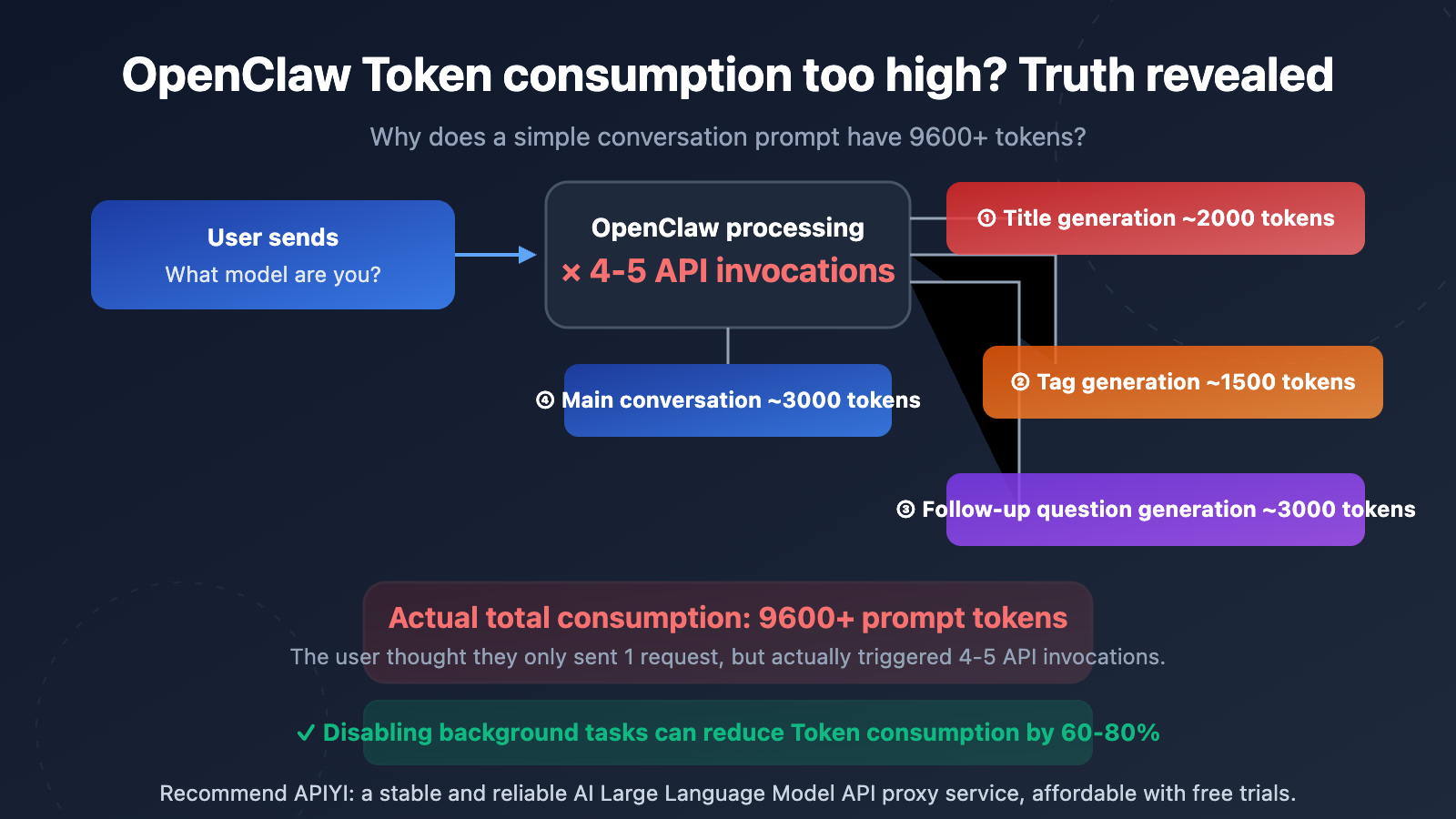
Many users are shocked when they see their API usage stats—a simple question like "What model are you?" results in 9,600 to over 10,000 prompt tokens. This isn't a billing issue with your API provider; it's a result of the architectural design of OpenClaw (Open WebUI).
The core reason is: OpenClaw automatically triggers several independent API calls in the background for every single message you send. These calls are completely invisible to the user, but each one consumes real tokens.
Detailed Breakdown of the 5 Major Token Sources in OpenClaw
Source 1: Auto Title Generation
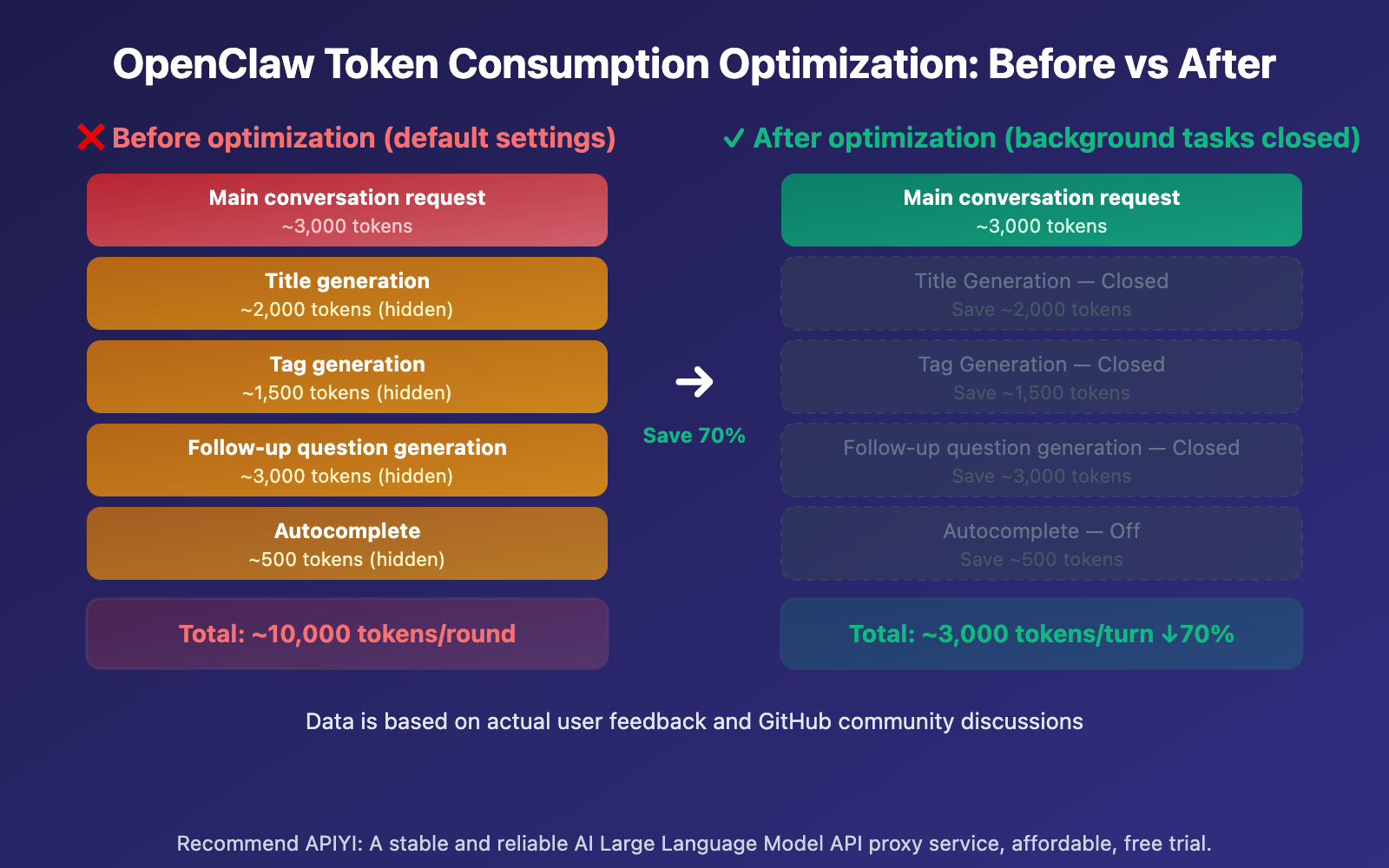
After you send your first message, OpenClaw automatically calls the API to generate a 3-5 word title for the conversation. This call sends your message content and consumes roughly 1,500-2,000 prompt tokens.
Source 2: Auto Tag Generation
Simultaneously, OpenClaw calls the API to generate 1-3 category tags for the chat. This is another independent API call, costing about 1,000-1,500 prompt tokens.
Source 3: Follow-up Question Suggestions
By default, OpenClaw generates 3-5 follow-up suggestions. This call uses the {{MESSAGES:END:6}} template, which pulls the last 6 messages as context, consuming around 2,000-3,000 prompt tokens.
Source 4: Autocomplete Generation
Some versions of OpenClaw also enable an input autocomplete feature that predicts what you might type next.
Source 5: The Main Chat Request Itself
Finally, there's the actual chat request you see, which includes the system prompt, conversation history, and your input.
OpenClaw Token Consumption: Quick Optimization Guide
Minimalist Config: Disabling Background Tasks
Here's the fastest way to optimize—disable unnecessary background API calls via environment variables:
# Add environment variables in docker-compose.yml
environment:
  - ENABLE_TITLE_GENERATION=false
  - ENABLE_TAGS_GENERATION=false
  - ENABLE_FOLLOW_UP_GENERATION=false
  - ENABLE_AUTOCOMPLETE_GENERATION=false
View full steps for configuring via the Admin Panel
If you're not comfortable modifying environment variables, you can also configure this through the OpenClaw admin panel:
- Log in to the OpenClaw admin backend.
- Go to Settings → Tasks.
- Turn off the following options one by one:
- Title Generation → Off
- Tags Generation → Off
- Follow-up Generation → Off
- Autocomplete Generation → Off
- If you don't want to turn them off completely, you can set the Task Model to a cheaper model (like
gpt-4o-mini). - Save settings and refresh the page.
# Option 2: Keep features enabled but use a cheaper model for background tasks
environment:
  - TASK_MODEL_EXTERNAL=gpt-4o-mini
This way, background tasks still run normally (titles, tags, and follow-up questions are automatically generated), but they'll use a lower-priced model instead of your main chat model.
🎯 Optimization Tip: Disabling background tasks is the most direct way to slash OpenClaw token consumption. If you're using APIs via APIYI (apiyi.com), these optimizations can significantly lower your costs. APIYI provides a unified multi-model interface, making it easy to set different Task Models.
OpenClaw Token Consumption: Real-World Data Analysis
Here's some real token consumption data reported by users, which clearly shows the scale of the issue:
| Usage Scenario | Expected Token Consumption | Actual Token Consumption | Multiplier |
|---|---|---|---|
| Simple Q&A "What model are you?" | ~200 | 9,600-10,269 | 50x |
| 5 rounds of daily chat | ~3,000 | ~45,000 | 15x |
| 30 rounds of coding chat | ~12,000 | 1,860,000 | 155x |
| Chat after uploading docs | ~5,000 | 600,000+ | 120x |
The data above comes from real user feedback in the Open WebUI GitHub community. The extreme 155x case in the 30-round coding chat is mainly because the follow-up question generation template {{MESSAGES:END:6}} pulls the last 6 messages, and coding chats often have massive code blocks in a single message.
Cumulative Effect of Conversation Rounds on OpenClaw Token Consumption
| Conversation Round | Default Setting Consumption | Optimized Consumption | Savings Ratio |
|---|---|---|---|
| Round 1 | ~10,000 | ~3,000 | 70% |
| Round 5 | ~50,000 | ~15,000 | 70% |
| Round 10 | ~150,000 | ~45,000 | 70% |
| Round 20 | ~500,000 | ~150,000 | 70% |
| Round 30 | ~1,200,000 | ~360,000 | 70% |
As conversation rounds increase, token consumption grows exponentially. This is because every round resends the entire conversation history. Under default settings, this history isn't just sent once for the main chat—it's also sent for title generation, tag generation, and follow-up question generation.
🎯 Cost Control Tip: Token consumption growth is especially staggering in long conversation scenarios. We recommend making model invocations through APIYI (apiyi.com). The platform offers a detailed usage statistics panel, making it easy to monitor and optimize your token spend.
OpenClaw Token Consumption Optimization Comparison
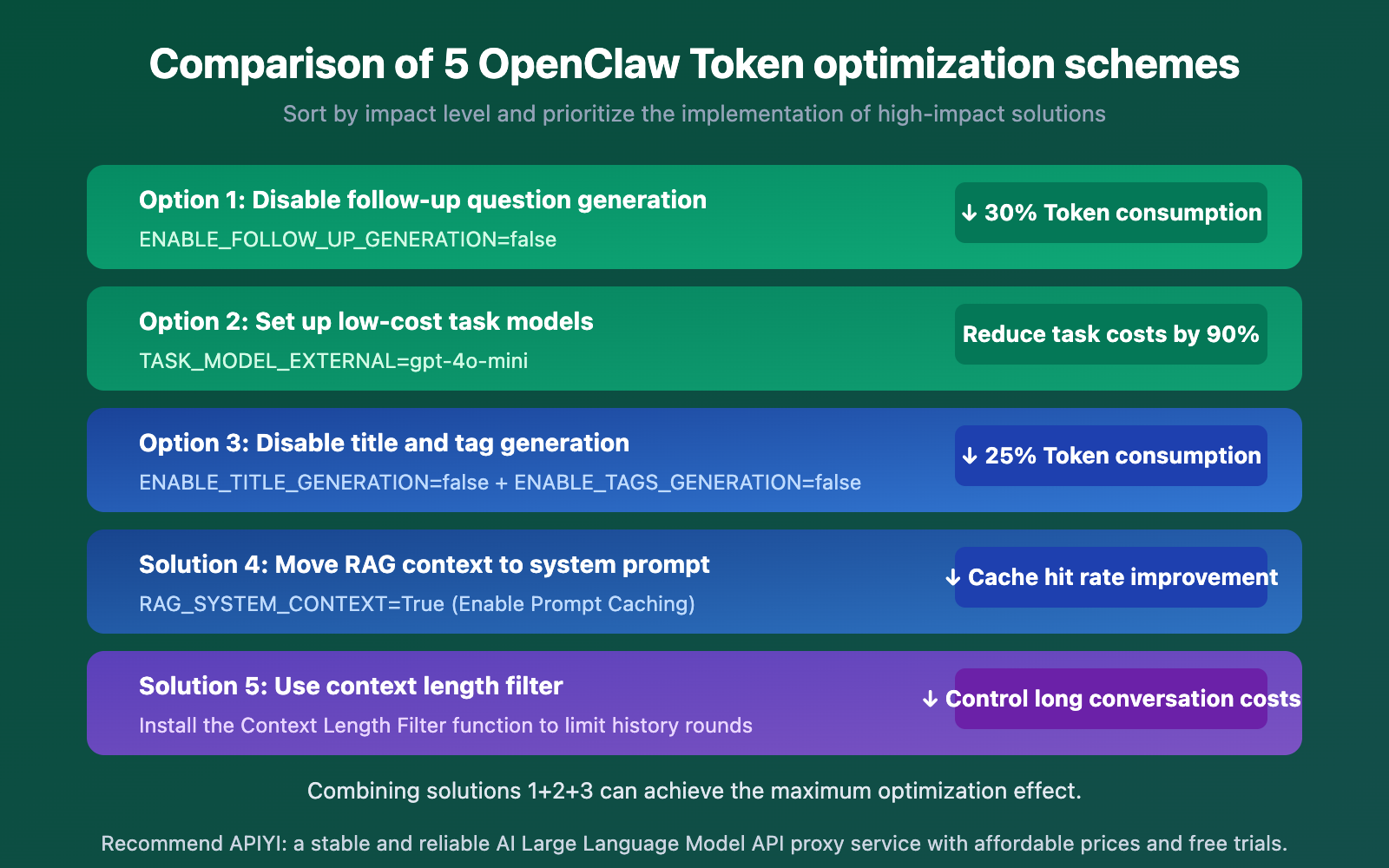
| Optimization Strategy | Difficulty | Token Savings | Impact on Features | Recommendation |
|---|---|---|---|---|
| Disable Follow-up Questions | Easy | ~30% | No suggested questions displayed | ⭐⭐⭐⭐⭐ |
| Set Budget Task Models | Easy | Task cost down 90% | Full features retained | ⭐⭐⭐⭐⭐ |
| Disable Title/Tag Generation | Easy | ~25% | Manual conversation naming required | ⭐⭐⭐⭐ |
| Move RAG to System Prompt | Medium | Enables caching | No negative impact | ⭐⭐⭐⭐ |
| Context Length Filter | Medium | Controls long chat costs | Potential loss of early context | ⭐⭐⭐ |
🎯 Best Practice: If you don't want to lose any functionality, Option 2 (setting budget task models) is your best bet—background tasks keep running, but they use low-cost models like
gpt-4o-mini. Through APIYI (apiyi.com), you can easily manage API keys for multiple models, using just one key to handle all major model invocations.
FAQ
Q1: Why is OpenClaw’s Token consumption so much higher than the official ChatGPT?
The official ChatGPT uses a subscription model, not per-Token billing, so you don't notice the Token usage. OpenClaw, however, operates via API model invocation where every Token is billed. Additionally, OpenClaw's background tasks are enabled by default, making the actual consumption 3-5 times higher than the user-visible requests.
Q2: Will OpenClaw’s Token consumption return to normal after disabling background tasks?
Yes. By disabling title generation, tag generation, follow-up question generation, and autocomplete, each message will only trigger a single API call (the main conversation). This can reduce Token consumption by 60-80%. If you still want to keep these features, you can use the APIYI (apiyi.com) platform to set up a budget model (like gpt-4o-mini) specifically to handle these background tasks.
Q3: How can I monitor actual OpenClaw Token usage?
We recommend the following ways to monitor Token consumption:
- Check the detailed Token data for each API call via the APIYI (apiyi.com) usage statistics dashboard.
- View statistics on the Usage page within the OpenClaw admin panel.
- Keep an eye on the ratio of Prompt Tokens to Completion Tokens—if the Prompt count is significantly higher than Completion, it means background tasks are consuming too much.
Summary
Key takeaways for managing high OpenClaw token consumption:
- Hidden background calls are the main culprit: Every single message triggers 4–5 independent API calls. While you only see one response, the background is working overtime.
- Setting a budget-friendly task model is the best solution: Using
TASK_MODEL_EXTERNAL=gpt-4o-minican slash background task costs by 90% while keeping all features intact. - Watch out for long conversations: Conversation history is resent with every call. A 30-round chat can easily balloon to over 1 million tokens.
By mastering these optimization tips, you can reduce your OpenClaw token costs by 60–80%, making your API usage much more economical.
We recommend managing your model invocations through APIYI (apiyi.com). The platform provides a unified interface and detailed usage statistics to help you precisely control token consumption and costs.
📚 References
-
Open WebUI Token Consumption Discussion: GitHub community discussion regarding high token usage.
- Link:
github.com/open-webui/open-webui/discussions/7281 - Note: Several users shared actual token consumption data and optimization experiences.
- Link:
-
Open WebUI Environment Variable Configuration Documentation: Official reference for environment variable settings.
- Link:
docs.openwebui.com/reference/env-configuration - Note: Contains all configurable environment variables and their default values.
- Link:
-
Follow-up Generation Token Consumption Issues: Follow-up question generation consuming the full context.
- Link:
github.com/open-webui/open-webui/issues/15081 - Note: Detailed analysis of how follow-up question generation templates consume massive amounts of tokens.
- Link:
-
System Prompt Duplication Bug: Agentic tool calls causing system prompt stacking.
- Link:
github.com/open-webui/open-webui/issues/19169 - Note: A known issue to watch out for when using tool-calling features.
- Link:
Author: APIYI Technical Team
Technical Exchange: Feel free to join the discussion in the comments. For more resources, visit the APIYI Documentation Center at docs.apiyi.com.