Author's Note: A deep dive into why Nano Banana Pro image edits are rejected with blockReason: OTHER errors. We'll analyze how scenarios like background replacement and composite photos are flagged as deceptive manipulation, and offer 5 viable solutions.
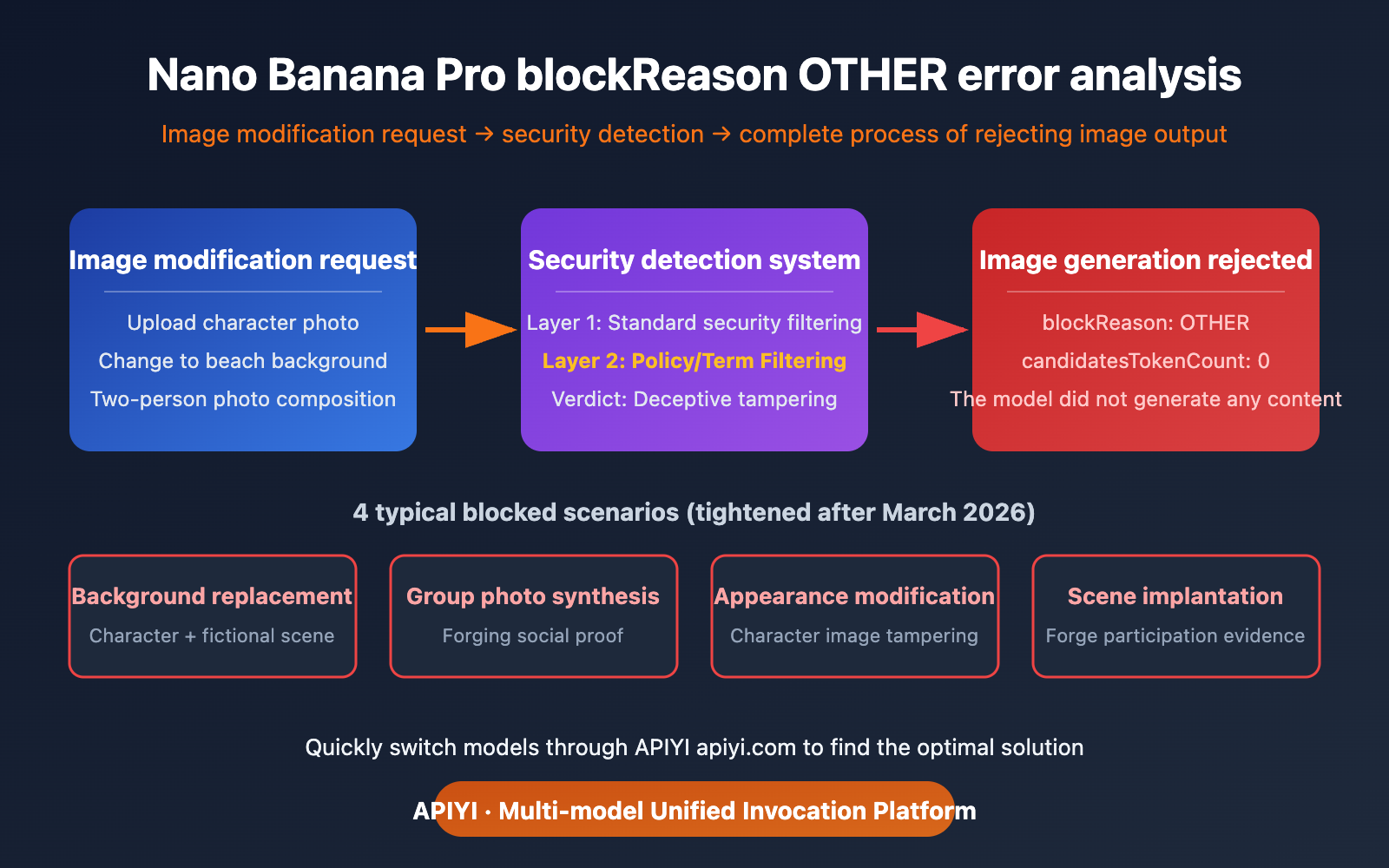
Recently (March 2026), many developers have noticed that Nano Banana Pro's image editing features have become much stricter. Operations like 'background replacement' and 'composite photos with two people' that used to work fine are now frequently returning blockReason: OTHER errors. These seemingly normal editing requests are being flagged as 'deceptive manipulation' by Google's safety system, leading to image generation rejections.
Core Value: By the end of this article, you'll understand the trigger mechanism for blockReason: OTHER, know which image editing operations have been tightened since March 2026, and learn 5 viable alternative solutions.
Key Takeaways on Nano Banana Pro's blockReason OTHER Error
| Key Point | Explanation | Scope of Impact |
|---|---|---|
| Error Meaning | Request violates terms of service or is an unsupported operation | Primarily image editing requests |
| Trigger Cause | Background replacement or composite photos involving people are deemed deceptive content | Significantly tightened after March 2026 |
| Error Category | OTHER is a catch-all, not specific to explicit categories like pornography/violence/hate | Cannot be bypassed via safety settings configuration |
| candidatesTokenCount | Returns 0, indicating the model didn't generate any content | Request is intercepted before generation |
Full Error Analysis for Nano Banana Pro's blockReason OTHER
Let's break down this error response field by field:
{
  "promptFeedback": {
    "blockReason": "OTHER"
  },
  "usageMetadata": {
    "promptTokenCount": 537,
    "candidatesTokenCount": 0,
    "totalTokenCount": 537,
    "promptTokensDetails": [
      {"modality": "TEXT", "tokenCount": 21},
      {"modality": "IMAGE", "tokenCount": 516}
    ]
  },
  "modelVersion": "gemini-3-pro-image-preview",
  "responseId": "9EesaeyMN7HxjrEPtpSj0QE"
}
Key Field Interpretations:
| Field | Value | Meaning |
|---|---|---|
blockReason |
OTHER |
Not a standard safety category; it's an interception at the terms of service/policy level |
candidatesTokenCount |
0 |
The model didn't generate any output; the request was rejected at the input stage |
promptTokenCount |
537 |
Input consumed 537 tokens (21 text + 516 image) |
IMAGE tokenCount |
516 |
Input includes an image, indicating this is an image-to-image editing request |
modelVersion |
gemini-3-pro-image-preview |
The Nano Banana Pro model is being used |
From candidatesTokenCount: 0, we can confirm: this isn't output filtering (where the model generates content but it's blocked), but rather input filtering (where the model doesn't even start generating). Google's safety system directly determines that the operation falls into an disallowed category after analyzing your prompt + input image.
Differences Between Nano Banana Pro's blockReason OTHER and Other blockReasons
The Gemini API has several blockReason types, and OTHER is the most unique one:
| blockReason | Meaning | Adjustable via safety settings |
|---|---|---|
SAFETY |
Triggers standard safety categories (pornography/violence/hate/dangerous content) | ✅ Threshold can be lowered |
OTHER |
Violates terms of service, policy restrictions, or is an unsupported operation | ❌ Cannot be bypassed via configuration |
BLOCKLIST |
Triggers a custom blocklist | ✅ Blocklist can be modified |
PROHIBITED_CONTENT |
Triggers unconfigurable hard limits (e.g., CSAM) | ❌ Absolutely cannot be bypassed |
Key Difference: SAFETY type blocks can be relaxed by setting harm_block_threshold, but OTHER type is a policy-level restriction and isn't affected by safety settings. This means no matter how you adjust the safety parameters, a blockReason: OTHER cannot be resolved through configuration.
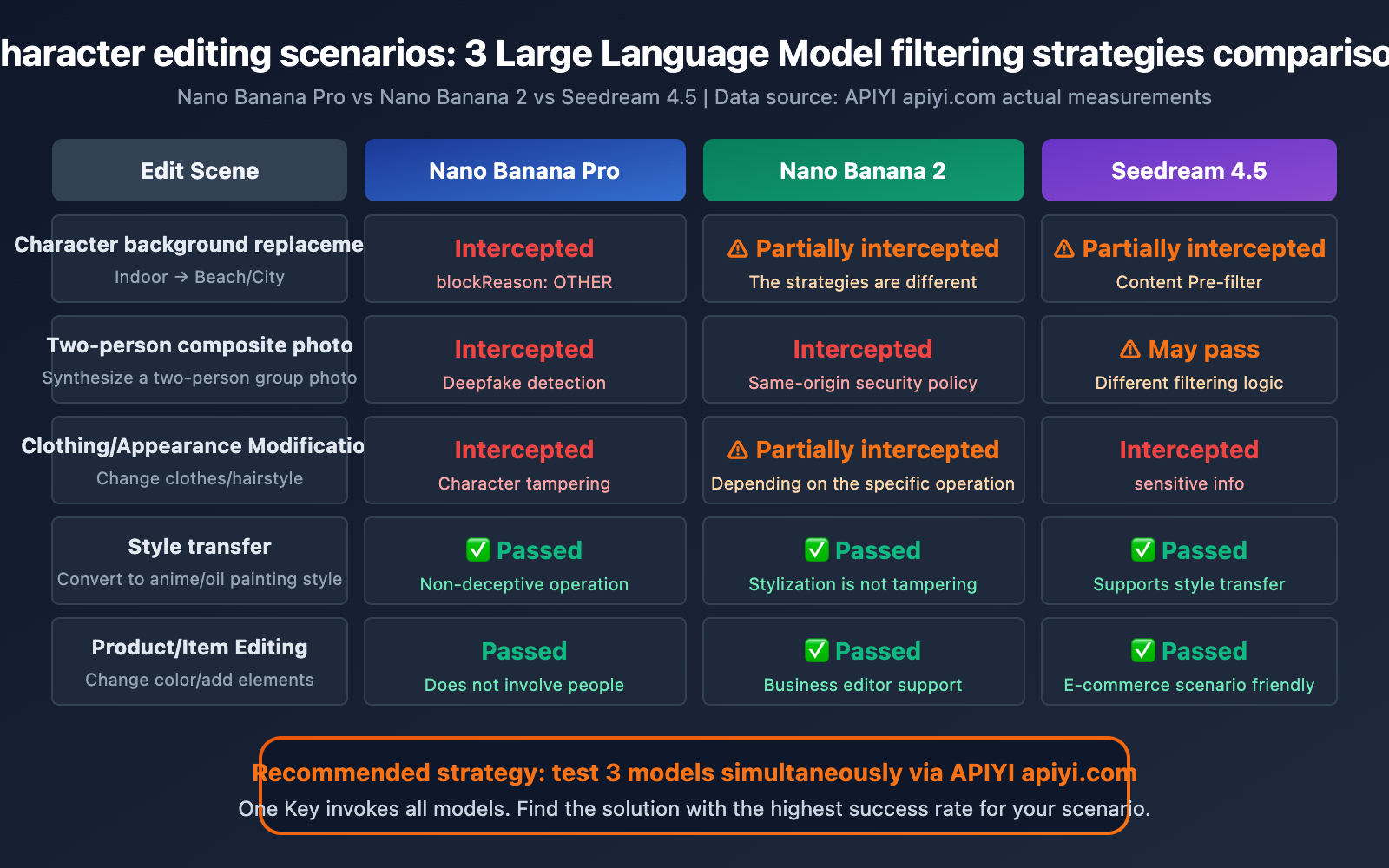
In March 2026, Google further tightened its image editing safety policies for Nano Banana Pro. Here are the most common scenarios that are now being blocked:
Scenario 1: Person Background Replacement
Operation: You upload a photo of a person and ask to change the background from indoors to a beach/city/other scene.
Rejection Reason: Google's safety system flags this as "creating a false scenario"—making a person appear somewhere they've never actually been. This falls under the category of Deepfake / deceptive content.
Error Return: blockReason: OTHER
Analysis: While users might see this as a simple "background change," from a platform safety perspective, it's equivalent to forging a photo of someone in a specific location, which could potentially be used for fraud, false evidence, and other malicious purposes.
Scenario 2: Two-Person Composite Photo
Operation: You upload two photos of different people and ask to combine them into one photo where they appear together.
Rejection Reason: This is one of the most classic Deepfake scenarios—making two people who may have never met appear to be together in a photo. This could be used for false social evidence, forging celebrity photos, and so on.
Error Return: blockReason: OTHER
Scenario 3: Person Clothing/Appearance Modification
Operation: You upload a photo of a person and ask to change their clothes, hairstyle, or alter their appearance.
Rejection Reason: Modifying the appearance of a real person is considered person tampering. The safety system finds it difficult to distinguish between "giving a friend a funny new look" and "creating a false persona."
Scenario 4: Placing a Person into a Specific Scene
Operation: You upload a photo of a person and ask to "place" them into a movie poster, magazine cover, or a specific scene.
Rejection Reason: Similar to background replacement, these types of operations could be used to forge evidence of a person participating in specific events or activities.
💡 Important Note: The scenarios above were working normally in early 2026. However, since the release of Nano Banana 2 in February, Google has comprehensively upgraded its content safety mechanisms, and the rejection rate for these operations has significantly increased. This isn't a bug; it's Google's deliberate tightening of its safety policies.
Technical Reasons for Nano Banana Pro's blockReason OTHER
Why Google Tightened Its Image Editing Policy
Google tightened Nano Banana Pro's image editing safety policy for these core reasons:
Deepfake Proliferation Risk:
Nano Banana Pro's image editing quality is incredibly high – you can barely tell when a background has been changed. This means that if misused, the generated fake images could be highly deceptive. As the technology provider, Google doesn't want to be responsible for the widespread dissemination of deepfakes.
EU AI Act Compliance Pressure:
The EU AI Act (fully effective August 2026) includes strict accountability clauses for deceptive AI-generated content. Tightening filtering policies in advance is part of Google's compliance preparation.
The "Better Safe Than Sorry" Principle of Safety Systems:
Google's safety systems can't accurately determine user intent – "changing to a nice background for a social media post" and "falsifying a photo of someone in a certain location for fraud" are technically identical operations. The safety system can only broadly block all operations involving person + scene modifications.
Nano Banana Pro's Dual-Layer Safety Filtering Architecture
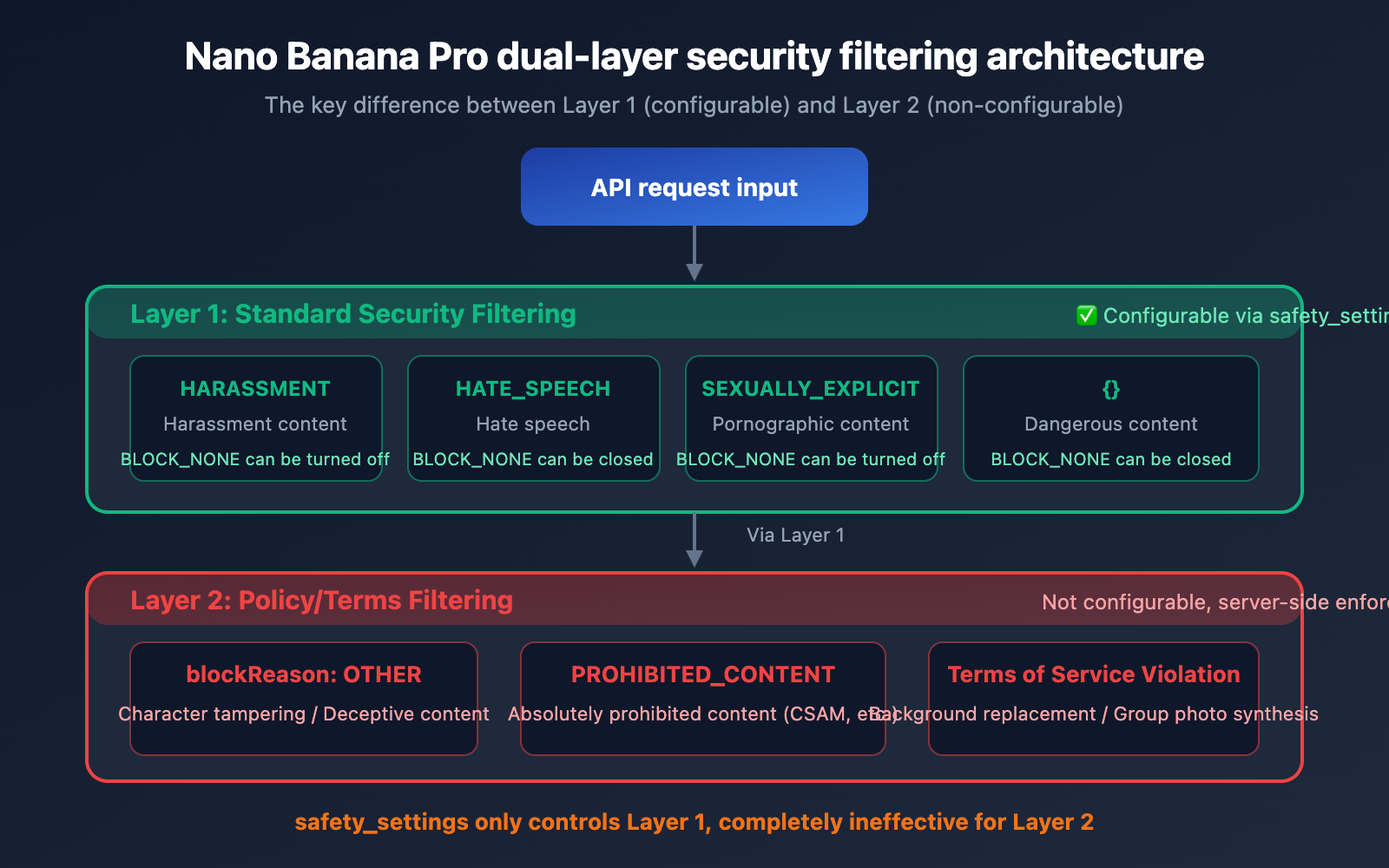
Nano Banana Pro uses two independent safety filtering systems:
| Filtering Layer | Name | Configurability | Triggered blockReason |
|---|---|---|---|
| Layer 1 | Standard Safety Filter | ✅ Adjustable via safety_settings |
SAFETY |
| Layer 2 | Policy/Terms Filter | ❌ Not configurable | OTHER / PROHIBITED_CONTENT |
blockReason OTHER is triggered by Layer 2 – this layer is not controlled by API parameters; it's a policy restriction enforced by Google on the server side.
# Even if all safety settings are set to the lowest, blockReason OTHER will still be triggered
import google.generativeai as genai

# These settings only affect Layer 1, and are ineffective for Layer 2
safety_settings = [
    {"category": "HARM_CATEGORY_HARASSMENT", "threshold": "BLOCK_NONE"},
    {"category": "HARM_CATEGORY_HATE_SPEECH", "threshold": "BLOCK_NONE"},
    {"category": "HARM_CATEGORY_SEXUALLY_EXPLICIT", "threshold": "BLOCK_NONE"},
    {"category": "HARM_CATEGORY_DANGEROUS_CONTENT", "threshold": "BLOCK_NONE"},
]

# blockReason OTHER is not affected by the above settings
# Background replacement involving people will still be blocked by Layer 2
🎯 Technical Tip: When you encounter blockReason OTHER, don't try to adjust the
safety_settingsparameter; it's completely ineffective. You'll need to change your approach or choose a different model. You can quickly switch to other models like Nano Banana 2 or Seedream via the APIYI apiyi.com platform to test the same requirements.
5 Solutions for Nano Banana Pro's blockReason OTHER
Solution One: Switch to Pure Text-to-Image Generation (text-to-image instead of img2img)
blockReason OTHER primarily blocks "edits based on real person photos." If you switch to generating your desired scene using pure text descriptions, the success rate will significantly increase:
import openai

client = openai.OpenAI(
    api_key="YOUR_API_KEY",
    base_url="https://vip.apiyi.com/v1"
)

# ❌ img2img method (prone to triggering blockReason OTHER)
# Upload real person photo + "change background to a beach"

# ✅ text-to-image method (bypasses person photo editing restrictions)
response = client.chat.completions.create(
    model="gemini-3-pro-image-preview",
    messages=[
        {
            "role": "user",
            "content": "Generate a portrait photo of a young professional woman standing on a beautiful tropical beach at sunset, warm golden lighting, natural relaxed pose, high quality photography"
        }
    ]
)
# Pure text-to-image generation doesn't involve editing real person photos, leading to a higher success rate
View more text-to-image alternative examples
import openai

client = openai.OpenAI(
    api_key="YOUR_API_KEY",
    base_url="https://vip.apiyi.com/v1"
)

# Scenario 1: Replacing "change background" requirement
# Describe your desired person + background combination in detail with text
response = client.chat.completions.create(
    model="gemini-3-pro-image-preview",
    messages=[{
        "role": "user",
        "content": "A professional headshot of a businessman in a navy suit, modern glass office building in the background, natural daylight, corporate photography style"
    }]
)

# Scenario 2: Replacing "group photo" requirement
# Describe your desired group photo scene instead of compositing real photos
response = client.chat.completions.create(
    model="gemini-3-pro-image-preview",
    messages=[{
        "role": "user",
        "content": "Two friends taking a selfie together at a coffee shop, smiling naturally, warm indoor lighting, candid photography style, smartphone photo quality"
    }]
)
🚀 Quick Start: We recommend calling the Nano Banana Pro API via the APIYI apiyi.com platform. The platform offers free trial credits, making it easy for you to quickly test different prompt strategies.
Solution Two: Use Nano Banana 2 as an Alternative
Nano Banana 2 (gemini-3.1-flash-image-preview) has different filtering policies than Nano Banana Pro for certain editing scenarios. While the overall safety mechanisms are similar, some edge cases might have a higher success rate with Nano Banana 2:
| Comparison Aspect | Nano Banana Pro | Nano Banana 2 |
|---|---|---|
| Model ID | gemini-3-pro-image-preview | gemini-3.1-flash-image-preview |
| Image Quality | Highest | Approx. 95% Pro quality |
| Speed | Slower | 3-5x Faster |
| Person Editing Filter | Very strict after March 2026 | Strict but may vary slightly |
| Price | Higher | Lower |
💰 Cost Optimization Tip: With the APIYI apiyi.com platform, you can use a single API key to call both Nano Banana Pro and Nano Banana 2, quickly comparing filtering results for the same request across different models.
Solution Three: Edit Only Non-Person Elements
If your editing needs don't involve modifying people, but rather other elements in the scene, the probability of being blocked will significantly decrease:
Safe Operations (usually don't trigger blockReason OTHER):
- Modifying products/items in an image (e.g., changing product color, adding accessories)
- Adjusting the lighting and tone of landscapes/buildings
- Adding text or graphic elements to an image
- Changing the overall style of an image (e.g., converting to illustration or oil painting style)
Risky Operations (likely to trigger blockReason OTHER):
- Modifying the background/scene where a person is located
- Adding/removing people from an image
- Modifying a person's clothing, appearance, or posture
- Compositing people from different photos together
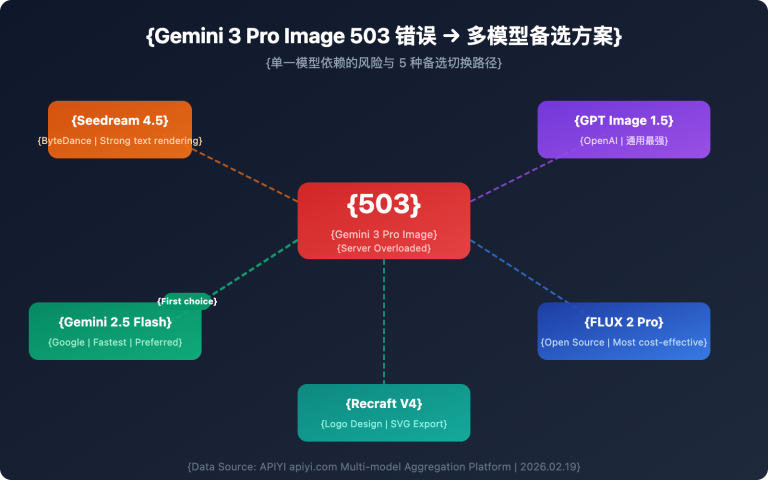
Solution Four: Use Seedream 4.5 as an Alternative
For person editing scenarios that Nano Banana Pro can't handle, Seedream 4.5 might be an alternative. Seedream's content filtering policy differs from Google's (it's set by ByteDance), so success rates may vary for certain scenarios:
import openai

client = openai.OpenAI(
    api_key="YOUR_API_KEY",
    base_url="https://vip.apiyi.com/v1"
)

# Use Seedream 4.5 to try the same editing request
response = client.images.generate(
    model="seedream-4.5",
    prompt="A professional portrait with a modern city skyline background, soft evening lighting",
    n=1,
    size="1024x1024"
)
Note: Seedream also has its own content filtering system (Content Pre-filter), and some scenarios may also be blocked (returning a sensitive information error). However, the filtering policies of the two platforms don't completely overlap, so a scenario blocked by one might pass through the other.
Solution Five: Step-by-Step Editing Strategy
Breaking down a complex editing operation into multiple simple steps, with each step making only a small modification, can reduce the probability of triggering safety filters:
One-Shot Editing (prone to blocking):
- "Change the background of this person's photo from an office to in front of the Eiffel Tower in Paris"
Step-by-Step Editing (higher success rate):
- Step 1: Use text-to-image to generate an empty scene in front of the Eiffel Tower in Paris.
- Step 2: Separately generate a person matching the style of the original photo.
- Step 3: Use professional image editing software for composition.
While this method involves more steps, it helps avoid the safety risks associated with directly modifying real person photos.
Frequently Asked Questions
Q1: Can `blockReason OTHER` be resolved by adjusting `safety_settings`?
No, it can't. blockReason OTHER is triggered by Layer 2 filtering (policy/terms level), and it's not controlled by the safety_settings parameter in the API. Even if you set all harm_block_threshold values to BLOCK_NONE, blockReason OTHER will still be triggered. This is a server-side enforced restriction by Google, completely different from the filtering mechanism for standard safety categories (SAFETY).
Q2: Why are image editing operations that used to work now suddenly failing?
Google significantly upgraded Nano Banana Pro's safety policies between February and March 2026, especially after the release of Nano Banana 2. Filtering has become much stricter for operations involving people, such as background replacement, group photo composition, and appearance modification. This isn't a bug or a temporary issue; it's an intentional tightening of policies. We recommend trying other models for the same needs via the APIYI apiyi.com platform.
Q3: Will all image edits involving people be rejected?
No, not all. Nano Banana Pro still supports some person-related editing operations, such as adjusting lighting and tone, modifying the overall image style (e.g., converting to anime style), or simple background blurring. What's primarily blocked are operations involving "scene fabrication" – making someone appear in a place they weren't actually in, or making two people look like they're together in a photo.
Q4: Does `blockReason OTHER` consume API quota?
Yes, it consumes input tokens. You can see promptTokenCount: 537 in the error message, which indicates that the input text and images have been processed and consumed 537 tokens. Even though no output was generated (candidatesTokenCount: 0), the cost for the input portion will still be calculated. So, frequently triggering blockReason OTHER won't just prevent your task from completing; it'll also waste your API invocation costs.
Summary
Key takeaways regarding Nano Banana Pro's blockReason OTHER errors:
blockReason OTHERis a policy-level interception: Unlike SAFETY types, which can be adjusted viasafety_settings, OTHER is a hard, non-configurable limit.- Person-related editing policies significantly tightened after March 2026: Operations like background replacement, group photo composition, and modifying a person's appearance are now considered deceptive manipulation.
candidatesTokenCount: 0means rejection at the input stage: The model didn't even start generating; the safety system intercepted it directly after analyzing the input.text-to-imageis the most effective alternative: Describe the desired scene with text to generate it, bypassing the red line of "editing based on real photos."- Switching models might show differences: Nano Banana 2 and Seedream 4.5 have filtering policies that aren't entirely identical to Nano Banana Pro.
We recommend using the APIYI apiyi.com platform to quickly switch between different image generation models. With just one API key, you can invoke various models like Nano Banana Pro, Nano Banana 2, and Seedream 4.5 to find the optimal solution for your needs.
Reference Materials
-
Gemini API Safety Settings Documentation: Explanation of safety_settings parameter configuration
- Link:
ai.google.dev/gemini-api/docs/safety-settings - Description: Includes the meaning of each blockReason type and how to configure safety_settings
- Link:
-
Google Generative AI Use Policy: Explanation of prohibited uses for the Gemini API
- Link:
policies.google.com/terms/generative-ai/use-policy - Description: Clearly lists deceptive content generation behaviors that are not allowed
- Link:
-
Gemini API Troubleshooting Guide: Official recommendations for handling blockReason errors
- Link:
ai.google.dev/gemini-api/docs/troubleshooting - Description: Includes the official explanation and handling directions for blockReason OTHER
- Link:
-
Nano Banana Pro API Documentation: Features and limitations of Gemini 3 Pro Image Preview
- Link:
ai.google.dev/gemini-api/docs/models/gemini-3-pro-image-preview - Description: Model capabilities, supported editing operations, and safety policies
- Link:
Author: APIYI Tech Team
Technical Discussion: Feel free to discuss Nano Banana Pro image editing issues in the comments. For more AI image API usage tips, visit the APIYI docs.apiyi.com documentation center.