Author's Note: A deep analysis of the occasional appearance of a visible "veo" watermark in the bottom-right corner of videos generated by Veo 3.1 in Google Flow. We'll explore potential causes like subscription tiers, the SynthID mechanism, and service load, and provide practical solutions.
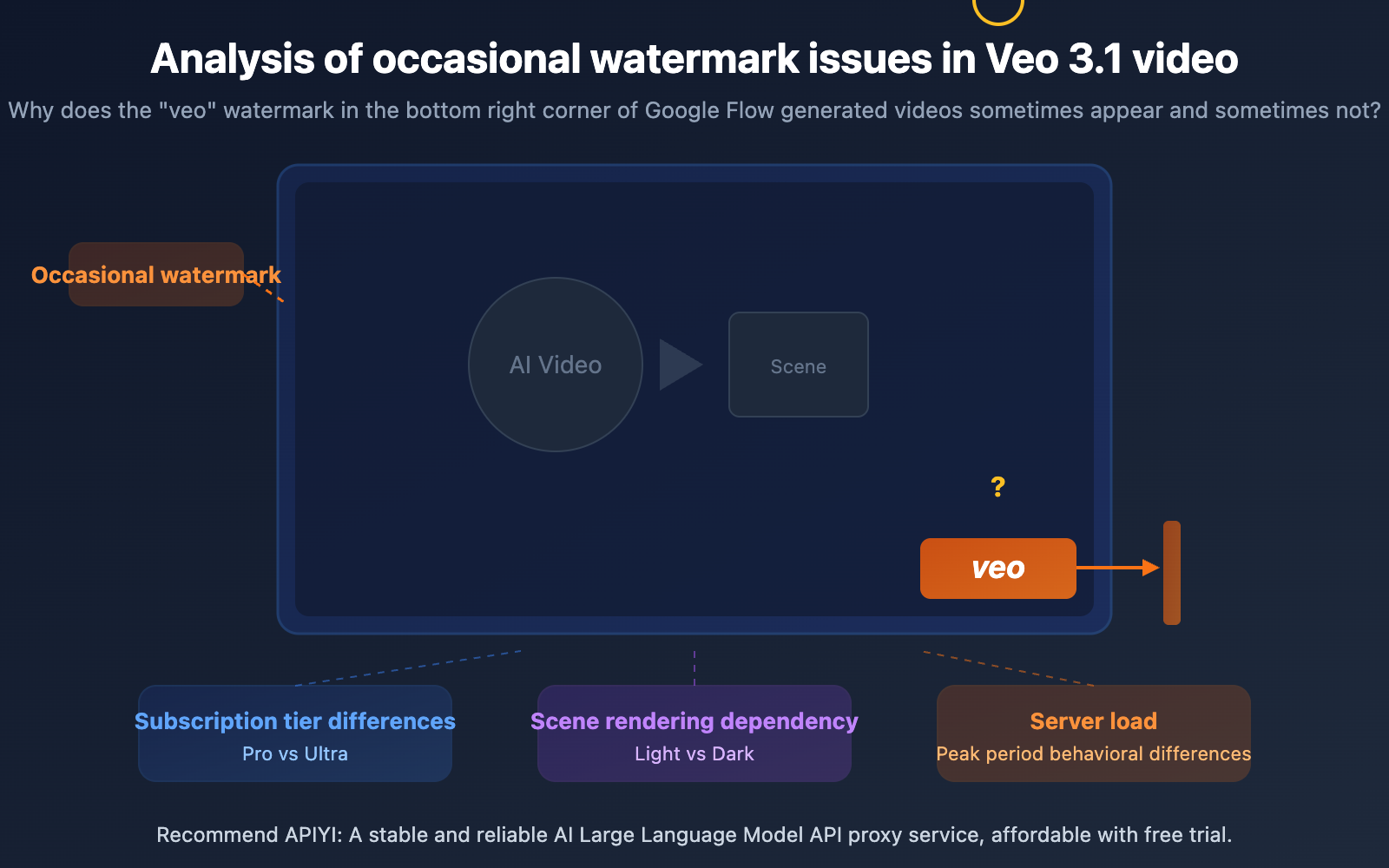
When generating videos with Google Flow, you might have encountered this: a "veo" text watermark occasionally appears in the bottom-right corner of videos created by Veo 3.1, but not every time. This intermittent watermark has left many developers and creators puzzled—is it a bug or by design?
This article will deeply analyze the possible causes of this phenomenon from three angles: Google's official watermark mechanism, differences in subscription tiers, and speculation about server-side load. We'll also provide practical and actionable solutions.
Core Value: After reading this article, you'll understand the complete logic behind Veo 3.1's watermark mechanism, be able to judge if your watermark issue is normal behavior, and learn how to avoid visible watermarks through appropriate methods.
Key Points of the Veo 3.1 Watermark Issue
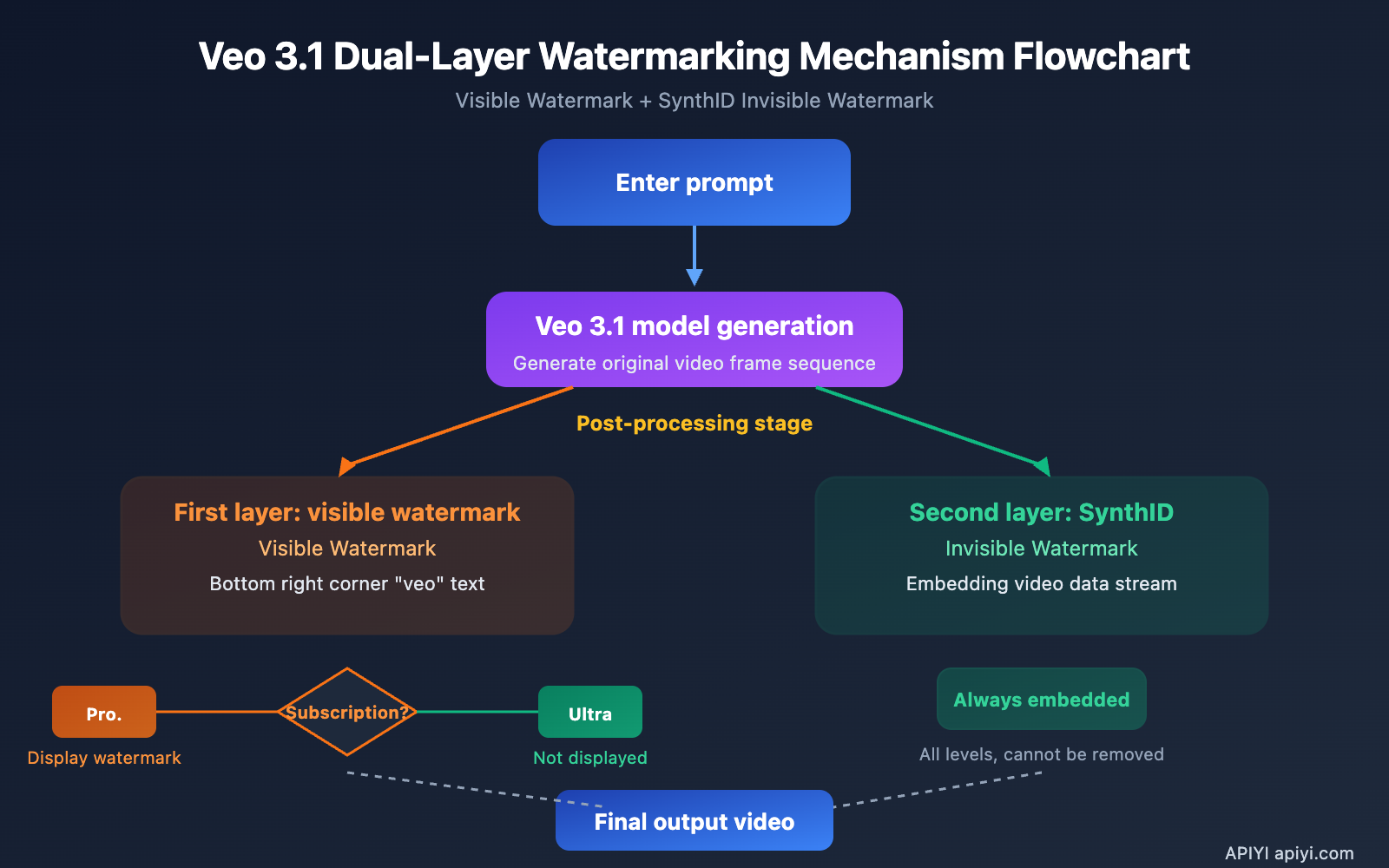
Google introduced a two-layer watermark mechanism in the Veo 3 series models: a Visible Watermark and an Invisible Watermark (SynthID). Understanding how these two layers work is key to determining if your watermark issue is normal.
| Key Point | Description | Impact |
|---|---|---|
| Visible Watermark | "veo" text in bottom-right corner, semi-transparent | Shown by default for Pro users, exempt for Ultra users |
| SynthID Invisible Watermark | Embedded in video data, invisible to the naked eye | Embedded for all tiers, cannot be removed |
| Intermittent Watermark | Not visible in every frame, doesn't appear in some scenes | Harder to notice in dark scenes or fast motion |
| Determined by Subscription Tier | Ultra users in Flow do not see the visible watermark | API calls may have different watermark policies |
The Two-Layer Architecture of Veo 3.1's Watermark Mechanism
Layer 1: Visible Watermark. Google officially introduced the visible watermark mechanism in June 2025 when Veo 3 expanded to 73 countries globally. This watermark appears as the text "veo" in the bottom-right corner of the video, in a small, semi-transparent font. Google's stated intent is to label AI-generated content, but some have noted that the watermark "isn't visible in every scene, and the font could be bigger"—meaning the watermark is indeed invisible in certain scenes, which is a known feature, not a bug.
Layer 2: SynthID Invisible Watermark. Regardless of your subscription tier, all videos generated by Veo 3.1 are embedded with a SynthID digital watermark. SynthID is an AI content identification technology developed by Google DeepMind. It's embedded directly into the video data stream, completely invisible to the naked eye, and robust against common video processing operations (cropping, compression, transcoding). Currently, ordinary users cannot detect the SynthID watermark; specialized tools are required.
Analysis of 3 Possible Reasons for Veo 3.1 Watermark Inconsistency
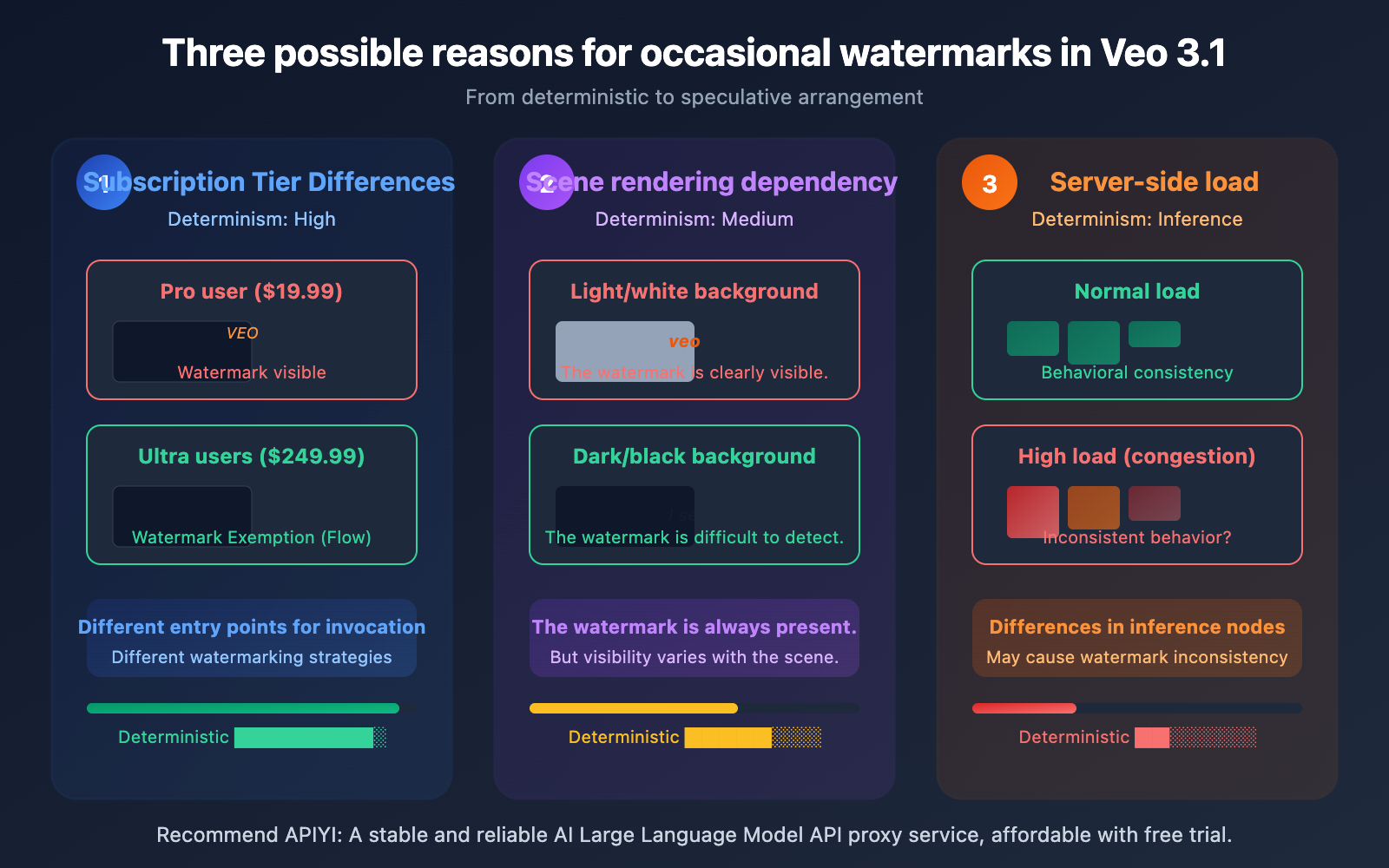
The "sometimes there, sometimes not" watermark phenomenon is a core confusion for many users. Here are 3 plausible speculations based on known information.
Reason 1: Subscription Tier and Calling Channel Differences
This is the most direct and likely reason. Google has clear distinctions in visible watermark policies for different subscription tiers:
| Subscription Tier | Monthly Fee | Visible Watermark | SynthID | Notes |
|---|---|---|---|---|
| Google AI Plus | $7.99 | Displayed | Embedded | Basic tier, Veo 3.1 Fast |
| Google AI Pro | $19.99 | Displayed | Embedded | ~90 Fast videos per month |
| Google AI Ultra | $249.99 | Not Displayed | Embedded | Exempt when using Veo 3.1 in Flow |
| Gemini API Direct Call | Per-second billing | To be confirmed | Embedded | API watermark policy may differ |
The crucial detail is: Ultra users are only exempt from the visible watermark when using Veo 3.1 within Flow. If you call it through the Gemini App or other channels, the watermark policy might be different. This means the same Ultra user could experience the "sometimes with watermark, sometimes without" difference when generating videos through different entry points.
Furthermore, when calling Veo 3.1 through a third-party API proxy service, the watermark's behavior might depend on the specific implementation of the underlying call chain.
Recommendation: Generate videos by calling the Veo 3.1 API via APIYI apiyi.com, with prices starting as low as $0.15 per video. It uses the same asynchronous calling method as OpenAI and supports the full Flow series of video generation models.
Reason 2: Visible Watermark Rendering and Scene Dependency
Google's official materials and multiple third-party reviews confirm one fact: the visible watermark is not clearly visible in every frame of the video. BGR's review article explicitly mentions "it isn't visible in every scene."
This isn't the watermark randomly disappearing; it's related to the visual characteristics of the video content itself:
- Dark/black background scenes: The semi-transparent white watermark might be hard to notice due to insufficient contrast.
- Scenes with bright elements in the bottom-right corner: The watermark might get "drowned out" by the content.
- Fast-motion scenes: Visual attention is focused on the main subject, reducing watermark perception.
- Specific resolutions and encoding: Watermark clarity might decrease after video compression.
In other words, what you perceive as "the watermark occasionally appears" might actually be the watermark always being there, just difficult for the naked eye to detect in certain scenes.
Reason 3: Server Load and Generation Chain Speculation
This is a more speculative hypothesis, but worth discussing.
When the Veo 3.1 service is under high load (similar to the "deepthink" congestion phenomenon with the Gemini series models), the server's behavior might undergo subtle changes:
- Downgrading to different inference nodes: Under high load, requests might be routed to different inference clusters. Different clusters' post-processing pipelines (including the watermark overlay step) might have configuration differences.
- Watermark overlay as a post-processing step: If the visible watermark is applied in a post-processing stage after video generation, the load status of the post-processing service might affect whether the watermark is correctly applied.
- Caching and retry mechanisms: During service congestion, some requests might have undergone retries or used cached results. Watermark behavior could be inconsistent across different paths.
It's important to emphasize: The above speculations currently have no official confirmation from Google. However, from a distributed systems design perspective, it's a completely reasonable hypothesis that high load leads to inconsistent edge-case behavior. In our practical use, we have indeed observed that during API call peaks, Veo 3.1's response behavior (including, but not limited to, watermarks) shows more uncertainty.
Veo 3.1 Video Watermark Solutions
Solution Comparison
| Solution | Cost | Effectiveness | Best For |
|---|---|---|---|
| Upgrade to Ultra Subscription | $249.99/month | Removes visible watermark in Flow | High-frequency creators, commercial use |
| Via API Calls | Per-second/per-video billing | Watermark policy may differ | Developers, batch generation |
| Post-processing | Time cost | Crop the bottom-right corner area | Non-commercial/personal projects |
| Accept SynthID | No extra cost | Invisible watermark has no visual impact | All users |
Veo 3.1 API Calling Method
For developers, calling Veo 3.1 directly via API is a more flexible solution. The API uses an asynchronous task model, similar to OpenAI's video generation API:
import requests
import time

# Step 1: Submit video generation task
response = requests.post(
    "https://vip.apiyi.com/v1/videos/generations",
    headers={"Authorization": "Bearer YOUR_API_KEY"},
    json={
        "model": "veo-3.1",
        "prompt": "A golden retriever running on a beach at sunset",
        "duration": 8,
        "aspect_ratio": "16:9"
    }
)
task_id = response.json()["id"]

# Step 2: Poll for task status
while True:
    result = requests.get(
        f"https://vip.apiyi.com/v1/videos/generations/{task_id}",
        headers={"Authorization": "Bearer YOUR_API_KEY"}
    )
    status = result.json()["status"]
    if status == "completed":
        video_url = result.json()["video_url"]
        print(f"Video generation complete: {video_url}")
        break
    elif status == "failed":
        print("Generation failed")
        break
    time.sleep(10)
View Complete Async Call Code (with Error Handling)
import requests
import time
from typing import Optional

def generate_veo_video(
    prompt: str,
    duration: int = 8,
    aspect_ratio: str = "16:9",
    model: str = "veo-3.1",
    max_wait: int = 300
) -> Optional[str]:
    """
    Asynchronously call Veo 3.1 to generate video

    Args:
        prompt: Video description prompt
        duration: Video duration (seconds)
        aspect_ratio: Aspect ratio
        model: Model name
        max_wait: Maximum wait time (seconds)

    Returns:
        Video URL or None
    """
    base_url = "https://vip.apiyi.com/v1"
    headers = {"Authorization": "Bearer YOUR_API_KEY"}

    # Submit task
    try:
        resp = requests.post(
            f"{base_url}/videos/generations",
            headers=headers,
            json={
                "model": model,
                "prompt": prompt,
                "duration": duration,
                "aspect_ratio": aspect_ratio
            },
            timeout=30
        )
        resp.raise_for_status()
        task_id = resp.json()["id"]
        print(f"Task submitted: {task_id}")
    except Exception as e:
        print(f"Submission failed: {e}")
        return None

    # Poll for result
    elapsed = 0
    while elapsed < max_wait:
        try:
            result = requests.get(
                f"{base_url}/videos/generations/{task_id}",
                headers=headers,
                timeout=15
            )
            data = result.json()
            if data["status"] == "completed":
                return data["video_url"]
            elif data["status"] == "failed":
                print(f"Generation failed: {data.get('error', 'Unknown error')}")
                return None
        except Exception as e:
            print(f"Query exception: {e}")
        time.sleep(10)
        elapsed += 10

    print("Wait timeout")
    return None

# Usage example
video = generate_veo_video(
    prompt="A cat walking on a rooftop under moonlight, cinematic quality",
    duration=8,
    aspect_ratio="16:9"
)
if video:
    print(f"Download URL: {video}")
Recommendation: APIYI apiyi.com supports the full Google Flow video generation model series (including Veo 3, Veo 3.1), with prices starting as low as $0.15 per video. The asynchronous calling method is simple and easy to integrate.
Veo 3.1 Watermark Mechanism vs. Other Video Models
Understanding where Veo 3.1's watermark strategy stands in the industry helps you make more informed choices:
| Model | Visible Watermark | Invisible Watermark | Removal Condition | API Available |
|---|---|---|---|---|
| Veo 3.1 | Bottom-right "veo" (Pro and below) | SynthID (all users) | Ultra subscription + Flow | Yes (per-second billing) |
| Sora 2 | No visible watermark | C2PA metadata | N/A | Yes (per-video billing) |
| Kling 3 | Free version has watermark | No public info | Paid subscription | Yes |
| Runway Gen-4 | Free version has watermark | No public info | Paid subscription | Yes |
As you can see from the table, AI video generation models commonly use watermark strategies to differentiate between free and paid users. Veo 3.1's SynthID invisible watermark is one of the most advanced AI content identification technologies available—and it's something no tier can bypass. However, it doesn't affect the visual experience during actual use.
Comparison Tip: If you need a video generation solution without visible watermarks, you can test different models' effects via APIYI apiyi.com. The platform supports unified API calls for mainstream video generation models like Veo 3.1 and Sora 2.
Frequently Asked Questions
Q1: Can the “veo” watermark in Veo 3.1 be removed?
The visible watermark can be avoided by upgrading to a Google AI Ultra subscription ($249.99/month) and using it within Flow. Technically, it can also be handled by cropping the bottom-right corner in post-production, but this will alter the frame composition. The SynthID invisible watermark currently cannot be removed, but it does not affect the visual quality.
Q2: Do videos generated via the Veo 3.1 API have a watermark?
The SynthID invisible watermark is always present. The behavior of the visible watermark depends on the specific API call chain and configuration. By calling the Veo 3.1 API via APIYI at apiyi.com, prices start as low as $0.15 per video. It's recommended to conduct a small batch test to confirm the specific watermark behavior.
Q3: Is the watermark a bug or an intended design?
The visible watermark is a design choice by Google, not a bug. Google explicitly announced its visible watermark policy in June 2025. However, the watermark "not being visible in every frame" is also a known characteristic, influenced by video content and scenes. If you are an Ultra user but still see a watermark in Flow, it's recommended to contact Google Support for confirmation.
Q4: Which Flow video generation models does APIYI support?
APIYI at apiyi.com supports the full suite of Google Flow video generation models, including Veo 3, Veo 3.1, and others, using the same asynchronous invocation method as OpenAI. Prices start as low as $0.15 per video. No Google account or VPN is required; you can start using it immediately upon registration.
Summary
The key points regarding the occasional Veo 3.1 video watermark issue are:
- Dual Watermark Mechanism: Visible watermark ("veo" text) + SynthID invisible watermark, operating independently.
- Subscription Tier Determines Visibility: Ultra users are exempt from the visible watermark in Flow; Pro and lower tiers display it by default.
- Occurrence is Normal: The visibility of the watermark is affected by video scenes, background colors, motion speed, and other factors, meaning it's not clearly visible in every frame.
- Service Load May Be a Factor: Differences in request routing during high load might lead to inconsistent watermark behavior (speculative, not officially confirmed).
For commercial use requiring no visible watermark, it's recommended to invoke Veo 3.1 via the API. APIYI at apiyi.com supports the full Flow video generation API suite, with prices starting as low as $0.15 per video. Its simple, asynchronous invocation method makes it a cost-effective choice for batch video generation.
References
-
Google Veo Official Page: Veo model capabilities and watermark mechanism description
- Link:
deepmind.google/models/veo/ - Description: Contains the official introduction to SynthID watermark technology
- Link:
-
Veo 3.1 Release Blog: Ingredients to Video feature update
- Link:
blog.google/innovation-and-ai/technology/ai/veo-3-1-ingredients-to-video/ - Description: Core capabilities and new feature introductions for Veo 3.1
- Link:
-
BGR: Veo 3 Visible Watermark Report: Third-party evaluation and watermark visibility analysis
- Link:
bgr.com/tech/those-amazing-veo-3-videos-will-finally-tell-you-they-were-made-with-ai/ - Description: Detailed analysis of visible watermark position, visibility, and layer differences
- Link:
-
Google Flow Help Center: Flow usage guide and subscription description
- Link:
support.google.com/flow/answer/16353333 - Description: Flow feature introduction and subscription tier comparison
- Link:
-
Gemini API Video Generation Documentation: Veo 3.1 API call specifications
- Link:
ai.google.dev/gemini-api/docs/video - Description: API asynchronous calling methods and parameter descriptions
- Link:
Author: APIYI Technical Team
Technical Discussion: Feel free to share your Veo 3.1 watermark issues and solutions in the comments. For more resources, visit the APIYI docs.apiyi.com documentation center.