If you're currently using Cursor as your editor for Claude Code, your experience likely looks like this: Cursor handles file management and code editing, while Claude Code runs heavy agentic tasks in the terminal. Occasionally, you run into those awkward "stutter + conflict" moments where they fight over file indexing, hog memory, or both the Composer and Claude Code try to modify the same file at the same time. You might be starting to wonder: Is Zed a better host for Claude Code?
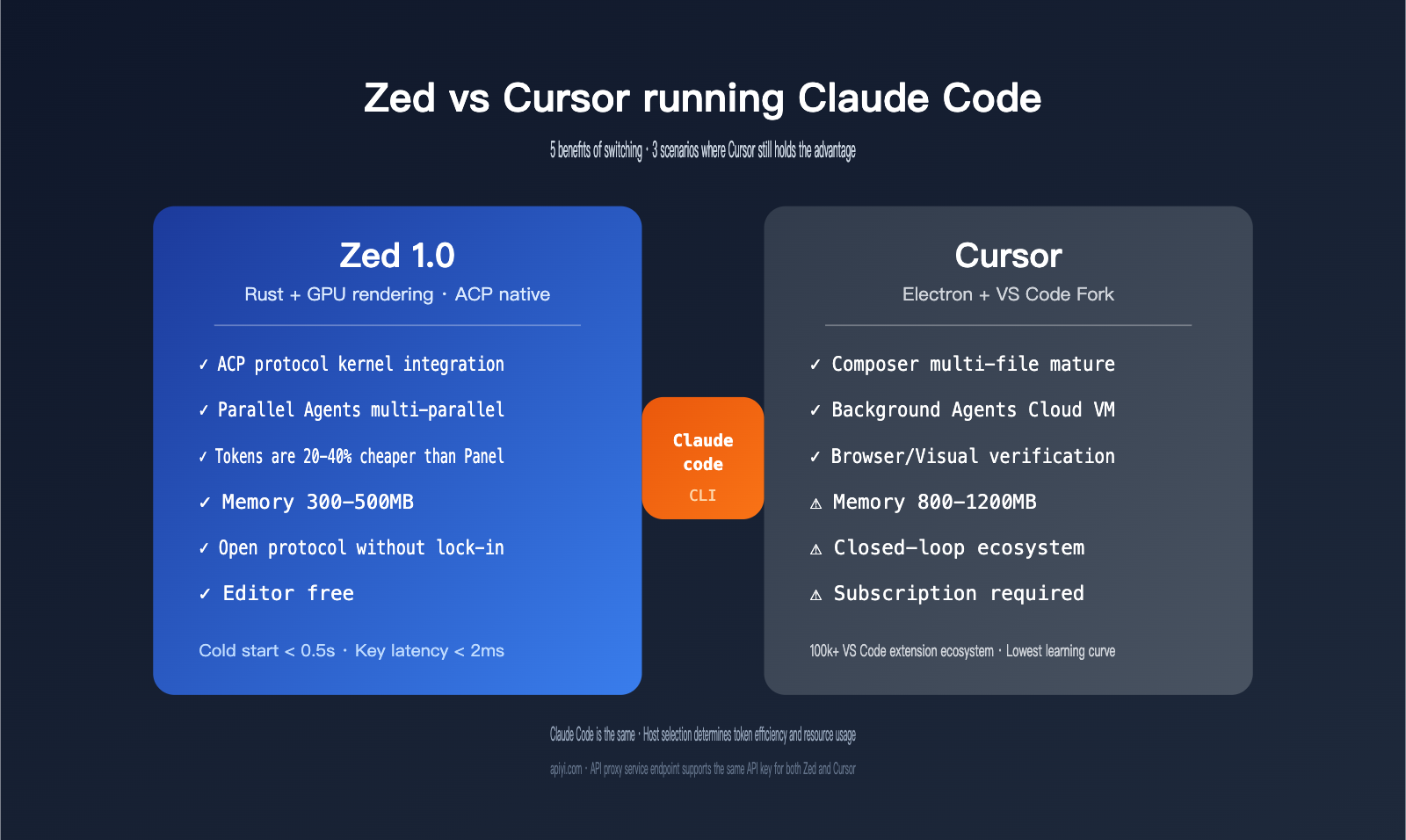
The answer isn't a simple "yes" or "no." It needs to be broken down across five dimensions: integration method (ACP native vs. external terminal), resource consumption, protocol openness, token efficiency, and the irreplaceable nature of Cursor's proprietary features like Background Agents. This article provides a comprehensive comparison of Zed vs. Cursor for Claude Code, based on the latest Zed 1.0 + Claude Code public beta data, to help you decide whether to migrate your workflow.
1. Core Differences Between Zed and Cursor as Claude Code Hosts
Many people instinctively think of Cursor and Zed as just "editor shells," with Claude Code doing the actual heavy lifting. However, the choice of host profoundly impacts the Claude Code experience, primarily in three areas.
1.1 Integration Method: ACP Native vs. External Terminal
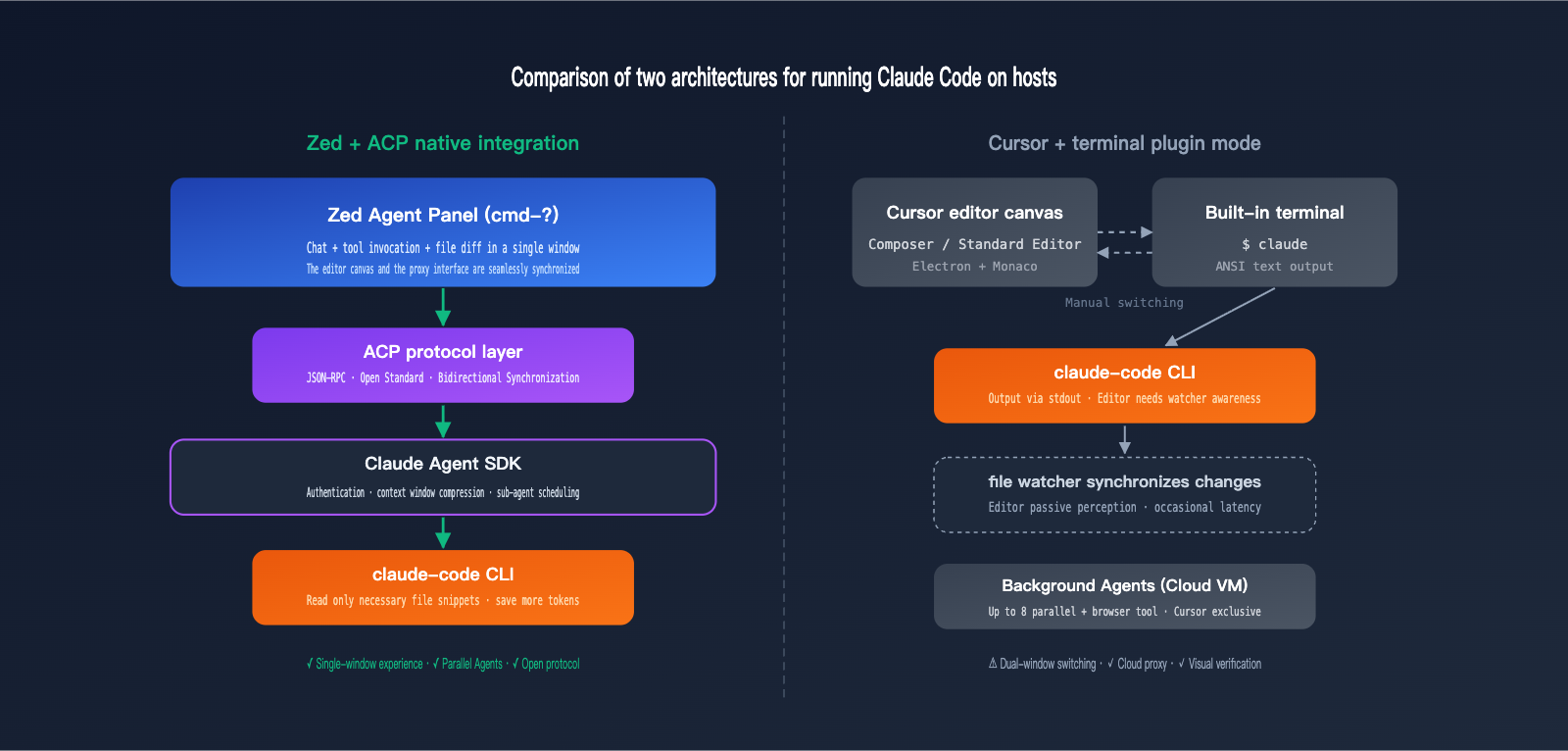
In Cursor, running Claude Code means "opening the built-in terminal + typing claude." Claude Code still runs as a CLI tool, and Cursor is just a shell. It can see your project directory, but it doesn't "know" which files Claude Code has modified—you have to rely on Cursor's own file watcher to detect changes.
Since version 1.0, Zed has integrated Claude Code natively into its Agent Panel via the ACP (Agent Client Protocol). While the Claude Agent SDK still runs Claude Code under the hood, all interactions, file changes, and tool calls are synced back to the editor via the ACP standard. You can trigger it with cmd-? / ctrl-?, and it supports authentication via Anthropic API key or Claude Pro/Max subscription, allowing you to switch between modes seamlessly.
1.2 Resource Consumption
This is the most direct pain point for Cursor users. Cursor is built on Electron, and Claude Code launches a Node process in the background. Combined with the VS Code extension ecosystem's indexing, Cursor + Claude Code often consumes over 1GB of RAM in typical projects. Zed is written in Rust and uses GPU-accelerated rendering; even with the Claude Code Agent SDK, memory usage typically stays in the 300-500MB range.
When opening the same 50MB file, Zed takes about 0.8 seconds, while Cursor takes nearly 3.2 seconds. When you add the CPU load from Claude Code running agentic tasks, Cursor's fans will spin up noticeably during long coding sessions, while Zed barely breaks a sweat.
1.3 Openness of the Agent Protocol
Cursor's Composer and Background Agents are part of a closed ecosystem, where Claude Code is just one of the available models. Zed's ACP is an open protocol, co-promoted with JetBrains, with the goal of "any editor connecting to any agent." Claude Code, Gemini CLI, Codex, and custom-built agents can all run in Zed using the same protocol.
This means if you're worried about vendor lock-in or want to use multiple agent tools simultaneously, Zed + ACP is a more stable long-term choice. In the short term, Cursor's experience remains more "polished," but Zed clearly holds the advantage in ecosystem openness.
🎯 Integration Tip: Zed allows you to configure a custom
base_urlviasettings.jsonto connect to third-party API proxy services. This offers a unique benefit for Claude Code users: you can route Claude Code directly through an APIYI (apiyi.com) proxy endpoint. This lets you enjoy standard pricing for the Sonnet 4.5 1M context window while tracking your token consumption in a unified console. We recommend running a full agentic task in a test project first before deciding whether to migrate your main project.
2. 5 Real Benefits of Running Claude Code in Zed
To translate these abstract differences into practical scenarios, here are the five most immediate benefits you'll experience after switching to Zed.
2.1 Instant Memory and Startup Times
The first thing you'll notice is resource usage. Cursor takes about 2.5 seconds to launch and be ready for coding, while Zed takes less than 0.5 seconds. Opening a project with 100,000 lines of code takes Cursor ~4.5 seconds, whereas Zed finishes in under 1 second. For similar projects, Cursor typically consumes 500-800MB of memory, while Zed stays within 200-400MB. When you add Claude Code to the mix, Cursor's memory usage often spikes to 1GB+, while Zed remains stable at 300-500MB.
For developers running multiple projects or keeping several sessions open on a laptop, this gap means you can run 2-3 more Claude Code tasks without any lag.
2.2 Native ACP Integration: No More "Editor + Terminal" Switching
In Cursor, running Claude Code requires opening a terminal and constantly switching between the editor canvas and the terminal—Claude Code outputs a suggestion, you switch to the editor to review the changes, and then switch back to the terminal to continue the conversation. Zed uses ACP to bring the entire interaction into the Agent Panel. Claude Code's conversation, tool invocations, and file diffs are all displayed in the same panel, eliminating the need for dual-window operation.
For those who frequently need to quickly review Claude Code's changes, this "single-window experience" saves a significant amount of time. The Agent Panel also directly displays which file Claude Code is currently reading and which tool it's calling, offering much higher observability than a raw terminal.
2.3 Parallel Agents Make Multi-Agent Workflows Possible
The Parallel Agents introduced in Zed 1.0 are particularly useful for Claude Code scenarios. You can simultaneously launch one Claude Code instance for backend refactoring, one Codex for unit test generation, and one Gemini CLI for documentation synchronization. All agent outputs flow into the editor canvas without conflicting with each other.
Cursor currently cannot do this—its Composer is a single-threaded multi-file editor, and while Background Agents support parallel execution (up to 8), they run in cloud VMs, making the local experience feel like "waiting for results one by one." Zed's parallelism feels more like a "local multi-workstation" setup, which is perfect for workflows that require rapid iteration.
🎯 Multi-Agent Cost Tip: Running multiple Claude Code/Codex instances simultaneously will multiply your token consumption. If you use official APIs, your bill can easily spiral out of control. We recommend opening an independent key on the APIYI (apiyi.com) platform for Zed, using Sonnet 4.5 for the primary agent and Haiku 4.5 for secondary agents, supplemented by a local completion model. This is the most stable combination for controlling the costs of Parallel Agents.
2.4 Claude Code in Zed is More Token-Efficient than Agent Panel Invocations
This is a counter-intuitive fact that has been verified through multiple tests: when Zed's Agent Panel calls Sonnet directly, it tends to be "greedy," often reading entire files into the context. When running through Claude Code via ACP, it is more "clever," reading only the necessary file snippets and loading full files only when absolutely required.
In other words, even when using the same Sonnet 4.5, calling via the Claude Code link typically saves 20%-40% in tokens compared to using the standard Zed Agent Panel. For long-term users, this translates to real savings.
2.5 Avoid Vendor Lock-in for Long-Term Stability
ACP is an open protocol, which means that regardless of whether Claude Code, Codex, or Gemini CLI updates faster in the future, you can seamlessly switch between them in Zed using the same protocol. Cursor's Composer and Background Agents are a closed ecosystem; you have to wait for official support for model upgrades or pricing changes, making you more passive in your workflow.
For teams planning to use AI programming tools for the long haul, this "protocol-level independence" is Zed's most underrated advantage.
3. 3 Scenarios Where Cursor Still Holds the Edge
To be fair, Cursor isn't being completely crushed. In the following scenarios, Cursor remains a more suitable host for Claude Code.
3.1 Background Agents: Cloud VMs and Visual Verification
Cursor's Background Agents run in cloud-based Ubuntu VMs, supporting up to 8 parallel tasks with built-in browser tools for screenshots, visual verification, and E2E debugging. These "cloud agents" are very friendly for long-running tasks—you can submit a PR-level request, let the agent run in the cloud for minutes or even tens of minutes, and continue coding locally in the meantime.
Zed's Parallel Agents are local and multi-parallel, consuming local CPU and memory, which can create pressure during long runs, and they lack built-in browser tools. So, if your workflow heavily relies on cloud agents or visual verification, Cursor remains irreplaceable.
3.2 Continuation of the VS Code Extension Ecosystem
Cursor is a fork of VS Code, meaning the vast majority of VS Code extensions work directly—including internal enterprise plugins, specific DSL highlighting, debugger integrations, and remote SSH development. Zed only has about 1,000 native extensions, while the VS Code Marketplace has over 100,000.
If your project heavily relies on niche extensions (such as LSP enhancements for an internal framework or a specialized debugger), switching to Zed prematurely will result in a loss of these capabilities.
3.3 Team Friction
This is a soft but very real issue. The learning curve for Cursor is almost zero for VS Code users, whereas Zed uses a different set of keyboard shortcuts and conceptual models. If members of your team insist on the VS Code style, forcing a switch to Zed will create friction in collaboration.
The table below summarizes the differences between the two:
| Dimension | Zed + Claude Code | Cursor + Claude Code |
|---|---|---|
| Integration | Native ACP, single-window Agent Panel | Terminal-based, dual-window switching |
| Startup Speed | < 0.5 seconds | ~2.5 seconds |
| Typical Memory Usage | 300-500 MB (incl. Claude Code) | 800-1200 MB (incl. Claude Code) |
| Protocol Openness | Open ACP, switch to any Agent | Closed, follows official updates |
| Parallel Agents | Local Parallel Agents | Background Agents (up to 8 in cloud) |
| Token Consumption | Claude Code via ACP saves 20%-40% | Standard consumption |
| Extension Ecosystem | ~1000 (growing) | Inherits VS Code's 100,000+ |
| Browser/Visual Tools | No native support yet | Built into Background Agents |
| Learning Curve | Medium (new shortcut system) | Low (zero-cost for VS Code users) |
IV. Zed vs. Cursor: Performance and Resource Benchmark Data
The following table highlights key metrics based on independent benchmarking, with all data sourced from public evaluations conducted in 2026.
| Metric | Zed 1.0 + Claude Code | Cursor + Claude Code |
|---|---|---|
| Cold start to editable | < 0.5 seconds | ~2.5 seconds |
| Open 50MB large file | ~0.8 seconds | ~3.2 seconds |
| Open 100k-line monolith project | < 1 second | ~4.5 seconds |
| Key-to-screen latency | < 2 ms | 10-15 ms |
| Idle memory usage | 200-400 MB | 500-800 MB |
| Full load with Claude Code | 300-500 MB | 800-1200 MB |
| Rendering pipeline | Rust + GPU (Metal/Vulkan) | Electron + Web |
| Claude Code integration | ACP native + terminal optional | Terminal only |
The logic behind these figures is straightforward: Zed communicates directly with the GPU using Rust, bypassing the Web rendering bottlenecks inherent in Electron. Because Cursor inherits the VS Code architecture, it remains constrained by Chromium kernel overhead regardless of optimization efforts. In scenarios like Claude Code, which requires long-running agent tasks, this performance gap becomes even more pronounced.
V. Practical Guide: Setting Up Claude Code in Zed
If you've decided to give the Zed + Claude Code combo a try, you only need three steps for a minimal setup. First, make sure you have the Claude Code CLI and Zed 1.0 installed, then add the following configuration to your Zed settings.json:
{
  "agent_servers": {
    "claude-code": {
      "command": "claude",
      "args": ["--acp"],
      "env": {
        "ANTHROPIC_BASE_URL": "https://vip.apiyi.com",
        "ANTHROPIC_AUTH_TOKEN": "${API_YI_KEY}"
      }
    }
  },
  "agent": {
    "default_agent": "claude-code"
  }
}
There are three key points here: command points to your local Claude Code CLI; args passes the ACP mode startup parameter; and in env, ANTHROPIC_BASE_URL is pointed to the APIYI API proxy service endpoint. This ensures all Claude Code requests go through the proxy, allowing you to use Sonnet 4.5 with a 1M context window while skipping the Cursor subscription.
Once configured, use cmd-? to open the Agent Panel, select claude-code as your default agent, and you're ready to go. If you want to keep a workflow compatible with Cursor, you can also run claude directly in the built-in Zed terminal—it offers the same experience as Cursor but with a much lighter resource footprint.
🎯 Configuration Verification Tip: Changes to Zed's
settings.jsontake effect immediately without needing a restart. We recommend running a simple "modify a single comment" task after your first setup to verify the connectivity and latency of the APIYI API proxy service. Confirm that Claude Code can read and write files correctly before using it on a real project. This progressive verification helps avoid issues when debugging in your main project.
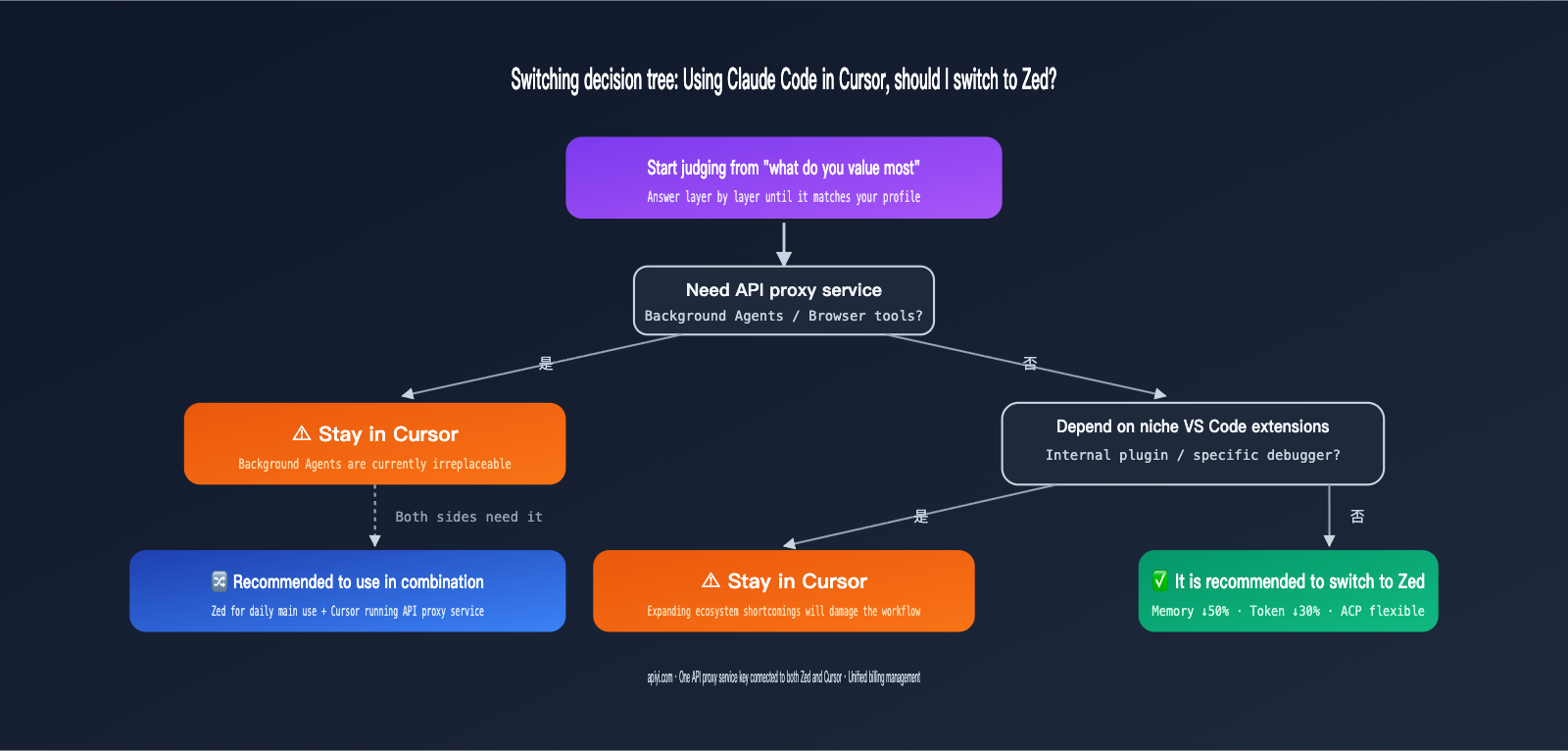
VI. Decision Guide: Should You Switch to Zed or Stay with Cursor?
To boil down all the analysis above: the answer to the Zed vs. Claude Code vs. Cursor comparison depends entirely on what you value most. The table below provides a recommended path based on specific scenarios.
| User Profile | Recommendation | Primary Reason |
|---|---|---|
| Resource-constrained laptop, multi-project workflow | ✅ Switch to Zed | Memory usage cut in half, significantly lower fan noise |
| Heavy reliance on Claude Code multi-file agent | ✅ Switch to Zed | ACP single-window experience + Parallel Agents |
| Already paying for Claude Max/API, want to avoid Cursor sub | ✅ Switch to Zed | Zed is free; Claude Code uses your own key |
| Heavy reliance on Cursor Composer's semantic editing | ⚠️ Stay with Cursor | Composer has higher engineering maturity |
| Need Background Agents (cloud-based parallel tasks) | ⚠️ Stay with Cursor | Zed lacks a direct equivalent for cloud agents |
| Project heavily relies on niche VS Code extensions | ⚠️ Stay with Cursor | Zed's extension ecosystem is still a weak point |
| Team collaboration where changing tools is hard | ⚠️ Stay with Cursor | Switching costs are human, not technical |
| macOS/Linux user, likes early adoption + open protocols | ✅ Switch to Zed | ACP offers high long-term value |
A middle-ground approach is "hybrid usage": use Zed + Claude Code for performance-heavy projects, and stick with Cursor for projects requiring its specific capabilities (like Background Agents). You can connect both tools to the same API key from APIYI, keeping your billing centralized and minimizing migration friction.
VII. FAQ: Common Questions About Running Claude Code in Zed
Q1: Can I migrate my Claude Code conversation history when switching from Cursor to Zed?
Claude Code stores your conversation history locally in the ~/.claude/ directory. Since this is independent of the editor, you won't lose your history when switching hosts. Zed's Agent Panel reads from this same directory, so everything will pick up right where you left off. If you're using a Claude Pro/Max subscription, your login status is also shared.
Q2: Will Zed's Parallel Agents cause my bill to skyrocket?
Yes, and this is a cost you need to be aware of. When multiple agents run tasks in parallel, your token consumption naturally multiplies. We recommend using Sonnet 3.5 for your primary agent and lighter models like Haiku 3.5 or Codex for secondary agents. By connecting via APIYI (apiyi.com), you can monitor real-time consumption under a single key, avoiding the unpleasant surprise of waking up to a bill of several hundred dollars.
Q3: Is the Claude Code integrated into ACP identical in functionality to the CLI version?
Under the hood, it's the same Claude Code SDK, so all commands, sub-agents, and tool calls are exactly the same. The only difference is the user interface—in ACP mode, file changes and tool call results are synced via protocol to the Agent Panel instead of being output as ANSI text in a terminal. If you prefer the terminal experience, you can simply run claude directly in Zed's built-in terminal for a 100% identical experience to the CLI.
Q4: Can I save money by using a Claude Pro/Max subscription with Zed + Claude Code?
Yes. You can use the /login command in Zed's Claude Code and select "Log in with Claude Code." This will guide you through binding your Pro/Max subscription, which is great for individual users. However, Pro/Max has usage limits. For power users, we recommend using an API key via APIYI (apiyi.com) to enjoy standard 1M context window pricing and the flexibility of switching between multiple models.
Q5: Can Windows users run Zed + Claude Code?
The Windows version of Zed is still catching up. Some users have reported that the LSP and Claude Code SDK can be occasionally unstable on Windows. If you're primarily a Windows user, we suggest trying the Zed Linux version inside WSL2 for two weeks to ensure stability before migrating your main workflow. Cursor remains more mature on Windows for now.
VIII. Conclusion: The Final Verdict on Zed vs. Cursor for Claude Code
Back to the original question: Should those using Claude Code in Cursor switch to Zed?
If you prioritize "performance, open protocols, local multi-agent support, and token efficiency," Zed is superior in almost every dimension, and the switch is worth it. If you prioritize "background agent cloud capabilities, the VS Code extension ecosystem, and team stability," Cursor remains irreplaceable. There is no standard answer for the Zed Claude Code vs. Cursor comparison—only the choice that fits your workflow.
The ideal path is a hybrid approach: use Zed for daily editing and local agent tasks, and keep Cursor for tasks that require cloud VMs or browser tools. Connect both to the same API proxy service key from APIYI (apiyi.com). This way, you enjoy Zed's performance advantages without losing Cursor's exclusive capabilities, all while keeping your billing transparent in a single console.
If you're preparing to make the switch, we recommend taking a week to move your daily projects to Zed, run a complete workflow using Claude Code via ACP, and record three sets of data: startup/indexing time, peak memory usage, and average token consumption per task. Once you compare those three metrics, you'll have your answer.
—— APIYI Team (api.apiyi.com)