Author's Note: OpenAI has officially open-sourced the Photobooth demo project based on gpt-image-2. This article provides a deep dive into the source code, the principles behind its streaming implementation, and how you can replicate this capability with zero friction using the APIYI official proxy service.
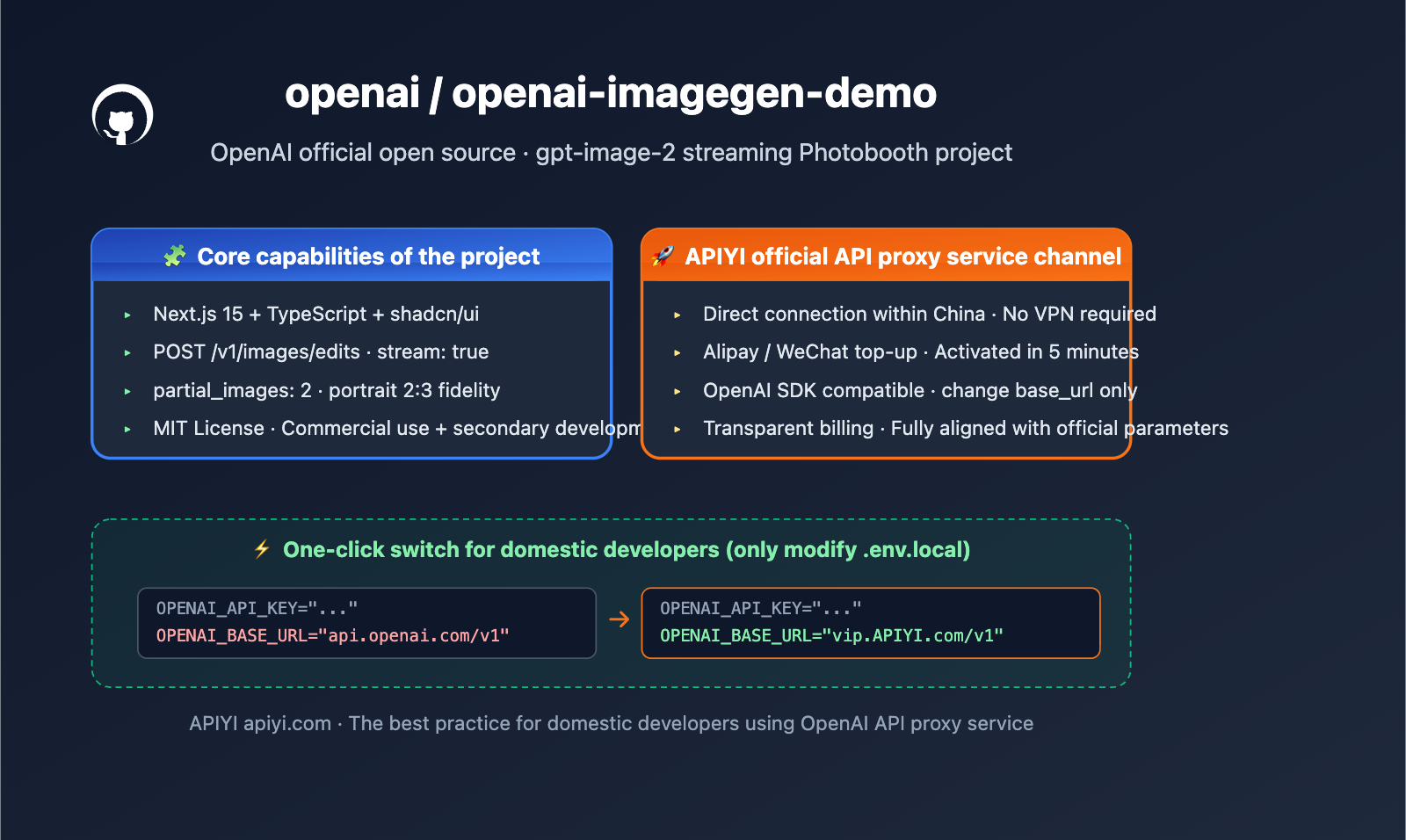
OpenAI has open-sourced the openai-imagegen-demo project on GitHub. This is a Next.js demo application released alongside gpt-image-2, showcasing unique model capabilities like streaming image generation, portrait stylization, and multi-style concurrency. Project URL: github.com/openai/openai-imagegen-demo.
This isn't just another "Hello World" example. The source code contains the progressive partial_images streaming output mode recommended by OpenAI, as well as the latest usage of the /v1/images/edits endpoint for multi-image editing scenarios.
Core Value: After reading this, you'll fully understand the architecture, key parameters, and reproduction steps of this official demo, and learn how to use the same gpt-image-2 API in China without needing a VPN or waiting, via the APIYI official proxy service.
openai-imagegen-demo Key Takeaways
| Feature | Description | Value |
|---|---|---|
| Project Positioning | Official OpenAI Photobooth demo, showcasing gpt-image-2 portrait stylization |
The most authoritative gpt-image-2 integration reference |
| Tech Stack | Next.js 15 App Router + TypeScript + Tailwind + shadcn/ui | Modern web stack, production-ready and reusable |
| Core Endpoint | POST /v1/images/edits, with stream: true and partial_images |
The first official streaming image generation demo |
| Model | gpt-image-2, quality high, size 1024x1536 (2:3 portrait) |
Emphasizes portrait fidelity and expression restoration |
| License | MIT License, free for commercial use and secondary development | Ready for direct integration into commercial projects |
| Access Method | Official requires OpenAI API Key; APIYI proxy apiyi.com allows direct connection in China |
Lowers barrier to entry, no VPN required |
Deep Dive into imagegen-demo Positioning
openai-imagegen-demo is essentially an interactive photobooth: users upload or take a selfie, select up to 4 preset styles (e.g., knitted, digital art, oil painting, etc.), and the application concurrently calls the gpt-image-2 images/edits endpoint, returning the finished product for each style in a streaming fashion.
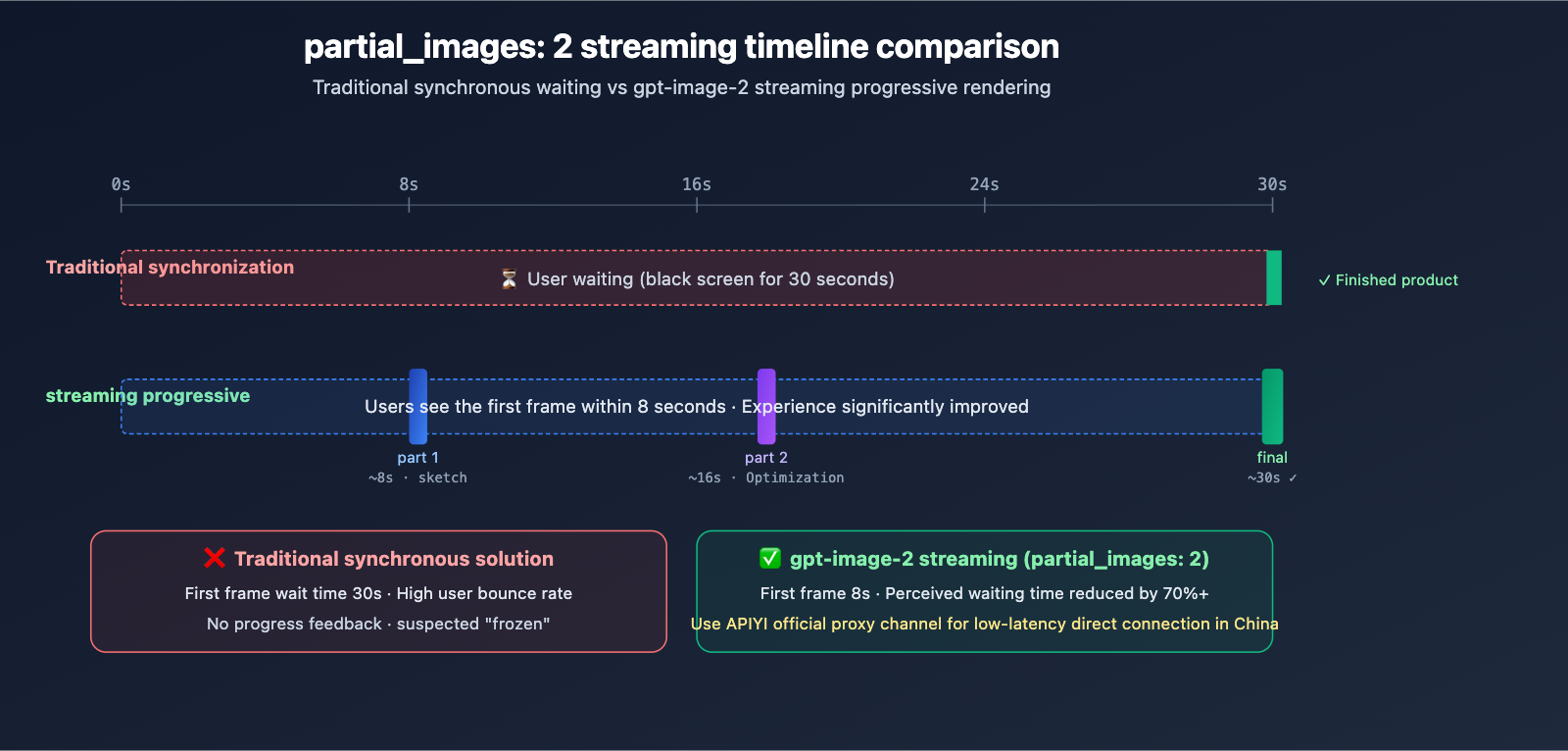
Unlike common "text-to-image demos" on the market, this official repository focuses on two new capabilities: image-to-image (image editing) and progressive streaming output (partial_images). The former solves the engineering challenge of "maintaining face consistency," while the latter transforms the waiting experience from a 30-second black screen into a frame-by-frame reveal.
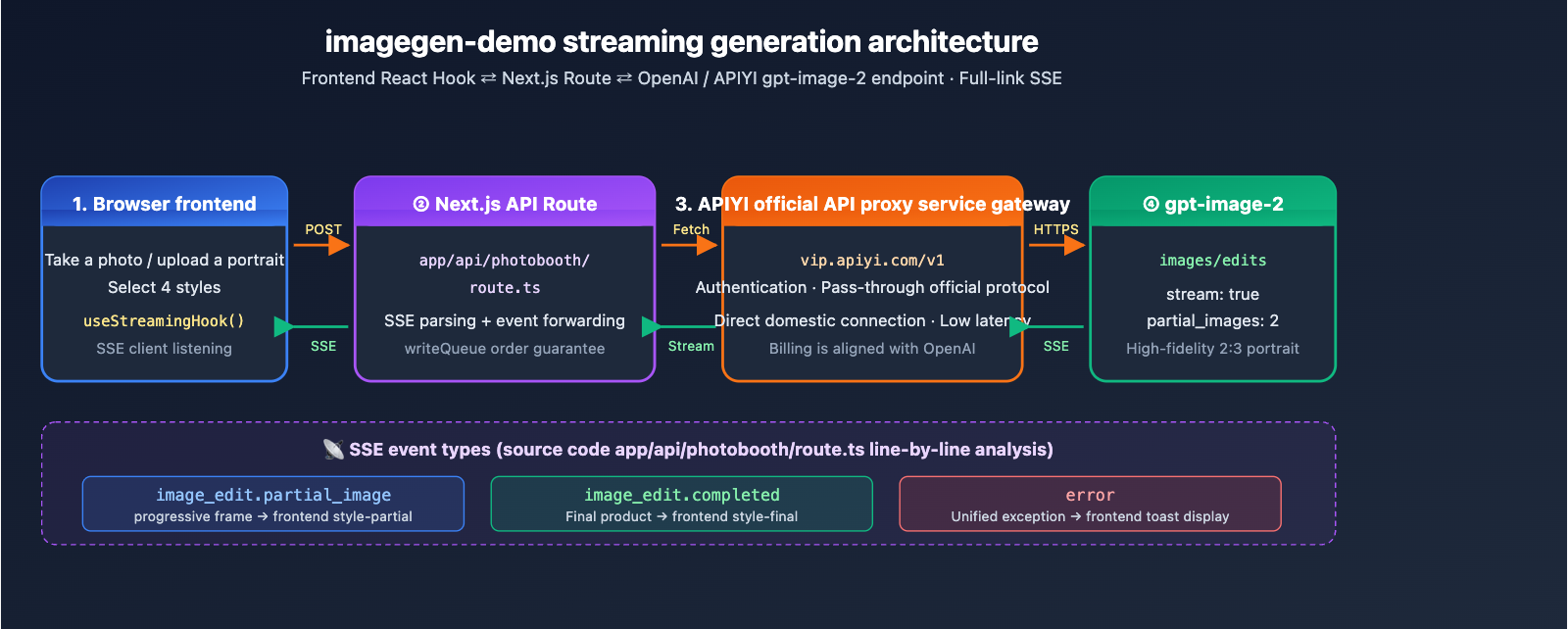
Decoding the imagegen-demo Project Architecture
Key Source Code Analysis
The project core consists of a single API Route: app/api/photobooth/route.ts. It’s responsible for packaging the frontend portrait image and style prompt, then sending a streaming request to OpenAI’s /v1/images/edits endpoint. Here is the structure of the critical request body:
const body = {
  model: "gpt-image-2",
  prompt: `${style.prompt}\n\n${OPENAI_IMAGE_OUTPUT_REQUIREMENTS}`,
  images: [{ image_url: imageDataUrl }],
  size: "1024x1536",
  quality: "high",
  output_format: "png",
  stream: true,
  partial_images: 2,
};
Three details are worth noting:
stream: true+partial_images: 2: These are unique streaming capabilities of gpt-image-2. The server pushes two intermediate frames before delivering the final image.imagesparameter: This accepts a data URL for one or more reference images, supporting multi-image fusion editing.OPENAI_IMAGE_OUTPUT_REQUIREMENTS: This enforces a "2:3 portrait aspect ratio, maintaining character pose and expression," which is the golden standard for writing effective image editing prompts.
Streaming Event Parsing
The route uses SSE (Server-Sent Events) to listen to official responses and handles three types of events:
image_edit.partial_image: Intermediate frames; pushesstyle-partialto the frontend.image_edit.completed: The final product; pushesstyle-finalto the frontend.error: Throws an exception, which the frontend catches uniformly.
On the React side, the frontend uses a custom hook to maintain a writeQueue Promise chain, ensuring that event order remains consistent during concurrent style requests. This is the most engineering-valuable part of the demo.
Getting Started with imagegen-demo
Minimalist Reproduction Steps
Following the official README, you can get it running in just 5 commands:
git clone https://github.com/openai/openai-imagegen-demo
cd openai-imagegen-demo
cp .env.example .env.local
echo "OPENAI_API_KEY=sk-xxxxx" >> .env.local
npm install && npm run dev
View the complete .env.local configuration for running via the APIYI proxy
# Option 1: Use official OpenAI API (requires overseas network + API quota)
OPENAI_API_KEY="sk-proj-xxxxx"

# Option 2: Use APIYI proxy service (direct domestic connection, no VPN required)
OPENAI_API_KEY="your-apiyi-key"
OPENAI_BASE_URL="https://vip.apiyi.com/v1"

# Optional: Organization and Project ID
OPENAI_ORG_ID=""
OPENAI_PROJECT_ID=""
Then, simply replace the hardcoded endpointBase in app/api/photobooth/route.ts to read process.env.OPENAI_BASE_URL ?? "https://api.openai.com/v1", and you can seamlessly switch between the official and proxy channels.
const endpointBase = process.env.OPENAI_BASE_URL ?? "https://api.openai.com/v1";

const response = await fetch(`${endpointBase}/images/edits`, {
  method: "POST",
  headers: {
    "Authorization": `Bearer ${apiKey}`,
    "Content-Type": "application/json",
  },
  body: JSON.stringify(body),
});
Integration Tip: Domestic developers often face three major hurdles when running the official OpenAI demo (network access, API quotas, and payment methods). We recommend obtaining a compatible key via the APIYI (apiyi.com) proxy service. By pointing
OPENAI_BASE_URLtohttps://vip.apiyi.com/v1, you can launch the project locally with one click, with streaming events and parameters fully aligned with the official version.
imagegen-demo Integration Comparison
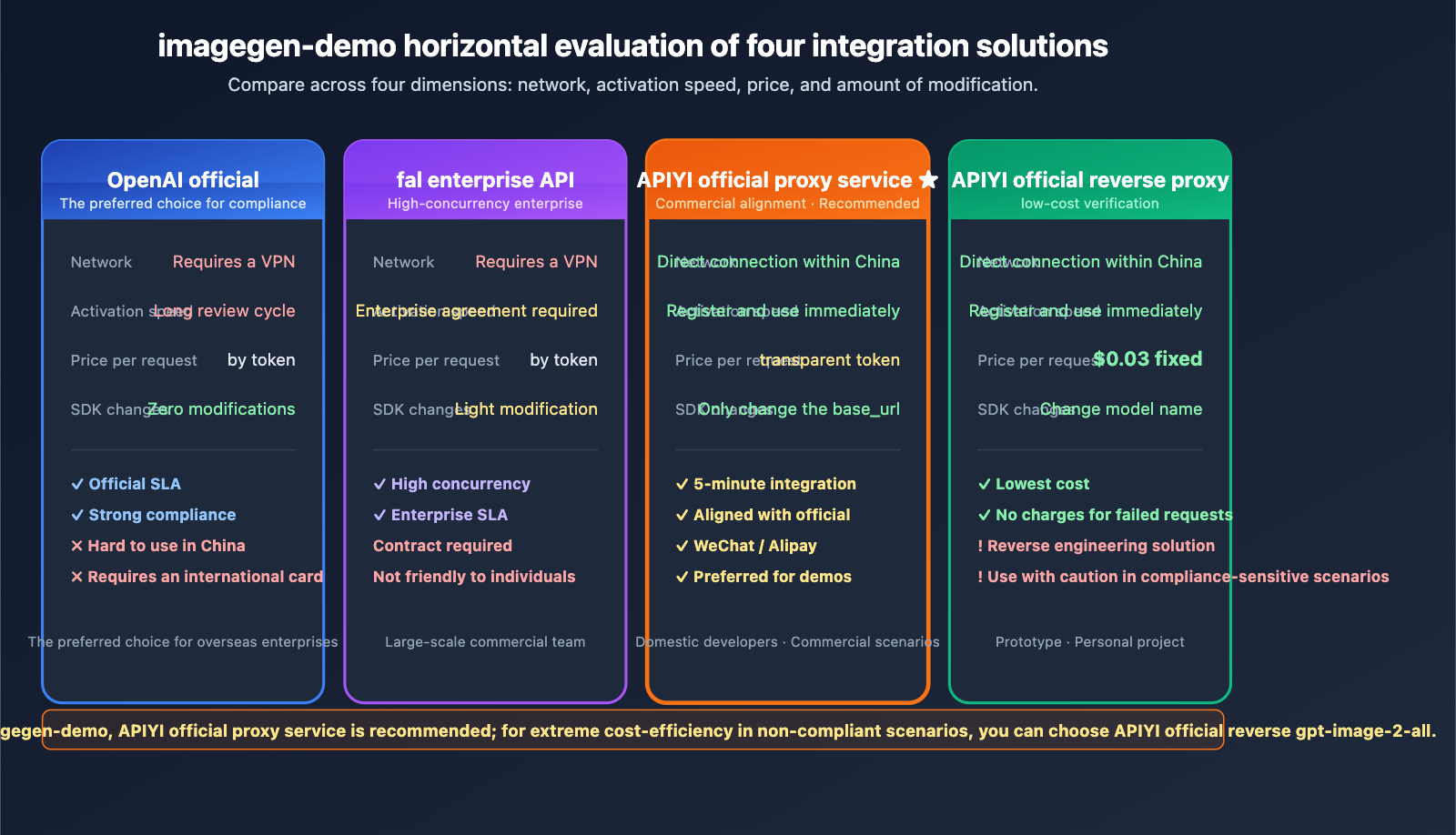
| Integration Method | Network Requirements | Activation Speed | Unit Price | SDK Changes |
|---|---|---|---|---|
| OpenAI Official | Overseas network required | Card binding + review | Token-based (approx. $0.15+/image) | None |
| fal Enterprise API | Overseas access | Enterprise agreement | Token-based | Minor modifications |
| APIYI Official Proxy | Domestic direct access | Instant | Transparent token billing | Change base_url only |
| APIYI Reverse Proxy | Domestic direct access | Instant | Fixed $0.03/image | Change model name only |
Analysis of Approaches
OpenAI Official Direct Connection: The official channel remains the gold standard for compliance and SLA, serving as the default target environment for imagegen-demo. However, using it from within China requires a VPN, an international credit card, and a lengthy API quota approval process. In contrast, the APIYI official proxy is much better suited for development, testing, and domestic production environments due to its accessibility and speed.
fal Enterprise API: On April 21, 2026, fal released its enterprise endpoint for gpt-image-2, which offers excellent high-concurrency SLA. However, it's geared toward enterprise clients, making the barrier to entry high for individual developers. For those looking to get imagegen-demo running locally, APIYI is a much more lightweight option.
APIYI Official Proxy vs. Reverse Proxy: The Official Proxy means APIYI acts as a transparent bridge to the official OpenAI API; billing, SLA, and features are identical to the official version, making it ideal for commercial use. The Reverse Proxy is achieved by reverse-engineering the ChatGPT web interface, offering a fixed price of $0.03 per image, which is perfect for prototyping. Both channels are available on the APIYI platform, allowing developers to switch between them as needed.
Note: The data above is compiled from official OpenAI pricing, fal enterprise release notes, and technical documentation at
docs.apiyi.com. You can verify these details yourself at APIYI (apiyi.com).
Detailed Breakdown of gpt-image-2 Key Parameters (from imagegen-demo source code)
Based on lib/constants.ts in the imagegen-demo, here are the officially recommended default parameter combinations for gpt-image-2:
| Parameter | Demo Default | Description | Adjustment Suggestion |
|---|---|---|---|
| model | gpt-image-2 |
The latest image model | Keep as is |
| size | 1024x1536 |
2:3 portrait ratio | Use 1536x1024 for social media landscape |
| quality | high |
Highest image quality | Use medium/low to reduce costs |
| output_format | png |
Supports transparent backgrounds | Use webp for web to save bandwidth |
| stream | true |
Enables SSE streaming | Must-have for real-time apps |
| partial_images | 2 |
Pushes 2 intermediate frames | Max is 3; balance wait time vs. bandwidth |
Prompt Engineering Best Practices
The OPENAI_IMAGE_OUTPUT_REQUIREMENTS constant in the demo is a highly valuable prompt template:
"portrait orientation (2:3 aspect ratio), preserve the exact people, poses, facial expressions, and scene composition as faithfully as possible"
This snippet reveals the golden paradigm for gpt-image-2 image editing:
- Explicitly specify the ratio: Even if the
sizeparameter is set, reiterate the ratio in the prompt to improve hit rates. - Emphasize fidelity requirements:
preserve the exact ...is the key incantation for maintaining face consistency. - List fidelity dimensions: Explicitly name people, poses, expressions, and the scene; the more specific you are, the higher the restoration quality.
FAQ
Q1: What is the openai-imagegen-demo project?
openai-imagegen-demo is an official OpenAI open-source Photobooth demo application on GitHub. It uses Next.js 15 + TypeScript + gpt-image-2 to implement a complete workflow: "upload portrait → select style → stream multi-style image generation." It is currently the most authoritative reference for gpt-image-2 images/edits endpoint integration and is licensed under MIT for commercial use.
Q2: How does imagegen-demo differ from other image generation demos?
The differences are twofold: First, it uses the brand-new /v1/images/edits endpoint for image-to-image (rather than traditional DALL-E text-to-image), which maintains face consistency. Second, it enables stream: true + partial_images streaming capabilities, allowing users to see the image rendering process step-by-step instead of waiting 30 seconds with a black screen. Most other community demos are DALL-E 3 text-to-image and lack these two capabilities.
Q3: When was imagegen-demo released?
The repository was open-sourced alongside the release of ChatGPT Images 2.0 by OpenAI on April 21, 2026. With the official launch of the gpt-image-2 model in the API and Codex, the official team hopes to lower the barrier for developer integration through this demo. The README is still being updated.
Q4: Which application scenarios is imagegen-demo best suited for?
It is primarily suited for four types of scenarios:
- Social App Costume/Style Swapping: Users upload selfies to generate traditional, oil painting, or cyberpunk versions.
- E-commerce Product Image Unification: Batch convert product photos into a unified brand visual style.
- Conference/Event AI Photo Booth: Interactive photo installations for offline events.
- Teaching Demos/Hackathon Prototypes: Quickly demonstrate new gpt-image-2 capabilities.
Q5: How can I quickly run imagegen-demo via API?
We recommend using the APIYI official proxy channel for a quick reproduction:
- Visit APIYI (apiyi.com) to register an account and create an API key.
- Clone the repository:
git clone https://github.com/openai/openai-imagegen-demo - Write
OPENAI_API_KEYandOPENAI_BASE_URL=https://vip.apiyi.com/v1into.env.local. - Modify
route.tsso thatendpointBasereadsprocess.env.OPENAI_BASE_URL. - Run
npm install && npm run devto see the results atlocalhost:3000.
APIYI supports unified access to various mainstream image models like gpt-image-2, Nano Banana Pro, and Flux, making it easy to compare and switch locally.
Q6: How does the imagegen-demo partial_images parameter work?
partial_images specifies how many intermediate frames the server pushes before returning the final image. The demo default is 2, meaning a single generation goes through three stages: "initial sketch → secondary optimization → final product." Each intermediate frame is pushed via the SSE event image_edit.partial_image, allowing the frontend to render in real-time and avoid the 30-second black-screen wait. This parameter supports up to 3, though more intermediate frames will increase bandwidth usage.
Q7: How can developers in China run imagegen-demo without barriers?
Running the official demo directly from China faces three major obstacles: network access to the OpenAI API, the need for an international credit card, and a long API quota review cycle. You can solve these at once using the APIYI official proxy channel:
- Register an account on
apiyi.com(supports Alipay/WeChat top-ups). - Obtain an API key compatible with the OpenAI protocol.
- Set
OPENAI_BASE_URL=https://vip.apiyi.com/v1in.env.local. - Have
route.tsread this environment variable; no other code changes are needed.
The entire process takes about 5 minutes, requires no VPN, and billing is transparently aligned with official OpenAI pricing.
Q8: What are the known limitations of imagegen-demo?
Here are the current objective limitations:
- Single Image Generation Time: At high quality (
quality: high), one image takes about 20-30 seconds; batch processing requires concurrency optimization. - Face Consistency is not 100%: Slight distortions may still occur in complex poses or multi-person scenes.
- Cost Considerations: OpenAI officially charges by token; high-quality images start at approximately $0.15 each. For batch scenarios, we recommend using
mediumquality or the APIYI official proxy channel ($0.03/image). - Limited Style Presets: The demo only has ~10 built-in styles; you need to extend
lib/styles.tsyourself. - Mobile Camera Compatibility: iOS Safari may require manual authorization for camera access on the first visit.
openai-imagegen-demo Key Takeaways
- Official OpenAI Open Source: An authoritative demo released alongside gpt-image-2, licensed under MIT for commercial use.
- Focus on image-to-image capabilities: Utilizes the
/v1/images/editsendpoint, establishing an engineering paradigm for maintaining face consistency. - Streaming rendering magic: Combines
stream: trueandpartial_images: 2to transform the waiting experience from a blank screen to progressive rendering. - Next.js 15 Full-stack: The App Router + SSE architecture represents the modern best practice for image generation applications.
- Shortcut for domestic access: Connect directly by using the APIYI (apiyi.com) official proxy channel and updating just one
base_url. - The Golden Prompt Paradigm: Using "preserve the exact…" is the secret spell for high fidelity—definitely worth copying into your own projects.
- Official Proxy vs. Reverse Proxy: Choose the official proxy for commercial use (aligned with OpenAI) or the reverse proxy for testing (fixed at $0.03/image).
Summary
openai-imagegen-demo is the best entry point for understanding the new capabilities of gpt-image-2. Its core value lies in three areas:
- Authoritative Reference: An integration paradigm written by the official team, covering parameters, prompts, and streaming architecture in one go.
- Production-ready Code: Next.js 15 + SSE + multi-style concurrency that you can reuse directly in your own projects.
- Reproducible in China: With the APIYI official proxy channel, domestic developers can get the official demo up and running in just 5 minutes.
If you want to try out the streaming image editing capabilities of gpt-image-2 right away, we recommend getting a compatible key via APIYI (apiyi.com). Simply clone openai-imagegen-demo, point your OPENAI_BASE_URL to https://vip.apiyi.com/v1, and you'll be able to replicate the official OpenAI demo experience locally.
Related Articles
If you're interested in gpt-image-2 and the openai-imagegen-demo, we recommend checking out these resources:
- 📘 Where to find the gpt-image-2 Reverse API? Integrate with the APIYI official reverse channel in 3 minutes – Learn about the low-cost $0.03/image solution.
- 📊 gpt-image-2 vs. Nano Banana Pro: Image Model Comparison – A deep dive into the capability differences between mainstream image models.
- 🚀 6 Industry Use Cases for gpt-image-2 – Explore real-world applications in e-commerce, education, social media, and more.
📚 References
-
OpenAI imagegen-demo Official Repository: Full source code, README, and installation documentation.
- Link:
github.com/openai/openai-imagegen-demo - Note: The authoritative starting point for understanding the gpt-image-2 integration paradigm, including first-hand source code and setup guides.
- Link:
-
OpenAI Official gpt-image-2 API Documentation: Model parameters, endpoints, and billing details.
- Link:
developers.openai.com/api/docs/models/gpt-image-2 - Note: Check here for all supported parameters, pricing, and rate limit rules.
- Link:
-
OpenAI ChatGPT Images 2.0 Release Page: Introduction to new model capabilities.
- Link:
openai.com/index/introducing-chatgpt-images-2-0/ - Note: Learn about the design philosophy, core capabilities, and use cases for gpt-image-2.
- Link:
-
APIYI gpt-image-2 Official Proxy Channel Documentation: Guide for direct access in China.
- Link:
docs.apiyi.com/en/api-capabilities/gpt-image-2-all/overview - Note: Get details on compatible keys, base_url configurations, and pricing.
- Link:
Author: APIYI Technical Team
Technical Discussion: Feel free to share your imagegen-demo practical use cases in the comments. For more documentation, visit the APIYI documentation center at docs.apiyi.com.