Why Freepik's Nano Banana Pro is a Love-Hate Relationship
Nano Banana Pro (Google Gemini 3 Pro Image) is currently one of the most powerful Large Language Models for image generation. With a 94% text rendering accuracy and native 4K output capability, it's a top-tier performer for product photos, poster design, and architectural visualization.
Many users choose to use Nano Banana Pro through Freepik because it offers a convenient web interface and a massive library of assets. But once you start using it for real work, you'll run into a few frustrating issues:
| Pain Point | Specifics | Impact |
|---|---|---|
| High Credit Consumption | Costs 250 credits per image | Monthly quota is drained in no time |
| 4K Excluded from Unlimited | Premium+/Pro "Unlimited" doesn't include 4K | You'll pay extra for high-def needs |
| Short Promotion Period | "Unlimited Nano Banana Pro" lasts only 7 days | Long-term costs become very high |
| No API Access | Only supports Web UI operations | Can't be integrated into your own apps |
| Queue Rate Limiting | Enter the slow queue after exceeding quota | Batch generation efficiency is low |
🎯 The Core Issue: Freepik is great for casual designers, but for developers and businesses needing API integration, batch generation, or stable 4K output, both the cost and flexibility are major dealbreakers.
Freepik Nano Banana Pro: Real Cost Analysis
Let's do the math and see the real cost of using Nano Banana Pro on Freepik:
2.1 Freepik Plans and AI Credits
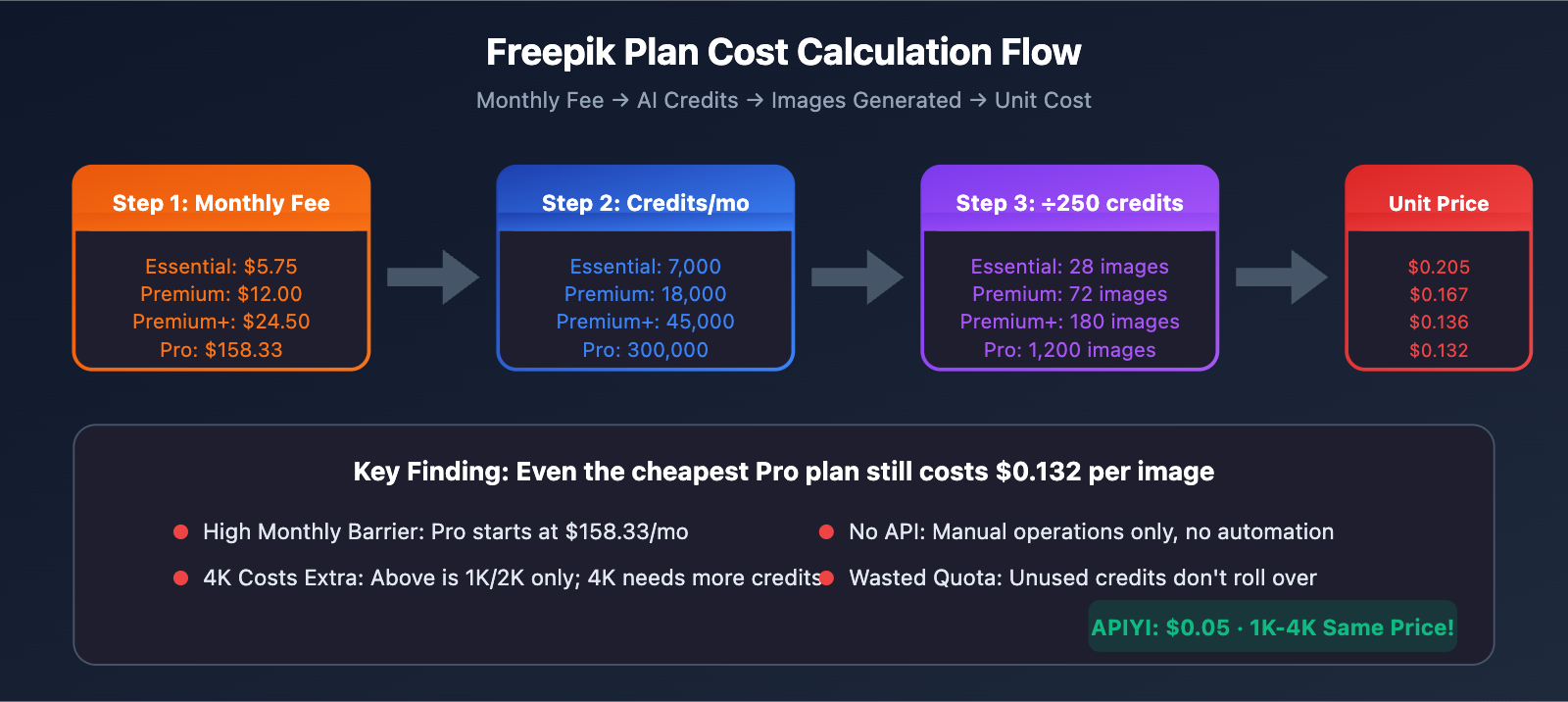
| Plan | Monthly Fee | AI Credits/mo | Images Generated (Nano Banana Pro) |
|---|---|---|---|
| Essential | $5.75 | 7,000 | 28 images |
| Premium | $12.00 | 18,000 | 72 images |
| Premium+ | $24.50 | 45,000 | 180 images |
| Pro | $158.33 | 300,000 | 1,200 images |
Note: The above is calculated at 250 credits per image. In actual use, adding style references (+100 credits) or downloading SVGs (+150 credits) will further increase consumption.
2.2 Unit Cost Comparison
| Plan | Monthly Fee | Images Generated | Unit Cost | Vs. Official $0.234 |
|---|---|---|---|---|
| Essential | $5.75 | 28 images | $0.205/image | 87% |
| Premium | $12.00 | 72 images | $0.167/image | 71% |
| Premium+ | $24.50 | 180 images | $0.136/image | 58% |
| Pro | $158.33 | 1,200 images | $0.132/image | 56% |
It looks like the Freepik Pro plan's unit price is already cheaper than the official site? But don't forget:
- High Monthly Barrier – The Pro plan starts at $158.33/month.
- 4K Costs Extra – The prices above are for 1K/2K; 4K requires additional credits.
- No API – Manual operations only; you can't make programmatic calls.
- Wasted Quotas – Unused credits won't roll over to the next month.
💡 Key Finding: If you only need to generate 100–500 images per month, Freepik's expensive monthly plans actually aren't cost-effective. Plus, since there's no API support, you can't integrate it into your own products.
3 Low-Cost Alternatives to Nano Banana Pro
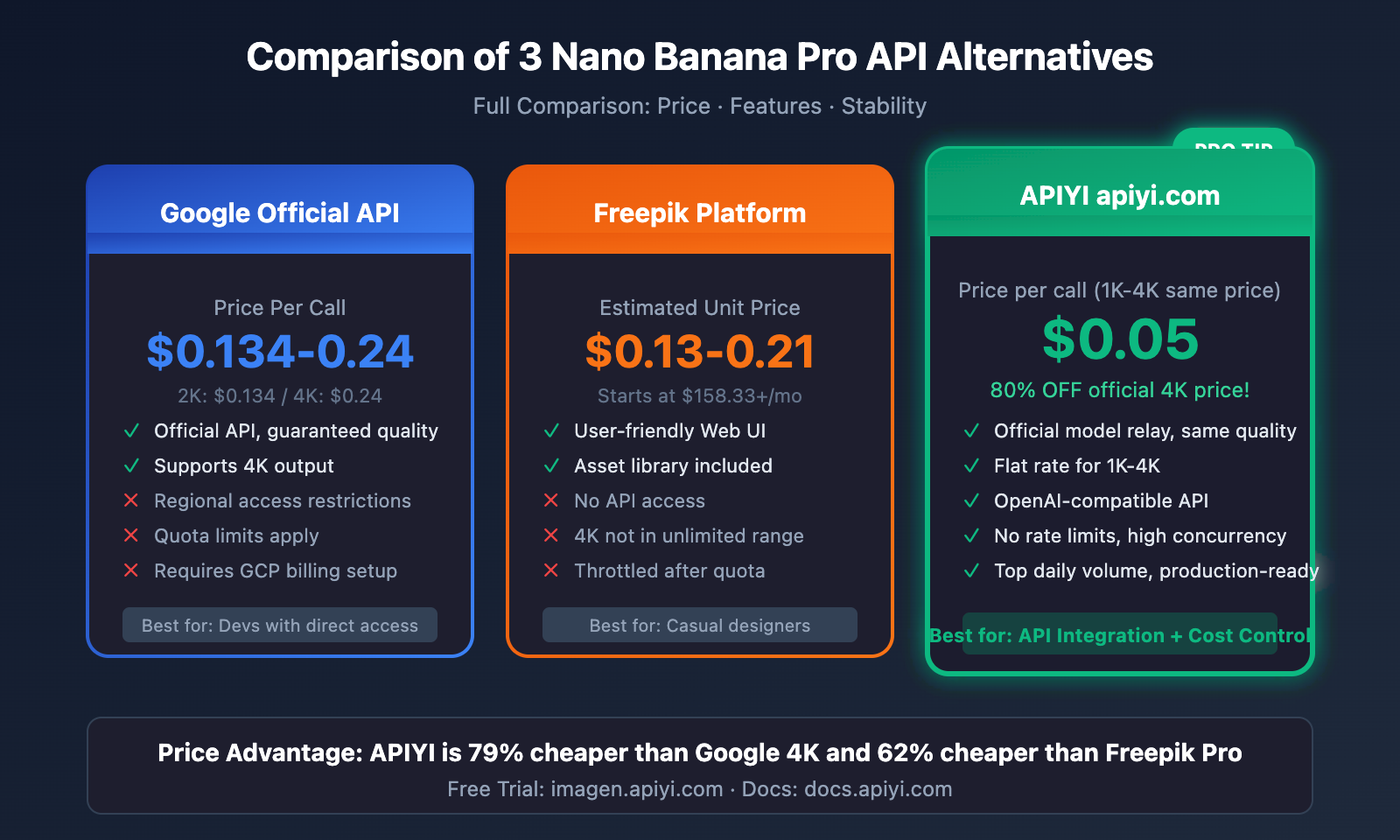
As a developer, what you really need is a stable API interface + reasonable pricing + no rate limits. Here are the 3 best options currently on the market:
Feature Comparison Overview
| Option | Unit Price | 4K Support | API Access | Rate Limit | Stability |
|---|---|---|---|---|---|
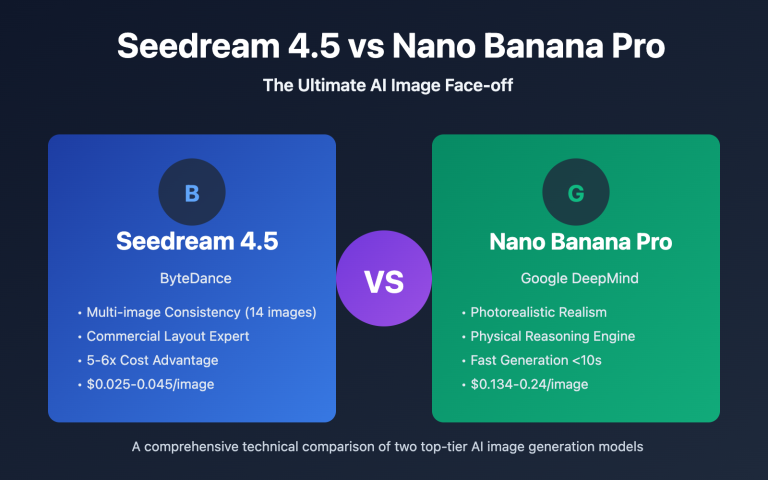
| Google Official API | $0.134-0.24 | ✅ | ✅ Native | Quota limits | ⭐⭐⭐⭐⭐ |
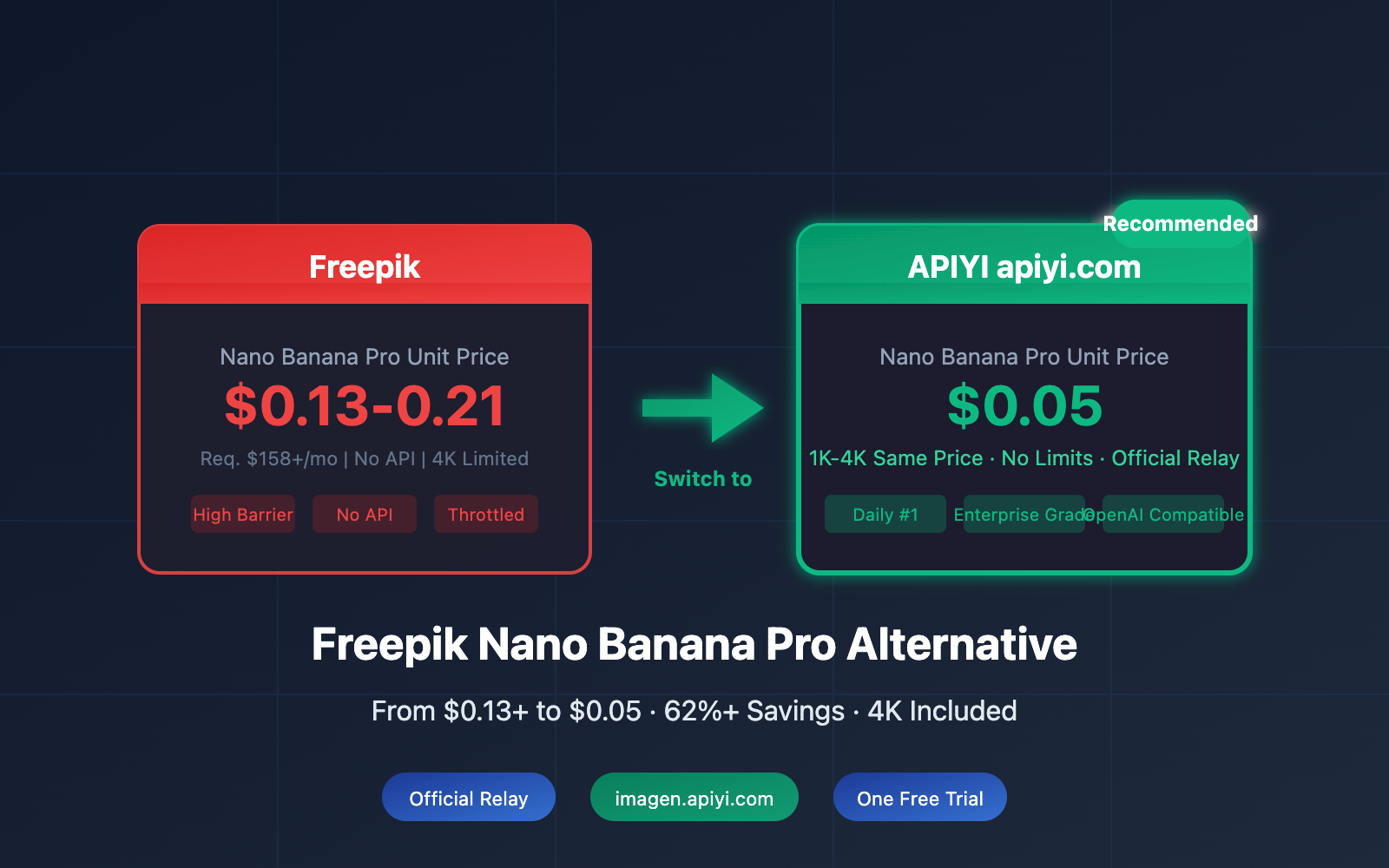
| Freepik | $0.13-0.21 | Restricted | ❌ | Queuing | ⭐⭐⭐⭐ |
| APIYI apiyi.com | $0.05 | ✅ Same Price | ✅ OpenAI Compatible | No Limits | ⭐⭐⭐⭐⭐ |
Option 1: Google Official API (Vertex AI / AI Studio)
4.1 Official Pricing
Google offers two official channels:
| Channel | 1K-2K Price | 4K Price | Features |
|---|---|---|---|
| AI Studio | $0.134/image | $0.24/image | Best for individual developers |
| Vertex AI | $0.134/image | $0.24/image | Enterprise-grade, requires GCP account |
4.2 Limitations of the Official API
- Regional Restrictions – Direct access isn't available in some regions.
- Quota Limits – The free tier is limited to 15 requests per minute, and even the paid tier has upper limits.
- Complex Billing – It requires linking a GCP billing account, which isn't very user-friendly for developers in certain regions.
- High 4K Pricing – At $0.24 per image, the 4K price is nearly double that of 2K.
4.3 Official Documentation Reference
If you're able to use the official API directly, you can refer to Google's official documentation:
Google AI Image Generation Docs: ai.google.dev/gemini-api/docs/image-generation
Option 2: Third-party API Platform Comparison
There are several third-party platforms on the market providing Nano Banana Pro API proxy services, though pricing and stability vary quite a bit:
| Platform | 2K Price | 4K Price | API Format | Notes |
|---|---|---|---|---|
| Replicate | $0.08 | $0.15 | Proprietary | Requires adaptation |
| fal.ai | $0.10 | $0.18 | Proprietary | European nodes |
| Segmind | $0.12 | $0.23 | REST API | Pricing close to official |
| NanoBanana API | $0.02 | $0.12 | Proprietary | Unofficial model |
The Issue: Most platforms use their own API formats, which means you'll need to do extra development work to adapt your code, and it's often hard to guarantee long-term stability.
Option 3: APIYI – The Heavyweight Champion for Daily Usage (Recommended)
🚀 Why we recommend it: Nano Banana Pro is the number one model by daily consumption on the APIYI platform. We've poured significant DevOps resources into ensuring its rock-solid stability and availability.
6.1 Core Advantages
| Advantage | Description |
|---|---|
| Rock-bottom Pricing | Flat rate of $0.05/request for 1K-4K, which is 80% off the official 4K price |
| Guaranteed Official Source | Calls Google's official interface directly—no third-party middleman models |
| No Speed Limits | No quota restrictions; supports high-concurrency batch generation |
| Commercial-Grade Stability | Enterprise-level SLA guarantees, perfect for production environments |
| OpenAI Compatible | Use the SDKs you already know with zero learning curve |
6.2 Price Comparison
Freepik Pro:     $0.132/image (requires $158.33/month)
Google Official 4K:  $0.240/image
APIYI:          $0.050/image (1K-4K same price!)

Savings:
vs Freepik: 62%
vs Google 4K: 79%
6.3 Free Trial
Want to see the results for yourself first? We've provided a free online testing tool:
🎨 AI Image Master: Visit
imagen.apiyi.comto try it out for free and experience the 4K output quality of Nano Banana Pro firsthand.
Hands-on Tutorial: Calling Nano Banana Pro via APIYI
7.1 Getting Started
- Visit
apiyi.comto register an account. - Create an API Key in the dashboard.
- Top up your account balance (supports Alipay and WeChat).
7.2 Two Ways to Call the API
APIYI supports two calling methods, so you can choose whichever fits your workflow:
Method 1: Using the Official Google Format
If you're already familiar with Google's official documentation, you just need to swap out the request address and the key:
import google.generativeai as genai

# 只需替换这两行,其他代码与官方文档完全一致
genai.configure(
    api_key="your-apiyi-key",
    transport="rest",
    client_options={"api_endpoint": "https://api.apiyi.com"}
)

model = genai.ImageGenerationModel("imagen-3.0-generate-002")

result = model.generate_images(
    prompt="A serene Japanese garden with cherry blossoms, 4K ultra detailed",
    number_of_images=1,
    aspect_ratio="1:1"
)

# 保存图像
result.images[0].save("output.png")
📚 Official Format Docs: Refer to the official Google documentation at
ai.google.dev/gemini-api/docs/image-generation. Just remember to replace the endpoint and key.
Method 2: Using the OpenAI Compatible Format (Recommended)
import openai

client = openai.OpenAI(
    api_key="your-apiyi-key",
    base_url="https://api.apiyi.com/v1"  # APIYI 统一接口
)

response = client.images.generate(
    model="nano-banana-pro",
    prompt="Professional product photography, smartphone on marble surface, studio lighting, 4K",
    size="1024x1024",
    quality="hd"
)

print(response.data[0].url)
7.3 Node.js Example
import OpenAI from 'openai';

const client = new OpenAI({
  apiKey: 'your-apiyi-key',
  baseURL: 'https://api.apiyi.com/v1'  // APIYI 接口
});

async function generateImage(prompt) {
  const response = await client.images.generate({
    model: 'nano-banana-pro',
    prompt: prompt,
    size: '1024x1024',
    quality: 'hd'
  });

  return response.data[0].url;
}

// 使用示例
const imageUrl = await generateImage(
  'Modern minimalist logo design, tech company, clean lines'
);
console.log(imageUrl);
7.4 cURL Example
curl -X POST "https://api.apiyi.com/v1/images/generations" \
  -H "Authorization: Bearer your-apiyi-key" \
  -H "Content-Type: application/json" \
  -d '{
    "model": "nano-banana-pro",
    "prompt": "Futuristic city skyline at sunset, cyberpunk style, 4K ultra detailed",
    "size": "1024x1024",
    "quality": "hd"
  }'
Cost Comparison for Different Usage Levels
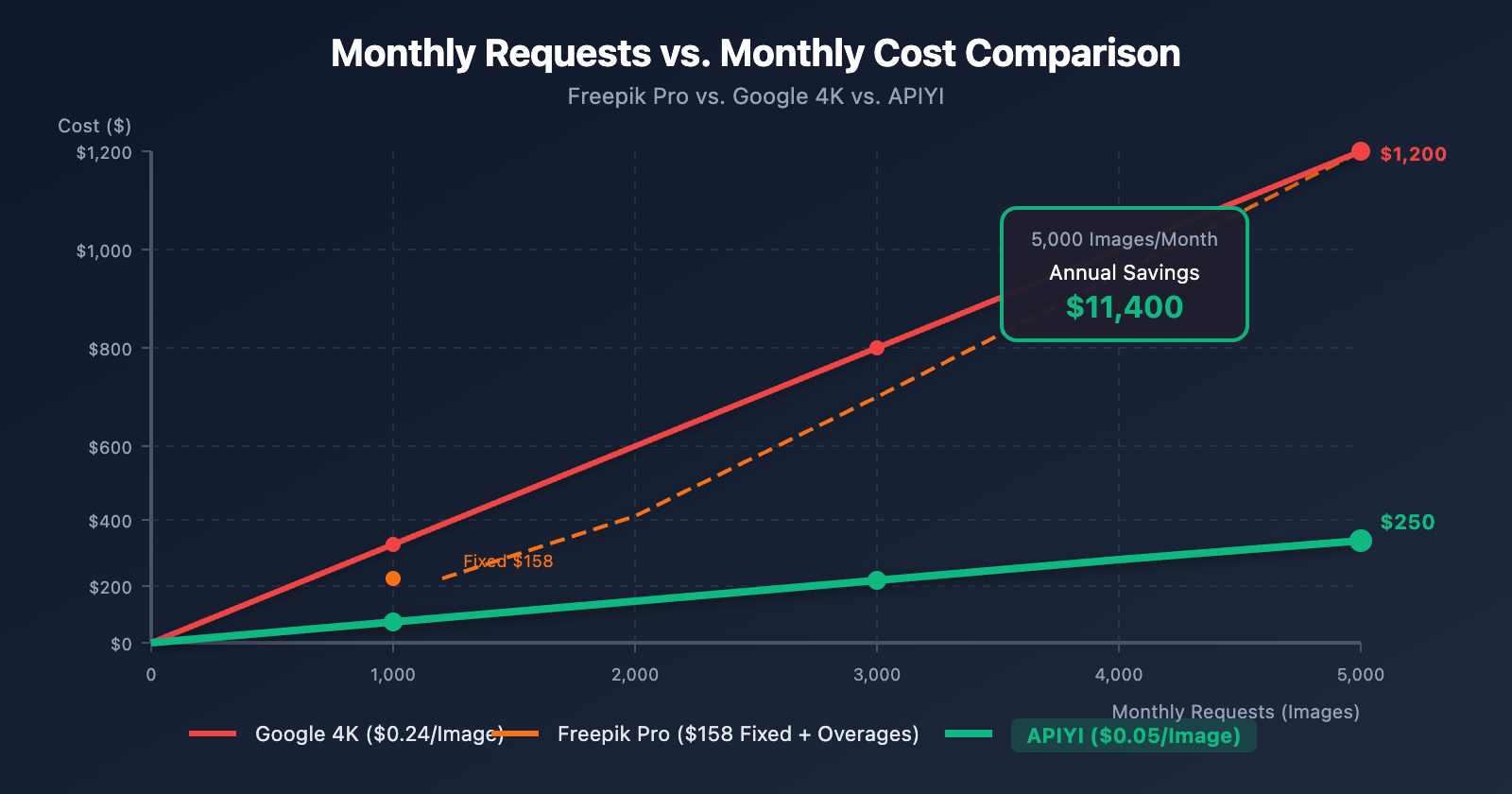
8.1 Monthly Cost Simulation
| Monthly Requests | Freepik Pro | Google Official 4K | APIYI | Recommendation |
|---|---|---|---|---|
| 100 Images | $158.33 (Fixed) | $24 | $5 | APIYI |
| 500 Images | $158.33 | $120 | $25 | APIYI |
| 1,000 Images | $158.33 | $240 | $50 | APIYI |
| 2,000 Images | $316.66 (Requires upgrade) | $480 | $100 | APIYI |
| 5,000 Images | Not supported | $1,200 | $250 | APIYI |
8.2 Annual Cost Comparison
Imagine you're an e-commerce team generating 1,000 product images every month:
Freepik Pro Annual Cost:   $158.33 × 12 = $1,899.96
Google Official 4K:       $0.24 × 1,000 × 12 = $2,880
APIYI:                    $0.05 × 1,000 × 12 = $600

Annual Savings (vs Freepik): $1,299.96 (68%)
Annual Savings (vs Google):  $2,280 (79%)
💰 Cost Optimization: For usage exceeding 1,000 images per month, calling Nano Banana Pro via APIYI (apiyi.com) can save you 68%-79% while giving you more flexible API capabilities.
Recommended Scenarios
9.1 When to Choose Freepik
- ✅ Occasional use, < 50 images per month
- ✅ Need access to the Freepik asset library
- ✅ Don't need API integration
- ✅ Comfortable with a web-based UI
9.2 When to Choose APIYI
- ✅ Need to integrate the API into your own app
- ✅ Monthly usage > 100 images
- ✅ Require consistent 4K output
- ✅ Need batch generation without rate limits
- ✅ Looking for cost-effectiveness and budget-conscious
- ✅ Need enterprise-grade reliability
9.3 Typical Application Scenarios
| Scenario | Monthly Volume | Recommended Plan | Monthly Cost |
|---|---|---|---|
| Individual Designer | 50 Images | Freepik Premium | $12 |
| Small E-commerce | 200 Images | APIYI | $10 |
| Content Team | 500 Images | APIYI | $25 |
| SaaS Product | 2,000 Images | APIYI | $100 |
| Large Enterprise | 10,000 Images | APIYI (Enterprise) | Contact for custom pricing |
Frequently Asked Questions (FAQ)
Q1: Is APIYI's Nano Banana Pro the official model?
A: Yes. APIYI connects directly to Google's official interfaces, ensuring it's an official model relay, not a third-party trained imitation. The generation quality is exactly the same as the official version. We invest heavily in maintenance and operations for the APIYI (apiyi.com) platform to ensure the service is stable and production-ready.
Q2: Why is APIYI's price so low?
A: There are a few main reasons:
- Scale Effect – Nano Banana Pro is our #1 model by daily volume, so we handle a massive amount of requests.
- Technical Optimization – Our smart routing and caching strategies help drive down costs.
- Direct Partnerships – We work closely with upstream channels to get the best rates.
Q3: Are 1K-4K really the same price?
A: They sure are. Whether you're generating 1024×1024 or 4096×4096, APIYI charges a flat $0.05 per generation. This is one of our core competitive advantages—officially, 4K pricing is nearly double that of 2K, but we don't differentiate between them.
Q4: Which programming languages are supported?
A: APIYI provides an OpenAI-compatible interface, which means it supports all major languages:
- Python (openai SDK)
- Node.js (openai SDK)
- Go, Java, PHP, Ruby, and more
- Any language that can handle HTTP requests
You can find detailed documentation at docs.apiyi.com.
Q5: How do I migrate from Freepik to APIYI?
A: If you were previously using Freepik manually, migrating to APIYI will require some coding. The good news is:
- APIYI uses an OpenAI-compatible interface, so the learning curve is extremely low.
- Our official documentation at
docs.apiyi.comprovides detailed examples to get you started. - You can also use the online tools at
imagen.apiyi.comas a transition.
Q6: Is there a free trial?
A: Yes! Visit AI Image Master at imagen.apiyi.com to try one image for free. You can experience Nano Banana Pro's 4K output quality for yourself.
Nano Banana Pro Prompt Optimization Tips
Since you're using the API, it's worth learning a few prompt techniques to make sure every call gives you the best results:
10.1 High-Quality Prompt Structure
[Subject] + [Scene/Background] + [Style] + [Lighting] + [Quality Parameters]
10.2 Scenario Templates
E-commerce Product Shots:
Professional product photography of [Product Name],
placed on [Material] surface, soft studio lighting,
clean white background, commercial style,
4K ultra detailed, sharp focus
Social Media Covers:
Modern [Subject] banner design,
[Color Palette] color palette,
bold typography area on [Position],
minimalist style, 16:9 aspect ratio
Architectural Visualization:
Architectural visualization of [Building Type],
[Time of Day] lighting, [Weather] atmosphere,
photorealistic rendering, 4K resolution,
professional 3D render quality
10.3 Unique Advantages of Nano Banana Pro
| Capability | Prompt Technique | Result |
|---|---|---|
| Text Rendering | Clearly specify the text content and position | 94%+ accuracy |
| Physical Realism | Describe light source direction and materials | Automatic calculation of reflections/refractions |
| 4K Detail | Add "4K ultra detailed" | Noticeably more fine-grained output |
Summary: How to Choose the Best Solution for You
After a detailed comparison, here are our conclusions:
| Requirements | Recommended Solution | Why? |
|---|---|---|
| Occasional use + need for design assets | Freepik | All-in-one design platform |
| Personal development & testing | Google AI Studio | Official channel with a free tier |
| API Integration + Cost Control | APIYI | Lowest price, stable, and production-ready |
| Large-scale commercial use | APIYI Enterprise | Customized support |
Final Recommendation
If you're frustrated by Freepik's high costs and lack of API access, we highly recommend giving APIYI a try:
- Try it for free: Visit
imagen.apiyi.comto generate your first image for free. - Check the documentation: Visit
docs.apiyi.comfor full API details. - Get started: Register an account at
apiyi.comto get your API Key.
💡 Core Value: APIYI's Nano Banana Pro service is just $0.05 per generation, with the same price for 1K to 4K resolutions, no speed limits, and a guaranteed official relay. As our top-performing model by daily volume, we've invested heavily in maintenance to ensure it's stable and ready for any commercial application.
References
- Freepik Pricing Page: freepik.com/pricing
- Google AI Image Generation Docs: ai.google.dev/gemini-api/docs/image-generation
- APIYI Official Documentation: docs.apiyi.com
- AI Image Master (Free Trial): imagen.apiyi.com
This article was written by the APIYI Team. Nano Banana Pro is APIYI's #1 model by daily usage. If you'd like to learn more or need a custom enterprise solution, feel free to visit apiyi.com and get in touch.