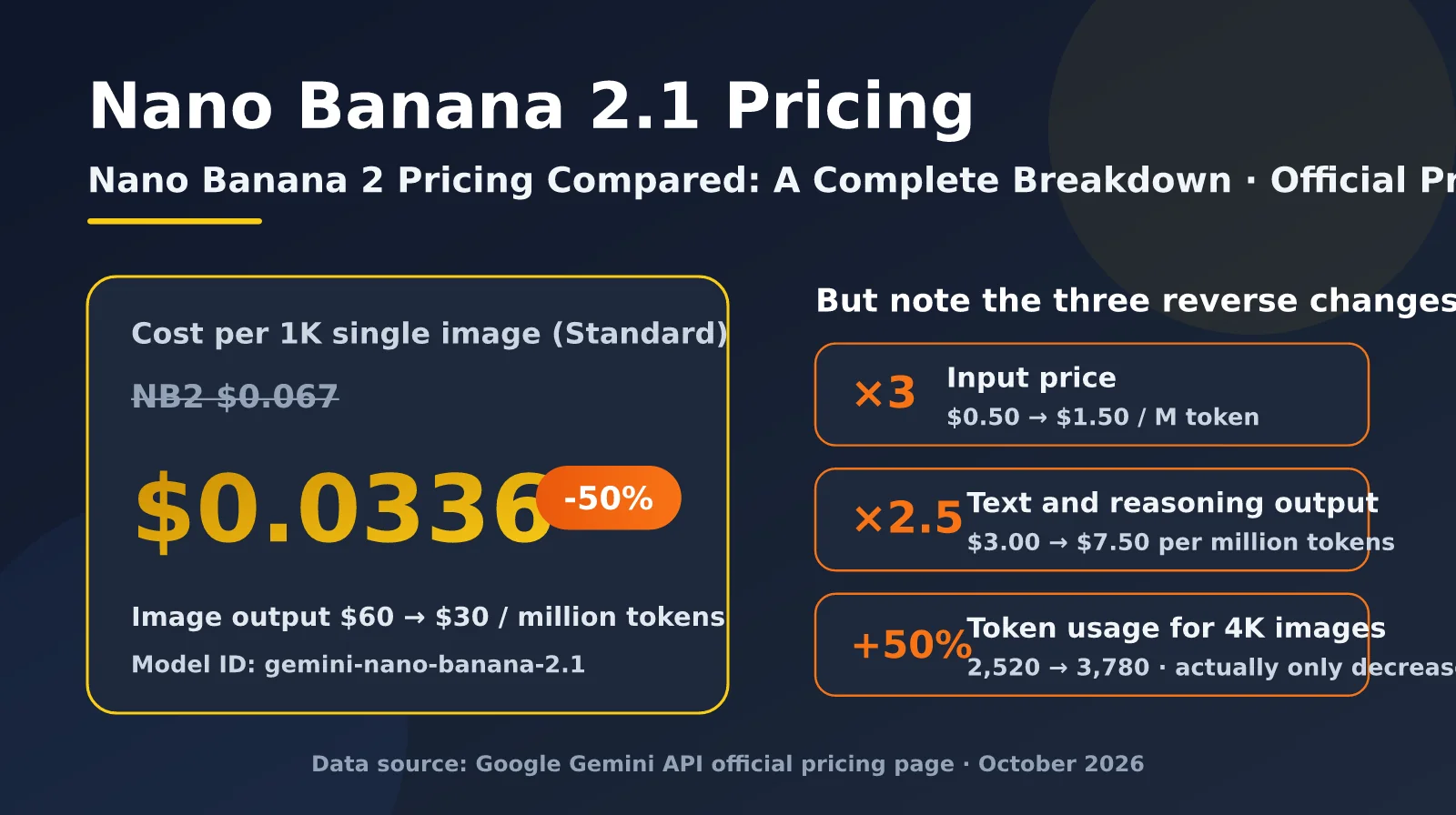
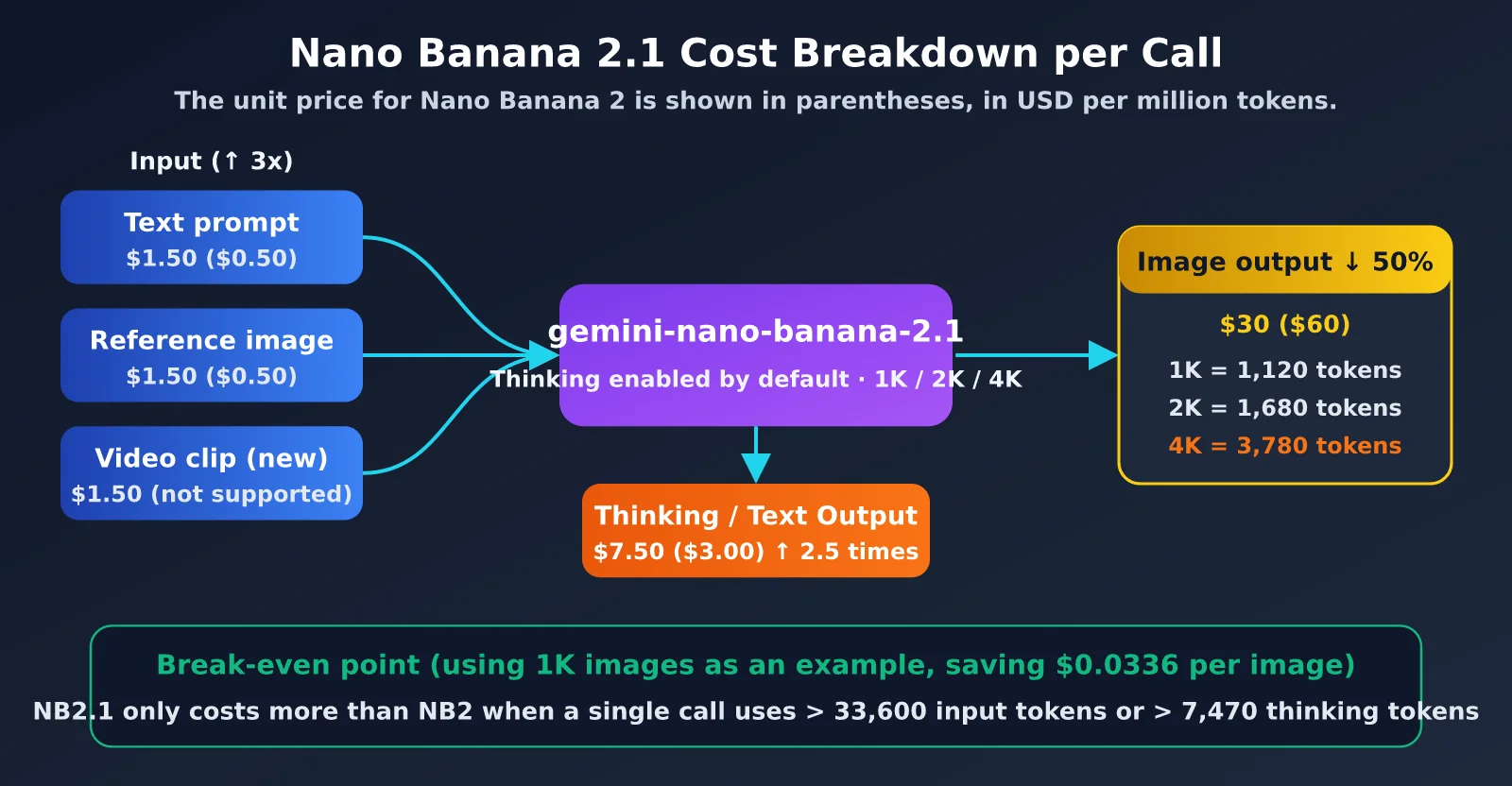
On October 6, 2026, Google launched Nano Banana 2.1 (model ID gemini-nano-banana-2.1) in the Gemini API, positioning it as an upgrade to Nano Banana 2 (Gemini 3.1 Flash Image). The biggest headline is Nano Banana 2.1 Pricing: image output drops from $60 to $30 per million tokens, while the cost of a single 1K image falls from $0.067 to $0.0336.
But if you only look at the “half the price” headline, you could easily get the math wrong. The official pricing table also contains several changes in the opposite direction: input prices have tripled, text and thinking output prices have increased 2.5×, 4K images use 50% more tokens, and the 0.5K tier has disappeared from the pricing table.
This article breaks down the price differences between Nano Banana 2.1 and Nano Banana 2 using Google’s official pricing page, calculates real costs for different resolutions and workflows, and offers migration advice.
What you’ll get from this article: By the end, you’ll be able to accurately assess how much your business can save by switching to Nano Banana 2.1—and which use cases won’t see as much of a reduction.
Nano Banana 2.1 Pricing at a Glance
Let’s start with the key figures from Google’s official pricing table. The prices below are for the Standard paid tier and are in U.S. dollars per million tokens. Neither model has a free tier in the Gemini API (the Free Tier is listed as Not available; Nano Banana 2 is available for free testing in Google AI Studio).
| Billing item | Nano Banana 2 (gemini-3.1-flash-image) |
Nano Banana 2.1 (gemini-nano-banana-2.1) |
Change |
|---|---|---|---|
| Input price | $0.50 (text / image) | $1.50 (text / image / video) | ↑ 3× |
| Text and thinking output | $3.00 | $7.50 | ↑ 2.5× |
| Image output | $60.00 | $30.00 | ↓ 50% |
| Batch image output | $30.00 | $15.00 | ↓ 50% |
| Google Search Grounding | 5,000 free requests per month (shared across 3.x), then $14 / 1,000 requests | Same | No change |
| Is paid-tier data used for training? | No | No | No change |
The pricing strategy behind Nano Banana 2.1 is to “shift costs from image output to input and reasoning.” For most requests that generate one image from a single prompt, image output accounts for more than 95% of the total cost, so the overall price really does come close to being cut in half. But for workflows with many reference images, multiple rounds of editing, or extended thinking, higher input and thinking costs will eat into some of those savings.
It’s also worth noting that Nano Banana 2.1 adds video as an input type, so you can use video clips as generation references. Video frames typically consume a lot of tokens, though, so you’ll want to assess the cost separately at $1.50 per million tokens.
🎯 Testing recommendation: The prices in the table are theoretical; your actual costs depend on prompt length, the number of reference images, and the thinking level. We recommend using the APIYI platform at apiyi.com to run the same set of real prompts through both models, compare token usage in the
usagefield, and then decide whether to switch.
Nano Banana 2.1 vs. Nano Banana 2: Per-Image Price Comparison
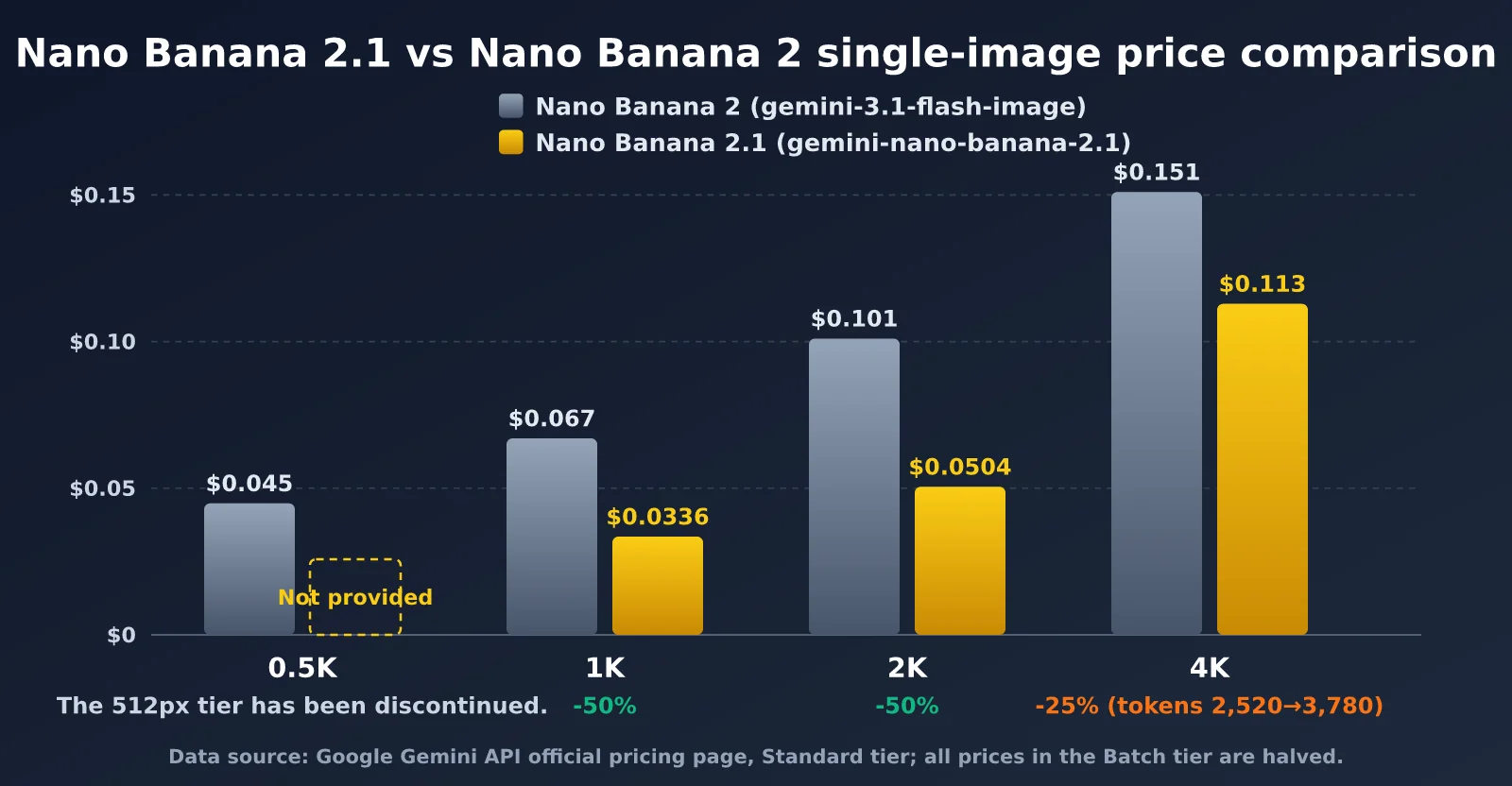
The first thing developers want to know is “How much does each image cost?” Footnotes on the official pricing page list the token usage for each resolution. The table below calculates the per-image cost for Standard and Batch pricing by multiplying the token count by the price per token.
| Resolution | NB2 token count | NB2 per image (Standard / Batch) | NB2.1 token count | NB2.1 per image (Standard / Batch) | Reduction |
|---|---|---|---|---|---|
| 0.5K (512px) | 747 | $0.045 / $0.0224 | Not available | — | — |
| 1K (1024×1024) | 1,120 | $0.067 / $0.0336 | 1,120 | $0.0336 / $0.0168 | 50% |
| 2K (2048×2048) | 1,680 | $0.101 / $0.0504 | 1,680 | $0.0504 / $0.0252 | 50% |
| 4K (4096×4096) | 2,520 | $0.151 / $0.0756 | 3,780 | $0.113 / $0.0567 | About 25% |
At 1K and 2K, token usage is exactly the same, so halving the price also halves the cost—with no strings attached. The 4K tier is where you need to be careful: Nano Banana 2.1 uses 3,780 tokens per 4K image, a full 50% more than Nano Banana 2’s 2,520 tokens. As a result, the cost per 4K image drops only from $0.151 to $0.113, a reduction of about 25%.
Here’s an easy pricing pitfall to miss. Some English-language third-party articles list Nano Banana 2.1’s 4K price as $0.0756, carrying over the old model’s 2,520-token figure. Use the footnotes on the official pricing page as your source of truth: a 4K image uses 3,780 tokens and costs about $0.113. Use that figure when planning your budget.
The disappearance of the 0.5K tier is also worth noting. Nano Banana 2’s 512px tier costs $0.045 per image and is often used for thumbnails, draft previews, and bulk screening. Nano Banana 2.1’s pricing table lists only 1K, 2K, and 4K. The good news is that 2.1’s 1K price of $0.0336 is already lower than 2’s 0.5K price, so the same budget can get you a higher resolution.
3 Hidden Costs in Nano Banana 2.1 Pricing
The price cut is real, but to get an accurate picture, you need to factor in these three hidden costs as well.
- Input tokens cost 3× more: The price per million input tokens rises from $0.50 to $1.50. A typical text-to-image prompt contains only a few hundred tokens, so the impact is negligible. But with image-to-image generation or multi-image fusion, each reference image adds input tokens. In multi-turn, conversational editing workflows, previous images are carried into the context too, so input usage can quickly add up to tens of thousands of tokens.
- Thinking tokens cost 2.5× more: Thinking is enabled by default in Gemini 3.x image models, and thinking tokens are billed at the text output rate whether or not they’re returned. Nano Banana 2.1’s text and thinking output price rises from $3.00 to $7.50 per million tokens. The longer the reasoning triggered by prompts for complex compositions or text-heavy layouts, the more noticeable this cost becomes.
- 4K token usage increases: As noted above, 4K output usage rises from 2,520 to 3,780 tokens, offsetting half of the price reduction. For e-commerce and print workflows where 4K is the main resolution, the actual savings are about 25%, not 50%.
These three factors give us a simple break-even point. At 1K resolution, you save $0.0336 per image. Since input costs an extra $1.00 per million tokens, the higher input price only wipes out the savings when a single call uses more than about 33,600 input tokens. Thinking tokens cost an extra $4.50 per million, putting their break-even point at about 7,470 thinking tokens.
In other words, normal workflows are unlikely to hit either threshold. Nano Banana 2.1 is still cheaper in the vast majority of scenarios, but you’ll need to calculate the exact savings based on your workflow.
Cost Estimates for Nano Banana 2.1 and Nano Banana 2 Across Different Scenarios
Unit prices alone don’t tell the whole story. Here are the full per-call costs for four typical scenarios. Each reference image is estimated at about 1,120 input tokens (actual usage depends on image dimensions and the media resolution setting), and thinking tokens are estimated based on experience.
| Scenario | Input tokens | Thinking tokens | Output resolution | NB2 cost per call | NB2.1 cost per call | Savings |
|---|---|---|---|---|---|---|
| Simple text-to-image | 300 | 500 | 1K | $0.0688 | $0.0378 | 45% |
| E-commerce hero image (3 reference images) | 3,700 | 1,000 | 2K | $0.1056 | $0.0635 | 40% |
| Multi-image fusion (14 reference images) | 16,200 | 1,500 | 1K | $0.0798 | $0.0692 | 13% |
| 4K poster (long text layout) | 800 | 2,500 | 4K | $0.1591 | $0.1333 | 16% |
The estimates point to a clear pattern: the lighter the output and the heavier the input, the smaller Nano Banana 2.1’s advantage. Simple text-to-image generation and standard e-commerce images save more than 40%, making them the most obvious use cases to benefit. For multi-image fusion with 14 reference images and 4K posters with long text, savings drop to 13%–16%—but costs still don’t go up when you switch.
The difference becomes even clearer when you look at monthly budgets. If you generate 10,000 1K images per month, Nano Banana 2 costs about $672, compared with about $336 for Nano Banana 2.1. For the same number of 2K images, the costs are $1,008 versus $504; for 4K images, they’re $1,512 versus $1,134. For offline batch-processing tasks, applying the 50% Batch discount brings the monthly cost for 1K images down to $168.
💡 Cost tip: If your team generates a high volume of images each month, start with a small-scale rollout on APIYI apiyi.com for a week. Track the actual distribution of input, thinking, and image tokens, then use the formula above to estimate the savings from switching. This is safer than migrating everything at once.
Nano Banana 2.1 Call Example and Cost Estimation Code
Nano Banana 2.1 uses Gemini’s native generateContent interface. To migrate, you only need to replace the model ID. In imageConfig, imageSize can be set to 1K, 2K, or 4K. The example below makes a call through APIYI’s Gemini-compatible native endpoint:
import requests, base64

API_KEY = "your-apiyi-api-key"
URL = "https://api.apiyi.com/v1beta/models/gemini-nano-banana-2.1:generateContent"

payload = {
    "contents": [{"parts": [{"text": "一只戴墨镜的柴犬站在霓虹灯街头,招牌写着 BANANA CAFE"}]}],
    "generationConfig": {
        "responseModalities": ["IMAGE"],
        "imageConfig": {"aspectRatio": "16:9", "imageSize": "2K"}
    }
}
resp = requests.post(URL, headers={"x-goog-api-key": API_KEY}, json=payload, timeout=180).json()
img = next(p for p in resp["candidates"][0]["content"]["parts"] if "inlineData" in p)
open("output.png", "wb").write(base64.b64decode(img["inlineData"]["data"]))
print(resp.get("usageMetadata"))  # Log token usage for cost tracking
The returned usageMetadata includes a breakdown of input, thinking, and output tokens. It’s a good idea to persist these fields in your application logs—they’ll be useful when comparing model costs later.
Expand to view: Per-call cost comparison function for Nano Banana 2 and 2.1
# Prices in USD per million tokens (Standard tier)
PRICING = {
    "gemini-3.1-flash-image": {"input": 0.50, "text_out": 3.00, "image_out": 60.00,
                                "image_tokens": {"0.5K": 747, "1K": 1120, "2K": 1680, "4K": 2520}},
    "gemini-nano-banana-2.1": {"input": 1.50, "text_out": 7.50, "image_out": 30.00,
                                "image_tokens": {"1K": 1120, "2K": 1680, "4K": 3780}},
}

def estimate_cost(model, input_tokens, thinking_tokens, size, n_images=1, batch=False):
    p = PRICING[model]
    if size not in p["image_tokens"]:
        raise ValueError(f"{model} 不支持 {size} 档位")
    cost = (input_tokens * p["input"]
            + thinking_tokens * p["text_out"]
            + p["image_tokens"][size] * n_images * p["image_out"]) / 1_000_000
    return round(cost * (0.5 if batch else 1), 4)

for m in PRICING:
    print(m, estimate_cost(m, input_tokens=3700, thinking_tokens=1000, size="2K"))
# gemini-3.1-flash-image 0.1056
# gemini-nano-banana-2.1 0.0635
Connect this function to your usage logs to replay historical real-world data and calculate the savings from switching, rather than relying on the estimates in this article.
🚀 Get started quickly: We recommend getting an API key through APIYI apiyi.com and running the code above. The platform supports both Gemini’s native format and OpenAI-compatible format. To switch between Nano Banana 2 and 2.1, just change the model name. Check the console for the currently available models and billing details.
Nano Banana 2.1 Migration Decisions and FAQs
Beyond its pricing, Nano Banana 2.1 also brings capability upgrades. According to Google, it improves visual quality, character consistency across multi-turn conversations, text-rendering accuracy, and search-augmented generation. It supports three resolutions: 1K, 2K, and 4K. Based on pricing and capabilities, here’s how to choose:
| Your business needs | Recommended model | Why |
|---|---|---|
| Primarily 1K / 2K text-to-image generation | Nano Banana 2.1 | Cuts costs in half while improving quality |
| Rely on 512px thumbnails or drafts | Nano Banana 2.1 (1K) | Nano Banana 2.1 at 1K costs even less than Nano Banana 2 at 0.5K |
| Primarily generate 4K images | Nano Banana 2.1 | Still saves about 25%, but budget at $0.113 per image |
| Many reference images and multi-turn editing | Run a small-scale comparison first | Input costs are 3× higher, so savings may drop to 10%–20% |
| Offline batch generation | Nano Banana 2.1 + Batch | Just $0.0168 per 1K image |
As for the lifecycle of the older model, as of publication, Google’s official deprecation page had not listed a shutdown date for gemini-3.1-flash-image, though third-party reports have mentioned a migration window. We recommend completing compatibility testing early to avoid being forced to switch.
Nano Banana 2.1 Pricing FAQs
Q1: Does Nano Banana 2.1 have a free tier?
Nano Banana 2.1 doesn’t have a free tier in the Gemini API, so you’ll need a paid account to use it. If you’d like to try it first, you can register at APIYI (apiyi.com) to get test credits and evaluate image quality with a few requests before deciding whether to migrate.
Q2: Why is Nano Banana 2.1 only 25% cheaper for 4K images?
Because 4K images use 3,780 tokens, up from 2,520. The per-token price is halved, but the token count increases by 50%. Together, these changes bring the cost per image down from $0.151 to $0.113. The $0.0756 figure circulating online incorrectly uses the old token count.
Q3: What use cases are a good fit for Batch mode?
Batch mode charges $15 / M for image output, halving the per-image cost again. Results are returned asynchronously, so it’s a good fit for tasks that aren’t time-sensitive, such as bulk product image generation and dataset creation. Real-time interactive applications should still use the Standard tier. You can test latency and costs for both modes through APIYI (apiyi.com).
Q4: Is there an extra charge for Grounding search?
Yes. There are 5,000 free search requests per month, shared across all Gemini 3.x models. Beyond that, requests cost $14 per 1,000. A single request may trigger multiple search queries, each billed separately, but retrieved content isn’t counted as input tokens.
Conclusion: Is Nano Banana 2.1 Pricing Worth Migrating For?
Nano Banana 2.1 Pricing is essentially a structural price adjustment: image output prices are cut in half, input and thinking token prices go up, 4K usage increases, and the 0.5K tier is discontinued. For most businesses focused on 1K and 2K text-to-image generation, this means a genuine 40%–50% cost reduction. Combined with improvements in image quality and text rendering, migration is an easy call.
Workflows that use lots of input tokens, require heavy reasoning, or primarily generate 4K images deserve a closer look. Savings for these workloads will shrink to 13%–25%. They’re still worthwhile, but you’ll need to recalculate your budget using the token counts in the official footnotes rather than simply dividing your old bill in half.
Our recommended migration path is to first replay historical usage logs using the cost function in this article, then run a small-scale comparison to measure actual image quality and token usage, and finally switch over in stages. You can do all of this through APIYI’s unified interface at apiyi.com, using the same API key to quickly compare image models such as Nano Banana 2 and Nano Banana 2.1.
References:
– Gemini API official pricing page: ai.google.dev/gemini-api/docs/pricing
– Gemini API model deprecation information: ai.google.dev/gemini-api/docs/deprecations
– Gemini image generation developer documentation: ai.google.dev/gemini-api/docs/image-generation
– APIYI documentation center: docs.apiyi.com
About the author: The APIYI technical team focuses on AI model integrations and cost optimization. Visit APIYI at apiyi.com to discuss image generation model selection and cost-saving strategies.