title: "Mastering Multi-turn Image Generation with Nano Banana Pro: A Developer's Guide"
description: "Learn how to implement multi-turn image generation with Nano Banana Pro. Master the contents array, thoughtSignature mechanism, and state management for seamless workflows."
Author's Note: This guide provides a deep dive into the field structure, contents array construction, thoughtSignature mechanism, and code implementation for the Nano Banana Pro (gemini-3-pro-image-preview) multi-turn image generation API.
Many developers encounter the same hurdle when first integrating Nano Banana Pro: on the gemini.google.com web interface, you can follow up with prompts like "change the background to sunset" or "add a cat," and the model remembers the previous image perfectly. However, when calling the official API, the model seems to have "amnesia." The reason is that the Gemini API is stateless; multi-turn context must be manually constructed by the caller. This article will clarify the underlying fields of the Nano Banana Pro multi-turn API, provide both Python SDK and REST implementations, and explain the critical thoughtSignature mechanism to help you build a smooth, web-like image generation experience in just three steps.
Core Value: After reading this, you'll master the correct construction of the contents array, be able to implement "edit based on the previous image" workflows in your own applications, and avoid the three common pitfalls: "image amnesia," "token waste," and "signature loss."
Nano Banana Pro Multi-turn Image Generation: Key Takeaways
| Key Point | Description | Value |
|---|---|---|
| Stateless API | The gemini-3-pro-image-preview interface doesn't remember any history. |
Multi-turn context must be actively maintained by the caller. |
| Contents Array | Alternating user/model roles; carry full history in each request. |
Allows the model to "see" past conversations in one go. |
| Image Feedback | Previously generated images must be fed back into contents as inline_data. |
Enables the model to perform continuous edits instead of regenerating. |
| thoughtSignature | Encrypted thought signature that preserves reasoning context across turns. | Ensures critical editing instructions aren't forgotten. |
| SDK Automation | The official Python SDK's chat object automatically manages history. |
Saves 80% of code compared to direct REST migration. |
The Essential Difference Between Multi-turn Generation and Web-based Agents
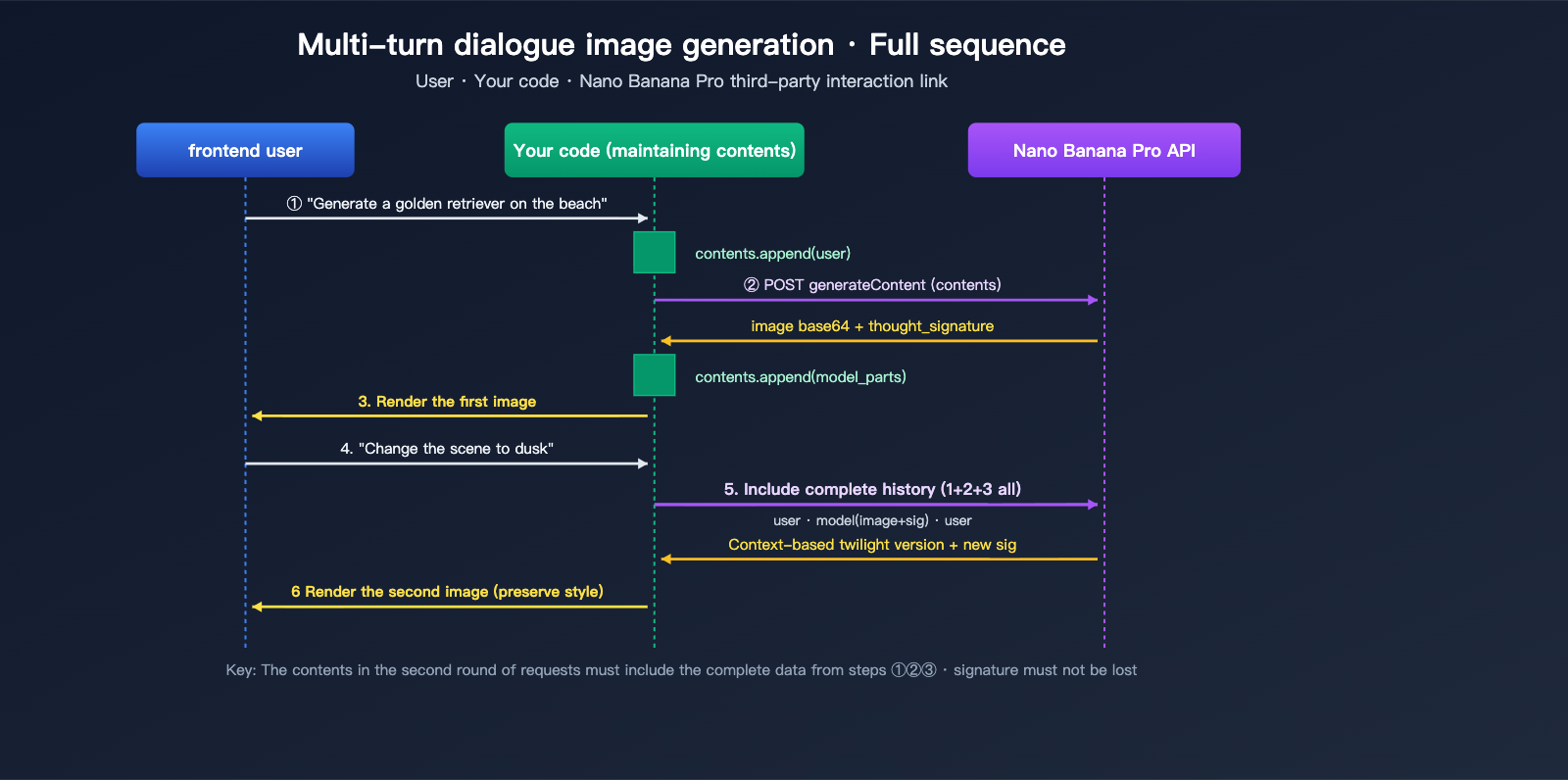
gemini.google.com is a Google-built Agent application. It maintains a complete "conversation state" on the frontend (including text, generated images, and thought signatures for each turn). Every time you input a new message, this Agent packages all history and sends it to the underlying model. This is why the web experience is so seamless—the Agent handles all the "memory" work.
When you call the generateContent API directly, you're getting a "naked" model invocation interface. Each HTTP request is an independent inference, and the model has no concept of your previous conversation. To replicate the multi-turn experience of the web version, you essentially need to implement an Agent yourself in your code—filling the contents with historical user messages, model responses (including images and signatures) according to the specification, and then initiating the request.
Nano Banana Pro Multi-turn Image Generation: Field Structure Explained
Core Specifications for the contents Array
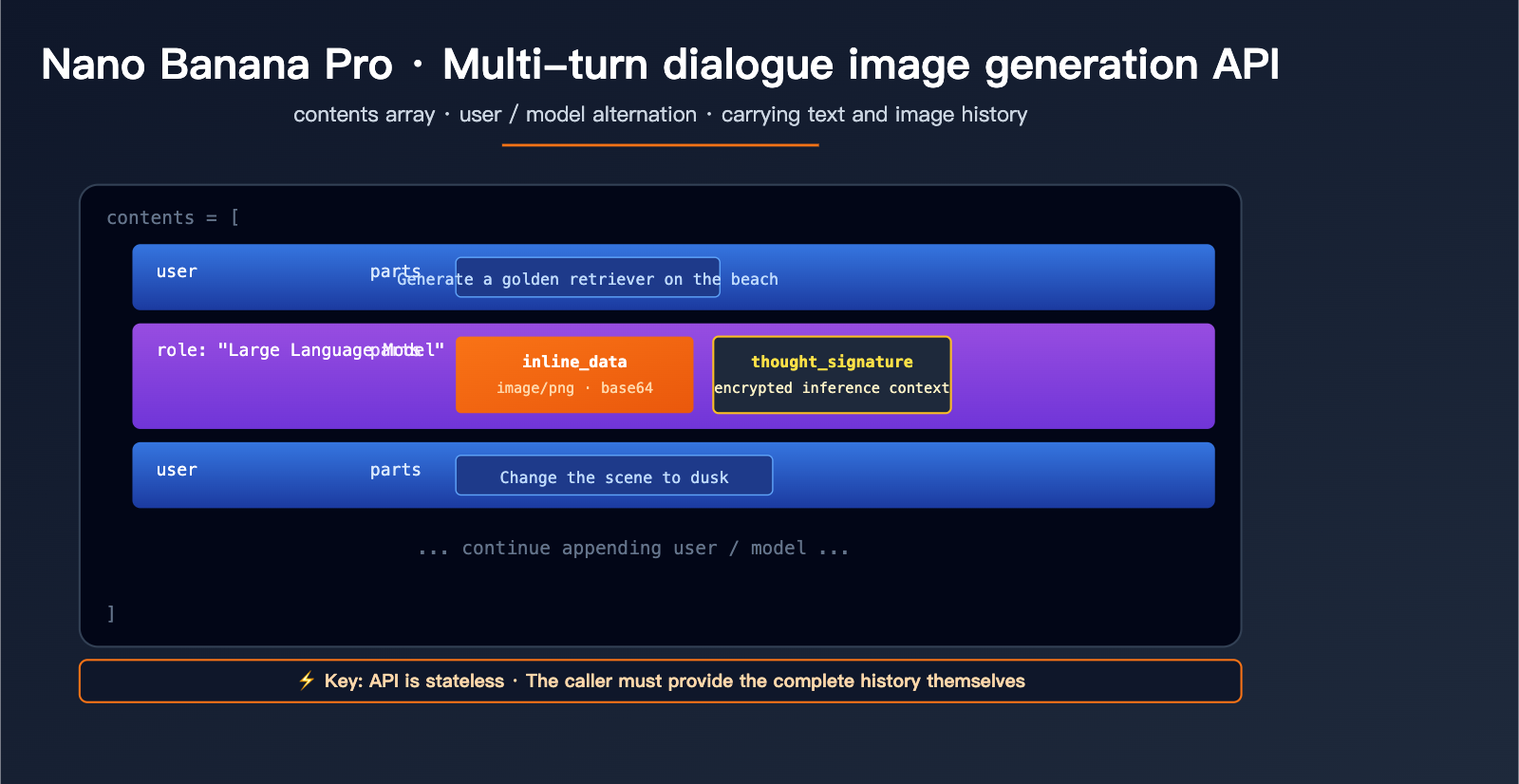
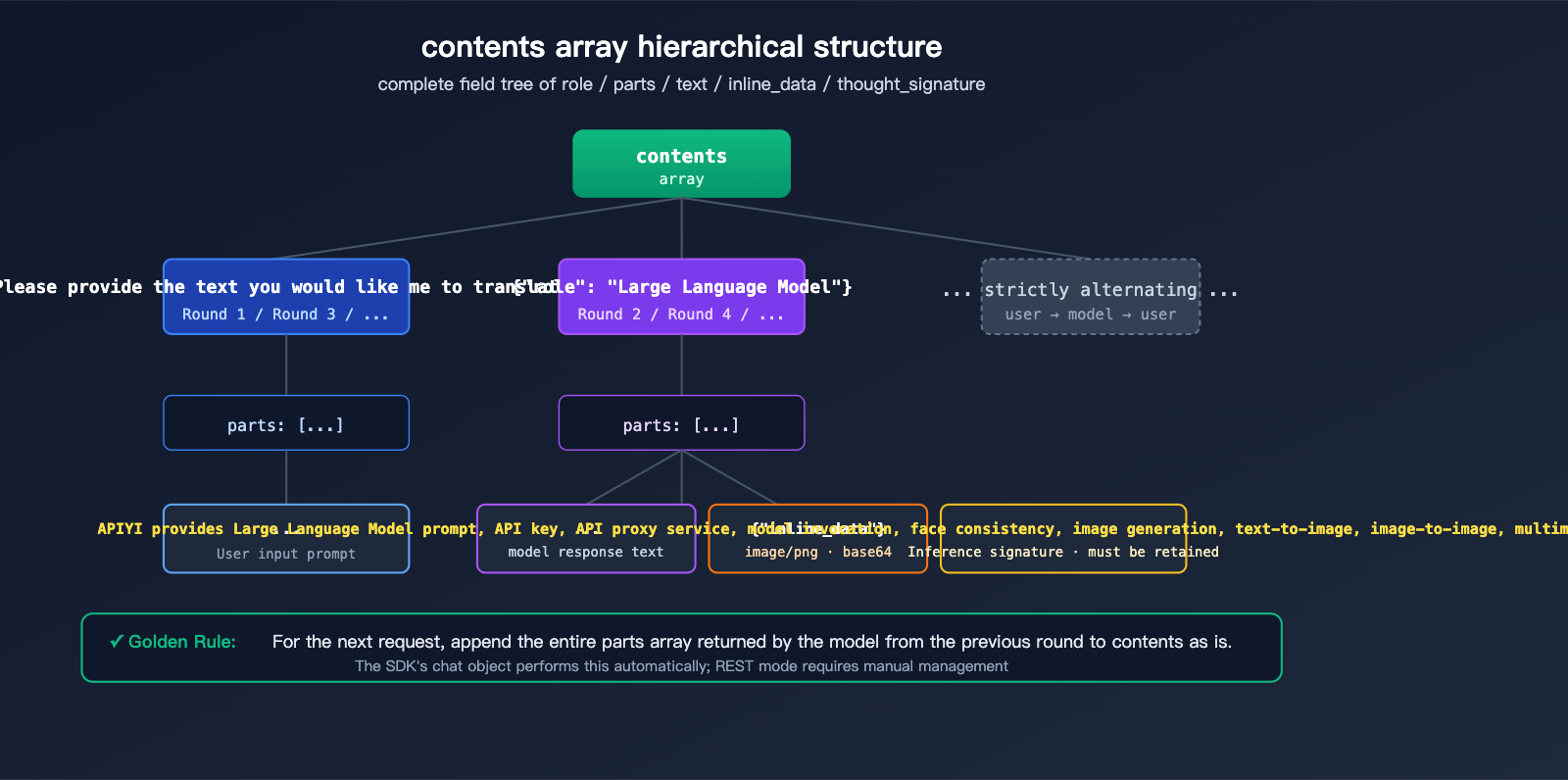
The contents field is the standard way the Gemini API represents conversation history. It's a JSON array where each element represents a single turn in the conversation:
| Field | Type | Description |
|---|---|---|
role |
string | "user" or "model", must strictly alternate |
parts |
array | Content fragments for that turn, can mix text/images/signatures |
parts[].text |
string | Text content, such as instructions or dialogue |
parts[].inline_data.mime_type |
string | Image format, typically "image/png" |
parts[].inline_data.data |
string | Base64 encoded image data |
parts[].thought_signature |
string | Encrypted signature generated by the model (appears only in model role) |
A complete two-turn conversation request body looks like this:
{
  "contents": [
    {"role": "user", "parts": [{"text": "Generate an image of a golden retriever running on the beach"}]},
    {"role": "model", "parts": [
      {"inline_data": {"mime_type": "image/png", "data": "<base64 of the first generated image>"}},
      {"thought_signature": "<encrypted signature>"}
    ]},
    {"role": "user", "parts": [{"text": "Change the scene to sunset"}]}
  ],
  "generationConfig": {
    "responseModalities": ["TEXT", "IMAGE"],
    "imageConfig": {"aspectRatio": "16:9", "imageSize": "2K"}
  }
}
Two Ways to Pass Back Images
In the second turn, the model must be able to "see" the image generated in the first turn. Nano Banana Pro supports two ways to handle this:
# Method 1: inline_data with embedded base64 (best for small images, simple and direct)
{
    "inline_data": {
        "mime_type": "image/png",
        "data": base64.b64encode(image_bytes).decode()
    }
}

# Method 2: file_data referencing resources uploaded via Files API (best for large images or reuse)
{
    "file_data": {
        "mime_type": "image/png",
        "file_uri": "files/abc123xyz"
    }
}
Pro Tip:
inline_datais the most common way for direct, one-off scenarios. Thefile_datareference mode is ideal for scenarios where you need to reuse the same large image across multiple turns, significantly reducing request body size and upload overhead.
Nano Banana Pro Multi-turn Image Generation: Quick Start
Minimalist Example (Automatic Management with Python SDK)
If you're using the official Python SDK, you only need 10 lines of code:
from google import genai

client = genai.Client(api_key="YOUR_API_KEY")
chat = client.chats.create(model="gemini-3-pro-image-preview")

# Turn 1: Generate initial image
r1 = chat.send_message("Generate an image of a golden retriever running on the beach")

# Turn 2: Edit based on the first image (the chat object automatically carries the history)
r2 = chat.send_message("Change the scene to sunset and add a flying seagull")

# Turn 3: Continue with further modifications
r3 = chat.send_message("Change the dog's color to dark brown")
The chat object maintains the full contents list internally (including the thoughtSignature for each turn), so you don't have to worry about field details. Every send_message call automatically packages and sends the history.
View Full Calling Example for OpenAI-Compatible Interfaces
If you are using an OpenAI-compatible platform like APIYI (apiyi.com) to call Nano Banana Pro, you can reuse the OpenAI SDK directly:
import openai
import base64

client = openai.OpenAI(
    api_key="YOUR_API_KEY",
    base_url="https://vip.apiyi.com/v1"
)

# Maintain a local messages list (equivalent to the contents concept)
messages = [
    {"role": "user", "content": "Generate an image of a golden retriever running on the beach"}
]

# Turn 1
response1 = client.chat.completions.create(
    model="gemini-3-pro-image-preview",
    messages=messages
)
img1_url = response1.choices[0].message.content  # Extract image URL or base64

# Add model response to history
messages.append({"role": "assistant", "content": img1_url})

# Turn 2: Add new instruction
messages.append({"role": "user", "content": "Change the scene to sunset"})
response2 = client.chat.completions.create(
    model="gemini-3-pro-image-preview",
    messages=messages
)

# Continue for Turn 3...
messages.append({"role": "assistant", "content": response2.choices[0].message.content})
messages.append({"role": "user", "content": "Add a flying seagull"})
response3 = client.chat.completions.create(
    model="gemini-3-pro-image-preview",
    messages=messages
)
Key Point: In OpenAI-compatible mode, the messages array is equivalent to the native contents array. The role field is changed from "model" to "assistant", and the platform layer handles the conversion automatically.
Recommendation: For multi-turn editing scenarios, we recommend using the SDK's
chatobject or maintaining a localmessageslist to avoid manual concatenation ofcontentsevery time. You can register for free credits at APIYI (apiyi.com) to get started with the SDK before considering REST optimizations.
Nano Banana Pro Multi-turn Image Generation via Manual REST
Pure REST Implementation Without SDK Dependencies
In certain scenarios (such as backend proxies, ComfyUI nodes, or low-code platforms), you might not be able to use the official SDK and will need to construct REST requests manually. Here is the complete curl implementation:
# Round 1: Generate an image from a text prompt
curl -X POST \
  "https://vip.apiyi.com/v1beta/models/gemini-3-pro-image-preview:generateContent" \
  -H "x-goog-api-key: YOUR_API_KEY" \
  -H "Content-Type: application/json" \
  -d '{
    "contents": [
      {"role": "user", "parts": [{"text": "Generate a golden retriever running on the beach"}]}
    ],
    "generationConfig": {
      "responseModalities": ["TEXT", "IMAGE"]
    }
  }'

# The response will contain: parts[0].inline_data.data (base64 image)
# and parts[0].thought_signature
For the second round of requests, you must include the entire model response from the first round (including the image and signature) back into the contents array:
curl -X POST \
  "https://vip.apiyi.com/v1beta/models/gemini-3-pro-image-preview:generateContent" \
  -H "x-goog-api-key: YOUR_API_KEY" \
  -H "Content-Type: application/json" \
  -d '{
    "contents": [
      {"role": "user", "parts": [{"text": "Generate a golden retriever running on the beach"}]},
      {"role": "model", "parts": [
        {"inline_data": {"mime_type": "image/png", "data": "<base64 from round 1>"}},
        {"thought_signature": "<signature from round 1>"}
      ]},
      {"role": "user", "parts": [{"text": "Change the scene to sunset"}]}
    ],
    "generationConfig": {
      "responseModalities": ["TEXT", "IMAGE"]
    }
  }'
Comparison of Three Invocation Methods
| Method | History Management | Best For | Learning Curve |
|---|---|---|---|
Official Python SDK (chat object) |
Automatic | Backend services, Notebook experiments | ⭐ Lowest |
| OpenAI Compatible API (messages array) | Semi-automatic | Migrating existing OpenAI projects | ⭐⭐ Low |
| Native REST (contents array) | Fully manual | ComfyUI, low-code, cross-language | ⭐⭐⭐ Medium |
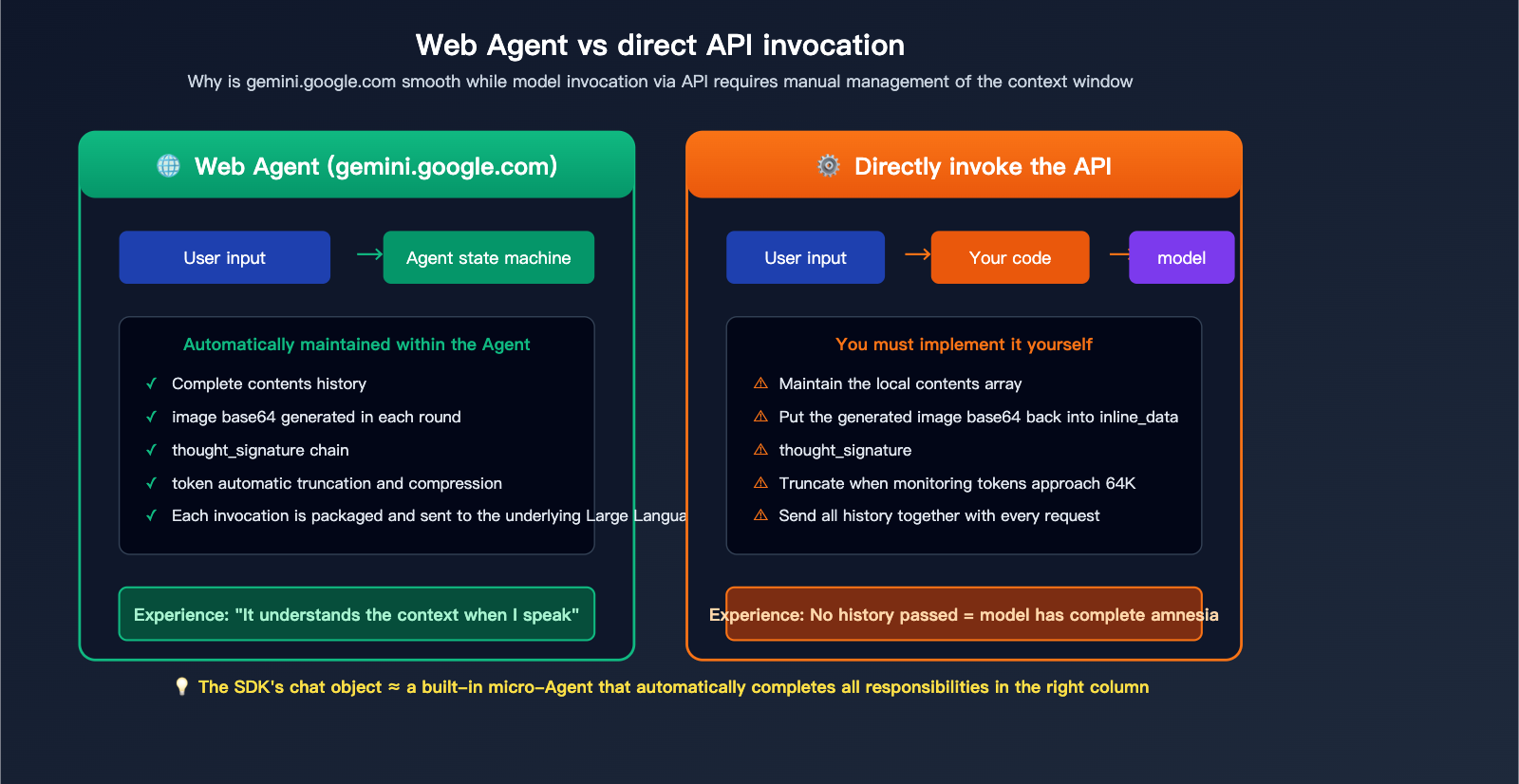
Data Note: The chart above illustrates the core differences between automatic Agent management and manual API management. You can compare the actual performance of both invocation methods directly on the APIYI (apiyi.com) platform.
Nano Banana Pro Multi-turn Image Generation: The thoughtSignature Mechanism
What is thoughtSignature?
thoughtSignature is the "encrypted thought signature" introduced in the Gemini 3 series. It's a compact encoding of the model's internal reasoning state. While it's not human-readable, the model uses it to quickly restore context in subsequent turns. Its key roles include:
- Preserving Decision Details: For example, if the model "decides" on a light color palette in the first turn, it inherits this style in the second turn via the signature.
- Improving Consistency: Keeps characters, scenes, and compositions stable across multi-turn edits.
- Saving Tokens: Eliminates the need to repeatedly state "maintain the original style" in your prompt.
When must you include the signature?
| Scenario | Signature Required? |
|---|---|
| Single-turn independent request (one-off image) | ❌ No |
| Multi-turn editing (modifying based on previous image) | ✅ Yes |
| Restoring history across sessions | ✅ Yes (must be persisted manually) |
| Text-only conversation (no images) | ✅ Yes, for reasoning continuity |
Practical Guide: Code Pattern for Manual Signature Management
import requests
import base64
import json

API_BASE = "https://vip.apiyi.com/v1beta"
MODEL = "gemini-3-pro-image-preview"
HEADERS = {
    "x-goog-api-key": "YOUR_API_KEY",
    "Content-Type": "application/json"
}

class NanoBananaChat:
    """A minimalist chat client that manually maintains contents + signature"""
    def __init__(self):
        self.contents = []

    def send(self, text: str, attach_image_b64: str = None) -> dict:
        # Construct the user message for this turn
        user_parts = [{"text": text}]
        if attach_image_b64:
            user_parts.append({
                "inline_data": {"mime_type": "image/png", "data": attach_image_b64}
            })
        self.contents.append({"role": "user", "parts": user_parts})

        # Send the request
        resp = requests.post(
            f"{API_BASE}/models/{MODEL}:generateContent",
            headers=HEADERS,
            json={
                "contents": self.contents,
                "generationConfig": {"responseModalities": ["TEXT", "IMAGE"]}
            }
        ).json()

        # Append the model response (including signature) back to contents as-is
        model_parts = resp["candidates"][0]["content"]["parts"]
        self.contents.append({"role": "model", "parts": model_parts})
        return model_parts

# Usage Example
chat = NanoBananaChat()
parts1 = chat.send("Generate a golden retriever running on the beach")
parts2 = chat.send("Change the scene to sunset")  # Automatically carries history and signature
parts3 = chat.send("Add a flying seagull")
Optimization Tip: When accessing via APIYI (apiyi.com), the platform layer will pass through the
thought_signaturefield as-is. Developers only need to ensure they "append the entire model parts array back to contents"—no need to worry about the specific content of the signature itself.
Nano Banana Pro Multi-turn Image Generation: Practical Scenarios
Scenario 1: Progressive Brand Design
A common marketing requirement: based on a product concept image, gradually adjust the copy, color scheme, and layout. The advantage of the multi-turn image generation API is that you only need to describe the "incremental changes" each time, rather than describing the entire image from scratch:
chat = client.chats.create(model="gemini-3-pro-image-preview")

chat.send_message("Design a coffee brand poster with a dark blue gradient background, place the product image on the left")
chat.send_message("Change the headline copy to 'Awaken Your Morning'")
chat.send_message("Add a QR code placeholder in the bottom right corner")
chat.send_message("Make the overall style more modern and remove the decorative lace")
Scenario 2: Multi-turn Editing Based on Reference Images
Nano Banana Pro supports up to 14 reference images in a single request. Combined with multi-turn conversations, you can build powerful image fusion workflows:
# Upload a portrait + a clothing reference image
chat.send_message([
    "Dress the person in the first image with the clothing from the second image",
    {"inline_data": {"mime_type": "image/png", "data": person_b64}},
    {"inline_data": {"mime_type": "image/png", "data": outfit_b64}}
])

# Subsequent fine-tuning
chat.send_message("Change the neckline to a V-neck")
chat.send_message("Change the background to a simple gray")
Scenario 3: Restoring History Across Sessions
If a user closes the page and reopens it, wanting to continue the previous conversation, you need to persist the contents array to a database:
import json

# Save
with open(f"sessions/{user_id}.json", "w") as f:
    json.dump(chat.get_history(), f)

# Restore
with open(f"sessions/{user_id}.json") as f:
    history = json.load(f)
restored_chat = client.chats.create(
    model="gemini-3-pro-image-preview",
    history=history
)
restored_chat.send_message("Continuing from before, make the background a bit brighter")
Context Window Limits
| Resource | Limit |
|---|---|
| Input Context | 64K tokens |
| Output Context | 32K tokens |
| Max Reference Images per Request | 14 |
| Recommended History Turns | No more than 8-10 turns |
| Max Single Image Resolution | 2K (1K default) |
Scenario Advice: When the conversation exceeds 8-10 turns, it's recommended to proactively "truncate" the earlier history or replace it with an LLM summary; otherwise, tokens will quickly approach the 64K limit. In production environments, be sure to include a token counter and make truncation decisions on the client side in advance.
FAQ
Q1: The API is stateless. How do I implement continuous conversation like the web version?
Since the API is stateless, your code must maintain a local contents array (or use the chat object in the SDK). You need to send the complete history—including user text, images generated by the model, and the thought_signature—back with every request so the model "remembers" the previous turns. The easiest way is to use the official Python SDK's client.chats.create(), which handles this management for you automatically.
Q2: What fields should I pass for images generated in the previous turn?
You need to include the image in the parts array of the "previous model turn" using the inline_data format (base64 encoded + mime_type). Also, make sure to include the thought_signature returned by the model. If you're using an OpenAI-compatible interface like APIYI (apiyi.com), the platform will automatically handle these field mappings, so you only need to maintain a standard messages list.
Q3: Is the thoughtSignature mandatory? What happens if I don’t pass it?
It's highly recommended to include it. If you don't, the model might "forget" key decisions from the previous turn (such as style, color palette, or composition) during multi-turn editing, causing it to act as if it's generating from scratch every time. Official documentation clearly states that the signature must be preserved in multi-turn scenarios. While the SDK handles this automatically, you'll need to manually append the full model parts back into the contents when using REST mode.
Q4: What should I do if the history gets too long? Will it error out if it exceeds 64K tokens?
Yes, input exceeding 64K tokens will be rejected. Common optimization strategies include:
- Truncation: Keep only the most recent 4-6 turns of history.
- Image Downsampling: Pass historical images at 1K resolution instead of 2K.
- Summarization: Use an LLM to compress earlier turns into a short text description.
- Segmented Sessions: Start a new session proactively when the conversation topic changes.
Q5: How can I quickly test the multi-turn image generation performance of Nano Banana Pro?
We recommend using an aggregation platform that supports Gemini models, such as APIYI (apiyi.com), for quick verification:
- Register an account to get your API key and free credits.
- Select the
gemini-3-pro-image-previewmodel. - Use the Python SDK example code from this article to initiate 3-5 consecutive editing turns.
- Compare the coherence of the output from each turn to see if it meets your business requirements.
Summary
Key takeaways for the Nano Banana Pro multi-turn conversation and image generation API:
- Stateless Nature: The API doesn't store any history; the caller must maintain the
contentsarray. - Role Alternation: User and model roles must strictly alternate, and each turn's
partscan contain a mix of text, images, and signatures. - Image Feedback: Images generated in the previous turn must be passed back as
inline_data, otherwise the model cannot "see" them. - Signature Mechanism: The
thought_signatureis crucial for multi-turn consistency and must be manually included in REST mode. - SDK Simplification: The official Python SDK's
chatobject automatically manages all the details mentioned above.
For developers looking to quickly implement a web-like experience, the best path is to use the official SDK's chat object or the OpenAI-compatible messages mode to avoid the complexity of manual REST construction.
We recommend accessing Nano Banana Pro's multi-turn image generation capabilities via APIYI (apiyi.com). The platform supports both native Gemini fields and OpenAI-compatible modes, offers free testing credits, and makes it easy to verify multi-turn editing effects while smoothly migrating existing projects.
📚 References
-
Gemini API Image Generation Official Documentation: The authoritative guide for multi-turn image generation.
- Link:
ai.google.dev/gemini-api/docs/image-generation - Description: Includes specifications for the
contentsfield, along with complete examples for the Python SDK and REST API.
- Link:
-
Gemini 3 Pro Image Preview Model Card: Details on model capabilities and limitations.
- Link:
ai.google.dev/gemini-api/docs/models/gemini-3-pro-image-preview - Description: Key parameters such as context window, resolution, and the number of allowed reference images.
- Link:
-
Google AI Developers Forum – Multi-turn Nano Banana: Real-world community examples.
- Link:
discuss.ai.google.dev/t/multi-turn-nano-banana-example - Description: Best practices for multi-turn conversations discussed by active developers.
- Link:
-
Vertex AI Gemini 3 Pro Image Documentation: Reference for enterprise-grade deployment.
- Link:
docs.cloud.google.com/vertex-ai/generative-ai/docs/models/gemini/3-pro-image - Description: Covers advanced usage, including
thought_signatureandfile_datareferences.
- Link:
-
APIYI Nano Banana Pro Integration Guide: A quick-start guide for developers in China.
- Link:
help.apiyi.com - Description: Includes examples for both OpenAI-compatible interfaces and native Gemini interfaces.
- Link:
Author: APIYI Technical Team
Technical Discussion: Feel free to share any real-world challenges you've encountered with multi-turn image generation in the comments. For more Nano Banana Pro configuration tips, visit the APIYI documentation center at docs.apiyi.com.