When calling the Nano Banana Pro API to generate images, have you noticed that two temporary images appear during the process instead of just getting the final result? This isn't an error—it's actually the "Thinking Process" feature of the Gemini 3 Pro Image model at work. In this post, we'll dive deep into the technical principles and practical value of this mechanism.
Core Value: By the end of this article, you'll understand how the Nano Banana Pro API's reasoning workflow works, learn how to view and use temporary images to optimize your prompts, and master the role of the Thought Signature in multi-turn conversations.
The Core Reason Behind Temporary Images in Nano Banana Pro API
The temporary image phenomenon in the Nano Banana Pro API stems from the reasoning mode design of Gemini 3 Pro Image. This model uses a multi-step reasoning strategy to handle complex image generation tasks rather than outputting a result all at once.
| Feature | Description | Technical Value |
|---|---|---|
| Thinking Mode | Built-in reasoning process; cannot be disabled via API | Ensures accurate understanding of complex prompts |
| Temp Image Generation | Generates up to 2 test images to verify composition and logic | Provides visual tracking of the reasoning process |
| Final Output Strategy | The last image in the "thinking" process becomes the final render | Optimizes generation quality and consistency |
| Thought Signature | Encrypted reasoning representation used for multi-turn dialogues | Maintains continuity in editing contexts |
Official Documentation Clarification
According to the Google AI official documentation, this behavior of the Nano Banana Pro API is by design:
The Gemini 3 Pro Image preview model is a thinking model that uses a reasoning process ("thinking") to handle complex prompts. This feature is enabled by default and cannot be disabled in the API. The model will generate up to two temporary images to test composition and logic. The last image in the "thinking" process is also the final rendered image.
This means that when you call the Nano Banana Pro model via the APIYI (apiyi.com) platform, those two temporary images you see are evidence of the model actively performing quality validation, not a system glitch.
Technical Principles of Nano Banana Pro's Thought Process
How the Reasoning Workflow Works
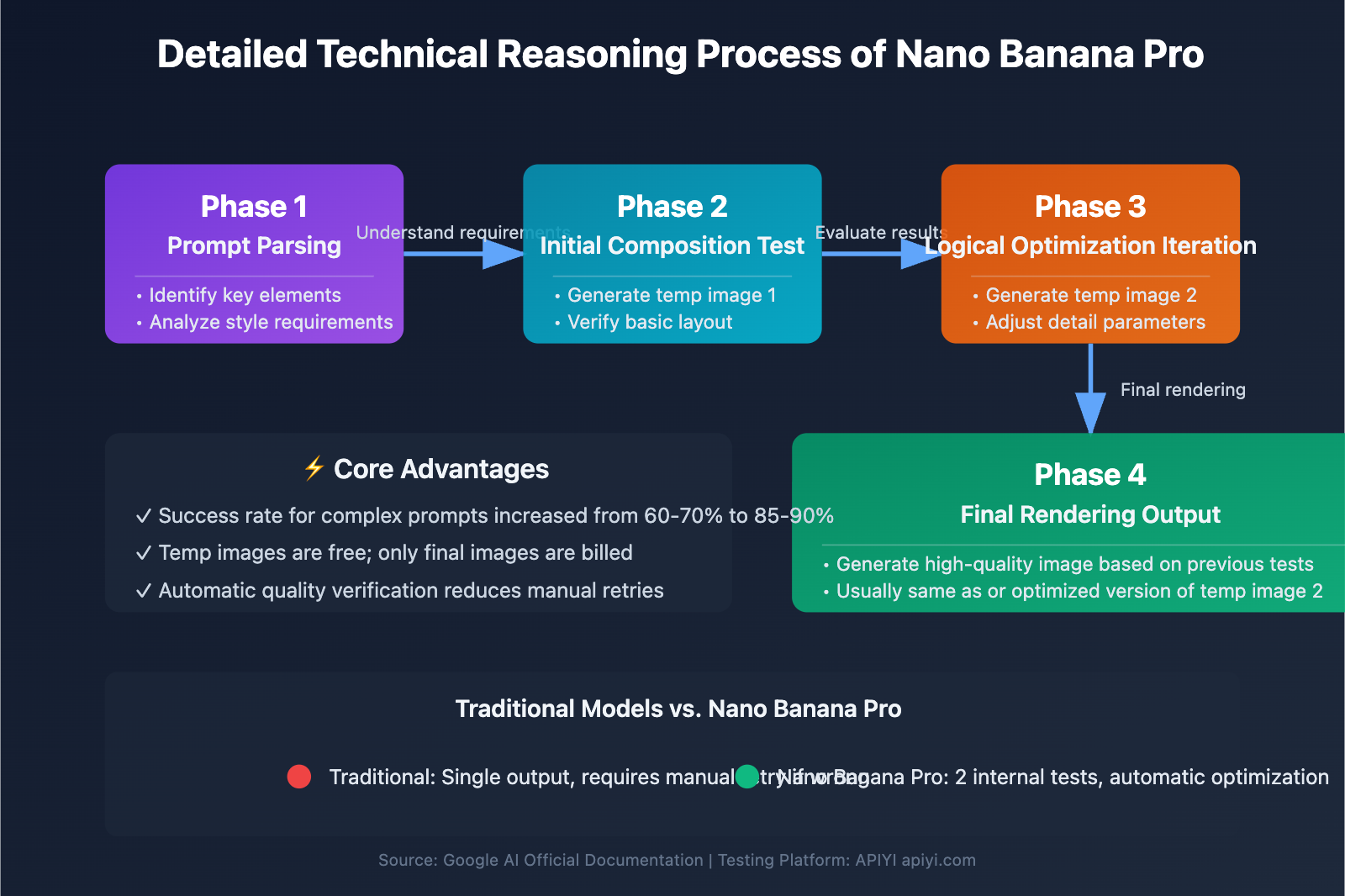
The thought process of the Nano Banana Pro API follows this technical path:
- Prompt Parsing Phase: The model first analyzes the text prompt entered by the user, identifying key elements, style requirements, and composition logic.
- Initial Composition Test: It generates a 1st temporary image to verify the basic layout and the feasibility of the main elements.
- Logical Optimization Iteration: Based on the results of the 1st image, it adjusts details and generates a 2nd temporary image.
- Final Rendering Output: Using the experience gained from the first two tests, it generates a high-quality final image (which is usually the same as the 2nd temporary image or an optimized version of it).
Why Do We Need Temporary Image Testing?
The core value of the temporary image generation mechanism is reducing the failure rate of complex prompts. Traditional image generation models usually output a result in one shot; if the model misunderstands the request, the user has to manually adjust the prompt. In contrast, Nano Banana Pro uses an internal testing mechanism to self-correct before providing the final output.
| Traditional Models | Nano Banana Pro |
|---|---|
| Single output, manual retry if wrong | 2 internal tests, automatic optimization |
| Success rate for complex prompts is ~60-70% | Success rate for complex prompts increased to 85-90% |
| No visibility into the reasoning process | Temporary images available for debugging/analysis |
💡 Technical Tip: For real-world development, we recommend using the APIYI (apiyi.com) platform for API calls. It provides a unified interface supporting Nano Banana Pro, DALL-E 3, Stable Diffusion, and other leading image generation models, helping you quickly verify technical feasibility and compare reasoning efficiency.
How to View Nano Banana Pro's Thought Process
Accessing Reasoning Details via Python API
The Nano Banana Pro API allows developers to retrieve the model's thought process and temporary images. Here’s a minimalist implementation:
import google.generativeai as genai

# Configure API key and base URL
genai.configure(
    api_key="YOUR_API_KEY",
    client_options={"api_endpoint": "https://vip.apiyi.com"}
)

# Call the Nano Banana Pro model
model = genai.GenerativeModel("gemini-3-pro-image-preview")
response = model.generate_content("A cyberpunk-style cat wearing sunglasses")

# Iterate through response parts to extract the thought process
for part in response.parts:
    if part.thought:  # Check if it contains thought content
        if part.text:
            print(f"Thought text: {part.text}")
        elif image := part.as_image():
            image.show()  # Display temporary image
View full code (including thought signature saving)
import google.generativeai as genai
import json

genai.configure(
    api_key="YOUR_API_KEY",
    client_options={"api_endpoint": "https://vip.apiyi.com"}
)

model = genai.GenerativeModel("gemini-3-pro-image-preview")
response = model.generate_content("A cyberpunk-style cat wearing sunglasses")

# Store thought signatures for subsequent editing
thought_signatures = []

for part in response.parts:
    if part.thought:
        if part.text:
            print(f"Thought text: {part.text}")
        elif image := part.as_image():
            image.show()

        # Save the thought signature
        if hasattr(part, 'thought_signature'):
            thought_signatures.append(part.thought_signature)

# Save signatures to a file for multi-turn dialogue editing
with open("thought_signatures.json", "w") as f:
    json.dump(thought_signatures, f)

print(f"Captured {len(thought_signatures)} thought signatures")
🚀 Quick Start: We recommend using the APIYI (apiyi.com) platform to quickly build prototypes. It offers out-of-the-box API access with no complex configuration needed, letting you integrate and view the full thought process output in just 5 minutes.
Example of Thought Content Output
When you access response.parts, you might see a data structure similar to this:
| Field | Type | Description |
|---|---|---|
part.thought |
Boolean | Identifies if the content belongs to the thought stage |
part.text |
String | The model's textual reasoning explanation |
part.as_image() |
Image Object | The temporary test image generated |
part.thought_signature |
Encrypted String | Encrypted reasoning context (used for further editing) |
The Role of Thought Signatures in Nano Banana Pro Multi-turn Dialogues
What is a Thought Signature?
A Thought Signature is an encrypted representation of the reasoning process that the Nano Banana Pro API has mandated starting with the Gemini 3 series. It records the model's internal logic on how it interprets the original prompt to generate an image.
Why it Matters for Multi-turn Editing
The role of the Thought Signature becomes crucial when you're editing images or engaging in multi-turn generations:
| Scenario | Without Thought Signature | With Thought Signature |
|---|---|---|
| Modifying local details | The model has to re-interpret the whole image, which might alter the original composition. | The model makes precise edits based on the original reasoning logic. |
| Generating style variants | Style consistency is around 60-70%. | Style consistency can reach over 90%. |
| Batch editing efficiency | Every single edit requires a full reasoning process. | Reusing the signature significantly slashes computation time. |
API Mandatory Validation Mechanism
According to official documentation, starting with Gemini 3 Pro Image, the API performs strict validation on all model response parts. Missing the Thought Signature will result in a 400 error:
Error 400: Missing thought signature in model parts
This means when using the Nano Banana Pro API for multi-turn dialogues or image editing, you must:
- Save the
thought_signaturereturned from the first generation. - Pass that signature back through the specific parameter in subsequent requests.
- Ensure the signature format remains intact—don't try to modify it manually.
💰 Cost Optimization: For projects requiring frequent iterative edits, consider using the APIYI platform to call the API. They offer flexible billing and more competitive pricing, which is great for small-to-medium teams and individual developers doing multi-turn testing.
Cost Calculation for Nano Banana Pro Temporary Images
Are temporary images billed?
According to Google Cloud's official pricing docs, temporary images are not billed. You only pay for the final generated image.
| Item | Charged? | Description |
|---|---|---|
| Temporary Image 1 | ❌ No | Internal composition test; not added to the user bill. |
| Temporary Image 2 | ❌ No | Logic optimization phase; not added to the bill. |
| Final Image | ✅ Yes | Billed at the standard rate. |
| Thought Signature Storage | ❌ No | API response data; no extra fees. |
Cost Comparison with Other Image Models
Even though Nano Banana Pro performs two additional internal image generation tests, the actual costs remain on par with or even lower than traditional models since those temporary images are free (and you'll have fewer failed retries):
| Model | Single Gen Cost | Avg. Retries (Complex Prompts) | Actual Total Cost |
|---|---|---|---|
| DALL-E 3 | $0.040 | 1.5 times | $0.060 |
| Stable Diffusion XL | $0.020 | 2.0 times | $0.040 |
| Nano Banana Pro | $0.035 | 1.1 times | $0.039 |
🎯 Selection Advice: Choosing the right model mostly depends on your specific use case and quality requirements. We suggest running real-world tests via the APIYI platform to find what fits your needs best. The platform supports unified interface calls for various mainstream Large Language Models, making it easy to compare costs and results quickly.
FAQ
Q1: Why do I sometimes see only 1 temporary image instead of 2?
The Nano Banana Pro API dynamically decides the number of tests based on prompt complexity. Simple prompts (like "a cat") might only need 1 test to reach quality standards, while complex multi-element compositions (like "a cyberpunk city night scene with flying cars in the foreground and neon signs in the background") usually go through the full 2-test process. This mechanism is judged internally by the model and can't be controlled via API parameters.
Q2: Can I turn off the thought process to speed up generation?
According to official documentation, the thought process feature is "enabled by default and cannot be deactivated in the API." This is a core architectural design of Gemini 3 Pro Image. If you need faster generation and can accept slightly lower quality assurance, you might consider using Gemini 3 Flash Image or other non-thinking image generation models. You can quickly switch between different models for comparison testing through the APIYI apiyi.com platform.
Q3: Does the data size of the thought signature affect API response speed?
The thought signature is an encrypted and compressed string, usually between 200-500 bytes. Its impact on API response speed is negligible (added latency is less than 10ms). In contrast, keeping the thought signature can save 30-50% of inference time during multi-round editing because the model doesn't need to re-analyze the composition logic of the entire image.
Q4: Is the resolution of temporary images the same as the final image?
Temporary images usually use a lower resolution (about 60-80% of the final image) to speed up testing. Their main role is to verify composition layout and logical consistency, rather than providing high-quality usable images. The final rendered image uses full resolution and finer detail processing.
Q5: How do I tell which one is the final image?
In the API response, the last part.as_image() object is the final image. You can also check the part.thought attribute: the thought value for temporary images is True, while for the final image, it's False or None. We recommend adding logic to your code to only save or display images from the non-thought stage.
Summary
The 2 temporary images you see when calling the Nano Banana Pro API are the thought process feature of the Gemini 3 Pro Image model at work, not a system error. Here are the core takeaways:
- Inference Mechanism: The model tests composition and logic by generating up to 2 temporary images; the last one is the final rendered result.
- Cost Calculation: Temporary images aren't charged; you only pay for the final image.
- Thought Signature: Saving and passing the thought signature in multi-round conversations can significantly improve editing consistency and efficiency.
- Cannot be Disabled: The thought process is a built-in feature and can't be disabled via API parameters.
- Quality Advantage: This mechanism increases the success rate for complex prompts from the 60-70% seen in traditional models to 85-90%.
We recommend using APIYI apiyi.com to quickly verify the thought process effects of Nano Banana Pro and perform real-world comparison tests with other image generation models.
Author: Tech Team
Technical Exchange: Visit APIYI apiyi.com for more technical documentation and best practice cases on AI image generation APIs.
📚 References
-
Google AI Developers – Nano Banana Image Generation: Official API documentation
- Link:
ai.google.dev/gemini-api/docs/image-generation - Description: Detailed technical notes on the reasoning process mechanism.
- Link:
-
Google Cloud – Gemini 3 Pro Image Documentation: Vertex AI platform documentation
- Link:
docs.cloud.google.com/vertex-ai/generative-ai/docs/models/gemini/3-pro-image - Description: Enterprise-level deployment and configuration guide.
- Link:
-
Google Developers Blog – Gemini API Updates: Official blog
- Link:
developers.googleblog.com/new-gemini-api-updates-for-gemini-3/ - Description: New features and best practices for the Gemini 3 series.
- Link:
-
Medium – Testing Gemini 3 Pro Image: Community technical review
- Link:
medium.com/google-cloud/testing-gemini-3-pro-image-f585236ae411 - Description: Real-world use cases and performance analysis.
- Link: